Somewhere along the way to digital nirvana, our desks have turned into a mess of jumbled-up cables. There is one charging brick for our laptop, a separate adapter for the phone, a third one for your tablet, and a fourth doing duty for whichever pair of earbuds or headphones happened to be running low on juice that day. Everything works, but it looks like a mess, and more annoyingly, it means you are forever reaching behind furniture to swap plugs around.
To be fair, charging accessories rarely excite anyone. Looking for a new one is the tech equivalent of buying a new toothbrush. So when the URBN 200W GaN Power Hub landed on my desk, my first thought had nothing to do with charging speeds. It was simply about how many of those bricks I could finally shove into a drawer. The answer, after a couple of weeks of daily use, turned out to be all of them.
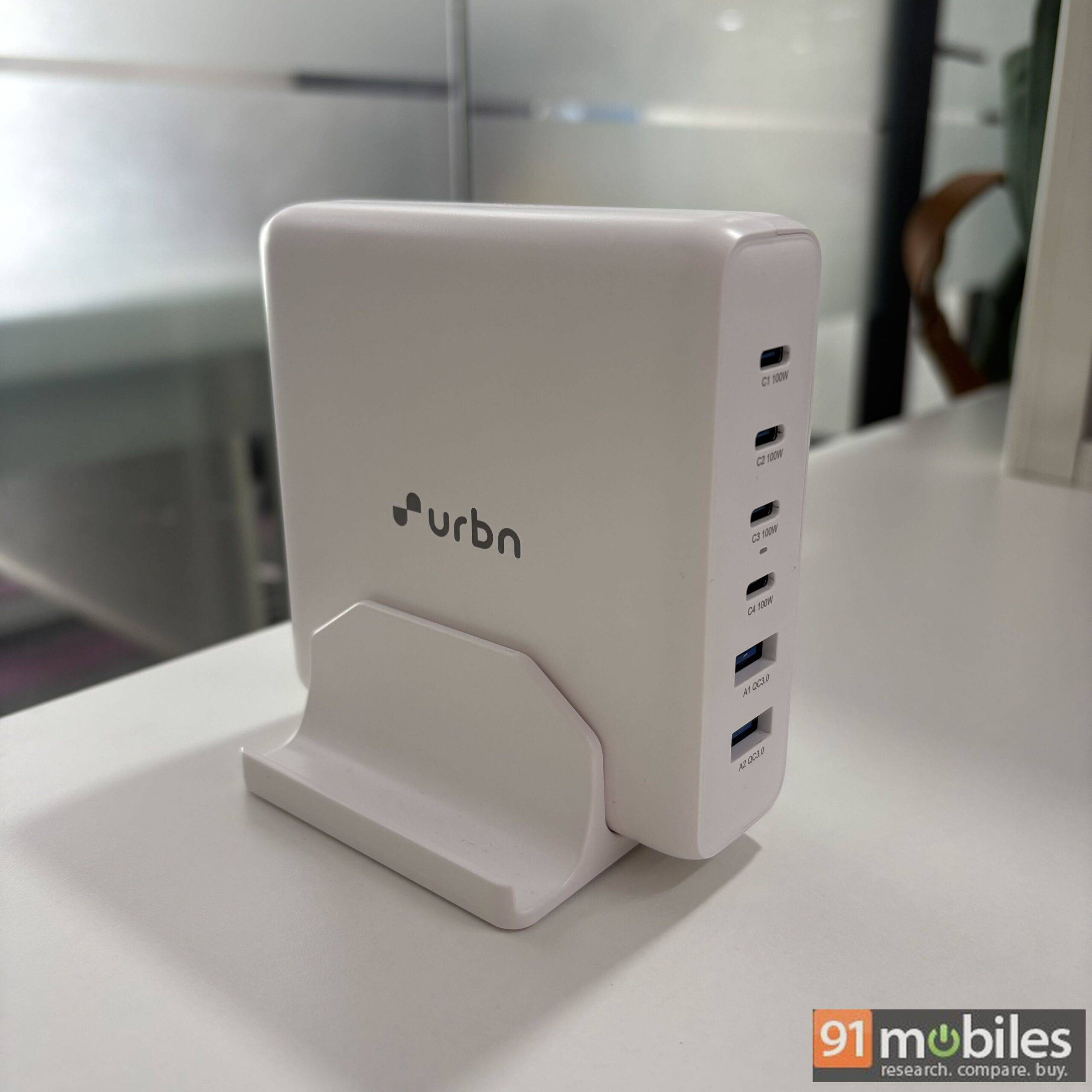
The pitch from the brand is pretty straightforward. Four USB-C ports, two USB-A ports, 200W of total output, and a form factor designed to sit on your desk rather than dangle off a wall socket. At Rs 6,999 (against an MRP of Rs 12,999), this is not an impulse buy. But if you’re the sort of person who has three or four devices plugged in at any given moment, I believe there’s a genuinely strong case here. Let me explain why.
Table of Contents
Features that offer versatility
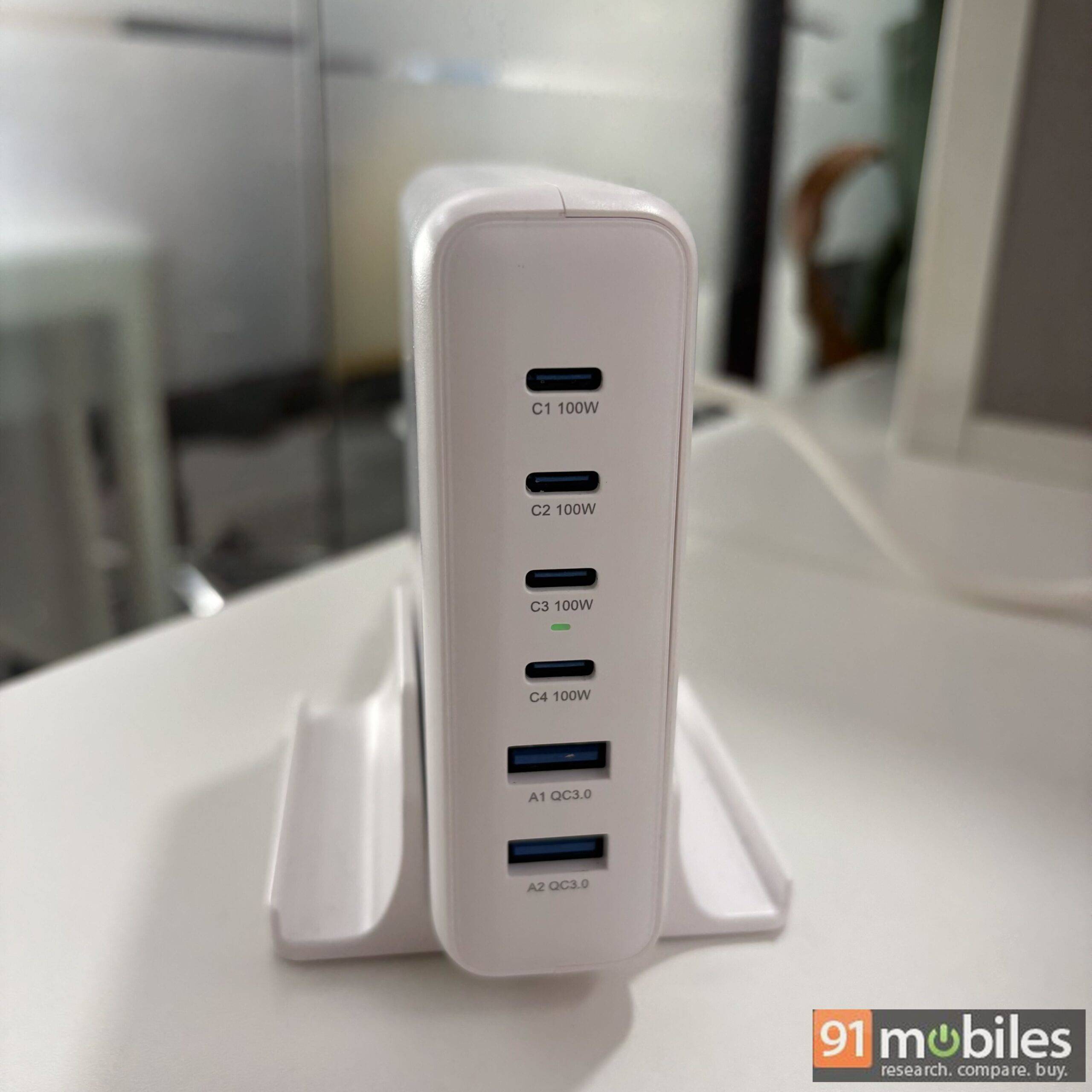
Here’s a quick look at what the URBN 200W GaN Power Hub brings to the table.
- Six ports in total: four USB-C and two USB-A
- 200W maximum combined output
- Up to 100W on a single USB-C port, up to 18W on a single USB-A port
- PPS support (3.3-21V/5A) alongside standard PD voltage profiles
- Wide input range of AC 110-240V, 50/60Hz, 3A (max)
- GaN internals to keep size and heat in check
- Bundled desk stand
- 1-year warranty
- Currently bundled with a free 240W Flex Cord USB-C to C cable (1.2m) worth Rs 1,999
Design and everyday convenience

Let’s get the obvious out of the way first. This is not a compact travel charger, and URBN isn’t pretending otherwise. The Power Hub is a tall, slab-like unit, and it feels even bigger once you slot it into the bundled stand. If you’re used to the palm-sized GaN bricks that have become the norm, the first impression is that this thing is considerably large in size.
That said, I’d argue the size is entirely justified. Squeezing six ports and 200W of headroom into something pocketable simply isn’t happening with today’s technology, and I’d much rather have the ports. What did surprise me is how light it is for its footprint. Picking it up, it feels closer to a hollow shell than the dense, weighty bricks I’m used to, which is very much a GaN (Gallium Nitride) benefit.
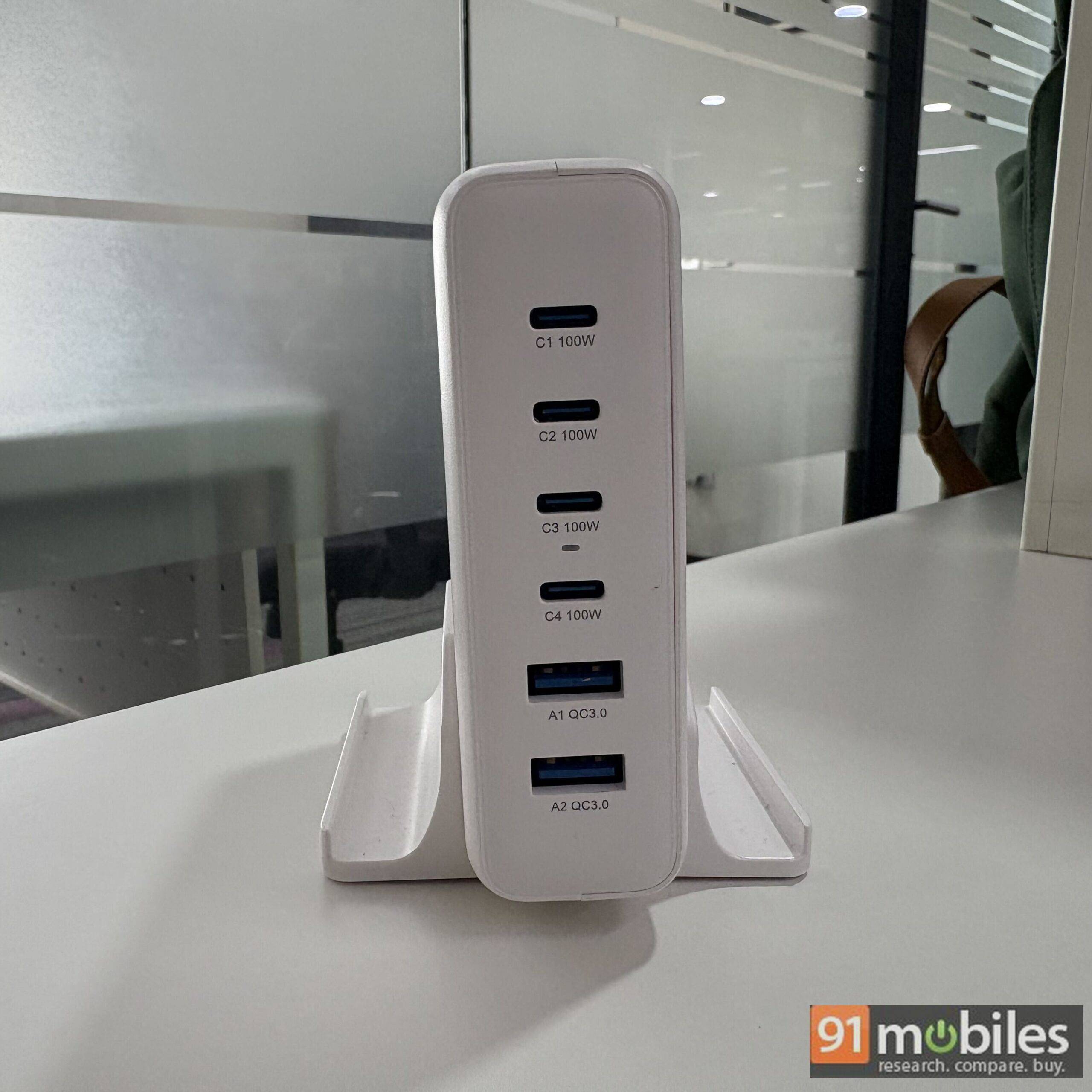
The stand is a smart inclusion, and it solves the single biggest problem with high-wattage multi-port chargers, which is that six taut cables will drag a loose brick around your desk all day. With the stand, the hub stays upright and planted. My one gripe is that the fit isn’t snug. There’s noticeable wiggle room between the charger and the stand, which makes it easy to lift out when you need to, but also means it never feels properly locked in. A slightly better fit would have made this setup feel a lot more premium.
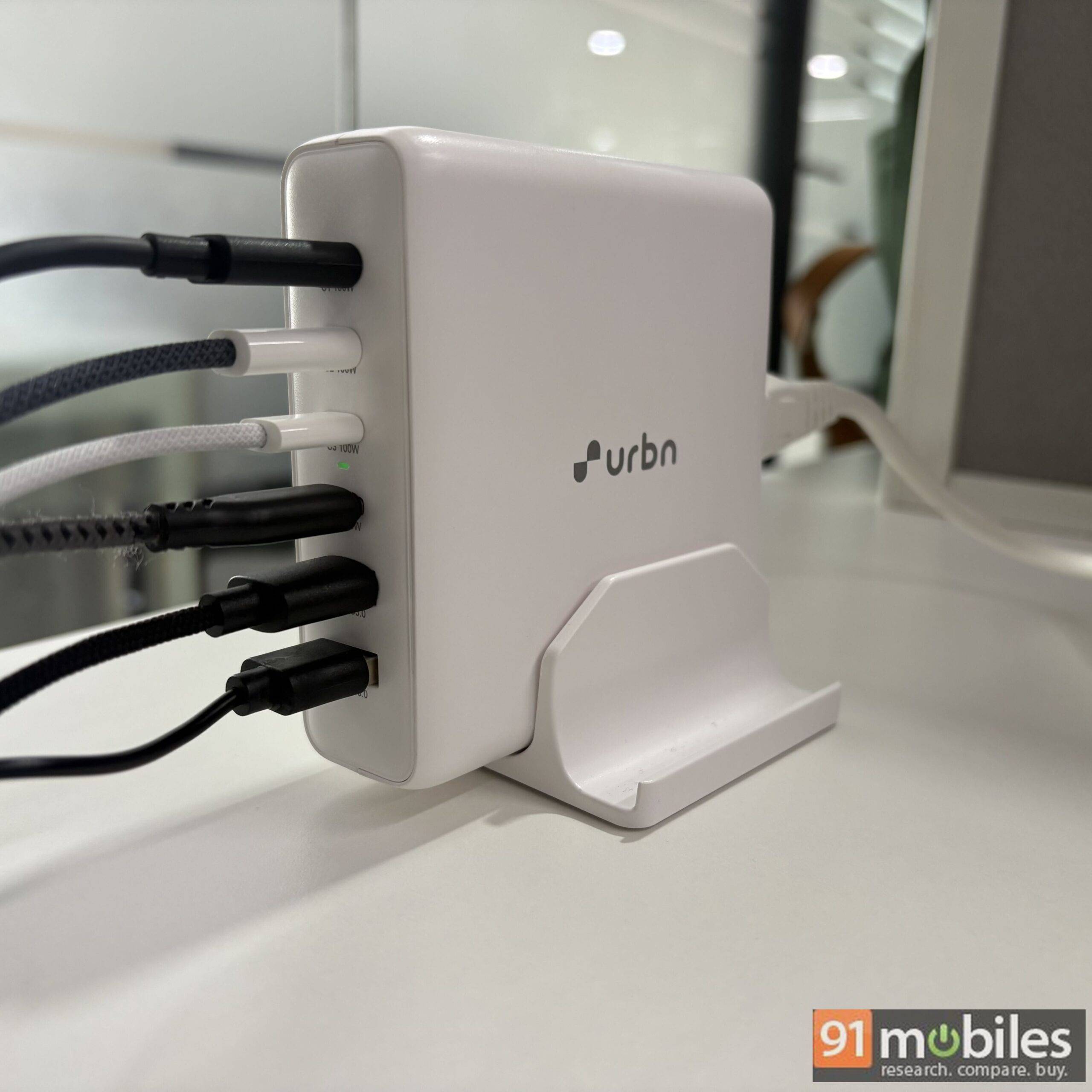
Now, the part that genuinely changed my routine. Because the hub sits on your desk rather than at the socket, the ports come to you instead of the other way around. This sounds like a small thing. In practice, it was the single most useful aspect of living with this charger. I have a couple of shorter cables that simply could not reach my usual wall socket, and they had been sitting unused in a drawer for months. With the Power Hub parked next to my laptop, every one of them suddenly became viable again. In effect, it works as an extender as much as a charger, and I could keep all my devices on the desk surface where I actually use them.
The second quality-of-life win is the end of cable swapping. My previous routine involved unplugging a Type-C to Type-C cable from one device so I could free up the port for my MacBook’s Type-C to MagSafe cable, or switching to a Type-C to Type-A cable depending on what needed juice. With four Type-C ports live at once, every cable now has a permanent home. In my experience, this is the sort of tiny friction you don’t notice until it’s gone.
How 200W actually gets divided
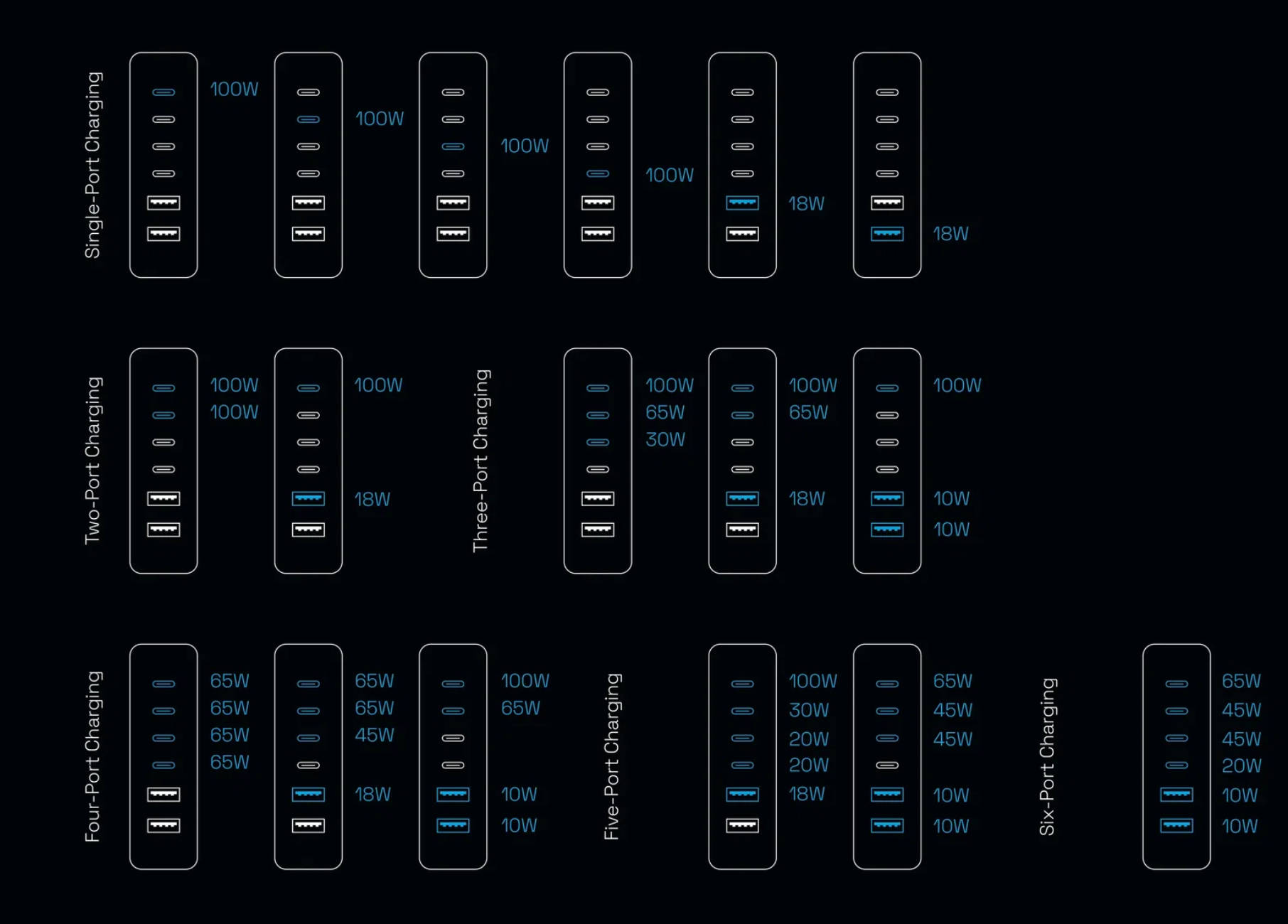
This is one of the important aspects worth understanding before you buy, because “200W” is a ceiling, and crucially not a promise for every port at once. URBN has published the full breakdown, and I’d recommend reading it carefully. Here’s how the combinations work out.
| Ports in use | Distribution |
|---|---|
| 1 port | 100W (any USB-C) or 18W (any USB-A) |
| 2 ports | 100W + 100W (dual Type-C) or 100W + 18W (Type-C + USB-A) |
| 3 ports | 100W + 65W + 30W (triple Type-C), 100W + 65W + 18W, or 100W + 10W + 10W |
| 4 ports | 65W + 65W + 45W + 20W (quad Type-C), 65W + 65W + 45W + 18W, or 100W + 65W + 10W + 10W |
| 5 ports | 100W + 30W + 20W + 20W + 18W or 65W + 45W + 45W + 10W + 10W |
| 6 ports | 65W + 45W + 45W + 20W + 10W + 10W |
The takeaway from all this is that two-port and three-port usage is where this hub is at its best. Dual 100W means you can run two laptops at full pelt, which is rare at this price. And the three-port split of 100W, 65W and 30W maps almost perfectly onto a laptop, tablet and phone, which is exactly the combination most of us are dealing with. If you push the usage to five or six ports, the charger would still give a decent performance but the top-end numbers drop considerably. So if you regularly need a laptop charging fast while five other things are plugged in, temper your expectations.
Charging performance
I ran two sets of tests. First, each device on its own from zero, and then all three together to see what simultaneous charging actually costs you.
Individual charging, 0 to 100 percent
| Time elapsed | iPhone 16 | iPad | MacBook |
|---|---|---|---|
| 10 mins | 24% | 16% | 20% |
| 30 mins | 59% | 50% | 57% |
| 45 mins | 76% | 68% | 74% |
| 60 mins | 86% | 79% | 87% |
| 75 mins | 95% | 90% | 95% |
| 90 mins | 100% | 96% (at 90 mins) | 100% (at 85 mins) |
| Full charge | 1h 30m | 1h 46m | 1h 25m |
The iPhone 16 also crossed the 50 percent mark in 24 minutes and hit 80 percent at the 50-minute mark, which is right in line with what I’d expect from a good 30W-class charge. The MacBook going from empty to full in an hour and 25 minutes is the number that impressed me most here, and the iPad’s slightly slower run to 100 percent is most likely down to the usual trickle behaviour in the last few percent rather than anything the hub is doing wrong.
All three charging together
| Time elapsed | iPhone | iPad | MacBook |
|---|---|---|---|
| 10 mins | 23% | 15% | 17% |
| 30 mins | 59% | 48% | 52% |
| 45 mins | 77% | 66% | 72% |
| 60 mins | 87% | 78% | 83% |
This is the result that sold me on the product. Compare the two tables and the simultaneous numbers land within a few percentage points of the solo runs, and in a couple of cases (only for iPhone) they’re marginally ahead, which I’d put down to run-to-run variance and iPhone charging speed limit rather than the hub somehow going faster. Either way, there is no meaningful penalty for charging all three at once.
There’s a logical reason for it, and it goes back to that three-port split. With 100W available to the MacBook, 65W to the iPad and 30W to the iPhone, none of my three devices were ever hitting their allocated ceiling, because none of them can draw those figures in the first place. The hub isn’t rationing power so much as it is comfortably over-provisioned for a typical Apple trio. That’s precisely the scenario URBN seems to have designed this for, and it delivers. The unit did get slightly warm during the three-device runs, which is far from unusual, but crucially it never got anywhere close to worrying.
Verdict
The URBN 200W GaN Power Hub is not a charger for everyone, and I want to be clear about that. If you carry one laptop and one phone, a good 65W or 100W dual-port brick will serve you better and cost a third of this product. This is a desk product, aimed squarely at people whose workstation looks like mine did.
For that audience, though, I think it’s an easy recommendation. Six ports, dual 100W output, near-zero performance penalty when everything is plugged in at once, and the underrated benefit of bringing the ports up to desk level. Add up what you’d spend on a 100W laptop charger plus a couple of decent multi-port adapters bought separately, and you land in a similar ballpark anyway, but without the tidiness.
The complaints I have with the product are fairly minor. It’s big, and even bigger with the stand, and it rattles around a little in that stand. The 1-year warranty is also on the short side for something at this price, especially when some competitors in the charging space offer two years.
None of that changes the fundamentals. In my experience, the best accessories are the ones you stop noticing because they’ve quietly removed a daily annoyance, and this one cleared four bricks off my desk. At Rs 6,999, if you’re charging three or more devices every day, this is worth your money.
Editor’s Rating: 8.4 / 10
Pros:
- Six charging ports (4 USB Type-C)
- Effortless simultaneous charging
- Lightweight for its size
- Eliminates cable-swapping routine
Cons:
- Large, especially with the stand
- Loose fit in the stand
- 1-year warranty