
Micromax Canvas Xpress 2 E313
+ Compare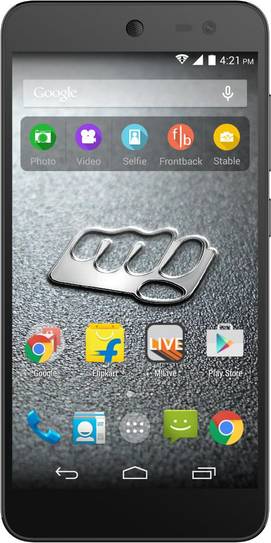

-
Design4

-
Rear Camera8

-
360° View

-
UI Screenshot17
![UI Screenshot]()
-
Benchmarks10
![Benchmarks]()
-
Videos2
![Videos]()


Key Specs
Performance
-
MediaTek MT6592M -
Octa Core, 1.4 GHz -
1 GB RAM
Display
-
5.0 inches (12.7 cm); IPS LCD -
720x1280 px (HD) -
Gorilla Glass 3 Protection
Rear Camera
-
Single Camera Setup - 13 MP Primary Camera
-
Dual LED Flash -
Full HD @30fps Video Recording
Front Camera
-
2 MP
Battery
-
2500 mAh
General
-
SIM1: Micro, SIM2: Micro -
5G Not Supported -
8 GB internal storage, Expandable upto 32 GB
Micromax Canvas Xpress 2 E313 Expert Review Summary
Expert Rating:
![Deeksha Koli]()
Verdict
The Micromax Canvas Xpress 2 boasts compelling specifications and design for its price. It features a sharp screen, smooth performance and decent battery life. However, there are some departments where the brand has cut corners. It doesn t support 4G for one, and runs an older version of Android too. The recently-launched Redmi 2 Prime, Moto E (2nd Gen) and Karbonn Titanium MachFive (first impressions) are all worthy contenders offering Android Lollipop and 4G for a marginally higher price. However, the Canvas Xpress 2 is still a compelling option in the budget segment, especially if you`re lo...
Read Full Verdict
Pros
- Good build quality
- Smooth performance
- Good battery life
- Doesn't heat up while gaming
Cons
- Average front camera
- No support for 4G
- Runs Android KitKat
Specs At A Glance
+
5-inch display, 1,280 x 720 pixels1.4GHz octa-core processor1GB RAM8GB onboard storage, expandable up to 32GB13MP primary camera, 2MP front cameraDual-SIM, 3G, Wi-Fi, Bluetooth and GPS2,500mAh batteryAndroid 4.4.2 KitKat
Read More
Designed to look premium
+
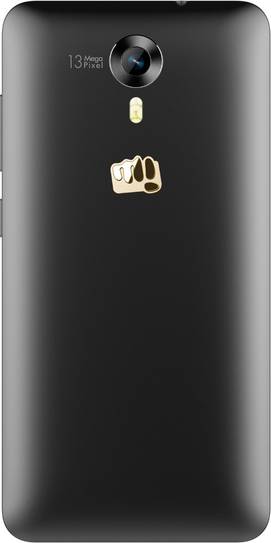
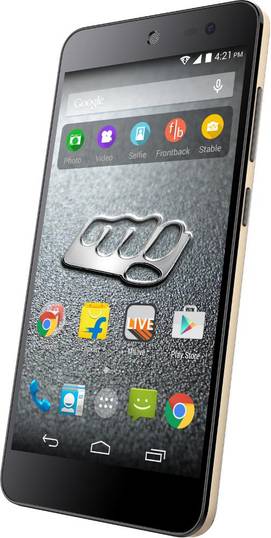
This sleek looking device is a testament of how Micromax has tried to put sugar, spice and everything nice into the design language of the Xpress 2. While there are no traces of metal, the phone mimics this look with a smart matte black rear panel and champagne gold trims. While both these elements are crafted out of plastic, the phone doesn’t feel cheap or flimsy to hold or to look at. The front is mostly taken up by the display, above which you will find a notification LED, earpiece, the front camera and a few sensors. The navigation keys appear on the screen as software overlays. The top edge of the device carries a 3.5mm audio port. On the right spine, you’ll find the volume rocker and power button. At the centre of the bottom edge you’ll find the micro-USB port, which is symmetrically bordered by precision drilled holes on either side. While one set hides the primary microphone, the other is a speaker grille. The back panel is home to the primary camera, dual-LED flash, and Micromax branding. The rear panel is removable and hides the battery compartment, two micro-SIM slots and a microSD card slot.The Micromax Canvas Xpress 2 is easy to handle. At 135g, the phone feels rather light in the hands and the matte finish only adds to the grip. Unless you have very small hands, the smartphone can be easily used with one hand, thanks to thin vertical bezels. For its asking price, we’d say the phone is one of the better-looking devices in the segment, all credit to the classy combination of black and gold, which as a matter of fact, is the only colour option you get.
Read More
5-inches of High Definition
+
The Micromax Canvas Xpress 2’s window to the world is its 5-inch IPS LCD display which bears a resolution of 720 x 1,280 pixels. This translates to a pixel density of 294ppi. The text appears crisp and so do the images and icons, and colours are vivid too. Due to the rainy weather, we had to sit and wait for the sun to show up, but we weren’t disappointed when it did. The display didn’t wash out in bright sunlight, even when we kept the brightness settings on auto. However, the screen is a tad reflective. The display settings come with a feature called ClearMotion video fluency enhancer. If you have an eye for detail, you’ll be able to notice the minor yet significant difference the ClearMotion makes. The feature managed to smoothen the flow of even the tiniest motions in the video we tested.The display of the Micromax Canvas Xpress 2 comes protected by a layer of Corning Gorilla Glass. The screen, overall, is on par with what the competition has to offer.
Read More
Impressive Shooting Capabilities
+
Equipped with a 13 megapixel sensor on the rear, the Canvas Xpress 2 takes home the title of being the most affordable smartphone with this camera resolution. However, the front camera’s megapixel count is just limited to 2MP.The default camera app is simple to use with a bunch of camera modes aligned vertically on the left of the view finder, while the virtual shutter button, video recorder and settings on the right. You can choose between normal, Live Photo, Beautify, HDR, Smile Detection, Panorama and Multi-angle view modes. While the normal mode is self-explanatory, the Live Photo mode captures a moving shot for five seconds. Beautify is a great option for selfie lovers who don’t mind impossibly smooth skin. You can choose from face slimming, skin whitening and wrinkle removal options, and tweak the enhancements to low, medium or high. The HDR mode in the Canvas Xpress 2 is rather impressive. The pictures don’t come out over-exposed or look artificial. The Multi angle view allows you to capture an object over an angle range. The outcome is almost like a GIF of an object being looked at from different angles. The settings menu gives you control over white balance, exposure, ISO and shutter delay. You can choose from various scenes like Auto, Night, Sunset, Party, Theatre and Beach. Colour effects like Mono, Sepia and Aqua can be added too.Considering the price it comes at, the Canvas Xpress 2 offers impressive picture quality on its rear snapper. The long shots we captured looked sharp. While there was slight blurring of images when zoomed in, the colour reproduction was pretty much accurate. The flash on the Xpress 2 works well. The objects were evenly lit and didn't wash out. The primary snapper on the Canvas Xpress 2 also impresses with its capability to shoot at night, and the images we took were usable... though you'd need to shoot with a steady hand to avoid blur.The front camera however, is not one of the best we’ve seen in smartphones lately but it can be worked with during the day. Here are some sample images taken by the rear camera.
Read More
Simplistic UI
+
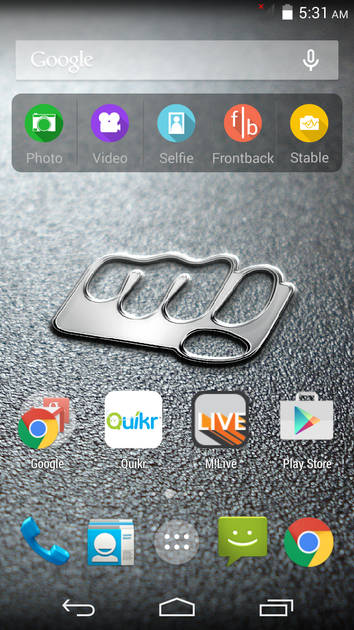
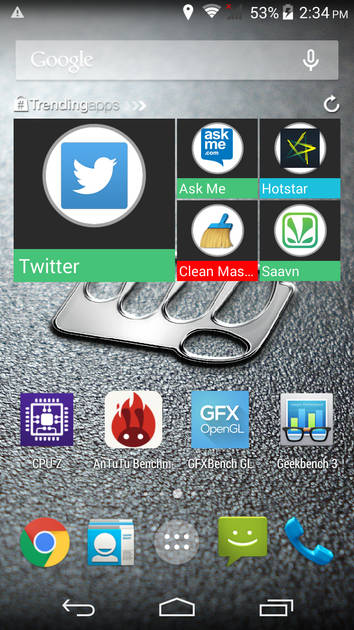
Out of the box, the Canvas Xpress 2 runs Android KitKat v4.4.2. The device is upgradable to Android Lollipop, however, the company hasn’t rolled out any update yet. The software is nearly stock but you will find some pre-loaded apps and some noticeable tweaks. The left most homescreen, called Quick Look by Micromax, is dedicated to news and shows your location, date and time, weather and all the current affairs organised as differently-sized tiles. A tab on any of the headlines opens the articles, with a link to the original news post at the bottom. Swiping down on this homescreen refreshes the news. The primary homescreen features a camera widget with quick access shortcuts to five different camera modes and apps. There’s Photo which launches the default camera app and Video which opens it in video shooting mode. Selfie lets you click beautified selfies with a timer, and turns on as soon as you press the volume down key. Frontback launches the popular camera app which makes use of both the front and the rear snappers simultaneously. Lastly, there’s Stable which is an app to ensure that you click pictures without any motion blur due to hand movements. The app features a bright red continuous line running on top of the viewfinder, which fluctuates when it detects hand movements. As soon your hands are steady, this line becomes straight and you can click. The Xpress 2 comes with quite a few preloaded apps. There’s Quikr, Housing, hotstar, Newshunt, Scandid, M!live, Swiftkey and Start. Scandid is essentially a shopping app, which lets you scan barcodes on products and provides you with deals, both online and offline. Start is a useful app that can be used to customise the lockscreen with quick access icons and themes. By swiping right on the Start lockscreen, you can directly open media apps, messaging apps and the more frequently used apps. There’s a vertical sidebar as well which lets you access quick settings, create personal photo galleries, read email and add all sorts of other shortcuts. There’s also a game called SeaHorse FlapTap, which can be opened by swiping left from the Start lockscreen. Once installed, the game stays in background of the screen and can be played even when the phone is locked. While the app can be used occasionally, we thought it was too much for a lockscreen. We switched back to the default lockscreen after about an hour of usage. The device also rocks gesture control. There are as many as six gestures which can be used to execute a total of nine functions and you can choose which gesture does what. Swiping two fingers up or down the screen can increase or decrease the volume. You can pinch in to open the dialler and pinch out to access the app drawer. Other functions include opening the music player, changing tracks, playing or pausing music and opening the messaging app. There’s no option to custom define any gesture though.
Read More
Decent Power Under the Hood
+
The Canvas Xpress 2 comes powered by a MediaTek MT6592 processor with eight ARM Cortex-A7 cores running at 1.4GHz. There’s an integrated Mali-450 MP GPU as well. The processor works in tandem with a gig of RAM. While regular usage on the Xpress 2 was pretty smooth, it took a little while for apps to load when we had several tasks running in the background. But the jitters were almost negligible and we encountered no app crashes. A maximum of three cores worked for the day-to-day usage. However, the number jumped up to five or six when we played intensive games like Riptide GP2 and Dead Trigger 2. On maximum graphics quality, the games stuttered only in the very beginning and ran smoothly afterwards. Every time a new mission would load, we had to deal with a blank screen for a few seconds, but there were no pauses during the actual game play. Impressively, even after a 30-minute session of Dead Trigger 2, the phone didn’t heat up to uncomfortable levels despite the heavy graphics, though there was subtle warming.There’s 8GB of built-in storage, of which about 4.5GB is available for installing apps and storing media content. The storage can be further expanded using a microSD card by up to 32GB. The Xpress 2 is backed by a 2,500mAh battery. With 3G data working all day, and regular use of WhatsApp, Facebook, making calls and listening to a bit of music, the phone managed to last us through the day. On our standard battery test, which involves running a 720p video on loop with both volume and brightness set to 50 percent, the device gave about 7 hours and 30 minutes of video playback. There’s a CPU power saving mode in the device which made it last for almost nine hours on the same battery test. On the connectivity front, the Xpress 2 offers a dual-SIM GSM + CDMA configuration. The device limits connectivity to 3G, while a number of competitors sport 4G support. Apart from this, there’s Bluetooth, Wi-Fi and GPS.
Read More
Read full Review

Verdict
The Micromax Canvas Xpress 2 boasts compelling specifications and design for its price. It features a sharp screen, smooth performance and decent battery life. However, there are some departments where the brand has cut corners. It doesn t support 4G for one, and runs an older version of Android too. The recently-launched Redmi 2 Prime, Moto E (2nd Gen) and Karbonn Titanium MachFive (first impressions) are all worthy contenders offering Android Lollipop and 4G for a marginally higher price. However, the Canvas Xpress 2 is still a compelling option in the budget segment, especially if you`re lo... Read Full Verdict
- Good build quality
- Smooth performance
- Good battery life
- Doesn't heat up while gaming
Pros
- Average front camera
- No support for 4G
- Runs Android KitKat
Cons
Specs At A Glance
+5-inch display, 1,280 x 720 pixels1.4GHz octa-core processor1GB RAM8GB onboard storage, expandable up to 32GB13MP primary camera, 2MP front cameraDual-SIM, 3G, Wi-Fi, Bluetooth and GPS2,500mAh batteryAndroid 4.4.2 KitKat
Read MoreDesigned to look premium
+This sleek looking device is a testament of how Micromax has tried to put sugar, spice and everything nice into the design language of the Xpress 2. While there are no traces of metal, the phone mimics this look with a smart matte black rear panel and champagne gold trims. While both these elements are crafted out of plastic, the phone doesn’t feel cheap or flimsy to hold or to look at. The front is mostly taken up by the display, above which you will find a notification LED, earpiece, the front camera and a few sensors. The navigation keys appear on the screen as software overlays. The top edge of the device carries a 3.5mm audio port. On the right spine, you’ll find the volume rocker and power button. At the centre of the bottom edge you’ll find the micro-USB port, which is symmetrically bordered by precision drilled holes on either side. While one set hides the primary microphone, the other is a speaker grille. The back panel is home to the primary camera, dual-LED flash, and Micromax branding. The rear panel is removable and hides the battery compartment, two micro-SIM slots and a microSD card slot.The Micromax Canvas Xpress 2 is easy to handle. At 135g, the phone feels rather light in the hands and the matte finish only adds to the grip. Unless you have very small hands, the smartphone can be easily used with one hand, thanks to thin vertical bezels. For its asking price, we’d say the phone is one of the better-looking devices in the segment, all credit to the classy combination of black and gold, which as a matter of fact, is the only colour option you get.
Read More5-inches of High Definition
+The Micromax Canvas Xpress 2’s window to the world is its 5-inch IPS LCD display which bears a resolution of 720 x 1,280 pixels. This translates to a pixel density of 294ppi. The text appears crisp and so do the images and icons, and colours are vivid too. Due to the rainy weather, we had to sit and wait for the sun to show up, but we weren’t disappointed when it did. The display didn’t wash out in bright sunlight, even when we kept the brightness settings on auto. However, the screen is a tad reflective. The display settings come with a feature called ClearMotion video fluency enhancer. If you have an eye for detail, you’ll be able to notice the minor yet significant difference the ClearMotion makes. The feature managed to smoothen the flow of even the tiniest motions in the video we tested.The display of the Micromax Canvas Xpress 2 comes protected by a layer of Corning Gorilla Glass. The screen, overall, is on par with what the competition has to offer.
Read MoreImpressive Shooting Capabilities
+Equipped with a 13 megapixel sensor on the rear, the Canvas Xpress 2 takes home the title of being the most affordable smartphone with this camera resolution. However, the front camera’s megapixel count is just limited to 2MP.The default camera app is simple to use with a bunch of camera modes aligned vertically on the left of the view finder, while the virtual shutter button, video recorder and settings on the right. You can choose between normal, Live Photo, Beautify, HDR, Smile Detection, Panorama and Multi-angle view modes. While the normal mode is self-explanatory, the Live Photo mode captures a moving shot for five seconds. Beautify is a great option for selfie lovers who don’t mind impossibly smooth skin. You can choose from face slimming, skin whitening and wrinkle removal options, and tweak the enhancements to low, medium or high. The HDR mode in the Canvas Xpress 2 is rather impressive. The pictures don’t come out over-exposed or look artificial. The Multi angle view allows you to capture an object over an angle range. The outcome is almost like a GIF of an object being looked at from different angles. The settings menu gives you control over white balance, exposure, ISO and shutter delay. You can choose from various scenes like Auto, Night, Sunset, Party, Theatre and Beach. Colour effects like Mono, Sepia and Aqua can be added too.Considering the price it comes at, the Canvas Xpress 2 offers impressive picture quality on its rear snapper. The long shots we captured looked sharp. While there was slight blurring of images when zoomed in, the colour reproduction was pretty much accurate. The flash on the Xpress 2 works well. The objects were evenly lit and didn't wash out. The primary snapper on the Canvas Xpress 2 also impresses with its capability to shoot at night, and the images we took were usable... though you'd need to shoot with a steady hand to avoid blur.The front camera however, is not one of the best we’ve seen in smartphones lately but it can be worked with during the day. Here are some sample images taken by the rear camera.
Read MoreSimplistic UI
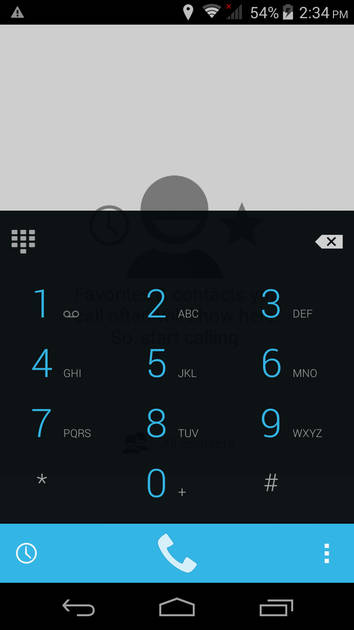
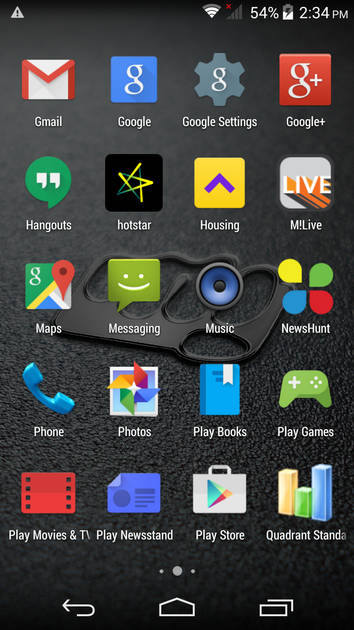
+Out of the box, the Canvas Xpress 2 runs Android KitKat v4.4.2. The device is upgradable to Android Lollipop, however, the company hasn’t rolled out any update yet. The software is nearly stock but you will find some pre-loaded apps and some noticeable tweaks. The left most homescreen, called Quick Look by Micromax, is dedicated to news and shows your location, date and time, weather and all the current affairs organised as differently-sized tiles. A tab on any of the headlines opens the articles, with a link to the original news post at the bottom. Swiping down on this homescreen refreshes the news. The primary homescreen features a camera widget with quick access shortcuts to five different camera modes and apps. There’s Photo which launches the default camera app and Video which opens it in video shooting mode. Selfie lets you click beautified selfies with a timer, and turns on as soon as you press the volume down key. Frontback launches the popular camera app which makes use of both the front and the rear snappers simultaneously. Lastly, there’s Stable which is an app to ensure that you click pictures without any motion blur due to hand movements. The app features a bright red continuous line running on top of the viewfinder, which fluctuates when it detects hand movements. As soon your hands are steady, this line becomes straight and you can click. The Xpress 2 comes with quite a few preloaded apps. There’s Quikr, Housing, hotstar, Newshunt, Scandid, M!live, Swiftkey and Start. Scandid is essentially a shopping app, which lets you scan barcodes on products and provides you with deals, both online and offline. Start is a useful app that can be used to customise the lockscreen with quick access icons and themes. By swiping right on the Start lockscreen, you can directly open media apps, messaging apps and the more frequently used apps. There’s a vertical sidebar as well which lets you access quick settings, create personal photo galleries, read email and add all sorts of other shortcuts. There’s also a game called SeaHorse FlapTap, which can be opened by swiping left from the Start lockscreen. Once installed, the game stays in background of the screen and can be played even when the phone is locked. While the app can be used occasionally, we thought it was too much for a lockscreen. We switched back to the default lockscreen after about an hour of usage. The device also rocks gesture control. There are as many as six gestures which can be used to execute a total of nine functions and you can choose which gesture does what. Swiping two fingers up or down the screen can increase or decrease the volume. You can pinch in to open the dialler and pinch out to access the app drawer. Other functions include opening the music player, changing tracks, playing or pausing music and opening the messaging app. There’s no option to custom define any gesture though.
Read MoreDecent Power Under the Hood
+The Canvas Xpress 2 comes powered by a MediaTek MT6592 processor with eight ARM Cortex-A7 cores running at 1.4GHz. There’s an integrated Mali-450 MP GPU as well. The processor works in tandem with a gig of RAM. While regular usage on the Xpress 2 was pretty smooth, it took a little while for apps to load when we had several tasks running in the background. But the jitters were almost negligible and we encountered no app crashes. A maximum of three cores worked for the day-to-day usage. However, the number jumped up to five or six when we played intensive games like Riptide GP2 and Dead Trigger 2. On maximum graphics quality, the games stuttered only in the very beginning and ran smoothly afterwards. Every time a new mission would load, we had to deal with a blank screen for a few seconds, but there were no pauses during the actual game play. Impressively, even after a 30-minute session of Dead Trigger 2, the phone didn’t heat up to uncomfortable levels despite the heavy graphics, though there was subtle warming.There’s 8GB of built-in storage, of which about 4.5GB is available for installing apps and storing media content. The storage can be further expanded using a microSD card by up to 32GB. The Xpress 2 is backed by a 2,500mAh battery. With 3G data working all day, and regular use of WhatsApp, Facebook, making calls and listening to a bit of music, the phone managed to last us through the day. On our standard battery test, which involves running a 720p video on loop with both volume and brightness set to 50 percent, the device gave about 7 hours and 30 minutes of video playback. There’s a CPU power saving mode in the device which made it last for almost nine hours on the same battery test. On the connectivity front, the Xpress 2 offers a dual-SIM GSM + CDMA configuration. The device limits connectivity to 3G, while a number of competitors sport 4G support. Apart from this, there’s Bluetooth, Wi-Fi and GPS.
Read MorePopular Comparisons
Micromax Canvas Xpress 2 E313 Specifications
General |
|
|---|---|
| Operating System | Android v4.4.2 (Kitkat) |
Performance |
|
|---|---|
| Chipset | MediaTek MT6592M |
| Processor | Octa core, 1.4 GHz |
| Graphics (GPU) | Mali-450 MP4 |
| RAM | 1 GB |
| RAM Type | DDR3 |
Benchmark Screenshots
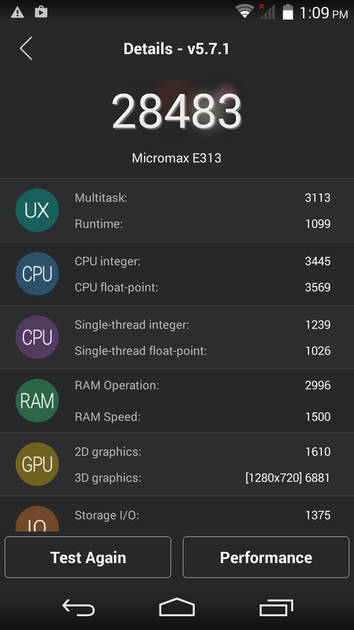
AnTuTu Benchmark
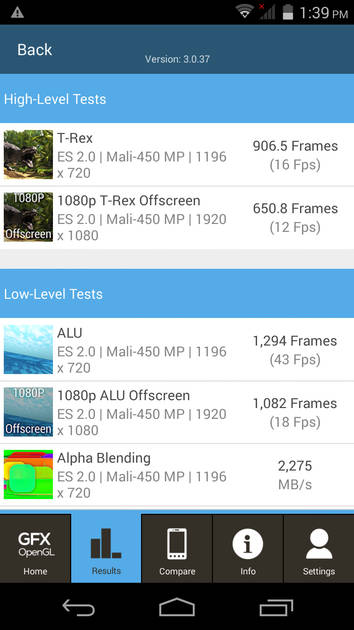
Graphics Benchmark
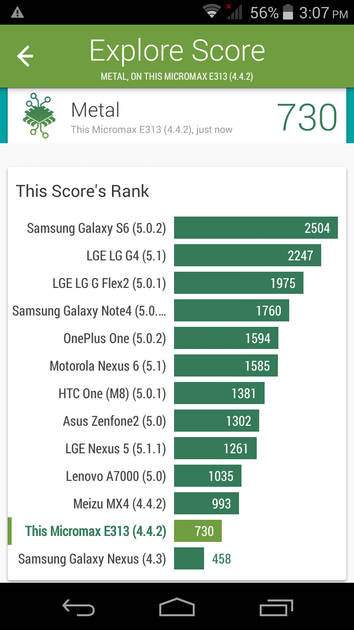
Vellamo Metal Benchmark
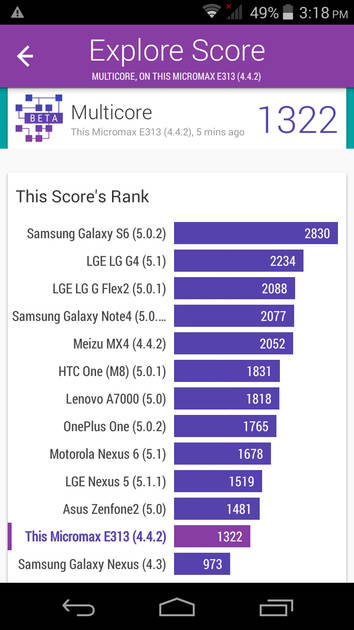
Vellamo Multicore Benchmark
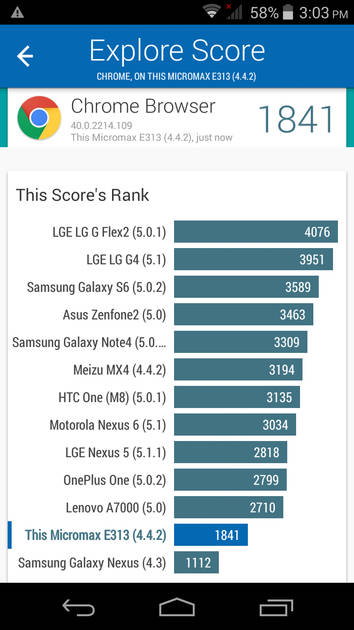
Vellamo Browser Benchmark
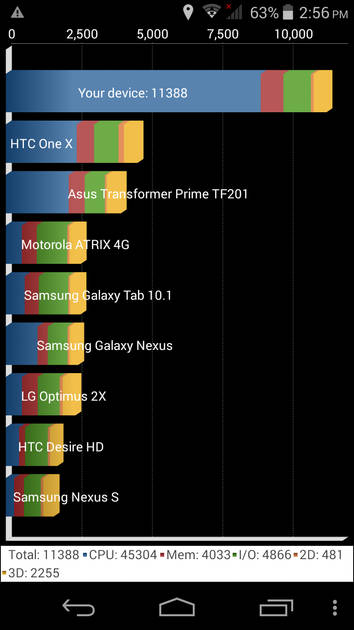
Quadrant Benchmark
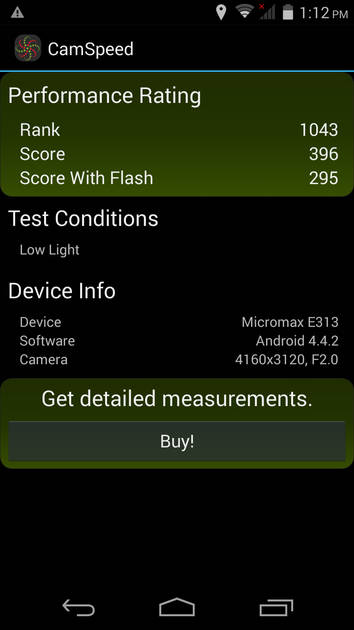
Camera Speed Benchmark
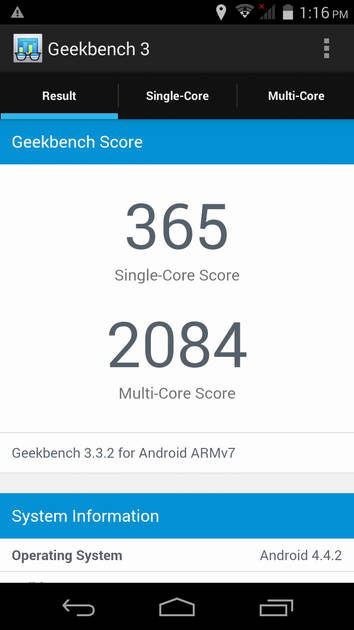
Geekbench3 Benchmark
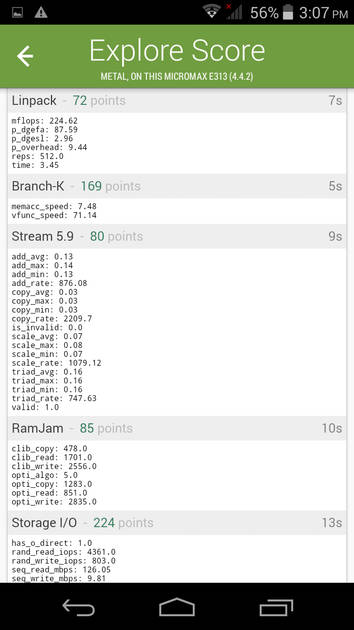
Linpack Benchmark
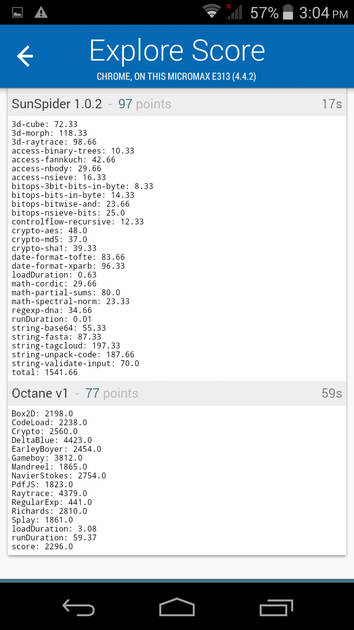
Sunspider Benchmark
|
Display |
|
|---|---|
| Display Type | IPS LCD |
| Screen Size | 5.0 inches (12.7 cm) |
| Resolution | 720x1280 px (HD) |
| Pixel Density | 294 ppi |
| Screen Protection | Corning Gorilla Glass v3 |
UI Screenshots

Lock Screen
Home Screen
Screen With Widgets
Dialer Screen
App Drawer

Notification Panel
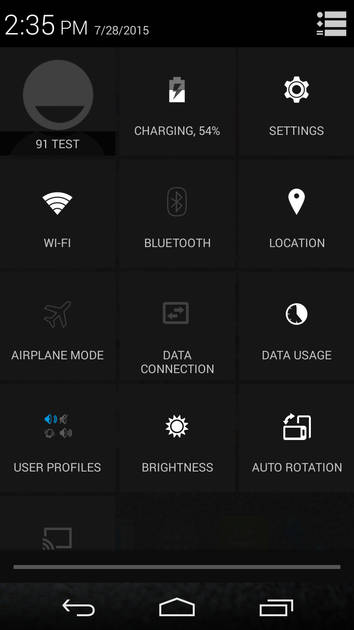
Quick Settings Panel

Settings Screen
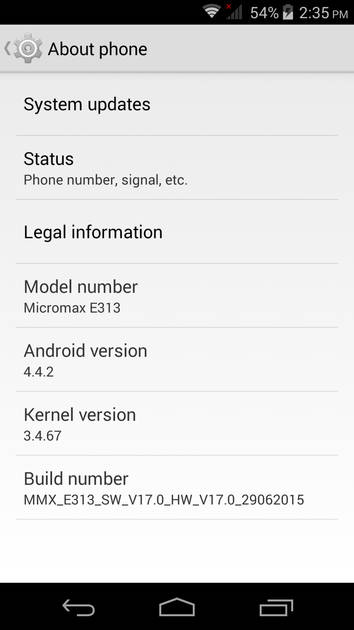
OS Version
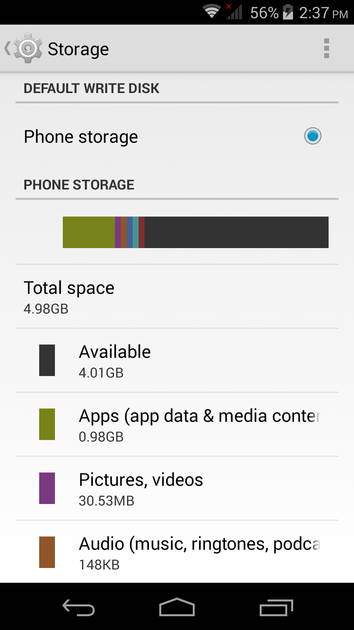
Storage
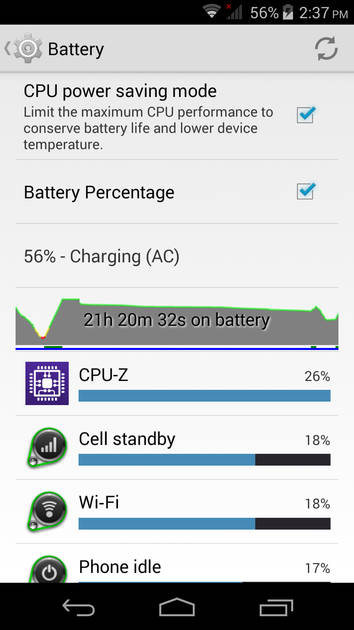
Battery
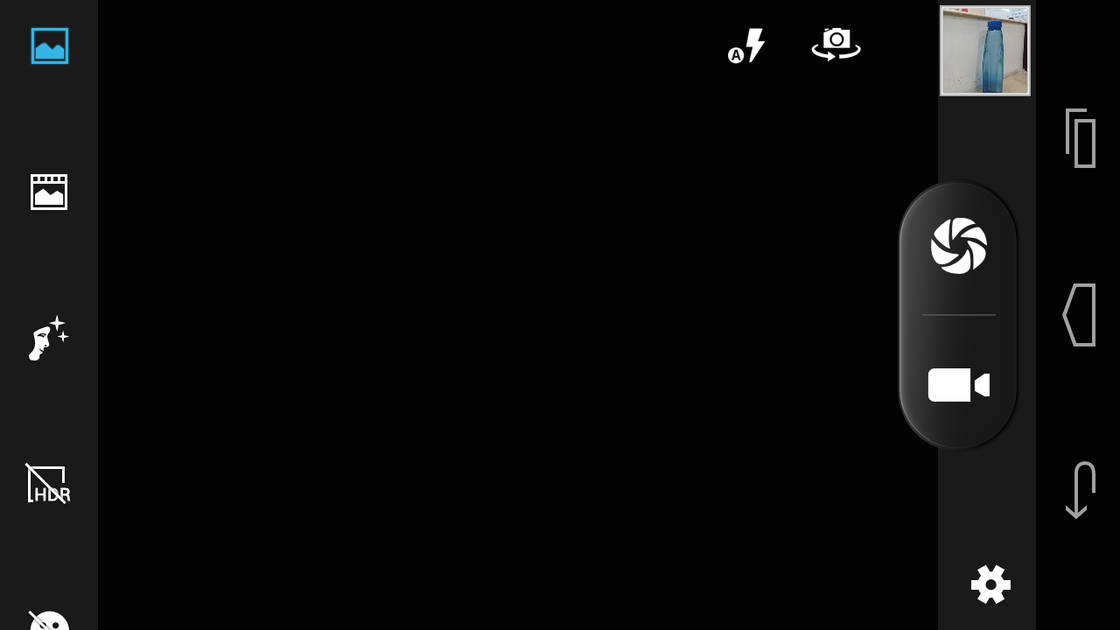
Camera On
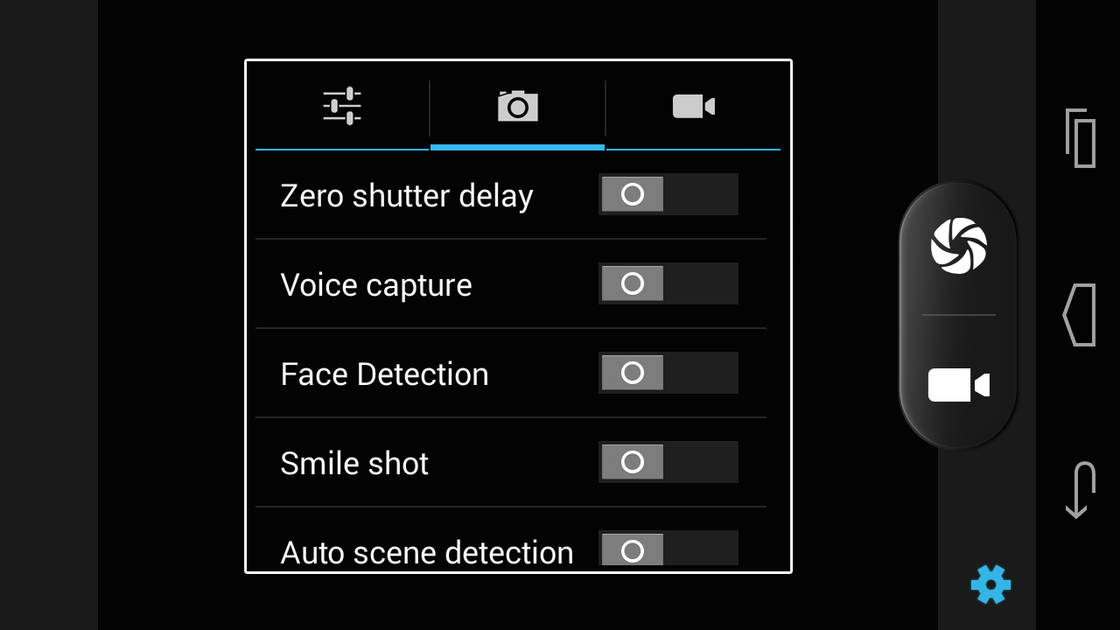
Camera Options
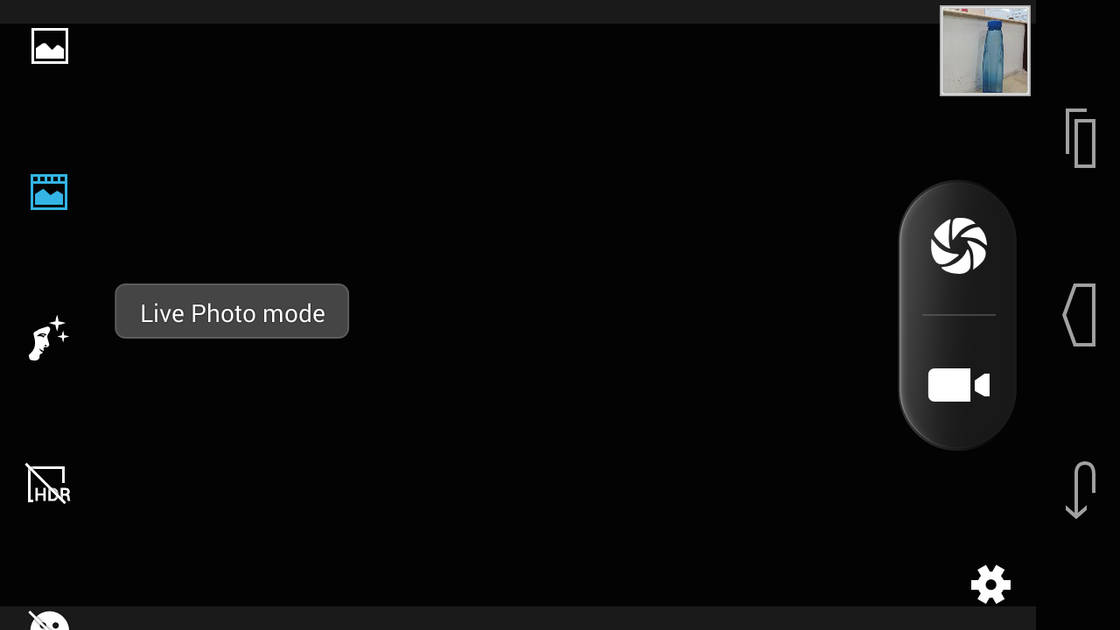
Camera Modes
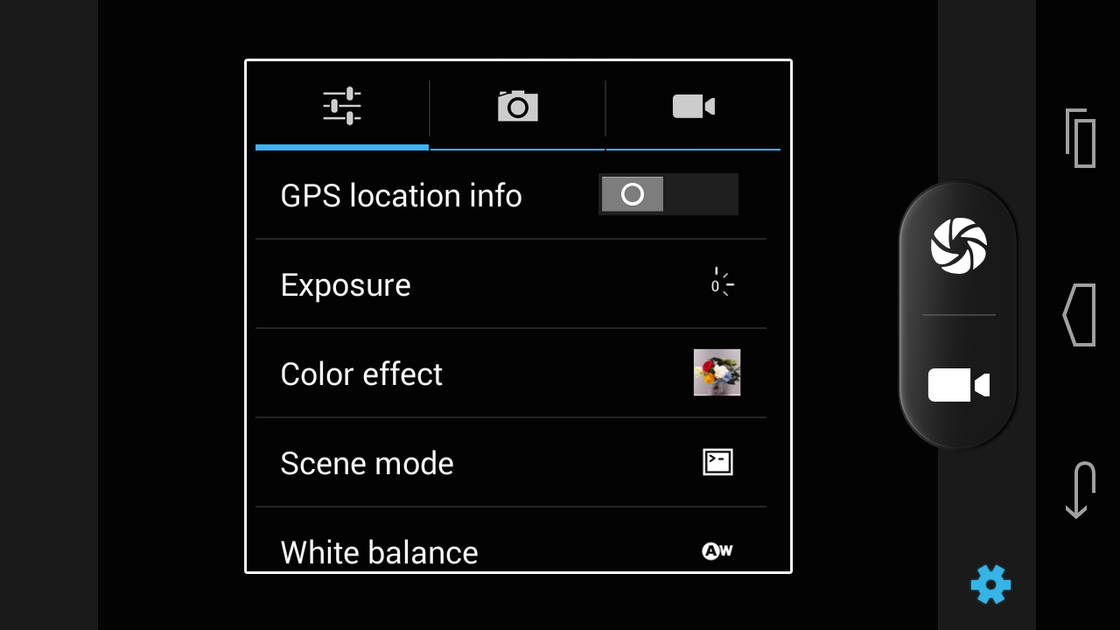
Camera Settings
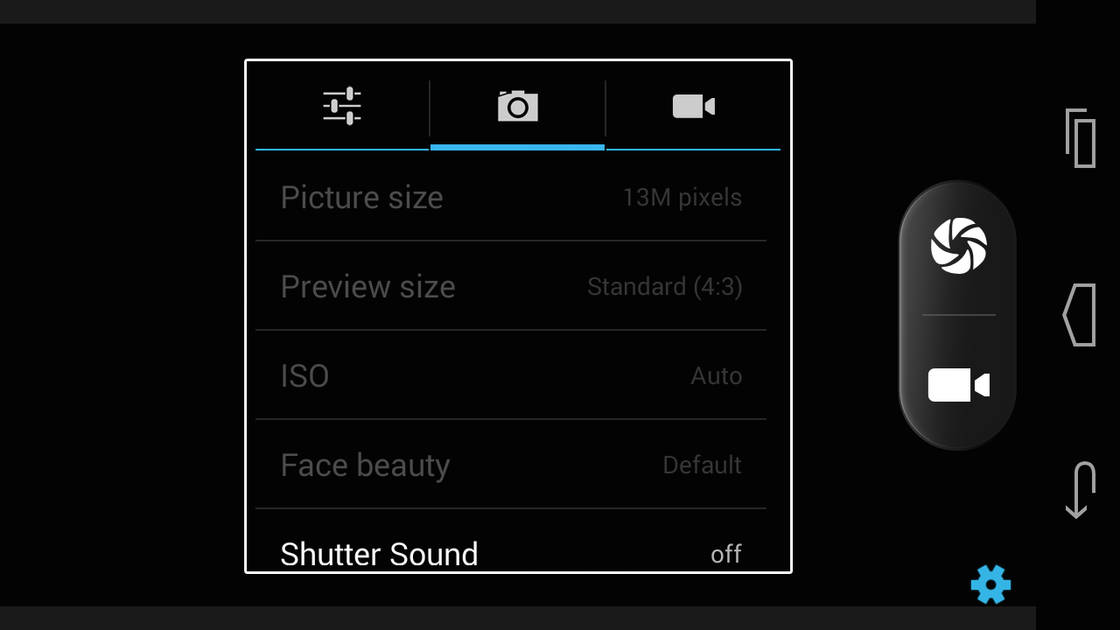
Picture Size Options
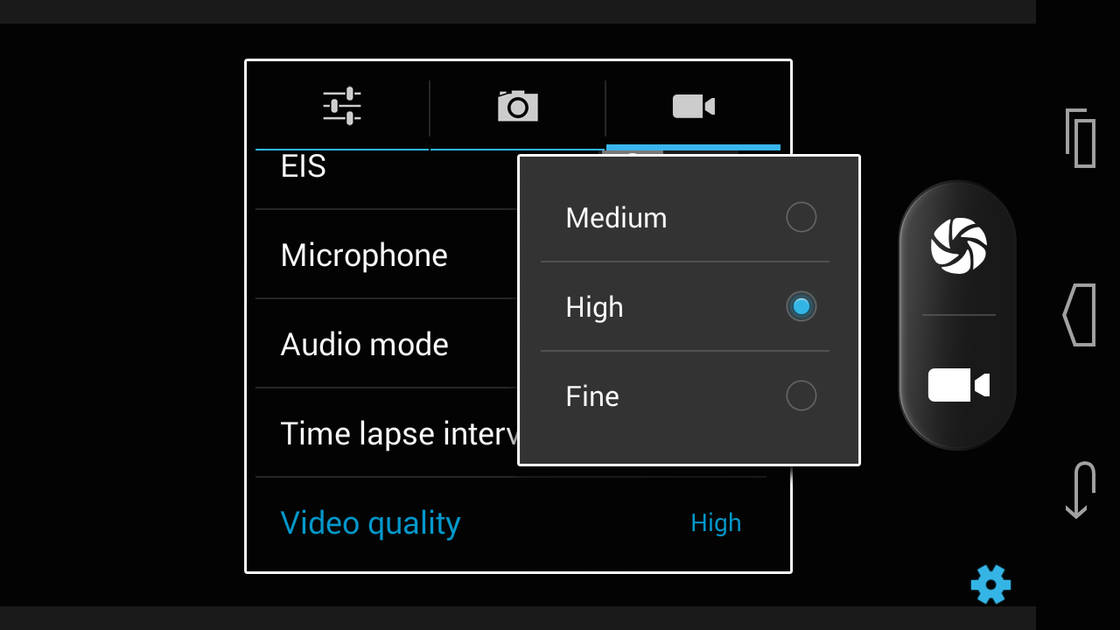
Video Size Options
|
Rear Camera |
||||
|---|---|---|---|---|
| Resolution | ||||
|
||||
| Autofocus | Yes | |||
| OIS | No | |||
| Flash | Yes, Dual LED Flash | |||
| Image Resolution | 4128 x 3096 Pixels | |||
| Settings | Exposure compensation | |||
| Shooting Modes |
Continuous Shooting High Dynamic Range mode (HDR) |
|||
| Camera Features |
Digital Zoom Auto Flash Face detection Touch to focus |
|||
| Video Recording | 1920x1080 @ 30 fps | |||
Rear Camera Samples

Close Up

Low Light

Low Light With Flash
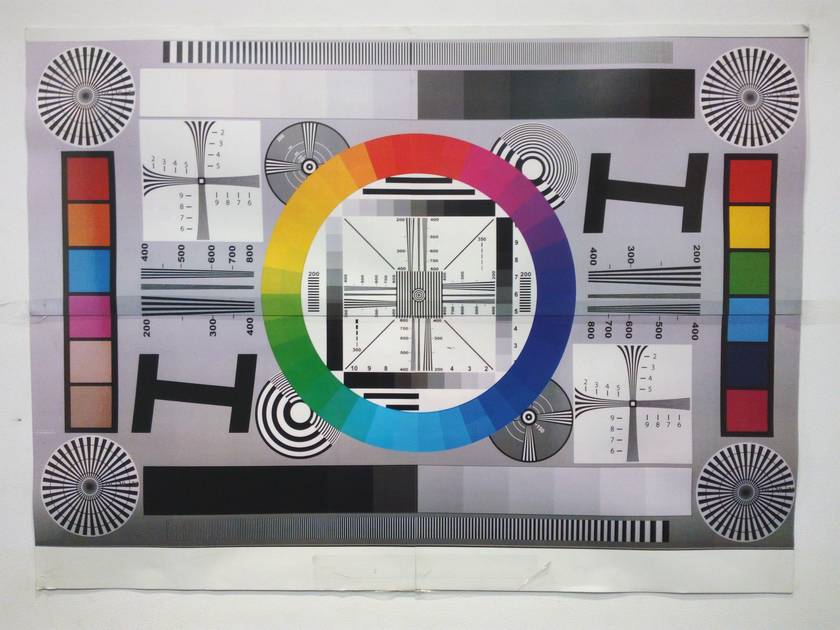
Colour Variance
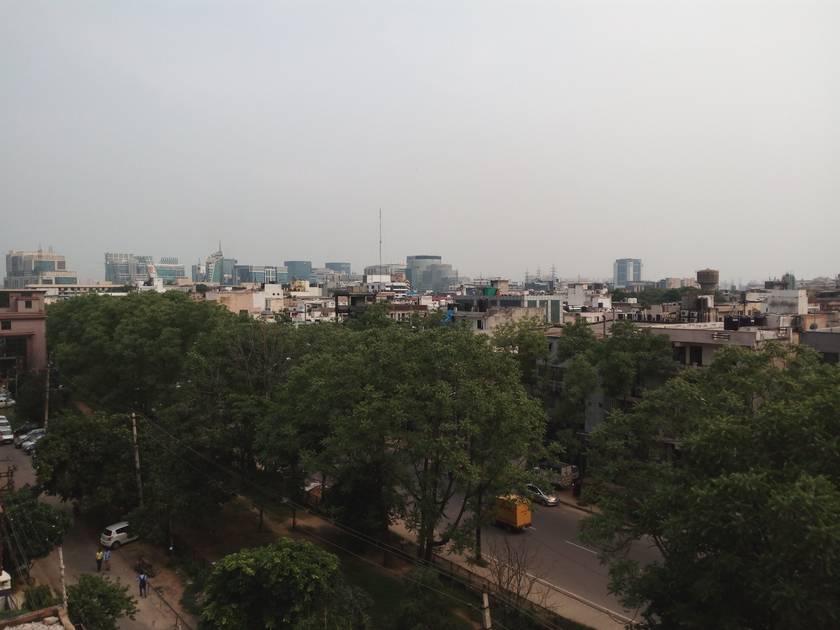
Long Shot
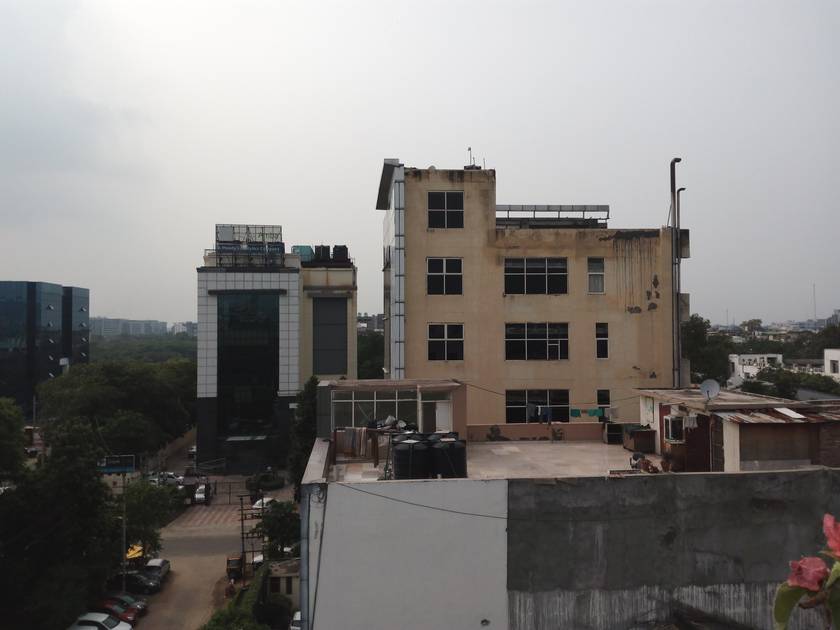
HDR Off

HDR On

Front Shot
|
Front Camera |
||||
|---|---|---|---|---|
| Resolution | ||||
|
||||
| Autofocus | No | |||
| Flash | No |
Battery |
|
|---|---|
| Capacity | 2500 mAh |
| Battery Type | Li-Polymer |
| TalkTime | Up to 9.5 Hours(2G) |
Storage |
|
|---|---|
| Internal Storage | 8 GB |
| Expandable Storage | Yes, Up to 32 GB |
Network & Connectivity |
|
|---|---|
| SIM Slot(s) | Dual SIM |
| SIM Type | SIM1: Micro, SIM2: Micro |
| Network Support | 5G Not Supported |
| SAR Value | Head: 0.54 W/kg, Body: 0.48 W/kg |
| Wi-Fi | Yes, Wi-Fi 4 (802.11 b/g/n) |
| Bluetooth | Yes, v4.0 |
| GPS | Yes with A-GPS |
| HDMI | No |
Multimedia |
|
|---|---|
| Audio Jack | 3.5 mm |
Sensors |
|
|---|---|
| Fingerprint Sensor | No |
| Other Sensors | Light sensor, Proximity sensor, Accelerometer |
Micromax Canvas Xpress 2 E313 User Reviews
Micromax Canvas Xpress 2 E313 Key Highlights
| Processor | MediaTek MT6592M |
| RAM & Storage | 1 GB + 8 GB |
| Display | 5.0", 720 x 1280 Resolution |
| Rear Camera | 13 MP |
| Front Camera | 2 MP |
| Battery | 2500 mAh |















Popular Links
- All Upcoming Phones
- vivo V80 5G
- OPPO F35 Pro
- vivo S2 FE 5G
- OPPO Find X10
- OPPO F35
- Samsung Mobiles
- Motorola Mobiles
- vivo Mobiles
- OPPO Mobiles
- Tecno Mobiles
- realme Mobiles
- Xiaomi Mobiles