
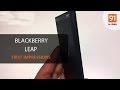
Blackberry Leap
+ Compare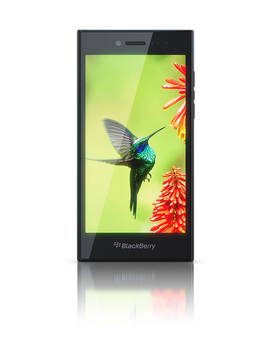
-
Design4

-
360° View

-
Videos1
Key Specs
Performance
-
Qualcomm Snapdragon S4 Plus -
Dual Core, 1.5 GHz -
2 GB RAM
Display
-
5.0 inches (12.7 cm); TFT -
720x1280 px (HD)
Rear Camera
-
Single Camera Setup - 8 MP (upto 5x Digital Zoom) Primary Camera
-
LED Flash -
Full HD @30fps Video Recording
Front Camera
-
2 MP -
HD fps Video Recording
Battery
-
2800 mAh
General
-
5G Not Supported -
16 GB internal storage, Expandable upto 128 GB
Blackberry Leap Expert Review Summary

Verdict
The BlackBerry Leap has been priced at Rs 21,490, and if we were to compare it to options in the same price bracket, it`d probably stop leaping and hide before being spotted. This dough can get you extremely compelling options running Android – we`re talking about the likes of the OnePlus One (review), the Xiaomi Mi 4 (review) and the ASUS ZenFone 2 (review). It`s clear that if specs are taken into consideration, the Leap doesn`t stand a chance against other offerin
- Solid build
- Reasonable performance
- BlackBerry Hub
- Support for Android apps
- Very good battery life
Pros
- Pricey considering the opportunity cost
Cons
Specs at a glance
+5-inch, 1,280 x 720 display (~294ppi)8MP primary camera, 2MP front shooter1.5GHz dual-core Qualcomm Snapdragon S4 Plus processor2GB RAM, 16GB internal storage, expandable by 128GB2,500mAh battery4G (FD-LTE Band 3), Wi-Fi, Bluetooth 4.0, A-GPS, MiracastBB OS 10.3.1FM radio
Read MoreThe basics
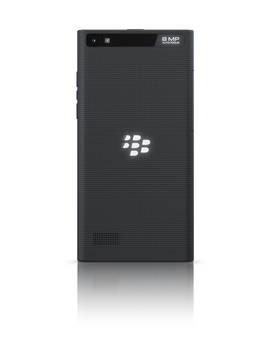
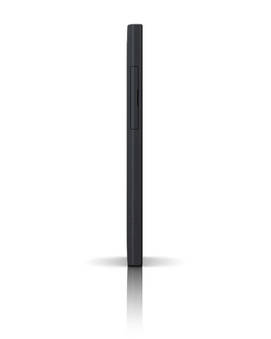
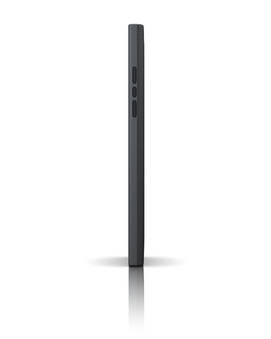
+When it comes to design, the BlackBerry Leap looks elegant in a solid, industrial sort of a way. Don’t expect to turn any heads with it – it’s more of a tank than a sports car when it comes to looks, and the build quality reflects that too. The dotted pattern at the rear is a nice touch – adding to the looks as well as the grip. The front is plain Jane, sporting BlackBerry branding under the display, and the usual earpiece, sensors, front camera and notification LED above. The micro-USB port is at the bottom, while the power key and 3.5mm audio socket are on top. The right sports two separate volume adjustment keys, with a dedicated button to launch the voice assistant placed in their middle.The rear panel on the Leap can’t be removed, and the slots for inserting a micro-SIM and a microSD card are hidden under a plastic flap on the left. At the rear, you’ll see the camera and flash modules placed on a mirror-finished strip on top, similar to the Classic. The large BlackBerry logo is embossed in the centre, and a speaker grille can be seen down below.The 5-inch display on the Leap offers a resolution of 1,280 x 720 pixels, translating into a pixel density of 294 ppi. In terms of capabilities, it’s pretty good – with crisp visuals and sharp text. The icons look like they’re floating on top of the screen, and we didn’t have any issues with either viewing angles or sunlight legibility. The touch response is excellent, which bodes well for this all-touch smartphone.
Read MoreThe platform
+Speaking of touch, the BlackBerry OS 10 platform has been designed from the ground up as a touch-driven OS, so those who’re planning to migrate to the Leap from any other rival mobile platform shouldn’t face any troubles. If you haven’t experienced BB OS 10 before, we can tell you that it’s quite fluid and responsive, and quite intuitive too once you get the hang of it. It’s mainly swipe driven and there are no navigation buttons. An upward swipe from the bottom towards the middle of the screen is enough to unlock it straight from standby, and what you see then is a simple icon-based UI. Apps can be categorised into custom folders, as you can expect, while a swipe down from the top of the screen brings down the customisable quick settings pane. Running apps can be minimised by swiping upwards from the bottom, and turn into what are called Active Frames. This is how the OS implements multitasking and you can have up to eight of these Active Frames open at a time. You can switch to any running app, or choose to kill it by tapping the ‘x’ at the bottom right of the frame. But what about notifications you ask? Well, you get heads-up notifications for messages, but the one central place where everything can be found is BlackBerry Hub. In our opinion, the BlackBerry Hub is the key pillar on which the brand’s mobile OS stands, and is easily one of its strongest features. It aggregates messages from all email accounts configured on the smartphone, along with SMSes, IM apps like BBM and WhatsApp, social accounts like Twitter, Facebook and LinkedIn. For someone who uses multiple email IDs for work and personal use and is active on a variety of social networks, the ability to see messages from all of them together in one central place can be a godsend. The Hub gets its own dedicated spot on the left side of the home screen, and can be accessed from anywhere by making an ‘inverted L gesture’, i.e., swiping up and then right. It’s quite loaded with features of its own, including a Priority Hub that, as the name indicates, displays messages it thinks are important. Apart from the Hub, the platform comes with quite a few other signature experiences as well, such as BBM Meetings for video conferencing, the very capable and useful voice-driven BlackBerry Assistant, actionable notifications, a powerful browser, BlackBerry Balance to segregate work and personal stuff, and BlackBerry Blend that allows you to access and use data from your smartphone from other devices like computers and tablets.A special mention is deserved by the BlackBerry keyboard, which can’t be replaced with alternatives unlike Android, but delivers a solid, intuitive text input mechanism. Apart from full-fledged support for multiple languages, the feature we like the most has to be the word prediction capabilities it offers. Word suggestions appear on top of alphabets, and you can just flick them upwards to input them into text fields. The prediction get better over time as it learns your typing habits, and eventually, you could enter text just using gestures. While social apps such as Facebook and Twitter, and online services like Dropbox come baked in, the native BlackBerry app ecosystem gets a huge fillip thanks to support for Android apps. Not only can you install Android apps directly using APK files, the Amazon Appstore comes preloaded, giving you access to the smorgasbord of Android apps available via this storefront. By including support for Android apps, BlackBerry has made sure that its users are not left in the lurch when it comes to the app ecosystem. Of course, the BlackBerry World storefront does have a fair share, and covers most of popular apps users generally want. In fact, we even managed to install two separate instances of WhatsApp on the Leap, one from BlackBerry World and another using a sideloaded Android APK, and got both working simultaneously with two different mobile numbers. Admittedly, the Android version didn’t work smoothly, but it did manage to receive and send messages.
Read MoreHow it fares
+As far as its shooting capabilities are concerned, the Leap offers an 8-meg primary camera and a 2MP front snapper that do a fair job. The camera app is quite minimalistic, offering a bunch of scene modes covering stuff like action, night and beach, and modes like panorama and HDR. However, there’s a nifty Time Shift mode that lets you go back in time to choose the best from a sequence of portrait shots. We love the fact that the app prompts you to choose settings depending upon shooting conditions, such as asking you to switch to the HDR mode when it detects contrasting light. In terms of image quality, it can shoot reasonably well in daylight, but the low-light capabilities aren’t too good. You can jump to the camera review for more details, but here are a few image samples for a quick look.
Read MorePopular Comparisons
Blackberry Leap Specifications
General |
|
|---|---|
| Operating System | Blackberry v10.3.1 |
Performance |
|
|---|---|
| Chipset | Qualcomm Snapdragon S4 Plus MSM8960 |
| Processor | Dual core, 1.5 GHz, Krait |
| Graphics (GPU) | Adreno 305 |
| RAM | 2 GB |
Display |
|
|---|---|
| Display Type | TFT |
| Screen Size | 5.0 inches (12.7 cm) |
| Resolution | 720x1280 px (HD) |
| Aspect Ratio | 16:9 |
| Pixel Density | 294 ppi |
| Screen to Body Ratio (calculated) | 65.7 % |
| Display Colour | 16M |
Design |
|
|---|---|
| Height | 144 mm |
| Width | 72.8 mm |
| Thickness | 9.5 mm |
| Weight | 170 grams |
|
Click to View

|
Rear Camera |
||||||
|---|---|---|---|---|---|---|
| Resolution | ||||||
|
||||||
| Autofocus | Yes | |||||
| Flash | Yes, LED Flash | |||||
| Image Resolution | 3264 x 2448 Pixels | |||||
| Shooting Modes | Continuous Shooting | |||||
| Camera Features |
5 x Digital Zoom Digital image stabilization Touch to focus |
|||||
| Video Recording | 1920x1080 @ 30 fps |
Front Camera |
||||
|---|---|---|---|---|
| Resolution | ||||
|
||||
| Video Recording | 1280x720 fps |
Battery |
|
|---|---|
| Capacity | 2800 mAh |
| Battery Type | Li-ion |
| TalkTime | Up to 17 Hours(3G) / Up to 12 Hours(2G) |
Storage |
|
|---|---|
| Internal Storage | 16 GB |
| Expandable Storage | Yes, Up to 128 GB |
Network & Connectivity |
|
|---|---|
| SIM Slot(s) | Single SIM |
| Network Support | 5G Not Supported, 4G |
| SIM 1 |
Expand
|
| Wi-Fi | Yes, Wi-Fi 4 (802.11 b/g/n) |
| Wi-Fi Features | Wi-Fi Direct, Mobile Hotspot |
| Bluetooth | Yes, v4.0 |
| GPS | Yes with A-GPS |
Multimedia |
|
|---|---|
| Audio Jack | 3.5 mm |
| Video Player | Yes, Video Formats: AVI, H.263, H.264, MPEG4 |
| Ring Tone | Music ringtones, Polyphonic ringtones, Vibration |
| Music | Yes, Music Formats: 3GP, AAC, AMR, FLAC, M4A (Apple lossless), MP3, OGG, WAV |
Sensors |
|
|---|---|
| Other Sensors | Light sensor, Proximity sensor, Accelerometer |
| Games | Yes |
| Browser | Yes, HTML |
| Phone Book | Yes, Practically Unlimited |
| Yes | |
| Instant Messaging | Yes |
| Other Facilities | Calculator, Converter, World clock, Calendar, Alarm, Document viewer |
Blackberry Leap User Reviews
Blackberry Leap Key Highlights
| Processor | Qualcomm Snapdragon S4 Plus MSM8960 |
| RAM & Storage | 2 GB + 16 GB |
| Display | 5.0", 720 x 1280 Resolution |
| Rear Camera | 8 MP |
| Front Camera | 2 MP |
| Battery | 2800 mAh |



















Popular Links
- All Upcoming Phones
- vivo V80 5G
- OPPO K14 Plus 5G
- Xiaomi Redmi Note 17 Pro 5G
- Lava Virat Curve 5G
- OPPO F35 Pro
- Samsung Mobiles
- Motorola Mobiles
- vivo Mobiles
- OPPO Mobiles
- Tecno Mobiles
- realme Mobiles
- Xiaomi Mobiles