
Huawei P9
+ Compare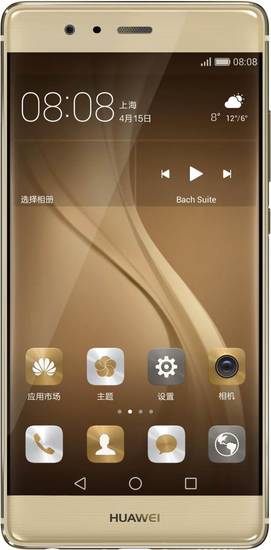

-
Design5

-
Rear Camera8

-
360° View

-
UI Screenshot16
![UI Screenshot]()
-
Benchmarks9
![Benchmarks]()
-
Videos6
![Videos]()



Key Specs
Performance
-
HiSilicon Kirin 955 -
Octa core (2.5 GHz, Quad Core + 1.8 GHz, Quad core) -
3 GB / 4 GB RAM
Display
-
5.2 inches (13.21 cm); IPS LCD -
1080x1920 px (FULL HD) -
Gorilla Glass 3 Protection
Rear Camera
-
Dual Camera Setup - 12 MP Primary Camera
- 12 MP Camera
-
Dual-color LED Flash -
FHD @30 fps Video Recording
Front Camera
-
8 MP -
FHD @30 fps Video Recording
Battery
-
3000 mAh, Li-Polymer -
Fast Charging; USB Type-C port
General
-
SIM1: Nano -
5G Not Supported -
32 GB / 64 GB Storage, Expandable upto 128 GB
Huawei P9 Prices in India
 Flipkart
Huawei P9 Expert Review Summary
Expert Rating:
![Ketaki Bhojnagarwala]()
Verdict
After two weeks of using the Huawei P9, the one thing we can say for certain is that this is a smartphone we really like using. We had a similar experience when we used the OnePlus 3(review), which is incidentally one of the P9`s biggest competitors, along with the LeEco Le Max 2(first impressions)and Xiaomi Mi 5(review). We`ve already spoken about the P9`s cameras, but we`d just like to add – this is a smartphone for users who really enjoy p
Pros
- Outstanding cameras
- Decent performance
- Sleek build quality
Cons
- Average battery life
- No OIS or 4K video recording
- Expensive
Specs at a glance
+
Display
Read More
Design: symmetry in geometry
+
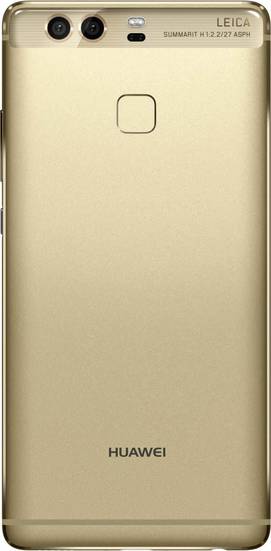
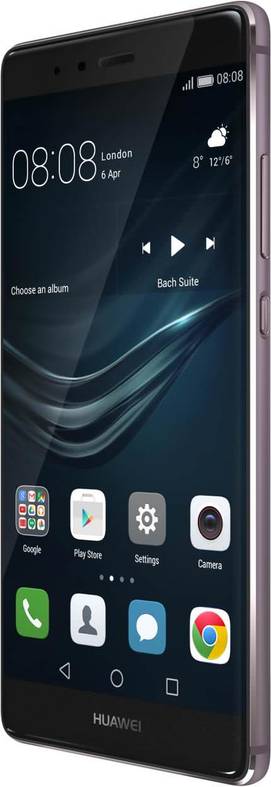
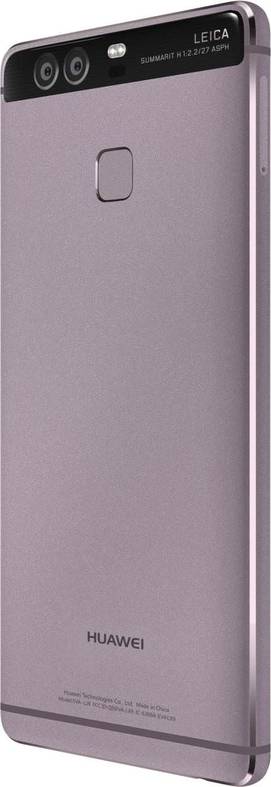
Dimensions: 145 x 70.9 x 6.9 mmWeight: 144 gramsThere’s no doubting the fact that the P9 is a sweet looking smartphone. It resembles a rectangular slab, with rounded edges and corners offsetting the geometry. It might not seem like it at first glance, but the P9 is a slim smartphone, measuring 6.95mm around the waist. It feels comfortable and nicely balanced, and at 144g, is lightweight without feeling flimsy. The P9 features a metal unibody design crafted out of aluminium, and our unit was a nice combination of a black façade and Titanium Grey rear. Unfortunately, as most metal phones are prone to do, the P9 is very slippery, and we highly recommend using a case for protection. With a display measuring 5.2-inches, the P9 is a compact device that fits well in the hand. Huawei has used 2.5D curved glass on the screen, so you get a nice dip towards the edges of the frame. The port and button placement is standard. You’ll find the front camera, sensors, earpiece and notification LED on top. Below the screen, you’ll find Huawei branding, since the navigation keys move up to the display as software overlays. The right spine is where you’ll see the power button and volume rocker. The former features a textured finish that makes it easy to locate. The left spine is home to the ejectable SIM tray. The P9 is a hybrid dual-SIM device, with one SIM card slot doubling up as a microSD card slot for storage expansion. Both the SIM slots accept only nano SIMs. The Huawei P9 uses the latest USB Type-C interface, and you’ll find this at the bottom, flanked by the primary microphone, 3.5mm audio jack and loudspeaker grill. The top edge is home to the secondary microphone.The back panel features a matte finish that doesn’t pick up smudges. However the metal used is quite soft, and is prone to picking up scratches quite easily. Right at the top, you’ll see a black glass strip that features the dual cameras, dual-LED flash and LEICA branding. Below this is the square-shaped fingerprint sensor.
Read More
Display: crisp and compact
+
Size: 5.2 InchResolution: Full HD (1080 x 1920 pixels)Display Type: IPS LCDPixel Density: 424 ppiAt a time when large screens top the popularity charts among smartphone users, there are still a few flagships that stick to compact screen sizes. The P9 with its 5.2-inch display is one of them. The 2.5D glass gets Gorilla Glass 4 for protection, but curved glass is still fragile, adding weight to our recommendation of putting the P9 in a case.The screen features full HD resolution, instead of the 2K resolution that many flagships have opted for. We’ve got no complaints about the screen though – at 423ppi the display is plenty sharp for our liking. The IPS LCD doesn’t have the saturated colours of AMOLED counterparts, but the screen outputs vivid, punchy colours with good viewing angles and brightness levels. Outdoor visibility on this smartphone is great – we had no problems viewing the screen even in bright sunlight. The P9 doesn’t feature a reading mode for reducing eye strain, but there is an option to adjust colour temperature in settings, with a choice between Default, Warm or Cool modes. If you want, you can even adjust the colour temperature manually on the spectrum. The P9’s display also has a Glove mode, but this is tucked away under the ‘Smart Assistance’ option in settings. The screen is smooth and fluid, although there were times when swipes and taps didn’t respond as well as we’d like.
Read More
Cameras: seeing double
+
Primary camera: 12 MPFlash: Dual-color LED FlashSecondary camera: 8 MPHuawei and Leica announced their long-term partnership for smartphone photography in January this year, and the P9 is the first device to emerge from that collaboration. The Huawei P9’s cameras might have Leica branding, but make no mistake – these aren’t Leica lenses. Instead, Huawei says the cameras have been ‘co-engineered’ with Leica. The twin lenses use Sony’s IMX286 sensors with f/2.2 aperture, while the module has been manufactured by Sunny Opticals, one of the world’s leading camera module suppliers. So where does Leica’s role come in exactly? There’s been a bit of controversy surrounding this fact, but the companies later issued a clarification, saying that the collaboration included work on the “optical design, imaging quality, image data processing, optimisation, and the mechanical construction of the camera module to the graphic user interface” – basically the cameras get the Leica stamp of approval.Putting the controversy aside, you might be wondering what the function of the dual cameras are. In the P9’s case, it’s quite interesting. While one of the cameras features a full RGB sensor to capture colour, the other is monochrome. And while you can use the monochrome sensor to capture black and white photos, its main function is to capture more light – about 200 percent more than the RGB sensor is what Huawei says. When you snap a photo with the P9, both cameras fire simultaneously, and the resulting image is a composite of what both sensors capture. The resulting image, in theory, should offer more detail, better contrast and depth. Moving over to the camera app for a bit, the one on the P9 is loaded to the gills with features and controls, but is uncomplicated and easy to navigate. Swiping from the left opens up the various shooting modes – you have the regular Photo mode, plus Monochrome, Beauty, Video, HDR, Panorama, Night Shot, Light Painting, Slow-mo, Watermark, Audio Note and Document Scan. Most of these modes speak for themselves, but there are a few which merit more explanation. The Night Shot mode, as you may have guessed, is for taking low light shots. It’s recommended you use a tripod with this one, because it keeps the shutter open for a maximum of 32 seconds. What’s nice is that the app shows you a second-by-second countdown of the exposure, letting you stop it at any moment. You also have the option to manually set the exposure and ISO in this mode. The Light Painting mode lets you conduct experiments in shutter speed, with four sub-modes to capture different kinds of shots. There’s Tail lights, which lets you capture light trails from moving cars, Light graffiti which lets you make patterns with light in the dark, Silky Water to capture flowing water and Star Trails to capture trails of starlight. All the modes are really easy to use, but using a tripod is recommended. That said, we tested the Light Graffiti mode without a tripod, and if you have a steady hand, it works quite well. Swiping from the right of the viewfinder opens up the camera settings, and here’s where you can enable features like a grid (including a Fibonacci grid), object tracking, touch to capture, smile detection and even enable Leica watermarks. On the viewfinder, you’ll find an option to access the wide aperture mode. This mode is great for macros, letting you focus on an object and adjust the depth of field using the onscreen slider. Images taken in this mode can be refocused later in edits. There are also a bunch of filters you can apply in real time, as well as the option to choose one of Leica’s film presets – Standard, Vivid or Smooth Colours. Just remember though, that the film preset you choose will apply to all images taken with the camera, irrespective of which mode you’re using. Lastly, the camera also has a dedicated Pro mode, and this can be easily accessed by swiping up from the viewfinder, which will display all the manual controls you need.The results from the Huawei P9’s cameras are among the best we’ve seen on a smartphone. The camera captures plenty of detail with good contrast levels, whether it’s a macro shot or landscape type image. The camera focuses really quickly, thanks to its laser-assisted autofocus, and is able to zero in on the subject even in a crowded close-up frame, any area where many smartphone cameras struggle. The low-light images from this camera are great – noise levels are some of the lowest we’ve seen, and colours are reproduced well too. The wide aperture mode lets you get the aperture down to as low as f/0.95, but this is done artificially through software, which means you’ll see some soft lines around your subject. If used intelligently thought, it can create some stunning bokeh shots. The monochrome lens though is the real star of the show. Because the camera has a dedicated lens and isn’t just converting images to black and white, the resulting shots have better tonality and dynamic range. We often found ourselves veering towards the monochrome sensor with the P9, and the results speak for themselves.The front camera on the P9 is an 8MP unit with f/2.4 aperture. It doesn’t feature autofocus, but the results are incredibly detailed. You can take some great selfies, whether it’s in daylight or low light, and you have the option to enable a screen flash and beauty mode too. While the cameras on the P9 deliver exceptional stills, it’s disappointing that the P9 doesn’t feature OIS or 4K video recording, with the resulting videos turning out quite shaky.You can check out our camera review for more details, or view the thumbnails below.
Read More
Software: feature packed
+
Operating System: AndroidOS Version: 6.0, MarshmallowYou can’t have a Huawei phone without EMUI, and the Honor runs EMUI 4.1 built atop Android Marshmallow. We’ve had complaints about EMUI in the past, but over the last couple of years, Huawei has really polished its mobile OS, and we think it’s among the best skins you can find on Android phones these days. We’ve covered EMUI in detail in our reviews of both Huawei and Honor devices, so we’ll just skim through the basics. You get the standard Magazine Unlock feature which displays a selection of high-resolution images as changing lockscreen wallpapers. The homescreen is devoid of an app drawer, with quite a few pre-loaded apps. Apart from the Huawei apps, you’ll find WPS Office, Facebook, Twitter, Todoist, Booking.com, EyeEm, News Republic and games like Dragon Mania, Puzzle Pets, Asphalt Nitro, Spider-Man: Ultimate Power and Ice Age: Scrat-Ventures. EMUI comes with theme support, with a range of both local and online themes you can download, customise and apply. The Phone Manager app is a dashboard similar to Xiaomi’s Security app, letting you scan the system, manage storage, notifications, battery, data and more. The P9 features an inbuilt pedometer, and the collected data is displayed in the Health app, which also shows your distance covered, calorie burn and more. In settings, you can enable a Simple homescreen layout, change the layout of the navigation bar, enable a floating dock and turn on various gestures. You can also enable a one-handed mode, as well as configure a few voice commands.
Read More
Performance: winning streak
+
CPU: Quad core, 2.5 GHz + Quad core, 1.8 GHz, HiSilicon KirinGPU: Mali-T880 MP4RAM: 3 GBMemory: 32 GB + Up to 128 GBSIM Slots: Single SIM , GSMThe Huawei P9 is powered by the brand’s own octa-core Kirin 955 chipset (four 2.5GHz Cortex-A72 cores + four 1.8GHz Cortex-A53 cores), paired with 3GB of RAM. The processor is powerful enough to handle multi-tasking and intensive tasks with ease, although you won’t get the blazing fast speeds you’d find on the Samsung Galaxy S7 duo. Thanks to the Mali-T880 MP4 GPU, gaming on this device is a breeze – we had a few intense sessions of Dead Trigger 2 and Asphalt Nitro and the graphics rendered smoothly without any hiccups. The only issue we faced with the P9 was the occasional app crash or freeze – and this was particularly while using Snapchat. We know Snapchat has issues on Android, but we found it to be particularly problematic on the P9, with errors and crashes too frequent for our liking. The P9 gets warm after extended gaming and use of the camera, but apart from that we didn’t face any heating issues on the phone. In terms of the onboard storage, you get 32GB of memory to work with, out of which just over 23GB is available out-of-the-box. That should be sufficient, when clubbed with microSD card support up to 128GB. In terms of the connectivity options, the P9 supports 4G LTE, dual-band Wi-Fi ac, DLNA, Wi-Fi Direct, Bluetooth 4.2, NFC and A-GPS. The fingerprint sensor on the P9 is one of its most underrated features – it’s fast and snappy, and rarely misses a beat. You can configure up to five fingerprints, and use them for accessing the safe (protected photos, videos, files, etc.,) and locked apps. Apart from this, the fingerprint can also be used for other functions, similar to what we’ve seen on the Honor 7 and Honor 5X. For instance, you can swipe up and down on the sensor to open / close the notification panel, and swipe left / right to browse through images in the gallery. You can also use it to answer calls, turn off an alarm and take a photo or video. These functions can be performed with any finger, and not just the ones enrolled. The Huawei P9 features a 3,000mAh sealed battery, and this is one of its weak points. The battery lasted for just over 8 hours in our video loop battery drain test, which is one of the poorer results we’ve seen from a flagship of late. In our daily use involving a few phone calls, plus usage of WhatsApp, Facebook, Twitter and more (some extended Pokemon Go sessions as well), we never got more than three hours of screen on time. This should be fine for casual users, but power users will be disappointed. The other issue is that the P9 doesn’t support fast charging, with the included charger taking over 2.5 hours to charge the battery from 0 to 100 percent.
Read More
Read full Review

Verdict
After two weeks of using the Huawei P9, the one thing we can say for certain is that this is a smartphone we really like using. We had a similar experience when we used the OnePlus 3(review), which is incidentally one of the P9`s biggest competitors, along with the LeEco Le Max 2(first impressions)and Xiaomi Mi 5(review). We`ve already spoken about the P9`s cameras, but we`d just like to add – this is a smartphone for users who really enjoy p
- Outstanding cameras
- Decent performance
- Sleek build quality
Pros
- Average battery life
- No OIS or 4K video recording
- Expensive
Cons
Specs at a glance
+Display
Read MoreDesign: symmetry in geometry
+Dimensions: 145 x 70.9 x 6.9 mmWeight: 144 gramsThere’s no doubting the fact that the P9 is a sweet looking smartphone. It resembles a rectangular slab, with rounded edges and corners offsetting the geometry. It might not seem like it at first glance, but the P9 is a slim smartphone, measuring 6.95mm around the waist. It feels comfortable and nicely balanced, and at 144g, is lightweight without feeling flimsy. The P9 features a metal unibody design crafted out of aluminium, and our unit was a nice combination of a black façade and Titanium Grey rear. Unfortunately, as most metal phones are prone to do, the P9 is very slippery, and we highly recommend using a case for protection. With a display measuring 5.2-inches, the P9 is a compact device that fits well in the hand. Huawei has used 2.5D curved glass on the screen, so you get a nice dip towards the edges of the frame. The port and button placement is standard. You’ll find the front camera, sensors, earpiece and notification LED on top. Below the screen, you’ll find Huawei branding, since the navigation keys move up to the display as software overlays. The right spine is where you’ll see the power button and volume rocker. The former features a textured finish that makes it easy to locate. The left spine is home to the ejectable SIM tray. The P9 is a hybrid dual-SIM device, with one SIM card slot doubling up as a microSD card slot for storage expansion. Both the SIM slots accept only nano SIMs. The Huawei P9 uses the latest USB Type-C interface, and you’ll find this at the bottom, flanked by the primary microphone, 3.5mm audio jack and loudspeaker grill. The top edge is home to the secondary microphone.The back panel features a matte finish that doesn’t pick up smudges. However the metal used is quite soft, and is prone to picking up scratches quite easily. Right at the top, you’ll see a black glass strip that features the dual cameras, dual-LED flash and LEICA branding. Below this is the square-shaped fingerprint sensor.
Read MoreDisplay: crisp and compact
+Size: 5.2 InchResolution: Full HD (1080 x 1920 pixels)Display Type: IPS LCDPixel Density: 424 ppiAt a time when large screens top the popularity charts among smartphone users, there are still a few flagships that stick to compact screen sizes. The P9 with its 5.2-inch display is one of them. The 2.5D glass gets Gorilla Glass 4 for protection, but curved glass is still fragile, adding weight to our recommendation of putting the P9 in a case.The screen features full HD resolution, instead of the 2K resolution that many flagships have opted for. We’ve got no complaints about the screen though – at 423ppi the display is plenty sharp for our liking. The IPS LCD doesn’t have the saturated colours of AMOLED counterparts, but the screen outputs vivid, punchy colours with good viewing angles and brightness levels. Outdoor visibility on this smartphone is great – we had no problems viewing the screen even in bright sunlight. The P9 doesn’t feature a reading mode for reducing eye strain, but there is an option to adjust colour temperature in settings, with a choice between Default, Warm or Cool modes. If you want, you can even adjust the colour temperature manually on the spectrum. The P9’s display also has a Glove mode, but this is tucked away under the ‘Smart Assistance’ option in settings. The screen is smooth and fluid, although there were times when swipes and taps didn’t respond as well as we’d like.
Read MoreCameras: seeing double
+Primary camera: 12 MPFlash: Dual-color LED FlashSecondary camera: 8 MPHuawei and Leica announced their long-term partnership for smartphone photography in January this year, and the P9 is the first device to emerge from that collaboration. The Huawei P9’s cameras might have Leica branding, but make no mistake – these aren’t Leica lenses. Instead, Huawei says the cameras have been ‘co-engineered’ with Leica. The twin lenses use Sony’s IMX286 sensors with f/2.2 aperture, while the module has been manufactured by Sunny Opticals, one of the world’s leading camera module suppliers. So where does Leica’s role come in exactly? There’s been a bit of controversy surrounding this fact, but the companies later issued a clarification, saying that the collaboration included work on the “optical design, imaging quality, image data processing, optimisation, and the mechanical construction of the camera module to the graphic user interface” – basically the cameras get the Leica stamp of approval.Putting the controversy aside, you might be wondering what the function of the dual cameras are. In the P9’s case, it’s quite interesting. While one of the cameras features a full RGB sensor to capture colour, the other is monochrome. And while you can use the monochrome sensor to capture black and white photos, its main function is to capture more light – about 200 percent more than the RGB sensor is what Huawei says. When you snap a photo with the P9, both cameras fire simultaneously, and the resulting image is a composite of what both sensors capture. The resulting image, in theory, should offer more detail, better contrast and depth. Moving over to the camera app for a bit, the one on the P9 is loaded to the gills with features and controls, but is uncomplicated and easy to navigate. Swiping from the left opens up the various shooting modes – you have the regular Photo mode, plus Monochrome, Beauty, Video, HDR, Panorama, Night Shot, Light Painting, Slow-mo, Watermark, Audio Note and Document Scan. Most of these modes speak for themselves, but there are a few which merit more explanation. The Night Shot mode, as you may have guessed, is for taking low light shots. It’s recommended you use a tripod with this one, because it keeps the shutter open for a maximum of 32 seconds. What’s nice is that the app shows you a second-by-second countdown of the exposure, letting you stop it at any moment. You also have the option to manually set the exposure and ISO in this mode. The Light Painting mode lets you conduct experiments in shutter speed, with four sub-modes to capture different kinds of shots. There’s Tail lights, which lets you capture light trails from moving cars, Light graffiti which lets you make patterns with light in the dark, Silky Water to capture flowing water and Star Trails to capture trails of starlight. All the modes are really easy to use, but using a tripod is recommended. That said, we tested the Light Graffiti mode without a tripod, and if you have a steady hand, it works quite well. Swiping from the right of the viewfinder opens up the camera settings, and here’s where you can enable features like a grid (including a Fibonacci grid), object tracking, touch to capture, smile detection and even enable Leica watermarks. On the viewfinder, you’ll find an option to access the wide aperture mode. This mode is great for macros, letting you focus on an object and adjust the depth of field using the onscreen slider. Images taken in this mode can be refocused later in edits. There are also a bunch of filters you can apply in real time, as well as the option to choose one of Leica’s film presets – Standard, Vivid or Smooth Colours. Just remember though, that the film preset you choose will apply to all images taken with the camera, irrespective of which mode you’re using. Lastly, the camera also has a dedicated Pro mode, and this can be easily accessed by swiping up from the viewfinder, which will display all the manual controls you need.The results from the Huawei P9’s cameras are among the best we’ve seen on a smartphone. The camera captures plenty of detail with good contrast levels, whether it’s a macro shot or landscape type image. The camera focuses really quickly, thanks to its laser-assisted autofocus, and is able to zero in on the subject even in a crowded close-up frame, any area where many smartphone cameras struggle. The low-light images from this camera are great – noise levels are some of the lowest we’ve seen, and colours are reproduced well too. The wide aperture mode lets you get the aperture down to as low as f/0.95, but this is done artificially through software, which means you’ll see some soft lines around your subject. If used intelligently thought, it can create some stunning bokeh shots. The monochrome lens though is the real star of the show. Because the camera has a dedicated lens and isn’t just converting images to black and white, the resulting shots have better tonality and dynamic range. We often found ourselves veering towards the monochrome sensor with the P9, and the results speak for themselves.The front camera on the P9 is an 8MP unit with f/2.4 aperture. It doesn’t feature autofocus, but the results are incredibly detailed. You can take some great selfies, whether it’s in daylight or low light, and you have the option to enable a screen flash and beauty mode too. While the cameras on the P9 deliver exceptional stills, it’s disappointing that the P9 doesn’t feature OIS or 4K video recording, with the resulting videos turning out quite shaky.You can check out our camera review for more details, or view the thumbnails below.
Read MoreSoftware: feature packed
+Operating System: AndroidOS Version: 6.0, MarshmallowYou can’t have a Huawei phone without EMUI, and the Honor runs EMUI 4.1 built atop Android Marshmallow. We’ve had complaints about EMUI in the past, but over the last couple of years, Huawei has really polished its mobile OS, and we think it’s among the best skins you can find on Android phones these days. We’ve covered EMUI in detail in our reviews of both Huawei and Honor devices, so we’ll just skim through the basics. You get the standard Magazine Unlock feature which displays a selection of high-resolution images as changing lockscreen wallpapers. The homescreen is devoid of an app drawer, with quite a few pre-loaded apps. Apart from the Huawei apps, you’ll find WPS Office, Facebook, Twitter, Todoist, Booking.com, EyeEm, News Republic and games like Dragon Mania, Puzzle Pets, Asphalt Nitro, Spider-Man: Ultimate Power and Ice Age: Scrat-Ventures. EMUI comes with theme support, with a range of both local and online themes you can download, customise and apply. The Phone Manager app is a dashboard similar to Xiaomi’s Security app, letting you scan the system, manage storage, notifications, battery, data and more. The P9 features an inbuilt pedometer, and the collected data is displayed in the Health app, which also shows your distance covered, calorie burn and more. In settings, you can enable a Simple homescreen layout, change the layout of the navigation bar, enable a floating dock and turn on various gestures. You can also enable a one-handed mode, as well as configure a few voice commands.
Read MorePerformance: winning streak
+CPU: Quad core, 2.5 GHz + Quad core, 1.8 GHz, HiSilicon KirinGPU: Mali-T880 MP4RAM: 3 GBMemory: 32 GB + Up to 128 GBSIM Slots: Single SIM , GSMThe Huawei P9 is powered by the brand’s own octa-core Kirin 955 chipset (four 2.5GHz Cortex-A72 cores + four 1.8GHz Cortex-A53 cores), paired with 3GB of RAM. The processor is powerful enough to handle multi-tasking and intensive tasks with ease, although you won’t get the blazing fast speeds you’d find on the Samsung Galaxy S7 duo. Thanks to the Mali-T880 MP4 GPU, gaming on this device is a breeze – we had a few intense sessions of Dead Trigger 2 and Asphalt Nitro and the graphics rendered smoothly without any hiccups. The only issue we faced with the P9 was the occasional app crash or freeze – and this was particularly while using Snapchat. We know Snapchat has issues on Android, but we found it to be particularly problematic on the P9, with errors and crashes too frequent for our liking. The P9 gets warm after extended gaming and use of the camera, but apart from that we didn’t face any heating issues on the phone. In terms of the onboard storage, you get 32GB of memory to work with, out of which just over 23GB is available out-of-the-box. That should be sufficient, when clubbed with microSD card support up to 128GB. In terms of the connectivity options, the P9 supports 4G LTE, dual-band Wi-Fi ac, DLNA, Wi-Fi Direct, Bluetooth 4.2, NFC and A-GPS. The fingerprint sensor on the P9 is one of its most underrated features – it’s fast and snappy, and rarely misses a beat. You can configure up to five fingerprints, and use them for accessing the safe (protected photos, videos, files, etc.,) and locked apps. Apart from this, the fingerprint can also be used for other functions, similar to what we’ve seen on the Honor 7 and Honor 5X. For instance, you can swipe up and down on the sensor to open / close the notification panel, and swipe left / right to browse through images in the gallery. You can also use it to answer calls, turn off an alarm and take a photo or video. These functions can be performed with any finger, and not just the ones enrolled. The Huawei P9 features a 3,000mAh sealed battery, and this is one of its weak points. The battery lasted for just over 8 hours in our video loop battery drain test, which is one of the poorer results we’ve seen from a flagship of late. In our daily use involving a few phone calls, plus usage of WhatsApp, Facebook, Twitter and more (some extended Pokemon Go sessions as well), we never got more than three hours of screen on time. This should be fine for casual users, but power users will be disappointed. The other issue is that the P9 doesn’t support fast charging, with the included charger taking over 2.5 hours to charge the battery from 0 to 100 percent.
Read MorePopular Comparisons
 Huawei P9
 Samsung Galaxy A5 2016
Huawei P9
 Huawei P9 Plus
Huawei P9
 Huawei P9 Lite
Huawei P9
 Samsung Galaxy Note 7
Huawei P9
 Apple iPhone 7
Huawei P9
 OnePlus 3

Huawei P9 Specifications
General |
|
|---|---|
| Launch Date | August 17, 2016 (Official) |
| Operating System | Android v6.0 (Marshmallow) |
| Custom UI | EMUI |
Performance
(Avg)
|
|
|---|---|
| Chipset | HiSilicon Kirin 955 |
| Processor | Octa core (2.5 GHz, Quad core, Cortex A72 + 1.8 GHz, Quad core, Cortex A53) |
| Architecture | 64 bit |
| Graphics (GPU) | Mali-T880 MP4 |
| RAM | 3 GB / 4 GB |
Benchmark Screenshots

AnTuTu Benchmark
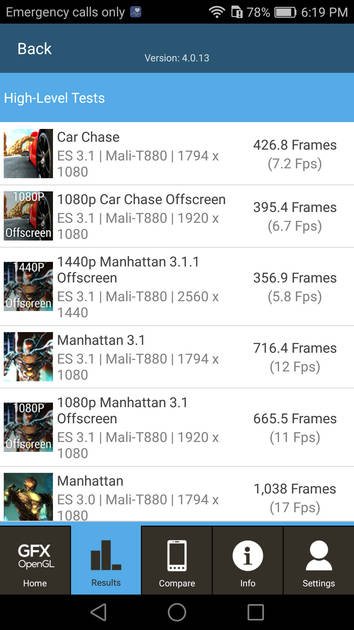
Graphics Benchmark
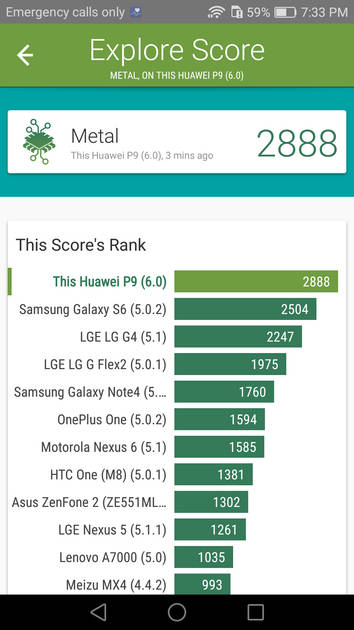
Vellamo Metal Benchmark
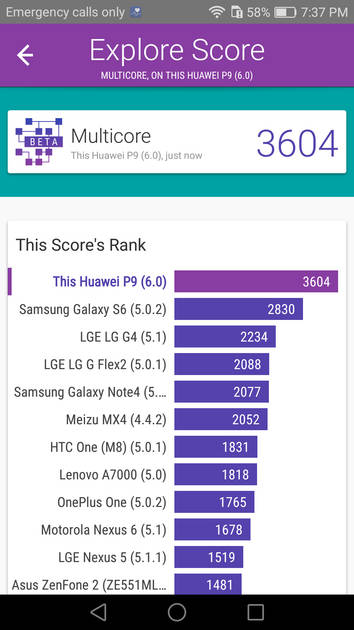
Vellamo Multicore Benchmark
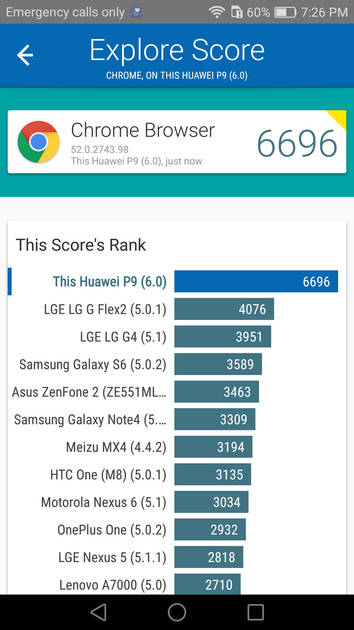
Vellamo Browser Benchmark
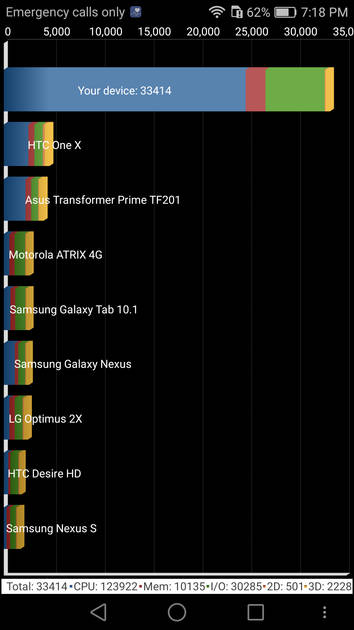
Quadrant Benchmark
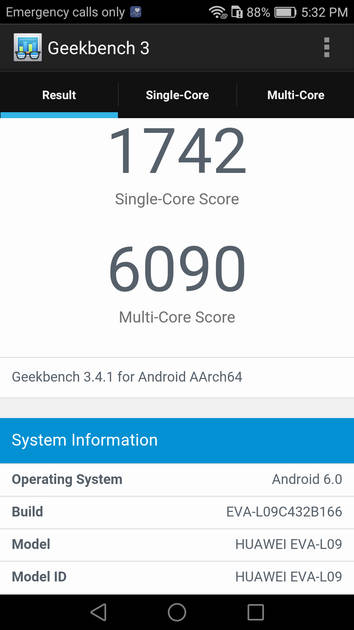
Geekbench3 Benchmark
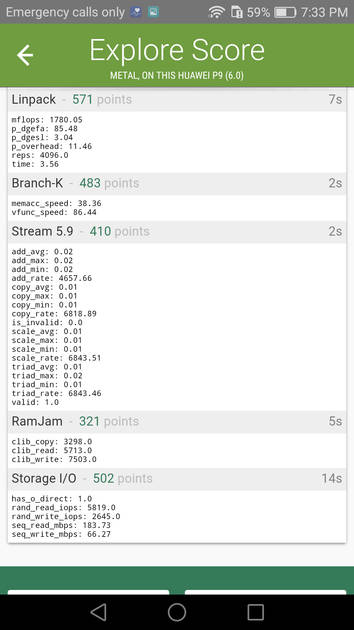
Linpack Benchmark
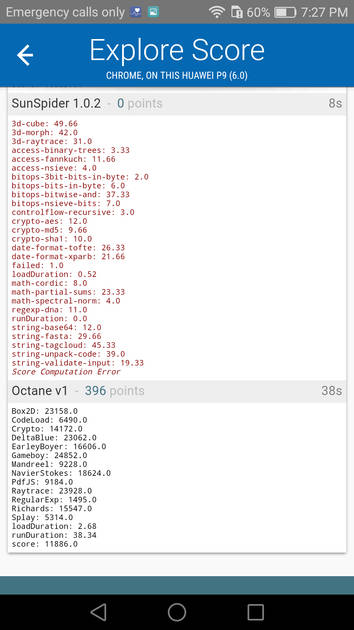
Sunspider Benchmark
|
Display
(Excellent)
|
|
|---|---|
| Display Type | IPS LCD |
| Screen Size | 5.2 inches (13.21 cm) |
| Resolution | 1080x1920 px (FULL HD) |
| Pixel Density | 424 ppi |
| Screen to Body Ratio (calculated) | 72.34 % |
| Screen Protection | Corning Gorilla |
UI Screenshots
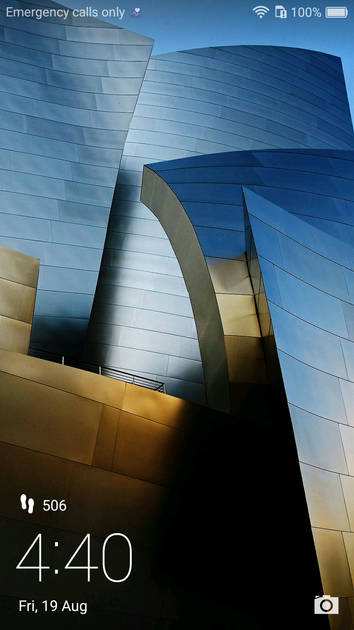
Lock Screen
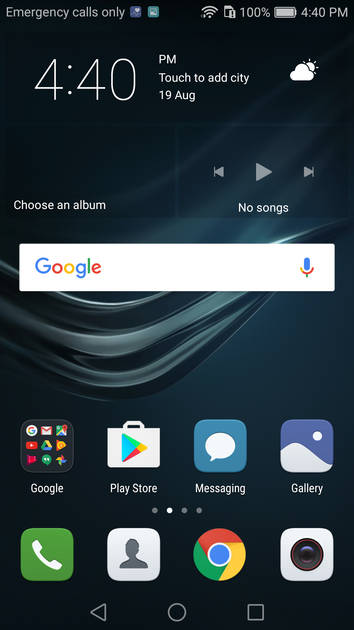
Home Screen
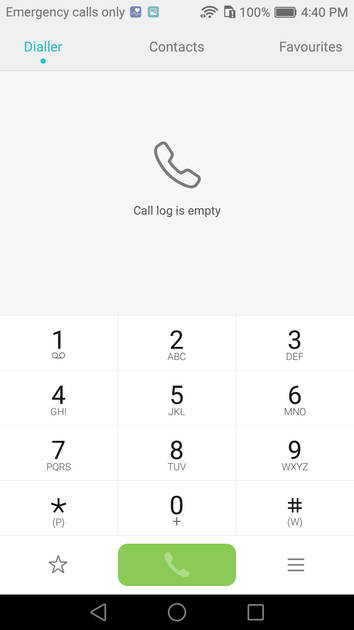
Dialer Screen
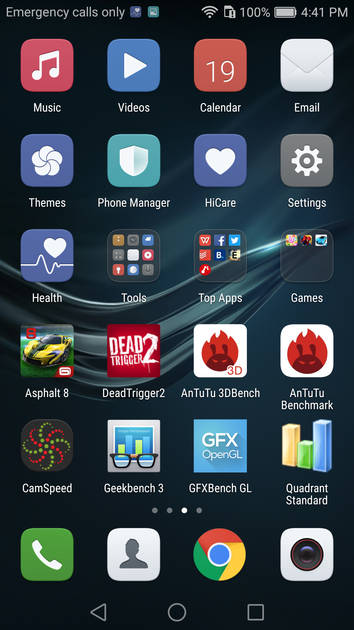
App Drawer
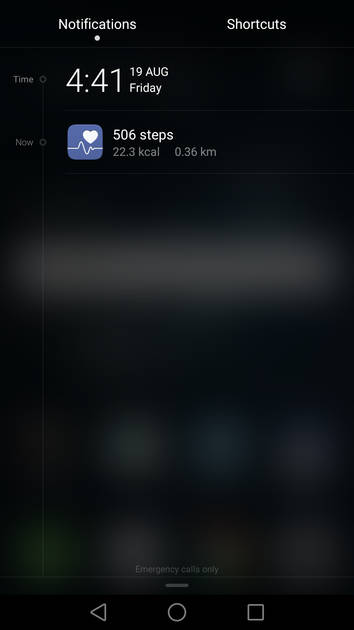
Notification Panel
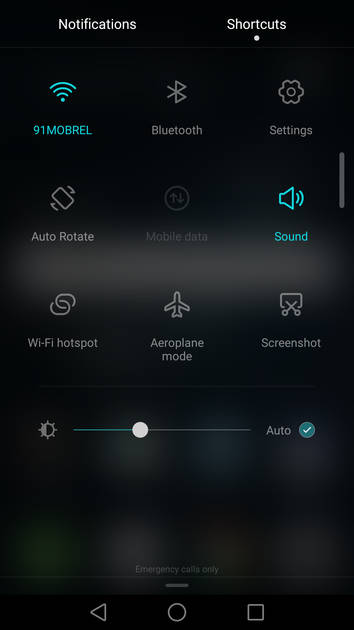
Quick Settings Panel
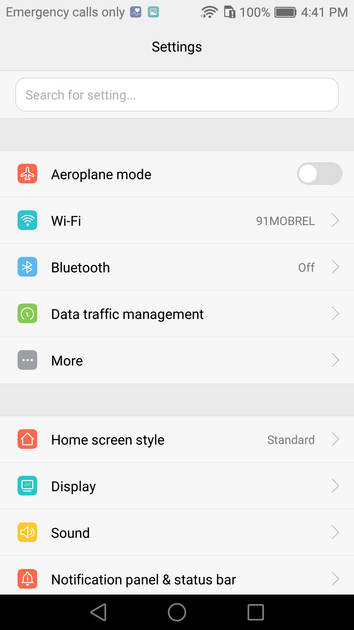
Settings Screen
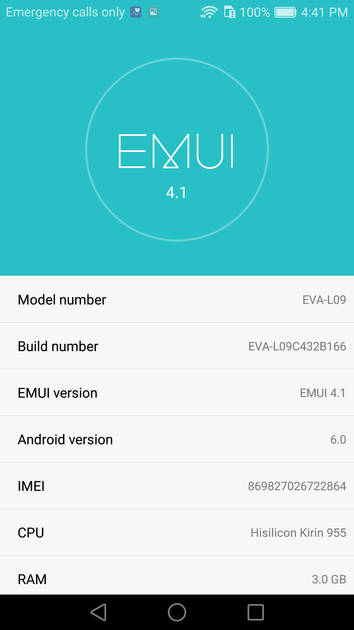
OS Version
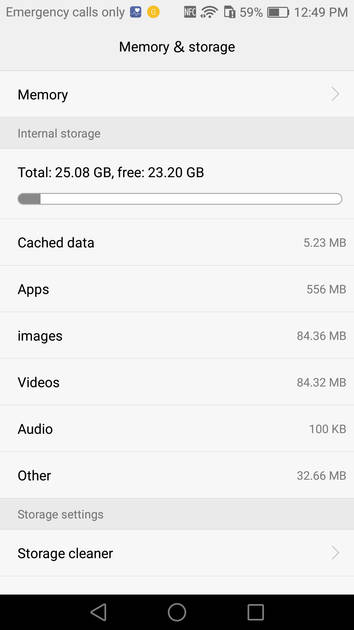
Storage
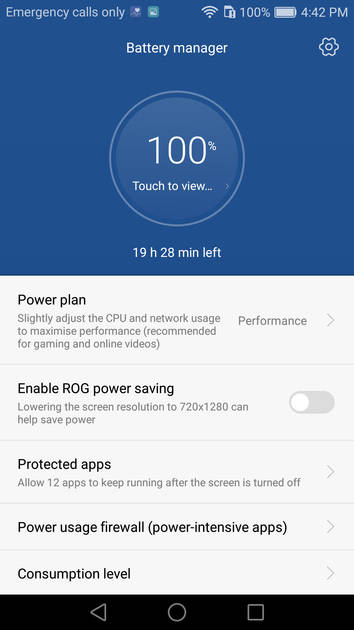
Battery
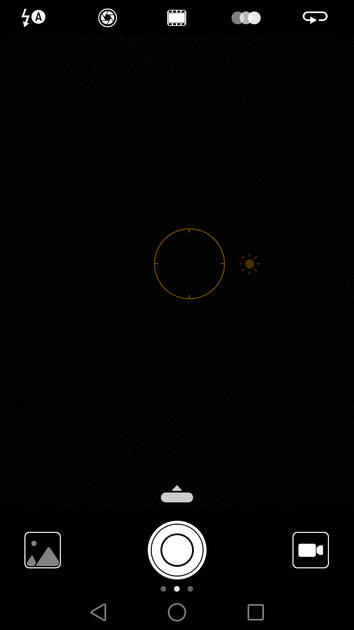
Camera On

Camera Options
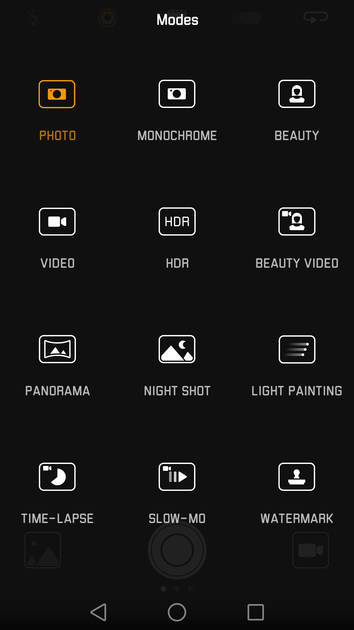
Camera Modes
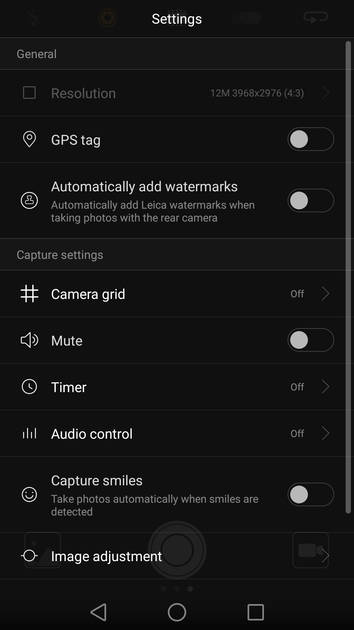
Camera Settings
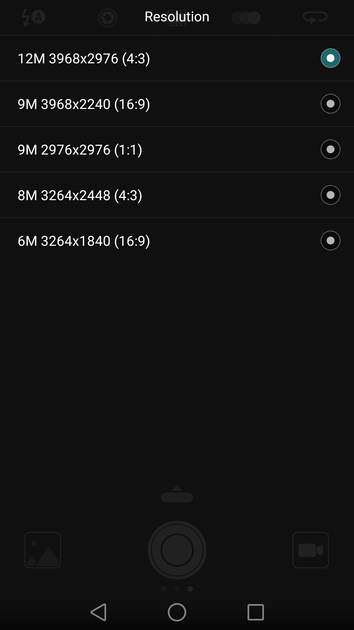
Picture Size Options
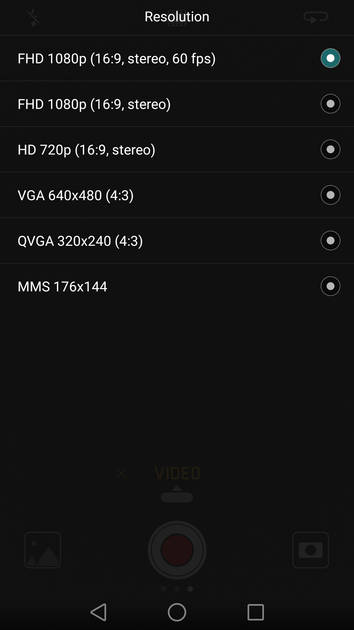
Video Size Options
|
Design |
|
|---|---|
| Height | 145 mm |
| Width | 70.9 mm |
| Thickness | 6.9 mm |
| Weight | 144 grams |
| Build Material |
Frame: Metal Back: Metal |
|
Click to View

|
Rear Camera
(Good)
|
|||||||||
|---|---|---|---|---|---|---|---|---|---|
| Resolution | |||||||||
|
|||||||||
| Autofocus | Yes, Laser Autofocus | ||||||||
| OIS | No | ||||||||
| Flash | Yes, Dual-color LED Flash | ||||||||
| Image Resolution | 4000 x 3000 Pixels | ||||||||
| Settings | Exposure compensation, ISO control | ||||||||
| Shooting Modes |
Continuous Shooting High Dynamic Range mode (HDR) Macro Mode |
||||||||
| Camera Features |
Digital Zoom Auto Flash Digital image stabilization Face detection Touch to focus |
||||||||
| Video Recording | FHD @30 fps | ||||||||
Rear Camera Samples
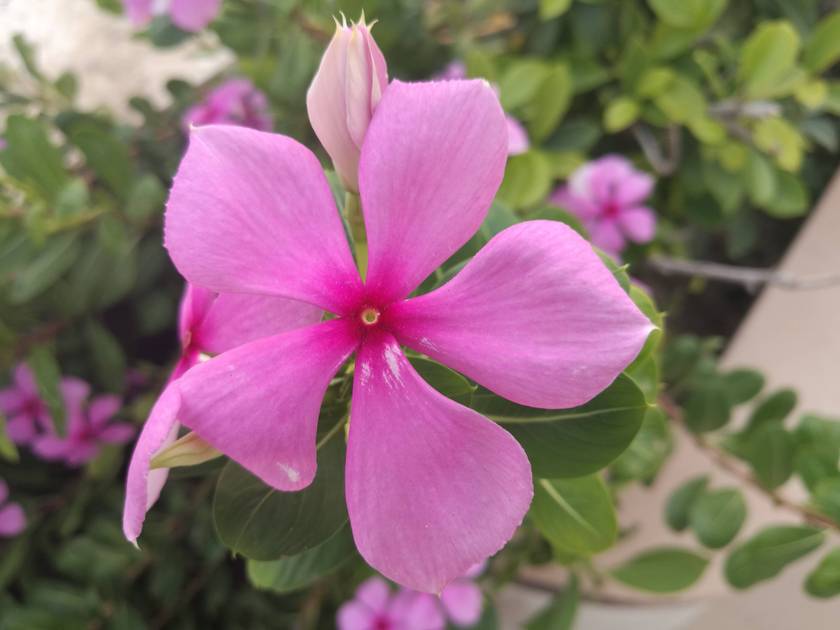
Close Up

Low Light

Low Light With Flash
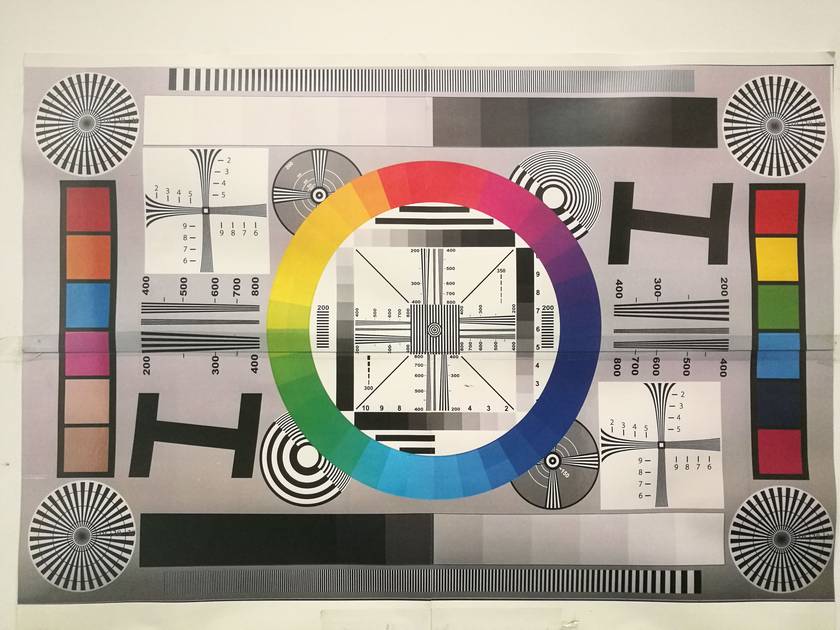
Colour Variance
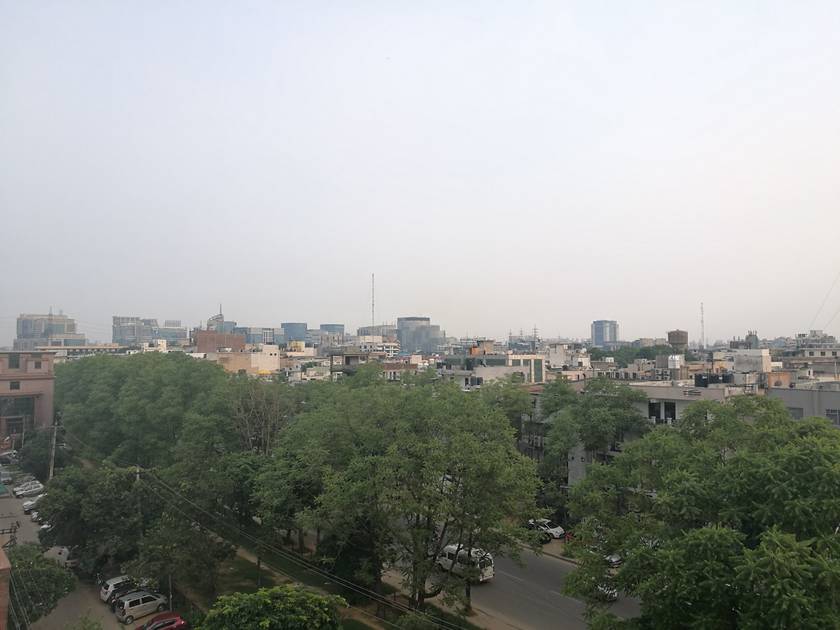
Long Shot
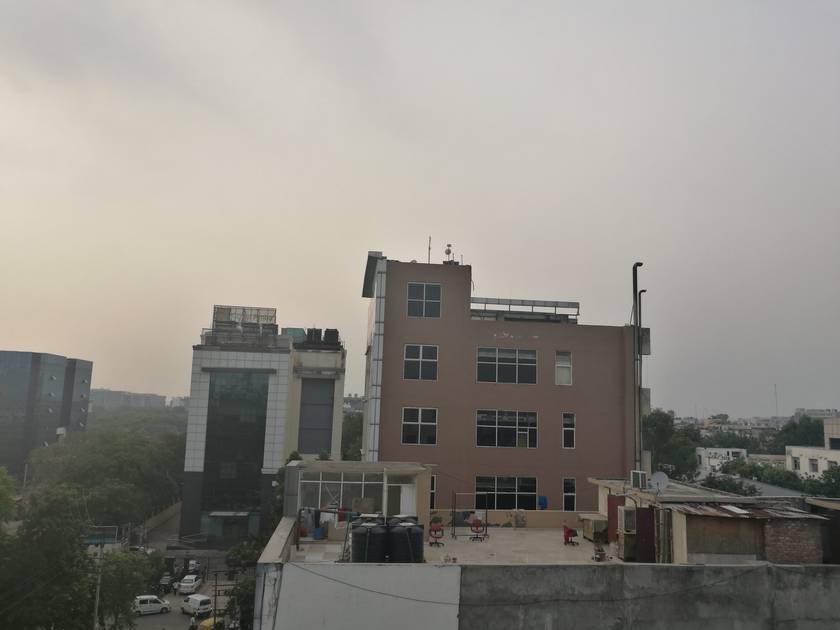
HDR Off
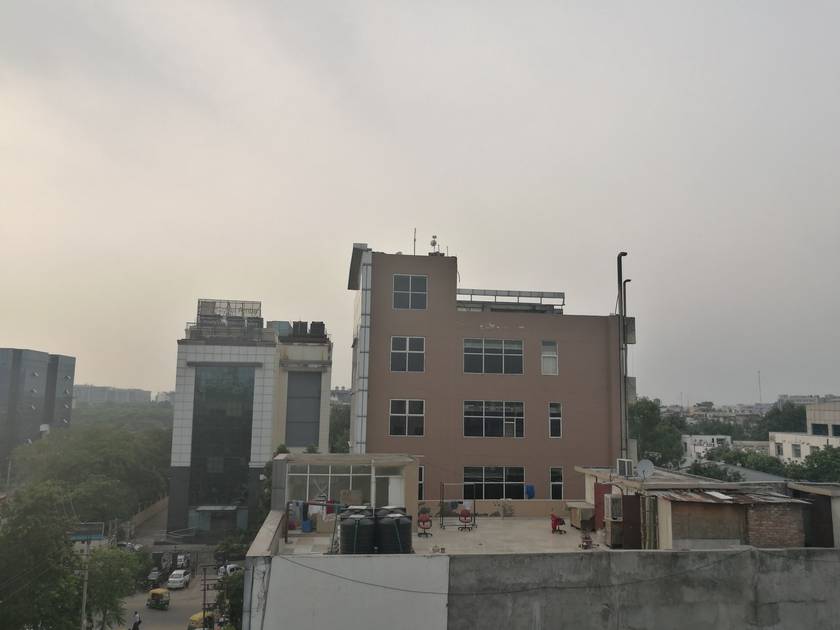
HDR On
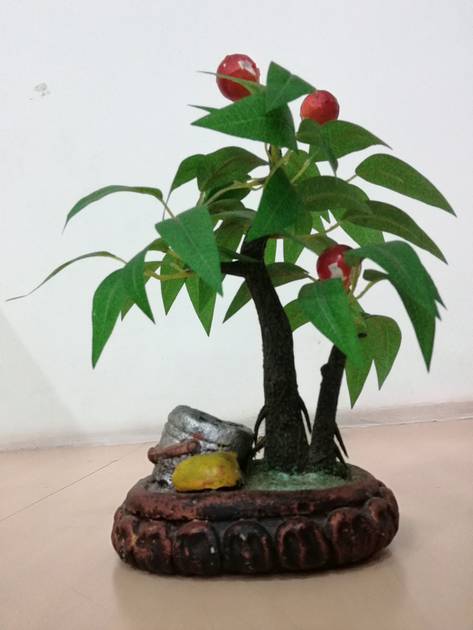
Front Shot
|
Front Camera
(Very Good)
|
||||||
|---|---|---|---|---|---|---|
| Resolution | ||||||
|
||||||
| Autofocus | No | |||||
| Flash | No | |||||
| Video Recording | FHD @30 fps |
Battery
(Very Good)
|
|
|---|---|
| Capacity | 3000 mAh |
| Battery Type | Li-Polymer |
| TalkTime | Up to 18 Hours(3G) / Up to 33 Hours(2G) |
| Quick Charging | Yes Fast Charging |
Storage |
|
|---|---|
| Internal Storage | 32 GB / 64 GB |
| Expandable Storage | Yes, Up to 128 GB |
Network & Connectivity |
|
|---|---|
| SIM Slot(s) | Single SIM |
| SIM Type | SIM1: Nano |
| Network Support | 5G Not Supported, 4G |
| SIM 1 |
4G bands, 4G Speed
Expand
|
| Wi-Fi | Yes, Wi-Fi 5 (802.11 a/b/g/n/ac) 5GHz |
| Wi-Fi Features | Mobile Hotspot |
| Bluetooth | Yes, v4.2 |
| GPS | Yes with A-GPS, Glonass |
| NFC | Yes |
Multimedia |
|
|---|---|
| Audio Jack | 3.5 mm |
Sensors |
|
|---|---|
| Fingerprint Sensor | Yes |
| Fingerprint Sensor Position | Rear |
| Other Sensors | Light sensor, Proximity sensor, Accelerometer, Compass, Gyroscope |
Recent Stories


Huawei P9 User Reviews
Huawei P9 Key Highlights
| Processor | HiSilicon Kirin 955 |
| RAM & Storage | 3 GB RAM + 32 GB 4 GB RAM + 64 GB |
| Display | 5.2", 1080 x 1920 Resolution |
| Rear Camera | 12 MP + 12 MP |
| Front Camera | 8 MP |
| Battery | 3000 mAh |






Huawei P9 Price In India
| Product Name | Store | Price |
|---|---|---|
| Huawei P9 (3 GB + 32 GB) | Flipkart | ₹40,999 |
Popular Links
- All Upcoming Phones
- OPPO Find X10 Pro Max
- OPPO Find X10
- Infinix GT 50 Pro
- Tecno Spark 50s 5G
- Nothing Phone 4a
- Samsung Mobiles
- Motorola Mobiles
- vivo Mobiles
- OPPO Mobiles
- Tecno Mobiles
- realme Mobiles
- OnePlus Mobiles