
Lenovo K3 Note
+ Compare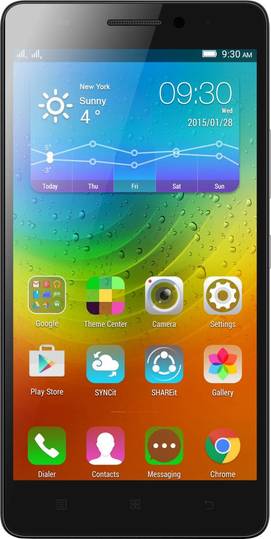




-
Design6

-
Rear Camera8

-
360° View

-
UI Screenshot17
![UI Screenshot]()
-
Benchmarks10
![Benchmarks]()
-
Videos4
![Videos]()



Key Specs
Performance
-
MediaTek MT6752 -
Octa Core, 1.7 GHz -
2 GB RAM, LPDDR3
Display
-
5.5 inches (13.97 cm); IPS LCD -
1080x1920 px (FULL HD) -
AGC Dragontrail Protection
Rear Camera
-
Single Camera Setup - 13 MP Primary Camera
-
Dual LED Flash -
Full HD @30 fps Video Recording
Front Camera
-
5 MP
Battery
-
2900 mAh, Li-ion
General
-
SIM1: Micro, SIM2: Micro -
5G Not Supported -
16 GB internal storage, Expandable upto 32 GB
Lenovo K3 Note Prices in India
 Flipkart
Lenovo K3 Note Expert Review Summary
Expert Rating:
![Nitansh Rastogi]()
Verdict
As we stated in the beginning of this review, the Lenovo K3 Note (FAQs) has all the makings of a bestseller and our usage experience reaffirms the same. The phablet offers a potent mix of a superb display, powerful internals and impressive snappers along with DOLBY speakers – and all that at a mouth-watering price of Rs 9,999.Till about a couple of days ago, the Lenovo K3 Note would have been our only recommendation as the best smartphone to buy under Rs 10,000. However, now the device fac
Pros
- Lovely display
- Loaded hardware
- Good image quality
Cons
- Average battery life
- Lags while playing high-end games
Specs at a glance
+
Measures 152.6 x 76.2 x 8mmWeighs 150g5.5-inch display, with a resolution of 1,920 x 1,080 pixels1.7GHz octa-core processor2GB RAM16GB in-built storage, expandable up to 32GB13MP primary camera with dual-LED flash5MP secondary cameraDual-SIM 4G2,900mAh batteryAndroid 5.0 Lollipop with Vibe UI
Read More
Cloning the Lenovo A7000
+
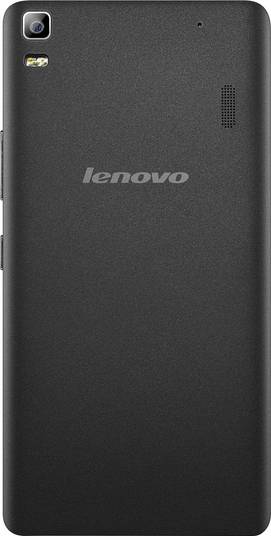
The Chinese manufacturer seems to be a big believer of “don’t fix if it ain’t broke” when it comes to the design ethos of its devices. Perhaps that’s why Lenovo has opted for a similar design for its recent launches. The Lenovo K3 Note seems to be exactly the same as the A7000 (first impressions), which in turn is remarkably similar to its smaller sibling, the Lenovo A6000 (first impressions).The fascia of the phablet is adorned by a large 5.5-inch display, which is surrounded by slim bezels on the sides. Above the panel, the device features an earpiece, a front-facing snapper, a notification LED and a couple of sensors, whereas an array of navigation keys are located below. Although the hardware keys don’t have any backlight, it’s not very difficult getting used to them as they follow the Android standard, with the first key allowing access to recently-opened apps, the middle one to jump to the homescreen and last button to return to the previous screen. Both the volume rocker and the power toggle can be found on the right and they have a metallic texture, making it easier to find them by feel. Up top, lies a 3.5mm audio socket and a micro-USB port. Both the left edges and the base of the Lenovo K3 Note are barren, except for the presence of a microphone at the bottom. The matte finish at the back makes the Lenovo K3 Note comfortable to hold in the hand. Thanks to the texture, the handset doesn’t feel slippery after extended periods of use, even when the hands are sweaty. However, the rear panel can still pick up smudges and fingerprints quite easily. At the back, you’ll find the primary camera module along with a dual-LED flash and a speaker grille at the top, whereas a Lenovo logo is present towards the middle.Removing the back cover will give you the access to the removable battery along with a pair of micro-SIM card slots and a storage expansion slot.Being a phablet, the Lenovo K3 Note might take some getting used to for those who haven’t handled large smartphones before. However, the brand has tried to ensure that the device nestles in the hand well and we were able to do some basic operations single-handedly. The slim waist of 8mm and lightweight body of 150g also helps in the ergonomic handling of the phone.Overall, the Lenovo K3 Note might not steal your attention with its design, but features a decent build quality. While our review unit is in black, you can also purchase the phone in white, with the yellow version set to arrive soon.
Read More
The big picture
+
The display is the trump card of the Lenovo K3 Note. At a time when most smartphones in its segment offer HD displays, the smartphone's screen offers full HD resolution. Not just that, the device also offers a large screen real estate of 5.5-inches. With such a big OGS IPS display at your disposal, watching movies, reading eBooks or playing games on the phone is a delightful experience. Colours pop out on the screen quite well and it’s also sharp since it bears a pixel density of 401ppi. The display also offers wide viewing angles and doesn’t show any glare even when you shift your angle.In case the colours on the display don't match your preferences, then it offers you the option to change the colour balance to comfort mode or customise it as per your liking. While the brightness of the display is fine and we find it to be legible even under direct sunlight, you can enable the smart brightness mode if you want better visibility.One of the biggest complaints with the previous offerings from Lenovo was the absence of any protective coating over display, and the same is the case with the K3 Note. The display is devoid of any kind of protective layer like Corning Gorilla Glass, and hence it’s advisable to use a screen guard with the phone.
Read More
Savouring the sweet taste of Lollipop
+
The Lenovo K3 Note runs the latest build of Android, which is v5.0 Lollipop and it’s topped by the manufacturer’s custom skin dubbed Vibe UI. If you want a short description of the software aspect of the phablet, we can tell you that the UI is similar to most offerings from various Chinese brands, be it in terms of looks or the options to customise and personalise the phone. The lockscreen follows Lollipop guidelines, showing you notifications upfront and letting you unlock the device, or access the dialler or camera directly. All installed apps and games are available on the homescreens, and you can also add widgets if you want. Dragging down from the top brings the notification tray, with an option to access the notification log and clear all the notifications at one go. We really appreciate the idea of being able to check the history of all notifications, making it easier to view all of them in case you might have missed them earlier. Dragging the notification shade downwards again will display the quick settings panel. Lenovo’s Vibe UI tries its best to gel with Google's Material Design, though you’ll see some incongruences here and there. That said, Lenovo is offering all the features of Android Lollipop especially when it comes to the performance or the battery aspect. You can also use the Theme Center to change the theme, wallpapers, lock screen or even how the recently-opened apps appear. The device offers the support for various gestures, even when the display is asleep. You can use double-tap-to-wake, or access the camera or the browser by tracing ‘v’ or ‘o’ respectively. If you find it difficult to use the handset single-handedly, then you can enable the wide touch floating button to access frequently-used actions or apps easily. You can even customise the floating button with options such as double clicking it to return to the home screen or long-pressing it to hide it in the notification panel. Another useful feature in the smartphone is Smart Scene, which is an evolved version of various sound profiles. You can set these scenes to activate automatically on the basis of time or when the phone connects or detaches from specified Wi-Fi networks. This allow you to automate things like the sound mode, brightness, GPS, etc.If you want to have a separate secure space for work-related purposes, then you can enable the Secure Zone, which is easily accessible via the quick settings bar. Once set up, apps can be installed separately in this zone, and for security, you can enable a PIN / pattern / password lock. However, that doesn’t mean that you can’t access your notifications from the other, open zone, as Lenovo has offered the capability of cross-zone notifications.In terms of preloaded content, the Lenovo K3 Note comes with Lenovo’s suite of apps such as ShareIt and SyncIt apart from Google’s portfolio of apps. There are demo versions of some popular titles such as Asphalt 8 and Green Farm 3. The phone also comes with social networks such as Facebook, Twitter, etc.
Read More
Picture perfect, most of the times
+
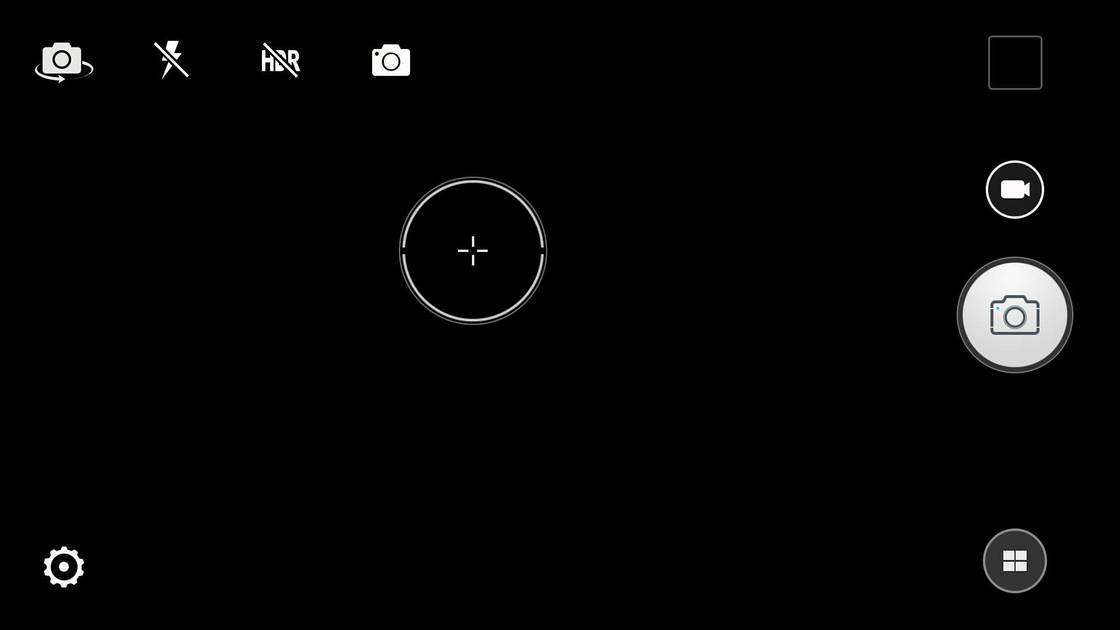
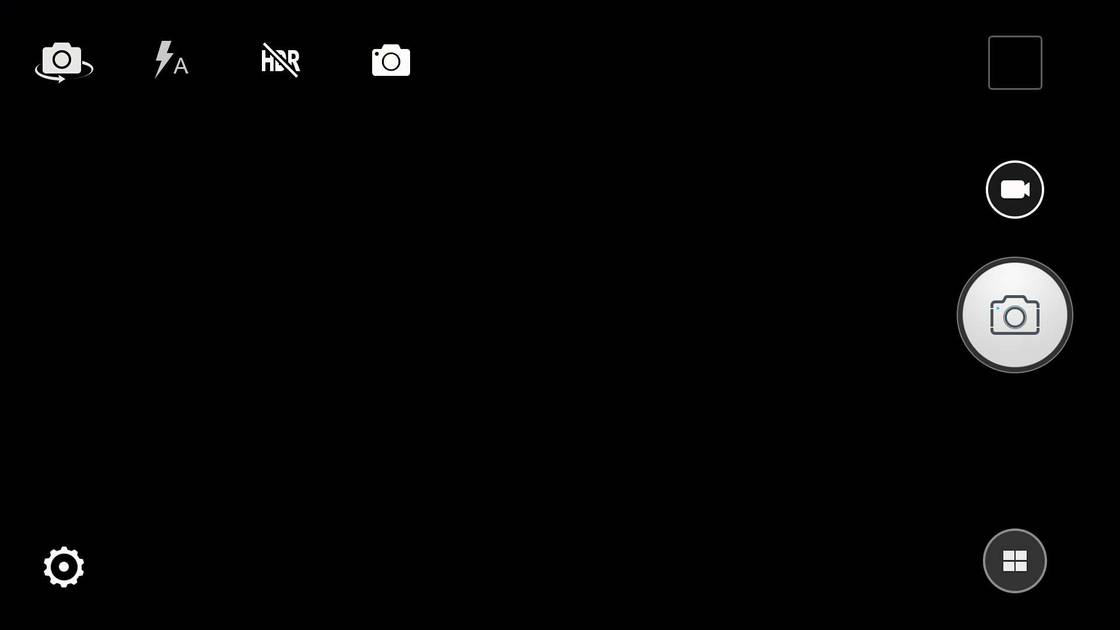
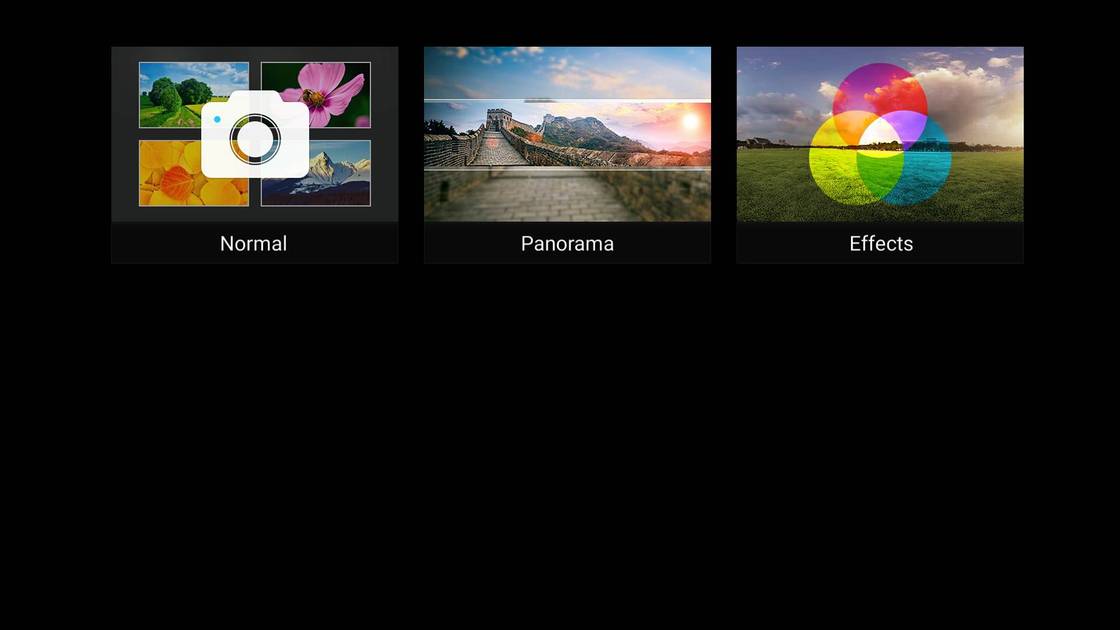
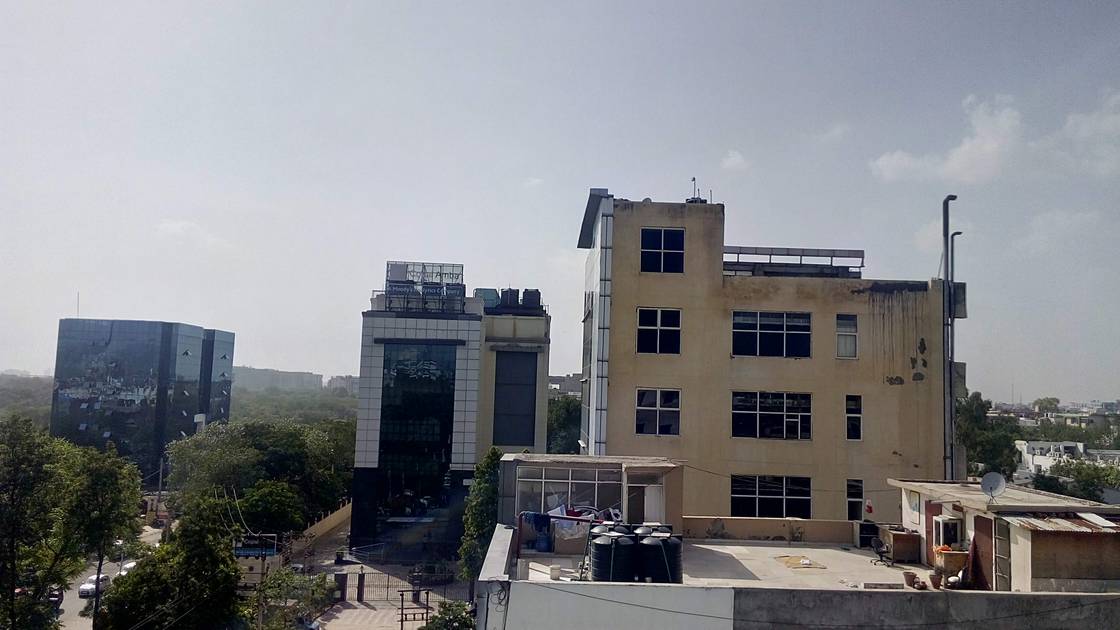
For imagery, the Lenovo K3 Note flaunts a 13-megapixel snapper at the back, which has become standard in this segment. The primary camera has an aperture of f/2.0, and comes with usual features such as autofocus, touch-to-focus, face detection, etc. It’s supplemented by a dual-LED flash to assist shooting in dimly-lit environments.Lenovo’s camera app offers a bevy of modes and options. However, they’re neatly hidden and by default, if the phone is on landscape mode, then you get the option to capture an image or record a video, preview the photos already clicked along with an option to shoot panoramas or use various effects such as sepia, posterize, and elegant, among others. You can also switch to the front camera, enable the flash or HDR mode along with the option to capture photos via touch, timer or voice (which gets activated by saying “snap” or “cheese”). The aspect ratio, white balance, scene mode, ISO, etc. can be changed from the settings menu. Images can be captured quickly straight from standby by double-pressing one of the volume buttons. Quality wise, the Lenovo K3 Note should be able to handle your basic photography needs well. The images captured by the phablet score high on detail and colours are also reproduced well. Be it landscape shots or macro images, the device manages to do complete justice to the scene. Although, when you zoom in, then some noise creeps in into the image. The HDR mode is also impressive, and you can see a definite improvement from the normal shots. The flash also helps in poor-lighting conditions, since it illuminates the surroundings uniformly.Take a gander at some images captured with the Lenovo K3 Note’s primary camera. For selfie lovers, the K3 Note features a 5MP camera at the front. To make it easier to capture selfies, the phablet offers various modes such as timer, tap, voice, hand sign and blink. There’s also a beauty mode to enhance the images.Both the cameras are capable of recording videos in 1080p resolution. While the Lenovo K3 Note is able to capture decent images, it’s not the best snapper we’ve come across in this price band.
Read More
A force to reckon with
+
Even with its budget pricing, the Lenovo K3 Note boasts of serious firepower under the hood. It comes equipped with MediaTek’s MT6752 CPU, which offers eight Cortex-A53 cores ticking at 1.7GHz. The processor is 64-bit capable and combined with Android 5.0’s support for this future-proof architecture, the processor zips through any tasks thrown at it. 2GB of RAM complements the chipset and allows you to run multiple apps together smoothly. A Mali-T760 MP2 graphics processor is there to take care of the graphics. While we don’t have any complaints in terms of basic performance or playing casual games, we found noticeable stutter while playing high-end titles such as Asphalt 8 or Leo’s Fortune. It seems that the 1080p resolution of the phone takes a toll on the GPU.We also found that the software throws up some random issues here and there. Quite a few times, the device went unresponsive for a few minutes and apps crashed unexpectedly. We hope Lenovo takes care of these problems with a software update.Lenovo must be applauded for optimising the processor though, as the K3 Note seems to have good thermal management. Even after playing graphics-heavy games for 30 minutes, the device only got a tad warm at the rear.There's 16GB of storage on board for installing apps and games, and store content on the Lenovo K3 Note. You’ll be able to access about 9.8GB capacity after accounting for the space consumed by the OS and the other preloaded content. The good thing is that if you want more storage, then you can uninstall several of the preinstalled apps. You can also extend the storage further with the use of a microSD card, with capacities of up to 32GB supported. The handset can also access flash drives thanks to USB On-the-Go capabilities.Keeping you connected with the world is the 4G support on both the SIM slots of the Lenovo K3 Note. The phone also has the usual connectivity features such as Bluetooth, Wi-Fi and GPS.Adding to the large screen experience of the K3 Note is its DOLBY certification. While the speakers offer decent sound output, both in terms of loudness or quality, the real magic happens when you plug in your earphones. The available app allows you to customise the sound to your liking for things like music, movie, game and others.
Read More
‘Knight and day’ when it comes to the battery life
+
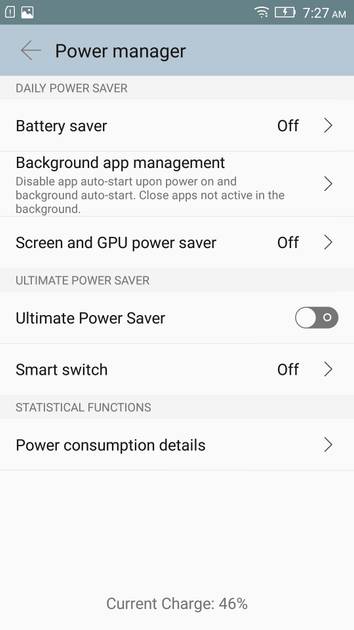
In terms of pure numbers, the 2,900mAh battery powering the Lenovo K3 Note seems pretty capable, and better than the competition. However, the same can’t be said about its real-life performance. Sure, it can give you a company for an entire working day, but by night, you’ll need to hunt for the charger. Juiced up at 100 percent at 8:00 am, the device was down to 8 percent by 11:00 pm with the use of half an hour of calls, use of 3G / 4G for almost the whole time, navigation for a few minutes and playing games for 10 to 15 minutes. The phablet was able to play a 720p video continuously for little over 8 hours and 30 minutes, with both the brightness and volume set at 50 percent levels and everything turned off except for cellular connectivity. This might be because of the high resolution of the display, but the results displayed by the battery on the device are just about average. However, it’s not like that the phone will give up on you in the emergency situations, as you get the option to activate various battery-saving modes. The basic mode is called battery saver, which reduces the K3 Note’s performance and limits background data, while you can also go a step further by reducing the power consumed by the screen and GPU. If the battery is on the verge of dying, then you can opt for the ultimate power save mode, which will disable all functionality except calling and messaging. The device also offers granular control over the apps or games that can access background data.
Read More
Read full Review

Verdict
As we stated in the beginning of this review, the Lenovo K3 Note (FAQs) has all the makings of a bestseller and our usage experience reaffirms the same. The phablet offers a potent mix of a superb display, powerful internals and impressive snappers along with DOLBY speakers – and all that at a mouth-watering price of Rs 9,999.Till about a couple of days ago, the Lenovo K3 Note would have been our only recommendation as the best smartphone to buy under Rs 10,000. However, now the device fac
- Lovely display
- Loaded hardware
- Good image quality
Pros
- Average battery life
- Lags while playing high-end games
Cons
Specs at a glance
+Measures 152.6 x 76.2 x 8mmWeighs 150g5.5-inch display, with a resolution of 1,920 x 1,080 pixels1.7GHz octa-core processor2GB RAM16GB in-built storage, expandable up to 32GB13MP primary camera with dual-LED flash5MP secondary cameraDual-SIM 4G2,900mAh batteryAndroid 5.0 Lollipop with Vibe UI
Read MoreCloning the Lenovo A7000
+The Chinese manufacturer seems to be a big believer of “don’t fix if it ain’t broke” when it comes to the design ethos of its devices. Perhaps that’s why Lenovo has opted for a similar design for its recent launches. The Lenovo K3 Note seems to be exactly the same as the A7000 (first impressions), which in turn is remarkably similar to its smaller sibling, the Lenovo A6000 (first impressions).The fascia of the phablet is adorned by a large 5.5-inch display, which is surrounded by slim bezels on the sides. Above the panel, the device features an earpiece, a front-facing snapper, a notification LED and a couple of sensors, whereas an array of navigation keys are located below. Although the hardware keys don’t have any backlight, it’s not very difficult getting used to them as they follow the Android standard, with the first key allowing access to recently-opened apps, the middle one to jump to the homescreen and last button to return to the previous screen. Both the volume rocker and the power toggle can be found on the right and they have a metallic texture, making it easier to find them by feel. Up top, lies a 3.5mm audio socket and a micro-USB port. Both the left edges and the base of the Lenovo K3 Note are barren, except for the presence of a microphone at the bottom. The matte finish at the back makes the Lenovo K3 Note comfortable to hold in the hand. Thanks to the texture, the handset doesn’t feel slippery after extended periods of use, even when the hands are sweaty. However, the rear panel can still pick up smudges and fingerprints quite easily. At the back, you’ll find the primary camera module along with a dual-LED flash and a speaker grille at the top, whereas a Lenovo logo is present towards the middle.Removing the back cover will give you the access to the removable battery along with a pair of micro-SIM card slots and a storage expansion slot.Being a phablet, the Lenovo K3 Note might take some getting used to for those who haven’t handled large smartphones before. However, the brand has tried to ensure that the device nestles in the hand well and we were able to do some basic operations single-handedly. The slim waist of 8mm and lightweight body of 150g also helps in the ergonomic handling of the phone.Overall, the Lenovo K3 Note might not steal your attention with its design, but features a decent build quality. While our review unit is in black, you can also purchase the phone in white, with the yellow version set to arrive soon.
Read MoreThe big picture
+The display is the trump card of the Lenovo K3 Note. At a time when most smartphones in its segment offer HD displays, the smartphone's screen offers full HD resolution. Not just that, the device also offers a large screen real estate of 5.5-inches. With such a big OGS IPS display at your disposal, watching movies, reading eBooks or playing games on the phone is a delightful experience. Colours pop out on the screen quite well and it’s also sharp since it bears a pixel density of 401ppi. The display also offers wide viewing angles and doesn’t show any glare even when you shift your angle.In case the colours on the display don't match your preferences, then it offers you the option to change the colour balance to comfort mode or customise it as per your liking. While the brightness of the display is fine and we find it to be legible even under direct sunlight, you can enable the smart brightness mode if you want better visibility.One of the biggest complaints with the previous offerings from Lenovo was the absence of any protective coating over display, and the same is the case with the K3 Note. The display is devoid of any kind of protective layer like Corning Gorilla Glass, and hence it’s advisable to use a screen guard with the phone.
Read MoreSavouring the sweet taste of Lollipop
+The Lenovo K3 Note runs the latest build of Android, which is v5.0 Lollipop and it’s topped by the manufacturer’s custom skin dubbed Vibe UI. If you want a short description of the software aspect of the phablet, we can tell you that the UI is similar to most offerings from various Chinese brands, be it in terms of looks or the options to customise and personalise the phone. The lockscreen follows Lollipop guidelines, showing you notifications upfront and letting you unlock the device, or access the dialler or camera directly. All installed apps and games are available on the homescreens, and you can also add widgets if you want. Dragging down from the top brings the notification tray, with an option to access the notification log and clear all the notifications at one go. We really appreciate the idea of being able to check the history of all notifications, making it easier to view all of them in case you might have missed them earlier. Dragging the notification shade downwards again will display the quick settings panel. Lenovo’s Vibe UI tries its best to gel with Google's Material Design, though you’ll see some incongruences here and there. That said, Lenovo is offering all the features of Android Lollipop especially when it comes to the performance or the battery aspect. You can also use the Theme Center to change the theme, wallpapers, lock screen or even how the recently-opened apps appear. The device offers the support for various gestures, even when the display is asleep. You can use double-tap-to-wake, or access the camera or the browser by tracing ‘v’ or ‘o’ respectively. If you find it difficult to use the handset single-handedly, then you can enable the wide touch floating button to access frequently-used actions or apps easily. You can even customise the floating button with options such as double clicking it to return to the home screen or long-pressing it to hide it in the notification panel. Another useful feature in the smartphone is Smart Scene, which is an evolved version of various sound profiles. You can set these scenes to activate automatically on the basis of time or when the phone connects or detaches from specified Wi-Fi networks. This allow you to automate things like the sound mode, brightness, GPS, etc.If you want to have a separate secure space for work-related purposes, then you can enable the Secure Zone, which is easily accessible via the quick settings bar. Once set up, apps can be installed separately in this zone, and for security, you can enable a PIN / pattern / password lock. However, that doesn’t mean that you can’t access your notifications from the other, open zone, as Lenovo has offered the capability of cross-zone notifications.In terms of preloaded content, the Lenovo K3 Note comes with Lenovo’s suite of apps such as ShareIt and SyncIt apart from Google’s portfolio of apps. There are demo versions of some popular titles such as Asphalt 8 and Green Farm 3. The phone also comes with social networks such as Facebook, Twitter, etc.
Read MorePicture perfect, most of the times
+For imagery, the Lenovo K3 Note flaunts a 13-megapixel snapper at the back, which has become standard in this segment. The primary camera has an aperture of f/2.0, and comes with usual features such as autofocus, touch-to-focus, face detection, etc. It’s supplemented by a dual-LED flash to assist shooting in dimly-lit environments.Lenovo’s camera app offers a bevy of modes and options. However, they’re neatly hidden and by default, if the phone is on landscape mode, then you get the option to capture an image or record a video, preview the photos already clicked along with an option to shoot panoramas or use various effects such as sepia, posterize, and elegant, among others. You can also switch to the front camera, enable the flash or HDR mode along with the option to capture photos via touch, timer or voice (which gets activated by saying “snap” or “cheese”). The aspect ratio, white balance, scene mode, ISO, etc. can be changed from the settings menu. Images can be captured quickly straight from standby by double-pressing one of the volume buttons. Quality wise, the Lenovo K3 Note should be able to handle your basic photography needs well. The images captured by the phablet score high on detail and colours are also reproduced well. Be it landscape shots or macro images, the device manages to do complete justice to the scene. Although, when you zoom in, then some noise creeps in into the image. The HDR mode is also impressive, and you can see a definite improvement from the normal shots. The flash also helps in poor-lighting conditions, since it illuminates the surroundings uniformly.Take a gander at some images captured with the Lenovo K3 Note’s primary camera. For selfie lovers, the K3 Note features a 5MP camera at the front. To make it easier to capture selfies, the phablet offers various modes such as timer, tap, voice, hand sign and blink. There’s also a beauty mode to enhance the images.Both the cameras are capable of recording videos in 1080p resolution. While the Lenovo K3 Note is able to capture decent images, it’s not the best snapper we’ve come across in this price band.
Read MoreA force to reckon with
+Even with its budget pricing, the Lenovo K3 Note boasts of serious firepower under the hood. It comes equipped with MediaTek’s MT6752 CPU, which offers eight Cortex-A53 cores ticking at 1.7GHz. The processor is 64-bit capable and combined with Android 5.0’s support for this future-proof architecture, the processor zips through any tasks thrown at it. 2GB of RAM complements the chipset and allows you to run multiple apps together smoothly. A Mali-T760 MP2 graphics processor is there to take care of the graphics. While we don’t have any complaints in terms of basic performance or playing casual games, we found noticeable stutter while playing high-end titles such as Asphalt 8 or Leo’s Fortune. It seems that the 1080p resolution of the phone takes a toll on the GPU.We also found that the software throws up some random issues here and there. Quite a few times, the device went unresponsive for a few minutes and apps crashed unexpectedly. We hope Lenovo takes care of these problems with a software update.Lenovo must be applauded for optimising the processor though, as the K3 Note seems to have good thermal management. Even after playing graphics-heavy games for 30 minutes, the device only got a tad warm at the rear.There's 16GB of storage on board for installing apps and games, and store content on the Lenovo K3 Note. You’ll be able to access about 9.8GB capacity after accounting for the space consumed by the OS and the other preloaded content. The good thing is that if you want more storage, then you can uninstall several of the preinstalled apps. You can also extend the storage further with the use of a microSD card, with capacities of up to 32GB supported. The handset can also access flash drives thanks to USB On-the-Go capabilities.Keeping you connected with the world is the 4G support on both the SIM slots of the Lenovo K3 Note. The phone also has the usual connectivity features such as Bluetooth, Wi-Fi and GPS.Adding to the large screen experience of the K3 Note is its DOLBY certification. While the speakers offer decent sound output, both in terms of loudness or quality, the real magic happens when you plug in your earphones. The available app allows you to customise the sound to your liking for things like music, movie, game and others.
Read More‘Knight and day’ when it comes to the battery life
+In terms of pure numbers, the 2,900mAh battery powering the Lenovo K3 Note seems pretty capable, and better than the competition. However, the same can’t be said about its real-life performance. Sure, it can give you a company for an entire working day, but by night, you’ll need to hunt for the charger. Juiced up at 100 percent at 8:00 am, the device was down to 8 percent by 11:00 pm with the use of half an hour of calls, use of 3G / 4G for almost the whole time, navigation for a few minutes and playing games for 10 to 15 minutes. The phablet was able to play a 720p video continuously for little over 8 hours and 30 minutes, with both the brightness and volume set at 50 percent levels and everything turned off except for cellular connectivity. This might be because of the high resolution of the display, but the results displayed by the battery on the device are just about average. However, it’s not like that the phone will give up on you in the emergency situations, as you get the option to activate various battery-saving modes. The basic mode is called battery saver, which reduces the K3 Note’s performance and limits background data, while you can also go a step further by reducing the power consumed by the screen and GPU. If the battery is on the verge of dying, then you can opt for the ultimate power save mode, which will disable all functionality except calling and messaging. The device also offers granular control over the apps or games that can access background data.
Read MorePopular Comparisons
 Lenovo K3 Note
 Lenovo K8 Plus
Lenovo K3 Note
Lenovo K8 Plus
Lenovo K3 Note
 Xiaomi Mi4
Lenovo K3 Note
Xiaomi Mi4
Lenovo K3 Note
 Xiaomi Redmi Note 5
Lenovo K3 Note
Xiaomi Redmi Note 5
Lenovo K3 Note
 Lenovo A7000
Lenovo K3 Note
Lenovo A7000
Lenovo K3 Note
 Lenovo K4 Note
Lenovo K3 Note
Lenovo K4 Note
Lenovo K3 Note
 Lenovo Vibe K5 Plus


-mobile-phone-small-1.jpg?tr=q-70)

Lenovo K3 Note Specifications
General |
|
|---|---|
| Launch Date | June 25, 2015 (Official) |
| Operating System | Android v5.0.2 (Lollipop) |
| Custom UI | VIBE UI |
Performance
(Avg)
|
|
|---|---|
| Chipset | MediaTek MT6752 |
| Processor | Octa core, 1.7 GHz, Cortex A53 |
| Architecture | 64 bit |
| Graphics (GPU) | Mali-T760 MP2 |
| RAM | 2 GB |
| RAM Type | LPDDR3 |
Benchmark Screenshots

AnTuTu Benchmark
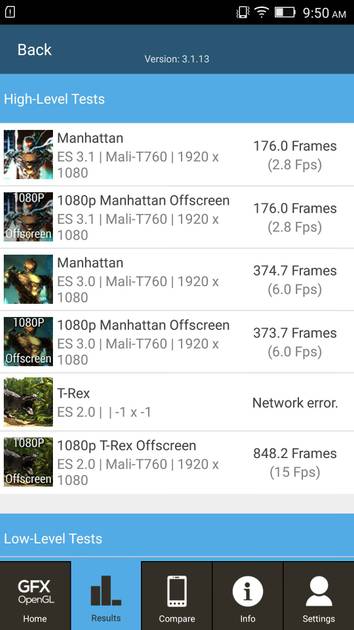
Graphics Benchmark
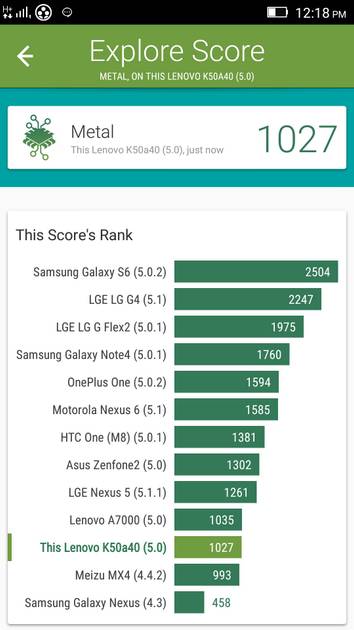
Vellamo Metal Benchmark
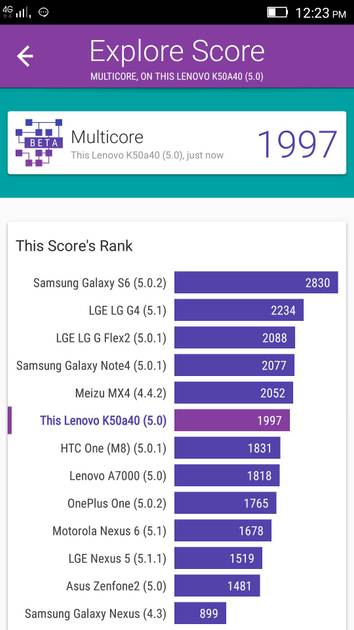
Vellamo Multicore Benchmark
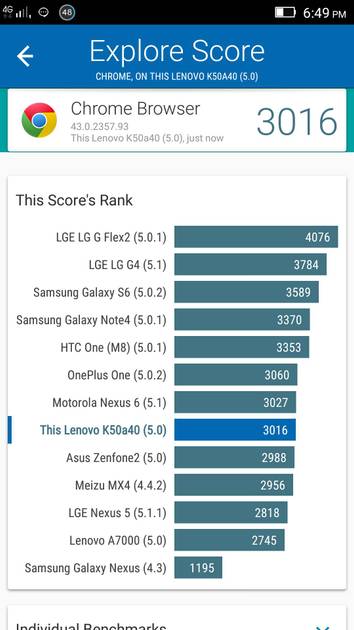
Vellamo Browser Benchmark
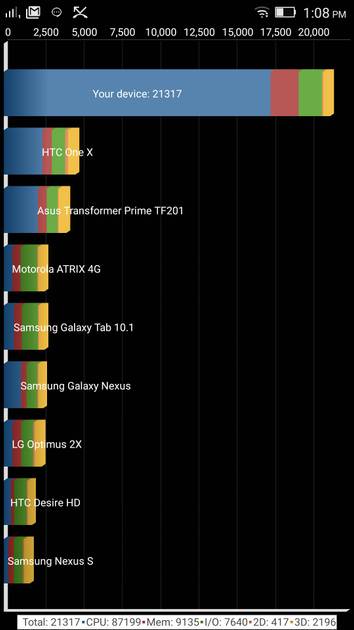
Quadrant Benchmark
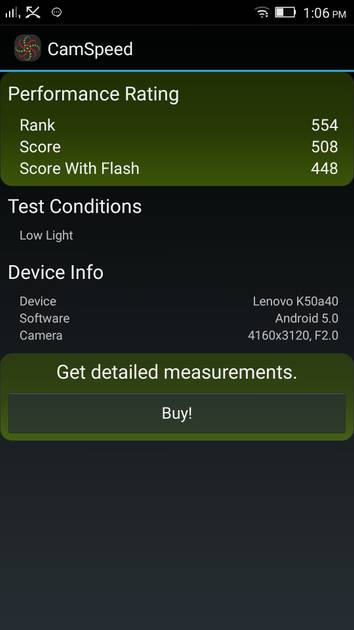
Camera Speed Benchmark
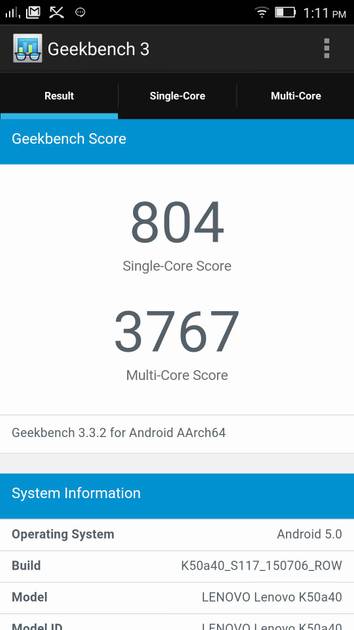
Geekbench3 Benchmark
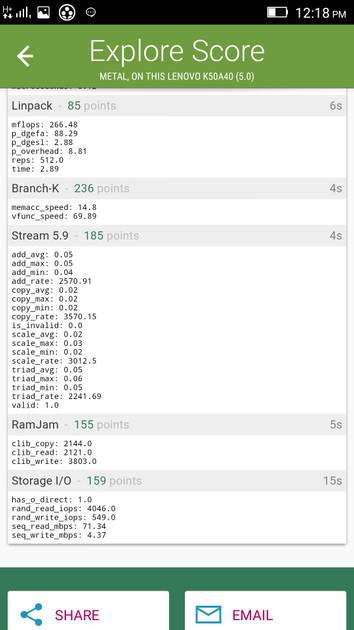
Linpack Benchmark

Sunspider Benchmark
|
Display
(Excellent)
|
|
|---|---|
| Display Type | IPS LCD |
| Screen Size | 5.5 inches (13.97 cm) |
| Resolution | 1080x1920 px (FULL HD) |
| Aspect Ratio | 16:9 |
| Pixel Density | 401 ppi |
| Screen to Body Ratio (calculated) | 71.55 % |
| Screen Protection | Yes |
UI Screenshots
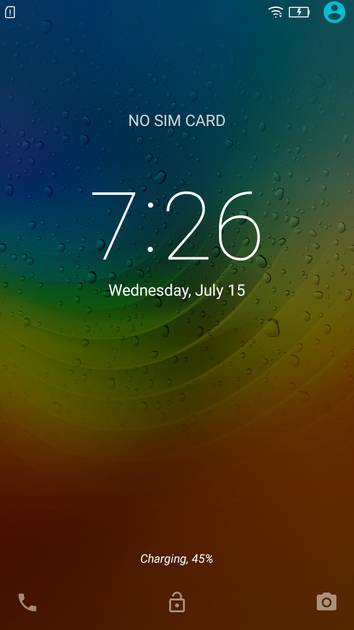
Lock Screen
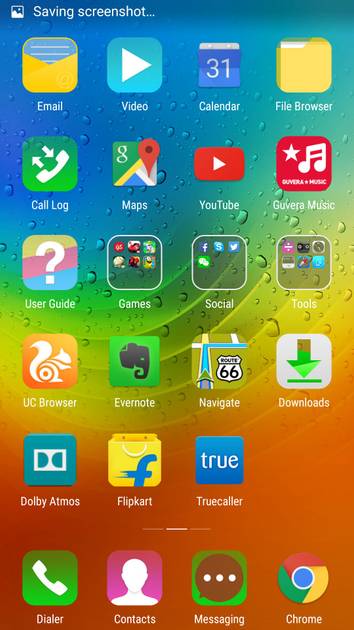
Home Screen
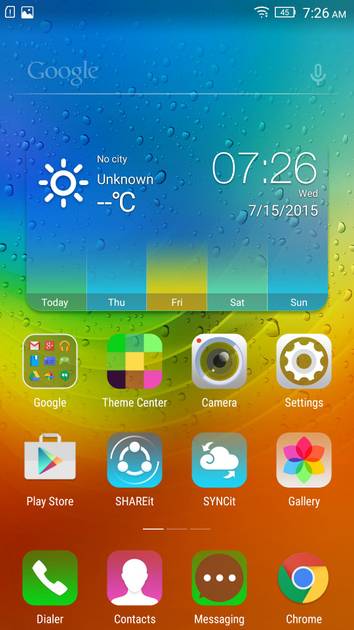
Screen With Widgets
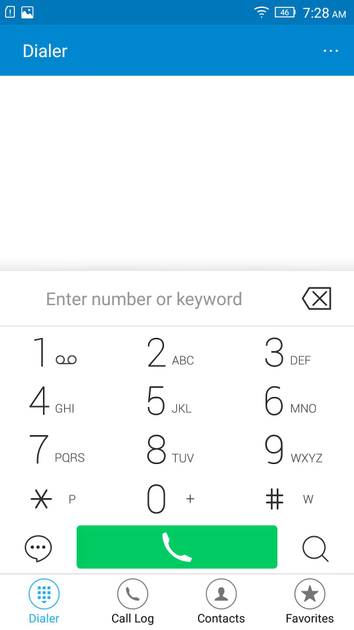
Dialer Screen
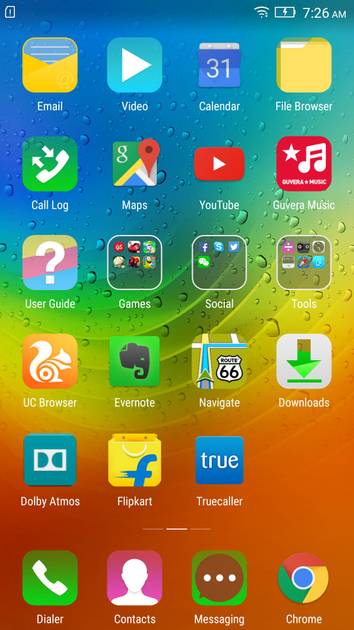
App Drawer
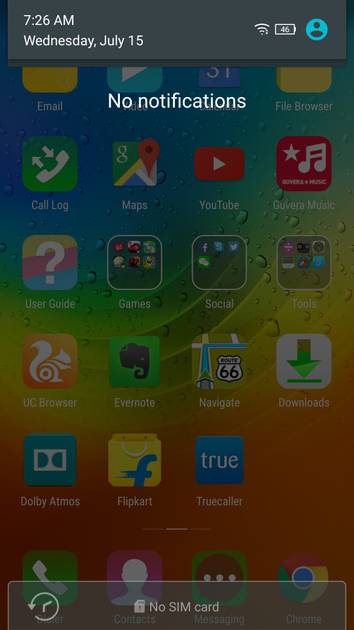
Notification Panel
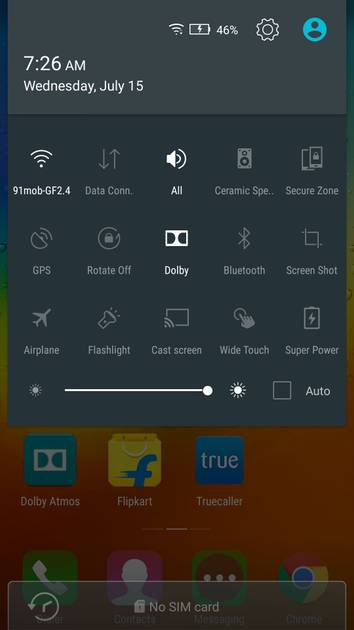
Quick Settings Panel
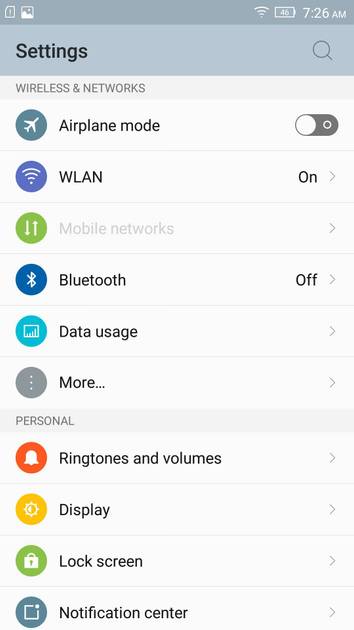
Settings Screen
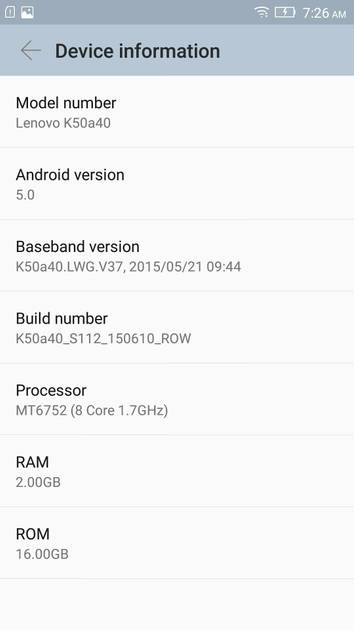
OS Version
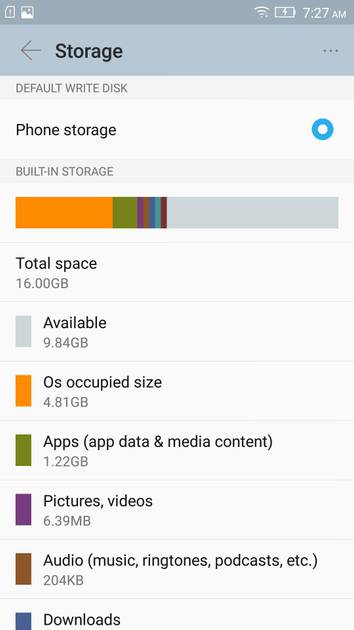
Storage
Battery
Camera On
Camera Options
Camera Modes
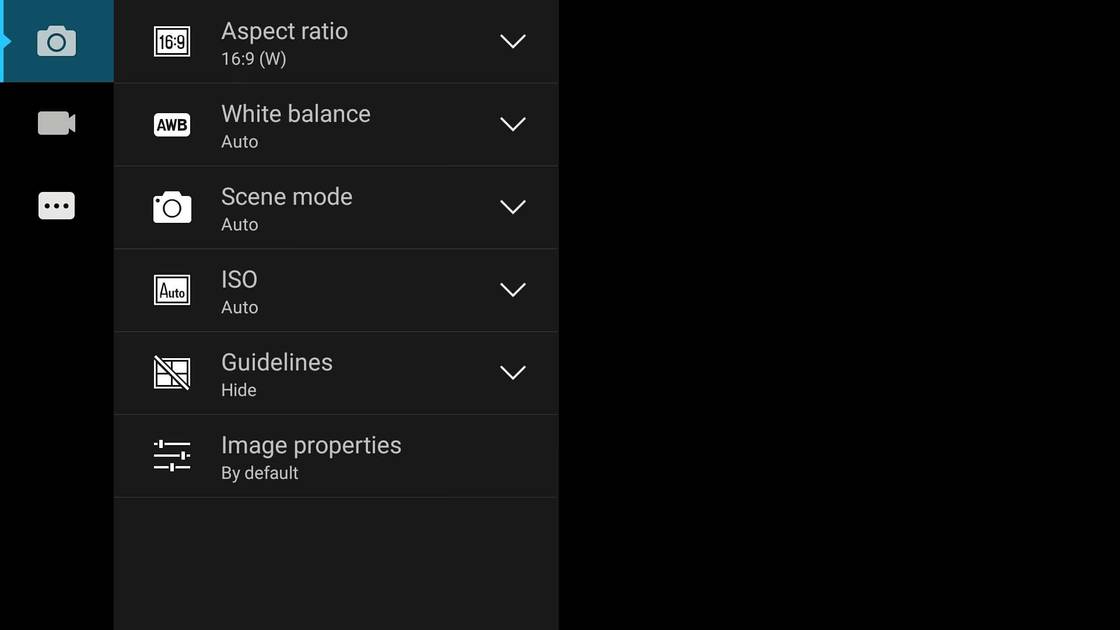
Camera Settings
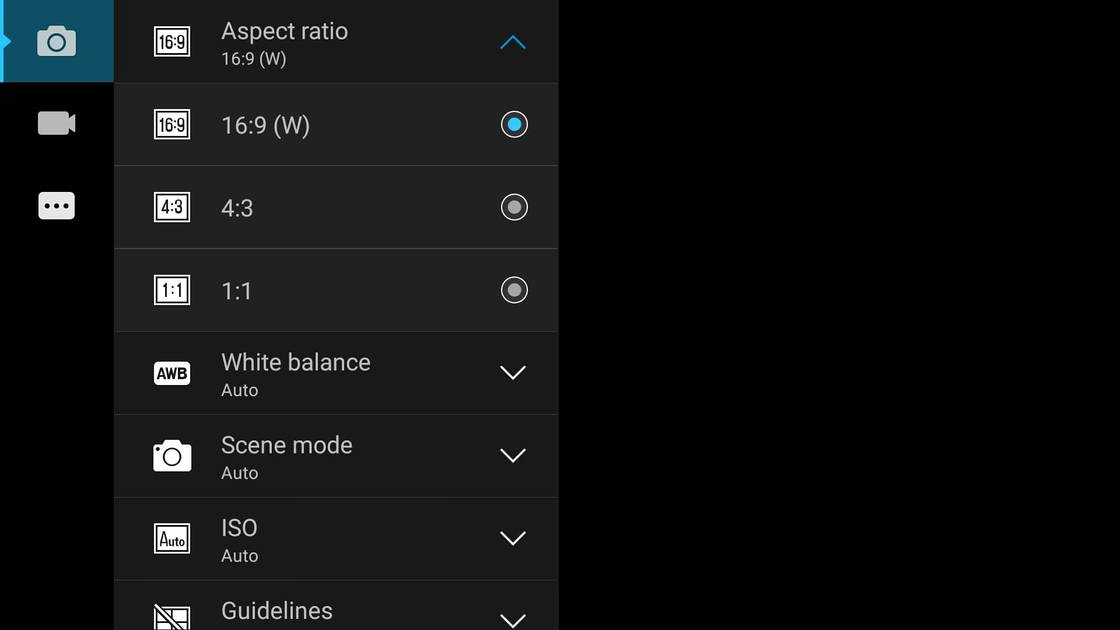
Picture Size Options
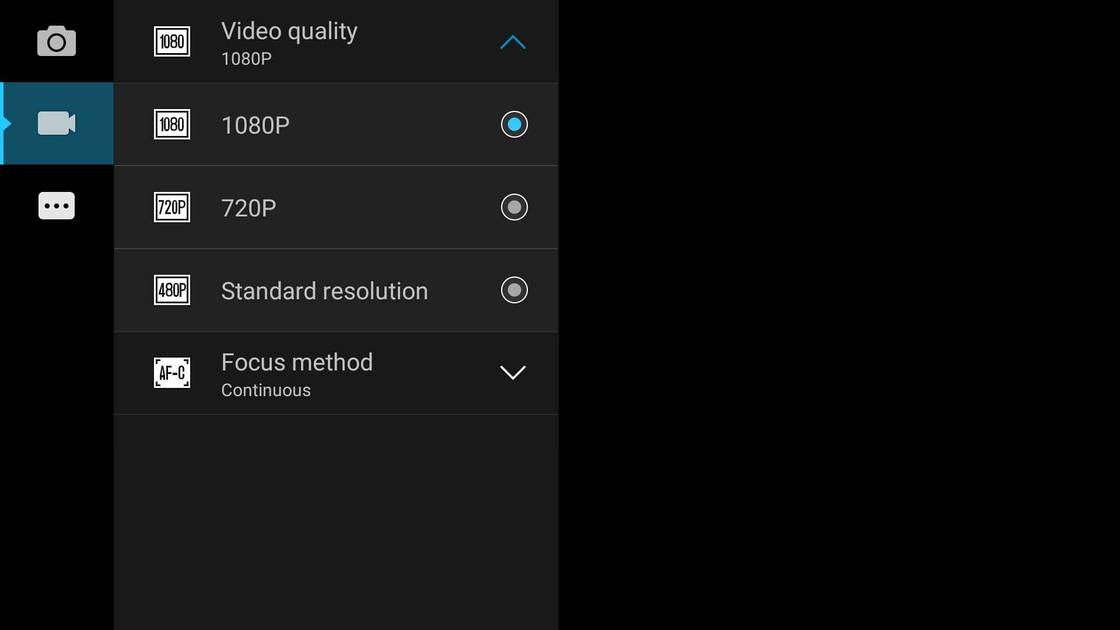
Video Size Options
|
Design |
|
|---|---|
| Height | 152.6 mm |
| Width | 76.2 mm |
| Thickness | 8 mm |
| Weight | 150 grams |
|
Click to View

|
Rear Camera
(Good)
|
||||||||
|---|---|---|---|---|---|---|---|---|
| Resolution | ||||||||
|
||||||||
| Autofocus | Yes | |||||||
| OIS | No | |||||||
| Flash | Yes, Dual LED Flash | |||||||
| Image Resolution | 4128 x 3096 Pixels | |||||||
| Settings | Exposure compensation, ISO control | |||||||
| Shooting Modes |
Continuous Shooting High Dynamic Range mode (HDR) |
|||||||
| Camera Features |
Digital Zoom Auto Flash Digital image stabilization Face detection Touch to focus |
|||||||
| Video Recording | Full HD @30 fps | |||||||
Rear Camera Samples

Close Up

Low Light

Low Light With Flash

Colour Variance

Long Shot
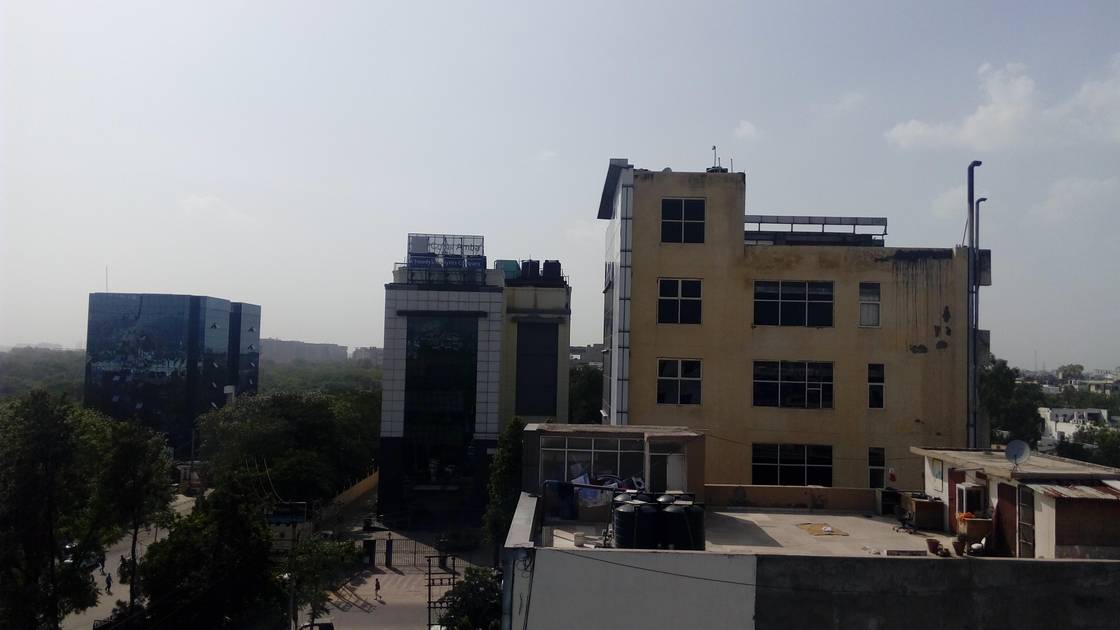
HDR Off
HDR On

Front Shot
|
Front Camera
(Good)
|
||||||
|---|---|---|---|---|---|---|
| Resolution | ||||||
|
||||||
| Autofocus | No | |||||
| Flash | No |
Battery
(Very Good)
|
|
|---|---|
| Capacity | 2900 mAh |
| Battery Type | Li-ion |
| TalkTime | Up to 36 Hours(3G) |
Storage |
|
|---|---|
| Internal Storage | 16 GB |
| Expandable Storage | Yes, Up to 32 GB |
Network & Connectivity |
|
|---|---|
| SIM Slot(s) | Dual SIM |
| SIM Type | SIM1: Micro, SIM2: Micro |
| Network Support | 5G Not Supported, 4G |
| SIM 1 |
4G bands
Expand
|
| SIM 2 |
4G bands
Expand
|
| SAR Value | Head: 1.590 W/kg, Body: 0.688 W/kg |
| Wi-Fi | Yes, Wi-Fi 4 (802.11 b/g/n) |
| Wi-Fi Features | Wi-Fi Direct, Mobile Hotspot |
| Bluetooth | Yes, v4.0 |
| GPS | Yes with A-GPS |
| NFC | No |
Multimedia |
|
|---|---|
| Audio Jack | 3.5 mm |
| Audio Features | Dolby Atmos |
Sensors |
|
|---|---|
| Fingerprint Sensor | No |
| Other Sensors | Light sensor, Proximity sensor, Accelerometer, Compass, Gyroscope |
| Applications | Lenovo SHAREit, Lenovo SYNCit |
Lenovo K3 Note User Reviews
Lenovo K3 Note Key Highlights
| Processor | MediaTek MT6752 |
| RAM & Storage | 2 GB + 16 GB |
| Display | 5.5", 1080 x 1920 Resolution |
| Rear Camera | 13 MP |
| Front Camera | 5 MP |
| Battery | 2900 mAh |

























Lenovo K3 Note Price In India
| Product Name | Store | Price |
|---|---|---|
| Lenovo K3 Note (2 GB + 16 GB) | Flipkart | ₹9,999 |
Popular Links
- All Upcoming Phones
- vivo V80 5G
- OPPO K14 Plus 5G
- Xiaomi Redmi Note 17 Pro 5G
- Lava Virat Curve 5G
- OPPO F35 Pro
- Samsung Mobiles
- Motorola Mobiles
- vivo Mobiles
- OPPO Mobiles
- Tecno Mobiles
- realme Mobiles
- Xiaomi Mobiles