
Lenovo Vibe Z2 Pro (K920)
+ Compare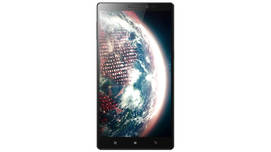
-
Design6

-
360° View

-
Videos3

Key Specs
Performance
-
Qualcomm Snapdragon 801 -
Quad Core, 2.5 GHz -
3 GB RAM
Display
-
6.0 inches (15.24 cm); IPS LCD -
1440x2560 px (QHD (2k)) -
Gorilla Glass 3 Protection
Rear Camera
-
Single Camera Setup - 16 MP Primary Camera
-
Dual LED Flash -
4k @30 fps Video Recording
Front Camera
-
5 MP
Battery
-
4000 mAh, Li-Polymer
General
-
SIM1: Micro -
5G Not Supported -
32 GB internal storage, Non Expandable
Lenovo Vibe Z2 Pro (K920) Prices in India
 Flipkart
Lenovo Vibe Z2 Pro (K920) Expert Review Summary

Verdict
With the Vibe Z2 Pro, Lenovo is bringing its A-game to the smartphone market. It has everything you can ask from a smartphone – looks, a solid build, a high-res display, powerful internals, a reasonably capable camera and even decent battery life, which is one of the most important concerns with many capable devices. Combine all that with a jaw-dropping pricing of Rs 32,999, and Lenovo Vibe Z2 Pro easily becomes one of the best flagship smartphones around.With such a killer pricing, there
Specs at a glance
+Measures 81.3 x 7.7 x 156mm Weighs 179g 6-inch display with a resolution of 2,560 x 1,440 pixels (~490ppi) 2.5GHz quad-core Qualcomm Snapdragon 801 processor Adreno 330 graphics processor 3GB RAM 32GB fixed storage 16-megapixel BSI camera on the rear with dual-LED flash 5-megapixel front-facing camera Android 4.4 KitKat 4,000mAh sealed battery
Read MoreThe phablet of steel (aluminium, to be precise)
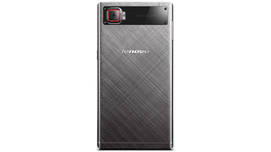
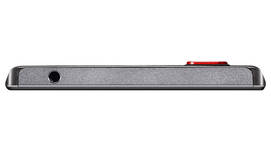
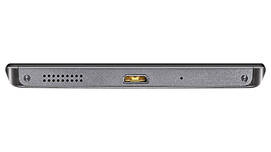
+As we mentioned already, the Lenovo Vibe Z2 Pro follows the design language of the K900 and rocks a metallic body. The brushed aluminium gives the device a touch of class, along with making it sturdy. However, you won’t notice all that if you see the device from the front. That’s because the front of the phone seems to be all black, and you might be mistaken that it has an edge-to-edge display, thanks to the extremely slim bezels. Above and below the screen, there are the usual elements, but they are also hidden quite well in the black hue of the front, though the earpiece and front camera above the display panel are noticeable when looked upon closely. Below the screen, you’ll find a row of backlit capacitive keys for navigation, giving you the ability to access the options menu, jump to the home screen and return to the previous screen. Like most Android smartphones, long-pressing the options button will bring up the multitasking menu.When you flip the Vibe Z2 Pro, you will see the metallic body of the device in all its glory. The pattern on the aluminium body also lends the phone a distinct look. While the unit we got for our review was grey, the device is also available in two more colour options of gold or silver.The camera and the dual-LED flash module on the back are placed on a separate plate supported by four screws, making them stand out from the rest of the rear. The camera lens juts out of the body and is highlighted in red, bringing it instantly to one’s notice. While we don’t necessarily like the protruding camera since it can get scratched easily when kept on a flat surface, the extra girth may be required to get the advantage of OIS which requires mechanical components. Along with a Lenovo branding in the middle, you’ll only find a plastic strip towards the bottom, which acts as an antenna.Talking about the sides of the Vibe Z2 Pro, they taper towards the back of the phone, which makes it easier to hold. However, we would have preferred rounded edges, since that would have made the device even more comfortable to hold for a longer duration.In terms of button and port placement, the volume rocker is available on the left, whereas the power button is on the right spine along with a micro-SIM tray. The buttons have a metallic texture and offer good response, plus the placement of the power key is towards the middle, making it more easier to reach. Up top, lies a 3.5mm audio port, while the bottom houses a micro-USB port as well as a speaker mesh. Interestingly enough, the top and bottom of the phone are constructed from plastic. We haven’t specifically talked about one aspect in the design section that can actually make or break the usability – the handling of the smartphone. With a large 6-inch display, the device is truly a phablet, which is also evident from its dimensions of 156 x 81.3 mm. While we have come to love phablets for their large screen real estate and don’t feel much of a problem using them, the Lenovo Vibe Z2 Pro does take time to adjust because of its massive profile. For those who are comfortable with a medium screen size of around 4.5-inches, using the Vibe Z2 pro will be definitely a difficult task.Having said that, Lenovo’s design team must be given kudos for making an enviable screen-to-body ratio with the Vibe Z2 Pro. In fact, the phablet matches the dimensions of the Apple’s first phablet, the iPhone 6 Plus (review), which sports a display panel of 5.5-inches.However, the weight of the device is certainly on the higher side at 176g. With a 7.7mm frame, it’s neither too thick, nor too lean. The Lenovo Vibe Z2 Pro is definitely unlike any other smartphone in the market with its distinct metallic language design, though it might not win any awards for it.
Read MoreGoing beyond pixels
+Just a couple of years back, TV manufacturers were highlighting their HD ready and full HD televisions, and now mobile devices are certainly matching them with their resolution. It was just last year when smartphone brands were promoting 1080p display resolution of their offerings, and now the flagship devices are moving past that.The Lenovo Vibe Z2 Pro packs a resolution of 2,560 x 1,440 pixels (also referred to as Quad-HD or 2K resolution). Even though the device carries a gargantuan screen size of 6-inches, it manages to offer a rich pixel density of 490 pixels-per-inch thanks to its eye-popping resolution. In fact, the Vibe Z2 Pro is the largest smartphone with a 2K resolution currently available in the market.The display offers vibrant visuals and sharp text and images. The viewing angles are great too, and brightness also seems to be adequate and doesn’t render the screen unreadable outdoors. However, we preferred to manually control the brightness level as per our liking, instead of relying on the automatic brightness settings. The protective layer of Corning’s Gorilla Glass ensures that it remains unaffected by minor scratches or knocks. If you aren’t pleased by the colour reproduction of the device, then the Vibe Z2 Pro offers numerous customisable options. The Super Bright mode, as the name suggests, results in a very bright screen, but also drains the battery faster. With Custom mode, you can adjust Tone, Saturation and Contrast of the screen. We really liked the Comfort mode, which reduces the tone of the screen making it useful for reading documents, browsing the web for longer hours without straining the eyes. You can also activate the Smart brightness mode, that automatically increases brightness if you’re using the device outdoors.
Read MoreGetting positive vibes from Lenovo's custom skin
+The Vibe Z2 Pro comes with the latest version of the Vibe UI v 2.0, which is based on Android 4.4.2 KitKat. Although the company hasn’t given an exact timeline, it would be updated to give you a sweet taste of the recently-announced Android Lollipop.Similar to the software modifications by other Chinese smartphone vendors, Lenovo’s custom UI marks a radical departure from stock Android. The changes begin to appear from the lock screen itself. Instead of the usual padlock-based method to unlock the device or access a few apps directly, the lock screen on the Vibe Z2 Pro gives you the option to unlock by swiping upwards or launch phone, message or camera by swiping their icons.The homescreen is your one-stop place to do everything on the Lenovo Vibe Z2 Pro, since there’s no dedicated app launcher. This means that all your apps and widgets are available on the homescreen itself, though of course, you can manage them across different screens or organise them into various folders. The Vibe UI also changes the look-and-feel of the Android platform with colourful icons, even for default apps. In case, you don’t like the default theme, then the preinstalled theme manager allows you to change the theme or wallpaper. However, the options are fairly limited, as compared to the vast number of themes available on Xiaomi’s MIUI. That said, we really liked one little touch – the ability to change the wallpaper by simply dragging the screen from the corner, which gives a nice paper-turning effect as well. Similarly, you can change the wallpaper on the lock screen by swiping left or right.The notification shade is also customised, with both the quick toggles and notifications available on one panel. You can expand the quick toggles to get options to control more features such as GPS, NFC, etc. The expanded view shows 15 toggles and they can be reordered as well, or you can replace them with a few other options. To clear all notifications, you can hit the cross sign, which is available towards the bottom of the screen, making it easier to reach. One interesting feature is the option which lets you select the apps that can send you notifications, as well as the ability to prioritise notifications from certain apps. The recent apps menu is also different from the stock Android interface. The apps open at the bottom part of the screen, which is good, as you can easily close them by swiping them upwards. You can also lock specific apps by swiping downwards, so that if you clean all the apps, those apps won't be killed. There’s also another useful feature to access favourites from this menu itself, and you can add more apps in this tab. When it comes to pre-installed content, the device comes loaded with the default Android apps, along with Evernote, Kingsoft Office, Route 66 Navi and Maps apps (for navigation), social networking apps like Facebook and Twitter. There’s Guvera music streaming as well, which debuted its services in India just couple of weeks ago. The phablet also comes loaded with a number of games, but sadly, they are all trial versions.Lenovo has also loaded its own suite of apps – SyncIt, ShareIt and Security. While SyncIt allows you to easily back up and restore your contacts and messages, ShareIt can be used to transfer files between two devices. Security is a comprehensive way of managing your device’s security, and it also gives you granular control over what all apps can access. It has several useful features such as Anti-virus, Anti-spam (to block spam calls and messages), Anti-theft, Data usage monitor, etc. There’s also Privacy Guard that keeps a note of what kind of information (personal details, locations, etc.) the installed apps can access. With Private Space, you can create a completely secure place for your calls, messages and even contacts. To make the device enterprise-friendly, Lenovo has added a Secure Zone, which allows for the configuration of a separate zone on the smartphone. This zone is password-protected and users can select what all apps they want to access from it. Apart from the interface changes, the custom skin also brings a lot of features to the device, which might be on the verge of being deemed as gimmicky. Neatly available under the features tab in settings, there are a slew of options, allowing you to make use of gestures, customise shortcuts, enable pocket mode and more.3D gestures seems like a straight rip-off of gesture-based features launched by Korean giant Samsung with its last year’s flagship, the Galaxy S4. By making use of gestures, you can accept or reject calls or navigate the screen right or left as well as up or down. However, the differentiator is that these gestures are applicable across all the apps. These gestures came in handy while flipping through articles on Flipboard or viewing images in the gallery, but at times, even slight hand movements were detected as actions and that became quite frustrating.As highlighted in the design section, using the Lenovo Vibe Z2 Pro with one hand is not an easy task, but if it’s a necessity, then the device offers an option to enable a feature dubbed Micro Screen. To activate this, you have to draw a ‘C’ on the either side of the screen to open it on the respective side. This will instantly minimise the screen and thus makes it easier to reach any corner of the screen with a single hand. You can also resize the screen slightly. If you want to simply dial a number without using both hands, then you can enable the Smart Dialer feature that tilts the number pad left or right. To lock the smartphone, you can simply shake the device. While for unlocking, you can make use of either the dedicated power key or volume button.By enabling Wide Touch, the phablet gives you a floating button that provides one-touch access to various apps such as calculator, camera, music, multitasking menu, etc. directly along with the option to return to the previous screen or lock the device.If you’re an avid gamer, then you will appreciate the option to disable the home button when the phone is held in landscape orientation. This is a simple, but useful option as many a times, the home button is pressed by mistake while playing a game and the device instantly jumps to the homescreen.With Pocket Mode, the mobile automatically recognises if it’s in your pocket and increase the ringtone volume. Similarly, if you pick up the device while ringing,, then the volume is automatically decreased.Of course, if the custom skins don’t appeal to you, then all the features and customisations mentioned above don’t make any sense, and that’s why the Vibe Z2 Pro offers you an incredibly useful option – the option to switch to stock Android. We’ve already detailed the steps to do that in our frequently asked questions regarding the Lenovo Vibe Z2 Pro. But we do think it’s worth highlighting that the Chinese brand has made it so simple, and thus doesn’t alienate the users who like stock interface. Moreover, there are no complex steps involved in doing this and you can easily switch back again to the Vibe UI. In our opinion, the Lenovo’s custom skin does offer a neat interface and some useful features, though it isn’t as good as Xiaomi’s MIUI.
Read MoreA capable pair of shooters, but just a notch below perfection
+The device looks like a pretty attractive option for photography lovers as well, as Lenovo has mounted a 16-megapixel BSI sensor on the back of the Vibe Z2 Pro. It’s also one of the very few devices that boast of optical image stabilisation, which is a hardware component to automatically compensate for hand shake while clicking a picture. To shoot in dimly-lit environments, the Vibe Z2 Pro gets a dual-LED flash.The custom skin of Lenovo also offers a custom camera app dubbed as SnapIt. The camera app is crammed to the neck when it comes to options and features. But thankfully, the company has kept all those modes under a pro mode, and by default, users will be seeing a relatively minimal interface in the smart mode. In this mode, you can capture images or record videos, preview images and enable Panorama or make use of real-time effects such as Old-time, Gray, Negative among many others. You can also enable the flash or switch to the front camera, or visit settings. Settings opens a semi-circular dial giving you options to change the aspect ratio of the images, enable or disable smart scene recognition, choose video resolution or video quality (fast-motion or slow-motion). If you want to get more control over the image quality, then you can switch to professional interface. Here you can make use of HDR, change metering method, click images automatically by setting the timer or activating the shutter by voice or detecting a smile, etc. To click images in full resolution, you have to set the aspect ratio at 4:3. In terms of video capabilities of the phablet, you can record videos in 720p, 1080p, 2K and 4K resolutions, as well record a time-lapse or slow-mo video.At the front, the Vibe Z2 Pro comes with a 5-megapixel BSI sensor that’s able to capture videos in full HD resolution.Take an in-depth look at the camera performance of the Lenovo Vibe Z2 Pro
Read MoreFlexes its performance muscles well
+The Lenovo Vibe Z2 Pro is a fully-loaded smartphone when it comes to its internals. It’s fuelled by Qualcomm’s Snapdragon 801 chipset which offers four Krait cores running at 2.5GHz. The SoC also comes with Adreno 330 graphics processor clocked at 550MHz. Augmented by a 3GB of RAM, the hardware combination delivers a delightful experience on the smartphone. The phablet literally zips through screens and apps, without any trace of lag. The story continues even while playing graphics-intensive titles such as Deer Hunter 2014 and Riptide GP2. The games ran extremely smoothly and we didn’t encounter any kind of hang ups or frame drops.Sadly, the handset faces the same issue as most phones powered by high-clocked CPUs – it becomes too hot, too quickly. Hardly just five minutes into a game, the Vibe Z2 Pro starts heating up from the upper portion of the rear panel. Since the smartphone features an all-metal body (and metal is a good conductor of heat... remember those science classes?), very soon the whole back of the device becomes hot. This happens only when the processor is running too fast, such as while playing games or recording a 4K video.In the storage department, the Vibe Z2 Pro comes with 32GB flash memory. Users can access approximately 25GB space for installing apps and saving documents or multimedia files, which in our opinion should be fine for most of the users. If that’s not the case, then you can make use of USB OTG support to instantly plug-and-play flash drives, however since the phablet lacks a microSD card, you can't extend the available storage further.The device is loaded in terms of connectivity options as well as it’s one of the very few flagship options that offer dual-SIM support. However, if you’re looking for future-proofing your purchase with the phone that has 4G compatibility, then the Vibe Z2 Pro misses out on that aspect as it does have 4G, but doesn’t support the Indian band of 2,300MHz. Other connectivity options include Wi-Fi, Bluetooth, NFC and GPS.
Read MoreComfortably lasts a day and then some more
+Keeping in line with its gigantic proportions, the phone gets a monstrous battery to keep it running. It’s equipped with a non user-replaceable 4,000mAh Li-Po battery, which is definitely more than the current norm of battery capacities. However, it powers four times the number of pixels on a full HD display resulting in faster battery drain, which means you won’t get very impressive results when it comes to battery life. That said, it’s still impressive that the device manages to give you a company for an entire day and even more if you don't use battery-draining features such as gaming, cellular internet, GPS, etc. Under our standard battery test, where we played a 720p video on loop while turning off all wireless connections except the cellular network and both the brightness and volume set at 50 percent levels, the Vibe Z2 Pro clocked in a little more than 11 hours, which is fairly impressive.You can also efficiently manage the phone’s battery life by using the Power Manager app. It allows you to switch to Power saving or Emergency modes. As their names indicate, the Power saving mode reduces battery consumption by automatically adjusting brightness and preventing power consuming apps in the background, while the Emergency mode instantly turns off everything else apart from calls and messaging to prolong the battery life. Additionally, you can configure an option to switch between modes automatically within a specified period of time.But that’s not all as there’s an option to enable a power-saving engine, which optimises brightness and graphics to enhance the battery life. An option of Frozen apps allow you to freeze rarely-used apps.
Read MorePopular Comparisons
Lenovo Vibe Z2 Pro (K920) Specifications
General |
|
|---|---|
| Launch Date | September 30, 2014 (Official) |
| Operating System | Android v4.4.2 (Kitkat) |
| Custom UI | VIBE UI |
Performance
(Avg)
|
|
|---|---|
| Chipset | Qualcomm Snapdragon 801 MSM8974AC |
| Processor | Quad core, 2.5 GHz, Krait 400 |
| Graphics (GPU) | Adreno 330 |
| RAM | 3 GB |
Display
(Excellent)
|
|
|---|---|
| Display Type | IPS LCD |
| Screen Size | 6.0 inches (15.24 cm) |
| Resolution | 1440x2560 px (QHD (2k)) |
| Pixel Density | 490 ppi |
| Screen to Body Ratio (calculated) | 78.07 % |
| Screen Protection | Corning Gorilla |
Design |
|
|---|---|
| Height | 156 mm |
| Width | 81.3 mm |
| Thickness | 7.7 mm |
| Weight | 179 grams |
|
Click to View

|
Rear Camera
(Very Good)
|
||||||
|---|---|---|---|---|---|---|
| Resolution | ||||||
|
||||||
| Autofocus | Yes | |||||
| OIS | Yes | |||||
| Flash | Yes, Dual LED Flash | |||||
| Image Resolution | 3456 x 4608 Pixels | |||||
| Shooting Modes | High Dynamic Range mode (HDR) | |||||
| Camera Features |
Digital Zoom Face detection Touch to focus |
|||||
| Video Recording |
4k @30 fps Full HD @30 fps |
Front Camera
(Avg)
|
||||
|---|---|---|---|---|
| Resolution | ||||
|
Battery
(Very Good)
|
|
|---|---|
| Capacity | 4000 mAh |
| Battery Type | Li-Polymer |
| TalkTime | Up to 45 Hours(2G) |
Storage |
|
|---|---|
| Internal Storage | 32 GB |
| Expandable Storage | No |
Network & Connectivity |
|
|---|---|
| SIM Slot(s) | Dual SIM |
| SIM Type | SIM1: Micro |
| Network Support | 5G Not Supported, 4G |
| SIM 1 |
4G Speed
Expand
|
| Wi-Fi | Yes, Wi-Fi 5 (802.11 b/g/n/ac) |
| Wi-Fi Features | Mobile Hotspot |
| Bluetooth | Yes, v4.0 |
| GPS | Yes with A-GPS |
| NFC | Yes |
Multimedia |
|
|---|---|
| Audio Jack | 3.5 mm |
Sensors |
|
|---|---|
| Other Sensors | Proximity sensor, Accelerometer, Compass, Gyroscope |
Lenovo Vibe Z2 Pro (K920) User Reviews
Lenovo Vibe Z2 Pro (K920) Key Highlights
| Processor | Qualcomm Snapdragon 801 MSM8974AC |
| RAM & Storage | 3 GB + 32 GB |
| Display | 6.0", 1440 x 2560 Resolution |
| Rear Camera | 16 MP |
| Front Camera | 5 MP |
| Battery | 4000 mAh |



Lenovo Vibe Z2 Pro (K920) Price In India
| Product Name | Store | Price |
|---|---|---|
| Lenovo Vibe Z2 Pro (K920) (3 GB + 32 GB) | Flipkart | ₹34,999 |
Popular Links
- All Upcoming Phones
- vivo V80 5G
- OPPO K14 Plus 5G
- Xiaomi Redmi Note 17 Pro 5G
- Lava Virat Curve 5G
- OPPO F35 Pro
- Samsung Mobiles
- Motorola Mobiles
- vivo Mobiles
- OPPO Mobiles
- Tecno Mobiles
- realme Mobiles
- Xiaomi Mobiles