HP OmniBook 3 2026 review: a workhorse that delivers without having to spend the big bucks


Review Summary
Expert Rating
In the years I’ve spent writing on consumer devices, I’ve always seen prices going south, and premium features trickle down to lower price segments. But that was before the AI juggernaut rolled over established norms and started munching on solid-state memory for breakfast. Prices went up and continue to do so as you read this, with this alarming trend not likely to stop anytime soon. In this situation, finding a laptop that can deliver on the core aspects such as performance and battery life, without making any compromises or shelling out big bucks, is a tough ask. That’s where the 2026 HP OmniBook 3 14-hz0026QU steps in. Listed at Rs 79,990, this 14-inch laptop comes powered by the Snapdragon X processor and offers 16 gigs of RAM, along with a 512GB SSD. And as I discovered during the course of my usage, this one (note)book you definitely shouldn’t judge by its cover.
Table of Contents
Design and build


This isn’t a device that can attract second looks. It’s not bad-looking, but its silver plastic body doesn’t really come across as super stylish, especially given the 1.5cm thickness and 1.4kg weight. Elegant might be a better word to describe it than sleek or svelte, I’d say. The fit and finish are good, and there are no creaks or flex evident across the smooth, flat chassis. The laptop just about passes the one-finger lid-opening test and seems sturdy enough to take on the daily hustle without complaining. The hinge is smooth yet firm, with just a teeny weeny little wobble when you push the lid.
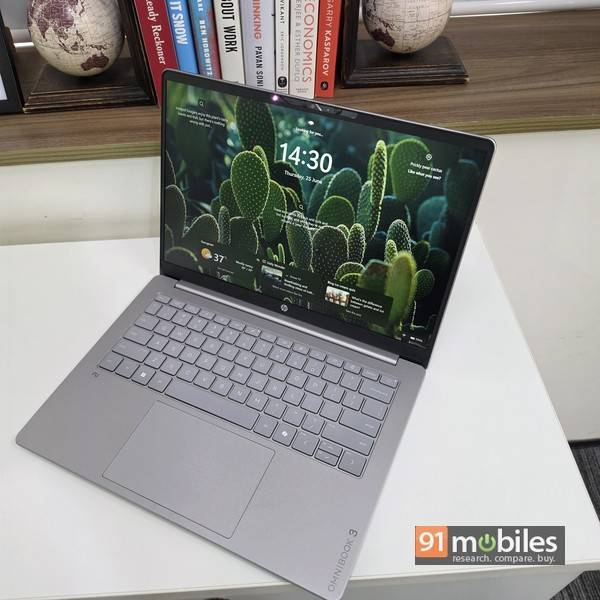
Opening the lid reveals the neat-looking keyboard deck with a large, centre-aligned trackpad below, and a 14-inch display above. Up top is the webcam, complete with a physical shutter (which is much appreciated). The base of the laptop has vents for speakers and cooling, plus rubber strips to keep the device from slipping when you’re using it on a desk.
As far as the available ports are concerned, the HP OmniBook 3 covers the basics. You get an HDMI, a USB Type-A and a couple of Type-C ports on the left, while the right is home to another Type-A port and a 3.5mm audio port.
Display and audio

The 14-inch 2K (1,920 x 1,200) IPS display is functional, offering 300 nits of brightness and 60Hz refresh rate. It features an anti-glare coating, which is super useful when you’re using the laptop in brightly lit areas like your office or outdoors, cutting down glare very effectively. It’s a big productivity enhancer if you ask me, as screen glare and unwanted reflections on the display can cause headaches and fatigue.
While the display is tuned well for productivity, it might not be ideal for graphics-related tasks or colour grading though, since the hues can look a bit muted. As far as audio is concerned, the bottom-firing speakers are placed towards the front, just where the base of the laptop curves downwards. They churn out decent audio – it might not be rich enough or pack enough thump to make music or movies enjoyable, but it certainly works well enough for work calls over video platforms. The webcam serves the purpose too – it’s not too pally with low light, but that apart, it does its job well. It also enables Windows Hello authentication for face recognition, though you don’t get a fingerprint sensor here.
Keyboard and touchpad

The large touchpad is responsive and smooth. It doesn’t have the same buttery-smooth flair as glass trackpads, but handles multi-finger gestures well. The keyboard could actually be the star of the show here. The keys are flat and packed close together, but offer good travel and tactility for long hours of typing, complemented by two-stage white backlighting so you can keep going at it after office hours too. But only if you really need to.
Performance and battery life
Now these are aspects where the HP OmniBook 3 really shines. The Snapdragon X processor packs a lot of grunt and, paired with the ample 16 gigs of RAM, offers sufficient raw power and multitasking capabilities to handle productivity-related use cases without complaining. The smooth performance is evident both in real-life usage as well as synthetic benchmarks.Speaking of, benchmark results against similarly-priced and similarly-configured contenders like the ASUS Vivobook S16, the Lenovo IdeaPad Slim 5, and the much-hyped Apple MacBook Neo show a few positive aspects in favour of the HP OmniBook 3. For one, the HP OmniBook 3 features an exceptionally fast storage subsystem, delivering the fastest read speeds among all compared models. It scored an impressive 6,995.81 MB/s in the Sequential Read Speed test, outperforming the ASUS Vivobook S16 (6,327.65 MB/s) and the Lenovo Ideapad Slim 5 (6,183.98 MB/s). It also claims a victory in random read performance at 87.17 MB/s, beating out the Lenovo Ideapad Slim 5 (81.10 MB/s), and ASUS Vivobook S16 (80.01 MB/s). The processor inside the HP OmniBook 3 also demonstrates superior multi-threaded optimisation, scoring 1,566 points in Cinebench 2026 Multi-Threaded , as compared to the Apple MacBook Neo, which scores 1,391.


Yet another feather in the OmniBook 3’s cap is battery life. With a runtime of 18 hours and 42 minutes in the PCMark 10 video test, it shows how long it can last on a single charge. In regular usage as well, it comfortably lasts a full day, and then some more. Another point worth mentioning is the charger. Bulky charging bricks add to the total weight you carry around on your shoulders, and HP has taken care of that by bundling a compact Type-C charger. Hardly bigger than a mobile charger, it’s small and lightweight, outputs 65W, and can also be used to charge your smartphone, thereby killing two birds with one stone.
Verdict

The HP OmniBook 3 delivers a fair bit for its asking price. It’s not meant for gamers or tasks which involve graphics or colour grading etc, but it shines as a workhorse that can be ridden hard without any slowdowns. The Apple MacBook Neo emerges as a strong rival in this price range, though its recent price hike doesn’t help its cause. Still, it makes for a worthy purchase if you’re in the Apple ecosystem. The ASUS Vivobook S16 is another strong contender, and lures with its 16-inch OLED display that makes it better for graphics-related work. However, it isn’t as portable as the HP OmniBook 3. HP’s contender isn’t perfect and comes with its share of faults – the screen brightness and speakers could have been better, and HP could have added an SD card slot, though asking for an Ethernet port could be a bit too much. All said and done, the HP OmniBook 3 makes a strong case for itself as a work-oriented laptop that delivers on the core aspects like performance and battery life, and doesn’t cost an arm and a leg.
Editor’s rating: 7.7 / 10
Pros:
- Smooth performance
- Good battery life
- Antiglare display
- Compact charger
Cons:
- Screen brightness could have been better
- Audio quality is so-so

