
Samsung Galaxy Alpha
+ Compare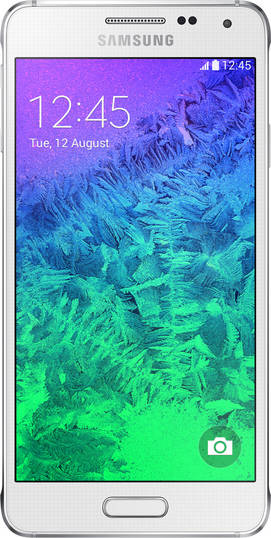


-
Design9

-
360° View

-
Videos1
Key Specs
Performance
-
Samsung Exynos 5 Octa 5430 -
Octa core (1.8 GHz, Quad Core + 1.3 GHz, Quad core) -
2 GB RAM
Display
-
4.7 inches (11.94 cm); Super AMOLED -
720x1280 px (HD) -
Gorilla Glass 4 Protection
Rear Camera
-
Single Camera Setup - 12 MP Primary Camera
-
LED Flash -
4k @30fps Video Recording
Front Camera
-
2.1 MP
Battery
-
1860 mAh
General
-
SIM1: Nano -
5G Not Supported -
32 GB internal storage, Non Expandable
Samsung Galaxy Alpha Expert Review Summary

Verdict
There`s no doubt in our minds that the Samsung Galaxy Alpha is one of the best phones the brand has outed yet. Apart from its low-res screen and non-expandable storage, it`s difficult to find fault with it. Sure, the camera is scared of darkness and the battery life is average, but it still shines as a loaded smartphone worth considering for those who need a compact and handy daily driver that doesn`t skimp on power or features. The Sony Xperia Z3 Compact (review) comes real close as another worthy, albeit slightly pricier alternative, and stands out thanks to its waterproof capabilities and a... Read Full Verdict
Specs at a glance
+4.7-inch, 1,280 x 720 pixel IPS display (312ppi) Exynos 5 Octa 5430 processor (quad-core 1.8GHz and quad-core 1.3GHz) 2GB RAM 12-megapixel primary camera, 2.1MP front 32GB storage (non-expandable) USB OTG, 4G, dual-band Wi-Fi 802.11 a/b/g/n/ac, Bluetooth 4.0, A-GPS, Wi-Fi Direct, Wi-Fi Hotspot, DLNA, NFC, USB 2.0 Android KitKat 4.4.4 with Touchwiz 1,860mAh battery Fingerprint scanner, heart rate monitor
Read MoreFirst they frame me
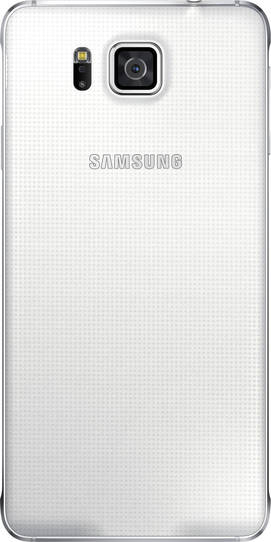
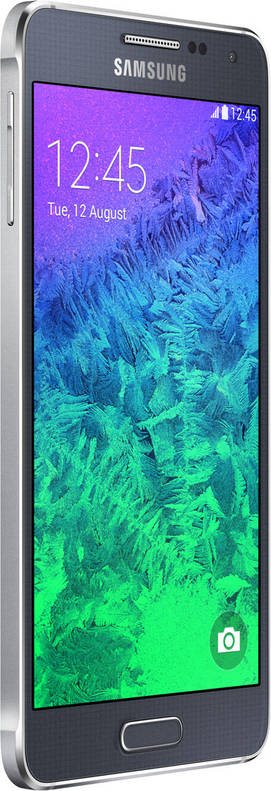
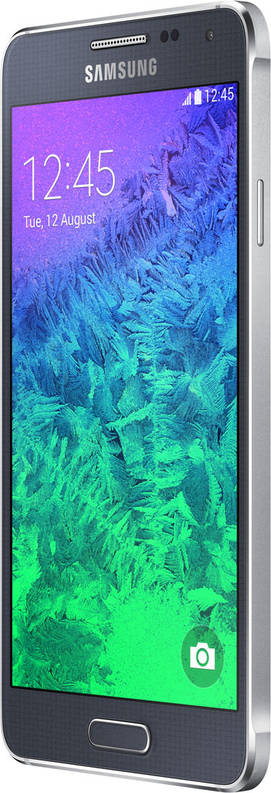
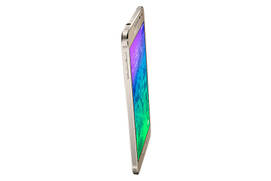
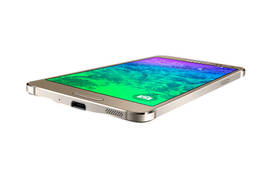
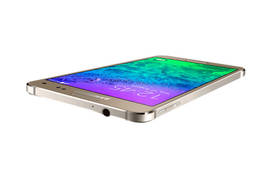
+The first thing that comes to mind when you first see the Galaxy Alpha is its resemblance to the Apple iPhone. However, that really can’t be helped when a metal frame with chamfered edges comes into the picture – even the Xiaomi Mi 4 (review) and quite a few other devices in the past have faced accusations of copying the iPhone’s design due to just this reason. We won’t really hold this against the Galaxy Alpha in any way though and as the key highlight of its design, it adds dollops to both the build and the looks.The Galaxy Alpha screams premium in a way no other mainstream Galaxy smartphone has done in the recent past, and that’s saying a lot. To a small extent, it also helps justify the sticker price. Another key aspect of the Alpha is its compact size – something that strays away from the current norm since most high-end smartphones these days tend to approach phablet territory. Thanks to its 4.7-inch screen, slim bezels and svelte profile, the Alpha feels like a refreshing change after playing around with so many large-screened Android phones and is great for one-handed usage. It’s a mere 6.7mm thick and weights 115g, making it very handy to use. Apart from the screen, the fascia holds the physical home button below, flanked by backlit keys for back and recent apps. On top, you’ll find Samsung branding, along with the earpiece, sensors, notification LED and front shooter. The grey bezels around the screen ensure most of these elements are quite visible, and a chrome border around the oval home key and the chrome-finished earpiece stand out quite well. The metal frame on the sides holds the ports and the controls, and up top you’ll find the audio socket and the secondary microphone, while the bottom is home to the micro-USB port, the primary mic and precision-drilled holes on the right that hide the speaker. The volume rocker is placed on the left spine, while the right is where the power key is located. Both are placed high up, and fall right under the thumb and index finger when the device is held with the left hand in the most natural position. The rear panel is done up in grey too, and sports a chequered pattern that feels smooth to the tough and helps keep smudges at bay. You’ll see chrome-embossed Samsung branding and a camera lens that juts out. The flash module that also holds the heart rate sensor is placed next to the camera lens. The real panel can be pried open to reveal the nano-SIM slot and the removable battery.
Read MoreScreen test
+The Galaxy Alpha peers back at you with a 4.7-inch screen which offers a resolution of 1,280 x 720 pixels resulting into a pixel density of 312ppi. The 720p screen resolution seems low for a premium device like this, and considering the outlay involved, it wouldn’t be unreasonable to expect a full HD screen. However, the Super AMOLED display on the Alpha is bright and vivid and we didn’t really have any issues with it while using the device as a daily driver.It doesn’t score as high as IPS displays when it comes to colour accuracy and viewing angles, but graphics and text look quite sharp and legibility under direct sunlight is fine too. Just in case you want to tweak the display to your own liking, display settings include various screen modes to choose from, including AMOLED cinema, AMOLED photo and an Adaptive display mode that automatically optimises the colour range and saturation for apps/tasks such as the gallery and video playback. Though it’s not specifically called a ‘glove mode’, there’s also an option to enhance touch sensitivity.
Read MoreTouch the wiz
+The Alpha wouldn’t really be a Galaxy smartphone without Samsung’s proprietary Touchwiz UI, and the base is the latest public release of Android, viz. KitKat v4.4.4. In terms of features and look and feel, the interface is pretty much the same as the Galaxy S5 (review), and as usual, features the Flipboard-powered news aggregator dubbed My Magazine. This occupies a dedicated space on the leftmost side of the home screens, and is customisable since you can choose topics of interest and even add social feeds such as Twitter and LinkedIn to it. Multi Window is there too, and as usual, allows you to run two apps simultaneously – though it isn’t as useful on the Alpha due to the smallish screen size. A long press of the back button activates it, and you can also enable it via settings. Quite a few other customisation options are thrown in. You can customise the unlock animation on the lockscreen, and by default, it displays time, date, and weather, along with a camera shortcut. In case you have the pedometer enabled in the S Health app, the number of steps you’ve taken are displayed too. The quick settings pane displays notifications in the same screen, and can be expanded to view the whole range of toggles available. A slider for controlling screen brightness is available here as well, and you can choose to hide or re-order the buttons. The app drawer can be tweaked too, as you can manage apps from here, create custom folders, hide or uninstall apps, change sort order, etc. The device settings is where you’d find most features hidden though, and you can even choose to view settings as a grid, list or arranged under tabs. Under Network connections, you’ll find a handy Download booster feature that combines Wi-Fi and cellular data to boost the download speeds. There’s a Toolbox option that displays a tiny floating button overlaid on top of the display, giving you quick access to your favourite apps. You can access up to five apps using this and can choose the ones you want displayed in the menu. The Personalisation settings let you choose an Easy mode that changes the launcher into a simplified, bare-bones UI meant for newbies and the elderly, while there’s a Blocking mode which is Samsung’s version of a Do Not Disturb mode… disabling notifications as per need or scheduled timings. A Private mode lets you secure personal content, just in case you have some stuff you’d like hidden.Under Motion settings, you’ll find options like Direct call and Smart alert, letting you call displayed contacts by just bringing the phone to your ears or getting alerted via vibration if you have any missed notifications when you pick up the phone, respectively. There’s an Air View feature crammed in too, and this gives you thumbnail previews of content such as images, videos and calendar events in S Planner when you hover your finger a little above the screen without touching it. A Safety assistance feature is baked in as well, and this can be used in emergency situations to alert pre-specified contacts about your current location. As usual, you’ll also find two different power saving modes to help prolong battery life, including a regular one that restricts performance and background data and the more aggressive Ultra Power Saving mode that applies a simplified grey-scale theme and limits the number of usable apps. Coming to the fingerprint scanner which is built into the home button, and can be set up using the Finger scanner option available in settings, we were a little apprehensive at first to try it out given our experience with the same feature on the Galaxy S5. However, we were pleasantly surprised when we did give it shot, because it seems Samsung has improved it slightly. On the S5, we had to go through multiple attempts to set it up since the fingerprint scanner on the device failed to recognise our finger swipes unless done so slowly and precisely. The same issues plagued regular usage once fingerprints were registered. On the Alpha though, registering fingerprints was relatively painless and while unlocking did require precise swipes, the device manage to recognise our finger swipes in the first attempts. Not that it can’t do without some further improvement in this area though. Using the heart rate monitor on the Alpha is a little more problematic, for the simple reason that the sensor is flush with the rear panel and more difficult to locate by feel, unlike the S5 where the sensor sits inside a small cavity along with the flash. On the Alpha, we had to turn the device to make sure our index finger was resting at exactly the right spot for the heart rate monitor to work, but that aside, the feature works reasonably well and feeds captured data to the S Health app. The latter also captures other info such as number of steps walked and keeps track of other physical activities too.Apart from S Health, there’s the usual Samsung stuff pre-installed, including S Planner, S Voice, and the Galaxy Apps storefront. Other apps aside, the latter also allows you to download more Samsung goodies such as S Note, Story Album, and S Translator. Samsung likes to call these Galaxy Essentials and they used to come pre-loaded on some high-end Galaxy smartphones before sense prevailed and Samsung decided to leave the choice to the users and made them downloadable extras.
Read MoreShooting shenanigans
+The Samsung Galaxy Alpha offers a 12-meg primary shooter capable of 4K video recording, along with a rather mundane 2.1-megapixel front shooter. The primary camera shoots in full resolution using the widescreen (16:9) aspect ratio, and the app is pretty much the same as we saw earlier on the Galaxy S5. The modes available cover Beauty face, Shot & more, Panorama, Virtual tour, and Dual camera, and you can download a few others such as Surround shot. Other features such as HDR Burst mode and Selective focus (Samsung’s version of Background defocus) are there too, and you can also make use of a bunch of live filters. There’s a fair bit of creative control available too since you can tweak settings like ISO, white balance and exposure. The image quality is extremely pleasing overall, especially when shot in daylight. The autofocus speeds are quite fast, but the same can’t be said for the capture speeds and sometimes, this can result in blurry shots if the subjects are in motion. The camera’s low-light imaging prowess isn’t too impressive, and it tends to churn out noisy results when there isn’t enough light. We have more in our camera review, and here are a few image samples so you can take a look with your own eyes.
Read MoreTesting out its mettle
+Powering the show is an Exynos 5 Octa 5430 SoC which utilises a pair of quad-core clusters clocked at 1.8GHz and 1.3GHz. These are mated to 2GB of RAM and for storing apps and media, you get 32GB of storage. Almost 25GB is available to use out of the box, but sadly, you can’t add more since there’s no microSD card slot available. The Galaxy Alpha does support USB OTG though, along with a bunch of other options including 4G (with support for Indian bands), dual-band Wi-Fi ac, NFC, Wi-Fi Direct, Wi-Fi hotspot, DLNA, Bluetooth and A-GPS.The Alpha proved to be an able performer and rolled over anything we threw at it – including multitasking and graphics-intensive games like Asphalt 8. Needless to say, productivity-related tasks ran like oiled ball bearings. We were a little sceptical about its 1,860mAh battery though, considering its not-so beefy rating. It managed to surprise us again by lasting a very respectable 10 and a half hours in our video playback battery drain test. Real-life usage wasn’t so great though, and you can expect the Alpha to last you through the day with light to medium usage. Your mileage will vary depending upon specific usage patterns though, but we wouldn’t really call it special in terms of battery life… though it wasn’t as bad as we initially thought it’d be.
Read MorePopular Comparisons
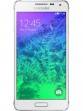
Samsung Galaxy Alpha Specifications
General |
|
|---|---|
| Operating System | Android v4.4.4 (Kitkat) |
Performance
(Avg)
|
|
|---|---|
| Chipset | Samsung Exynos 5 Octa 5430 |
| Processor | Octa core (1.8 GHz, Quad core, Cortex A15 + 1.3 GHz, Quad core, Cortex A7) |
| Graphics (GPU) | Mali-T628 MP6 |
| RAM | 2 GB |
Display
(Excellent)
|
|
|---|---|
| Display Type | Super AMOLED |
| Screen Size | 4.7 inches (11.94 cm) |
| Resolution | 720x1280 px (HD) |
| Pixel Density | 312 ppi |
| Screen to Body Ratio (calculated) | 70.06 % |
| Screen Protection | Corning Gorilla Glass v4 |
Design |
|
|---|---|
| Height | 132.4 mm |
| Width | 65.5 mm |
| Thickness | 6.7 mm |
| Weight | 115 grams |
| Build Material |
Frame: Metal Back: Metal |
|
Click to View

|
Rear Camera
(Good)
|
||||
|---|---|---|---|---|
| Resolution | ||||
|
||||
| Autofocus | Yes | |||
| OIS | No | |||
| Flash | Yes, LED Flash | |||
| Image Resolution | 4000 x 3000 Pixels | |||
| Settings | Exposure compensation, ISO control | |||
| Shooting Modes |
Continuous Shooting High Dynamic Range mode (HDR) |
|||
| Camera Features |
Digital Zoom Auto Flash Digital image stabilization Face detection Smile detection Touch to focus |
|||
| Video Recording |
3840x2160 @ 30 fps 1920x1080 @ 60 fps 1280x720 @ 120 fps |
Front Camera
(Avg)
|
||||
|---|---|---|---|---|
| Resolution | ||||
|
||||
| Flash | No |
Battery
(Very Good)
|
|
|---|---|
| Capacity | 1860 mAh |
| Battery Type | Li-ion |
| TalkTime | Up to 11 Hours(3G) |
Storage |
|
|---|---|
| Internal Storage | 32 GB |
| Expandable Storage | No |
Network & Connectivity |
|
|---|---|
| SIM Slot(s) | Single SIM |
| SIM Type | SIM1: Nano |
| Network Support | 5G Not Supported, 4G |
| SIM 1 |
4G bands, 4G Speed
Expand
|
| SAR Value | Head: 1.18 W/kg, Body: 0.75 W/kg |
| Wi-Fi | Yes, Wi-Fi 5 (802.11 a/b/g/n/ac) 5GHz |
| Wi-Fi Features | Wi-Fi Direct |
| Bluetooth | Yes, v4.0 |
| GPS | Yes with A-GPS, Glonass |
| NFC | Yes |
Multimedia |
|
|---|---|
| Audio Jack | 3.5 mm |
Sensors |
|
|---|---|
| Fingerprint Sensor | Yes |
| Heart Rate Monitor | Yes |
| Other Sensors | Light sensor, Proximity sensor, Accelerometer, Compass, Gyroscope |
Samsung Galaxy Alpha User Reviews
Samsung Galaxy Alpha Key Highlights
| Processor | Samsung Exynos 5 Octa 5430 |
| RAM & Storage | 2 GB + 32 GB |
| Display | 4.7", 720 x 1280 Resolution |
| Rear Camera | 12 MP |
| Front Camera | 2.1 MP |
| Battery | 1860 mAh |
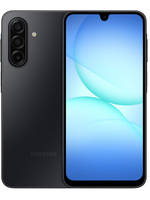

Popular Links
- All Upcoming Phones
- Upcoming Samsung Phones
- Samsung phones under 10k
- Samsung phones under 20k
- vivo V80 5G
- OPPO K14 Plus 5G
- Xiaomi Redmi Note 17 Pro 5G
- Lava Virat Curve 5G
- OPPO F35 Pro
- Samsung Mobiles
- Motorola Mobiles
- vivo Mobiles
- OPPO Mobiles
- Tecno Mobiles
- realme Mobiles
- Xiaomi Mobiles