
Blackberry Z3
+ Compare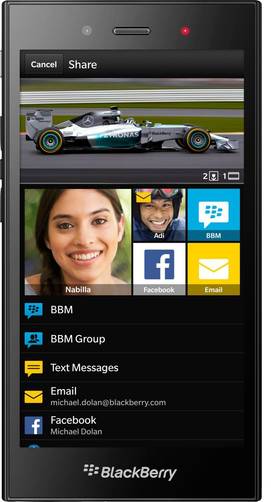


-
Design4

-
360° View

-
Videos2
Key Specs
Performance
-
Qualcomm Snapdragon 400 -
Dual Core, 1.2 GHz -
1.5 GB RAM
Display
-
5.0 inches (12.7 cm); TFT -
540x960 px
Rear Camera
-
Single Camera Setup - 5 MP (upto 5x Digital Zoom) Primary Camera
-
LED Flash -
Full HD @30fps Video Recording
Front Camera
-
1.1 MP -
HD fps Video Recording
Battery
-
2500 mAh
General
-
SIM1: Micro -
5G Not Supported -
8 GB internal storage, Expandable upto 32 GB
Blackberry Z3 Expert Review Summary
Expert Rating:
![Deepak Dhingra]()
Verdict
This is where things get tough. Priced at Rs 15,990, we think it`d have been much simpler to recommend the Z3 wholeheartedly if it had been priced slightly lower, but then, we`d like all phones out there to be lighter on the pocket. Compared head on with other smartphones in the same price bracket, the BlackBerry Z3 looks like it`s fighting a losing battle, especially when you take pure specs into account. Android has always been BlackBerry`s nemesis, and compelling options like the Moto G (review), and the ASUS Zenfone 5 (review) don`t make things easy. Thanks to the crowded landscape, there ...
Read Full Verdict
Pros
- Solid build quality
- Smooth performance
- Intuitive UI with useful features
- BlackBerry Hub provides at-a-glance info on all connected accounts
- Superb battery life
Cons
- Average camera
- Doesn`t match up in terms of specs
- No native Google apps
Specs at a glance
+
5-inch, 960 x 540 display (~220ppi) 5MP primary camera, 1.1MP front shooter 1.2GHz dual-core Qualcomm MSM8230 processor 1.5GB RAM, 8 GB internal storage, expandable by 32GB 2,500mAh battery 3G, Wi-Fi, Bluetooth 4.0, A-GPS, Miracast, Wi-Fi Direct BB OS 10.2.1 FM radio
Read More
Not really a ramp model, but a solid partner
+
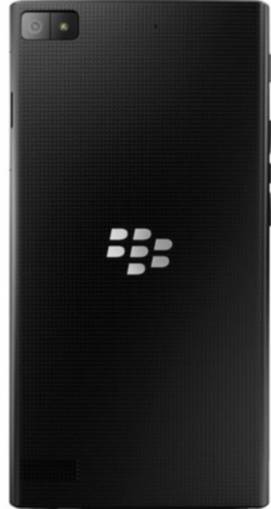
When it comes to looks, the Z3 looks rather elegant, but in a subtle way. Sporting a slightly blocky design which is reminiscent of Sony’s Xperia devices, it also feels large for its 5-inch display size due the wide bezels on the top and bottom of the display.There are no hardware keys on the fascia, so all you’ll find in the front apart from the screen is the BlackBerry logo below and the usual array of earpiece, front camera, sensors and notification LED on top. The power key is placed on the left spine, closer to the top, and you’ll also find two separate volume keys on this side, with a voice command key placed in their middle. The slots for the micro-SIM and the microSD card are hidden under a tab on the right spine.The headset socket is on top, while the micro-USB port is at the bottom.Flip the device over and you’ll see the Z3’s main design highlight. The rear panel, which is non-removable, totes a chequered pattern that looks nice and also aids in grip. Further, it doesn’t smudge easily too. In the middle is a large chrome-embossed BlackBerry flying D’s logo, and a speaker mesh at the bottom. On top, you’ll see the primary camera lens and the LED flash inside a small rectangular window.
Read More
A reasonably capable display
+
As we noted in our ASUS Zenfone 5 review, the 5-inch screen size is the sweet spot that balances handling and an immersive usage experience well, though BlackBerry already has a 5-inch smartphone in the form of the Z30. The latter is in a different league though, and the Z3 lands as the affordable contender.Its 5-inch display only offers a resolution of 540 x 960 pixels though, resulting in a pixel density of 220ppi. In regular usage, the screen is sharp enough, while the viewing angles angles and sunlight legibility are fine too. The colours are reproduced well, though if looked upon closely, the text doesn’t appear as sharp as we’d prefer. This gripe apart, the display quality is reasonably good.Moreover, since BB OS 10 has been specifically designed as a touch-driven mobile platform, the experience is better on a full-touch device like the Z3, when compared to the QWERTY-toting BlackBerry handsets like the Q10 and the Q5. Unless you can’t do without a physical keyboard, the virtual keyboard on the all-touch BB 10 also offers quite a few useful functionalities.
Read More
Casual shooting for social shenanigans
+
The Z3 sports a 5-megapixel autofocus shooter along with a flash, capable of shooting full HD videos. A 1.1MP fixed-focus shooter is available in the front, handling video calling duties and capable of shooting 720p videos. The camera app provides the same basic features we've seen earlier on the Z3's BB 10-toting siblings, covering modes like burst shooting and HDR, a few scene presets, and control over aspect ratio. There's no shutter key, either physical or virtual, and you can just tap to focus and shoot. A nifty Time Shift feature is available too, capturing a series of images even before you actually shoot and letting you choose the best one later.When it comes to image quality, it churns out reasonably good results in good lighting, and its HDR mode is quite capable, highlighting darker areas of shot images quite well. That apart, low-light shots are quite noisy and unimpressive. Overall, we wouldn’t count the camera as one of the Z3’s strengths, and it’s just about good enough for casual shooting and social sharing. You can head to our BlackBerry Z3 camera review for more on how it fares, but here’s a look at a few images shot using its primary snapper.
Read More
An intuitive UI and dollops of features
+
If you’ve tried your hands on any of the BB OS 10 devices such as the Z10 or the Z30, you know how this works. If you haven’t though, be aware that the interface is vastly different if compared to other mobile platforms like Android or iOS. Thankfully though, there’s barely a learning curve required, and you can get up to speed with it in a matter of minutes. And after you do, you’ll find it so intuitive that you’ll be trying the same gestures on other devices too. Another thing worth noting is that unlike older BlackBerry smartphones, devices running BB OS 10 don’t require a special BlackBerry data plans for internet access, and regular 2G or 3G connections work just fine.The BlackBerry Z3 runs BB OS version 10.2.1, the latest release of this mobile OS. When this update was announced back in January this year, BlackBerry touted a series of highly useful features and enhancements over and above the previous iteration, and they’re all available on the Z3. We’ll be touching upon the key ones as part of this software overview. The main UI is icon-based, just like Android or iOS, and also features a swipe-down quick settings panel. That’s where the similarities end though. The rest of the interface is driven by swipes. The initial setup process is quite simple, and requires you to set up your accounts and sign in (or create) into your BlackBerry ID. There’s even a short tutorial that guides you through the gestures.The device can be unlocked straight from standby by swiping up from the BlackBerry logo towards the middle of the screen, and this is a quick and convenient way to access it without pressing the power key. If you press it however, you’ll be greeted with the lockscreen that displays time and date and the usual indicators covering battery, signal and connectivity status. In addition, there are handy and well-designed lockscreen previews that display various accounts that have pending notifications, and if you tap on the respective icons you’ll be able to view notifications from each listed alongside. You can even jump to the app and the specific message straight from here. The main UI comprises of app icons that scroll horizontally, along with a fixed, non-customisable dock at the bottom that gives you access to the phone, universal search and the camera. These can also be accessed via dedicated icons too. When you open an app, you won’t see any back or close button. The same gesture we described above, i.e. an upward swipe from the BlackBerry logo towards the screen centre minimises a running app, and converts it into a small window that occupies roughly a quarter of the screen. These tiny windows are termed Active Frames and comprise the main way how multitasking is implemented on BB OS 10. You can have up to four Active Frames (down from eight on the Z10 and Z30) open at a time, and activate any of them by tapping on it, or hit the ‘x’ at the corner to kill that app. If you have four Active Frames running and you launch a fifth app, the oldest one is killed spontaneously. Many apps use running Active Frames for additional functionality – the Calendar app displaying upcoming appointments, for example – roughly similar to the live tiles on Windows Phone. You’ll notice that Active Frames occupy a dedicated screen placed on the left side of the app icons, but the mainstay of the UI is something termed BlackBerry Hub. The Hub aggregates messages from all your accounts, covering the likes of email, text messages, BBM, WhatsApp, and other social accounts such as Facebook, Twitter and LinkedIn… all in one location. The Hub is placed on the leftmost side of the horizontally-scrolling UI, but its beauty is that it can be accessed from anywhere by performing an inverted ‘L’ gesture, i.e., by swiping up from the bottom of the screen and then continuing the same gesture towards the right. If you don’t lift your finger up from the screen after the gesture is complete, you’ll be able to ‘Peek’ at the Hub to see what’s new, and then you can choose to stay on the app you’re in or dive into the Hub. As one of its noteworthy features, the BlackBerry Hub offers a Priority Inbox, a place where it collates notifications and messages it deems important. You can also mark specific messages as priority and over a period of time, it learns what messages are important for you. A pinch gesture within the Hub takes you straight to the Priority Inbox too. And while we’re on the Hub, it’d also be apt to let you know that not only does the device sync email sent from other devices, it also lets you delete emails from either the phone or both from the device as well as the server.If you think those are enough gestures to come to grips with, hang on. There are more. Many apps also allow access to specific settings if you swipe down from the top of the screen.As yet another handy feature, the device detects if an incoming call is from a contact who’s also in your BBM contact list, and lets you reject the call with a BBM message. If not, you have the choice of rejecting the call via the usual text message.Incoming notifications pop up on top of the screen, no matter which app you’re using, and can be dismissed straight from here. A few apps, like SMS and BBM, also let you reply inline quickly from here, eliminating the need to launch the specific app. Text input is handled by BlackBerry’s virtual keyboard, and it offers superb text prediction capabilities, learning as you type. An innovative feature boasted by the keyboard is Flow, and it predicts and displays word suggestions on top of the alphabets, allowing you to insert suggestions by flicking them up. Once it gets attuned to your style of writing, a few basic messages can even be composed just by flicking the suggestions – it’s so intuitive and useful. Furthermore, the keyboard now supports languages such as Hinglish and Hindi natively, allowing you to type the way you’re most comfortable in. As far as preloaded apps are concerned, there are quite a few. The OS bakes in support for social networks like Facebook, Twitter and LinkedIn, and cloud services like Dropbox, Box and Evernote, and these are available as downloadable native apps too. The Docs To Go document editor is preloaded, allowing to create, edit and view office documents on the road. The app storefront, called the BlackBerry World, may not match up to what the Google Play Store or the Apple App Store have to offer in terms of variety of apps, but it covers all the basics and then some more. Most staple apps such as WhatsApp and Skype are available of course, while others such as Instagram can be accessed through third-party clients, even though the experience may not be the same. Suffice it to say that pretty much most of the commonly-used apps are available, and the choice is increasing as you read this. Our biggest gripe with the platform is the lack of native apps for Gmail and Google Maps though, and that could be a deal killer for some. Of course, Gmail can be configured as an account accessible via the BlackBerry Hub, and this will also sync your contacts and calendar, but that won’t give you specific features such as support for Gmail labels. But what if you’re looking for a specific app and aren’t able to find it on BlackBerry World? Just use the Android version. Yep, the platform can run Android apps too, and while this feature has been there for the while, the last platform refresh made it extremely convenient by allowing direct installation of Android APKs. In case you don’t know, APKs are native Android app installation files, and you can get hold of them online using websites such as the Evozi APK Downloader, and even export them using an Android device on which they are installed. Once you have the APK you wish to install on the Z3, just transfer it to the device and tap on it from the File Manager to start the installation process. You’ll need to allow the device to install apps from from other sources first though, and this is available under security settings. Of course, there’s no guarantee that all Android APKs will work on the smartphone, but we didn’t face any troubles with the ones we tried, like Zite for example. Even an intensive Android game like Riptide GP2 worked pretty well.
Read More
Smoothness is the name of the game
+
Let’s face it. A dual-core Snapdragon 400 processor CPU clocked at 1.2GHz is hardly worth shouting from the rooftops about. That said, we’ve always focussed more on usability than specs and thankfully, the BB OS 10 platform isn’t too resource hungry.With 1.5GB of RAM at its disposal, things remain quite smooth, and we didn’t encounter any lags… though admittedly, it doesn’t feel super-speedy either. Apps open reasonably fast, and playing a heavy game such as Riptide GP2 (installed using an APK) was quite smooth as well. There’s 8GB of internal storage, about half out of which is available to use. You can add up to 32GB more via the microSD card slot, but you should keep in mind that the platform doesn’t let you install apps on the memory card, only using it as a repository for files and media.Connectivity-wise the Z3 doesn’t sport a micro-HDMI port like some of its more accomplished siblings, nor the USB OTG feature boasted by the Z3, but does offer Miracast display mirroring, DLNA, and Wi-Fi Direct. The usual set of options like Wi-Fi, Bluetooth 4.0, A-GPS and micro-USB 2.0 are around, of course.One area where the Z3 really shines is its battery life. The sealed 2,500mAh unit is a marathon runner, and keeps going on and on without stopping. It’s capable of lasting you a couple of days if your usage isn’t too heavy, but even if it is, you can expect a full day very comfortably out of it. This bodes well for it, as battery life is such a crucial aspect of any mobile device.
Read More
Read full Review

Verdict
This is where things get tough. Priced at Rs 15,990, we think it`d have been much simpler to recommend the Z3 wholeheartedly if it had been priced slightly lower, but then, we`d like all phones out there to be lighter on the pocket. Compared head on with other smartphones in the same price bracket, the BlackBerry Z3 looks like it`s fighting a losing battle, especially when you take pure specs into account. Android has always been BlackBerry`s nemesis, and compelling options like the Moto G (review), and the ASUS Zenfone 5 (review) don`t make things easy. Thanks to the crowded landscape, there ... Read Full Verdict
- Solid build quality
- Smooth performance
- Intuitive UI with useful features
- BlackBerry Hub provides at-a-glance info on all connected accounts
- Superb battery life
Pros
- Average camera
- Doesn`t match up in terms of specs
- No native Google apps
Cons
Specs at a glance
+5-inch, 960 x 540 display (~220ppi) 5MP primary camera, 1.1MP front shooter 1.2GHz dual-core Qualcomm MSM8230 processor 1.5GB RAM, 8 GB internal storage, expandable by 32GB 2,500mAh battery 3G, Wi-Fi, Bluetooth 4.0, A-GPS, Miracast, Wi-Fi Direct BB OS 10.2.1 FM radio
Read MoreNot really a ramp model, but a solid partner
+When it comes to looks, the Z3 looks rather elegant, but in a subtle way. Sporting a slightly blocky design which is reminiscent of Sony’s Xperia devices, it also feels large for its 5-inch display size due the wide bezels on the top and bottom of the display.There are no hardware keys on the fascia, so all you’ll find in the front apart from the screen is the BlackBerry logo below and the usual array of earpiece, front camera, sensors and notification LED on top. The power key is placed on the left spine, closer to the top, and you’ll also find two separate volume keys on this side, with a voice command key placed in their middle. The slots for the micro-SIM and the microSD card are hidden under a tab on the right spine.The headset socket is on top, while the micro-USB port is at the bottom.Flip the device over and you’ll see the Z3’s main design highlight. The rear panel, which is non-removable, totes a chequered pattern that looks nice and also aids in grip. Further, it doesn’t smudge easily too. In the middle is a large chrome-embossed BlackBerry flying D’s logo, and a speaker mesh at the bottom. On top, you’ll see the primary camera lens and the LED flash inside a small rectangular window.
Read MoreA reasonably capable display
+As we noted in our ASUS Zenfone 5 review, the 5-inch screen size is the sweet spot that balances handling and an immersive usage experience well, though BlackBerry already has a 5-inch smartphone in the form of the Z30. The latter is in a different league though, and the Z3 lands as the affordable contender.Its 5-inch display only offers a resolution of 540 x 960 pixels though, resulting in a pixel density of 220ppi. In regular usage, the screen is sharp enough, while the viewing angles angles and sunlight legibility are fine too. The colours are reproduced well, though if looked upon closely, the text doesn’t appear as sharp as we’d prefer. This gripe apart, the display quality is reasonably good.Moreover, since BB OS 10 has been specifically designed as a touch-driven mobile platform, the experience is better on a full-touch device like the Z3, when compared to the QWERTY-toting BlackBerry handsets like the Q10 and the Q5. Unless you can’t do without a physical keyboard, the virtual keyboard on the all-touch BB 10 also offers quite a few useful functionalities.
Read MoreCasual shooting for social shenanigans
+The Z3 sports a 5-megapixel autofocus shooter along with a flash, capable of shooting full HD videos. A 1.1MP fixed-focus shooter is available in the front, handling video calling duties and capable of shooting 720p videos. The camera app provides the same basic features we've seen earlier on the Z3's BB 10-toting siblings, covering modes like burst shooting and HDR, a few scene presets, and control over aspect ratio. There's no shutter key, either physical or virtual, and you can just tap to focus and shoot. A nifty Time Shift feature is available too, capturing a series of images even before you actually shoot and letting you choose the best one later.When it comes to image quality, it churns out reasonably good results in good lighting, and its HDR mode is quite capable, highlighting darker areas of shot images quite well. That apart, low-light shots are quite noisy and unimpressive. Overall, we wouldn’t count the camera as one of the Z3’s strengths, and it’s just about good enough for casual shooting and social sharing. You can head to our BlackBerry Z3 camera review for more on how it fares, but here’s a look at a few images shot using its primary snapper.
Read MoreAn intuitive UI and dollops of features
+If you’ve tried your hands on any of the BB OS 10 devices such as the Z10 or the Z30, you know how this works. If you haven’t though, be aware that the interface is vastly different if compared to other mobile platforms like Android or iOS. Thankfully though, there’s barely a learning curve required, and you can get up to speed with it in a matter of minutes. And after you do, you’ll find it so intuitive that you’ll be trying the same gestures on other devices too. Another thing worth noting is that unlike older BlackBerry smartphones, devices running BB OS 10 don’t require a special BlackBerry data plans for internet access, and regular 2G or 3G connections work just fine.The BlackBerry Z3 runs BB OS version 10.2.1, the latest release of this mobile OS. When this update was announced back in January this year, BlackBerry touted a series of highly useful features and enhancements over and above the previous iteration, and they’re all available on the Z3. We’ll be touching upon the key ones as part of this software overview. The main UI is icon-based, just like Android or iOS, and also features a swipe-down quick settings panel. That’s where the similarities end though. The rest of the interface is driven by swipes. The initial setup process is quite simple, and requires you to set up your accounts and sign in (or create) into your BlackBerry ID. There’s even a short tutorial that guides you through the gestures.The device can be unlocked straight from standby by swiping up from the BlackBerry logo towards the middle of the screen, and this is a quick and convenient way to access it without pressing the power key. If you press it however, you’ll be greeted with the lockscreen that displays time and date and the usual indicators covering battery, signal and connectivity status. In addition, there are handy and well-designed lockscreen previews that display various accounts that have pending notifications, and if you tap on the respective icons you’ll be able to view notifications from each listed alongside. You can even jump to the app and the specific message straight from here. The main UI comprises of app icons that scroll horizontally, along with a fixed, non-customisable dock at the bottom that gives you access to the phone, universal search and the camera. These can also be accessed via dedicated icons too. When you open an app, you won’t see any back or close button. The same gesture we described above, i.e. an upward swipe from the BlackBerry logo towards the screen centre minimises a running app, and converts it into a small window that occupies roughly a quarter of the screen. These tiny windows are termed Active Frames and comprise the main way how multitasking is implemented on BB OS 10. You can have up to four Active Frames (down from eight on the Z10 and Z30) open at a time, and activate any of them by tapping on it, or hit the ‘x’ at the corner to kill that app. If you have four Active Frames running and you launch a fifth app, the oldest one is killed spontaneously. Many apps use running Active Frames for additional functionality – the Calendar app displaying upcoming appointments, for example – roughly similar to the live tiles on Windows Phone. You’ll notice that Active Frames occupy a dedicated screen placed on the left side of the app icons, but the mainstay of the UI is something termed BlackBerry Hub. The Hub aggregates messages from all your accounts, covering the likes of email, text messages, BBM, WhatsApp, and other social accounts such as Facebook, Twitter and LinkedIn… all in one location. The Hub is placed on the leftmost side of the horizontally-scrolling UI, but its beauty is that it can be accessed from anywhere by performing an inverted ‘L’ gesture, i.e., by swiping up from the bottom of the screen and then continuing the same gesture towards the right. If you don’t lift your finger up from the screen after the gesture is complete, you’ll be able to ‘Peek’ at the Hub to see what’s new, and then you can choose to stay on the app you’re in or dive into the Hub. As one of its noteworthy features, the BlackBerry Hub offers a Priority Inbox, a place where it collates notifications and messages it deems important. You can also mark specific messages as priority and over a period of time, it learns what messages are important for you. A pinch gesture within the Hub takes you straight to the Priority Inbox too. And while we’re on the Hub, it’d also be apt to let you know that not only does the device sync email sent from other devices, it also lets you delete emails from either the phone or both from the device as well as the server.If you think those are enough gestures to come to grips with, hang on. There are more. Many apps also allow access to specific settings if you swipe down from the top of the screen.As yet another handy feature, the device detects if an incoming call is from a contact who’s also in your BBM contact list, and lets you reject the call with a BBM message. If not, you have the choice of rejecting the call via the usual text message.Incoming notifications pop up on top of the screen, no matter which app you’re using, and can be dismissed straight from here. A few apps, like SMS and BBM, also let you reply inline quickly from here, eliminating the need to launch the specific app. Text input is handled by BlackBerry’s virtual keyboard, and it offers superb text prediction capabilities, learning as you type. An innovative feature boasted by the keyboard is Flow, and it predicts and displays word suggestions on top of the alphabets, allowing you to insert suggestions by flicking them up. Once it gets attuned to your style of writing, a few basic messages can even be composed just by flicking the suggestions – it’s so intuitive and useful. Furthermore, the keyboard now supports languages such as Hinglish and Hindi natively, allowing you to type the way you’re most comfortable in. As far as preloaded apps are concerned, there are quite a few. The OS bakes in support for social networks like Facebook, Twitter and LinkedIn, and cloud services like Dropbox, Box and Evernote, and these are available as downloadable native apps too. The Docs To Go document editor is preloaded, allowing to create, edit and view office documents on the road. The app storefront, called the BlackBerry World, may not match up to what the Google Play Store or the Apple App Store have to offer in terms of variety of apps, but it covers all the basics and then some more. Most staple apps such as WhatsApp and Skype are available of course, while others such as Instagram can be accessed through third-party clients, even though the experience may not be the same. Suffice it to say that pretty much most of the commonly-used apps are available, and the choice is increasing as you read this. Our biggest gripe with the platform is the lack of native apps for Gmail and Google Maps though, and that could be a deal killer for some. Of course, Gmail can be configured as an account accessible via the BlackBerry Hub, and this will also sync your contacts and calendar, but that won’t give you specific features such as support for Gmail labels. But what if you’re looking for a specific app and aren’t able to find it on BlackBerry World? Just use the Android version. Yep, the platform can run Android apps too, and while this feature has been there for the while, the last platform refresh made it extremely convenient by allowing direct installation of Android APKs. In case you don’t know, APKs are native Android app installation files, and you can get hold of them online using websites such as the Evozi APK Downloader, and even export them using an Android device on which they are installed. Once you have the APK you wish to install on the Z3, just transfer it to the device and tap on it from the File Manager to start the installation process. You’ll need to allow the device to install apps from from other sources first though, and this is available under security settings. Of course, there’s no guarantee that all Android APKs will work on the smartphone, but we didn’t face any troubles with the ones we tried, like Zite for example. Even an intensive Android game like Riptide GP2 worked pretty well.
Read MoreSmoothness is the name of the game
+Let’s face it. A dual-core Snapdragon 400 processor CPU clocked at 1.2GHz is hardly worth shouting from the rooftops about. That said, we’ve always focussed more on usability than specs and thankfully, the BB OS 10 platform isn’t too resource hungry.With 1.5GB of RAM at its disposal, things remain quite smooth, and we didn’t encounter any lags… though admittedly, it doesn’t feel super-speedy either. Apps open reasonably fast, and playing a heavy game such as Riptide GP2 (installed using an APK) was quite smooth as well. There’s 8GB of internal storage, about half out of which is available to use. You can add up to 32GB more via the microSD card slot, but you should keep in mind that the platform doesn’t let you install apps on the memory card, only using it as a repository for files and media.Connectivity-wise the Z3 doesn’t sport a micro-HDMI port like some of its more accomplished siblings, nor the USB OTG feature boasted by the Z3, but does offer Miracast display mirroring, DLNA, and Wi-Fi Direct. The usual set of options like Wi-Fi, Bluetooth 4.0, A-GPS and micro-USB 2.0 are around, of course.One area where the Z3 really shines is its battery life. The sealed 2,500mAh unit is a marathon runner, and keeps going on and on without stopping. It’s capable of lasting you a couple of days if your usage isn’t too heavy, but even if it is, you can expect a full day very comfortably out of it. This bodes well for it, as battery life is such a crucial aspect of any mobile device.
Read MorePopular Comparisons
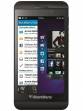
Blackberry Z3 Specifications
General |
|
|---|---|
| Operating System | Blackberry v10.2 |
Performance
(Below Avg)
|
|
|---|---|
| Chipset | Qualcomm Snapdragon 400 MSM8230 |
| Processor | Dual core, 1.2 GHz, Krait 200 |
| Graphics (GPU) | Adreno 305 |
| RAM | 1.5 GB |
Display
(Very Good)
|
|
|---|---|
| Display Type | TFT |
| Screen Size | 5.0 inches (12.7 cm) |
| Resolution | 540x960 px |
| Pixel Density | 220 ppi |
| Screen to Body Ratio (calculated) | 67.46 % |
| Display Colour | 16M |
Design |
|
|---|---|
| Height | 140 mm |
| Width | 72.8 mm |
| Thickness | 9.3 mm |
| Weight | 164 grams |
|
Click to View

|
Rear Camera
(Avg)
|
||||||
|---|---|---|---|---|---|---|
| Resolution | ||||||
|
||||||
| Autofocus | Yes | |||||
| Flash | Yes, LED Flash | |||||
| Image Resolution | 2592 x 1944 Pixels | |||||
| Shooting Modes |
Continuous Shooting High Dynamic Range mode (HDR) |
|||||
| Camera Features |
5 x Digital Zoom Auto Flash Digital image stabilization Touch to focus |
|||||
| Video Recording | 1920x1080 @ 30 fps |
Front Camera
(Avg)
|
||||
|---|---|---|---|---|
| Resolution | ||||
|
||||
| Camera Features | Fixed Focus | |||
| Video Recording | 1280x720 fps |
Battery
(Very Good)
|
|
|---|---|
| Capacity | 2500 mAh |
| Battery Type | Li-ion |
| TalkTime | Up to 15.5 Hours(2G) |
Storage |
|
|---|---|
| Internal Storage | 8 GB |
| Expandable Storage | Yes, Up to 32 GB |
Network & Connectivity |
|
|---|---|
| SIM Slot(s) | Single SIM |
| SIM Type | SIM1: Micro |
| Network Support | 5G Not Supported |
| Wi-Fi | Yes, Wi-Fi 4 (802.11 b/g/n) |
| Wi-Fi Features | Mobile Hotspot |
| Bluetooth | Yes, v4.0 |
| GPS | Yes with A-GPS |
Multimedia |
|
|---|---|
| Audio Jack | 3.5 mm |
| Video Player | Yes, Video Formats: H.263, H.264, MPEG4, WMV |
| Ring Tone | Music ringtones, Vibration |
| Music | Yes, Music Formats: 3GP, AAC, AAC++, AMR, eAAC+, FLAC, MP3, MP4, OGG, WAV, WMA |
Sensors |
|
|---|---|
| Other Sensors | Light sensor, Proximity sensor, Accelerometer |
| Games | Yes |
| Java | Yes, MIDP 2.1 |
| Browser | Yes, HTML5, RSS |
| Phone Book | Yes, Practically Unlimited |
| Yes, Push e-mail | |
| Instant Messaging | Yes, Other |
| Other Facilities | Calculator, Stopwatch, World clock, Calendar, Alarm, Document viewer |
Blackberry Z3 User Reviews
Blackberry Z3 Key Highlights
| Processor | Qualcomm Snapdragon 400 MSM8230 |
| RAM & Storage | 1.5 GB + 8 GB |
| Display | 5.0", 540 x 960 Resolution |
| Rear Camera | 5 MP |
| Front Camera | 1.1 MP |
| Battery | 2500 mAh |















Popular Links
- All Upcoming Phones
- OPPO F35 Pro
- Samsung Galaxy F70 5G
- vivo S2 FE 5G
- OPPO Find X10
- OPPO Find X10 Pro Max
- Samsung Mobiles
- Motorola Mobiles
- vivo Mobiles
- OPPO Mobiles
- Tecno Mobiles
- realme Mobiles
- OnePlus Mobiles