
Coolpad Note 3
+ Compare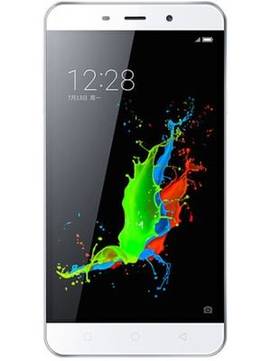
-
Design3

-
Rear Camera8

-
360° View

-
UI Screenshot15
![UI Screenshot]()
-
Benchmarks10
![Benchmarks]()
-
Videos3
![Videos]()



Key Specs
Performance
-
MediaTek MT6753 -
Octa core (1.5 GHz, Quad Core + 1.3 GHz, Quad core) -
3 GB RAM
Display
-
5.5 inches (13.97 cm); IPS LCD -
720x1280 px (HD)
Rear Camera
-
Single Camera Setup - 13 MP Primary Camera
-
LED Flash -
Full HD @30fps Video Recording
Front Camera
-
5 MP
Battery
-
3000 mAh
General
-
SIM1: Micro, SIM2: Micro -
5G Not Supported -
16 GB internal storage, Expandable upto 64 GB
Coolpad Note 3 Expert Review Summary
Expert Rating:
![Deeksha Koli]()
Verdict
The Coolpad Note 3 does stand out with its extremely efficient fingerprint scanner and powerful processor. The battery life of the device is just as good and some of the software features are rather interesting. However, the average display and poor camera take away from the package. The Lenovo K3 Note and YU Yureka Plus both beat the Coolpad Note 3 with their impressive cameras and sharper displays. However, the Note 3 has an edge over the two in terms of performance and battery life. If you can settle for a camera that just about does its job, the Coolpad Note 3 is a great option under Rs 10...
Read Full Verdict
Pros
- Efficient fingerprint sensor
- Great battery backup
- Powerful processor and ample RAM
Cons
- Average display
- Poor cameras
Design: Nothing extraordinary
+
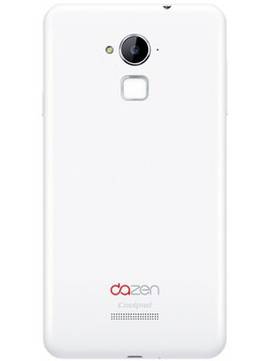
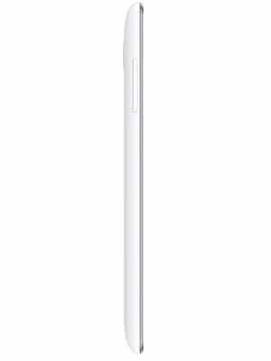
Dimensions: 151 x 77 x 9.3 mmWeight: 155 gramsThe first department you might notice the brand has cut corners in, is the design. There’s nothing special about the looks of the Coolpad Note 3 as it remains a candybar phone with rounded corners and thick horizontal bezels. However, a chrome trim runs towards the front, around the display of the device, being the only saving grace. The front is mostly taken up by the display which spans 5.5-inches. Flanking it from above are the earpiece, sensors and secondary camera. Below the screen you will find three capacitive navigation keys, which are not backlit. In terms of port and button placement, you will find a volume rocker on the left spine, while the power button resides on the right. There’s an audio socket up top, while the bottom edge houses a micro-USB port and the primary microphone. On the rear panel, the primary camera module takes its place towards the top, along with an LED flash. You’ll find a noise cancellation microphone alongside the camera lens, and the fingerprint sensor lies below it. Two rows of precision-drilled holes which hide the loudspeaker, and Coolpad branding towards the bottom complete the rear panel decor. The panel can be popped open to reveal a pair of micro-SIM slots and a microSD card slot.The Coolpad Note 3 is slightly difficult to handle because of its matte yet slippery back panel. The large display doesn’t help either. The rear panel of the phone also attracts a lot of fingerprints and smudges. While you might be able to spice things up with a nice back cover, on its own, the Coolpad Note 3 looks like just another phone.
Read More
Display: Not bad but could have been better
+
Size: 5.5 InchResolution: HD (720 x 1280 pixels)Display Type: IPS LCDPixel Density: 267 ppiThe Coolpad Note 3 falls in the phablet category with its large display and is not meant for one-handed usage. The aforementioned slipperiness of the back panel only makes the task more difficult. Talking about the screen, the colours on the HD display look vivid and the screen brightness is adequate. If the colour reproduction does not please you, you can choose from different Screen effect settings, which include the Standard mode, Vivid mode and a User mode. The User mode lets you take control over the screen contrast, saturation and colour temperature. Sunlight legibility is good and the screen is not very reflective either. However, you can see hints of blue from extreme viewing angles, and the screen is not one of the sharpest we’ve come across lately.
Read More
Camera: Simply disappointing
+
Primary camera: 13 MPFlash: LED FlashSecondary camera: 5 MPCamera quality has always been one of the crucial deciding factors while buying a smartphone and smartphone makers ensure they at least take the megapixel count up a notch, whether or not the results correspond. Similar is the case with the Coolpad Note 3.The camera UI is pretty simple with options arranged in all four corners. On one side of the view finder you will find the virtual shutter button and options like Photo, Video and Pro to choose from. The Pro mode lets you take control over ISO, focus, exposure and white balance while taking a picture. While the opposite corners feature virtual buttons to turn on the LED flash and switch to front camera, the modes button gives you access to various shooting modes like HDR, Dimlight Shot, Smile shot and Panorama. A set of three tiny dots on the edge of the view finder. when tapped, reveal all the camera settings, a shortcut to turn on HDR mode and a bunch of filters you can apply in real time while capturing images.The primary camera on the Coolpad Note 3 doesn’t perform as well as you’d expect from a 13MP sensor. The long shots suffered from lost detail and muddy textures. However, the macro shots were absolutely lovely. Night photography was fine as well, but some grain does creep in. The flash works perfectly well too.The snapper on the front manages to click decent selfies in daylight. If you like impossibly smooth skin and real-time face slimming, you will like the front camera and the associated shooting mode in the Coolpad Note 3. The brand has included gesture support in the camera app and you can perform the “peace out” gesture to click a picture with the front cam.Here are a few pictures taken with the Coolpad Note 3’s primary camera (right click and open in new tab to view in full size).
Read More
Software: offers some interesting features
+
Operating System: AndroidOS Version: 5.1, LollipopThe phone runs the brand’s Cool UI v6.0 on top of the latest version of Android Lollipop. There’s no dedicated app drawer, as you can expect from any Chinese Android skin. Apart from Whatsapp, which comes preloaded on the Coolpad Note 3, other third-party apps include WPS Office, WeChat, Amazon, Facebook and Xploree. There’s also a theme centre called Cool Show where in you can choose from eight different themes and customise them as well. An application called Rock Wallpaper lets you shuffle wallpapers by shaking the device. There are a lot of other software features on offer, including gesture support. From the Wake-Up gesture menu, you can choose to double tap to wake up the phone from standby, swipe down the screen to launch the camera app and draw letters to open other applications as well. However, if you have a phone lock set and you draw the letter ‘w ‘to launch Whatsapp from standby, you will have to unlock the phone as well. There’s also an option to capture screenshots by swiping three fingers up or down the display. You can edit any screenshot right after it’s taken and choose whether you need the full image or just a part of it. All the gestures work fine, but it does not seem very efficient when you draw on the screen to launch apps and then unlock the device, using either the fingerprint sensor or any other lock, to finally access the app you used the gesture for. The Coolpad Note 3 features a multi-window mode as well, and when you turn it on, a button appears on the side of the screen. You can expand it into a vertical bar which features all the apps you might want to multitask with. You can split the window into two and multitask easily, while being able to vary the size of each windows as well. There’s a battery-saving mode called Long Standby too, which only lets you access the dialer, messaging, alarms and calendar, while shutting off rest of the background actions to prolong battery life. One of the key highlights of the Coolpad Note 3…the fingerprint sensor is placed below the main camera module.The scanner is pretty impressive and responds as soon as you place your finger on it. The smartphone can store up to five fingerprints which can be used to execute different functions. While the placement of the sensor makes it easily accessible from your index finger, it can get difficult to access the sensor with the rest of your fingers and use other stored fingerprints without dropping the phone.The five things you can do with five separate fingerprints is unlocking the phone, capturing an image, launching an app, quick calling a contact and using the fingerprint to lock an app. All of the features are extremely handy and useful when you can efficiently use all five of your fingers when needed, which is a bit difficult. We used the index fingerprint as the primary phone lock. The middle fingerprint was set to open Whatsapp but more often than not we opened the app the usual way. Additional functions include answering calls and recording a call using fingerprints. However, you can do this with any of the five fingerprints stored on your phone.
Read More
Performance and Battery: steal the show
+
CPU: Octa core, 1.3 GHz, MediaTek MT6753GPU: Mali-T720 MP2RAM: 3 GBMemory: 16 GB + Up to 64 GBSIM Slots: Dual SIM , GSM+GSMThere’s nothing better than a nice and long session of a heavy game to test the engines in any smartphone. We chose Dead Trigger 2 and Riptide GP2, and both were a piece of cake for the Coolpad Note 3.There was no stuttering while playing the games on maximum graphics quality. There was negligible lag while launching and switching between apps and the overall usage experience on the phone was pretty smooth, all thanks to the 64-bit octa-core processor and 3GB of RAM at your disposal. However, a couple of times, some apps just refused to launch or took a couple of seconds to open. The phone didn’t heat up to uncomfortable levels despite the long gaming sessions.When we talk about specifications of a smartphone, the battery is the unsung hero. The rest of the spec list can be mouth watering, but unless the phone sports a battery capable that keeps the device alive despite all your usage, it’s just not worth it. The Coolpad Note 3’s battery does not disappoint at all. With all-day 3G connectivity, almost constant use of Whatsapp and playing games occasionally, the phone lasted through the day. On our standard battery test, which includes running a 720p video on loop, with 50 percent volume and 50 percent brightness, till the battery dies, we recorded a video playback time of 10 and a half hours which is a pretty decent result. The Coolpad Note 3 comes with 16GB of built-in storage, out of which about 10GB is available for personal use. You can make use of a microSD card to expand the storage up to 64GB. The phone comes with two SIM slots both of which support 4G LTE connectivity. There’s USB OTG support as well along with other standard connectivity options.
Read More
Read full Review

Verdict
The Coolpad Note 3 does stand out with its extremely efficient fingerprint scanner and powerful processor. The battery life of the device is just as good and some of the software features are rather interesting. However, the average display and poor camera take away from the package. The Lenovo K3 Note and YU Yureka Plus both beat the Coolpad Note 3 with their impressive cameras and sharper displays. However, the Note 3 has an edge over the two in terms of performance and battery life. If you can settle for a camera that just about does its job, the Coolpad Note 3 is a great option under Rs 10... Read Full Verdict
- Efficient fingerprint sensor
- Great battery backup
- Powerful processor and ample RAM
Pros
- Average display
- Poor cameras
Cons
Design: Nothing extraordinary
+Dimensions: 151 x 77 x 9.3 mmWeight: 155 gramsThe first department you might notice the brand has cut corners in, is the design. There’s nothing special about the looks of the Coolpad Note 3 as it remains a candybar phone with rounded corners and thick horizontal bezels. However, a chrome trim runs towards the front, around the display of the device, being the only saving grace. The front is mostly taken up by the display which spans 5.5-inches. Flanking it from above are the earpiece, sensors and secondary camera. Below the screen you will find three capacitive navigation keys, which are not backlit. In terms of port and button placement, you will find a volume rocker on the left spine, while the power button resides on the right. There’s an audio socket up top, while the bottom edge houses a micro-USB port and the primary microphone. On the rear panel, the primary camera module takes its place towards the top, along with an LED flash. You’ll find a noise cancellation microphone alongside the camera lens, and the fingerprint sensor lies below it. Two rows of precision-drilled holes which hide the loudspeaker, and Coolpad branding towards the bottom complete the rear panel decor. The panel can be popped open to reveal a pair of micro-SIM slots and a microSD card slot.The Coolpad Note 3 is slightly difficult to handle because of its matte yet slippery back panel. The large display doesn’t help either. The rear panel of the phone also attracts a lot of fingerprints and smudges. While you might be able to spice things up with a nice back cover, on its own, the Coolpad Note 3 looks like just another phone.
Read MoreDisplay: Not bad but could have been better
+Size: 5.5 InchResolution: HD (720 x 1280 pixels)Display Type: IPS LCDPixel Density: 267 ppiThe Coolpad Note 3 falls in the phablet category with its large display and is not meant for one-handed usage. The aforementioned slipperiness of the back panel only makes the task more difficult. Talking about the screen, the colours on the HD display look vivid and the screen brightness is adequate. If the colour reproduction does not please you, you can choose from different Screen effect settings, which include the Standard mode, Vivid mode and a User mode. The User mode lets you take control over the screen contrast, saturation and colour temperature. Sunlight legibility is good and the screen is not very reflective either. However, you can see hints of blue from extreme viewing angles, and the screen is not one of the sharpest we’ve come across lately.
Read MoreCamera: Simply disappointing
+Primary camera: 13 MPFlash: LED FlashSecondary camera: 5 MPCamera quality has always been one of the crucial deciding factors while buying a smartphone and smartphone makers ensure they at least take the megapixel count up a notch, whether or not the results correspond. Similar is the case with the Coolpad Note 3.The camera UI is pretty simple with options arranged in all four corners. On one side of the view finder you will find the virtual shutter button and options like Photo, Video and Pro to choose from. The Pro mode lets you take control over ISO, focus, exposure and white balance while taking a picture. While the opposite corners feature virtual buttons to turn on the LED flash and switch to front camera, the modes button gives you access to various shooting modes like HDR, Dimlight Shot, Smile shot and Panorama. A set of three tiny dots on the edge of the view finder. when tapped, reveal all the camera settings, a shortcut to turn on HDR mode and a bunch of filters you can apply in real time while capturing images.The primary camera on the Coolpad Note 3 doesn’t perform as well as you’d expect from a 13MP sensor. The long shots suffered from lost detail and muddy textures. However, the macro shots were absolutely lovely. Night photography was fine as well, but some grain does creep in. The flash works perfectly well too.The snapper on the front manages to click decent selfies in daylight. If you like impossibly smooth skin and real-time face slimming, you will like the front camera and the associated shooting mode in the Coolpad Note 3. The brand has included gesture support in the camera app and you can perform the “peace out” gesture to click a picture with the front cam.Here are a few pictures taken with the Coolpad Note 3’s primary camera (right click and open in new tab to view in full size).
Read MoreSoftware: offers some interesting features
+Operating System: AndroidOS Version: 5.1, LollipopThe phone runs the brand’s Cool UI v6.0 on top of the latest version of Android Lollipop. There’s no dedicated app drawer, as you can expect from any Chinese Android skin. Apart from Whatsapp, which comes preloaded on the Coolpad Note 3, other third-party apps include WPS Office, WeChat, Amazon, Facebook and Xploree. There’s also a theme centre called Cool Show where in you can choose from eight different themes and customise them as well. An application called Rock Wallpaper lets you shuffle wallpapers by shaking the device. There are a lot of other software features on offer, including gesture support. From the Wake-Up gesture menu, you can choose to double tap to wake up the phone from standby, swipe down the screen to launch the camera app and draw letters to open other applications as well. However, if you have a phone lock set and you draw the letter ‘w ‘to launch Whatsapp from standby, you will have to unlock the phone as well. There’s also an option to capture screenshots by swiping three fingers up or down the display. You can edit any screenshot right after it’s taken and choose whether you need the full image or just a part of it. All the gestures work fine, but it does not seem very efficient when you draw on the screen to launch apps and then unlock the device, using either the fingerprint sensor or any other lock, to finally access the app you used the gesture for. The Coolpad Note 3 features a multi-window mode as well, and when you turn it on, a button appears on the side of the screen. You can expand it into a vertical bar which features all the apps you might want to multitask with. You can split the window into two and multitask easily, while being able to vary the size of each windows as well. There’s a battery-saving mode called Long Standby too, which only lets you access the dialer, messaging, alarms and calendar, while shutting off rest of the background actions to prolong battery life. One of the key highlights of the Coolpad Note 3…the fingerprint sensor is placed below the main camera module.The scanner is pretty impressive and responds as soon as you place your finger on it. The smartphone can store up to five fingerprints which can be used to execute different functions. While the placement of the sensor makes it easily accessible from your index finger, it can get difficult to access the sensor with the rest of your fingers and use other stored fingerprints without dropping the phone.The five things you can do with five separate fingerprints is unlocking the phone, capturing an image, launching an app, quick calling a contact and using the fingerprint to lock an app. All of the features are extremely handy and useful when you can efficiently use all five of your fingers when needed, which is a bit difficult. We used the index fingerprint as the primary phone lock. The middle fingerprint was set to open Whatsapp but more often than not we opened the app the usual way. Additional functions include answering calls and recording a call using fingerprints. However, you can do this with any of the five fingerprints stored on your phone.
Read MorePerformance and Battery: steal the show
+CPU: Octa core, 1.3 GHz, MediaTek MT6753GPU: Mali-T720 MP2RAM: 3 GBMemory: 16 GB + Up to 64 GBSIM Slots: Dual SIM , GSM+GSMThere’s nothing better than a nice and long session of a heavy game to test the engines in any smartphone. We chose Dead Trigger 2 and Riptide GP2, and both were a piece of cake for the Coolpad Note 3.There was no stuttering while playing the games on maximum graphics quality. There was negligible lag while launching and switching between apps and the overall usage experience on the phone was pretty smooth, all thanks to the 64-bit octa-core processor and 3GB of RAM at your disposal. However, a couple of times, some apps just refused to launch or took a couple of seconds to open. The phone didn’t heat up to uncomfortable levels despite the long gaming sessions.When we talk about specifications of a smartphone, the battery is the unsung hero. The rest of the spec list can be mouth watering, but unless the phone sports a battery capable that keeps the device alive despite all your usage, it’s just not worth it. The Coolpad Note 3’s battery does not disappoint at all. With all-day 3G connectivity, almost constant use of Whatsapp and playing games occasionally, the phone lasted through the day. On our standard battery test, which includes running a 720p video on loop, with 50 percent volume and 50 percent brightness, till the battery dies, we recorded a video playback time of 10 and a half hours which is a pretty decent result. The Coolpad Note 3 comes with 16GB of built-in storage, out of which about 10GB is available for personal use. You can make use of a microSD card to expand the storage up to 64GB. The phone comes with two SIM slots both of which support 4G LTE connectivity. There’s USB OTG support as well along with other standard connectivity options.
Read MorePopular Comparisons

Coolpad Note 3 Specifications
General |
|
|---|---|
| Operating System | Android v5.1 (Lollipop) |
| Custom UI | Cool UI |
Performance
(Avg)
|
|
|---|---|
| Chipset | MediaTek MT6753 |
| Processor | Octa core (1.5 GHz, Quad core, Cortex A53 + 1.3 GHz, Quad core, Cortex A53) |
| Architecture | 64 bit |
| Graphics (GPU) | Mali-T720 MP3 |
| RAM | 3 GB |
Benchmark Screenshots
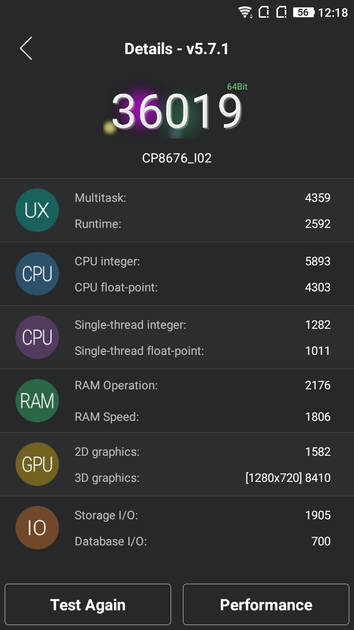
AnTuTu Benchmark
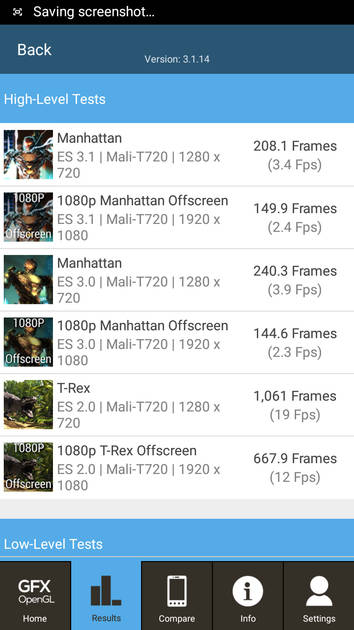
Graphics Benchmark
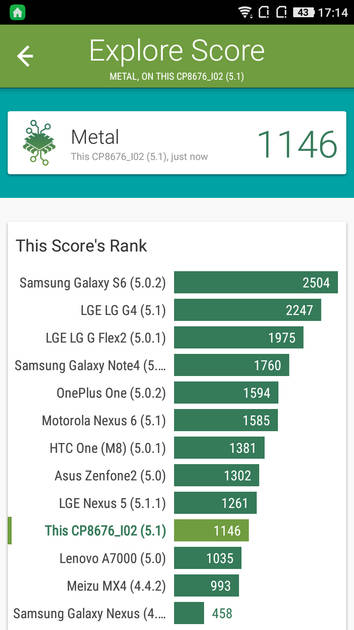
Vellamo Metal Benchmark
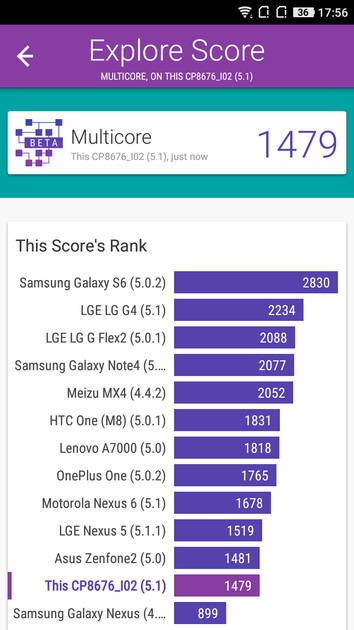
Vellamo Multicore Benchmark
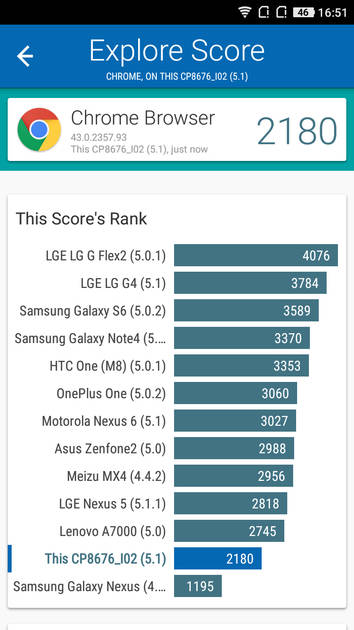
Vellamo Browser Benchmark
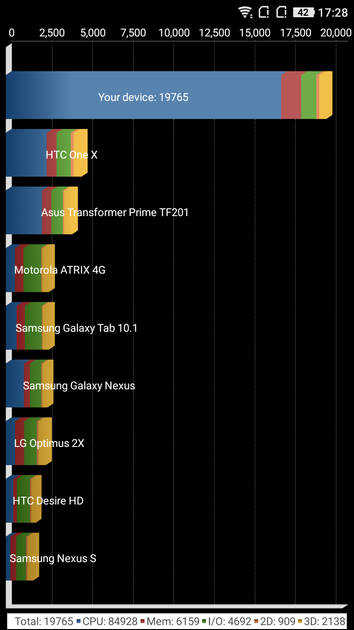
Quadrant Benchmark
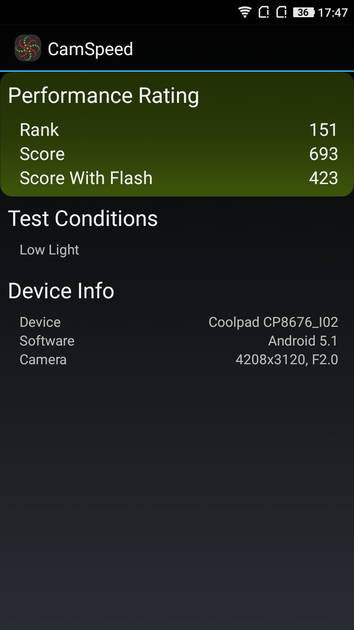
Camera Speed Benchmark
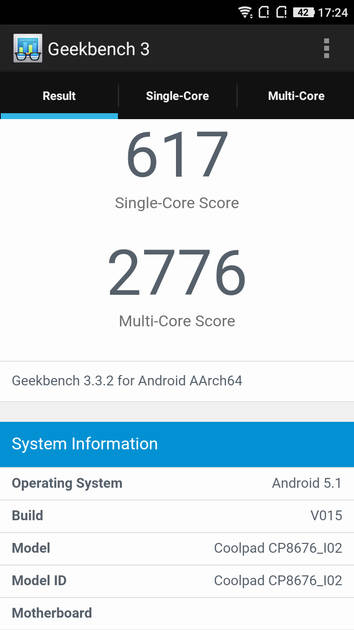
Geekbench3 Benchmark
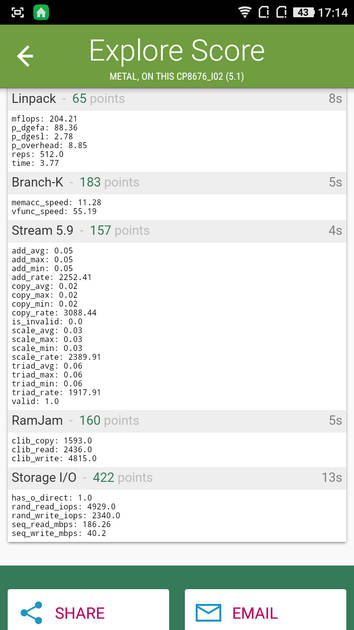
Linpack Benchmark
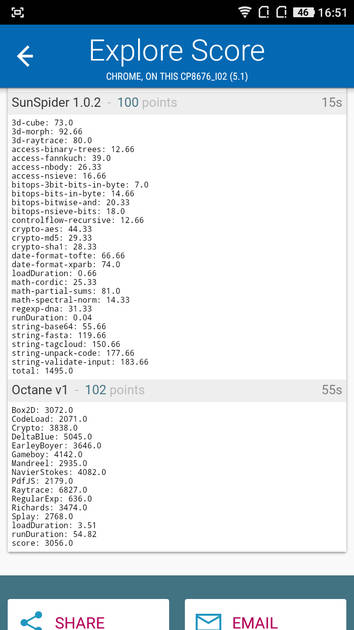
Sunspider Benchmark
|
Display
(Excellent)
|
|
|---|---|
| Display Type | IPS LCD |
| Screen Size | 5.5 inches (13.97 cm) |
| Resolution | 720x1280 px (HD) |
| Pixel Density | 267 ppi |
| Screen to Body Ratio (calculated) | 71.56 % |
UI Screenshots

Lock Screen
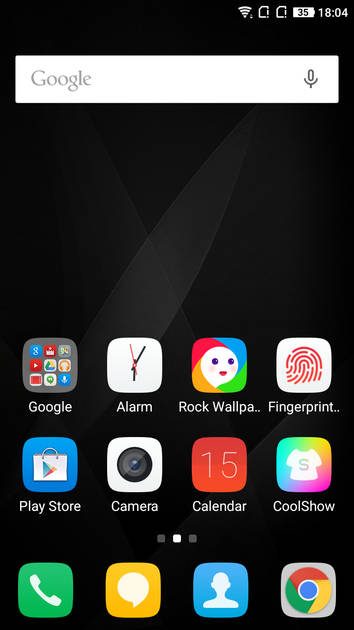
Home Screen
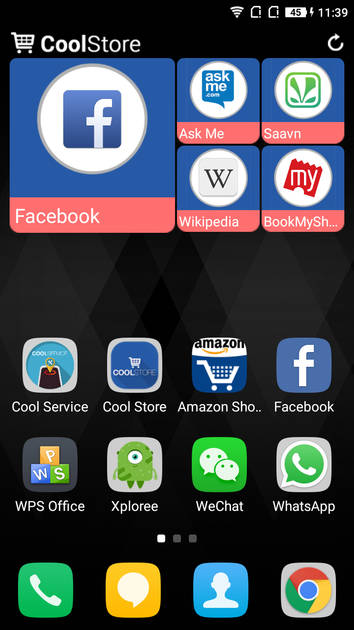
Screen With Widgets

Dialer Screen
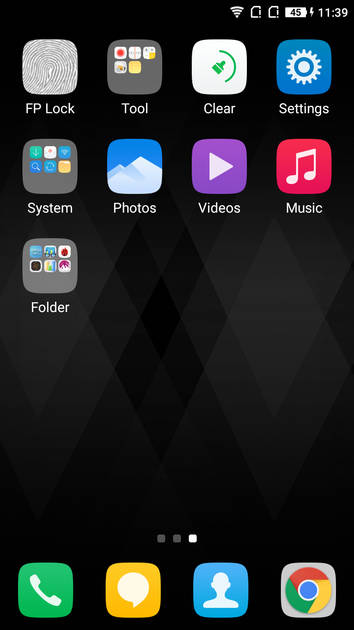
App Drawer
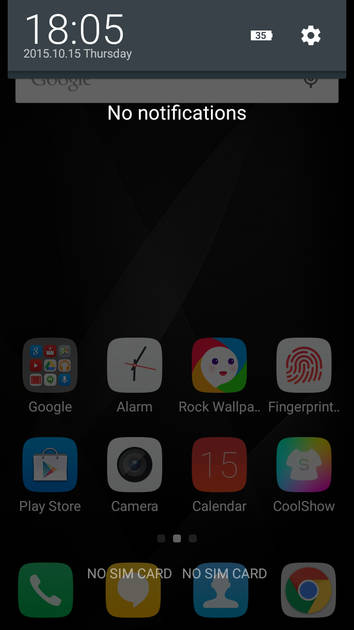
Notification Panel
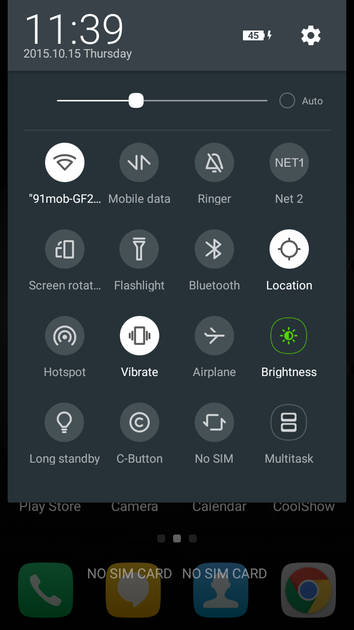
Quick Settings Panel
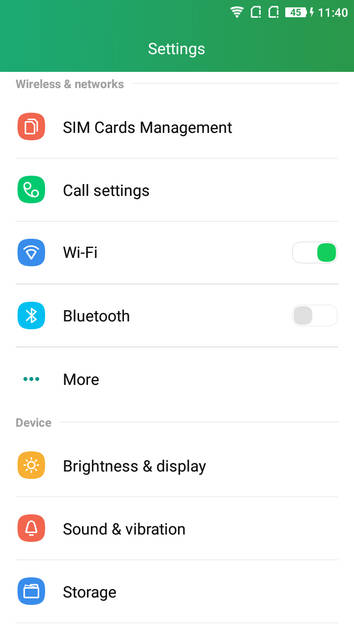
Settings Screen
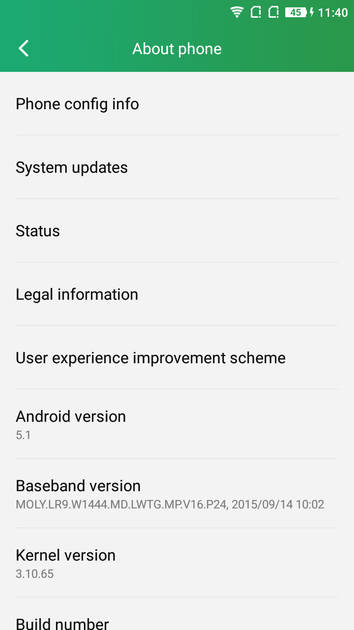
OS Version
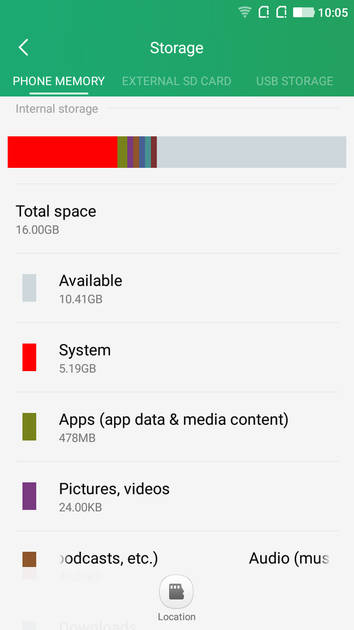
Storage
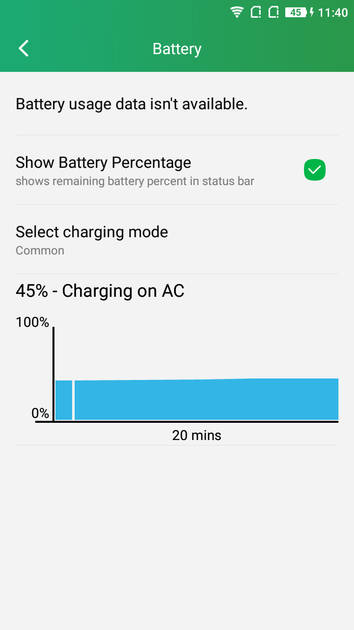
Battery
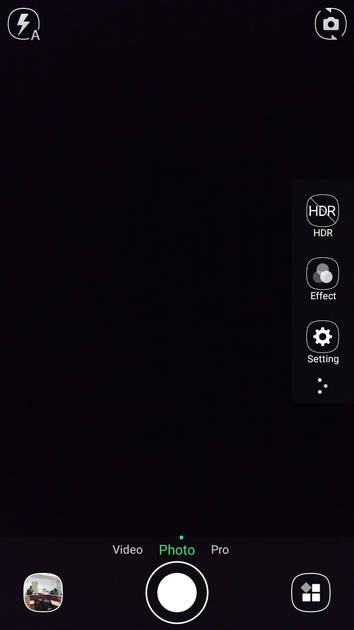
Camera Options
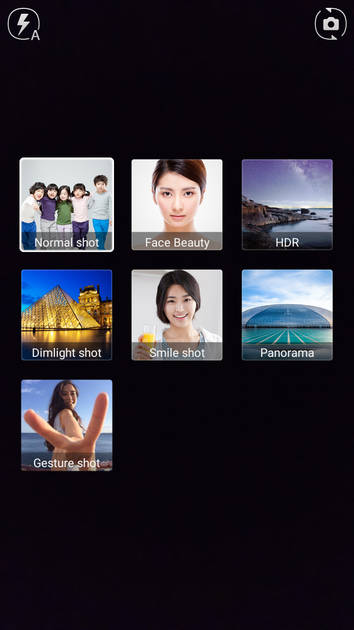
Camera Modes
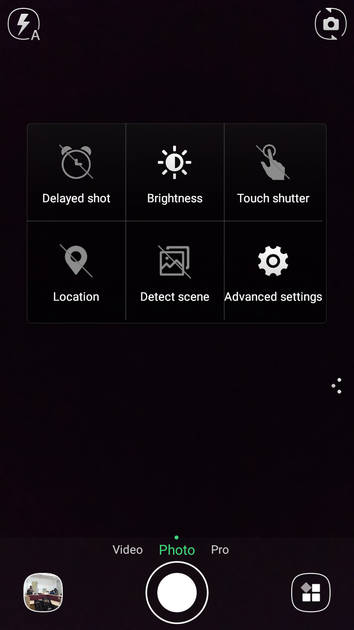
Camera Settings
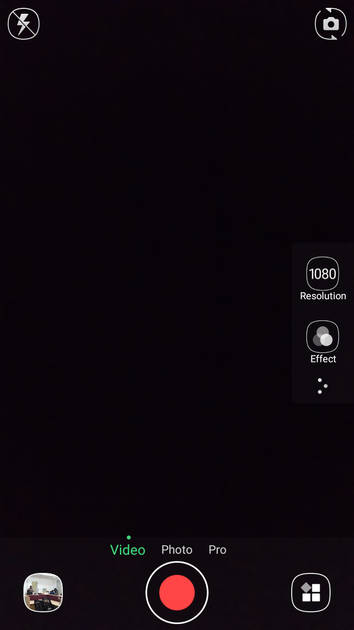
Video Size Options
|
Design |
|
|---|---|
| Height | 151 mm |
| Width | 77 mm |
| Thickness | 9.3 mm |
| Weight | 155 grams |
|
Click to View

|
Rear Camera
(Good)
|
||||||
|---|---|---|---|---|---|---|
| Resolution | ||||||
|
||||||
| Autofocus | Yes | |||||
| OIS | No | |||||
| Flash | Yes, LED Flash | |||||
| Image Resolution | 4128 x 3096 Pixels | |||||
| Settings | Exposure compensation, ISO control | |||||
| Shooting Modes |
Continuous Shooting High Dynamic Range mode (HDR) |
|||||
| Camera Features |
Digital Zoom Auto Flash Digital image stabilization Face detection Touch to focus |
|||||
| Video Recording | 1920x1080 @ 30 fps | |||||
Rear Camera Samples

Close Up

Low Light

Low Light With Flash

Colour Variance
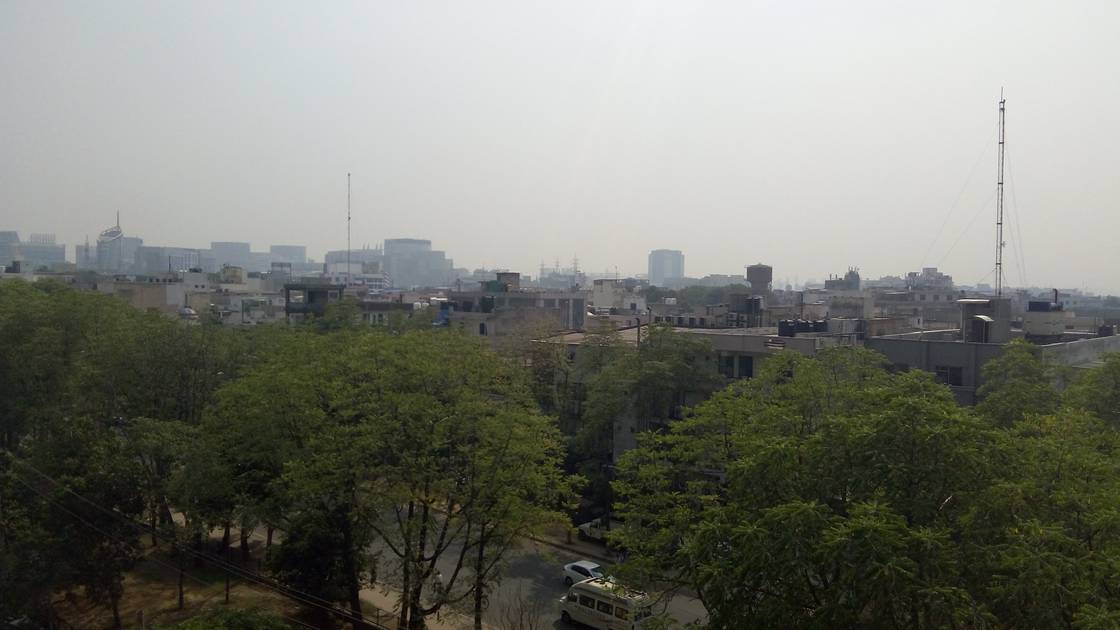
Long Shot

HDR Off
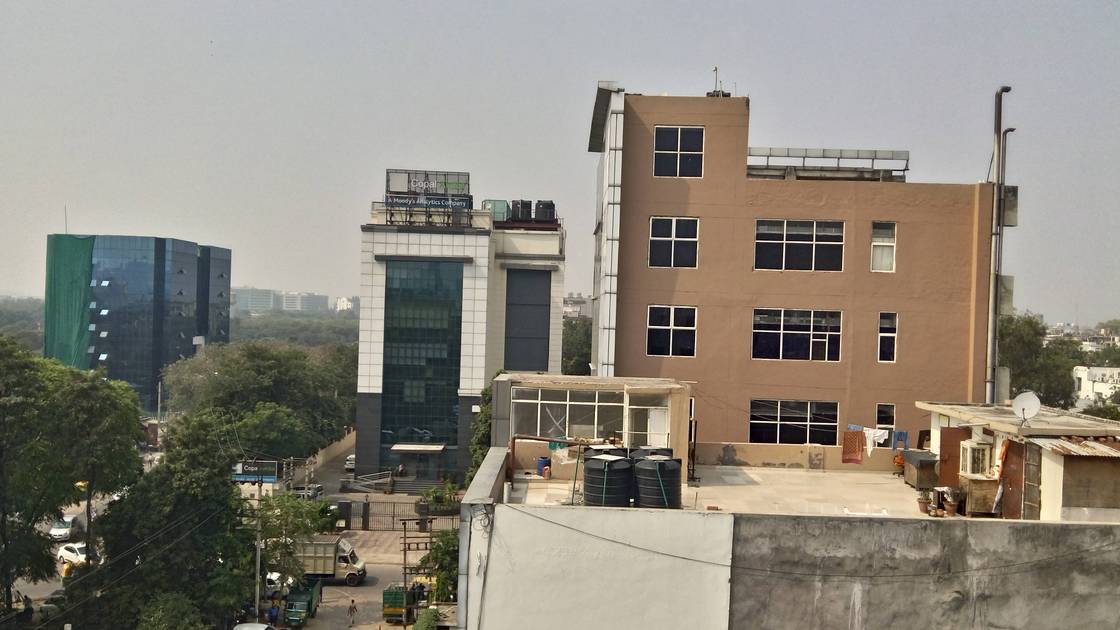
HDR On
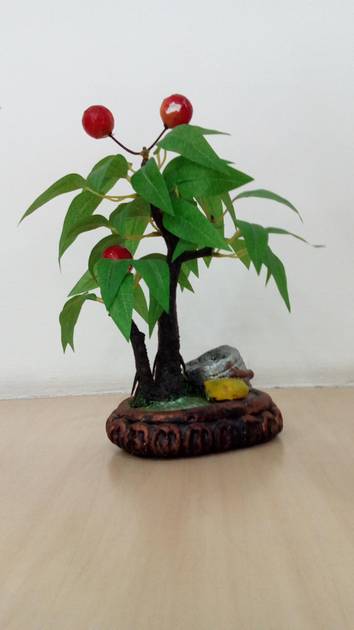
Front Shot
|
Front Camera
(Avg)
|
||||
|---|---|---|---|---|
| Resolution | ||||
|
||||
| Autofocus | No | |||
| Flash | No |
Battery
(Very Good)
|
|
|---|---|
| Capacity | 3000 mAh |
| Battery Type | Li-Polymer |
Storage |
|
|---|---|
| Internal Storage | 16 GB |
| Expandable Storage | Yes, Up to 64 GB |
Network & Connectivity |
|
|---|---|
| SIM Slot(s) | Dual SIM |
| SIM Type | SIM1: Micro, SIM2: Micro |
| Network Support | 5G Not Supported, 4G |
| SIM 1 |
4G bands, 4G Speed
Expand
|
| SIM 2 |
4G bands, 4G Speed
Expand
|
| SAR Value | Head: 0.249 W/kg, Body: 0.425 W/kg |
| Wi-Fi | Yes, Wi-Fi 4 (802.11 b/g/n) |
| Wi-Fi Features | Mobile Hotspot |
| Bluetooth | Yes, v4.0 |
| GPS | Yes with A-GPS |
| NFC | No |
Multimedia |
|
|---|---|
| Audio Jack | 3.5 mm |
Sensors |
|
|---|---|
| Fingerprint Sensor | Yes |
| Fingerprint Sensor Position | Rear |
| Other Sensors | Light sensor, Proximity sensor, Accelerometer, Compass, Gyroscope |
Coolpad Note 3 User Reviews
Coolpad Note 3 Key Highlights
| Processor | MediaTek MT6753 |
| RAM & Storage | 3 GB + 16 GB |
| Display | 5.5", 720 x 1280 Resolution |
| Rear Camera | 13 MP |
| Front Camera | 5 MP |
| Battery | 3000 mAh |













Popular Links
- All Upcoming Phones
- vivo V80 5G
- OPPO F35 Pro
- vivo S2 FE 5G
- Xiaomi Redmi Note 17 Pro Max 5G
- OPPO F35
- Samsung Mobiles
- Motorola Mobiles
- vivo Mobiles
- OPPO Mobiles
- Tecno Mobiles
- realme Mobiles
- Xiaomi Mobiles