As has been the tradition with One UI releases, Samsung often pushes an ‘x.5’ update a few months after a major Android update. With One UI 9, based on Android 17, launching out of the box on the Galaxy Z Fold 8 series and Galaxy Z Flip 8, Samsung has now opened up the One UI 9.5 beta program for the Galaxy S26 series in several markets. While users can download the update in beta, the stable One UI 9.5 update should debut with the Galaxy S27 series early next year.
Table of Contents
One UI 9.5 beta update: what’s new
With the One UI 9.5 release, Samsung is primarily focusing on offering more precise camera controls, personalised health insights, improved accessibility features, and stronger privacy protections for everyday use.
Redesigned camera app
Right off the bat, users on One UI 9.5 will notice that key camera controls and the zoom bar are readily available in the viewfinder. This removes the need to open the camera app and search for the required controls and settings. Similarly, Enhanced Pro and Pro video modes now offer expanded manual controls, along with custom presets tailored to specific shooting conditions.
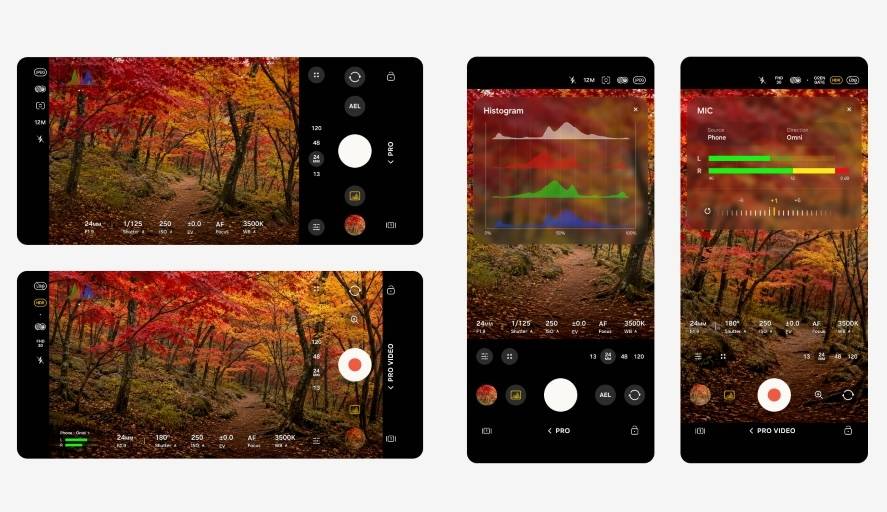
Samsung notes that these advanced modes are restricted to models that fully support the standard Pro options and are unavailable on devices equipped with Pro Lite variants. With key camera controls readily available, users can save time and capture the right moment without digging through settings to find the desired option.
Samsung Health app changes
The Samsung Health app has also received a subtle revamp with the addition of the Mindful Note feature. As the name suggests, it lets you jot down your thoughts and feelings and reflect on them from time to time. To make things easier, it also offers free writing and guided prompts to help you put your thoughts down in a simple, easy-to-understand way.
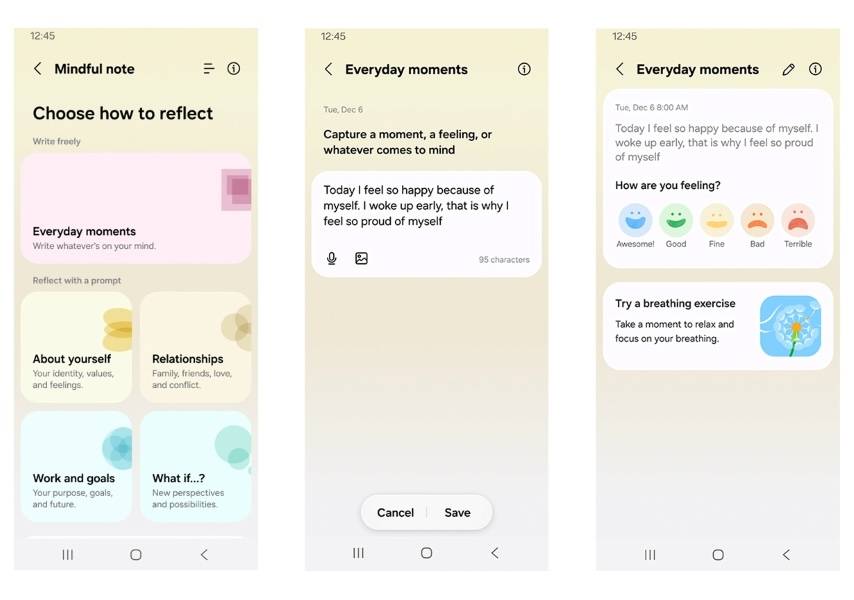
In addition, a new Medications feature lets users add prescriptions, vitamins, and supplements; set personalised reminders; and track medication adherence. As for the features’ real-world implications, it could help users turn passive prescription lists into an active tool that supports consistency, reduces preventable health setbacks, and gives people greater control over their wellness routines.
App lock comes to One UI
After years of waiting, One UI 9.5 finally brings App Lock for individual apps, a feature that has been available on all major Android skins for a while now, such as ColorOS, HyperOS, OriginOS, and others.
With App Lock enabled, users can lock selected apps with biometric authentication (fingerprint or face) or their screen lock. Furthermore, when an app is locked, its notifications and widget contents are securely hidden behind a lock. With App Lock on One UI, users can be assured that others don’t access their apps when handing over their device, and it also removes the need to use third-party apps to lock apps.
Accessibility: Quicker Access to Essential Controls
One UI 9.5 introduces movable floating shortcuts that can be placed anywhere on the screen, giving users instant one-tap access to their most-used functions and helping the interface feel more efficient.
Accessibility support for hearing-aid users has also been strengthened. New controls built into the notification panel let people fine-tune volume and send selected system audio, such as alerts, ringtones, and alarms, straight to their paired hearing devices.
While Samsung’s official press release mentions these changes, the One UI 9.5 update could include more changes and improvements across several areas.
How to apply and install One UI 9.5 beta update, eligible devices
First, the One UI 9.5 beta program is live in select countries, including Germany, India, Korea, Poland, the UK, and the U.S., for the Galaxy S26, Galaxy S26 Plus, and Galaxy S26 Ultra. Users interested in downloading and installing the update can follow these steps:
Step 1: Go ahead and open the Samsung Members app and sign in with your Samsung account, if you haven’t already.
Step 2: Now look for the One UI 9.5 banner and register for the update
Step 3: Once registered, open the Settings app and go to the Software update section
Step 4: On the next screen, the phone will fetch for the One UI 9.5 update. Once available, select ‘Download and Install’
Step 5: After that, the update will install shortly, and you’ll boot into One UI 9.5.
Per Android Authority, the One UI 9.5 update weighs around 3.49GB to 3.6GB and has several build numbers ending in ZZKH, CZKH, ZZKN, CZKN, and CZKF. Since this is a beta update, users should proceed with caution and back up their data before clicking Install to avoid data and information loss.