Choosing the best laptop for students in 2026 isn’t as straightforward as picking the fastest processor or the laptop with the biggest discount. Between assignments, online classes, research, presentations, coding projects, and the occasional Netflix binge, a student’s laptop needs to juggle quite a few responsibilities. And, ideally, it shouldn’t weigh down an already overstuffed backpack.
The good news? There are plenty of options across different budgets, from affordable everyday laptops to lightweight machines with premium displays and capable processors. The trick is finding one that balances performance, portability, battery life, and features without spending money on hardware that might never get used.
We’ve shortlisted six laptops for students in India, each suited to a different need. The Dell XPS 13 (2026) takes our top spot as the best overall laptop for students, thanks to its compact design, sharp touchscreen, and well-rounded approach to everyday computing. Meanwhile, the Lenovo V 14 caters to budget-conscious buyers, the ASUS ExpertBook P3 focuses on connectivity, and the HP OmniBook 5 OLED targets students who spend long hours away from a charger.
Here’s a closer look at the best laptops for students in 2026, including their key specifications, advantages, limitations, and approximate prices.
Note: Prices mentioned in this article are indicative and were checked against the respective product listings at the time of writing. Retailer discounts, bank offers, and availability can change.
Table of Contents
Dell XPS 13 (2026): Best overall laptop for students
Finding a laptop that can handle an entire college routine without becoming a burden is harder than it sounds. The Dell XPS 13 (2026) makes a strong case for itself by focusing on the things students are likely to appreciate every day: portability, a high-resolution display, a premium build, and dependable performance for everyday workloads.
Weighing approximately 1kg and measuring just 12.7mm at its thinnest point, the XPS 13 is exceptionally easy to carry between lectures, libraries, cafés, and home. Its aluminium chassis also gives it a refined appearance without making the laptop unnecessarily bulky. At approximately Rs. 79,990, it brings Dell’s premium XPS experience to a more accessible price point than many traditional flagship ultraportables.
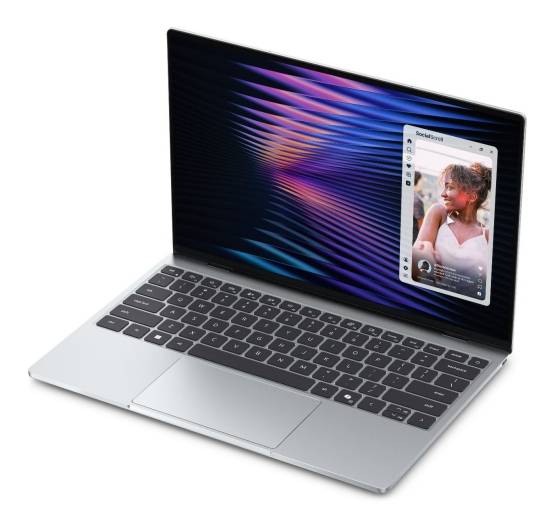
The display is another highlight. The 13.4-inch 2.5K InfinityEdge touchscreen offers a resolution of 2560 × 1600 pixels, up to 500 nits of brightness, and a variable refresh rate ranging from 30Hz to 120Hz. With 100% DCI-P3 colour coverage, it should also appeal to students who occasionally edit photographs, work on presentations, or create visual content. Under the hood, the selected configuration packs an Intel Core 5 320 processor, 8GB LPDDR5X memory, and a 512GB SSD. This combination is well suited to research, document editing, online classes, and everyday multitasking, although the limited memory makes it less suitable for demanding creative workloads.
Battery life is another potential advantage. Dell claims up to 17 hours of Netflix streaming under its specified test conditions, although actual runtime will vary with workload, brightness, and settings. The compact design, touchscreen, and modern connectivity round out a package that prioritises everyday convenience over raw computing muscle.
Key specifications:
- Processor: Intel Core 5 320, 6 cores, up to 4.6GHz
- Graphics: Integrated Intel Graphics
- RAM: 8GB LPDDR5X, 7467 MT/s, single-channel
- Storage: 512GB PCIe NVMe SSD
- Display: 13.4-inch 2.5K touchscreen, 30–120Hz, up to 500 nits
- Operating system: Windows 11 Home
- Weight: Approximately 1kg
- Price: Rs 84,990 (Instant Rs 5,000 cashback on Credit Card EMI and non-EMI transactions)
Pros
- Extremely lightweight, premium aluminium design
- Sharp 2.5K touchscreen with 120Hz refresh rate
- Compact footprint for everyday campus use
- Fast SSD and modern wireless connectivity
Cons
- 8GB RAM limits heavier multitasking
- Not designed for demanding gaming workloads
Compact port selection may require adapters
2. Lenovo V 14 (2026): Best afforable laptop for students
Not every student needs an expensive ultraportable with a high-resolution touchscreen. Sometimes, a laptop simply needs to run a browser with multiple tabs, open lecture notes, handle spreadsheets, and get through assignments without fuss. The Lenovo V 14 (2026) is aimed squarely at that audience. Its selected configuration features a 13th Gen Intel Core i5-13420H processor, 8GB of DDR5 RAM, and a 512GB SSD. The processor provides a capable foundation for everyday computing, while the SSD should make application launches and file access feel responsive.
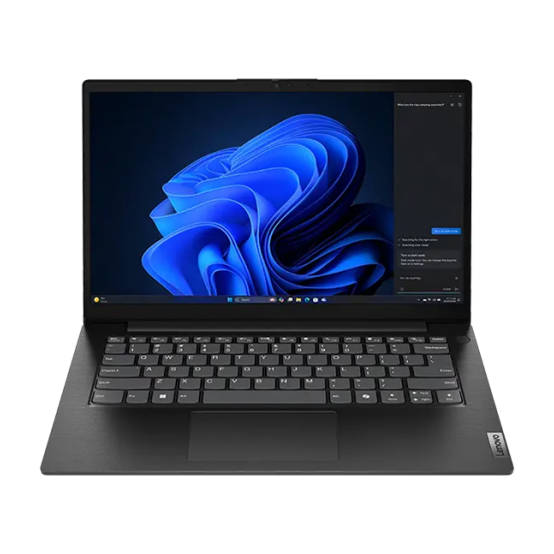
At approximately Rs. 60,990, the Lenovo V 14 is the most affordable laptop on this list. That makes it worth considering for students who need a dependable machine for academic work but don’t want to stretch their budgets. Its 14-inch Full HD display offers a practical screen size for reading documents, writing essays, and attending online classes without making the laptop particularly cumbersome. Its relatively conventional design also suits those who prefer function over flashy styling.
There are compromises, naturally. The 8GB RAM configuration is adequate for lighter workloads, but users who routinely keep dozens of browser tabs open alongside resource-intensive applications may find it limiting. The display is also more functional than premium, so students who prioritise high-resolution visuals or extensive creative work may want to look at the other options here.
Key specifications
- Processor: Intel Core i5-13420H, 13th Gen
- Graphics: Integrated Intel UHD Graphics
- RAM: 8GB DDR5
- Storage: 512GB SSD
- Display: 14-inch Full HD
- Operating system: Windows 11 Home
- Weight: Approximately 1.4kg
- Price: Approximately Rs 60,990
Pros
- Most affordable option on this list
- Capable processor for everyday academic work
- 512GB SSD provides useful storage space
- Practical 14-inch display size
Cons
- 8GB RAM may limit heavy multitasking
- Display lacks premium visual features
- Less compact than the Dell XPS 13
3. ASUS ExpertBook P3: Best-connected laptop for students
There’s one laptop accessory that students could probably do without: the little pouch filled with adapters and dongles. Between external monitors, USB drives, projectors, wired networking, and other peripherals, modern laptops can run out of ports surprisingly quickly. The ASUS ExpertBook P3 takes a more practical approach, offering an extensive selection of connectivity options that makes it particularly useful for students who frequently connect their laptops to other devices.
The selected configuration includes an Intel Core Ultra 5 225H processor, 16GB of DDR5 RAM, and a 512GB SSD. That’s a capable foundation for research, presentations, spreadsheets, and multitasking. The 14-inch form factor also keeps the laptop manageable for carrying between classrooms and study spaces. Its business-oriented design prioritises practicality over unnecessary visual flourishes, which should suit students who prefer a straightforward work machine.
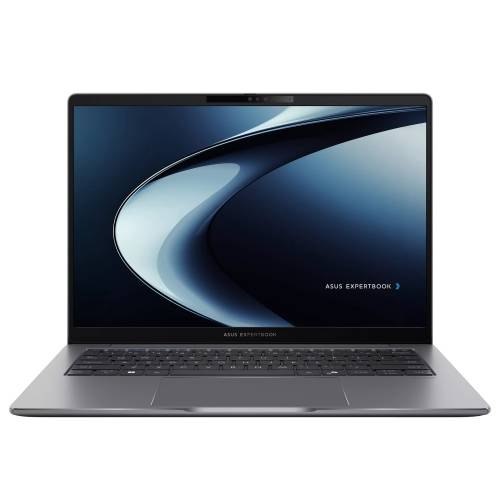
Connectivity is where the ExpertBook P3 stands out. It includes a Thunderbolt 4 port with USB4 compatibility, display output, and power delivery, alongside another USB-C port, two USB-A ports, HDMI 2.1, a 3.5mm audio jack, and RJ45 Gigabit Ethernet. This assortment makes it easier to connect external displays, transfer files, plug in accessories, and use wired internet without relying entirely on adapters. For students working with multiple displays or frequently presenting in classrooms, that flexibility can be genuinely useful.
The 16GB RAM configuration also gives it more breathing room for multitasking than the 8GB variants of the Dell XPS 13 and Lenovo V 14 featured here. However, the ExpertBook P3’s strongest argument is its connectivity rather than its premium portability.
Key specifications
- Processor: Intel Core Ultra 5 225H
- Graphics: Integrated Intel Arc graphics
- RAM: 16GB DDR5
- Storage: 512GB SSD
- Display: 14-inch display
- Operating system: Windows 11 Home
- Ports: Thunderbolt 4, USB-C, 2 × USB-A, HDMI 2.1, RJ45 Ethernet, 3.5mm audio
- Weight: Approximately 1.49kg
- Price: Approximately Rs 81,990
Pros
- Extensive selection of connectivity options
- Thunderbolt 4 and HDMI 2.1 support
- Built-in Gigabit Ethernet port
- 16GB RAM for multitasking
Cons
- Heavier than compact ultraportables
- Design prioritises practicality over portability
- Less suited to buyers seeking the smallest laptop
4. HP OmniBook 5 OLED: Best laptop for long days away from the charger
A laptop’s battery life becomes especially important when the nearest power outlet is either occupied or nowhere to be found. Students who spend their days moving between lectures, libraries, group projects, and cafés will appreciate a machine that doesn’t constantly demand a charging break. The HP OmniBook 5 OLED aims to deliver that kind of convenience, pairing a Snapdragon X platform with a lightweight design and a high-quality display.
The selected configuration comes with a Snapdragon X processor, 16GB RAM, and a 512GB SSD. This combination is designed for everyday productivity, including browsing, writing, video calls, and working with documents. At approximately 1.35kg, the laptop is also reasonably easy to carry around. Its 14-inch OLED display is another attraction, offering the rich contrast and deep blacks associated with OLED panels. Whether it’s lecture material, photographs, or an episode of a favourite series after a long day, the screen should make everyday viewing more enjoyable.
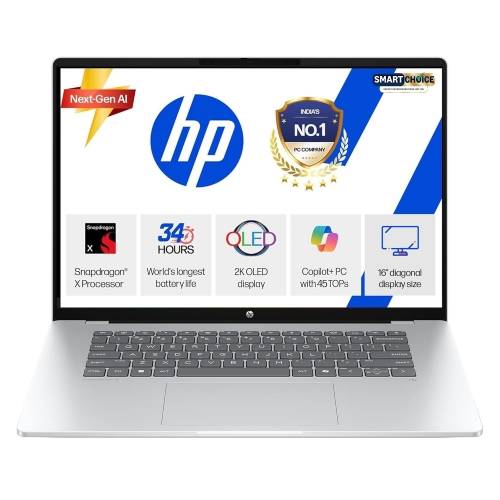
HP advertises up to 34 hours of battery life for this model, although that figure should be treated as a manufacturer claim rather than an expectation for every workload. Actual runtime depends on brightness, applications, connectivity, and usage patterns. Nevertheless, the combination of a Snapdragon platform and a portable chassis makes battery-conscious computing the laptop’s central appeal.
One consideration is software compatibility. Windows on Arm has matured considerably, but some specialised applications and peripherals may not behave exactly as they would on an Intel-based Windows laptop. Students who rely on niche engineering tools, older software, or particular laboratory applications should check compatibility before purchasing.
Key specifications
- Processor: Qualcomm Snapdragon X
- Graphics: Integrated Qualcomm Adreno graphics
- RAM: 16GB
- Storage: 512GB SSD
- Display: 14-inch 2K OLED
- Operating system: Windows 11 Home
- Weight: Approximately 1.35kg
- Advertised battery life: Up to 34 hours
- Price: Approximately Rs 86,159
Pros
- Lightweight design for everyday portability
- OLED display with rich contrast
- 16GB RAM and 512GB SSD
- Designed for power-efficient computing
Cons
- Application compatibility needs checking
- Advertised battery life isn’t guaranteed in practice
- Not intended for demanding gaming
5. Samsung Galaxy Book6: Best laptop for a connected workflow
For students who already use a compatible Samsung Galaxy smartphone or tablet, a laptop can be more than a standalone computer. It can become another part of an interconnected setup, making it easier to move between devices and manage everyday tasks. The Samsung Galaxy Book6 is worth considering for buyers who want to make the most of that connected-device experience.
The selected configuration features an Intel Core Ultra 7 355 processor, 16GB RAM, and a 512GB SSD. Its 16-inch display provides a larger workspace than the 13.4-inch panel on the Dell XPS 13, which can be useful when working with multiple documents, spreadsheets, or research material. The larger screen also makes it comfortable for watching videos and handling everyday tasks without constantly switching between windows.
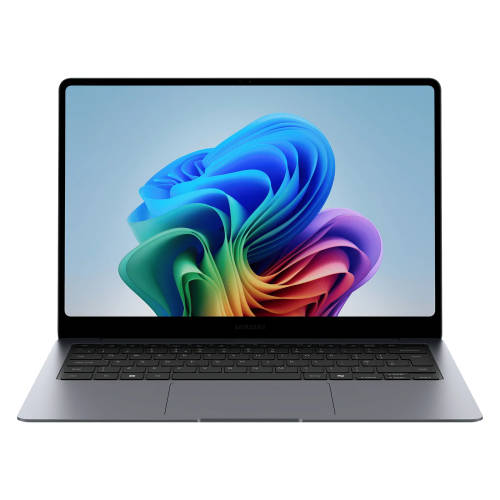
Samsung’s connected-device features are the main reason to consider this laptop. Depending on the compatible devices and software being used, students may be able to move files, access selected smartphone features, and work across their Galaxy devices more conveniently. That can be particularly useful for those who already have a Samsung phone and tablet and want them to work together as part of their study setup.
The catch is the price. At approximately Rs. 1,17,699, the Galaxy Book6 is considerably more expensive than the other options on this list. Its larger display and modern processor platform may appeal to certain users, but not every student needs to spend this much on a laptop. Buyers who don’t already use Samsung devices may also find the ecosystem features less compelling.
Key specifications
- Processor: Intel Core Ultra 7 355, Series 3
- Graphics: Integrated Intel Graphics
- RAM: 16GB LPDDR5X
- Storage: 512GB SSD
- Display: 16-inch display
- Operating system: Windows 11 Home
- Price: Approximately Rs 1,17,699
Pros
- Large 16-inch workspace
- Modern Intel Core Ultra processor
- 16GB RAM for multitasking
- Useful connected-device features for Galaxy users
Cons
- Expensive compared with other options here
- Larger footprint than compact ultraportables
- Ecosystem benefits depend on compatible devices
6. Acer Swift Neo OLED: Best laptop for entertainment
A student’s laptop needs to do more than open PDFs and run presentation software. It also doubles as a screen for films, YouTube videos, and the occasional gaming session when deadlines aren’t looming. The Acer Swift Neo OLED is a good fit for students who want an everyday laptop with a display that makes downtime more enjoyable.
The selected configuration features an Intel Core Ultra 5 125H processor, 16GB of LPDDR5 RAM, and a 512GB SSD. Its 14-inch WUXGA OLED display is the headline feature, offering the contrast and deep blacks that make OLED panels particularly appealing for watching films and other video content. The 1920 × 1200 resolution also provides a 16:10 workspace, which is useful for reading documents and working on assignments. At approximately 1.25kg, the laptop is light enough to carry around campus without adding much bulk.
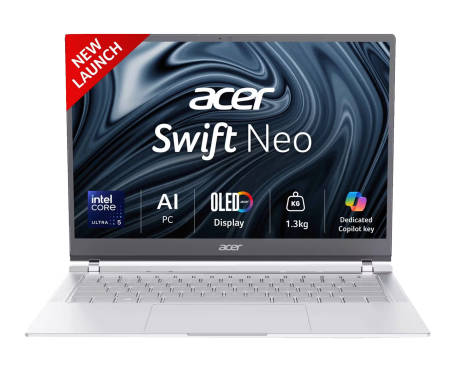
The Swift Neo OLED should handle everyday academic tasks comfortably, including browsing, online classes, document editing, and multitasking. The 16GB RAM configuration gives it more room to juggle applications than an 8GB machine, while the SSD provides space for coursework and media. It also includes useful everyday features such as a backlit keyboard and fingerprint reader.
There is one important qualification: the Intel Core Ultra 5 125H is an older-generation processor compared with some newer chips available in this price range. That doesn’t automatically make it unsuitable for everyday use, but students prioritising the newest processor architecture may prefer a more recent platform. The display is also WUXGA rather than a higher-resolution OLED panel, so buyers shouldn’t confuse it with more expensive premium-screen laptops.
Key specifications
- Processor: Intel Core Ultra 5 125H
- Graphics: Integrated Intel Arc graphics
- RAM: 16GB LPDDR5
- Storage: 512GB PCIe NVMe SSD
- Display: 14-inch WUXGA OLED, 1920 × 1200
- Operating system: Windows 11 Home
- Weight: Approximately 1.25kg
- Other features: Backlit keyboard, fingerprint reader, 1080p webcam
- Price: Approximately Rs 69,990
Pros
- OLED display with rich contrast
- Lightweight 1.25kg design
- 16GB RAM for everyday multitasking
- Backlit keyboard and fingerprint reader
Cons
- Older-generation Intel processor
- WUXGA resolution rather than higher-resolution OLED
- Not designed for demanding gaming
Which is the best laptop for students in 2026?
The right choice depends on what matters most: price, portability, battery life, connectivity, or entertainment. Here’s a quick comparison of the six laptops to help narrow things down.
Laptop | Biggest strength | Processor | RAM and storage | Display | Approx. price |
Dell XPS 13 (2026) | Compact design, sharp touchscreen, premium build | Intel Core 5 320 | 8GB RAM, 512GB SSD | 13.4-inch 2.5K touchscreen, 120Hz | Rs 84,990 |
Lenovo V 14 (2026) | Affordable everyday computing | Intel Core i5-13420H | 8GB DDR5, 512GB SSD | 14-inch FHD, 60Hz | Rs 60,990 |
ASUS ExpertBook P3 | Extensive port selection | Intel Core Ultra 5 225H | 16GB DDR5, 512GB SSD | 14-inch display, 60Hz | Rs 81,990 |
HP OmniBook 5 OLED | Power-efficient platform and OLED display | Snapdragon X | 16GB RAM, 512GB SSD | 14-inch 2K OLED, 60Hz | Rs 86,159 |
Samsung Galaxy Book6 | Large screen and connected-device features | Intel Core Ultra 7 355 | 16GB RAM, 512GB SSD | 16-inch display, 60Hz | Rs 1,17,699 |
Acer Swift Neo OLED | OLED display for entertainment | Intel Core Ultra 5 125H | 16GB LPDDR5, 512GB SSD | 14-inch WUXGA OLED, 60Hz | Rs 69,990 |
Our recommendation is the Dell XPS 13 (2026) for students who want the most well-rounded option. Its compact design, high-resolution touchscreen, and premium build make it particularly appealing for everyday campus use.
The Lenovo V 14 is the more affordable choice, while the ASUS ExpertBook P3 makes sense for those who frequently connect external devices. The HP OmniBook 5 OLED is worth considering for students who prioritise battery-conscious computing; the Samsung Galaxy Book6 suits those invested in the Galaxy ecosystem, and the Acer Swift Neo OLED is a good option for students who want an entertainment-friendly display.
Frequently asked questions
Which is the best laptop for students in 2026?
The Dell XPS 13 (2026) is our top overall pick for students who want a lightweight Windows laptop with a premium build, a high-resolution touchscreen, and capable everyday performance. Its compact design makes it easy to carry between classes, while the 512GB SSD provides useful storage for coursework and applications. However, students who need to run demanding software should consider whether its 8GB RAM configuration is sufficient.
Which is the best budget laptop for students in India?
The Lenovo V 14 (2026) is our budget recommendation, with the selected configuration priced at approximately Rs. 60,990 at the time of writing. It features a 13th Gen Intel Core i5-13420H processor, 8GB DDR5 RAM, and a 512GB SSD. It’s suitable for everyday academic work, online classes, browsing, and document editing.
How much should a student spend on a laptop in 2026?
The right budget depends on the intended workload. Students who primarily use a laptop for assignments, browsing, and online classes may find an affordable model around Rs. 60,000 sufficient. Those who value premium portability, better displays, or additional features may want to consider options around Rs. 70,000–Rs. 90,000. More expensive laptops can make sense for specialised requirements, but spending more doesn’t automatically mean getting a better fit for every student.
Is 8GB RAM enough for a student laptop?
8GB RAM is generally sufficient for basic academic tasks, such as writing assignments, browsing, attending online classes, and using office applications. However, students who regularly multitask across numerous browser tabs or use heavier applications may benefit from 16GB RAM or more. In this list, the Lenovo V 14 has 8GB RAM, while the ASUS ExpertBook P3, HP OmniBook 5 OLED, Samsung Galaxy Book6, and Acer Swift Neo OLED configurations have 16GB. The Dell XPS 13 is available in both 8GB and 16 GB RAM configurations.
Is an OLED laptop worth buying for students?
An OLED laptop can be worth buying for students who watch a lot of videos, enjoy films, or work with visual content. OLED panels can deliver deep blacks, high contrast, and vibrant colours, making them particularly appealing for entertainment. The Acer Swift Neo OLED and HP OmniBook 5 OLED are the two OLED options in this list. Students should also consider resolution, brightness, battery life, and price rather than choosing a laptop based on panel technology alone.
Which laptop is best for students who need long battery life?
The HP OmniBook 5 OLED is our pick for students who prioritise battery-conscious computing. Its Snapdragon X platform is designed with power efficiency in mind, and HP advertises up to 34 hours of battery life for the selected model. Actual battery life varies with usage, display brightness, applications, and settings, so the advertised figure shouldn’t be treated as a guaranteed runtime.
Which laptop is best for coding and programming students?
The ASUS ExpertBook P3 and Dell XPS 13 are both worth considering for coding and general programming coursework, depending on the student’s needs. The ASUS offers 16GB RAM and a generous selection of ports, while the Dell prioritises portability and a compact design. Students working with virtual machines, large development environments, or demanding workloads should pay particular attention to RAM, processor performance, and software requirements before choosing a configuration.
Which laptop is best for students who travel frequently?
The Dell XPS 13 is our preferred choice for students who frequently travel between campus, home, libraries, and other study spaces. Its approximately 1kg weight and compact 13.4-inch design make it particularly easy to carry. The Acer Swift Neo OLED and HP OmniBook 5 OLED are also relatively lightweight alternatives, although Dell’s smaller footprint gives it a distinct portability advantage.
Should students buy an Intel or Snapdragon laptop?
Intel and Snapdragon laptops can both work well for students, but the right choice depends on the workload. Intel-based laptops generally offer broad compatibility with Windows software, while Snapdragon-based models focus on power efficiency and can offer excellent battery life. Students who use specialised engineering, architecture, scientific, or legacy applications should check compatibility before buying an Arm-based Windows laptop.
Which is the best laptop for online classes, assignments, and everyday use?
For students who need one laptop for online classes, assignments, presentations, browsing, and entertainment, the Dell XPS 13 is our top overall recommendation. Its compact design, touchscreen, and SSD storage make it a practical everyday companion. Students on a tighter budget can consider the Lenovo V 14, while those who want an OLED display for entertainment may prefer the Acer Swift Neo OLED.
Is a lightweight laptop better for college students?
A lightweight laptop is often more convenient for college students because it is easier to carry between lectures, libraries, and home. Models weighing around 1–1.5kg can offer a useful balance between portability and screen size. However, weight shouldn’t be the only consideration: battery life, keyboard comfort, RAM, storage, and the applications required for coursework also matter.
What should students check before buying a laptop?
Before buying a laptop, students should consider the processor, RAM, storage, display, battery life, and portability to ensure the device meets their academic needs. A capable processor can handle coursework and everyday applications, while 8GB RAM is sufficient for basic tasks and 16GB offers more headroom for multitasking. A 512GB SSD is a good starting point for storing assignments, applications, and media. Display resolution, brightness, and panel type also matter, particularly for students who spend long hours reading or watching content.
Battery life should be assessed using independent tests wherever possible, rather than relying solely on manufacturer claims. Additionally, a lightweight design makes a laptop easier to carry around campus, while a suitable selection of ports helps connect external displays and peripherals. Finally, compare the actual selling price, warranty coverage, and available service options before making a purchase. Ultimately, the best laptop for college is one that meets the student’s requirements without paying extra for features that are unlikely to be used.