Google Maps rolls out a new battery saving mode, but there’s a catch
November Pixel Drop is here, and it brings a host of new features to Google smartphones, including AI-powered notifications summaries, Remix in Google Messages, Scam Detection, and more. But the one that truly caught my attention is Google Maps’ new power-saving mode – a thoughtful addition that could make a big difference for frequent navigators.
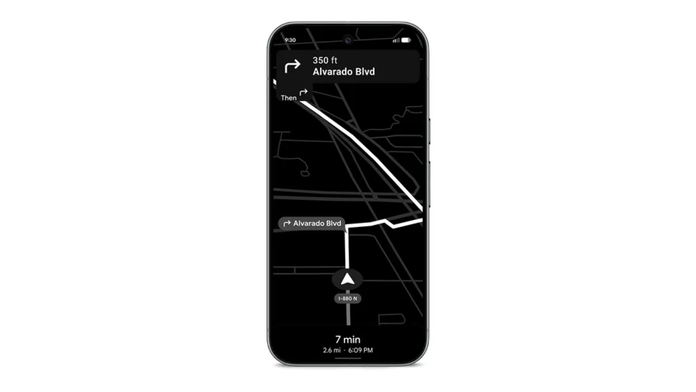
We all know how crucial it can be to save every last bit of battery life when your phone is running low, and Google Maps, being notoriously power-hungry, can quickly dampen the experience. This changes with the new update. Per Google’s blog, the new power-saving feature on its maps can increase the phone’s battery life by up to four hours. It has been made possible by switching from a bright, information-filled display to a modest black-and-white UI with only essential information visible on the screen.
This is likely to be a far more efficient solution than the existing battery-saving workarounds, such as switching to dark mode, limiting location access, or downloading offline maps. The new Google Maps power-saving mode tackles these issues directly by optimising the app’s display and performance specifically for low-power navigation.
That said, the feature remains exclusive to Google’s latest Pixel lineup – the Pixel 10, Pixel 10 Pro, Pixel 10 Pro XL, and Pixel 10 Pro Fold, possibly to make its offerings more power efficient than other smartphones during regular usage, such as navigation. Although it’s officially listed as part of the November 2025 security update, I wasn’t able to access it on my Pixel 10 even after installing the update. The feature doesn’t seem to be region-specific, which means one can expect it to be added in a future version of the same update.
Google further states that its maps’ power-saving feature will only be available in ‘Driving’ mode and doesn’t support other modes, such as walking or biking navigation. While there is no specific reason for that, we hope the feature is extended to other modes of navigation as well in the future.
The feature will be enabled by default and used in portrait orientation. In order to activate power saving mode, press the power button on your Pixel 10 devices after the navigation is initiated. This will change the layout to a more simplified version where nothing but the ETA, distance remaining, and next turn information will be visible in a black-and-white theme. To exit this mode, simply tap the screen or press the power button again.
Google appears to be tapping into the ‘AOD Min Mode’ on its latest Pixel smartphones to power the new battery-saving feature in Google Maps. This mode takes advantage of the Always-on Display’s ultra-low power state, using fewer colours, lower brightness, and a reduced refresh rate to show only essential information while conserving energy.
It’s an excellent feature that should ideally be available on every smartphone with an Always-on Display. For now, though, it’s unclear whether Google plans to extend it to its maps on other devices. If history is any indication, the feature could roll out more broadly with Google’s next major OS update – Android 17. Should that happen, it might make Google Maps an even more compelling choice for navigation compared to its competitors, such as Apple Maps.