
Xiaomi Mi4 64GB
+ Compare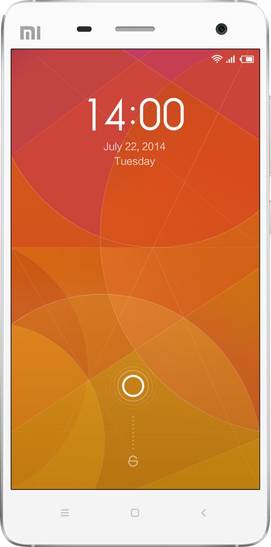

-
Design3

-
Rear Camera6

-
360° View

-
UI Screenshot8
![UI Screenshot]()
-
Benchmarks6
![Benchmarks]()
-
Videos2
![Videos]()


Key Specs
Performance
-
Qualcomm Snapdragon 801 -
Quad Core, 2.5 GHz -
3 GB RAM
Display
-
5.0 inches (12.7 cm); IPS LCD -
1080x1920 px (FULL HD)
Rear Camera
-
Single Camera Setup - 13 MP Primary Camera
-
LED Flash -
4k @30fps Video Recording
Front Camera
-
8 MP -
Full HD @30 fps Video Recording
Battery
-
3080 mAh -
Quick Charging v2.0
General
-
SIM1: Micro -
5G Not Supported -
16 GB / 64 GB internal storage, Non Expandable
Xiaomi Mi4 64GB Prices in India
Sorry, this product is not available in any store.
Xiaomi Mi4 64GB Expert Review Summary
Expert Rating:
![Deepak Dhingra]()
Verdict
It`s difficult to put things in perspective without a price tag, but since the 16GB model of the Mi 4 is priced at 1,999 yuan in China, we can take that as an indicative price for the device. That amount converts to less than Rs 20,000, and if we were to venture a guess, we`d peg Indian pricing in the region of Rs 22,000, give or take a few. To put that into context, the most affordable Snapdragon 801-powered smartphones you can buy in India currently are the Oppo Find 7a and the HTC
Pros
- Stylish, premium looks and solid build
- Gorgeous display
- Very capable HDR mode on the primary camera
- Blazingly-fast performance
- Very good battery life
- Smorgasbord of useful features in MIUI
Cons
- Non-expandable storage
- NFC missing in action
- Runs hot when stressed
Specs at a glance
+
5-inch, 1,920 x 1,080 pixel OGS display (441ppi) 2.5GHz quad-core Qualcomm Snapdragon 801 processor 3GB RAM 13-megapixel primary camera, 8MP front 16GB storage (non-expandable) USB OTG, infrared, 3G, dual-band Wi-Fi 802.11 a/b/g/n/ac, Bluetooth 4.0, A-GPS, GLONASS, Wi-Fi Direct, Wi-Fi Hotspot, USB 2.0, TV-out via MHL Android KitKat 4.4.2 with MIUI 3,080mAh battery FM Radio
Read More
Half the taste is in the presentation
+
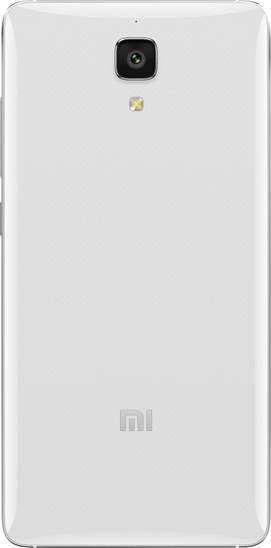
Xiaomi’s called the Apple of China for the cult following it enjoys in its home country and also for the iconic products it offers. That doesn’t mean its products resemble Apple’s in any way, but one look at the Mi 4 is enough to see how closely it matches the iPhone’s design. Clad in white, the Mi 4 features a stainless steel frame running around the sides, complete with chamfered edges.While on one hand, the Mi 4 loses a few points for lack of originality, but on the other, it makes up for those by gaining lots more for the premium looks and the solid build quality it offers. Not that the standard candybar form factor used by touchscreen smartphones these days offers too many possibilities for innovation in design anyway. Playing the devil’s advocate, the likes of HTC have managed to innovate quite a bit too. All said and done, the Xiaomi Mi 4 is a scrumptious-looking device… carrying oodles of oomph and screaming premium at the top of its voice.While both the Mi 3 and the Mi 4 sport 5-inch displays, the latter feels more compact in the hand thanks to slimmer bezels, and this bodes well for one-handed usage. The fascia includes the Mi branding up top, along with the usual sensors, earpiece and front camera. The three standard Android keys are present below the screen in the form of backlit capacitive buttons. Instead of placing a notification LED on top, Xiaomi has placed it at the bottom, right below the home button. As with the Mi 3, this is a multi-coloured LED, but is quite tiny and easy to miss. The top holds the 3.5mm audio socket, along with an infrared blaster, while the bottom is home to the micro-USB port and a speaker grille. The left spine is where you’ll find an ejectable tray that accepts a micro-SIM, while the right sports a volume rocker and a power key.Flip it around and you’ll be greeted by the glossy rear. It’s smooth to the touch but sports a subtle chequered pattern, only visible when looked upon closely. You’ll also find a secondary microphone, the primary camera lens, an LED flash, and more MI branding on the rear, along with some regulatory info.Overall, we think the Mi 4 looks quite gorgeous without being flashy. The iPhone sports such a classic, industrial design, and numerous smartphones have taken design inspiration from it… the Mi 4 just a tad bit more. We’re definitely not complaining, and don’t see how that could be a bone of contention.
Read More
Show me the screen
+
Premium flagships these days are moving slowly yet steadily towards 2K displays, though the options are still quite limited in India. The Mi 4 sticks to the norms with its 5-inch, full HD IPS screen, which at 441ppi, offers the same pixel density as the Mi 3. The key difference is that the Mi 4’s screen is based on One Glass Solution (OGS), and since Corning Gorilla Glass is too rigid to apply to screens based on OGS, the Mi 4 utilises another scratch-resistant glass layer from the same stable, dubbed Corning Concore.In terms of display quality, the Mi 4 s has lovely-looking screen that looks even better than the Mi 3’s. It produces rich colours and deep blacks, while the viewing angles are very good too. We don’t have any complaints regarding sunlight legibility either. You also get an option to tweak colour saturation and temperature via settings, but a glove mode has been omitted.
Read More
The King of HDR
+
Just like the display size and resolution, the Mi 4 isn’t much different from its predecessor when it comes to the primary camera… at least as first glance. Just like the Mi 3 before it, the latest flagship also offers a 13-megapixel primary shooter, but that’s where the similarities end. Inside the Mi 4 is the latest-generation Sony IMX214 stacked CMOS sensor.Boasting an aperture of f/1.8 (against f/2.2 on the Mi 3), it comes with some nifty features such as support for 4K video recording at 30 fps and hardware-level HDR. On paper, this should translate into better low-light photography, superfast autofocus speeds and speedy HDR captures. The camera app is a loaded affair, and just like we saw on the Mi 3, allows you to switch to the advanced mode from the default simple mode to gain access to more features which are built in. Apart from the usual set of modes we’ve encountered earlier, covering burst, HDR and panorama, you also get a new background defocus mode which isn’t there on the Mi 3. There’s tons of creative control, including the ability to tweak focus modes, ISO, white balance, and exposure, along with contrast, saturation and sharpness levels. The app can scan QR codes too, so you don’t need a separate third-party app for this in case you need this functionality. You can also set the volume buttons to control the shutter or digital zoom. Apart from a bunch of filters that provide tiny real-time previews, you also get the audio mode we saw on the Mi 3. This mode senses ambient noise levels and snaps a picture when it detects a sound over and above them – letting you shoot hands-free by yelling at it. When it comes to video capture, in addition to the 4K recording capabilities we mentioned earlier, the Mi 4 can shoot both fast and slow motion videos, and also supports video HDR. Cashing in on the selfie fad, Xiaomi has bumped up the front camera on the Mi 4 to 8-megapixels, and as with the Mi 3, it features a gimmicky face-detection mode that tries to guess your gender and age. The wide angles mean it’s convenient to capture selfies, even for a group, by placing the device at arm’s length, and offers enough detail to make it a very capable selfie shooter.When it comes to the all-important image quality of the primary camera though, we can’t say we were blown away with the results, especially with regards to its friendliness with low light. Images shot in dim lighting appear noisy, and the Mi 4 isn’t different from most other smartphones in this respect. Images shot in daylight look quite good for the most part, while close-ups captured in auto mode are quite sharp too. The autofocus speeds are very fast, but where it really shines is HDR though. Not only does it capture HDR shots quickly, allowing to capture even moving subjects in this mode, the images turn out quite lovely. You can take a gander at our Mi 4 camera review for some more info, but in any case, we’ll still let you take a closer look at some of the full-resolution camera samples here.
Read More
Android raised to power Mi
+
Most of us swear by the usability offered by stock Android, though admittedly, custom skins such as HTC’s Sense and ASUS’ ZenUI do offer quite a few nifty features. The Indian brand XOLO has also ventured into custom UI territory with its HIVE UI. These skins are not just a great way to differentiate the offerings, but also showcase the true power of Android as a platform. Xiaomi’s mainstay lies in MIUI (pronounced ‘Me-UI’) that powers all its products, and is also available as a custom ROM for a variety of non-Xiaomi smartphones. More that just a skin, MIUI is a full-fledged platform built over Android that boasts innumerable features designed to make things simple for newbies, yet offer immense control to power users. As a side note, also keep in mind that our Chinese Mi 4 doesn’t run Google services, which means that out of the box, it doesn’t come with the Google Play Store or any of the native apps that part of Google’s suit, including Gmail and Maps. There’s a quick workaround available for it that let us download and install all the required Google goodies without getting our hands dirty with rooting or any such hackery. We won’t get into the details since the Mi 4 launched officially in India will come with all of this by default, just like the Indian units of the Mi 3 before it and the countless other Android devices that are sold in the country. We’ve already covered the key features of MIUI in the software section of our Mi 3 review. Just to give you an overview though, MIUI doesn’t come with a separate app drawer, and gives you multiple home screens where all the apps and app folders appear, also allowing to add widgets alongside. Customisation is an important aspect of MIUI, and you can just download a variety of themes that change everything from the icons to the lock screen. You can even mix and match, choosing to use the clock widget from one them while using the lock screen from other, and so on and so forth. Other personalisation options include the ability to change fonts and changing the look of the quick settings panel. By default, the Mi 4 offers a 2-pane drop-down panel that displays notifications and customisable quick settings in different screens, but you can choose to change it to a common view with fewer shortcuts displayed. There’s the ability to control how notifications are displayed on a per-app level too, similar to iOS.The in-call menu includes a very useful call recorder, while there are literally hundreds of small yet handy features thrown about elsewhere too – a clock that vibrates with the seconds hand, a notes app that opens up a new note by swiping downwards on the icon, lock screen controls that switch to music playback controls with a double tap… to mention a few. The security and privacy features that have been baked in are also worth highlighting. The messages app includes a private area that you can choose to protect with a pattern lock and specify private contacts or numbers. Messages to and from these set of contacts won’t appear in the main list, hiding into the private area instead. The private messaging is quite tough to access too, unless you know exactly how. To do this, you need to swipe downwards in the main SMS list, taking the screen almost halfway down to the bottom – this usually needs the use of more than one finger and therefore, can’t be seen by prying eyes. Yet another worthy MIUI feature is the preinstalled security suite. This includes a cache and junk files cleaner, a data usage monitor, a blacklist for blocking calls or text messages from specified numbers, and a virus scanner. There’s also a power manager that lets you choose different battery-related profiles, create custom ones and schedule them for specific times of the day or switch them based on battery levels. One of the most powerful features of the security suite however, is the permissions monitor. Android can be prone to malware, and to control this, MIUI leans towards paranoia… which isn’t really a bad thing, if only a little cumbersome. Unless you disable the permission monitor, MIUI chooses to distrust any new app installed, and warns you when any third-party app does something that could violate your privacy access your contacts list or your location for example. If you trust the app, you can choose to grant permission and set it to never ask you again, let it access the stuff it needs just that single time, or deny access completely. This could be a tad cumbersome if you’re in the habit of installing new apps or games on a frequent basis, but shouldn’t be too much of an issue if you mainly use a specific set of staple apps. WhatsApp is a good example of an app that needs access to your contacts list to work properly, and since it’s a legitimate IM service, you can give it complete access without prompting you each and every time. Similarly, apps such as Twitter and Facebook need access to your location, along with making use of the camera to shoot pictures, among other things. However, if you install a seemingly simple game which tries to access your contacts in the background without you knowing it, MIUI could catch it red-handed and warn you when it tries to do so. The permissions monitor also allows you to control apps that auto-start on boot, along with letting you view and control app permissions on a per-app basis.We won’t cover the pre-installed apps here, since the ones that come on the official Mi 4 might be different. Our Chinese Mi 4 came with a whole bunch of apps specific to the users in that region, including the likes of Weibo and others. The universal remote app was in Chinese too, and we couldn't really do much with it.The above, and even the more detailed MIUI overview we provided in our Mi 3 review is just the tip of the proverbial iceberg when it comes to covering the features packed into the firmware. Suffice it to say that the it has enough to keep even the most geeky power users and customisation freaks satiated. Yet, once the basic app permissions etc have been set up, the UI is simple enough for even newbies to come to grips with very quickly.While Xiaomi is known to release updates to MIUI on a very frequent basis, squashing bugs and adding new features (many of them based on user feedback) in the process, we can’t wait to find out what it has in store for us in the upcoming version 6. This is currently under beta testing, and is expected to be out sometime in October, and based on some of the new features we've read about, it looks like Xiaomi is set to up the ante even further.
Read More
Steroidal performance for power users
+
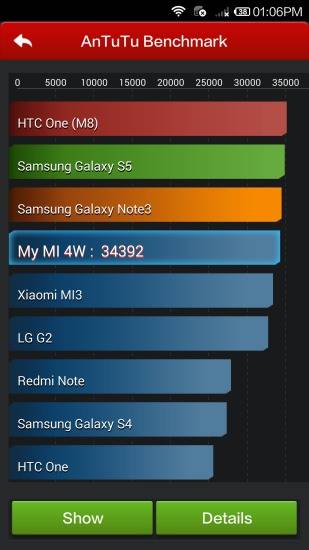
In a word, the Mi 4 is zippy. The key ingredients comprise the top-of-the-line Snapdragon 801 processor, which is a quad-core chip running at a blistering speed of 2.5GHz. And then there’s 3GB of RAM, which is very respectable, put mildly. This is a very potent combination that ensures there are no speed bumps whatsoever, making mincemeat of apps and games that come in its path. We've already taken a look at how the Mi 4 performs in benchmarks, but even in the real world, multitasking is buttery smooth, and intensive games fly. It just seems in a hurry to get things done quickly, and there’s nary a sign of any lag.The one red flag we can raise is that the device does tend to run hot when stressed – while gaming or recording 4K video for example. However, this doesn’t seem to affect stability or performance, though you’ll start feeling the heat on that steel frame in a matter of minutes. On the positive side, it cools down quite quickly too.The internal storage is 16GB, and the lack of a microSD card slot means you can’t cram in any more. A little over 12GB was available to use out of the box, but this could change depending upon preloaded content offered with the official Indian model. Thankfully, you can use the USB OTG feature to connect external flash drives directly – a very handy feature when in a crunch. Xiaomi also offers a 64GB storage variant of the Mi 4 in China, and it remains to be seen whether it chooses to bring it to India. This is just speculation on our part right now, but based on our interactions with senior Xiaomi personnel, it looks highly likely that both the 16 gig and 64 gig models will come here, though the company may decide to bring the higher capacity at a later date. Connectivity-wise, the Mi 4 offers 3G for now (with the 4G model that supports Indian LTE frequencies arriving later), dual-band Wi-Fi (including the latest ac standard), Bluetooth 4.0, wireless display, Wi-Fi Direct, Wi-Fi hotspot and A-GPS. TV-out via MHL is also supported. Xiaomi has decided to give NFC a miss, reportedly because it feels very few people use it… and while we’d agree, the feature does help make the pairing process with compatible accessories a breeze. Still, we won’t consider the lack of NFC a deal killer in any way.Powering the show is a 3,080mAh battery, and based on moderate usage, we’d say it can take you through a full working with ease. Again, your mileage could vary depending upon your usage, but unless you use it for media viewing or gaming for prolonged periods of time, you shouldn’t feel the need to give it a top-up charge during the day. In our standard battery rundown test, which involves playing a 720p video on loop with brightness and volume set to 50 percent, the Mi 4 lasted a very respectable eight and a half hours. Another point to note that our tests are based on the ‘High Performance’ mode offered by the Mi 4, and the default balanced mode should offer even better battery life.
Read More
Read full Review

Verdict
It`s difficult to put things in perspective without a price tag, but since the 16GB model of the Mi 4 is priced at 1,999 yuan in China, we can take that as an indicative price for the device. That amount converts to less than Rs 20,000, and if we were to venture a guess, we`d peg Indian pricing in the region of Rs 22,000, give or take a few. To put that into context, the most affordable Snapdragon 801-powered smartphones you can buy in India currently are the Oppo Find 7a and the HTC
- Stylish, premium looks and solid build
- Gorgeous display
- Very capable HDR mode on the primary camera
- Blazingly-fast performance
- Very good battery life
- Smorgasbord of useful features in MIUI
Pros
- Non-expandable storage
- NFC missing in action
- Runs hot when stressed
Cons
Specs at a glance
+5-inch, 1,920 x 1,080 pixel OGS display (441ppi) 2.5GHz quad-core Qualcomm Snapdragon 801 processor 3GB RAM 13-megapixel primary camera, 8MP front 16GB storage (non-expandable) USB OTG, infrared, 3G, dual-band Wi-Fi 802.11 a/b/g/n/ac, Bluetooth 4.0, A-GPS, GLONASS, Wi-Fi Direct, Wi-Fi Hotspot, USB 2.0, TV-out via MHL Android KitKat 4.4.2 with MIUI 3,080mAh battery FM Radio
Read MoreHalf the taste is in the presentation
+Xiaomi’s called the Apple of China for the cult following it enjoys in its home country and also for the iconic products it offers. That doesn’t mean its products resemble Apple’s in any way, but one look at the Mi 4 is enough to see how closely it matches the iPhone’s design. Clad in white, the Mi 4 features a stainless steel frame running around the sides, complete with chamfered edges.While on one hand, the Mi 4 loses a few points for lack of originality, but on the other, it makes up for those by gaining lots more for the premium looks and the solid build quality it offers. Not that the standard candybar form factor used by touchscreen smartphones these days offers too many possibilities for innovation in design anyway. Playing the devil’s advocate, the likes of HTC have managed to innovate quite a bit too. All said and done, the Xiaomi Mi 4 is a scrumptious-looking device… carrying oodles of oomph and screaming premium at the top of its voice.While both the Mi 3 and the Mi 4 sport 5-inch displays, the latter feels more compact in the hand thanks to slimmer bezels, and this bodes well for one-handed usage. The fascia includes the Mi branding up top, along with the usual sensors, earpiece and front camera. The three standard Android keys are present below the screen in the form of backlit capacitive buttons. Instead of placing a notification LED on top, Xiaomi has placed it at the bottom, right below the home button. As with the Mi 3, this is a multi-coloured LED, but is quite tiny and easy to miss. The top holds the 3.5mm audio socket, along with an infrared blaster, while the bottom is home to the micro-USB port and a speaker grille. The left spine is where you’ll find an ejectable tray that accepts a micro-SIM, while the right sports a volume rocker and a power key.Flip it around and you’ll be greeted by the glossy rear. It’s smooth to the touch but sports a subtle chequered pattern, only visible when looked upon closely. You’ll also find a secondary microphone, the primary camera lens, an LED flash, and more MI branding on the rear, along with some regulatory info.Overall, we think the Mi 4 looks quite gorgeous without being flashy. The iPhone sports such a classic, industrial design, and numerous smartphones have taken design inspiration from it… the Mi 4 just a tad bit more. We’re definitely not complaining, and don’t see how that could be a bone of contention.
Read MoreShow me the screen
+Premium flagships these days are moving slowly yet steadily towards 2K displays, though the options are still quite limited in India. The Mi 4 sticks to the norms with its 5-inch, full HD IPS screen, which at 441ppi, offers the same pixel density as the Mi 3. The key difference is that the Mi 4’s screen is based on One Glass Solution (OGS), and since Corning Gorilla Glass is too rigid to apply to screens based on OGS, the Mi 4 utilises another scratch-resistant glass layer from the same stable, dubbed Corning Concore.In terms of display quality, the Mi 4 s has lovely-looking screen that looks even better than the Mi 3’s. It produces rich colours and deep blacks, while the viewing angles are very good too. We don’t have any complaints regarding sunlight legibility either. You also get an option to tweak colour saturation and temperature via settings, but a glove mode has been omitted.
Read MoreThe King of HDR
+Just like the display size and resolution, the Mi 4 isn’t much different from its predecessor when it comes to the primary camera… at least as first glance. Just like the Mi 3 before it, the latest flagship also offers a 13-megapixel primary shooter, but that’s where the similarities end. Inside the Mi 4 is the latest-generation Sony IMX214 stacked CMOS sensor.Boasting an aperture of f/1.8 (against f/2.2 on the Mi 3), it comes with some nifty features such as support for 4K video recording at 30 fps and hardware-level HDR. On paper, this should translate into better low-light photography, superfast autofocus speeds and speedy HDR captures. The camera app is a loaded affair, and just like we saw on the Mi 3, allows you to switch to the advanced mode from the default simple mode to gain access to more features which are built in. Apart from the usual set of modes we’ve encountered earlier, covering burst, HDR and panorama, you also get a new background defocus mode which isn’t there on the Mi 3. There’s tons of creative control, including the ability to tweak focus modes, ISO, white balance, and exposure, along with contrast, saturation and sharpness levels. The app can scan QR codes too, so you don’t need a separate third-party app for this in case you need this functionality. You can also set the volume buttons to control the shutter or digital zoom. Apart from a bunch of filters that provide tiny real-time previews, you also get the audio mode we saw on the Mi 3. This mode senses ambient noise levels and snaps a picture when it detects a sound over and above them – letting you shoot hands-free by yelling at it. When it comes to video capture, in addition to the 4K recording capabilities we mentioned earlier, the Mi 4 can shoot both fast and slow motion videos, and also supports video HDR. Cashing in on the selfie fad, Xiaomi has bumped up the front camera on the Mi 4 to 8-megapixels, and as with the Mi 3, it features a gimmicky face-detection mode that tries to guess your gender and age. The wide angles mean it’s convenient to capture selfies, even for a group, by placing the device at arm’s length, and offers enough detail to make it a very capable selfie shooter.When it comes to the all-important image quality of the primary camera though, we can’t say we were blown away with the results, especially with regards to its friendliness with low light. Images shot in dim lighting appear noisy, and the Mi 4 isn’t different from most other smartphones in this respect. Images shot in daylight look quite good for the most part, while close-ups captured in auto mode are quite sharp too. The autofocus speeds are very fast, but where it really shines is HDR though. Not only does it capture HDR shots quickly, allowing to capture even moving subjects in this mode, the images turn out quite lovely. You can take a gander at our Mi 4 camera review for some more info, but in any case, we’ll still let you take a closer look at some of the full-resolution camera samples here.
Read MoreAndroid raised to power Mi
+Most of us swear by the usability offered by stock Android, though admittedly, custom skins such as HTC’s Sense and ASUS’ ZenUI do offer quite a few nifty features. The Indian brand XOLO has also ventured into custom UI territory with its HIVE UI. These skins are not just a great way to differentiate the offerings, but also showcase the true power of Android as a platform. Xiaomi’s mainstay lies in MIUI (pronounced ‘Me-UI’) that powers all its products, and is also available as a custom ROM for a variety of non-Xiaomi smartphones. More that just a skin, MIUI is a full-fledged platform built over Android that boasts innumerable features designed to make things simple for newbies, yet offer immense control to power users. As a side note, also keep in mind that our Chinese Mi 4 doesn’t run Google services, which means that out of the box, it doesn’t come with the Google Play Store or any of the native apps that part of Google’s suit, including Gmail and Maps. There’s a quick workaround available for it that let us download and install all the required Google goodies without getting our hands dirty with rooting or any such hackery. We won’t get into the details since the Mi 4 launched officially in India will come with all of this by default, just like the Indian units of the Mi 3 before it and the countless other Android devices that are sold in the country. We’ve already covered the key features of MIUI in the software section of our Mi 3 review. Just to give you an overview though, MIUI doesn’t come with a separate app drawer, and gives you multiple home screens where all the apps and app folders appear, also allowing to add widgets alongside. Customisation is an important aspect of MIUI, and you can just download a variety of themes that change everything from the icons to the lock screen. You can even mix and match, choosing to use the clock widget from one them while using the lock screen from other, and so on and so forth. Other personalisation options include the ability to change fonts and changing the look of the quick settings panel. By default, the Mi 4 offers a 2-pane drop-down panel that displays notifications and customisable quick settings in different screens, but you can choose to change it to a common view with fewer shortcuts displayed. There’s the ability to control how notifications are displayed on a per-app level too, similar to iOS.The in-call menu includes a very useful call recorder, while there are literally hundreds of small yet handy features thrown about elsewhere too – a clock that vibrates with the seconds hand, a notes app that opens up a new note by swiping downwards on the icon, lock screen controls that switch to music playback controls with a double tap… to mention a few. The security and privacy features that have been baked in are also worth highlighting. The messages app includes a private area that you can choose to protect with a pattern lock and specify private contacts or numbers. Messages to and from these set of contacts won’t appear in the main list, hiding into the private area instead. The private messaging is quite tough to access too, unless you know exactly how. To do this, you need to swipe downwards in the main SMS list, taking the screen almost halfway down to the bottom – this usually needs the use of more than one finger and therefore, can’t be seen by prying eyes. Yet another worthy MIUI feature is the preinstalled security suite. This includes a cache and junk files cleaner, a data usage monitor, a blacklist for blocking calls or text messages from specified numbers, and a virus scanner. There’s also a power manager that lets you choose different battery-related profiles, create custom ones and schedule them for specific times of the day or switch them based on battery levels. One of the most powerful features of the security suite however, is the permissions monitor. Android can be prone to malware, and to control this, MIUI leans towards paranoia… which isn’t really a bad thing, if only a little cumbersome. Unless you disable the permission monitor, MIUI chooses to distrust any new app installed, and warns you when any third-party app does something that could violate your privacy access your contacts list or your location for example. If you trust the app, you can choose to grant permission and set it to never ask you again, let it access the stuff it needs just that single time, or deny access completely. This could be a tad cumbersome if you’re in the habit of installing new apps or games on a frequent basis, but shouldn’t be too much of an issue if you mainly use a specific set of staple apps. WhatsApp is a good example of an app that needs access to your contacts list to work properly, and since it’s a legitimate IM service, you can give it complete access without prompting you each and every time. Similarly, apps such as Twitter and Facebook need access to your location, along with making use of the camera to shoot pictures, among other things. However, if you install a seemingly simple game which tries to access your contacts in the background without you knowing it, MIUI could catch it red-handed and warn you when it tries to do so. The permissions monitor also allows you to control apps that auto-start on boot, along with letting you view and control app permissions on a per-app basis.We won’t cover the pre-installed apps here, since the ones that come on the official Mi 4 might be different. Our Chinese Mi 4 came with a whole bunch of apps specific to the users in that region, including the likes of Weibo and others. The universal remote app was in Chinese too, and we couldn't really do much with it.The above, and even the more detailed MIUI overview we provided in our Mi 3 review is just the tip of the proverbial iceberg when it comes to covering the features packed into the firmware. Suffice it to say that the it has enough to keep even the most geeky power users and customisation freaks satiated. Yet, once the basic app permissions etc have been set up, the UI is simple enough for even newbies to come to grips with very quickly.While Xiaomi is known to release updates to MIUI on a very frequent basis, squashing bugs and adding new features (many of them based on user feedback) in the process, we can’t wait to find out what it has in store for us in the upcoming version 6. This is currently under beta testing, and is expected to be out sometime in October, and based on some of the new features we've read about, it looks like Xiaomi is set to up the ante even further.
Read MoreSteroidal performance for power users
+In a word, the Mi 4 is zippy. The key ingredients comprise the top-of-the-line Snapdragon 801 processor, which is a quad-core chip running at a blistering speed of 2.5GHz. And then there’s 3GB of RAM, which is very respectable, put mildly. This is a very potent combination that ensures there are no speed bumps whatsoever, making mincemeat of apps and games that come in its path. We've already taken a look at how the Mi 4 performs in benchmarks, but even in the real world, multitasking is buttery smooth, and intensive games fly. It just seems in a hurry to get things done quickly, and there’s nary a sign of any lag.The one red flag we can raise is that the device does tend to run hot when stressed – while gaming or recording 4K video for example. However, this doesn’t seem to affect stability or performance, though you’ll start feeling the heat on that steel frame in a matter of minutes. On the positive side, it cools down quite quickly too.The internal storage is 16GB, and the lack of a microSD card slot means you can’t cram in any more. A little over 12GB was available to use out of the box, but this could change depending upon preloaded content offered with the official Indian model. Thankfully, you can use the USB OTG feature to connect external flash drives directly – a very handy feature when in a crunch. Xiaomi also offers a 64GB storage variant of the Mi 4 in China, and it remains to be seen whether it chooses to bring it to India. This is just speculation on our part right now, but based on our interactions with senior Xiaomi personnel, it looks highly likely that both the 16 gig and 64 gig models will come here, though the company may decide to bring the higher capacity at a later date. Connectivity-wise, the Mi 4 offers 3G for now (with the 4G model that supports Indian LTE frequencies arriving later), dual-band Wi-Fi (including the latest ac standard), Bluetooth 4.0, wireless display, Wi-Fi Direct, Wi-Fi hotspot and A-GPS. TV-out via MHL is also supported. Xiaomi has decided to give NFC a miss, reportedly because it feels very few people use it… and while we’d agree, the feature does help make the pairing process with compatible accessories a breeze. Still, we won’t consider the lack of NFC a deal killer in any way.Powering the show is a 3,080mAh battery, and based on moderate usage, we’d say it can take you through a full working with ease. Again, your mileage could vary depending upon your usage, but unless you use it for media viewing or gaming for prolonged periods of time, you shouldn’t feel the need to give it a top-up charge during the day. In our standard battery rundown test, which involves playing a 720p video on loop with brightness and volume set to 50 percent, the Mi 4 lasted a very respectable eight and a half hours. Another point to note that our tests are based on the ‘High Performance’ mode offered by the Mi 4, and the default balanced mode should offer even better battery life.
Read MoreXiaomi Mi4 64GB Specifications
General |
|
|---|---|
| Operating System | Android v4.4.3 (Kitkat) |
Performance
(Avg)
|
|
|---|---|
| Chipset | Qualcomm Snapdragon 801 MSM8974AC |
| Processor | Quad core, 2.5 GHz, Krait 400 |
| Graphics (GPU) | Adreno 330 |
| RAM | 3 GB |
| RAM Type | LPDDR3 |
Benchmark Screenshots
AnTuTu Benchmark
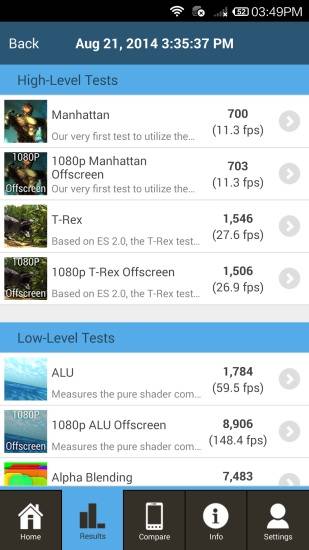
Graphics Benchmark
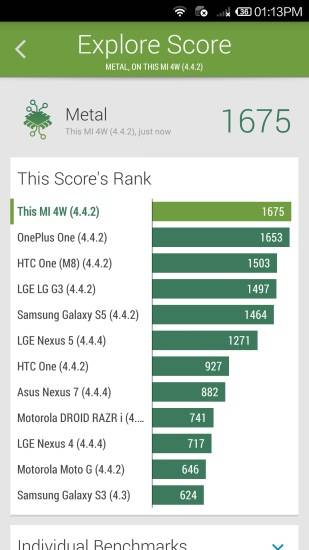
Vellamo Metal Benchmark
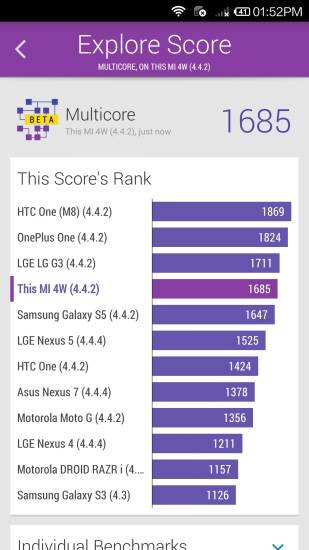
Vellamo Multicore Benchmark
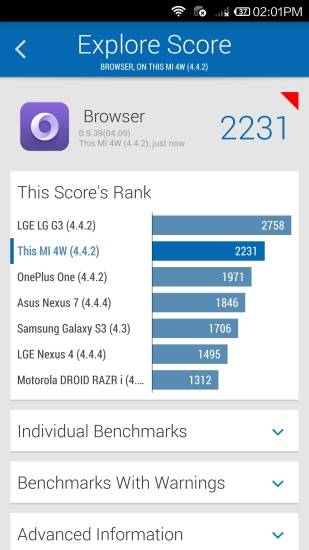
Vellamo Browser Benchmark
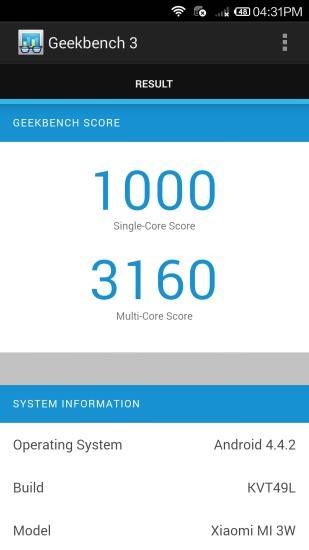
Geekbench3 Benchmark
|
Display
(Excellent)
|
|
|---|---|
| Display Type | IPS LCD |
| Screen Size | 5.0 inches (12.7 cm) |
| Resolution | 1080x1920 px (FULL HD) |
| Pixel Density | 441 ppi |
| Screen to Body Ratio (calculated) | 72.11 % |
| Screen Protection | No |
UI Screenshots
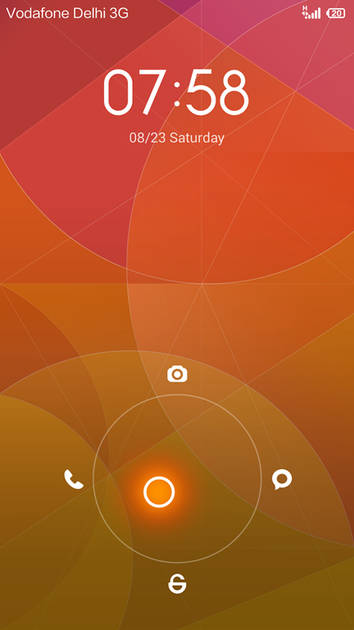
Lock Screen
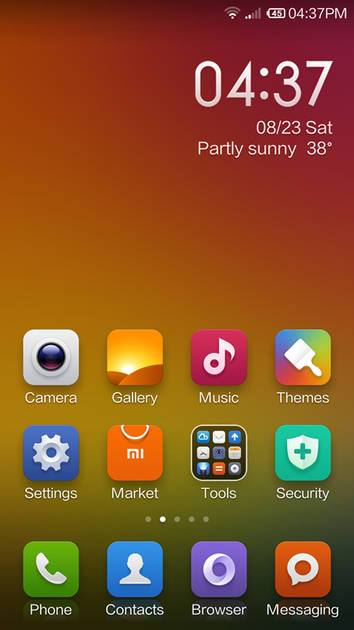
Home Screen
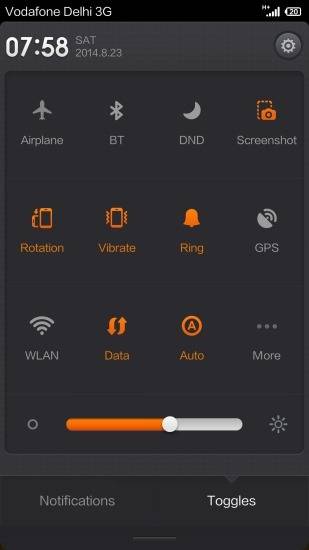
Quick Settings Panel
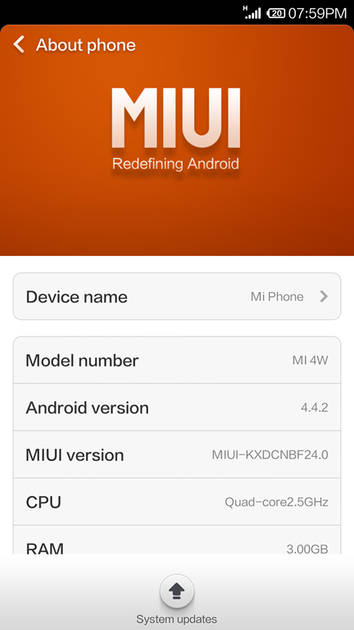
OS Version
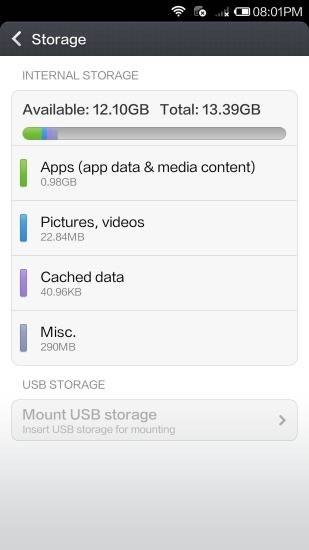
Storage
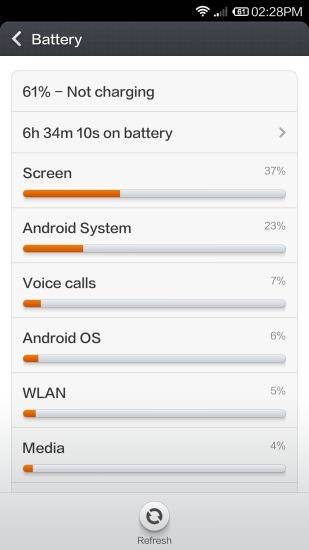
Battery
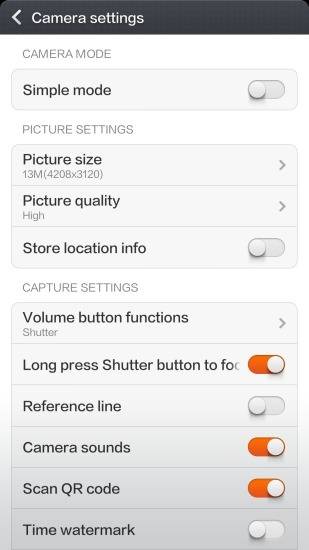
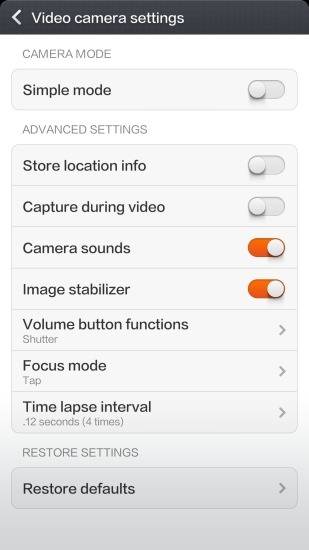
Camera Settings
Video Size Options
|
Design |
|
|---|---|
| Height | 139.2 mm |
| Width | 68.5 mm |
| Thickness | 8.9 mm |
| Weight | 149 grams |
| Build Material |
Frame: Stainless steel Back: Stainless steel |
|
Click to View

|
Rear Camera
(Good)
|
||||||||
|---|---|---|---|---|---|---|---|---|
| Resolution | ||||||||
|
||||||||
| Autofocus | Yes | |||||||
| OIS | No | |||||||
| Flash | Yes, LED Flash | |||||||
| Image Resolution | 4128 x 3096 Pixels | |||||||
| Settings | Exposure compensation, ISO control | |||||||
| Shooting Modes |
Continuous Shooting High Dynamic Range mode (HDR) Burst mode |
|||||||
| Camera Features |
Digital Zoom Auto Flash Digital image stabilization Simultaneous HD video and image recording Smile detection Touch to focus |
|||||||
| Video Recording |
3840x2160 @ 30 fps 1920x1080 @ 30 fps 1280x720 @ 120 fps |
|||||||
Rear Camera Samples
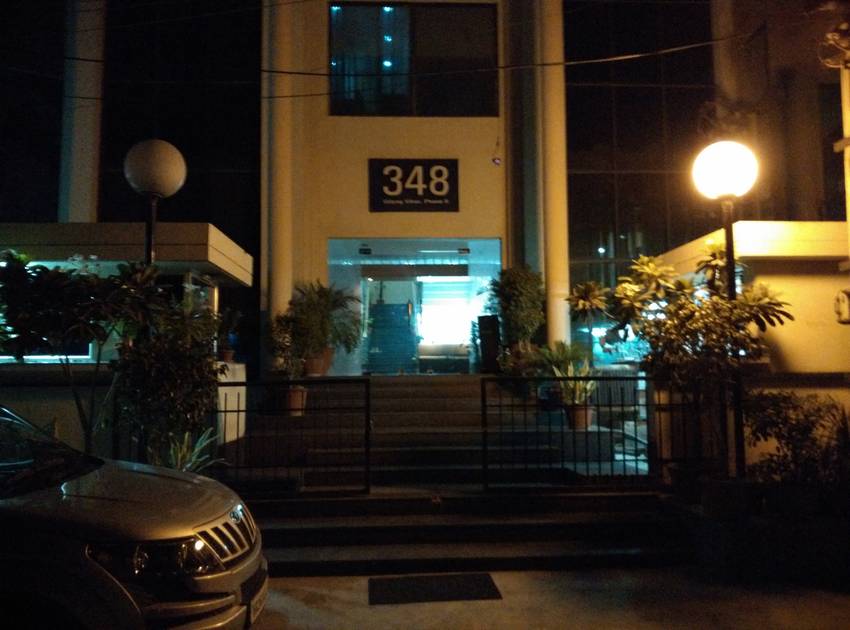
Night Mode OFF

Close Up

Low Light

Low Light With Flash

Long Shot

Front Shot
|
Front Camera
(Very Good)
|
||||||
|---|---|---|---|---|---|---|
| Resolution | ||||||
|
||||||
| Autofocus | No | |||||
| Flash | No | |||||
| Video Recording | 1920x1080 @ 30 fps |
Battery
(Very Good)
|
|
|---|---|
| Capacity | 3080 mAh |
| Battery Type | Li-Polymer |
| Quick Charging | Yes Quick Charging v2.0 |
Storage |
|
|---|---|
| Internal Storage | 16 GB / 64 GB |
| Expandable Storage | No |
Network & Connectivity |
|
|---|---|
| SIM Slot(s) | Single SIM |
| SIM Type | SIM1: Micro |
| Network Support | 5G Not Supported |
| SAR Value | Head: 0.92 W/kg, Body: 1.36 W/kg |
| Wi-Fi | Yes, Wi-Fi 5 (802.11 a/b/g/n/ac) 5GHz |
| Wi-Fi Features | Wi-Fi Direct, Mobile Hotspot |
| Bluetooth | Yes, v4.0 |
| GPS | Yes with A-GPS, Glonass |
| NFC | No |
Multimedia |
|
|---|---|
| Audio Jack | 3.5 mm |
Sensors |
|
|---|---|
| Fingerprint Sensor | No |
| Other Sensors | Light sensor, Proximity sensor, Accelerometer, Barometer, Compass, Gyroscope |
Xiaomi Mi4 64GB User Reviews
Xiaomi Mi4 64GB Key Highlights
| Processor | Qualcomm Snapdragon 801 MSM8974AC |
| RAM & Storage | 3 GB RAM + 16 GB 3 GB RAM + 64 GB |
| Display | 5.0", 1080 x 1920 Resolution |
| Rear Camera | 13 MP |
| Front Camera | 8 MP |
| Battery | 3080 mAh |


Xiaomi Mi4 Price In India
| Product Name | Store | Price |
|---|---|---|
| Xiaomi Mi4 (3 GB + 16 GB) | Flipkart | ₹14,999 |
Popular Links
- All Upcoming Phones
- Upcoming Xiaomi Phones
- Xiaomi phones under 10k
- Xiaomi phones under 20k
- vivo V80 5G
- OPPO F35 Pro
- Lava Virat Curve 5G
- vivo S2 FE 5G
- OPPO F35
- Samsung Mobiles
- Motorola Mobiles
- vivo Mobiles
- OPPO Mobiles
- Tecno Mobiles
- realme Mobiles
- Xiaomi Mobiles