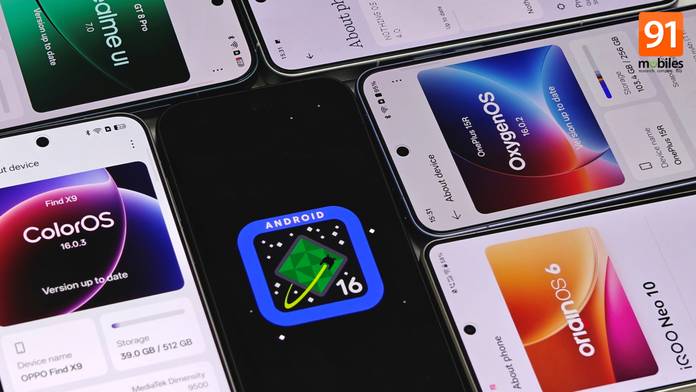
Announced back in June 2025, Android 16 emphasises productivity, security, and AI capabilities. Naturally, the update was first pushed out to Google Pixel devices, followed by other Android manufacturers like Samsung, Motorola, OPPO, and others. With the update already released for most flagship and high-end Android smartphones, it’ll continue to roll out to other phones throughout 2026 until Android 17 is released.
Therefore, if you’re wondering whether your Android smartphone is eligible for Android 16 and, if so, when it will receive the update, you’ve come to the right place. In this in-depth article, we’ve compiled brand-specific lists of smartphones set to receive Android 16, along with the update’s potential release timeline. Towards the end, you can check out the major highlights of every brand’s Android 16-based software, such as One UI 8, OxygenOS 16, OriginOS 6, and others.
Table of Contents
Smartphones that are eligible to get Android 16
Many Android OEMs have been rolling out Android 16 to eligible devices since September 2025. While these initially included high-end and premium smartphones and tablets, several devices are slated to receive the update throughout the first months of 2026.
Below is a brand-wise list of all eligible devices confirmed to receive Android 16. We’ve also added the timeline for when you can expect the update to arrive, along with which brands have committed to it, unless stated otherwise.
OPPO
First rolled out in beta to the OPPO Find X8 series in China, the Android 16 update, the underlying OS powering ColorOS 16, was released globally shortly after in November 2025. The stable firmware brought improved animations, wider customisation options, and upgraded AI features.
| Series | Models |
|---|---|
| Find X series (Rollout completed) | November 2025: OPPO Find X8 Ultra, Find X8 Pro, Find X8, Find X7 Ultra, Find X7, Find X6 Pro, Find X6, Find X5 Pro, Find X5 |
| Find N series (Rollout completed) | November 2025: OPPO Find N3 Flip, OPPO Find N3, OPPO Find N5 December 2025: OPPO Find N2, OPPO Find N2 Flip |
| Reno series | November 2025: OPPO Reno 14 Pro, Reno 14, Reno 14 Diwali Edition, Reno 14 F, Reno 13 Pro, Reno 13, Reno 13F 5G December 2025: OPPO Reno 13 F |
| K series | December 2025: OPPO K13 Turbo Pro, K13 Turbo Pro Jan-Mar 2026: OPPO K13 5G, K13x 5G, K12x 5G |
| F series | Jan-Mar 2026: OPPO F31 Pro+, F13 Pro, F13, F29 Pro, F27 Pro+, F27 5G, F25 Pro |
| Pad series | November 2025: OPPO Pad 3 Pro Jan-Mar 2026: OPPO Pad 2 |
| A-Series | Jan-July 2026: OPPO A3x, OPPO A3, OPPO A3 Pro, OPPO A98, OPPO A78, OPPO A59, OPPO A58 5G, OPPO A38, OPPO A80, OPPO A18, OPPO A1, OPPO A2 Pro, OPPO A2 |
OnePlus
Just like OPPO, OnePlus initially released the Android 16-based OxygenOS 16 update for the OnePlus 13 (its latest flagship then) through the beta channel. In early November 2025, the entire OnePlus 13 and OnePlus 12 series officially bagged the update, followed by older flagships and Nord smartphones.
| Series | Models |
|---|---|
| Flagship series |
|
| Nord series |
|
| Pad (tablet) series |
|
Realme
Realme’s Android 16 update came in the form of Realme UI 7. Unlike other Android manufacturers, the update rollout schedule released by Realme states the Open Beta rollout timelines, instead of the stable rollout. The major attraction of Realme UI 7 revolved around the “Light Glass Design” and enhanced AI features.
| Series | Models (Open Beta timeline) |
|---|---|
| GT series | End of 2025: realme GT 7 Pro, realme GT 7, realme GT 7 Dream Edition, realme GT 7T, realme GT 6T, realme GT 6 |
| Number series | End of 2025: realme 15 Pro, realme 15 5G, realme 14 Pro+, realme 14 Pro, realme 14T, realme 14x, realme 13 Pro+, realme 13 Pro, realme 13 5G, realme 12 Pro+ 5G, realme 12 Pro, realme 12, realme 12x Starting Jan 2026: realme 15x, realme 15T, realme 13+, realme 12+, Realme |
| P series | End of 2025: realme P4 Pro, realme P4, realme P3 Ultra, realme P3 Pro, realme P3, realme P3 Lite, realme P3x, realme P2 Pro, realme P1 Pro Starting Jan 2026: realme P1, realme P1 Speed |
| Narzo series | End of 2025: realme Narzo 80 Pro, Narzo 80x, Narzo 80 Lite 5G, Narzo 70x 5G, Narzo N65 5G Starting Jan 2026: realme Narzo 70 Pro, Narzo 70 Starting April 2026: realme Narzo 80 Lite, Narzo N63, Narzo N61 |
| C series | End of 2025: realme C75, realme C73, realme C65, realme C63 Starting April 2026: realme C71, realme C63, realme C61 |
Vivo
Vivo made a massive turnaround by finally bringing the OriginOS skin to global markets. Based on Android 16, the OriginOS 6 update featured a completely overhauled notification panel, an improved design language over Funtouch OS 15, and introduced several quality-of-life features like Origin Island and Office Kit.
| Series | Models |
|---|---|
| X series |
|
| V series |
|
| T series |
|
| Y series | Starting Jan 2026: Vivo Y400 Pro, Y400 5G, Y400, Y300 Plus, Y300 5G, Y200 Pro, Y200, Y200e 5G, Y100 5G, Y100, Y58 5G, Y39 5G, Y38 5G, Y31 Pro 5G |
iQOO
Since iQOO also uses the same software featured on Vivo smartphones, the company ditched Funtouch OS in favour of Android 16-based OriginOS 6 software. The iQOO 13 was the first iQOO smartphone to receive the update, followed bythe iQOO 12 and Neo series.
| Series | Models |
|---|---|
| Number and Neo series |
|
| Z series | Starting Jan 2026: iQOO Z10, Z10R, Z10x, Z9, Z9s Pro, Z92 |
Xiaomi
While Xiaomi didn’t bundle as significant changes or improvements as others in its HyperOS 3 update, which runs on top of Android 16, users were greeted with several meaningful features and improvements. This included Hyper Island and an improved set of transitions.
| Series | Models |
|---|---|
| Flagship series |
|
| Redmi Note series |
|
| Redmi number series |
|
| Pad (tablet) series |
|
| Wearables | Oct-Nov 2025: Xiaomi Watch S4 41mm, Xiaomi Smart Band 10 Glimmer Edition, Xiaomi Smart Band 10 Ceramic Edition, Xiaomi Smart Band 10 |
POCO
Since modern POCO smartphones also run on HyperOS, the Android 16-based HyperOS 3 update was released for the POCO F7 series globally from October 2025.
| Series | Models |
|---|---|
| F series |
|
| X series |
|
| M series |
|
| C series |
|
| Tablets | Dec 2025 – March 2026: POCO Pad |
Nothing
Nothing wasn’t among the first Android brands to release Android 16, but the Nothing OS 4 firmware brought much-needed improvements in several areas.
| Series | Models |
|---|---|
| Flagship series |
|
| Phone (a) series |
|
| CMF Phone series | December 2025: CMF Phone 2 Pro, CMF Phone 1 |
Motorola
Motorola, known for giving its own twist to stock Android, was quick to release Android 16 to a couple of devices in the Edge 60 series in September 2025, shortly after the Google Pixel 9 series.
| Series | Models |
|---|---|
| Moto Edge series |
|
| Moto Razr series | Moto Razr 60, Moto Razr 60 Ultra, Moto Razr 50, Moto Razr 50 Ultra, Moto Razr 40, Moto Razr 40 Ultra |
| Moto G series | Moto G96, Moto G86 Power, Moto G85, Moto G67 Power, Moto G57 Power |
Samsung
Samsung was the first Android manufacturer after Google to seed the Android 16 update to its devices, starting with the Galaxy S25 series. Tagging alongside Android 16 was One UI 8, which brought significant changes to the notification panel, recent apps page, redesigned system apps, and more.
In fact, Samsung has already pushed out the Android 16 update to most of its eligible devices by the end of 2025, including budget and mid-range smartphones and tablets.
| Series | Models |
|---|---|
| S-Series (Rollout completed) | Sept-Oct 2025: Galaxy S25 Ultra, Galaxy S25 Plus, Galaxy S25 Edge, Galaxy S25, Galaxy S24 Ultra, Galaxy S24 Plus, Galaxy S24, Galaxy S23 Ultra, Galaxy S23 Plus, Galaxy S23, Galaxy S23 FE, Galaxy S22 Ultra, Galaxy S22 Plus, Galaxy S22, Galaxy S21 FE 5G |
| Z-Series (Rollout completed) | Sept-Oct 2025: Galaxy Z Flip6, Galaxy Z Fold6, Galaxy Z Flip5, Galaxy Z Fold5, Galaxy Z Flip4, Galaxy Z Fold4 |
| A-Series (Rollout completed) | Oct-Nov 2025: Galaxy A73, Galaxy A56, Galaxy A55, Galaxy A54, Galaxy A53, Galaxy A36, Galaxy A35, Galaxy A34, Galaxy A33, Galaxy A26, Galaxy A25, Galaxy A24 5G, Galaxy A17, Galaxy A16 5G, Galaxy A16, Galaxy A15, Galaxy A15 5G, Galaxy A06, Galaxy A06 5G |
| M-Series (Rollout completed) | Oct-Nov 2025: Galaxy M56 5G, Galaxy M55s 5G, Galaxy M36 5G, Galaxy M35 5G, Galaxy M34 5G, Galaxy M16 5G, Galaxy M15 5G, Galaxy M06 5G, Galaxy M33 5G, Galaxy M53 5G, Galaxy M05 |
| F-Series (Rollout completed) | Oct-Nov 2025: Galaxy F56 5G, Galaxy F55 5G, Galaxy F54 5G, Galaxy F36 5G, Galaxy F34 5G, Galaxy F17 5G, Galaxy F16 5G, Galaxy F15 5G, Galaxy F06 5G, Galaxy F05 |
| Galaxy Tab Series (Rollout completed) | Oct-Nov 2025: Galaxy Tab S10 Lite 5G, Galaxy Tab S10 Lite, Galaxy Tab S10 Ultra 5G, Galaxy Tab S10 Ultra, Galaxy Tab S10+ 5G, Galaxy Tab S10 FE+ 5G, Galaxy Tab S10 FE+ Wi-Fi, Galaxy Tab S10 FE 5G, Galaxy Tab S10 FE, Galaxy Tab S9 FE+ 5G, Galaxy Tab S9 FE+, Galaxy Tab S9 FE 5G, Galaxy Tab S9 FE, Galaxy Tab S9 Ultra 5G, Galaxy Tab S9 Ultra, Galaxy Tab S9+ 5G, Galaxy Tab S9+, Galaxy Tab S9 5G, Galaxy Tab S9, Galaxy Tab S8 Ultra 5G, Galaxy Tab S8 Ultra, Galaxy Tab S8+ 5G, Galaxy Tab S8+, Galaxy Tab S8 5G, Galaxy Tab S8, Galaxy Tab A11 Wi-Fi, Galaxy Tab A11, Galaxy Tab S10+, Galaxy Tab A9+ 5G, Galaxy Tab A9+, Galaxy Tab A9 LTE, Galaxy Tab A9 |
| XCover (Rollout completed) | October 2025: Galaxy XCover7 |
As of January 2026, all eligible Google Pixel smartphones have received the Android 16 update. With the Material 3 Expressive design language being the major highlight of the update, the firmware rolled out to phones as old as the Pixel 6 series, all the way up to the Pixel 9 series.
Google’s current lineup, the Pixel 10 series, consisting of the Pixel 10, Pixel 10 Pro, Pixel 10 Pro XL, and Google Pixel 10 Pro Fold, made their global debut in August 2025 with Android 16 pre-installed.
Smartphones that have already received Android 16
Below is a brand-wise list of devices that have received the Android 16 update in recent months. Update availability varies by region, device variant, and carrier, so the status shown here is compiled from official announcements, brand community forums, and user reports on social media.
We’ll regularly update the details below as soon as we receive confirmation of devices getting the Android 16 update.
| Series | Models |
|---|---|
| Google Pixel 9 Series | Pixel 9, Pixel 9 Pro, Pixel 9 Pro Fold |
| Google Pixel 8 series | Pixel 8, Pixel 8 Pro, Pixel 8a |
| Google Pixel Fold | |
| Google Pixel 7 Series | Pixel 7, Pixel 7 Pro, Pixel 7a |
| Google Pixel 6 Series | Pixel 6, Pixel 6 Pro, Pixel 6a |
Samsung
| Series | Models |
|---|---|
| S-Series | Galaxy S25 Ultra, Galaxy S25 Plus, Galaxy S25 Edge, Galaxy S25, Galaxy S24 Ultra, Galaxy S24 Plus, Galaxy S24, Galaxy S25 FE, Galaxy S23 Ultra, Galaxy S23 Plus, Galaxy S23, Galaxy S23 FE, Galaxy S22 Ultra, Galaxy S22 Plus, Galaxy S22, Galaxy S21 FE 5G |
| Z-Series | Galaxy Z TriFold, Galaxy Z Flip7, Galaxy Z Fold7, Galaxy Z Flip6, Galaxy Z Fold6, Galaxy Z Flip5, Galaxy Z Fold5, Galaxy Z Flip4, Galaxy Z Fold4 |
| A-Series | Galaxy A73, Galaxy A56, Galaxy A55, Galaxy A54, Galaxy A53, Galaxy A36, Galaxy A35, Galaxy A34, Galaxy A33, Galaxy A26, Galaxy A25, Galaxy A24 5G, Galaxy A17, Galaxy A16 5G, Galaxy A16, Galaxy A15, Galaxy A15 5G, Galaxy A06, Galaxy A06 5G |
| M-Series | Galaxy M56 5G, Galaxy M55s 5G, Galaxy M36 5G, Galaxy M35 5G, Galaxy M34 5G, Galaxy M17 5G, Galaxy M16 5G, Galaxy M15 5G, Galaxy M06 5G, Galaxy M33 5G, Galaxy M53 5G, Galaxy M05 |
| F-Series | Galaxy F56 5G, Galaxy F55 5G, Galaxy F54 5G, Galaxy F36 5G, Galaxy F34 5G, Galaxy F17 5G, Galaxy F16 5G, Galaxy F15 5G, Galaxy F06 5G, Galaxy F05 |
| Galaxy Tab Series | Galaxy Tab S10 Lite 5G, Galaxy Tab S10 Lite, Galaxy Tab S10 Ultra 5G, Galaxy Tab S10 Ultra, Galaxy Tab S10+ 5G, Galaxy Tab S10 FE+ 5G, Galaxy Tab S10 FE+ Wi-Fi, Galaxy Tab S10 FE 5G, Galaxy Tab S10 FE, Galaxy Tab S9 FE+ 5G, Galaxy Tab S9 FE+, Galaxy Tab S9 FE 5G, Galaxy Tab S9 FE, Galaxy Tab S9 Ultra 5G, Galaxy Tab S9 Ultra, Galaxy Tab S9+ 5G, Galaxy Tab S9+, Galaxy Tab S9 5G, Galaxy Tab S9, Galaxy Tab S8 Ultra 5G, Galaxy Tab S8 Ultra, Galaxy Tab S8+ 5G, Galaxy Tab S8+, Galaxy Tab S8 5G, Galaxy Tab S8, Galaxy Tab A11 Wi-Fi, Galaxy Tab A11, Galaxy Tab S10+, Galaxy Tab A9+ 5G, Galaxy Tab A9+, Galaxy Tab A9 LTE, Galaxy Tab A9 |
| XCover | Galaxy XCover7 |
OPPO
| Series | Models |
|---|---|
| Find X series | OPPO Find X9 Pro, Find X9, Find X8 Pro, Find X8, Find X8s, Find X8s+, Find X7 Ultra, Find X7, Find X6 Pro, Find X6, Find X5 Pro, Find X5 |
| Find N series | OPPO Find N3 Flip, OPPO Find N3, OPPO Find N5, OPPO Find N2, OPPO Find N2 Flip |
| Reno series | OPPO Reno 14 Pro, Reno 14, Reno 14 Diwali Edition, Reno 14 F, Reno 13 Pro, Reno 13, Reno 13F 5G, Reno 11, Reno 11 Pro, Reno 10 Pro+ |
| K series | OPPO K13 Turbo Pro, K13 Turbo Pro, K13 5G |
| F series | OPPO F29 Pro, F27 5G, F25 Pro |
| Pad series | OPPO Pad 3 Pro, Pad 3, Pad 2 |
| A-Series | Yet to receive |
OnePlus
| Series | Models |
|---|---|
| Flagship series | OnePlus 15, OnePlus 15R, OnePlus 13, OnePlus 13R, OnePlus 13s, OnePlus 12, OnePlus 12R, OnePlus Open, OnePlus 11, OnePlus 11R, OnePlus 10 Pro |
| Nord series | OnePlus Nord 5, Nord 4, Nord 3, Nord CE 4, Nord CE 5, Nord CE 4, Nord CE 4 Lite |
| Pad (tablet) series | OnePlus Pad Go 2, OnePlus Pad 3, OnePlus Pad 2, OnePlus Pad, OnePlus Pad Lite |
Realme
| Series | Models |
|---|---|
| GT series | realme GT 8 Pro, realme GT 7 Pro, realme GT 7, realme GT 7 Dream Edition, realme GT 7T, realme GT 6T, realme GT 6 |
| Number series | realme 16 Pro+, realme 16 Pro, realme 15 Pro |
| P series | realme P4 Power (upcoming), realme P4 Pro, realme P3 Ultra |
| Narzo series | realme Narzo 80 Pro |
| C series | Yet to receive |
Vivo
| Series | Models |
|---|---|
| X series | Vivo X200T (upcoming), X300, X300 Pro, Vivo X200, X200 Pro, X200 FE, X Fold5, X100, X100 Pro, X Fold3 Pro, X90, X90 Pro |
| V series | Vivo V60, V60e |
| T series | Vivo T4 Ultra, T4 Pro |
| Y series | Yet to receive |
iQOO
| Series | Models |
|---|---|
| Number and Neo series | iQOO 15, iQOO 13, iQOO 12, iQOO 11, iQOO Neo 10, Neo 10R, Neo 9 Pro |
| Z series | iQOO Z10 |
Xiaomi
| Series | Models |
|---|---|
| Flagship series | Xiaomi 17, Xiaomi 17 Pro, Xiaomi 17 Pro Max, Xiaomi 17 Ultra, Xiaomi 15 Ultra, Xiaomi 15 Pro, Xiaomi 15, Xiaomi 15T Pro, Xiaomi 15T, Xiaomi MIX Flip, Xiaomi 14 Ultra, Xiaomi 14 Pro, Xiaomi 14, Xiaomi 14T Pro, Xiaomi 14T, Xiaomi 13 Ultra, Xiaomi 13 Pro, Xiaomi 13, Xiaomi 12 Pro, Xiaomi 12 |
| Redmi Note series | REDMI Note 14 Pro+, Note 14 Pro 5G, Note 14 Pro, Note 14, Note 14 5G |
| Redmi number series | Yet to receive |
| Pad (tablet) series | Xiaomi Pad 7 Pro, Xiaomi Pad 7, Xiaomi Pad Mini, Xiaomi Pad 6S Pro 12.4 |
| Wearables | Xiaomi Watch S4 41mm, Xiaomi Smart Band 10 Glimmer Edition, Xiaomi Smart Band 10 Ceramic Edition, Xiaomi Smart Band 10 |
POCO
| Series | Models |
|---|---|
| F series | POCO F7 Ultra, POCO F7 Pro, POCO F7, POCO F6 Pro, POCO F6 |
| X series | POCO X7 Pro, POCO X7 Pro Iron Man Edition, POCO X7, POCO X6 Pro |
| M series | POCO M6 Pro, POCO M7 Pro |
| C series | POCO C75 |
| Tablets | Yet to receive |
Nothing
| Series | Models |
|---|---|
| Flagship series | Nothing Phone (3), Nothing Phone (2) |
| Phone (a) series | Nothing Phone (3a), Phone (3a) Pro, Phone (2a), Phone (2a) Plus |
| CMF Phone series | CMF Phone 2 Pro, CMF Phone 1 |
Motorola
| Series | Models |
|---|---|
| Moto Edge series | Motorola Signature (upcoming), Moto Edge 70, Moto Edge 60 Fusion, Moto Edge 60 Pro, Moto Edge 50 Pro, Moto Edge 50 Ultra |
| Moto Razr series | Moto Razr 60 Ultra |
| Moto G series | Yet to receive |
Brand-wise Android 16 features and changes worth checking out
Notification cooldown, Do Not Disturb Modes, Live updates, and improved privacy and protection were the key offerings of Android 16. While these features are built into core Android 16 builds, here are some of the headlining changes and improvements introduced by various Android 16-based skins.
Google (Pixel UI)
For Google Pixels, Android 16 brings one of the biggest updates in years, particularly with its major design overhaul via Material 3 Expressive.
Material 3 Expressive: The next iteration of Material You, the Material 3 Expressive design language, revamps the look and feel of several UI elements by introducing a rich colour scheme, fluid animations, and background blur.

Live updates: Highly dependent on app compatibility, Pixel UI finally gets the ability to view the live status of food delivery or ride-hailing apps through a pill in the status bar, much like the iPhone’s Dynamic Island.
Notification Organiser and Cooldown: AI automatically groups and silences low-priority notifications (like promos or news) while summarising long group chats. Notification Cooldown, on the other hand, lowers notification volume when receiving many alerts within a short time.
Advanced Protection Mode: A one-tap setting for high-risk users (like journalists) that tightens device security, blocks unknown apps, and triggers network protection. Similarly, AI Scam Detection analyses and notifies of potential scam calls on messages.

Samsung (One UI 8)
Samsung’s One UI 8 brought Galaxy AI enhancements, better multitasking, visual polish, and security and productivity tweaks for a more intuitive experience. Samsung also announced the One UI 8.5 beta update (also based on Android 16) for the Galaxy S25 series in December 2025 for further refining the software.
Enhanced Galaxy AI features: Most of the existing Galaxy AI features have been upgraded to process data faster while providing more contextual results. These include Call Assist, Transcript Assist, Writing Assist, Photo Assist, and Audio Eraser.
Better multitasking: Just like OnePlus’ Open Canvas, users on One UI 8 can open two apps in a 90:10 split, where one app takes 90 percent of the screen, while the other collapses to a 10 percent view for quick glances.
Changes to Secure Folder: Secure Folder, which helps in keeping app data and sensitive information in a separate space on the phone, can now be set to hide apps and prevent notifications when you lock it.
Lockscreen changes: One UI 8 adds a dynamic lockscreen clock that adapts to wallpaper elements, more particularly those carrying a depth element, such as people or animals.
OPPO (ColorOS 16)
OPPO’s ColorOS 16 not only bags tons of refinements on the system and design level, but also updates the existing feature set and customisation options.
Luminous Rendering Engine (and Design): An improved Luminous Rendering Engine ensures fluid and precise animations across the UI. On the other hand, Luminous Design adds light and shadow effects in many places, giving the elements a sense of depth.
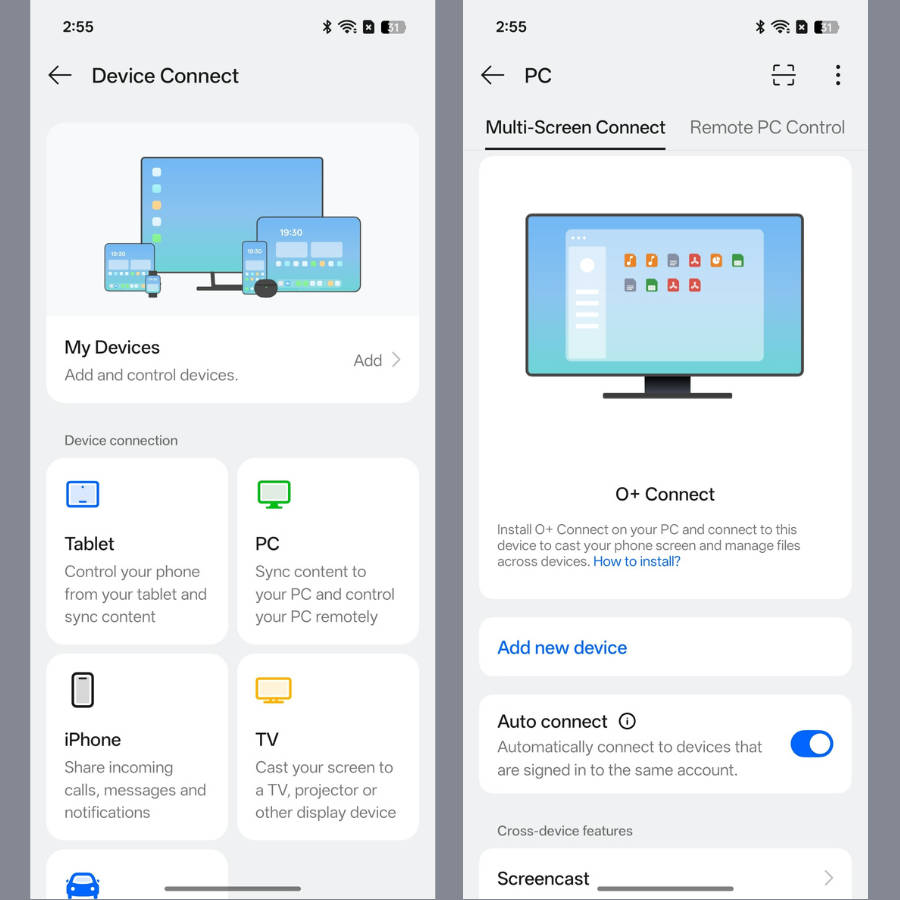
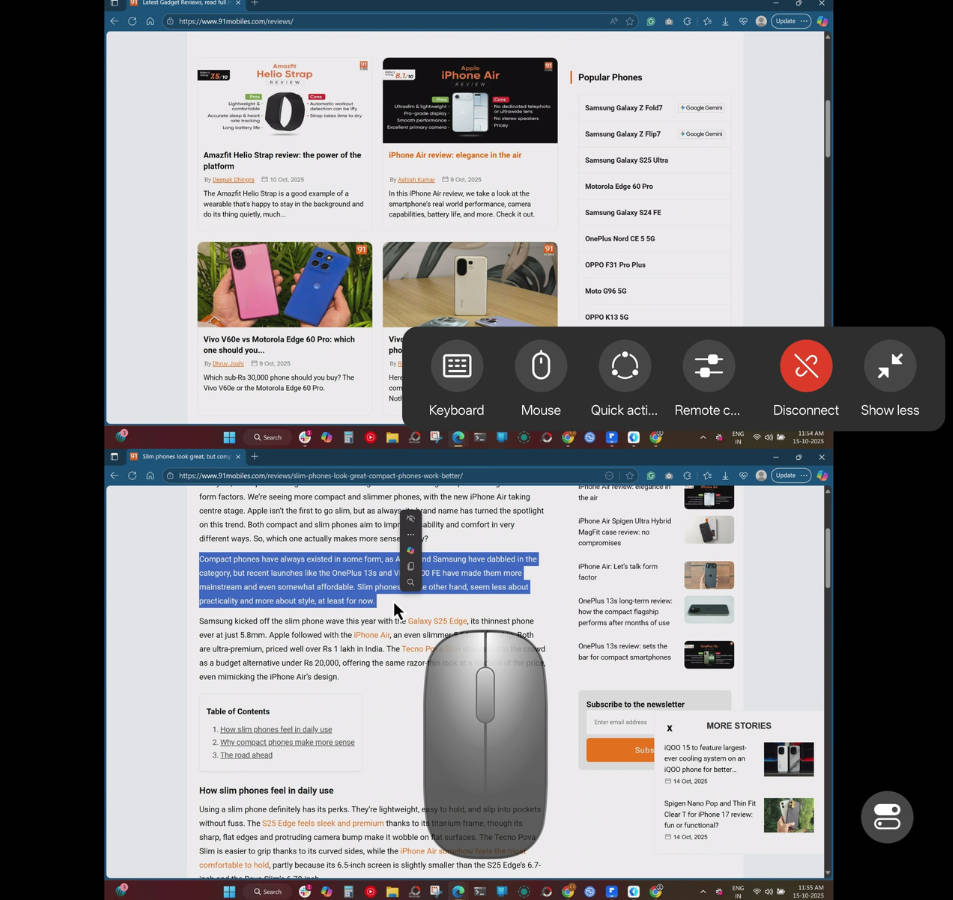
Advanced connectivity: O+ Connect functionality has expanded to MacBooks, allowing ColorOS 16 users to cast their macOS device’s screen on their OPPO phone, alongside Windows. Similarly, if you’re heavily invested in the Apple ecosystem, you can even interlink your OPPO Phone with an Apple Watch and iPhone for keeping a tab on calls and notifications.
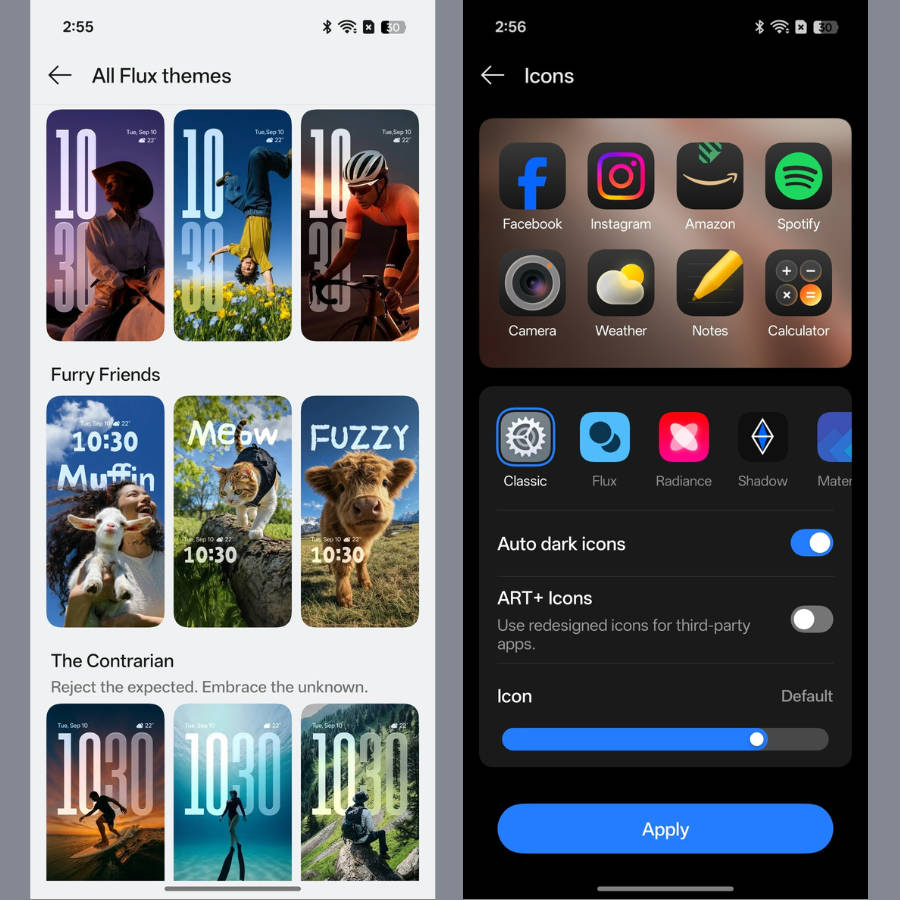
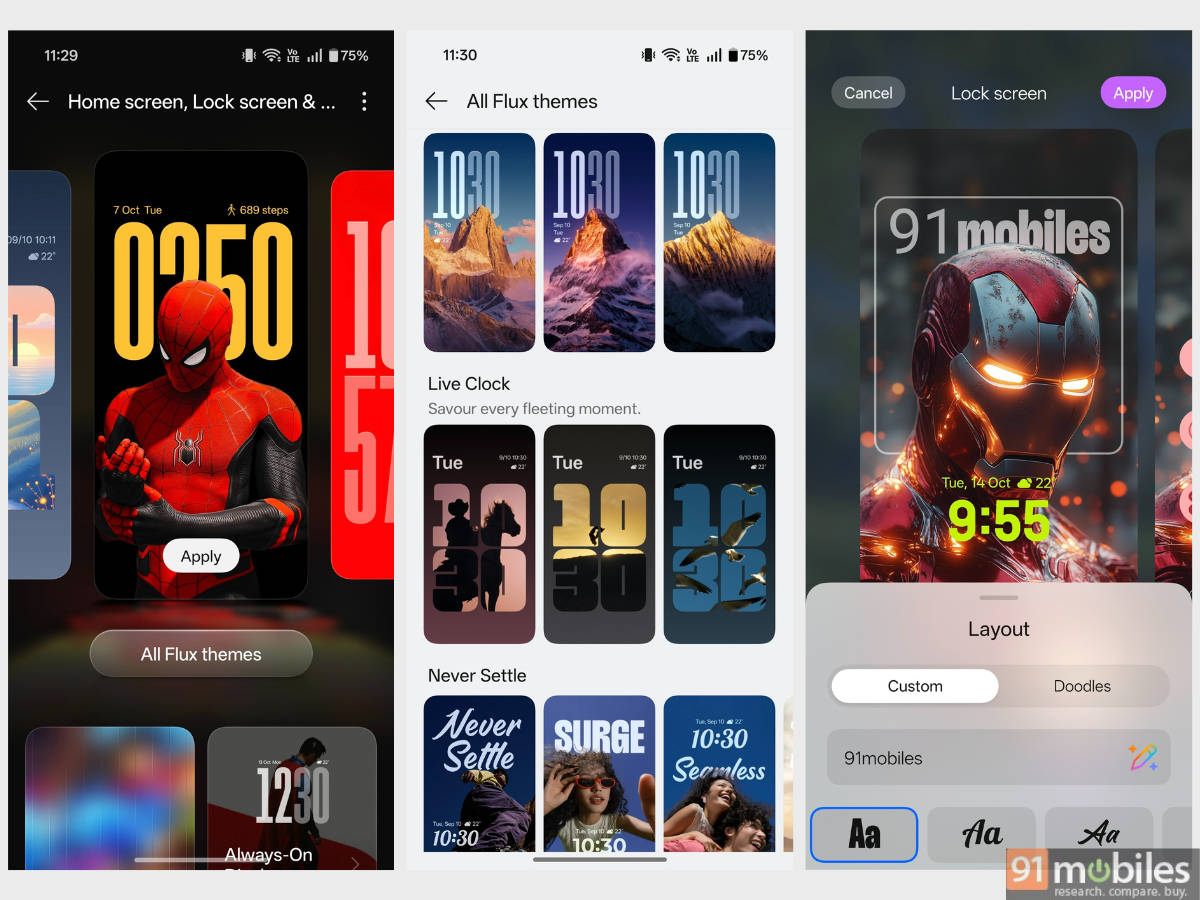
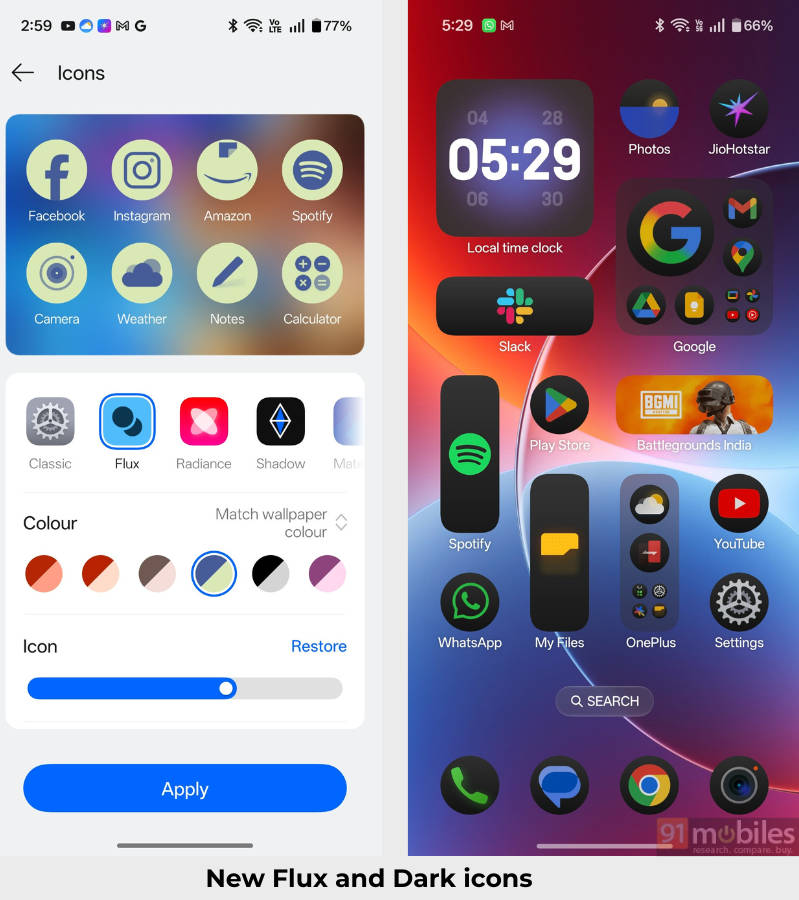
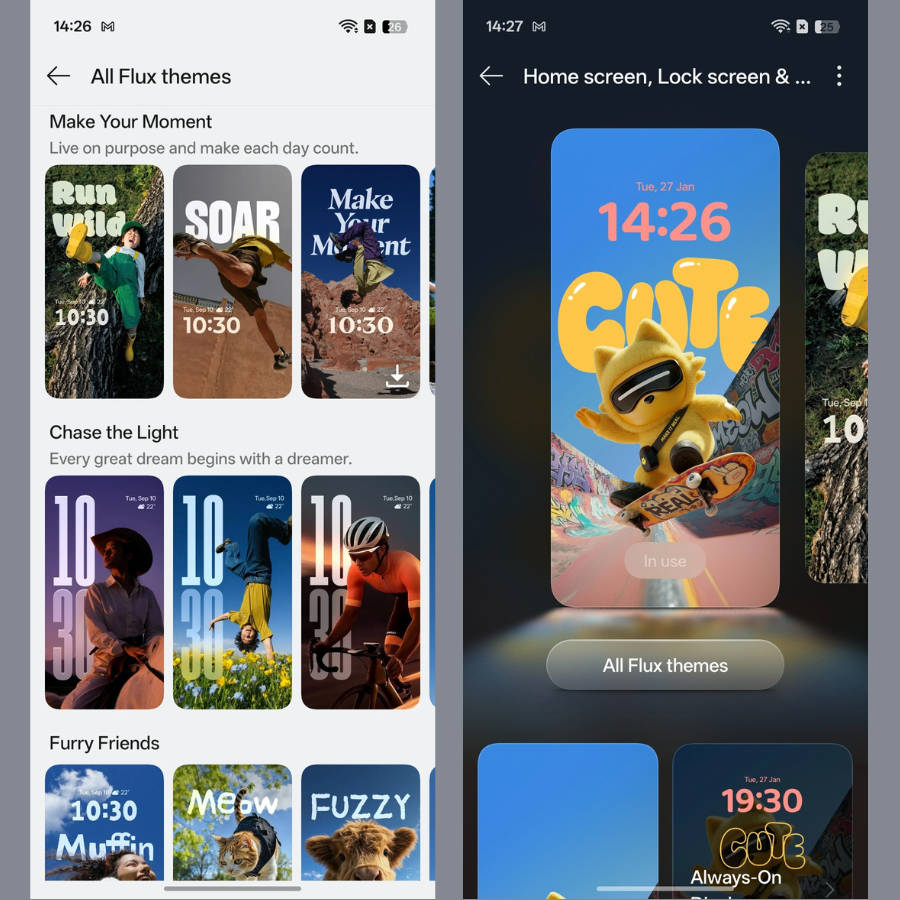
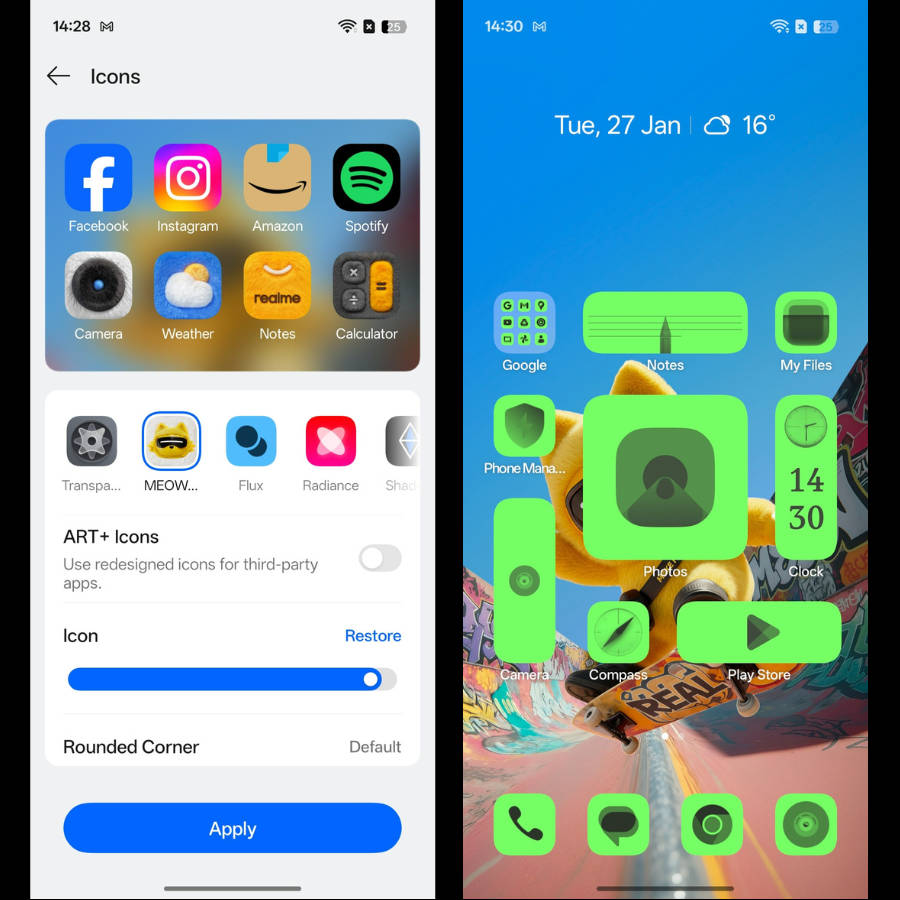
Flux themes and icons: With the introduction of Flux themes 2.0, ColorOS 16 adds a bunch of new lockscreen clock styles and motion wallpaper support. On the homescreen, the newly designed icons can be expanded into 1×2 and 2×2 layouts, while a ‘dark icon’ setting has been added.
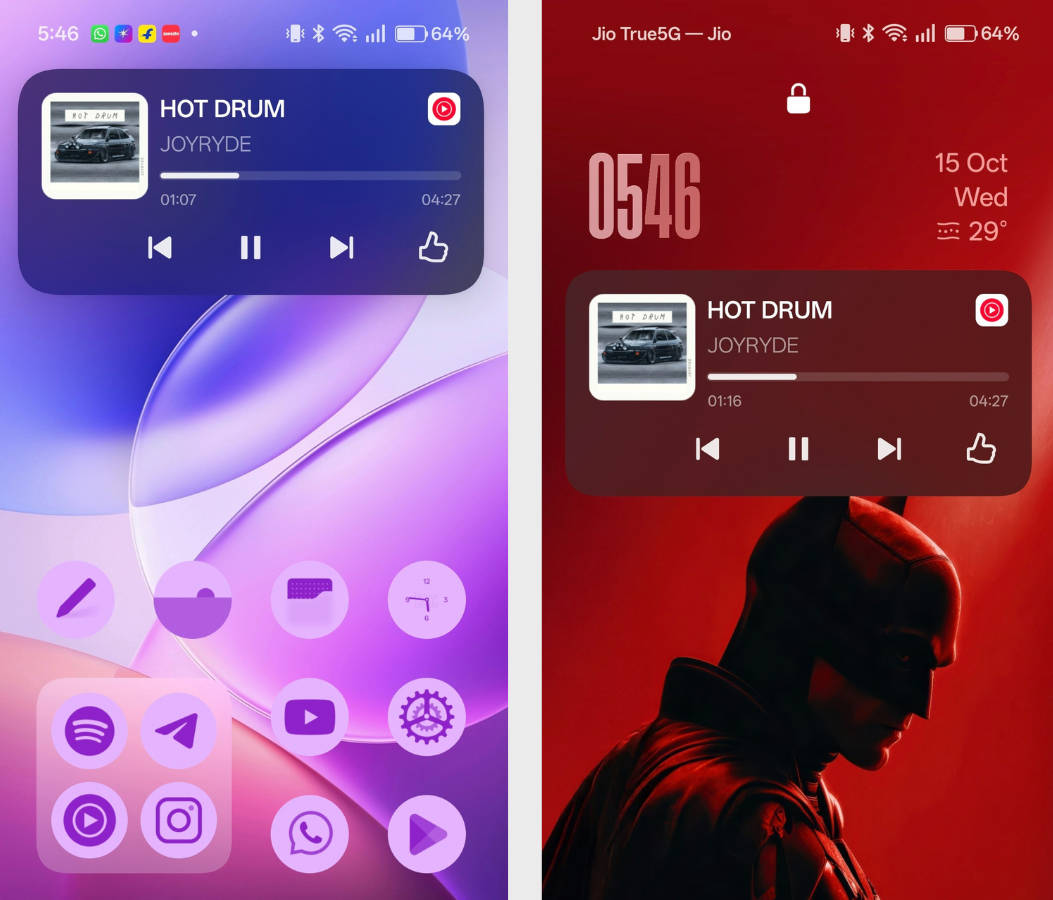
Aqua Dynamics: Aqua Dynamics (OPPO’s version of Dynamic Island) now boasts sports live alerts, real-time Google Maps directions, improved Blinkit, Zomato, and Swiggy trackers, and a YouTube Music player.
AI Mind Space: This feature scans your screen’s content and saves it for later reference. Additionally, Mind Space integrates with Google Gemini, allowing you to ask questions about the saved content.


OnePlus (OxygenOS 16)
While we’ve covered OxygenOS 16 in-depth in our hands-on review, here are the major highlights of what you can expect on OxygenOS’ latest release.
Flow Motion & improved Parallel Processing: OxygenOS 16 further improves upon the animations and responsiveness by bringing Flow Motion and an updated Parallel Processing, which has been extended to system apps.
Flux themes 2.0: OxygenOS 15 was largely known for the brand-new lockscreen themes. OxygenOS 16 takes these themes further by adding new clock styles and lockscreen widget support.
Better connectivity: Along with Windows, now you can link your OnePlus phone with an iPhone or MacBook for easy file transfers and screen casting. Furthermore, you can also link your OnePlus phone with an Apple Watch to receive notifications or call alerts.
Better Fluid Cloud integration: OxygenOS 16 brings Fluid Cloud to more apps, such as tracking a live sports match, Google Maps directions, Blinkit orders, and more. We were particularly impressed by how the system delivered live cricket match scores, making it a great addition.
Realme (Realme UI 7)
As noted in our Realme GT 8 Pro review, Realme UI 7, based on Android 16, introduces several visual refinements, most notably the Light Glass Design, which creates a sense of depth across the interface. Apart from that, here are the highlighting aspects of Realme UI 7:
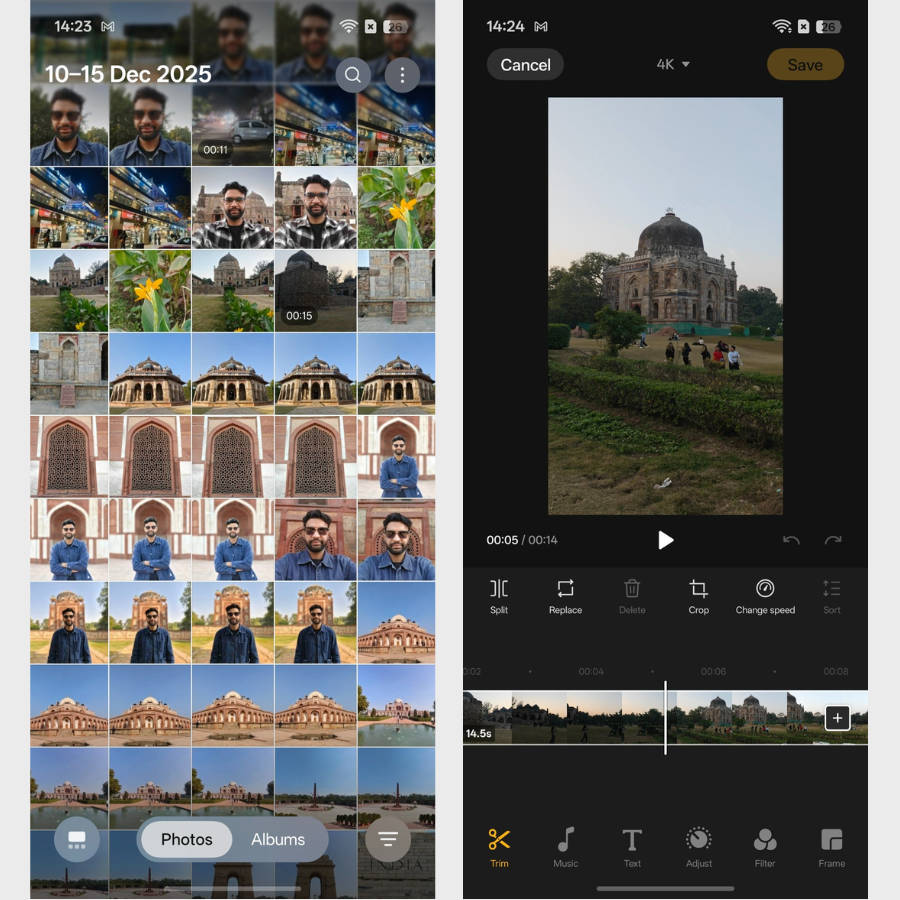
Redesigned Gallery and Video Editor: The upgraded Gallery on Realme UI 7 features an immersive view, along with a floating navigation bar, giving the app more screen real estate to display media. The new video editor supports more transitions and can even render in up to 4K resolution.
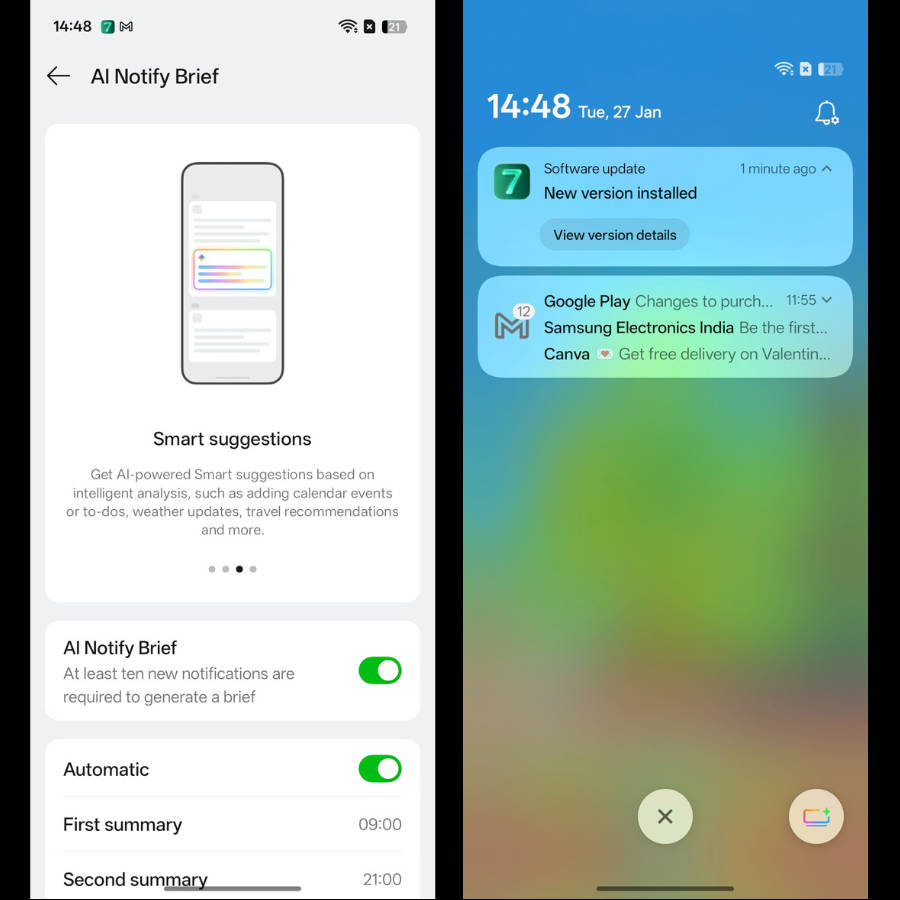
AI Notify Brief: If you’re someone who receives tons of notifications, AI Notify Brief summarises them into a single curated view for you to catch up on the latest happenings.
New ways to customise homescreen and lockscreen: Just like ColorOS 16 and OxygenOS 16, Realme UI 7 is packed with new lockscreen themes and icon packs.
Multi-Task Sidebar: If you’ve enabled Sidebar, you can add up to twelve recent apps in the sidebar section. This allows for convenient multitasking.
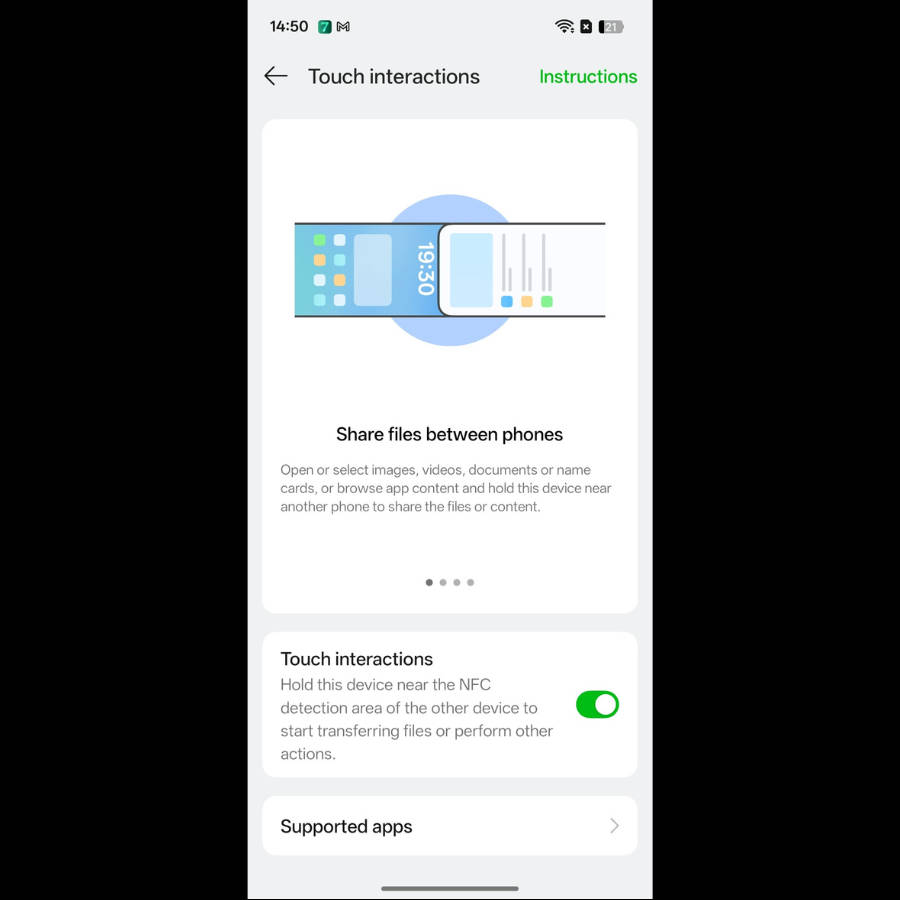
Touch to Share: On NFC-supported Realme phones, users can simply tap their phones with other Realme users (OPPO and OnePlus too) to exchange media and files.
Vivo and iQOO (OriginOS 6)
The much-anticipated OriginOS 6 update significantly changes the software look and feel on Vivo and iQOO devices. With a brand new ‘Origin Design’ language in tow, this Android 16 skin gets the following:
Dynamic Glow and Gradient blur: Many parts of the interface feature light, glow, and gradient blur effects, providing a natural and responsive feel. These design elements can be found in the control centre, number pad, and system-level buttons.
Origin Island: Origin Island is a pill-shaped interface that appears on the status bar. For instance, enabling the stopwatch, timer, and playing music, the pill provides real-time information of the ongoing action, with which you can also interact.
Office Kit: As noted in our OriginOS 6 hands-on review, with the Office Kit app on Windows and Mac, you can transfer files, mirror screens and even control your phone from your PC.
Customisation additions: The ‘Flip Card’ feature on the lockscreen is a standout addition on OriginOS 6. Once you select two to four photos, the lockscreen subtly shifts between these media when you tilt your phone left or right. Furthermore, there’s a new ‘Split’ control centre, icon resize support, and a handful of new lockscreen clock styles.
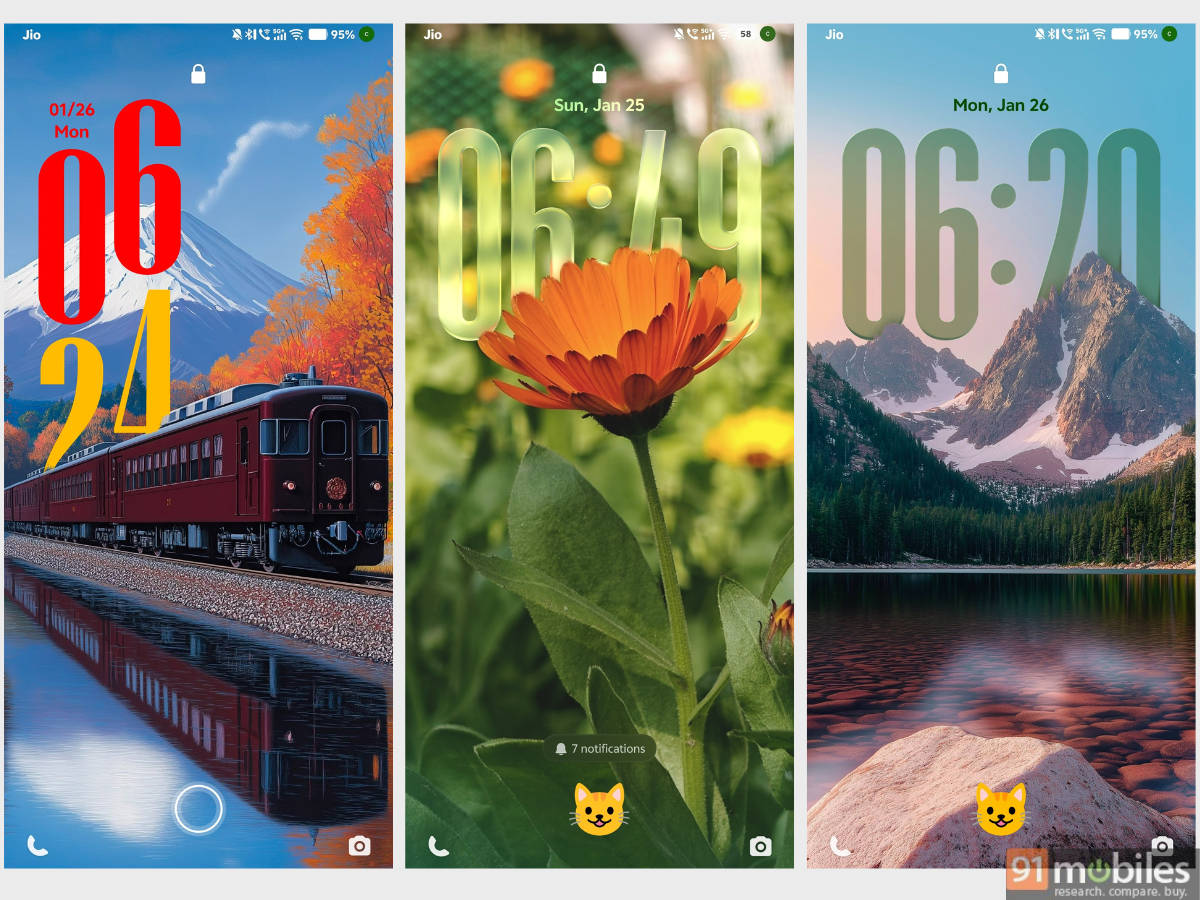
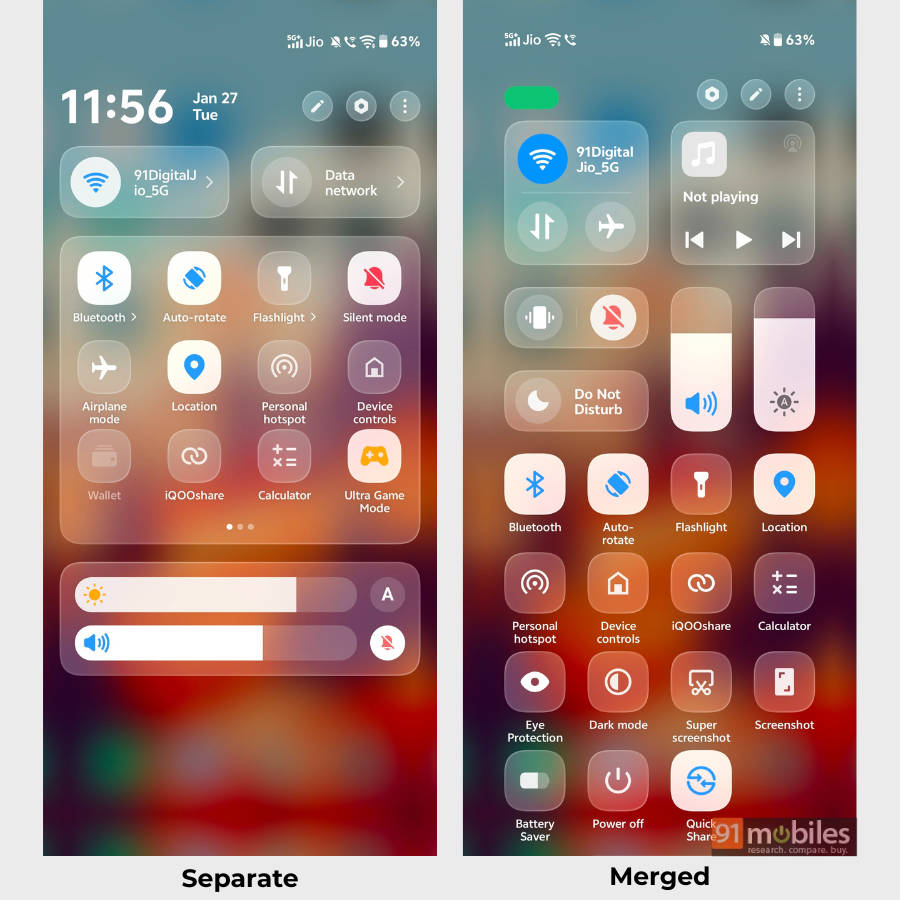
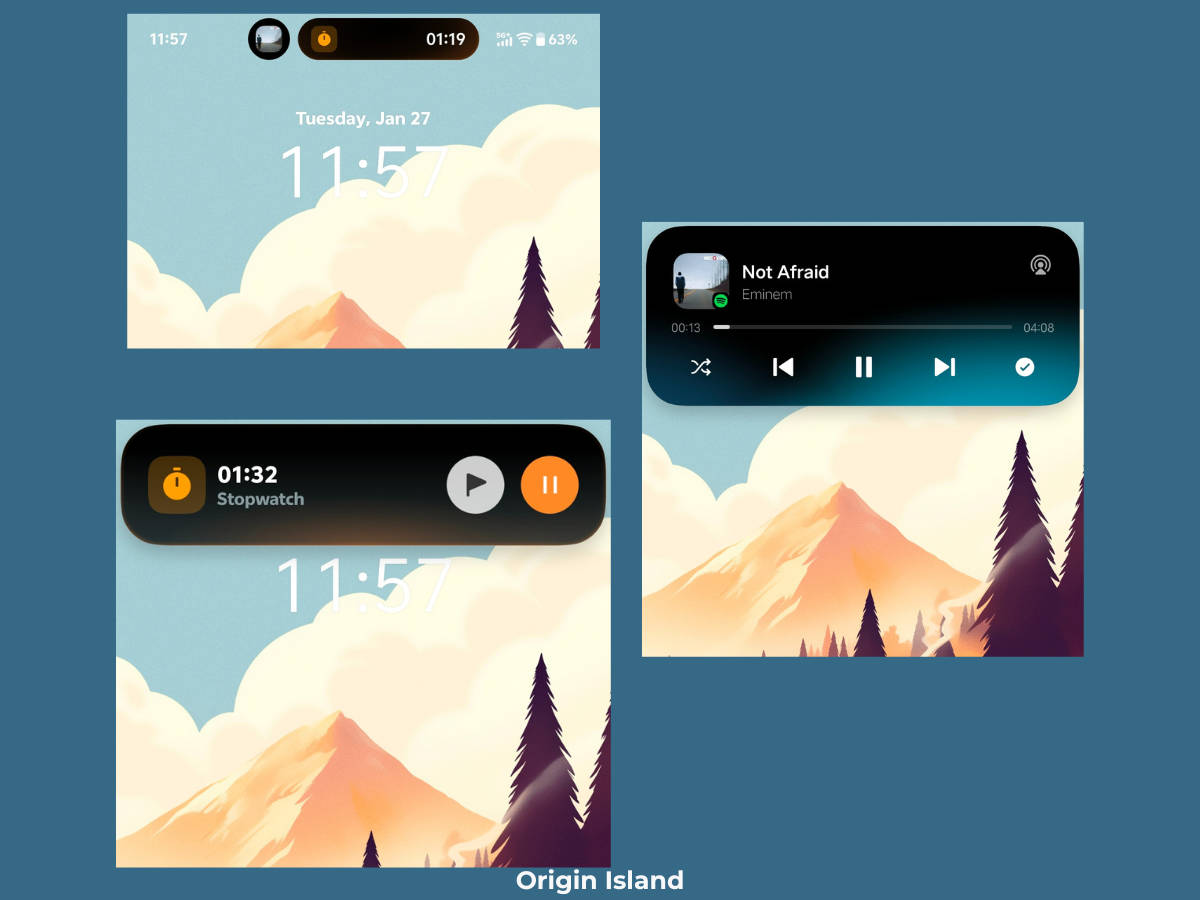
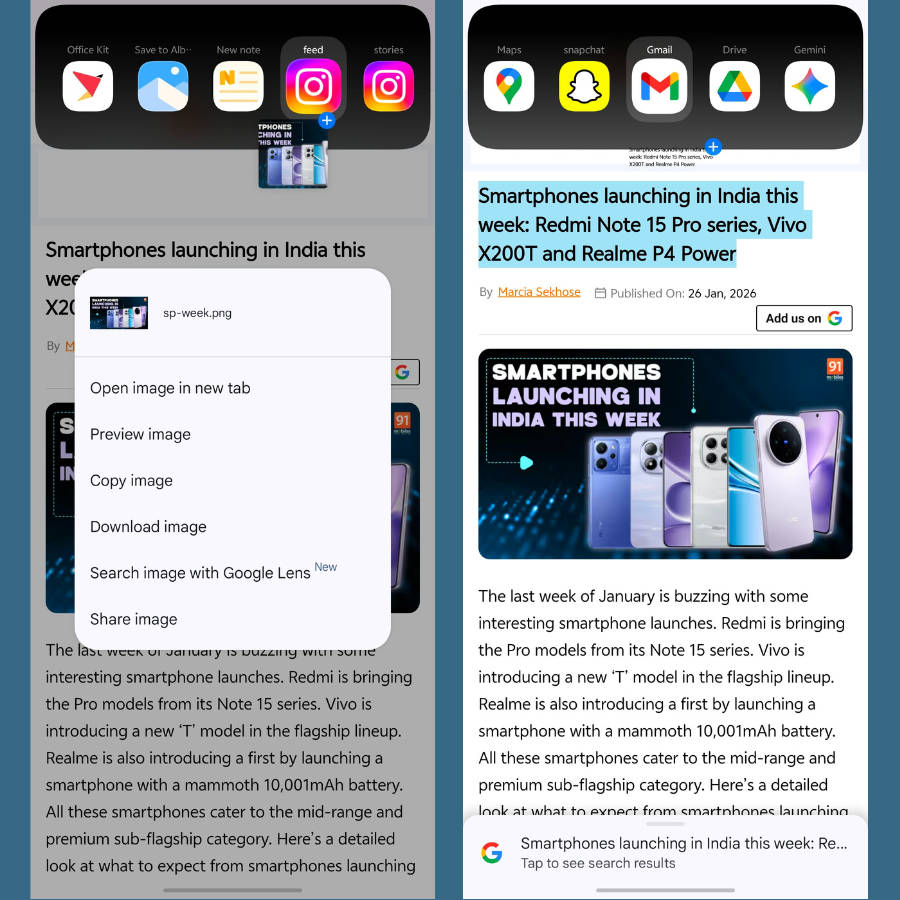
From our point of view, OriginOS 6 is a major leap forward in terms of UI design, animations, responsiveness, and features like Origin Island and Office Kit aid daily usage in meaningful ways.
Xiaomi and POCO (HyperOS 3)
With HyperOS 3 rolled out to several flagship smartphones under the Xiaomi 14 and Xiaomi 15 lineups, the software brings a handful of new features and also boasts iterative upgrades in several areas.
HyperIsland: One of the biggest additions on HyperOS 3, a pill-shaped area at the top that expands to show live activities like music playback, timers, delivery status, and ride-hailing updates.
HyperAI upgrades: The AI Cinematic lockscreen feature turns any wallpaper with a depth wallpaper into motion, while AI Writing has been deeply integrated system-wide to help rewrite texts, change tones, or summarise long recordings and documents. The “Glare Removal” to eliminate lens flares or reflections on skin and glasses.
Cross-ecosystem connectivity: HyperOS 3 devices can be linked with iPhones, iPads, and MacBooks for seamless file transfers. Similarly, the universal search allows you to find files, images, and messages across all your connected devices
Design and animation refinements: The Control Centre has been tweaked to display more colours, while the transitions and animations across the system have been further refined.
When trying out the Xiaomi 17 Pro (overview) to gauge its real-world usage experience, we found that the system animations felt more refined, while HyperIsland actually gives a boost to functionality.
Nothing (Nothing OS 4)
During our revisit of the CMF Phone 2 Pro, we found that Nothing OS 4 not only brings several new additions but also subtle refinements.
A true dark mode: In previous iterations of Nothing OS, the dark mode displayed a grey background in system apps and interfaces. OS 4 improves upon that by adding an “Extra Dark mode” option, which adds a pitch-black background to Settings, notification panel, etc.
Dual Pop-up view for apps: Nothing OS 4 brings support for opening two apps in floating windows. This helps in multitasking between two apps.
Customisation and visual improvements: On the customisation front, this Android 16-based skin adds two new lockscreen clock styles, revamps the status bar icons and system icons, adds support for more 1×2 widgets, and integrates haptics in more areas.
AI Dashboard: A dedicated dashboard curates all the AI usage data that the user indulges in over a period of time. This includes showing LLM usage, such as ChatGPT.
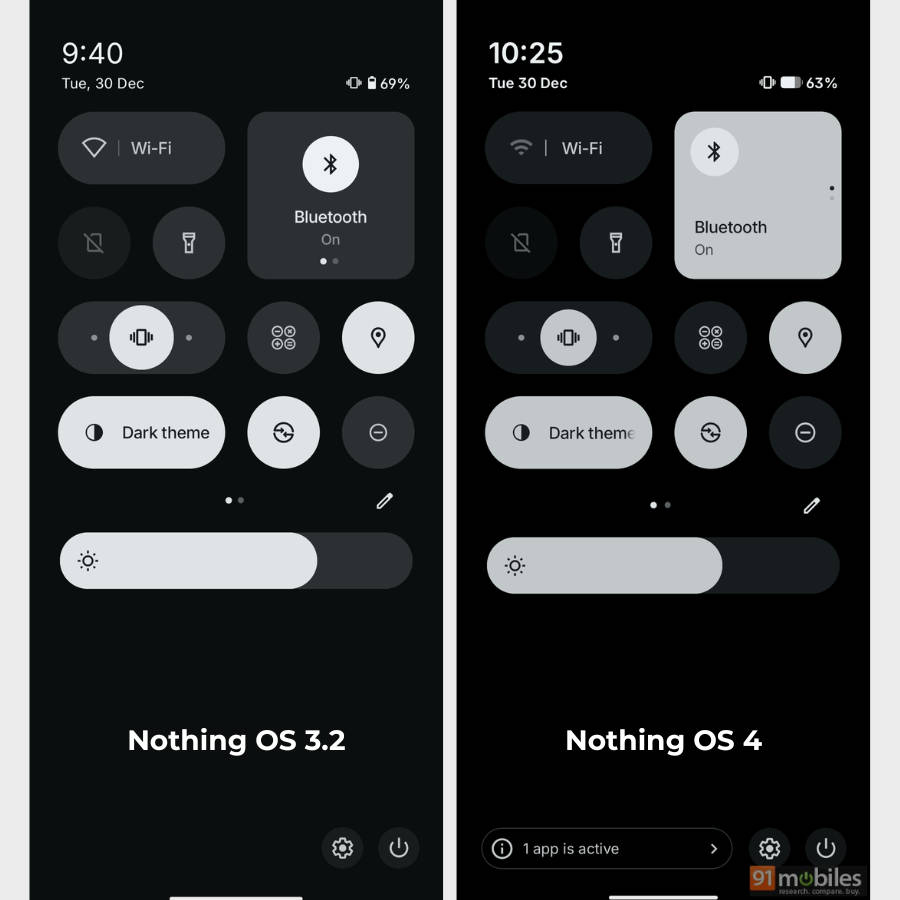
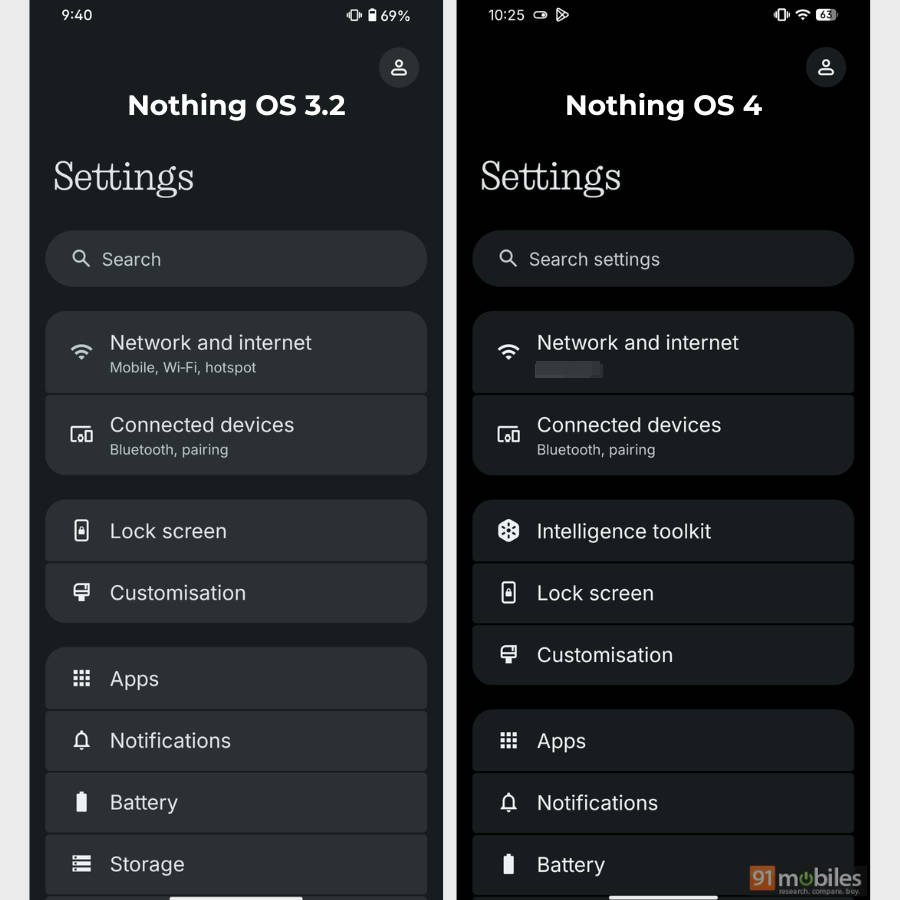
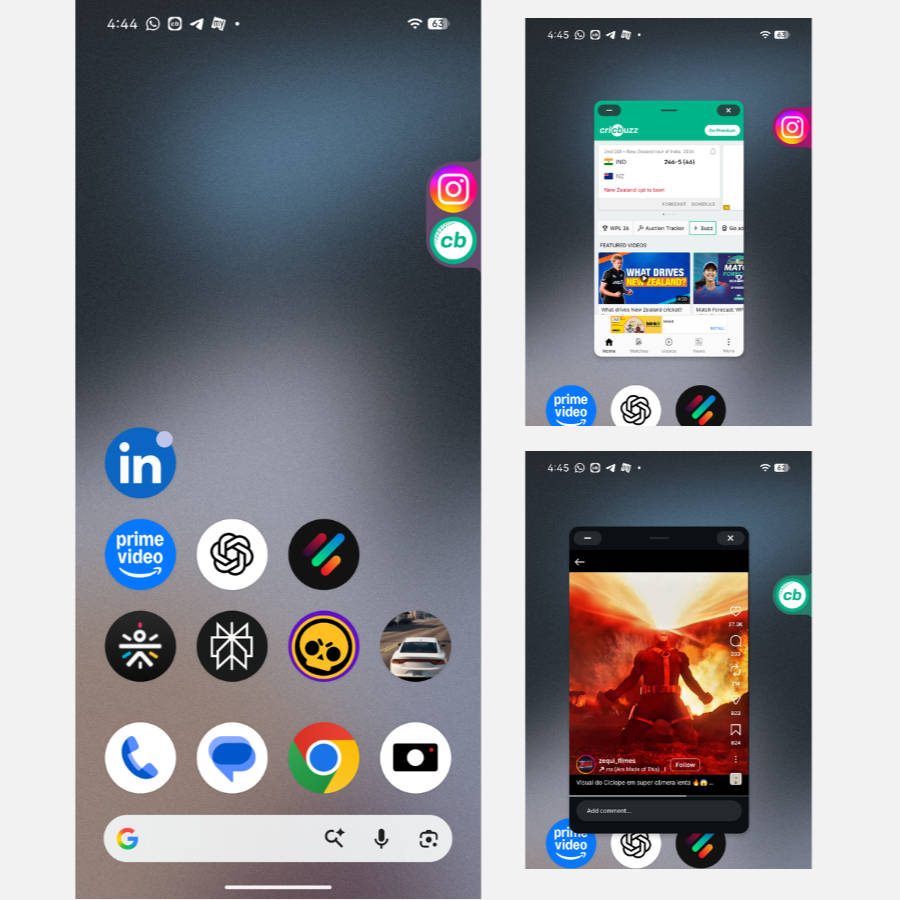
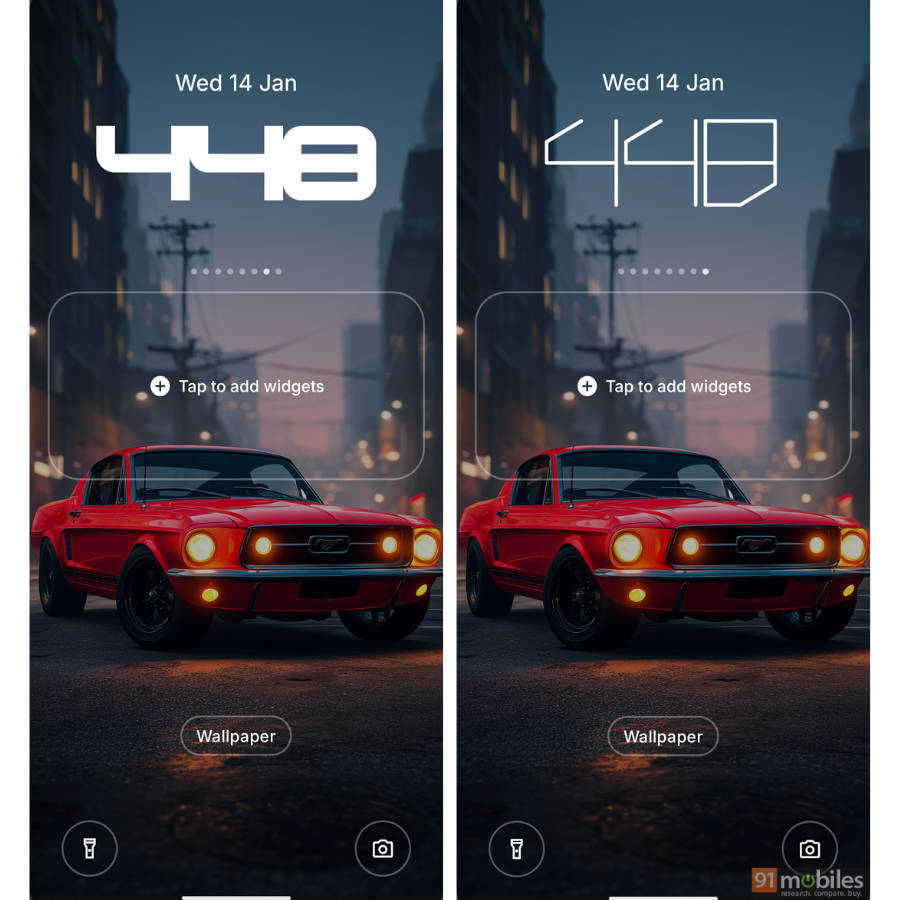
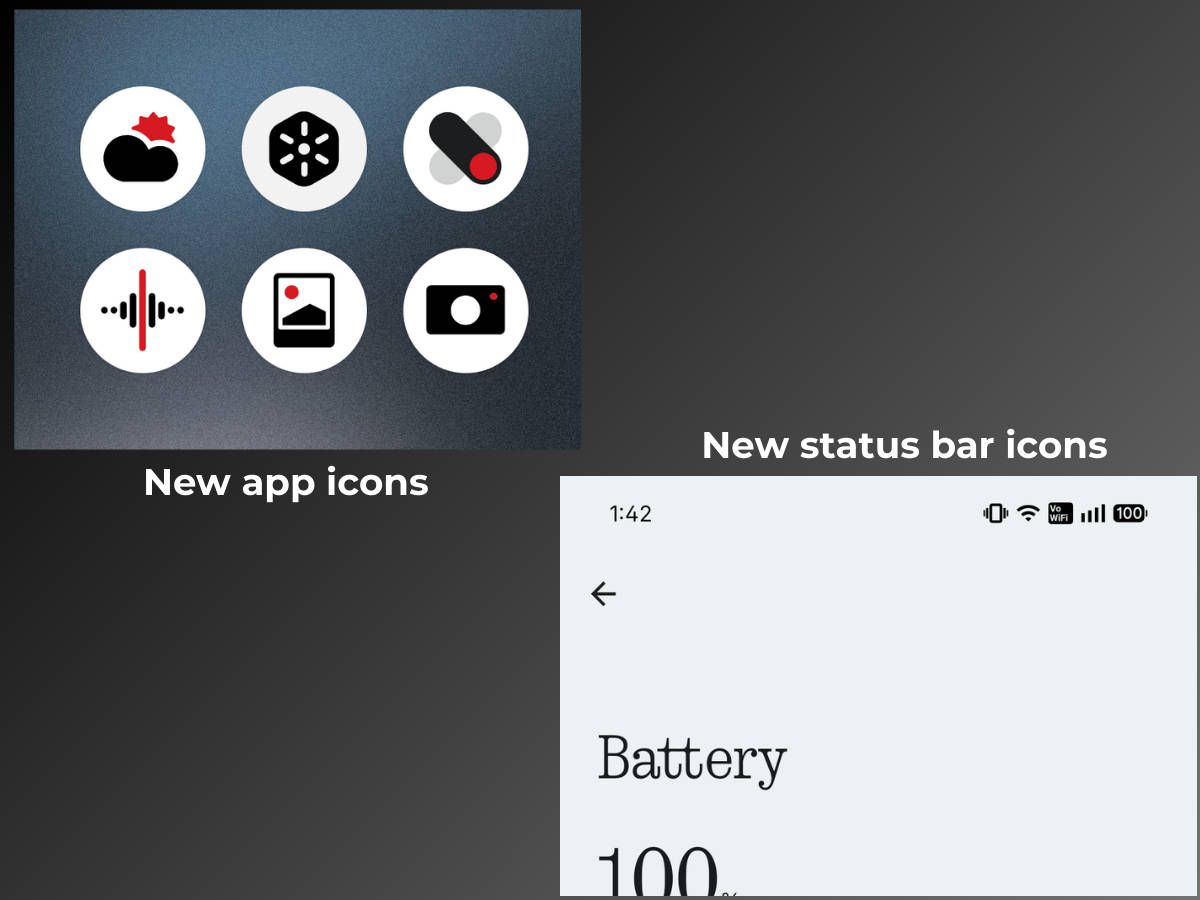
While device performance varies by hardware, our CMF Phone 2 Pro felt a tad smoother to use after the Nothing OS 4 update. This strongly implies that the update has been tuned to deliver a swift usage experience across devices.
Motorola (Hello UI)
Even though Motorola was among the first Android manufacturers to roll out the stable Android 16 update, the additions are subtle. The update improves upon several aspects of Android 15, though.
Subtle cosmetic changes & animation improvements: The most noticeable changes include the repositioning of the ‘About phone’ section within Settings, slower yet more polished app opening and closing animations, smoother focal length switching animation in Camera, and polished control centre opening transition.
Advanced protection: A single button automatically activates Theft Detection Lock, Offline Device Lock, caller ID, and spam call filtering, while also blocking non-HTTPS websites and warning against suspicious links received via SMS.
Core Android 16 features: Notification cooldown mutes the phone when consecutively receiving notifications, while Modes offer stricter controls over Do Not Disturb, sound profiles, and notifications.
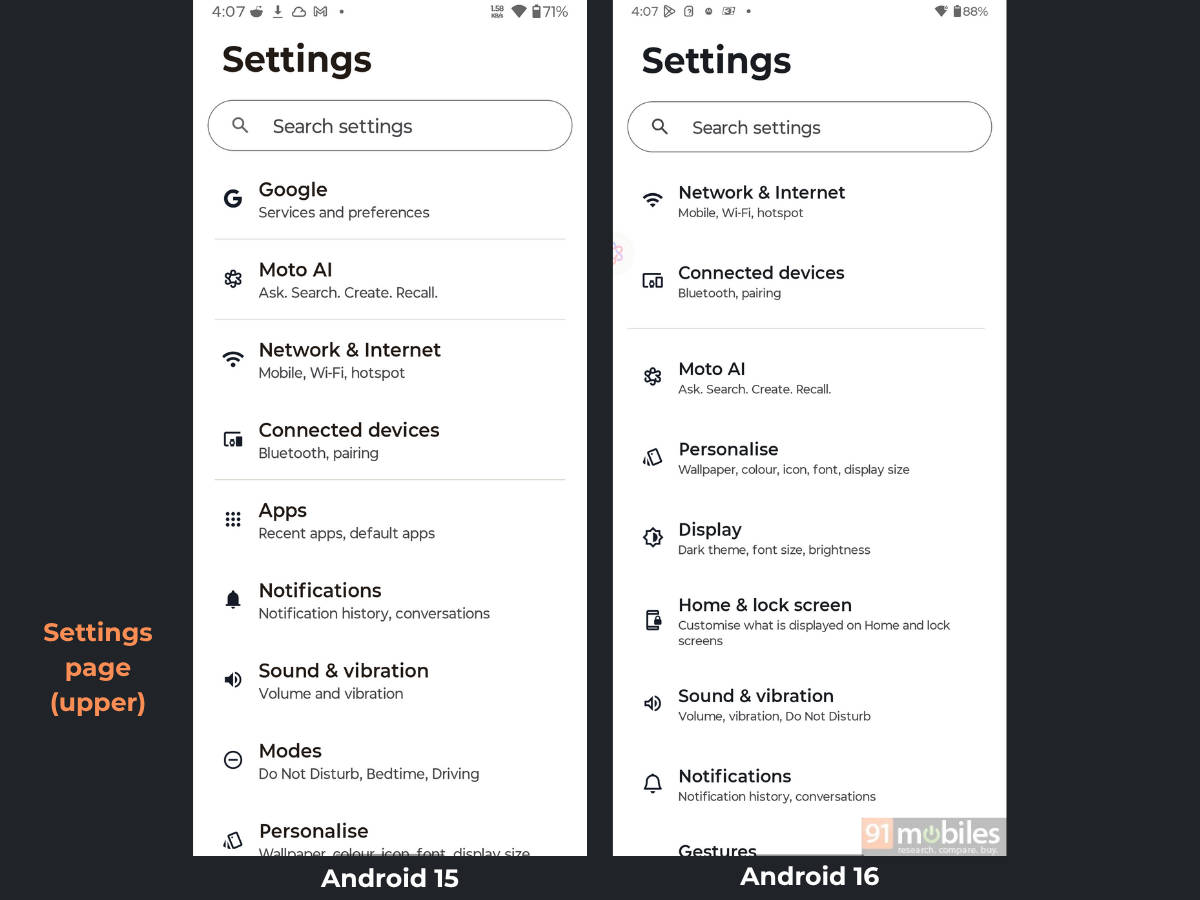
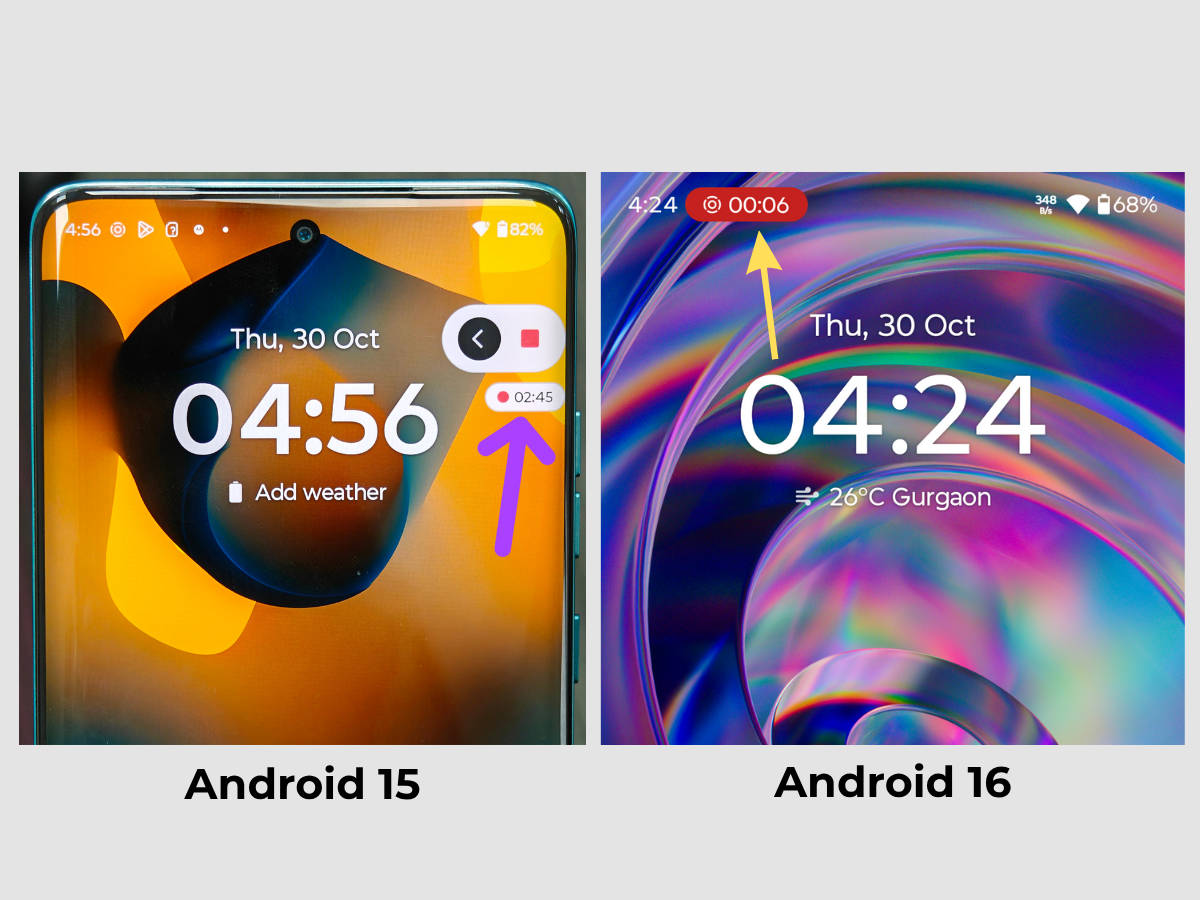
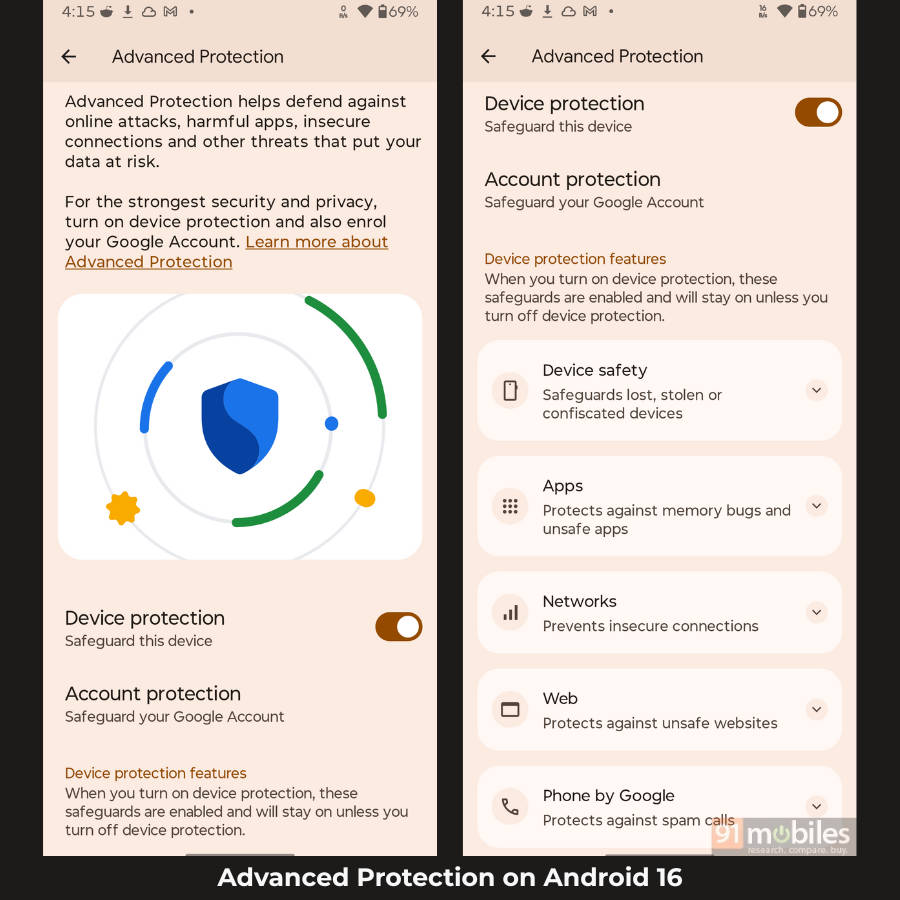
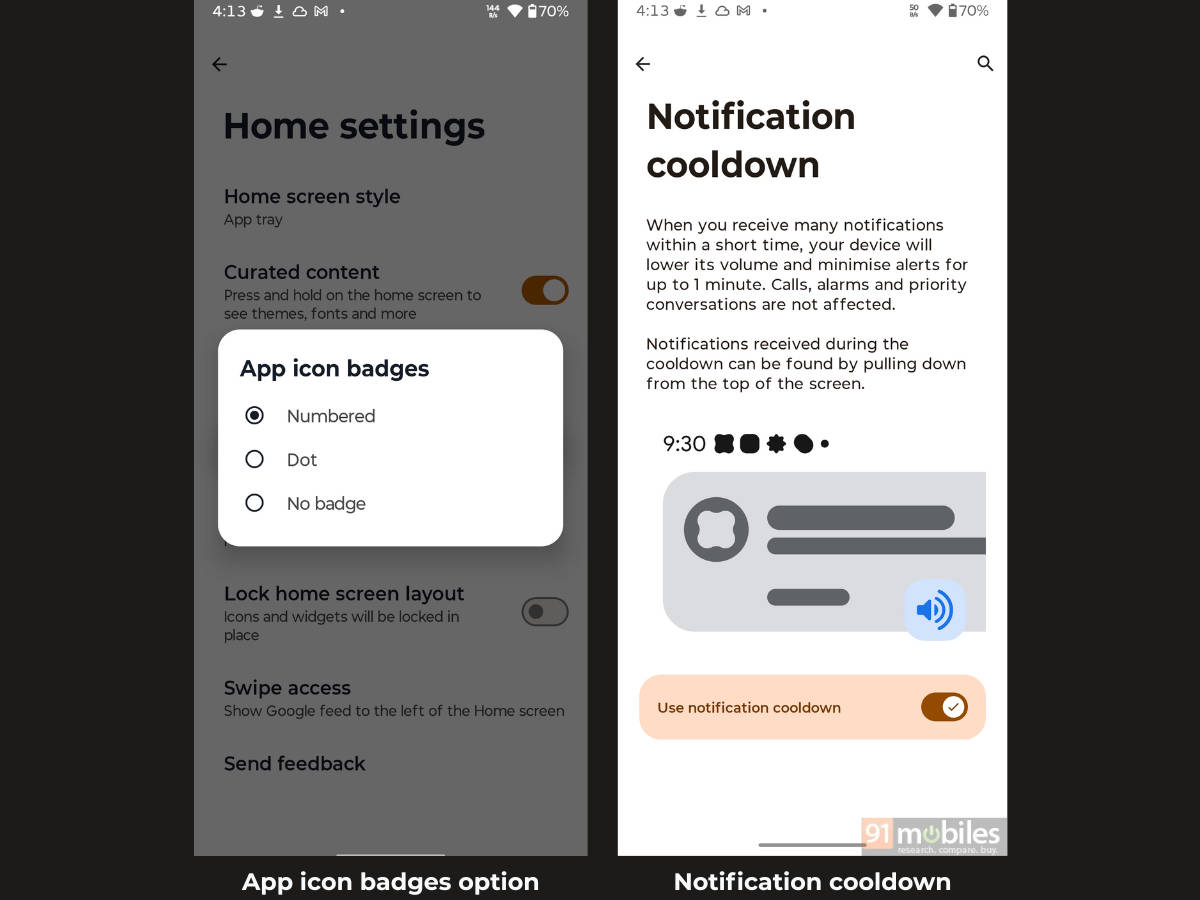
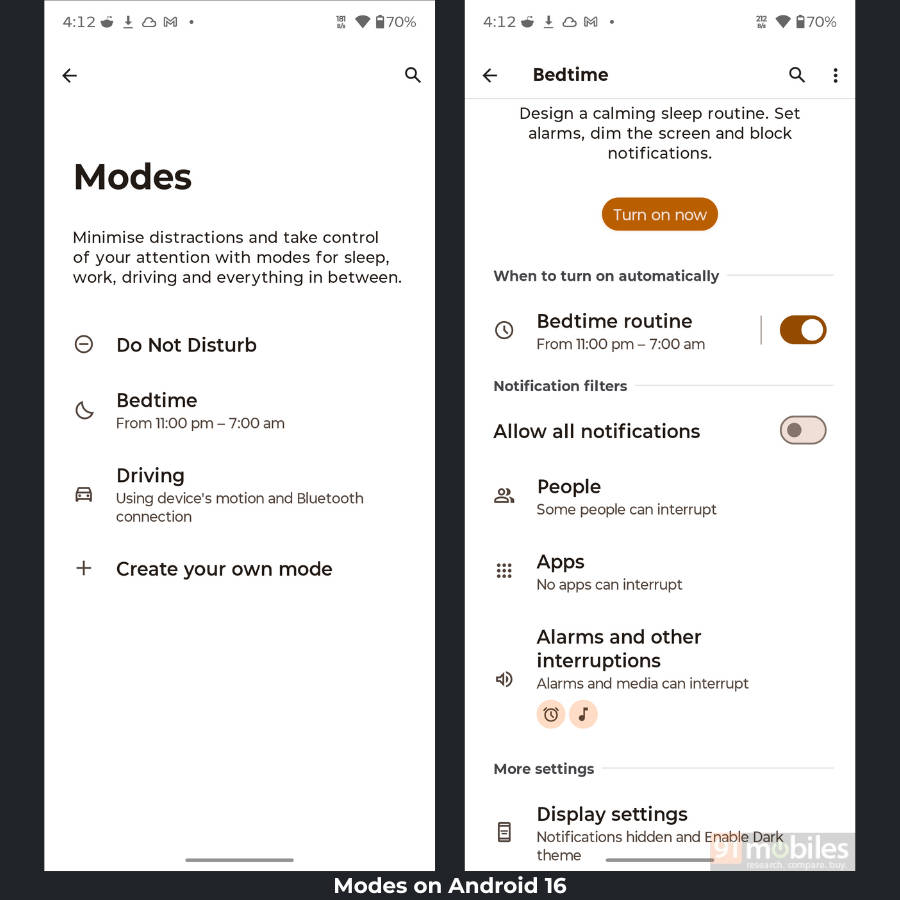
As stated in our Motorola Android 16 update hands-on review, even though the update’s offering and additions are on the lower side, users coming from Android 15 to Android 16 may still feel right at home due to minimal design changes.
FAQs
What are the major new features in Android 16?
While most Android manufacturers, such as Samsung, Vivo, Xiaomi, and others, develop proprietary features and additions for their custom skins, they also bake in the core features offered by Google in every iteration of Android.
For Android 16, these include Notification Cooldown that automatically lowers the volume if an app sends a rapid burst of notifications within a short window, predictive back gesture shows a “preview” of the screen or app you are about to land on before you complete the swipe, Advanced Protection mode that blocks and identifies spam messages and calls, and Desktop Windowing allows apps to be resized and moved freely.
How do I know when my device has received the Android 16 update?
There are several ways to check whether the Android 16 update has been rolled out to your device, with the most obvious being the OTA update notification. All Android smartphones receive a notification when the company pushes out an update. You can also manually check for these updates by going into your phone’s Settings app and selecting the ‘Check for updates’ or a similar option. Lastly, browsing the community forums for your smartphone brand lets you know whether a major Android update, like Android 16, has been made available for your device.
Is there any way I can roll back to Android 15?
You can roll back to Android 15 only if the device manufacturer allows it. However, downgrading almost always requires a full factory reset, which results in the loss of data, apps, photos, and settings unless you back up first.