The Android 17 update is currently underway on multiple smartphones, either in stable or beta form. While Google officially unveiled Android 17 at Google I/O on May 19, the major update has already rolled out to Pixels. On the other hand, brands such as Samsung, OPPO, OnePlus, Xiaomi, and others have already begun the beta programmes for their high-end devices. While Google has stated that Android 17 prioritises privacy, security, and refined performance, users can expect Android OEMs to deliver new and improved visual elements and smoother animations in their custom skins.
On that note, let’s look at Android 17’s development so far, the features it brings, and the OS update news that has been making headlines as of late.
Table of Contents
Android 17 release timeline
As is tradition with every major Android release, Google was the first Android OEM to release the Android 17 beta programme for its smartphones, notably Pixel phones. Unlike previous Android upgrades, the company directly seeded ‘Beta’ releases rather than ‘Developer Previews’. In a move to push out beta releases more quickly, Developer Previews have been phased out in favour of Android Canary builds, which are an ongoing software channel for beta and API development.
Canary updates are intended for testing and may be highly unstable, making them suitable primarily for developers and app builders. Besides that, all changes and fixes made in the Canary channel are continuously rolled up to the subsequent Android 17 beta channel. Regular users, enthusiasts, and, of course, developers can enrol in the beta programme to get an early taste of the software.
The first Android 17 beta update was released on February 14, 2026, for several Pixel smartphones. Interested users can enrol for the programme through Android’s official beta programme website, provided you’re aware of the risks and hurdles the update may bring, such as app incompatibility, bugs, and glitches.
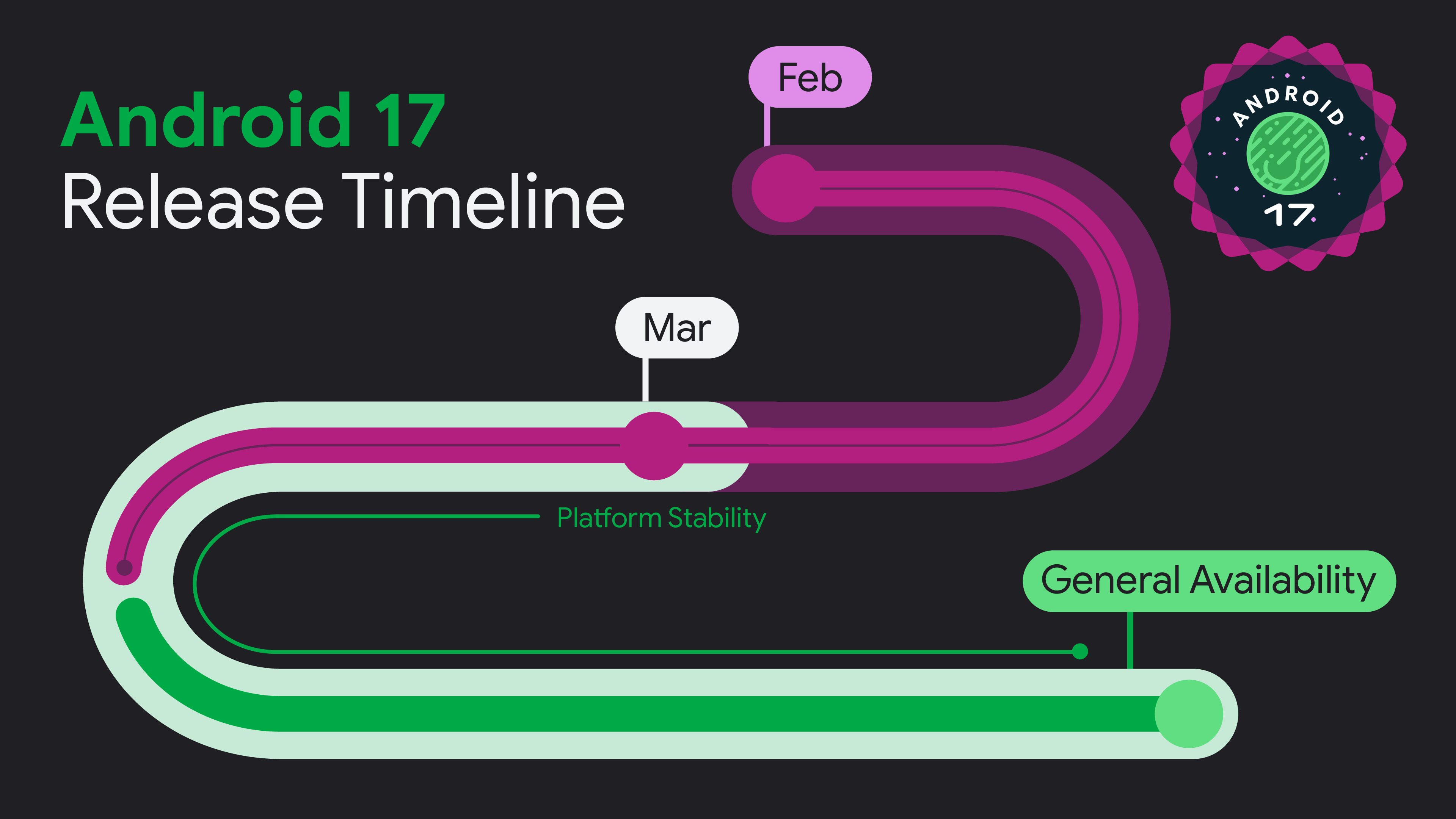
After pushing out four beta updates, the stable Android 17 firmware was released for eligible Pixel devices on June 17th globally. The update’s changelog emphasises improvements to productivity, gaming, and security.
Brand-wise Android 17 stable rollout
Google Pixel
With the stable Android 17 update out for Google Pixel devices, here are the new key improvements and changes it brings:
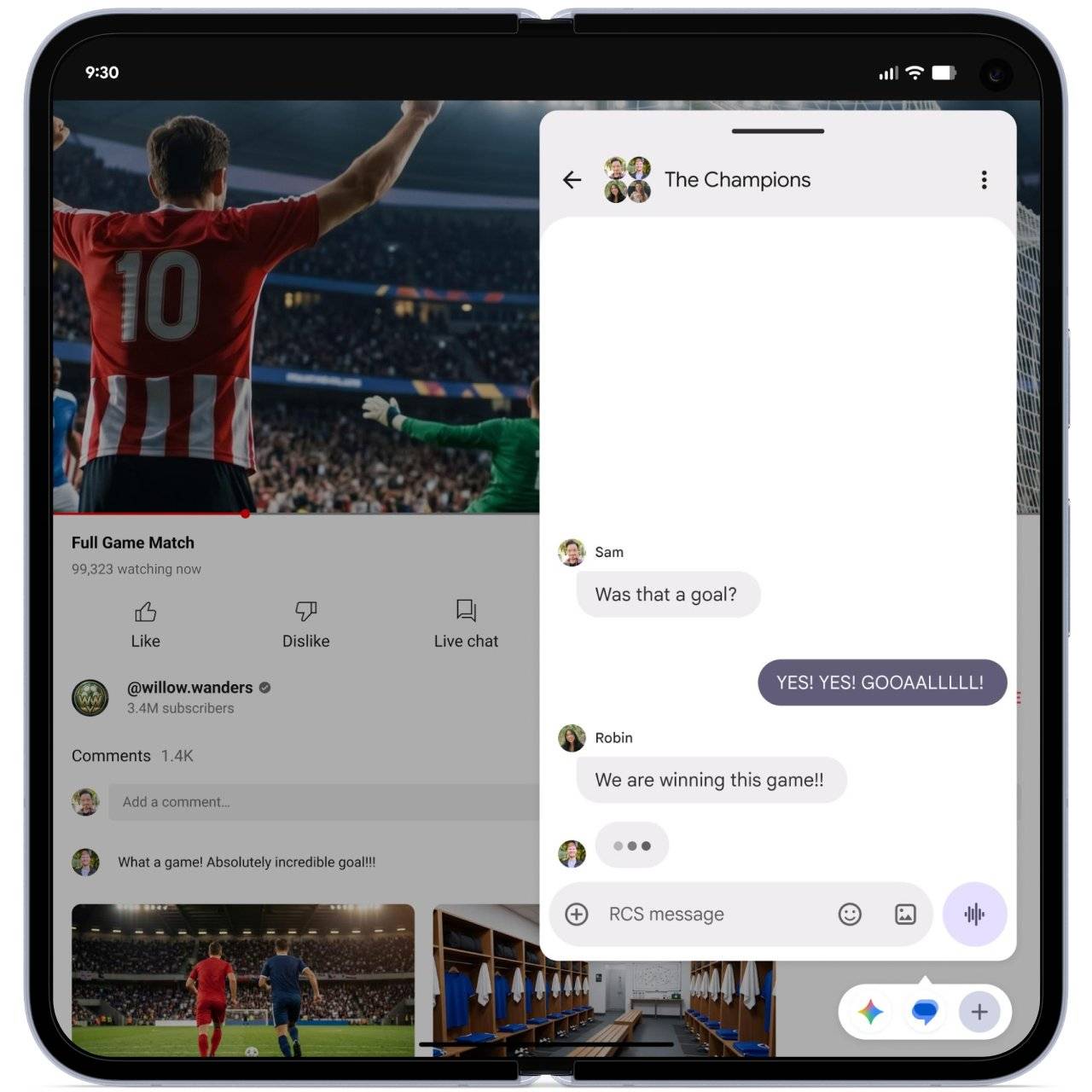
- Bubbles: Adds a new multitasking layer on top of split-screen and floating windows. Similar to Messenger bubbles, it lets users open multiple apps in a floating bubble format that can be docked to the screen edges.
- Consistent widget sizes: Widgets on external and connected displays now automatically adjust according to screen density for a uniform and polished look.
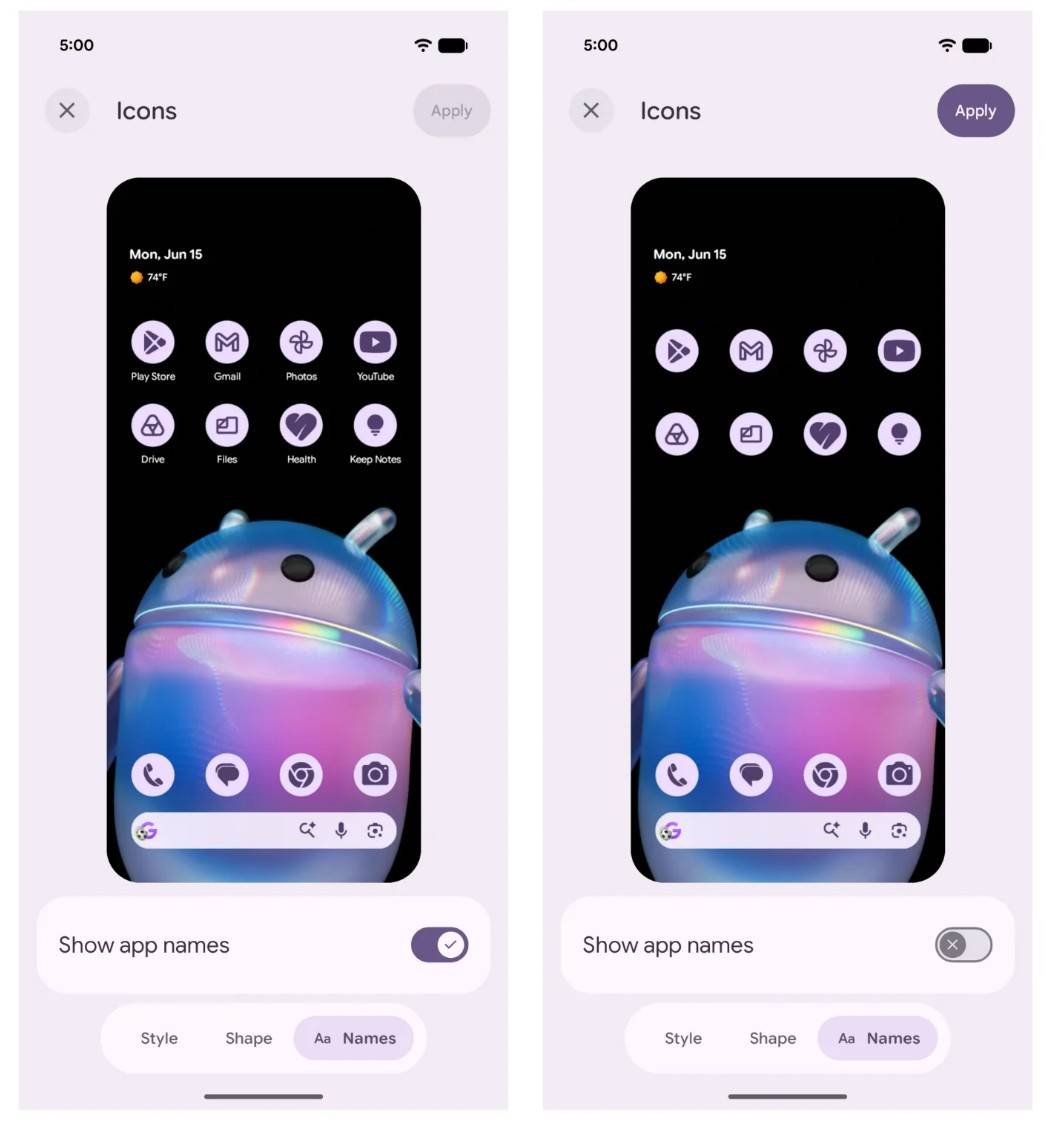
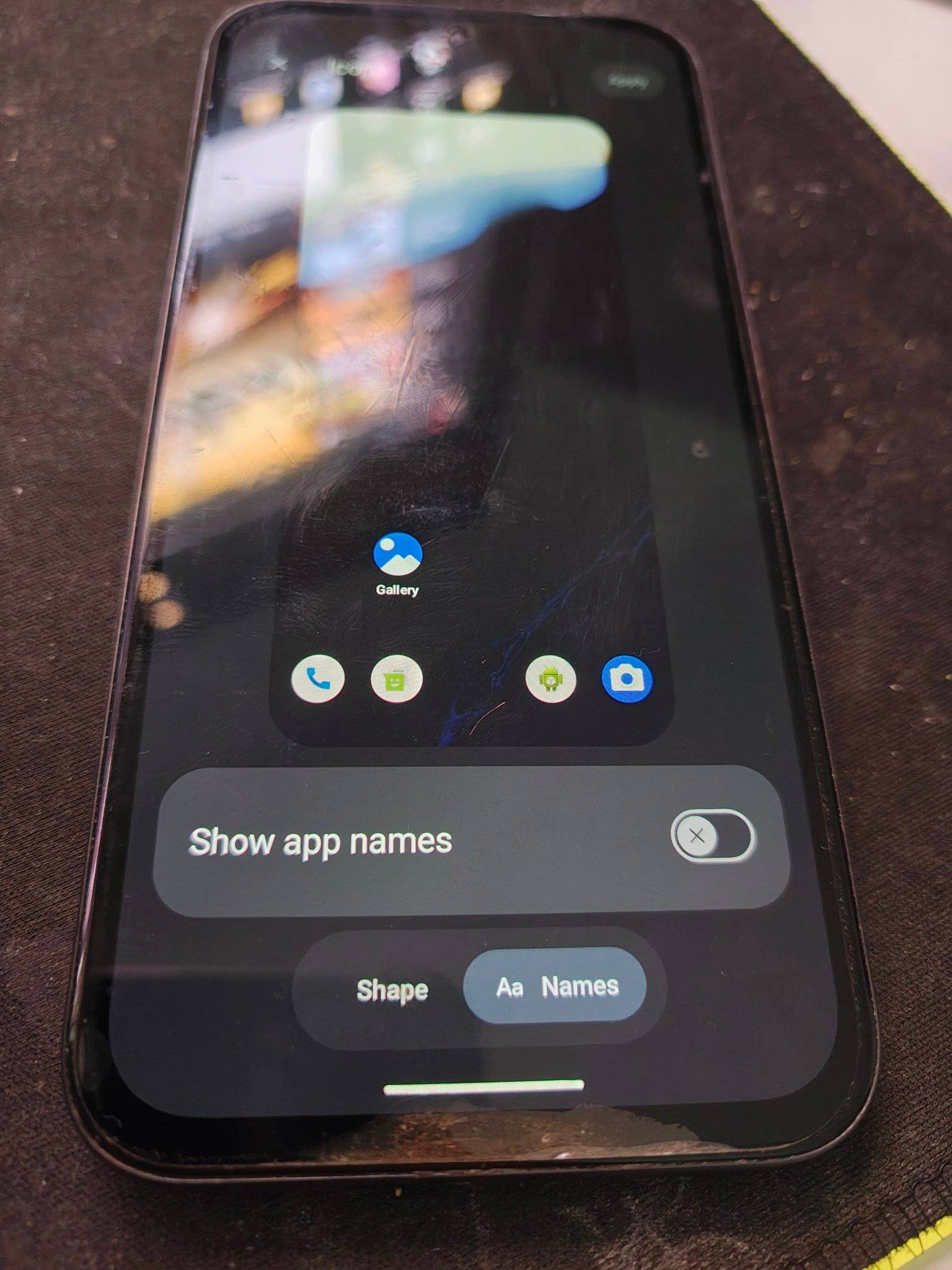
- Hide app names: Finally comes to stock Android. Users can hide app labels on the home screen for a cleaner and more minimalist look.
- Expanded blur effects: Android 17 extends blur effects to the widget picker, volume panel, and power menu, building on the improvements introduced in Android 16 with Material 3 Expressive.
- Compact settings menus: Menus in Settings have been made more compact, allowing more content to fit on a single screen.
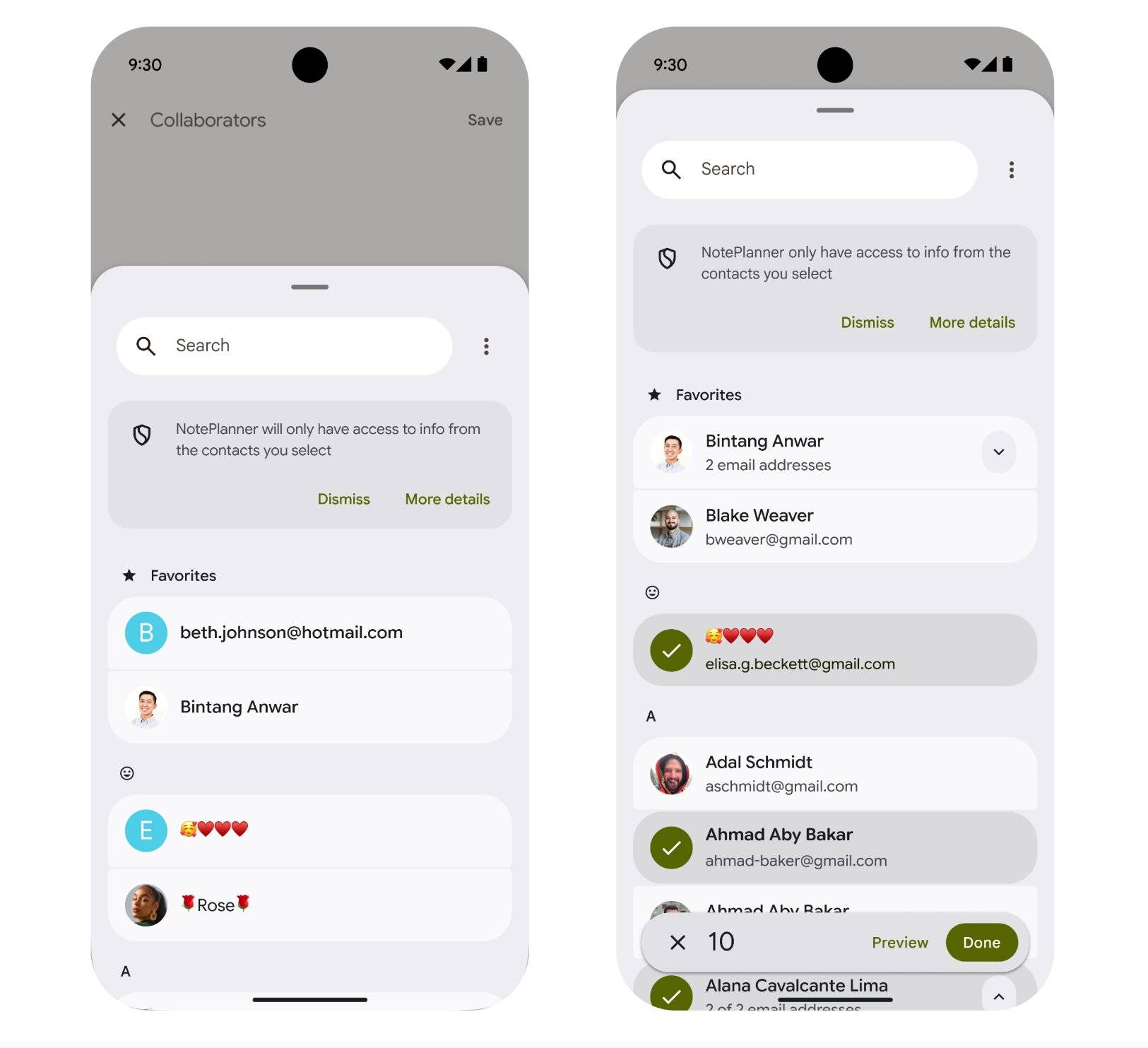
- Selective contact access: Users can now grant apps access to only specific contacts instead of the entire list.
- Per-session precise location: Apps can be granted precise location access for a single session only, ideal for one-time use.
- Screen Reactions: During screen recordings, users can overlay their face via the front camera with automatic background removal, delivering a cleaner look than previous implementations.
- Improved Live Updates: Live Updates are now more prominent across the notification shade, lock screen, and status bar.
- Separate WiFi and mobile data toggles: The update finally separates the WiFi and mobile data toggles, which were earlier clubbed together. This should enable users to instantly turn on or off their smartphone’s internet connectivity.
- App memory limits: Android 17 introduces intelligent per-app memory limits based on the device’s total RAM. These conservative limits help prevent extreme memory leaks and outliers that can cause UI stuttering, increased battery drain, and sudden app kills.
Google Pixel smartphones eligible for Android 17 update (confirmed):
- Pixel number series: Pixel 6, 6 Pro, 7, 7 Pro, 8, 8 Pro, 9, 9 Pro, 9 Pro XL, 10, 10 Pro, 10 Pro XL
- Pixel A‑series: Pixel 6a, 7a, 8a, 9a, 10a
- Foldables/tablet: Pixel Fold, Pixel 9 Pro Fold, Pixel 10 Pro Fold, Pixel Tablet
Brand-wise Android 17 beta rollout
Here’s an overview of all the brands that have released Android 17 beta builds for their smartphones. We will keep updating this section as and when a new beta programme is announced.
Android 17 beta for Google Pixel
As of the end of March 2026, Google pushed out three Android 17 beta updates. Let’s take a look at the changes, improvements, and new additions
Android 17 Beta 1 changes
The first beta update of Android 17 heavily emphasised performance, privacy, and security improvements over significant design or UI revamps. Apart from that, the firmware also included several tools to help developers make their apps compatible with the new Android version. Let’s take a look at what Android 17 Beta 1 had in store for testers:
Turn off At A Glance widget: As highly requested by the Pixel community and users, the update finally added the ability to disable the At A Glance Widget on the homescreen, resulting in a cleaner, more refined look.
Smoothened and refined animations: Thanks to improved resource management, Android 17 for Pixel smartphones delivers smoother, more polished animations across the board in areas such as the quick settings panel, app opening and closing, and the recents app page.
Opt out of rotation orientation: For large-screen devices, such as tablets and foldables, a new option has been added to opt out of orientation and resizability for better scaling and content adaptability.
Media and camera enhancements: Android 17 supports professional-grade tools and improves transitions between photo and video modes in the camera app. Apart from that, a standardised loudness function has been added across apps to prevent sudden volume jumps.
Extra dim mode in brightness slider: The extra dim brightness option has been directly integrated within the brightness slider of the quick settings panel.
Improvements to permission management: To better understand which apps have access to the location, microphone, or camera, Android 17 updates the layout and design of the permission manager. Apart from that, the ‘location’ indicator in the quick settings panel has been made larger for better visibility.
Android 17 Beta 2 changes
The Android 17 Beta 2 update introduced several new API changes that developers can implement in their apps to enhance user convenience and security.
Bubbles: Intended largely for devices with a big screen, such as foldables and tablets, Bubbles is Google’s alternate take on floating app windows. Since it’s enabled at the system level by default, apps opened in Bubble remain on the screen as an overlay unless dismissed, much like the implementation in Facebook Messenger for individual chats.
While the feature wasn’t available to use in Android 17 Beta 2, it debuted with Beta 3.
EyeDropper API: An API specifically designed for media and editing apps, the system-level EyeDropper API, when implemented in apps, can request a colour from any pixel on the display without requiring screen capture permissions.
Contacts Picker: Once again, a backend feature meant for developers to implement, Contacts Picker can grant temporary read access to only specific data fields requested by an app. Since it doesn’t read the entire contact information, this further enhances the user’s security.
Leaked Android 17 features and design changes for Google Pixel
Even before the first Android 17 beta was announced for Pixel smartphones, a wave of leaks revealed what users can expect in the stable build. Although several leaked features have already made their way into the beta channel, others could also be implemented in the public release of Android 17.
Blur and translucent design effects: As per 9to5Google, which has acquired several Android 17 leaked design images from RKBDI, a new blur effect could be applied to the volume slider, expanded volume panel, and the power menu, replacing the existing solid light/grey background.
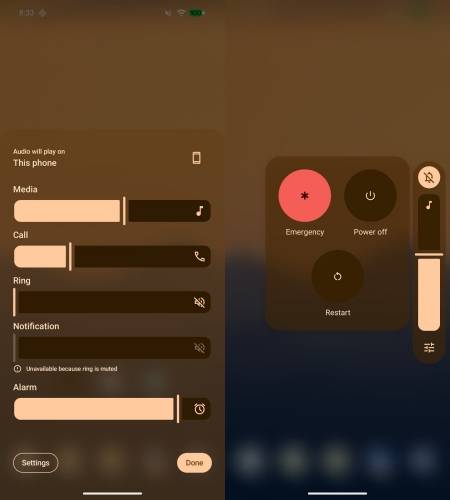
Although such visual effects are new on Google smartphones, other Android OEMs have been using blur, gradient, light, and glass designs for some time.
Split quick settings panel: Android 17 on Google Pixels could introduce the option to choose between a “Combined” and a “Separate” panel.
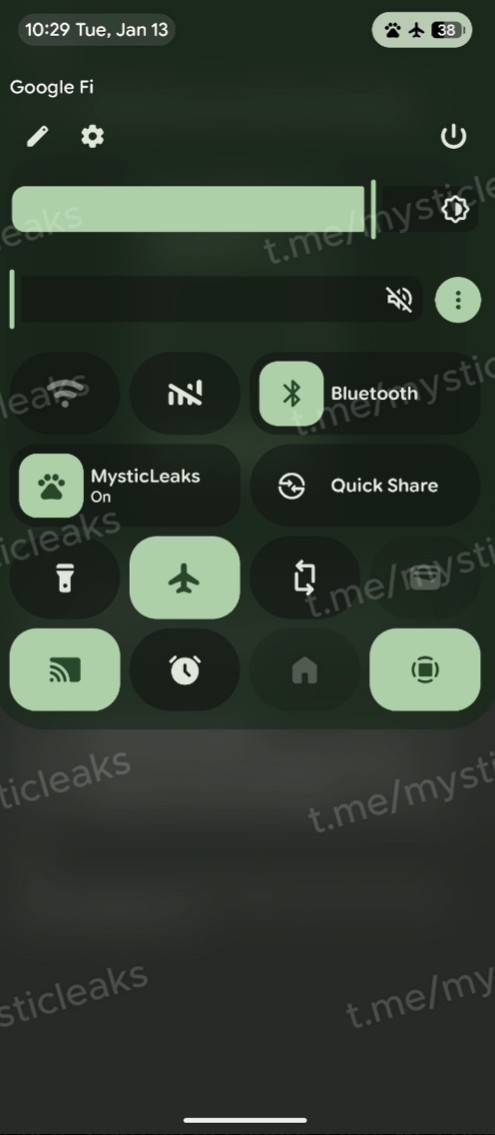
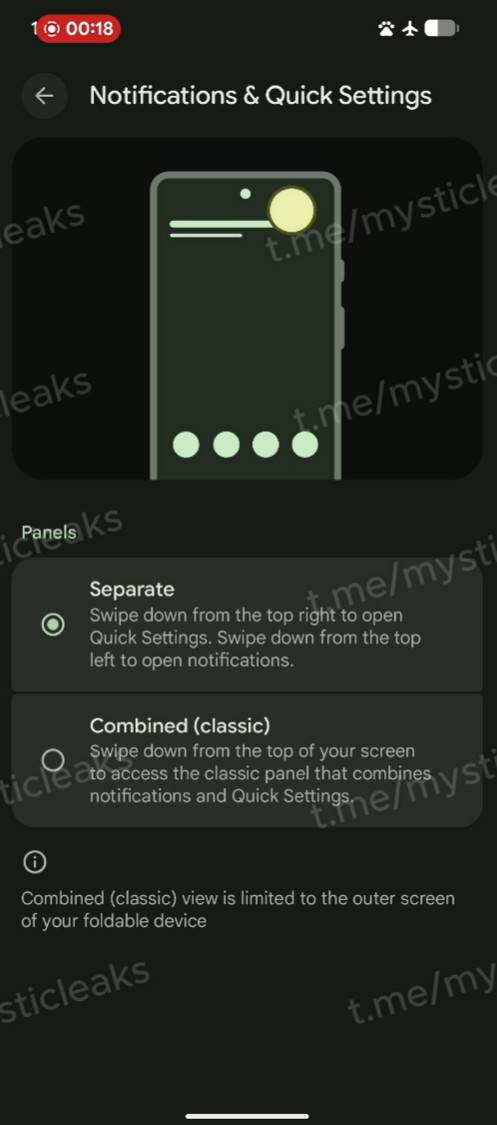
The new Separate quick settings panel will divide notifications and quick settings toggles into two panes, just as on other Android skins, such as ColorOS, OriginOS, HyperOS, and even One UI.
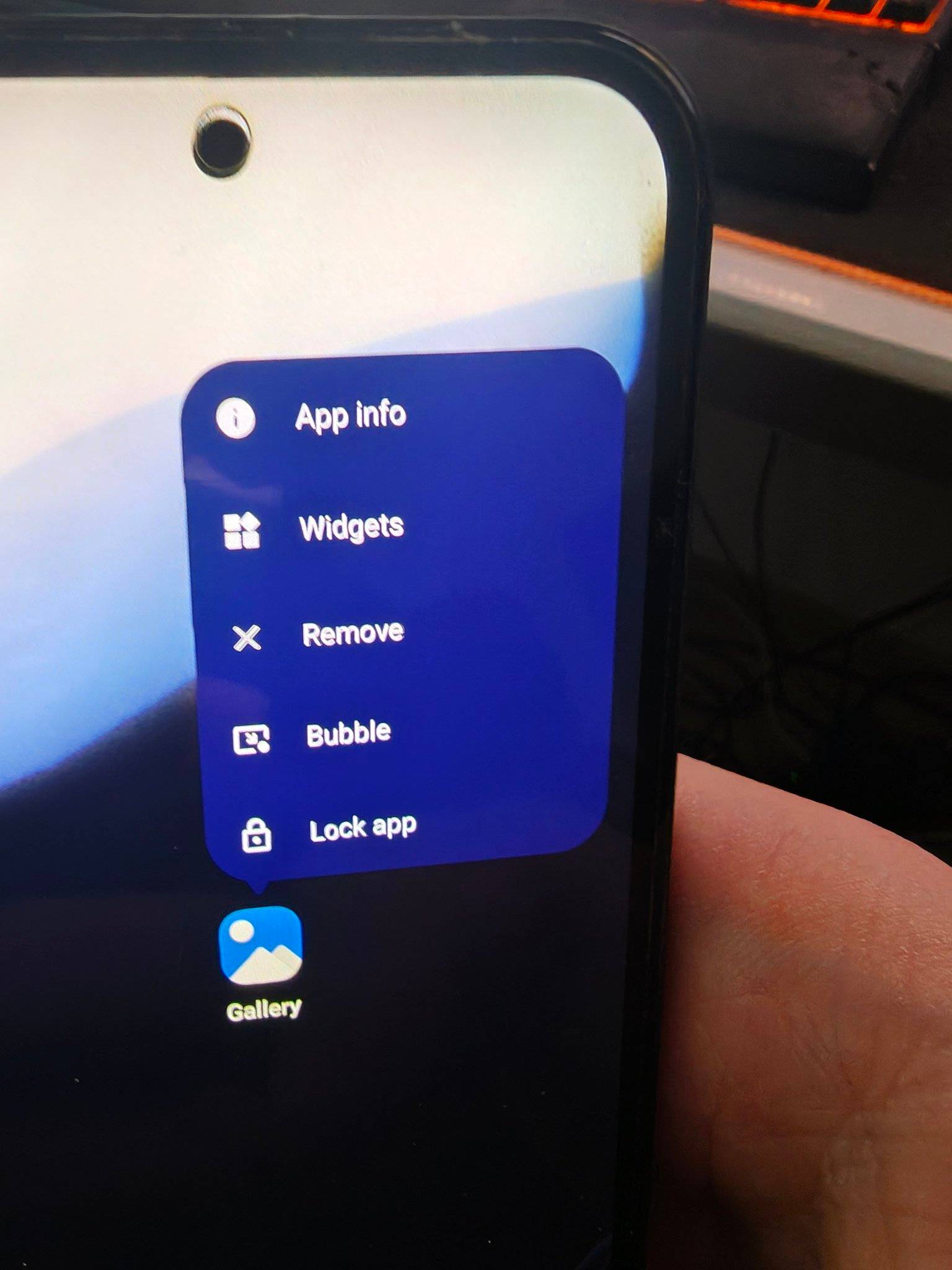
Lock apps right from the homescreen: Similar to ColorOS 16 and OxygenOS 16, Android 17 may let you lock apps directly from the homescreen. In fact, this could be the first time a native app lock feature arrives on AOSP, possibly debuting on Android 17 for Pixels.
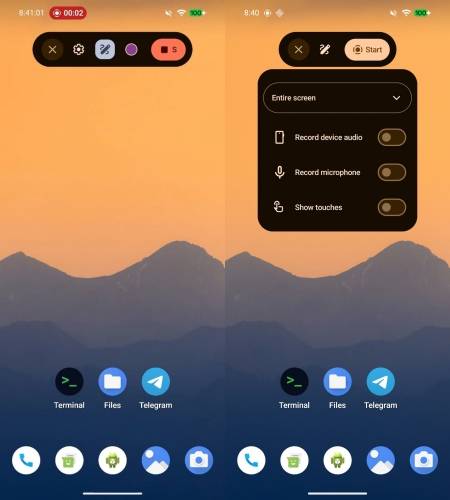
Screen recording pop-up menu: Tapping the screen record icon now triggers a floating controller. Alongside standard recording tools, a new “Doodle” button allows for real-time annotations. While it has been available on One UI for some time, its native arrival on Android could be beneficial for professionals delivering mobile presentations or digital walkthroughs.
Hide app names: In a move to offer more control over the homescreen, Google may finally bring an option to completely hide app icon names in Android 17. This could be a major plus for those who like a clutter-free homescreen devoid of any text.
Android 17 beta for OnePlus phones
Announced on March 25th, the first Android 17 beta update for the OnePlus 15 came in the form of Android 17 Beta 2 update. While the changelog doesn’t detail new additions or improvements, here’s what the update brought on the surface level:
- About phone displays ‘OxygenOS 16’: Even though the stable Android 17 firmware for OnePlus devices will be based on OxygenOS 17, for now, the About phone section of the OnePlus 15 displays ‘OxygenOS 16’, indicating the firmware is purely made for testing purposes.
- Homescreen organiser: Long-pressing an empty homescreen space reveals a new “Organise” button. This will allow users to categorise apps by colour scheme.
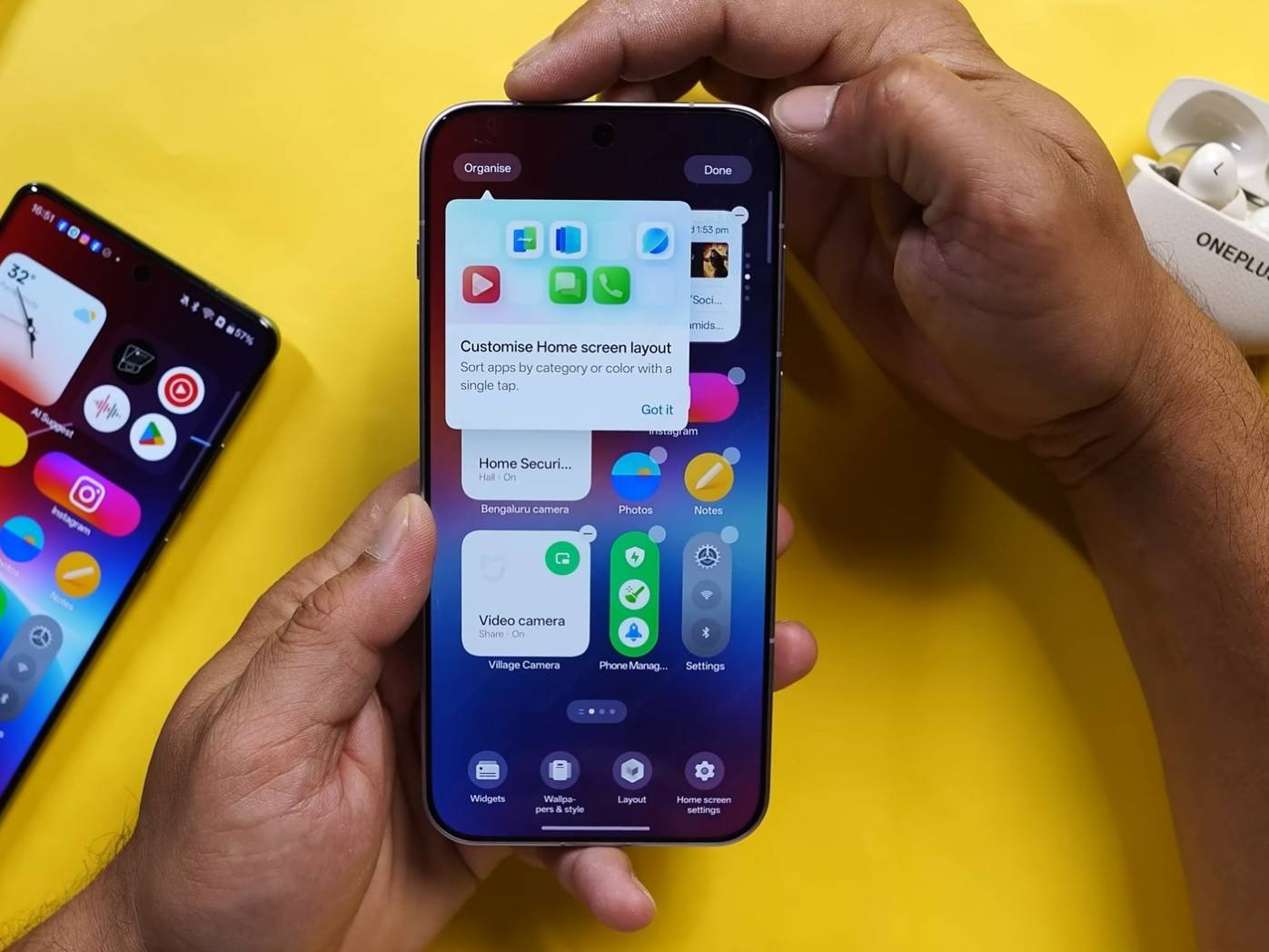
- Reworked quick settings panel animations: When swiping down to reveal the quick settings or notification panel, the animations are now bouncier compared to OxygenOS 16.
- Updated animations for Live Alerts: The Live Alerts animations now use prominent blur effects, a significant shift from OxygenOS 16 and 15’s Live Alert animations.
- Deeper Gaussian blur in Photos app: On similar lines, the top and bottom tab blur in the Photos app is now more prominent.
- View apps by colour in the app drawer: Right beside the search bar, a colour icon has been added, allowing users to categorise apps by colour, similar to what we’ve seen on Xiaomi or POCO launchers.
- Glow effect on lockscreen PIN screen: When tapping a number, it displays a bright glow effect.
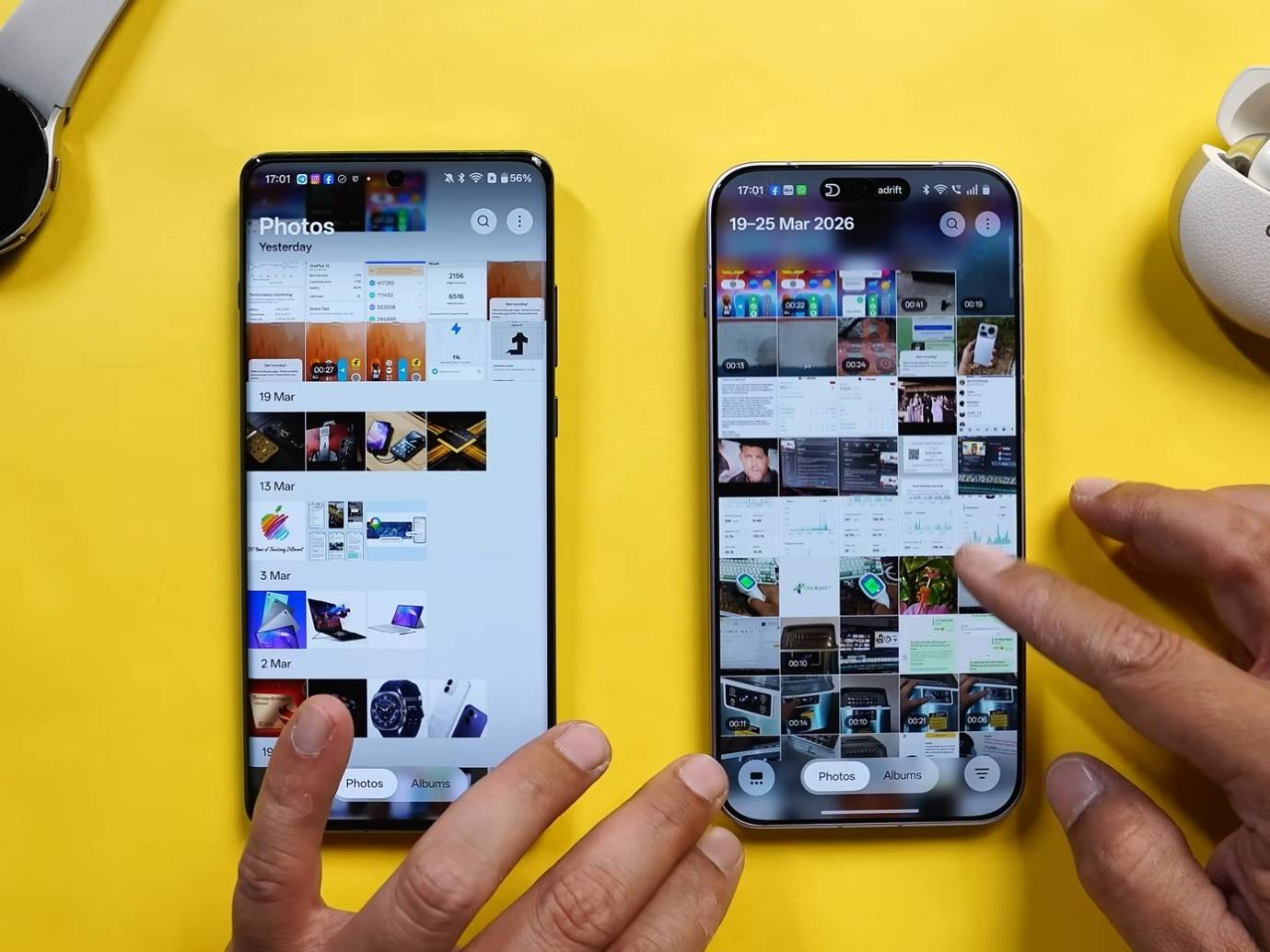
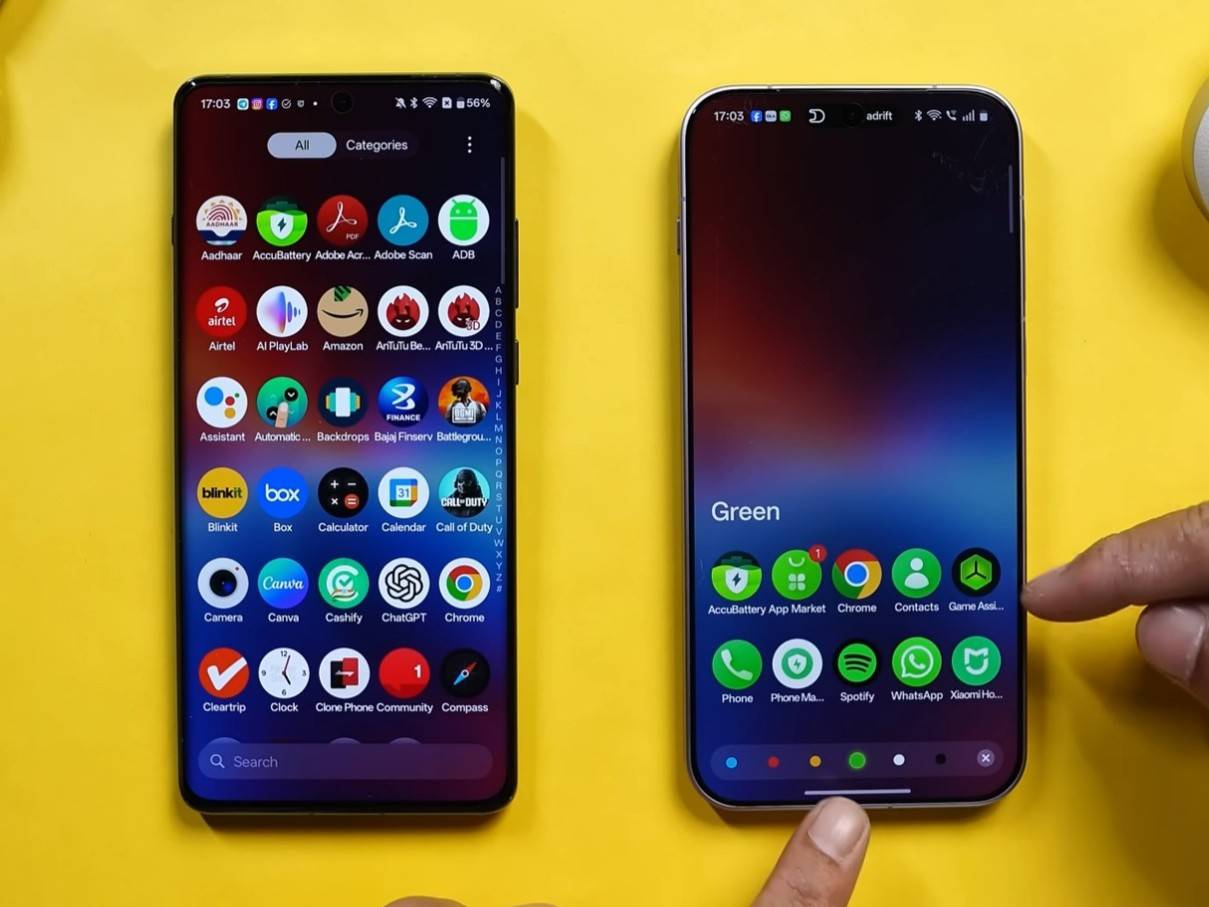
Apart from these, other changes include re-categorisation of a few sections within the Settings app, the ability to receive iPhone messages or calls on a OnePlus device through the O+ Connect app, and the addition of blur to quick settings tiles.
OnePlus device eligible for Android 17 update (confirmed): OnePlus 15.
Android 17 beta for OPPO phones
In a move to push out Android 17 earlier, OPPO announced the Android 17 Beta 2 update for the OPPO Find X9 Pro on March 25th, 2026. Just like the OnePlus 15, the OPPO Find X9 Pro offered a glimpse of what users can expect with ColorOS 17, even though the About phone page lists ‘ColorOS 16’.
- Updated animations for Live Alerts: Live Alerts animations feature heavy blur effects, a noticeable change over the Live Alert animations in OxygenOS 16 and 15.
- Homescreen organiser: Long-pressing an empty homescreen space reveals a new “Organise” button. This allows users to categorise apps by colour scheme.
- Glow effect on lockscreen PIN screen: Tapping a number triggers a bright glow effect.
- Deeper Gaussian blur in Photos app: The Photos app gets a new form of Gaussian blur at the top and bottom tabs of the main page.
- Reworked quick settings panel animations: Swiping down to access the quick settings or notification panel now shows bouncier animations compared to OxygenOS 16.
- View apps by colour in the app drawer: A colour icon has been added right next to the search bar. This lets users categorise apps by colour.
OPPO devices eligible for Android 17 update (confirmed): OPPO Find X9 Pro, Find X9.
Android 17 latest news
June 16th, 2026: Stable Android 17 stable firmware has started rolling out to eligible Pixel devices, including smartphones, foldables, and tablets.
May 12th, 2026: Samsung has officially announced the One UI 9 beta programme for the Galaxy S26 series in multiple countries, including India. Set to roll out this week for registered users, One UI 9 is based on Android 17, which focuses on providing more creativity, better customisation, and enhanced privacy and security.
May 13th, 2026: During the Android Show 2026, Google officially unveiled some of the features landing with the next major OS upgrade. These include juggling apps using floating bubbles, secure contact picker, blur effects in more areas, hide app names on homescreen, revival of separate WiFi and Mobile Data quick settings toggles, and more.
April 30th, 2026: Towards the end of April, Xiaomi joined the Android 17 party by opening up the Android 17 Developer Preview Programme for multiple flagship devices in select global markets. These include the Xiaomi 17 Ultra, Xiaomi 17 Ultra Leica Edition, Xiaomi 17, and Xiaomi 15T Pro.
April 17th, 2026: In mid-April, Google pushed out the Android 17 Beta 4 update for Pixel devices. Along with bug fixes and stability improvements, the firmware replaces the “No notifications” message in the notification panel with a more user-friendly “You’re all caught up” prompt and adds visual polish in various parts of the UI.
March 25th, 2026: OnePlus became one of the first Android OEMs, other than Google, to launch the Android 17 beta programme. Named Android 17 Beta 2, OnePlus followed Google’s naming scheme and ditched the Developer Preview channel in favour of rolling out Android 17 Beta directly to the OnePlus 15.
March 25th, 2026: OPPO rolled out the Android 17 Beta 2 update for the OPPO Find X9 Pro on the same day as OnePlus, delivering similar changes and improvements on the surface level, such as an ‘Organiser’ option in homescreen and improved transitions and visuals.
February 26th, 2026: The Android 17 Beta 2 update was pushed out towards the end of February, emphasising new APIs, such as Bubbles, EyeDropper API, and Contacts Picker.
February 17th, 2026: Just a couple of weeks after the myriad of leaks, Google released the Android 17 Beta update for Pixel phones for app developers and users interested in getting a taste of Android 17 early on. Unlike Android 16, Google didn’t release any ‘Developer Preview’ release, enabling developers to resort to Canary builds for API testing and features development.
Early February 2026: A bunch of Android 17 screenshots for Google Pixel phones leaked on Telegram and X, giving a glimpse of what to expect with the next major Android release. These leaks showcased a brand new ‘Separate’ quick settings toggle, an app lock feature on the homescreen, a new screen recording menu, and more.