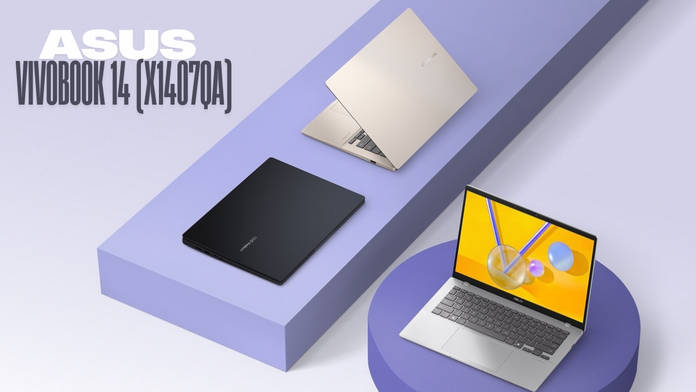
The ASUS Vivobook 14 is what you need if you want an affordable Snapdragon X-powered Ultrabook


Users have taken some time to warm up to Snapdragon PCs, and the Windows on ARM scene has needed a bit of time to become more relevant. There’s good reason for that, too, as these systems had a shaky start. Aside from their excellent battery efficiency, there were numerous complaints regarding compatibility with regular-use applications, such as Google Drive, VPNs, and Adobe Suite. The platform has matured significantly since then.
There is another reason why Snapdragon PCs still aren’t as mainstream as their x86-based counterparts: pricing. These laptops are usually priced well north of Rs 1,00,000, which limits them to a small segment of buyers. A segment where users often gravitate more toward Apple MacBooks and Apple’s ARM platform, which is considerably more established. That seems to be changing, and the ASUS Vivobook 14 is a testament to that.
Show Full Article


Starting at just Rs 65,990 on Flipkart, the Vivobook 14 features a Snapdragon X (X1-26-100) octa-core processor, clocking in at a maximum of 2.97GHz. It also features a dedicated Qualcomm Hexagon NPU, delivering 45 TOPS of processing power for AI-based workloads. At this price, the processor is a good performer and can easily handle your regular day-to-day tasks. The laptop comes with 16GB LPDDR5X RAM running at 8448MHz, so rest assured that multitasking will remain seamless throughout.
This variant includes a 512GB PCIe Gen 4 NVMe M.2 SSD, which is standard for this price point, but a 1TB variant is likely to be available soon. The display features a 14-inch FHD+ (1900 x 1200p) IPS panel with a 16:10 aspect ratio, offering a more expansive viewing space. The 60Hz refresh rate might feel lacking to users accustomed to higher refresh rates, but this is typical for thin and light laptops at this price, as it helps preserve battery life. The hinge can also be manoeuvred to about 180 degrees, which could come in handy depending on your usage.
One polarising aspect of the display is the 45 percent NTSC colour gamut. It’s on the lower end, meaning colours may not be represented as accurately. The panel is not out of the norm for this price unless you specifically opt for OLED or IPS options with wider colour coverage.
If you plan to do creative work requiring colour precision, an external display becomes necessary. Brightness is standard at 300 nits, so you shouldn’t have any visibility issues indoors. For audio, the device offers a dual stereo speaker setup with Dolby Atmos support. However, there is no information available about the total output or other specifics, so it is safe to assume the speakers are functional but may not satisfy audio enthusiasts.
There’s a decent number of connectivity options on board. You get two USB 3.2 Type-A ports, two Thunderbolt 4 ports, which also double as Power Delivery and DisplayPort, an HDMI 2.1 TMDS port, and a 3.5mm combo jack for audio. That’s a well-rounded set of options, and unless you have specific needs, you won’t have compatibility issues with most accessories. Wireless options include Bluetooth 5.3 and Wi-Fi 6E, the latter improving Wi-Fi speeds and connection strength with compatible networks.
Software-wise, the device runs Windows 11 Home with Copilot support. For students and professionals, it includes lifetime free Microsoft Office 2024 support and M365 Basic coverage for a year. It also has a Full HD infrared webcam for video calls and conferencing with Windows Hello support for secure face unlock.
The device is powered by a 50Wh battery and comes with a 65W fast-charging adapter. While the battery size is standard, you’ll get more out of it compared to regular Windows laptops. The ASUS Zenbook A14 (review), which featured similar specs but with a 70Wh battery, delivered nearly 20 hours of runtime in our PCMark battery benchmark. Based on that, the Vivobook 14 should comfortably last over 10 hours of typical usage.
All this comes in a 20mm thin chassis weighing just 1.49kg, with “Military-grade durability”. We can’t comment extensively on durability until we get hands-on with the device, but it is a highly portable option for users who require all-day power to support their busy schedules.
If you’re often on the go and need a reliable daily driver with exceptional battery life, the Vivobook 14 makes a lot of sense. You get a well-specced laptop with high-end hardware and top-tier battery life, making it a capable alternative to Apple MacBooks at a lower price point. At this price, the Lenovo IdeaPad Slim 5i (review) is another capable contender with a richer display, similar build quality and portability, and a powerful processor. If you want more raw power, note that these models will have significantly worse battery efficiency.
The main trade-off with the Vivobook 14 is the less vibrant display, which could be a deal-breaker for some users. However, if your work primarily involves office tasks and other essentials, this can be easy to overlook. These are our initial thoughts on the Vivobook 14, so you should wait for a full review to decide whether this laptop is worth investing in.

