The new Core Ultra 5 250K Plus is Intel’s answer to mainstream users who want something compelling from Team Blue to take on AMD’s strong mid-range lineup. While Intel calls this a refresh, the 250K Plus does bring a fair few improvements under the hood. The question is, does it actually claim the throne in this segment? Let’s find out.
Table of Contents
Intel Core Ultra 5 250K Plus: What’s New
The biggest upgrade here is the move to an 18-core design (6 Performance + 12 Efficiency cores), which is a noticeable step up from the previous generation. More E-cores essentially means better multitasking and improved performance in workloads that can take advantage of multiple threads. On paper, this already puts the 250K Plus in a very strong position for both gaming and everyday productivity.
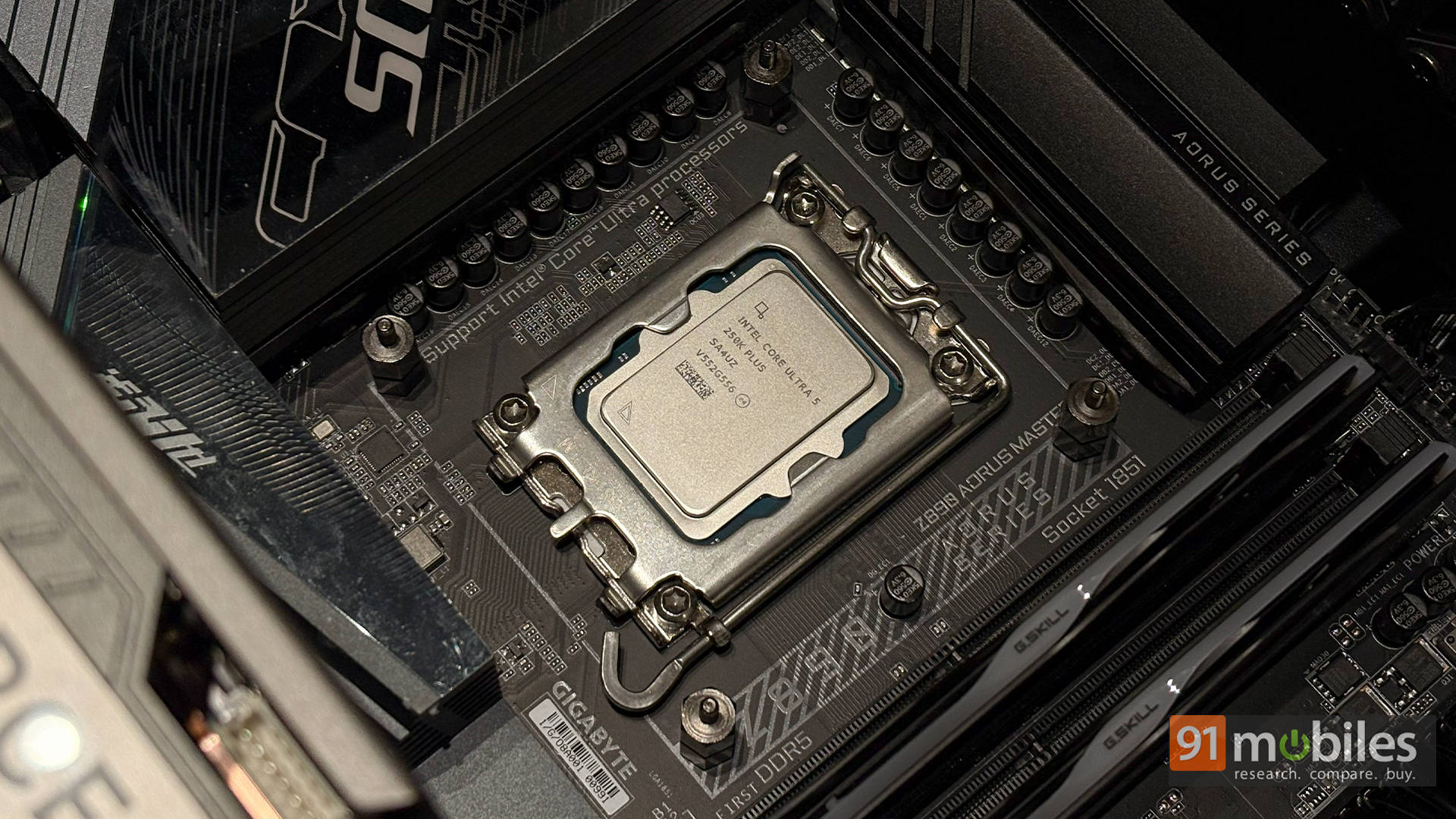
Beyond that, you still get Intel’s latest platform upgrades, including DDR5-7200 support, improved interconnect speeds, and better overall efficiency. Intel is also leaning heavily into software this time, with features like Intel Application Optimization and the new Binary Optimization Tool. We’ve already covered these in detail in our Core Ultra 7 270K Plus review, so do check that out for a deeper dive. But the short version is that Intel is now trying to boost performance not just through hardware, but software as well.
Test Bench Explained
Before diving into performance, here’s the setup we used for testing:
CPU Cooler: MSI MAG Coreliquid i360 Black
A capable 360mm AIO that keeps temperatures in check even under heavy loads. It ensures the CPU can sustain boost clocks without thermal throttling.
Motherboard: Gigabyte AORUS Z890 Master
A premium motherboard with excellent VRMs and stability. It provides the perfect foundation to extract consistent performance from the processor.
RAM: 32GB G.Skill Trident Z5 RGB 7200MT/s
Fast DDR5 memory that complements Intel’s push for higher memory speeds. Helps in maintaining strong performance across workloads.
SSD: 2TB Kingston NV3 NVMe PCIe 4.0
Reliable Gen4 storage with fast read/write speeds. Ensures quick load times and smooth system responsiveness.
GPU: ZOTAC GeForce RTX 5090 ARCTICSTORM AIO
A top-tier flagship GPU that eliminates any GPU bottlenecks during testing. The ARCTICSTORM AIO cooling keeps thermals under control even in demanding scenarios. This ensures the CPU is fully stressed and performance numbers reflect the processor’s true potential. It’s essentially the best-case scenario for CPU benchmarking.
PSU: MSI MAG A1000GL Black
A stable and efficient 1000W PSU that comfortably powers high-end components without any hiccups.
Cabinet: MSI MAG PANO 100R PZ Black
Spacious and airflow-focused chassis that keeps thermals optimized across all components.
Intel Core Ultra 5 250K Plus: Performance Analysis
Starting with synthetic benchmarks, the Core Ultra 5 250K Plus delivers a very noticeable jump over its predecessor, the 245K. In Cinebench R24 multi-core, it scores 1879, up from 1489 on the older chip, which is a significant uplift. Similar trends continue in Cinebench R23, where the 250K Plus hits 31,667 compared to 24,203. Single-core performance is also solid, as you can see in both Cinebench R24 and R23, putting it very close to the 270K. This is important because it means gaming and general responsiveness won’t feel compromised compared to its more expensive sibling.

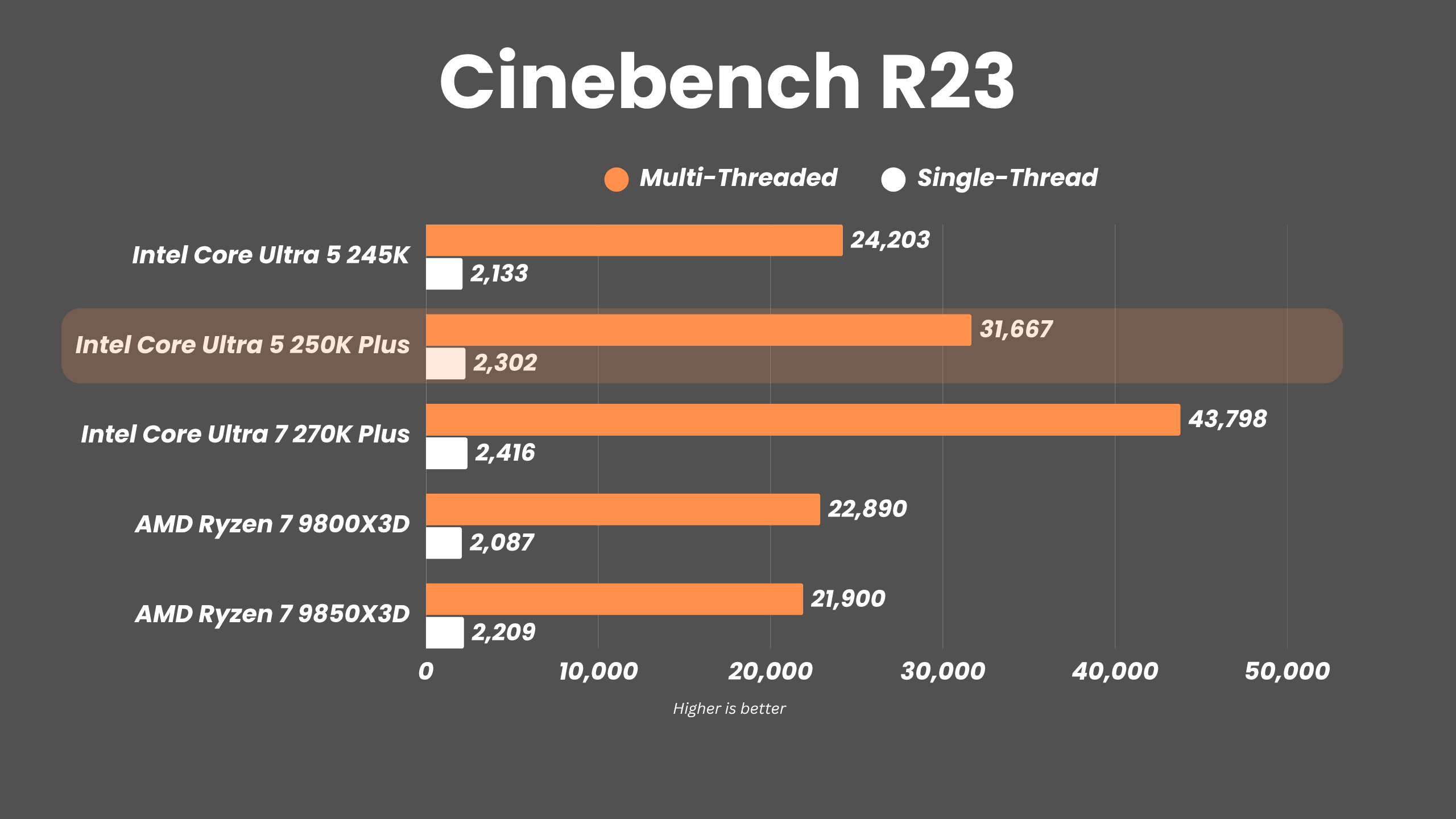
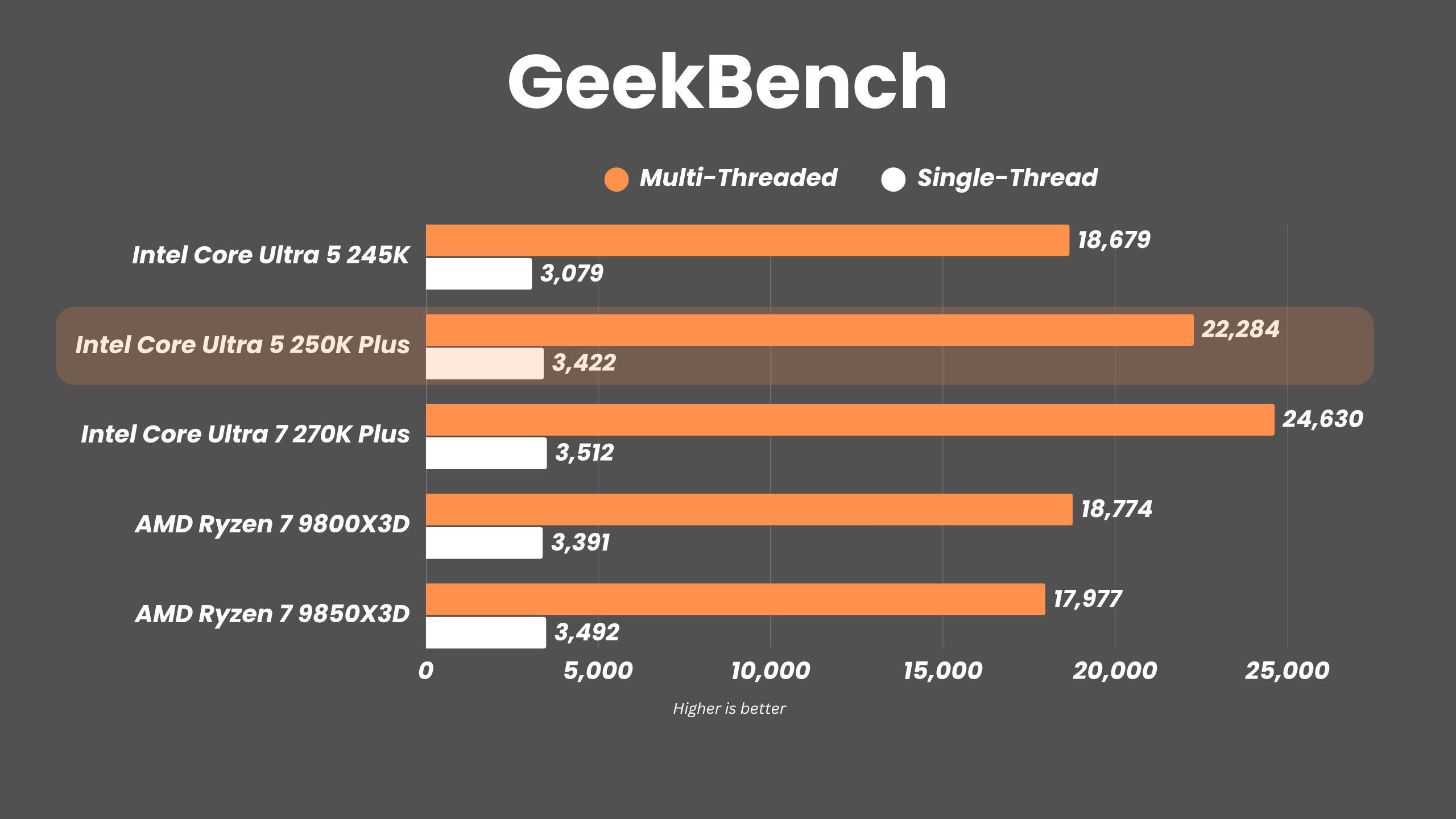


When compared to AMD’s Ryzen 7 9800X3D and 9850X3D, the 250K Plus holds up surprisingly well. In multi-core workloads, it clearly outpaces both chips, and even in single-core tests, it stays competitive. That’s impressive considering AMD’s chips typically excel in specific workloads. That said, the Ultra 7 270K still leads in multi-core performance, which is expected given its higher core count. But the gap isn’t massive enough to make the 250K feel underpowered. In fact, if anything, it reinforces how well-balanced this chip is.
Does it game, though?
Now, coming to gaming performance, things get a bit more interesting. Compared to the older 245K, the improvements are present but not dramatic. In titles like Cyberpunk 2077, the jump from 129 FPS to 142 FPS at 1080p is noticeable, but not game-changing. Similarly, in Forza Horizon 5 and F1 25, the gains are incremental.
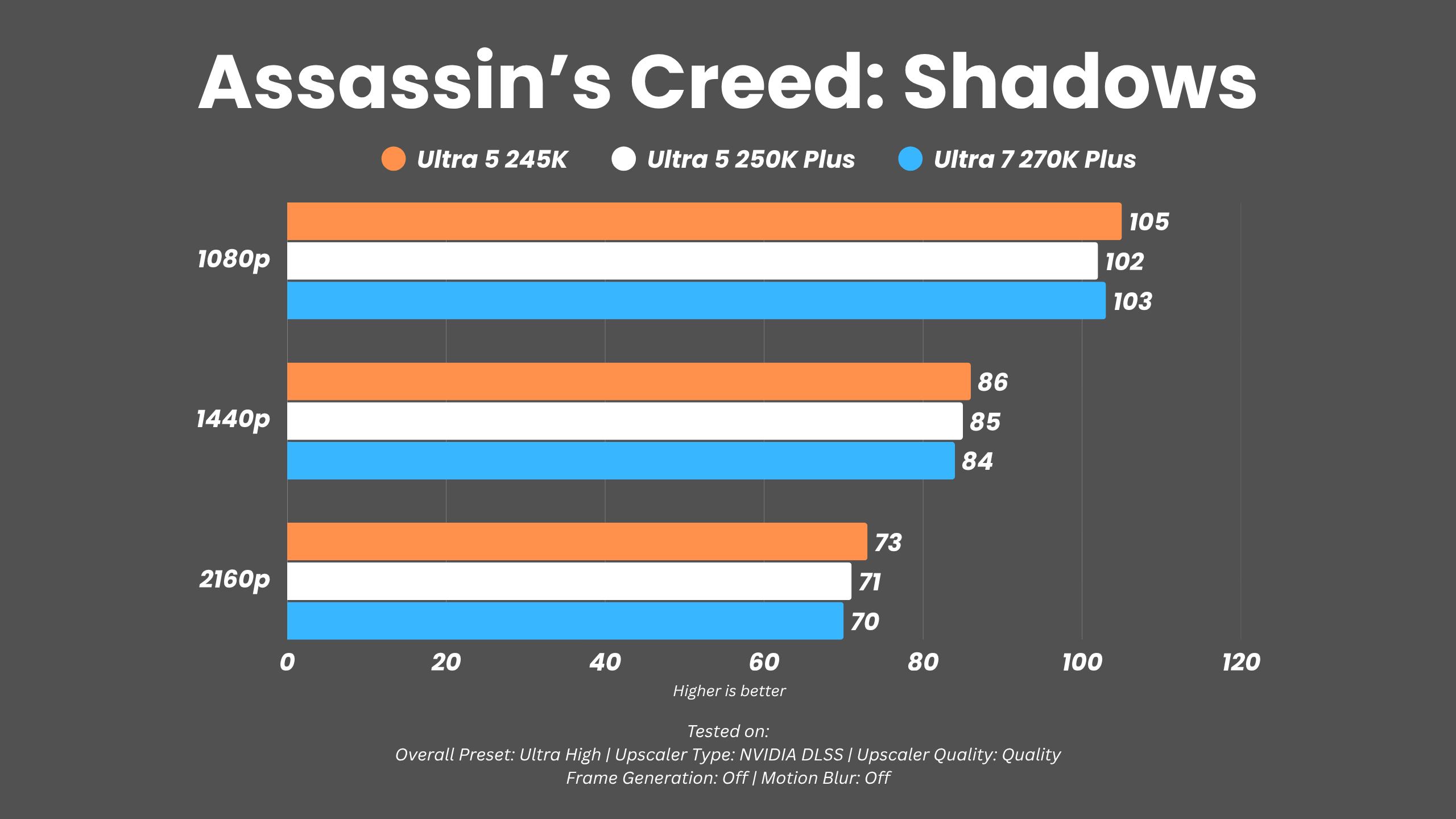
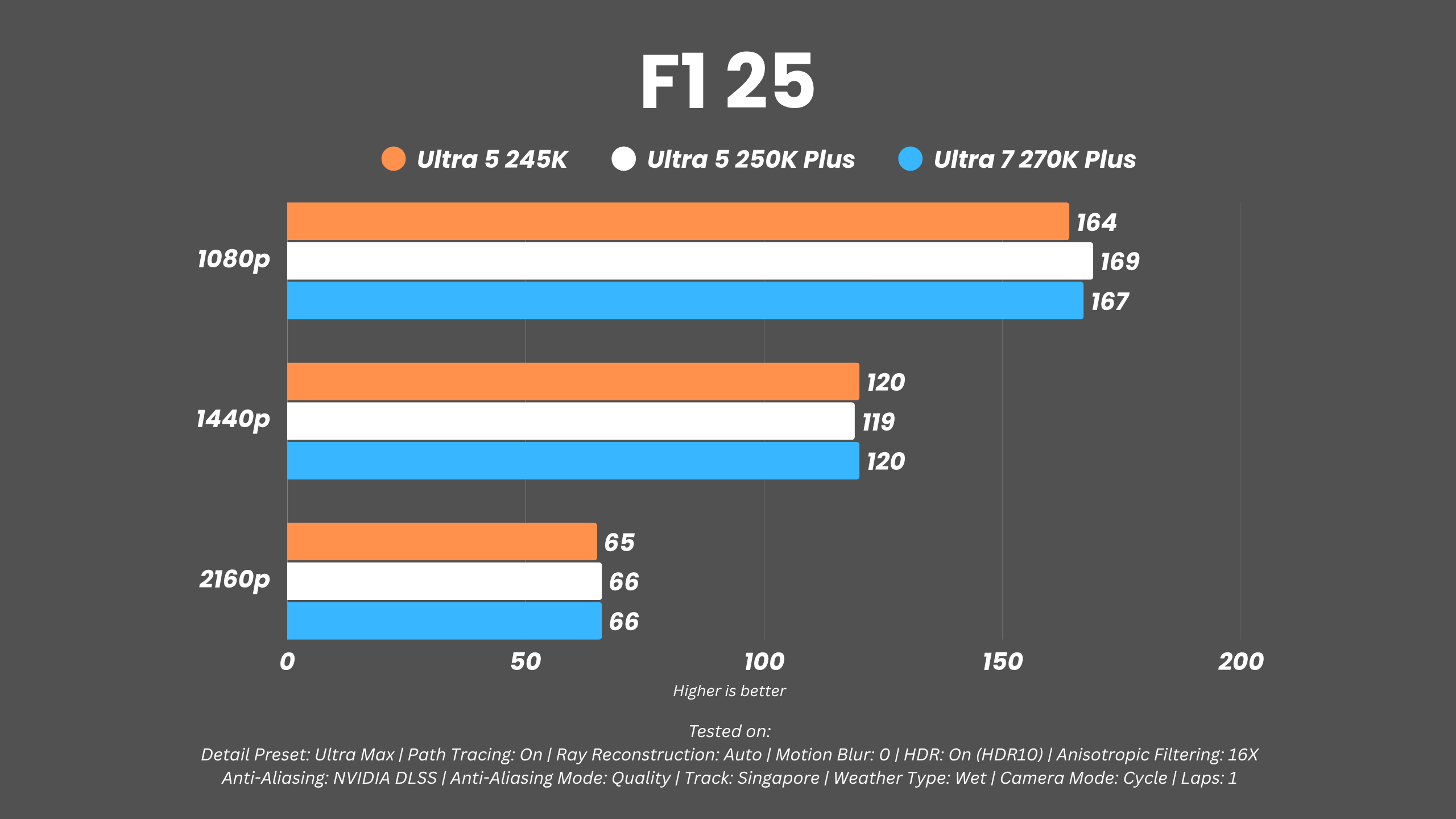
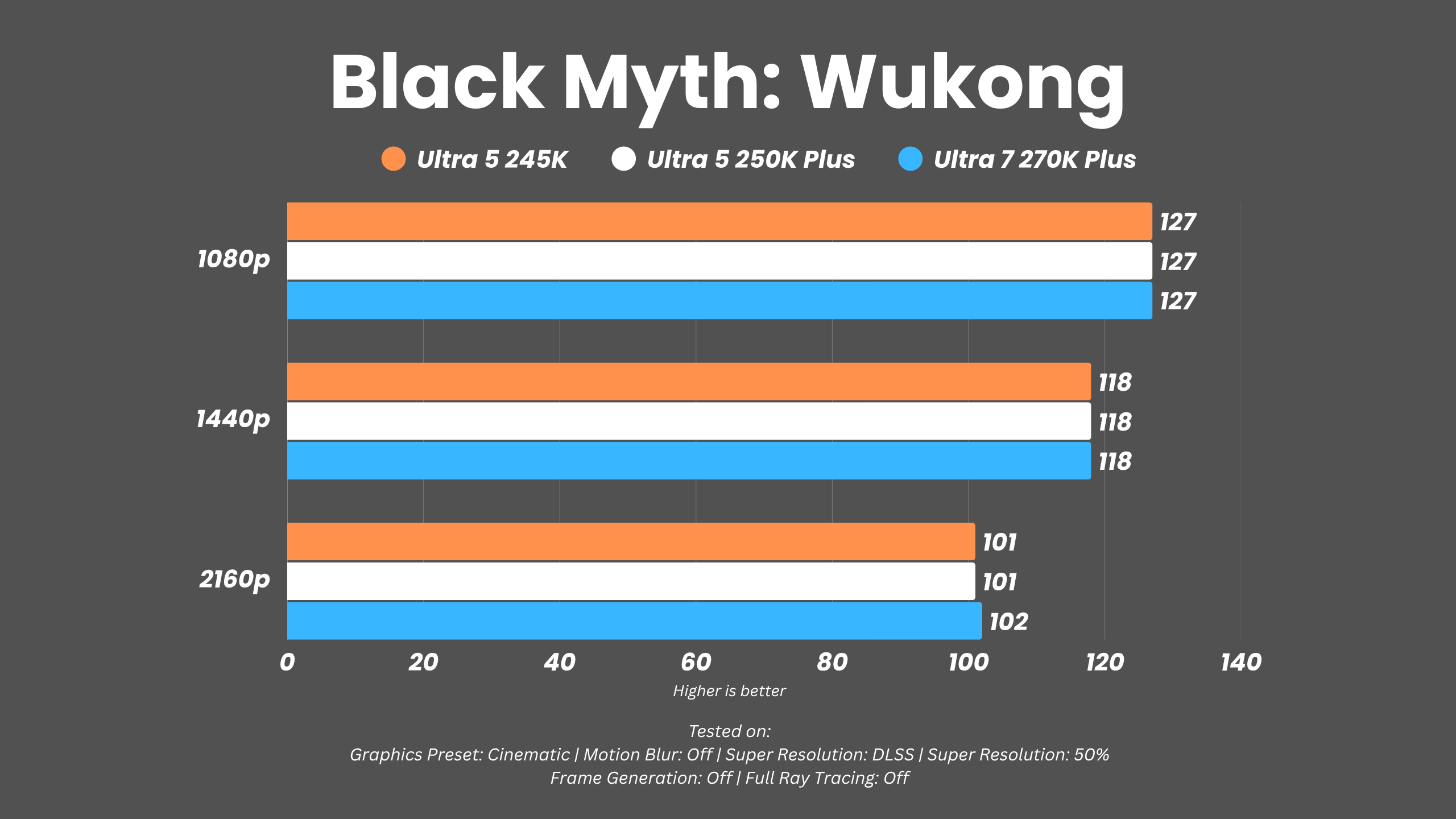
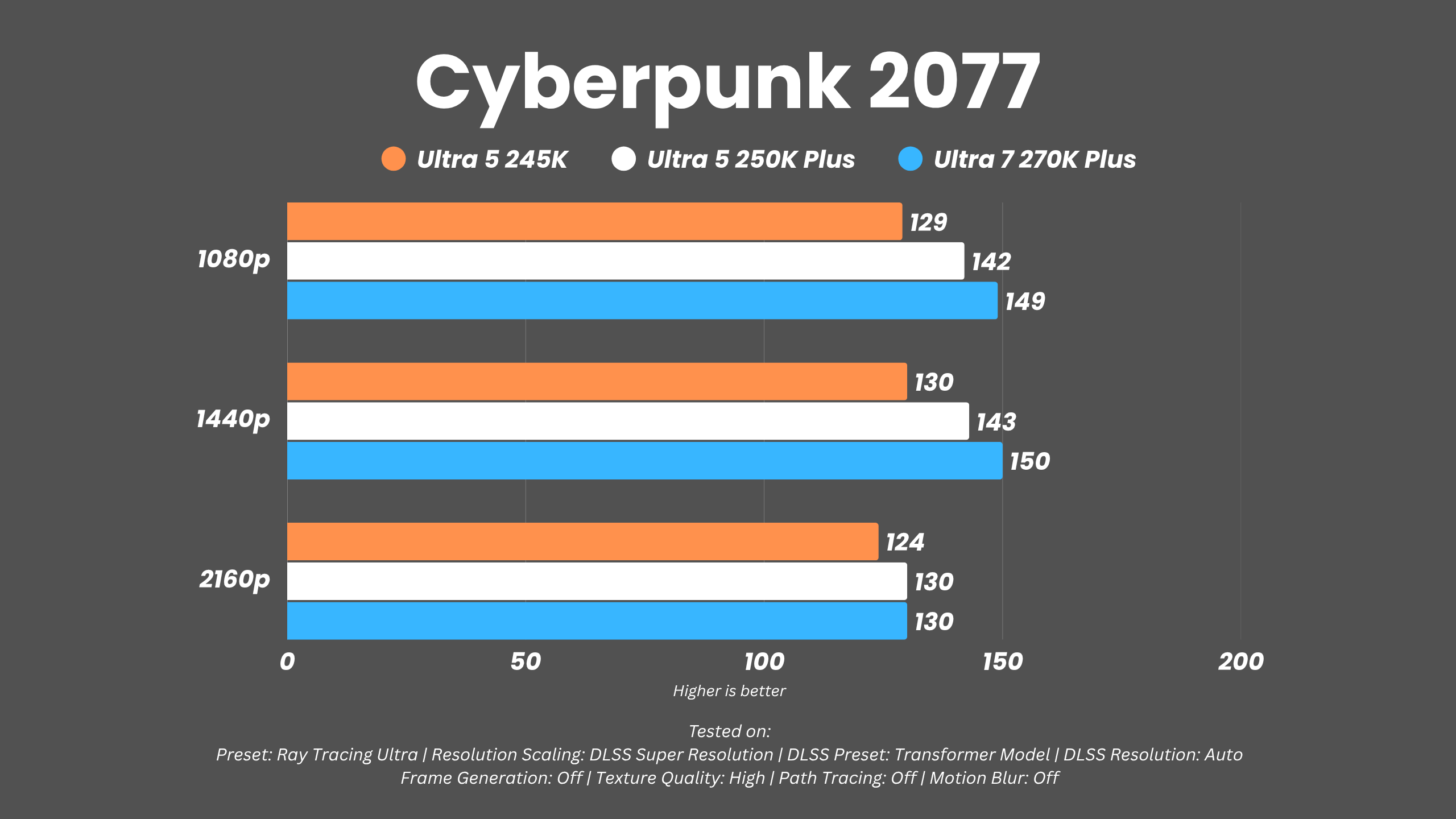
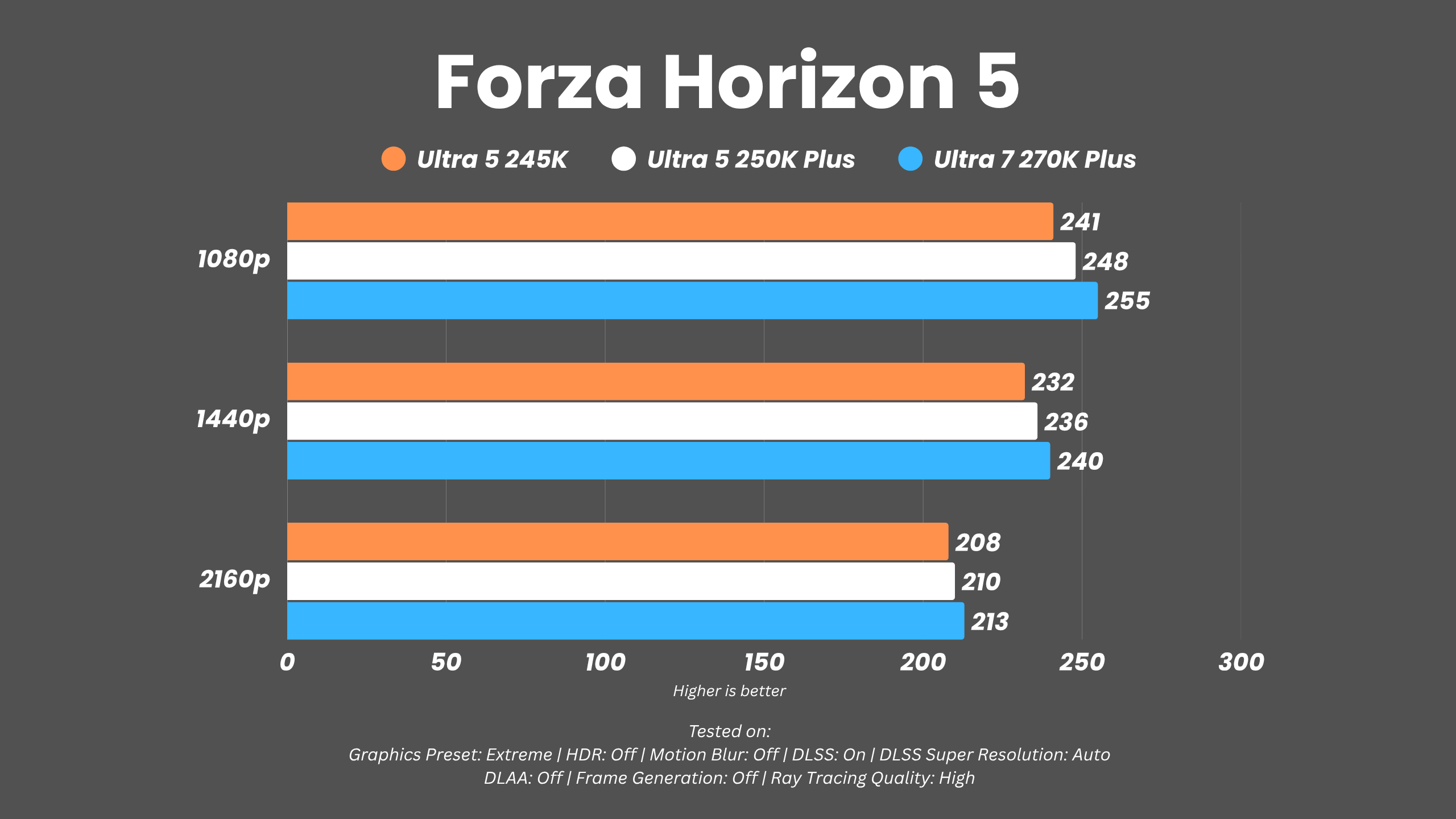

Against the Ultra 7 270K, the 250K Plus holds up quite well. In many games, the difference is just a few frames, and in some cases, the results are nearly identical. The 270K does pull ahead in certain scenarios, especially in CPU-heavy titles like CS2, but the gap isn’t as large as the price difference might suggest.
Let’s be honest, most users considering the 250K Plus won’t be pairing it with an RTX 5090. In more realistic builds, the GPU will likely be the limiting factor. What matters here is that the CPU doesn’t bottleneck performance, and the 250K Plus passes that test comfortably.
Intel’s Secret Sauce
Just like the Core Ultra 7 270K Plus, the Ultra 5 250K Plus also comes with support for
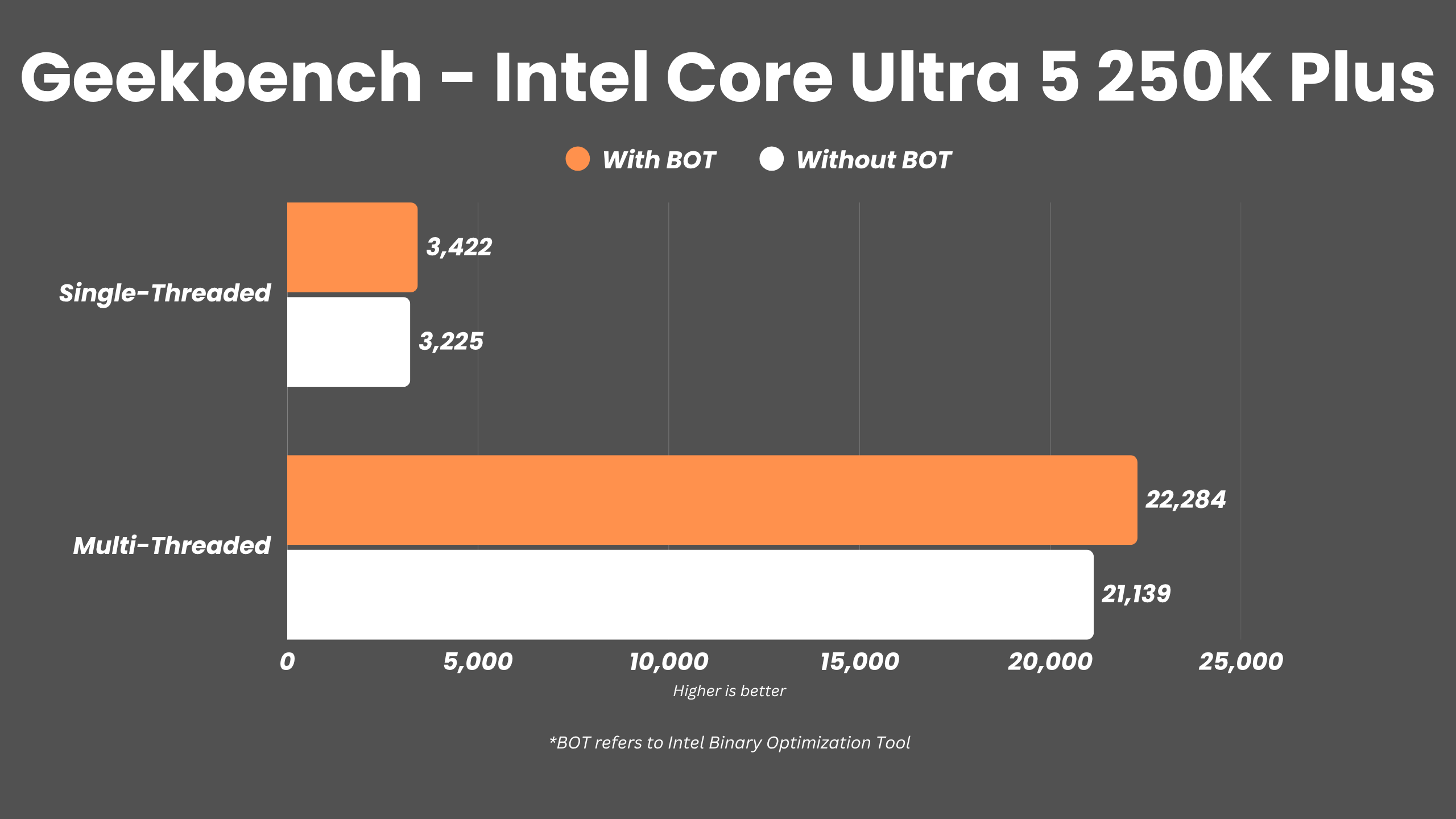
Intel’s APO and the Binary Optimization Tool. And similarly, the results are nothing to write home about. In synthetic tests like Geekbench, the impact is clear. The single-core score jumps from 3225 to 3422, while the multi-core score improves from 21,139 to 22,284. That’s a decent boost and shows the tech has potential.
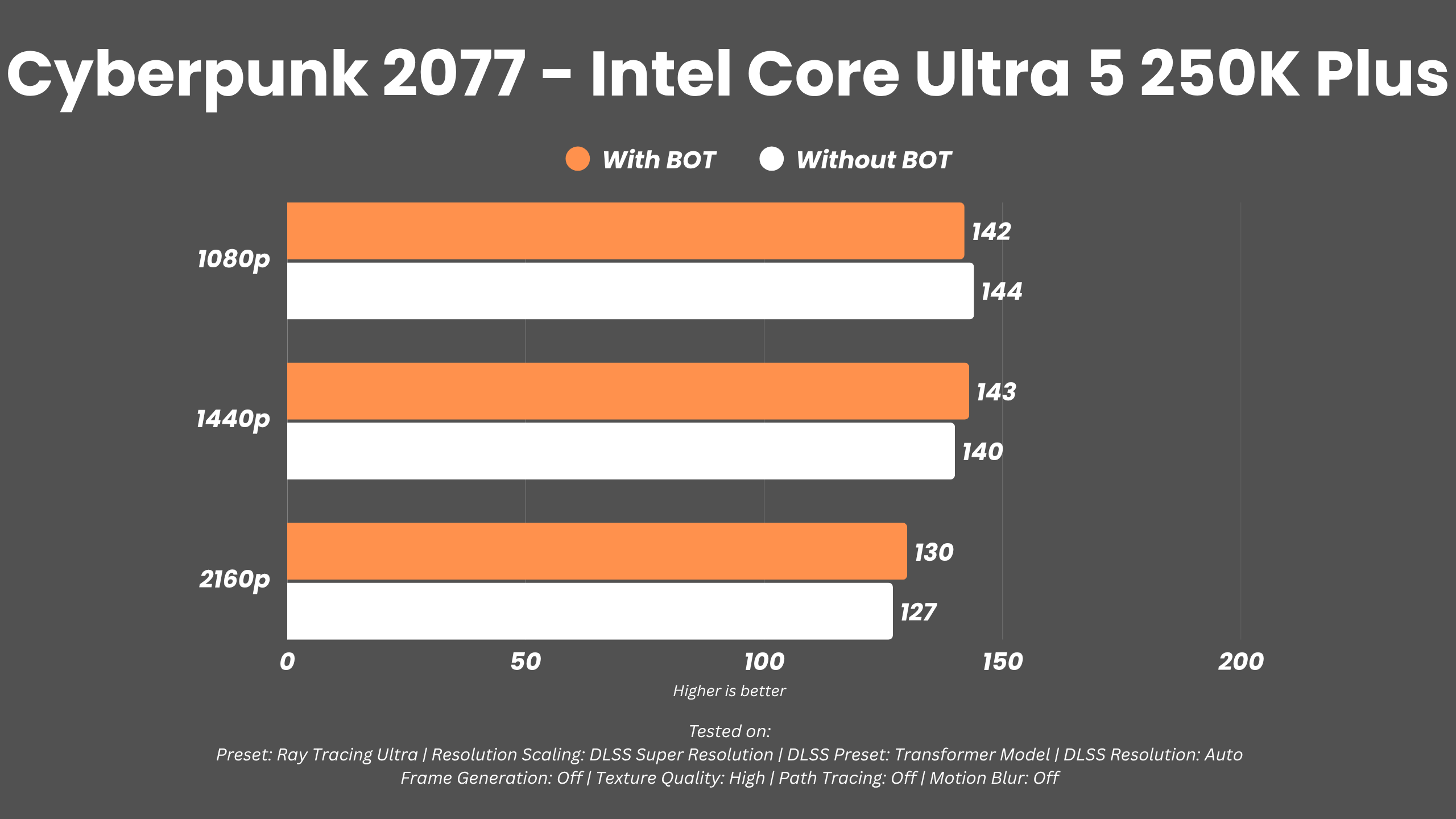
However, in real-world gaming, the difference is minimal. In Cyberpunk 2077, the performance is almost identical with or without optimization. In some cases, it’s within the margin of error.
Another limitation is support: only around 12 games are compatible at launch, and most of them aren’t exactly new titles. It’s a promising idea, but right now, it feels like a work in progress. That said, if Intel expands support and refines the tech, this could become a meaningful advantage down the line.
Intel Core Ultra 5 250K Plus: The Real MVP?
The Core Ultra 5 250K Plus might not scream “game-changer” on paper, but in real-world use, it quietly flexes where it matters. It’s a solid jump over the 245K, keeps up surprisingly well with AMD’s competition, and even gets uncomfortably close to the pricier Ultra 7 270K. In gaming, especially, the gap is so small that most gamers wouldn’t notice, especially once a decent GPU enters the chat.
And that’s exactly why this chip hits different. At around $199, it undercuts both Intel’s own lineup and AMD’s pricier options while still delivering all-around performance that just works. Sure, the LGA 1851 platform might not have the longest future, but if the goal is performance right now, this is easily one of the smartest buys out there. Honestly, chances are the GPU gets upgraded long before this CPU even breaks a sweat.
Editor’s Rating: 8.7 / 10
Pros:
- Excellent value for money
- Strong multi-core performance boost
- Great all-rounder CPU
- Future-facing software optimizations
Cons:
- Socket may not last many generations
- Limited game support for Binary Optimization Tool
- Gaming gains are incremental