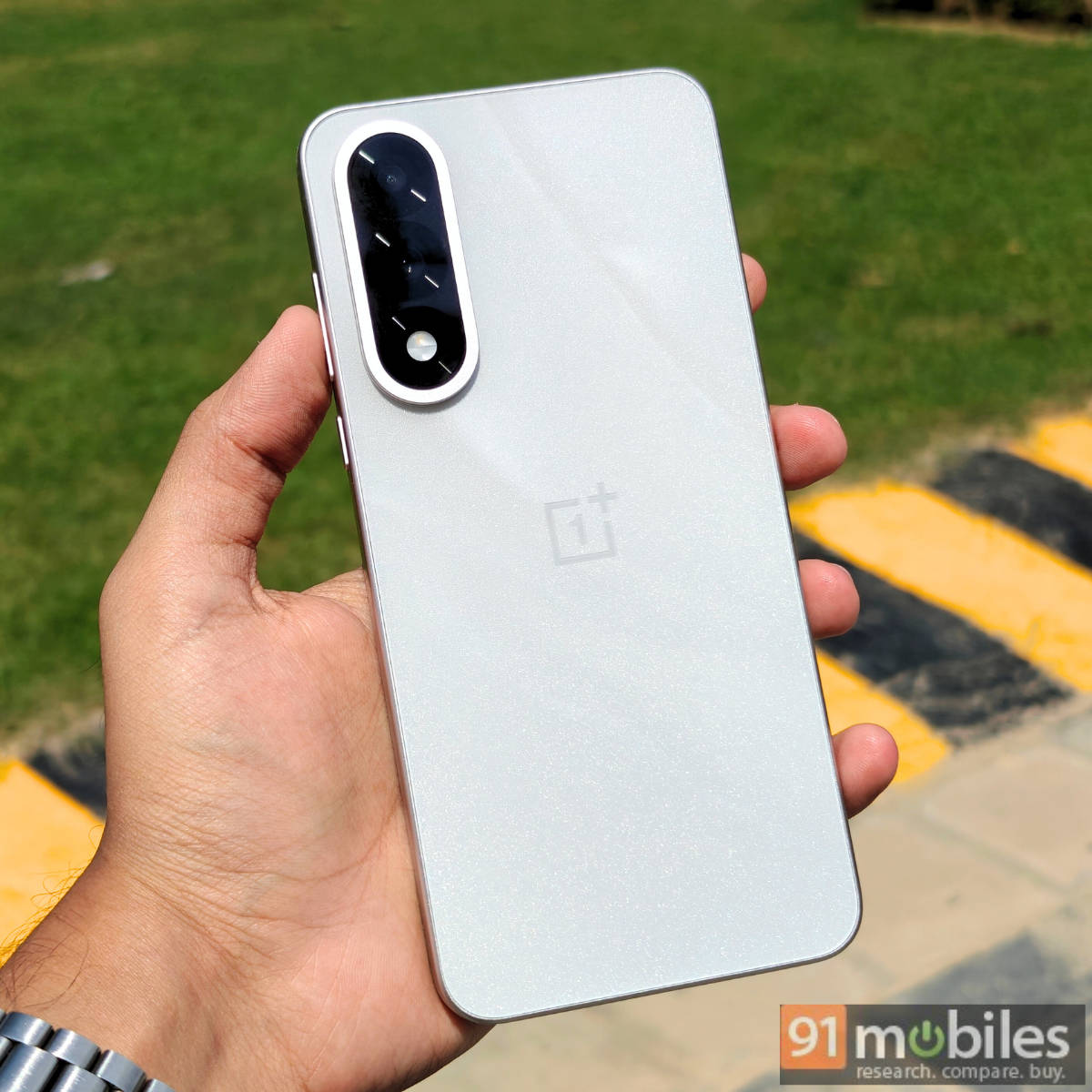
With the OnePlus Nord 5, the company has shifted its gears to offer high-performance hardware by packing in a Qualcomm Snapdragon 8 series chipset for the first time on a Nord smartphone. Running on the Snapdragon 8s Gen 3, the OnePlus Nord 5 (review) gets LPDDR5X RAM, up to 144Hz refresh rate AMOLED display, and a large 7,300mm² vapour chamber, the segment’s largest. It’s evident that OnePlus has kept performance at the forefront with this edition’s Nord smartphone.
On the other hand, the OnePlus Nord 5’s close rivals, such as the POCO F7 and iQOO Neo 10, feature a newer Snapdragon 8s Gen 4 processor. So, how well does it fare in gaming after two months of its release? Find out below through in-depth gaming stats.
Table of Contents
A brief look into the testing methodology and conditions
To analyse the gaming performance of the OnePlus Nord 5, I selected two highly popular games among mobile gamers: Battlegrounds Mobile India (BGMI) and Call of Duty: Mobile (CODM).
Both of these also happen to be the games which OnePlus claims can run at 144Hz with or without using the ‘Adaptive Frame Booster’ within the Games app. This also puts more stress on the phone’s processor, as the system must generate additional frame rates in real-time. Here are the conditions the phone was set at before the gaming session:
Conditions:
- Non-AC room (ambient temperatures of around 34 degrees Celsius)
- Phone’s brightness set at 50 to 60 percent
- Phone’s screen resolution set at 1.5K (2800 x 1272)
- Adaptive Frame Booster enabled to achieve maximum frame rates
- Gameplay FPS recorded using Scene app, a performance monitoring tool
- All apps removed from the memory before the gameplay, except Scene
- No apps running in the background except Scene
- Phone updated to the latest available firmware
- Removed the back cover while gaming
A joyful BGMI experience on OnePlus Nord 5
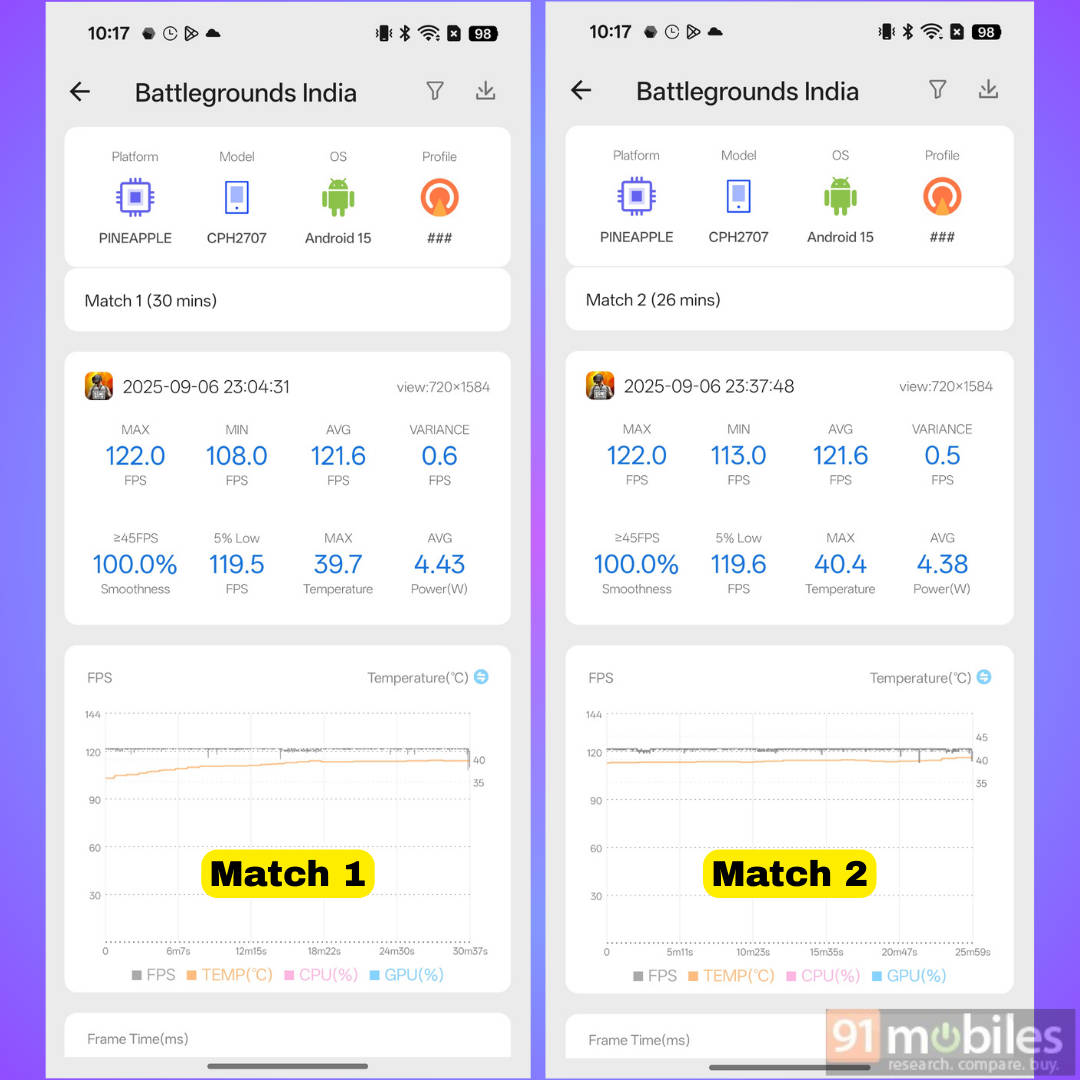
I kicked off the gaming session of the OnePlus Nord 5 with BGMI. Before diving into my experience and numbers, it’s worth noting that the graphics setting was kept at ‘Smooth‘, while the frame rate was set at ‘Extreme+‘. With these settings, the Nord 5 ran the game at 90FPS. To take things up a notch, I enabled ‘Adaptive Frame Booster’ for both Combat and Lobby modes, and the game instantly switched to 120Hz.
Considering OnePlus claims BGMI can run at 144Hz after enabling this setting, the system FPS tracker was displaying 120FPS, which happens to be the maximum frame rate Nord 5 can run BGMI at on our unit. But there was an interesting twist towards the end of the gaming session. More on this later.
Right before landing in the first Battle Royale match, the phone’s temperature was around 36 degrees, as displayed by the game manager. The phone performed buttery smooth, with no signs of overheating, in a match that lasted 30 minutes. Per the Scene app, Nord 5 delivered an average FPS of 121.6, and the temperature recorded by the end of the match was 39.7 degrees. I landed in the “Neon Outpost” region (Transformers BGMI update), where tons of action happens, and the phone handled it without breaking a sweat.
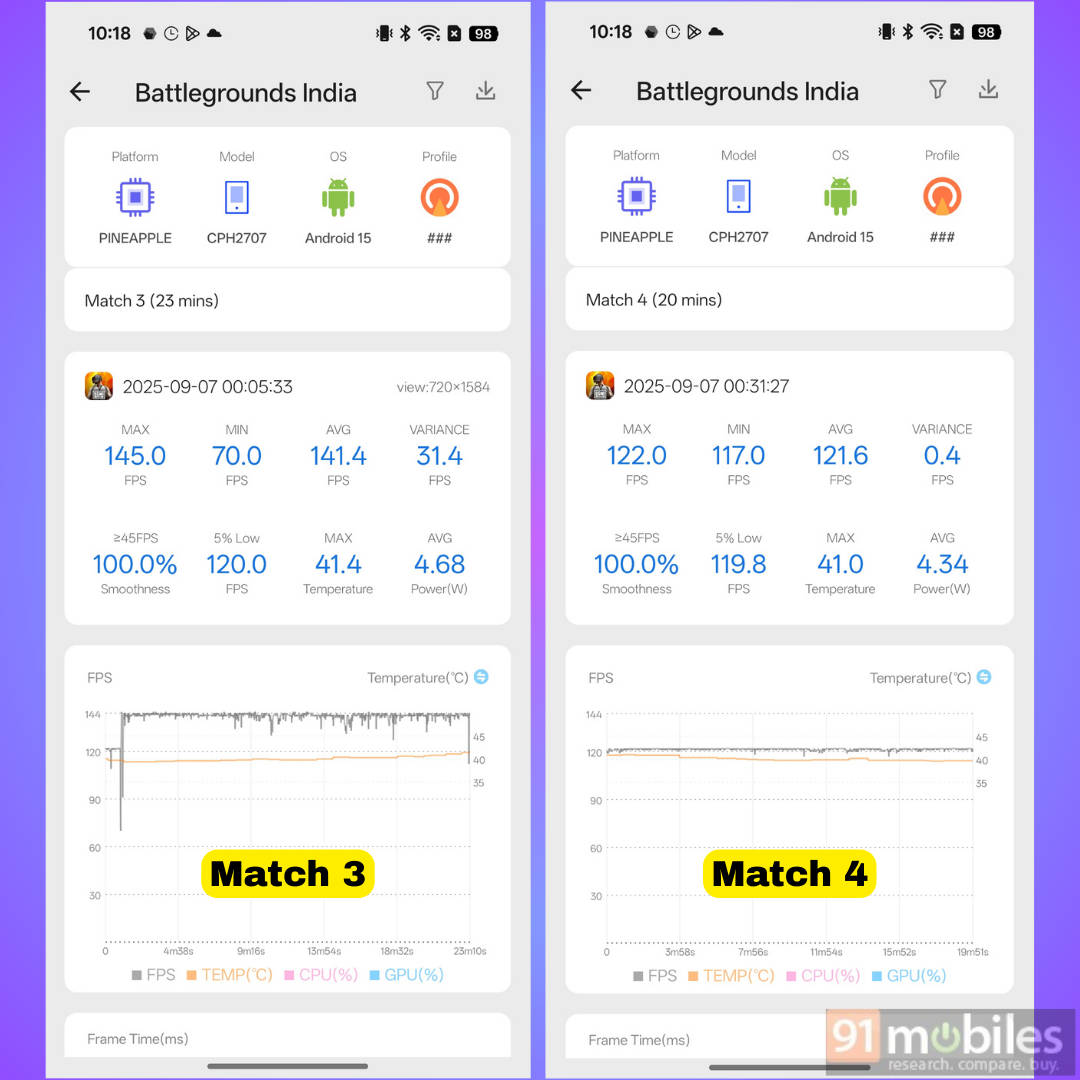
Now here’s where things got interesting in the third match. Upon starting the match, the live FPS tracker suddenly showed 144 FPS. This somewhat indicates that the Adaptive Frame Booster on Nord 5 is inconsistent and doesn’t always increase the frame rates to 144FPS. As for the 144FPS experience, the phone handled BGMI really well, with the FPS averaging around 141.4 while temperatures remained under 41.4 degrees. Unfortunately, the FPS dropped to 120 FPS in the fourth and final match.

Consistent 144FPS gaming on Call of Duty: Mobile
To determine how the OnePlus Nord 5 fares in Call of Duty: Mobile, I played the game for approximately 30 minutes, which consisted of eight consecutive multiplayer matches. Unlike BGMI, gamers can set the frame rate to 144FPS (graphic quality at ‘Low’) without needing to enable the ‘Adaptive Frame Booster’ option, as the game natively supports 144FPS.

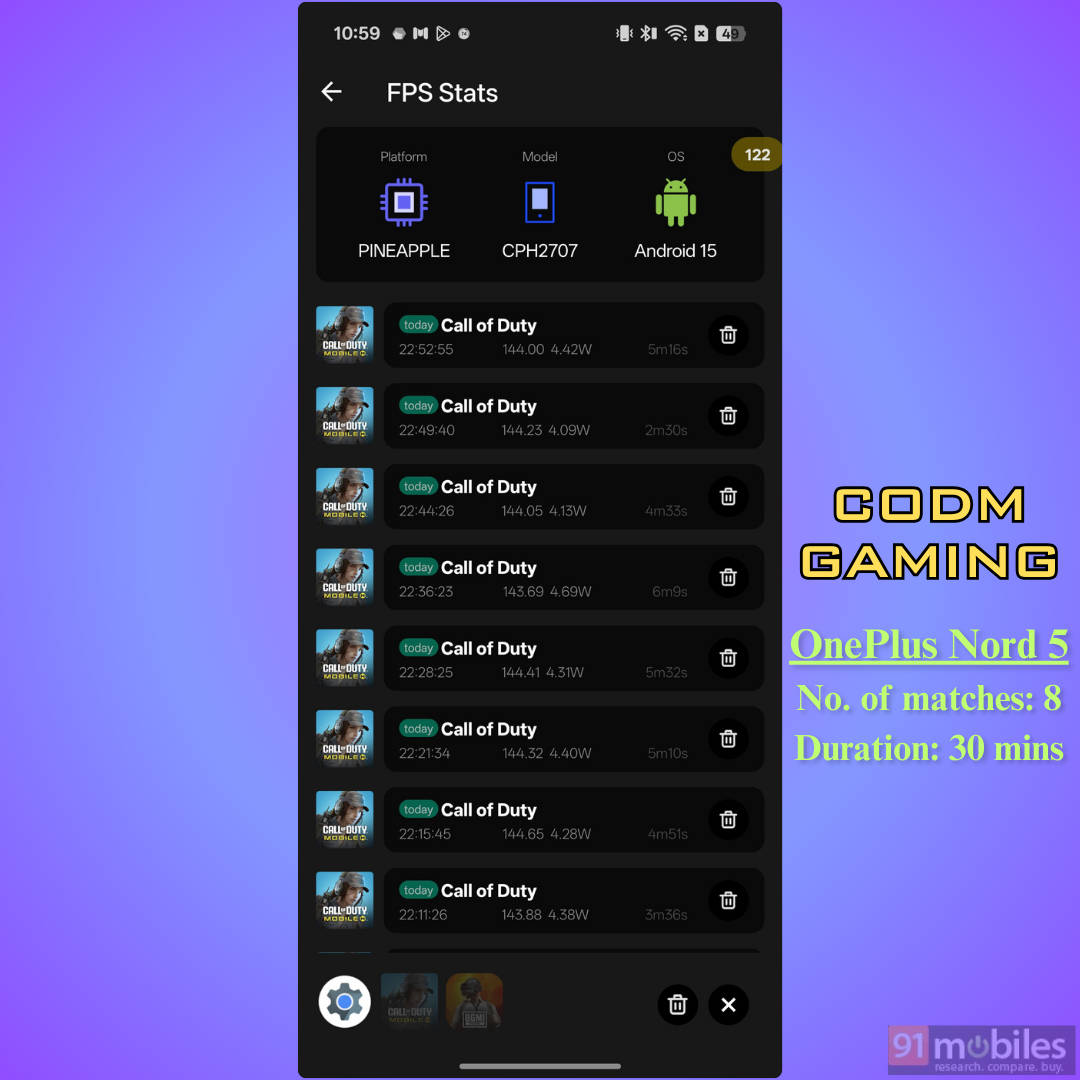
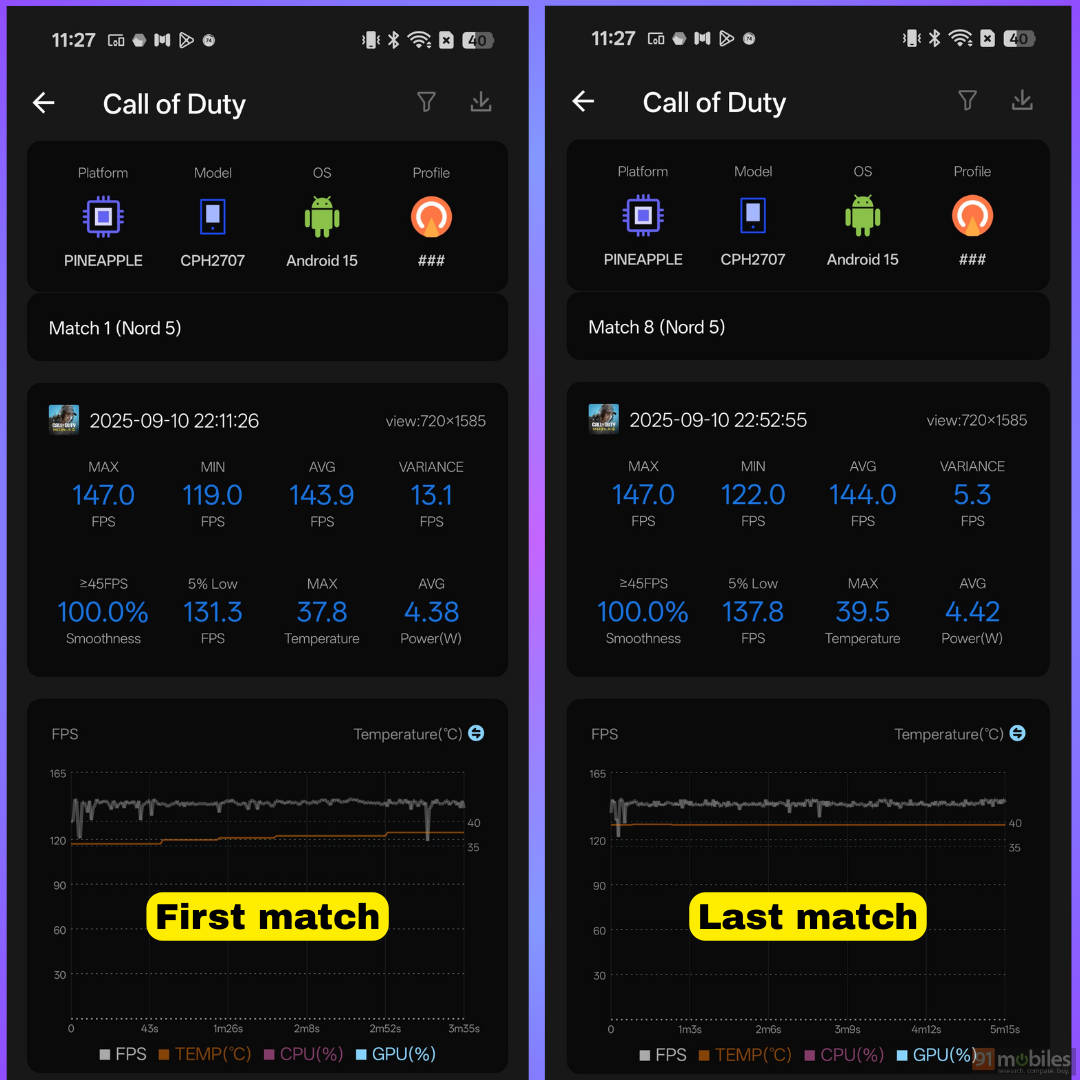
It’s also worth noting that in both BGMI and CODM, the handset didn’t cause any discomfort due to the heat. While the back panel was warm to the touch, it was fairly okay to firmly hold the phone because the plastic sideframe was much cooler than the rear panel.
How does the OnePlus Nord 5 fare against its closest rivals?

Launched at Rs 31,999 for the 8+256GB storage option, this puts it directly against the Snapdragon 8s Gen 4-powered phones like the iQOO Neo 10 (review) and POCO F7 (review). If someone is in the market for a performance-oriented device, both these are compelling choices, especially when they boast a newer flagship-grade Snapdragon processor compared to the Nord 5. Therefore, we also played BGMI and CODM on the aforementioned smartphones to determine how they perform compared to the OnePlus Nord 5.
BGMI and CODM on POCO F7
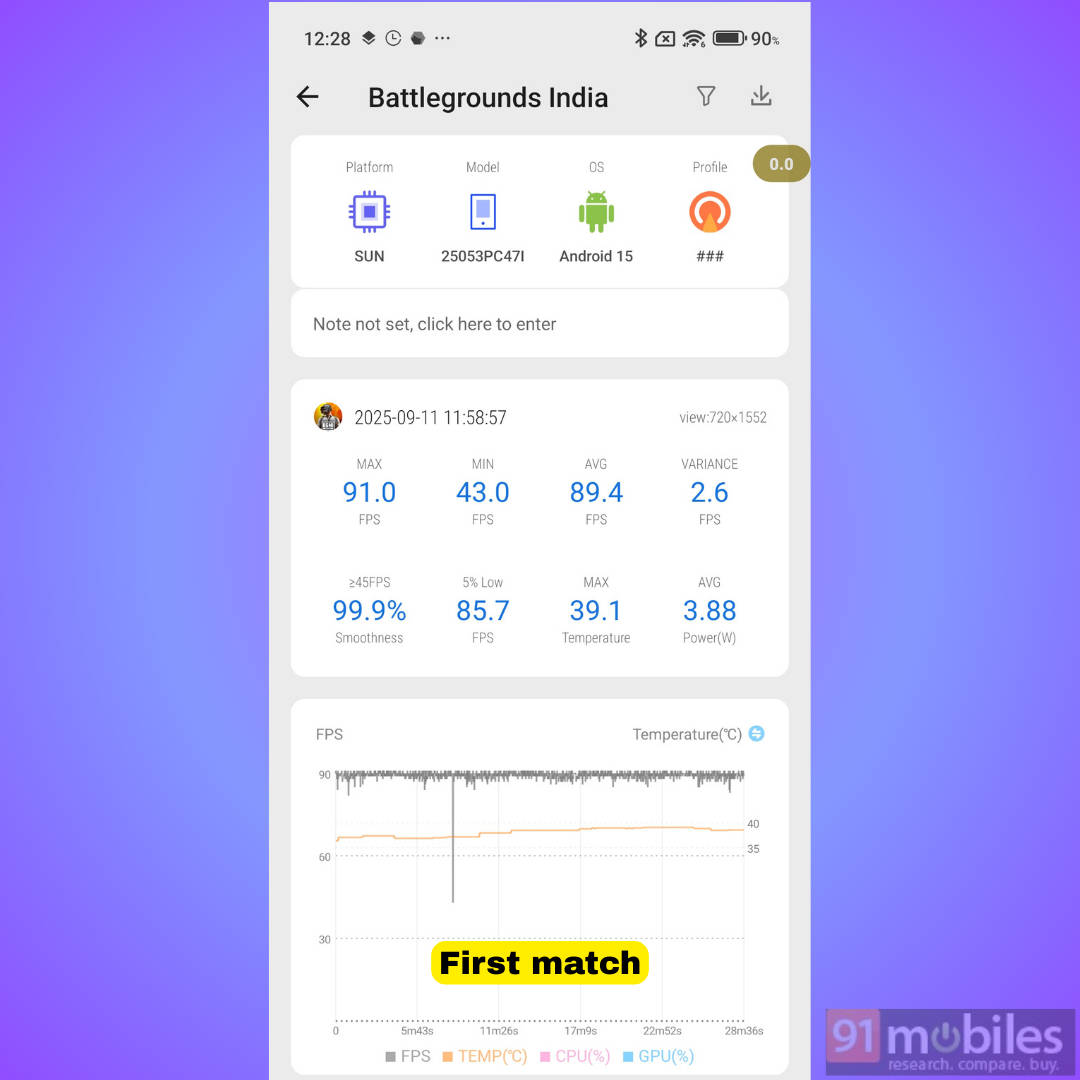
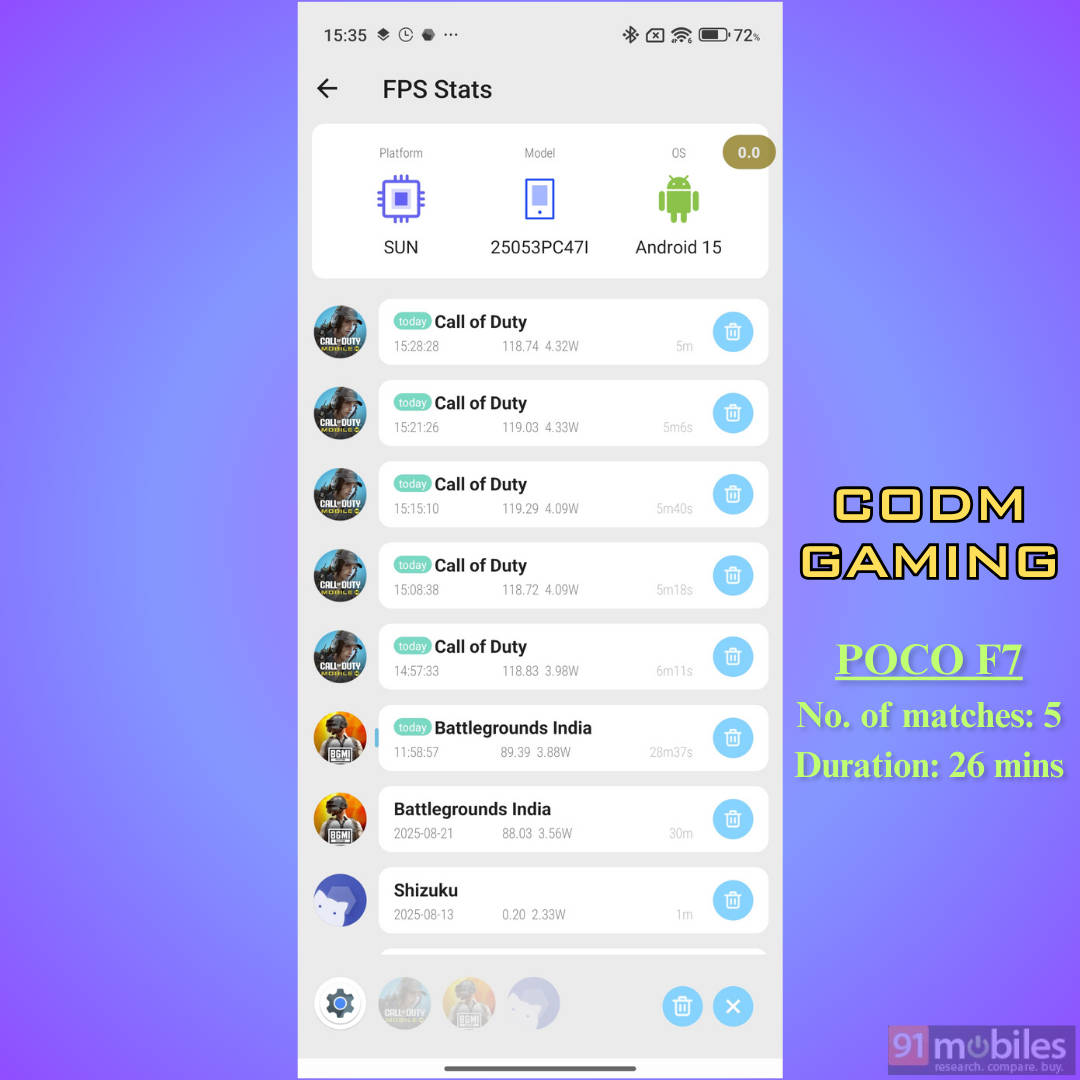
The POCO F7 can run BGMI at Smooth + Extreme+ graphical settings. Meaning, you get 90FPS support without the support of frame rate interpolation like the OnePlus Nord 5, at least at the time of drafting this article. I played a Battle Royale match on the Erangel map, which lasted 30 minutes, and the phone achieved a solid 89.5 average FPS with temperatures reaching 39.1 degrees. While these are great numbers, the gameplay wasn’t as smooth as the Nord 5 due to the lack of 120 or 144 FPS.
BGMI and CODM on iQOO Neo 10
Known for excellent value proposition phones with over-the-top performance hardware, iQOO smartphones are generally recognised as the go-to devices for mobile gaming. The iQOO Neo 10 is no different and poses as a direct rival to the OnePlus Nord 5.
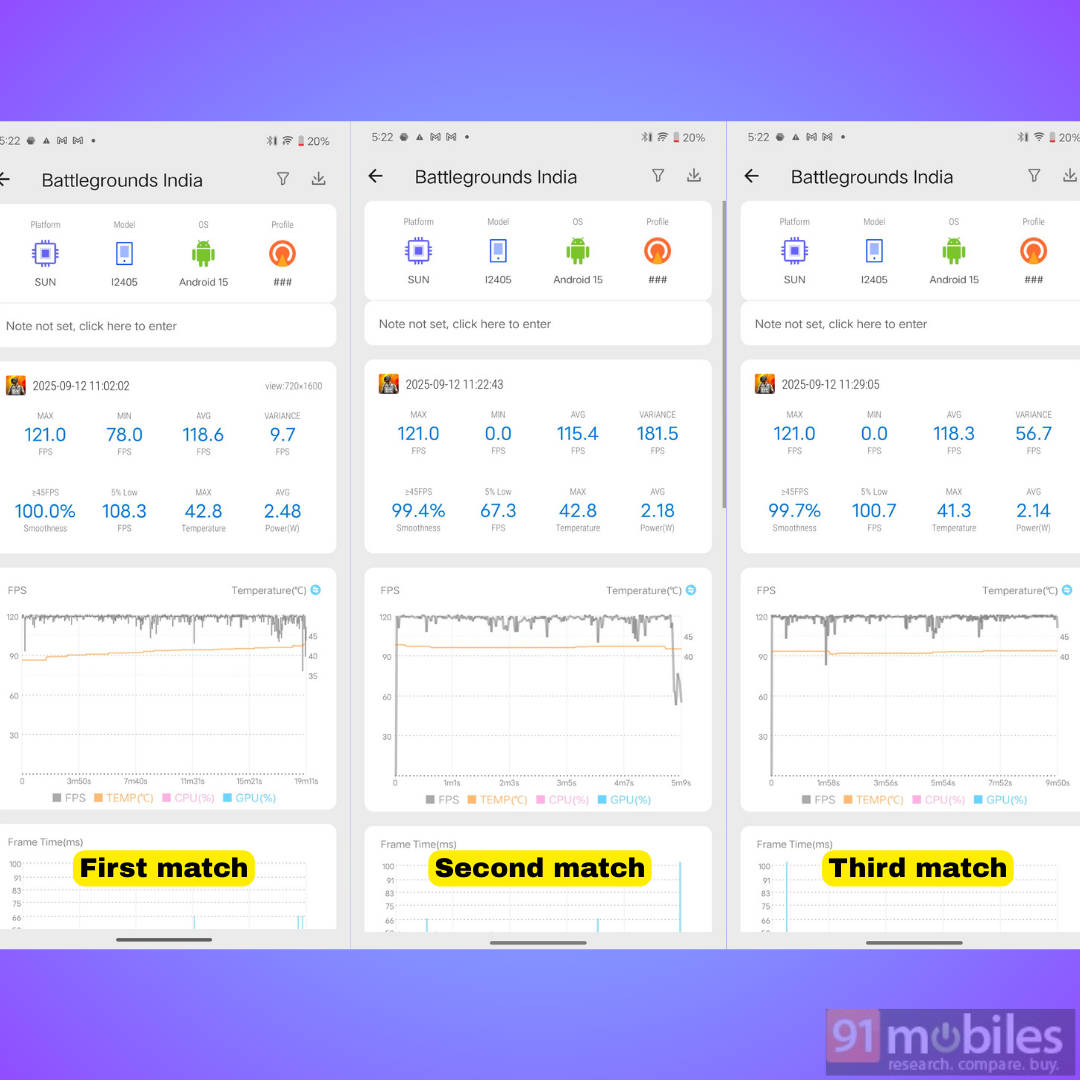
To see how it actually fares, I played several BGMI Battle Royale matches cumulatively for 35 minutes. Just like the OnePlus phone, iQOO Neo 10 supports 144FPS in BGMI through frame interpolation, but the same story continues here. In our iQOO Neo 10 unit, we were unable to achieve 144FPS, as the maximum the game could reach was 120FPS in Smooth + Ultra Extreme settings. Regardless, I got an average FPS of 118.3 and the maximum temperature it reached after three games was 42.8 degrees. In BGMI, the Neo 10 certainly felt warmer to hold than the Nord 5 towards the end and saw frame rate fluctuations, as you can see in the graphs.
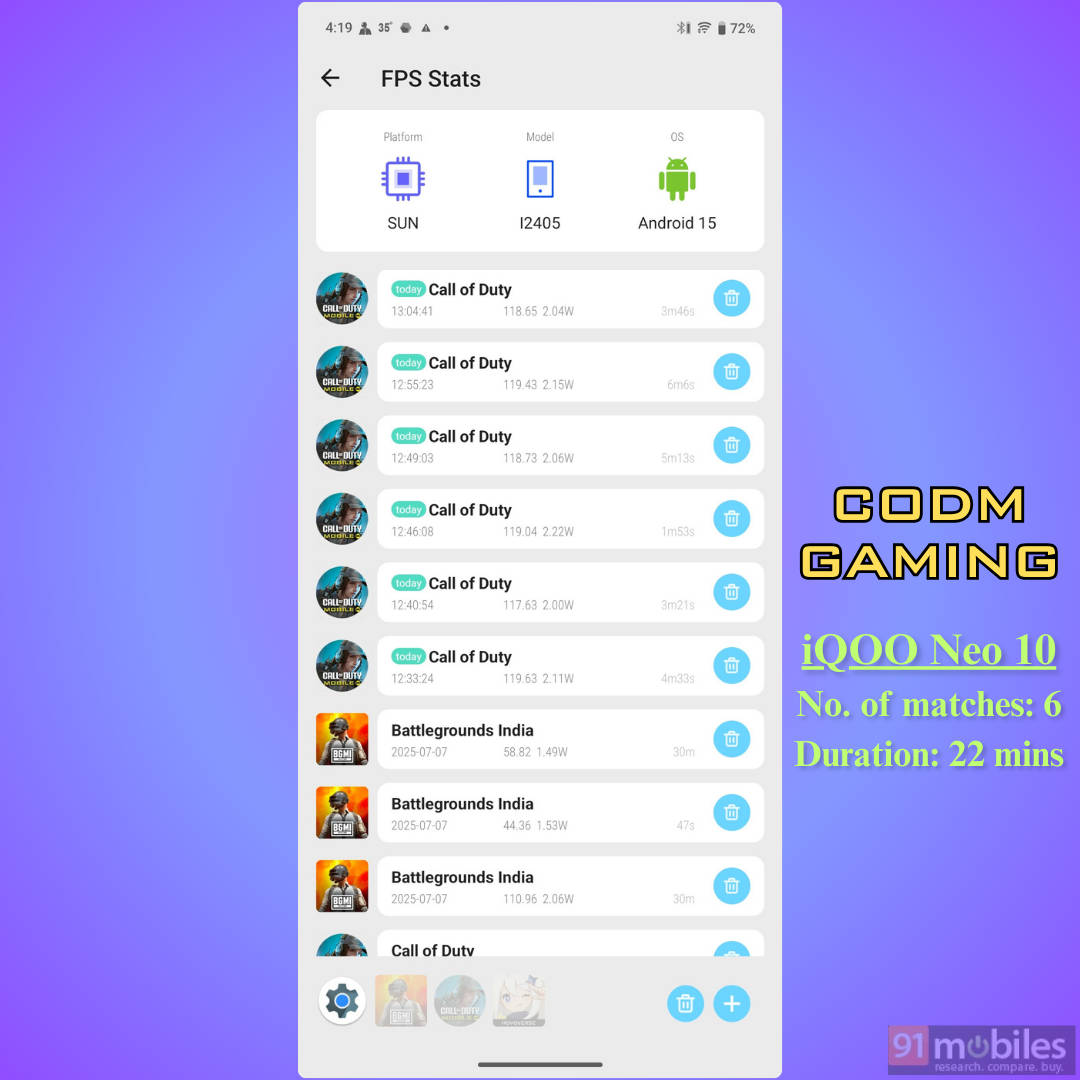
| OnePlus Nord 5 | Duration | 34 minutes |
| Avg. FPS | Temperatures | 144 FPS/ 39.5°C | |
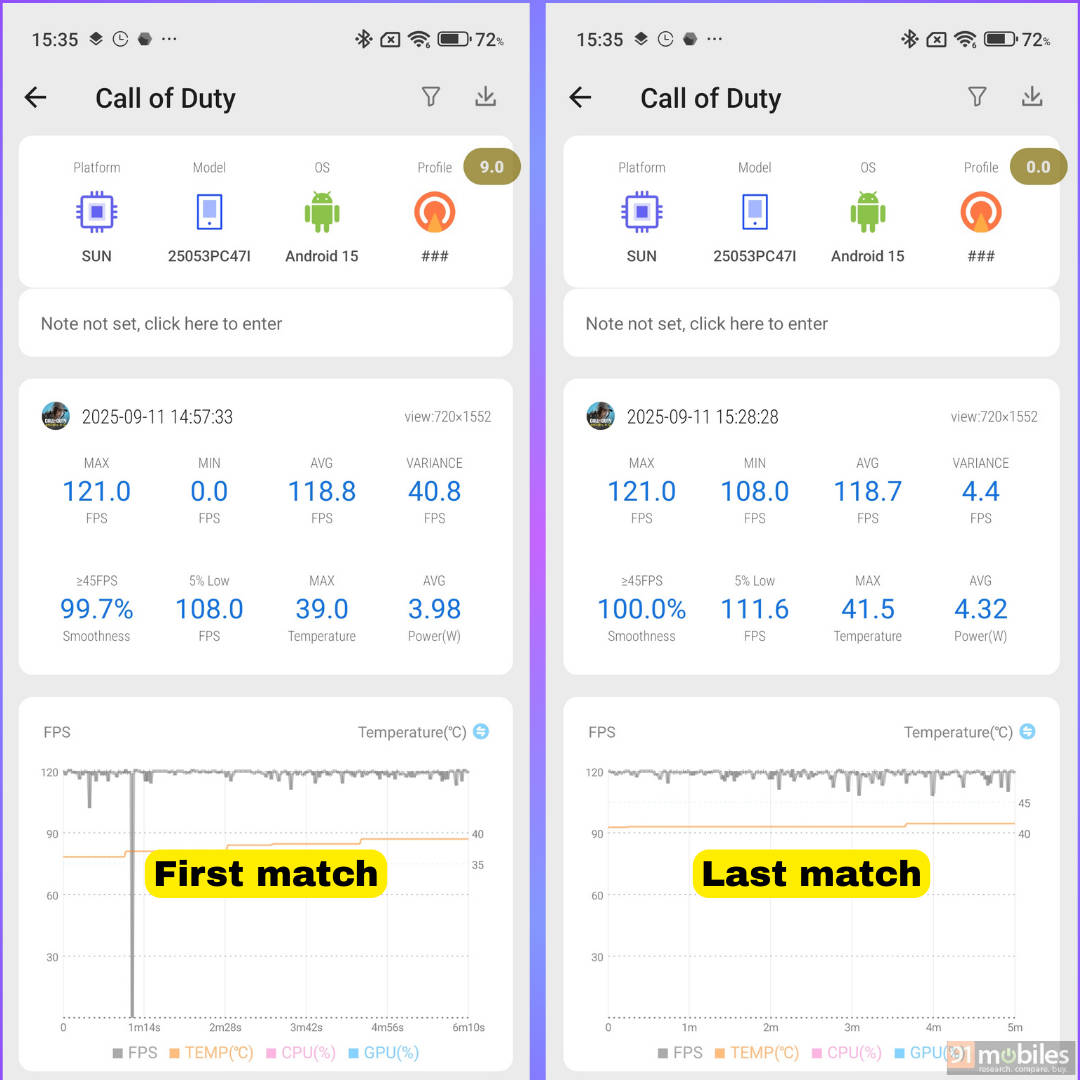
| POCO F7 | Duration | 26 minutes |
| Avg. FPS | Temperatures | 118.7 FPS/ 41.5°C | |
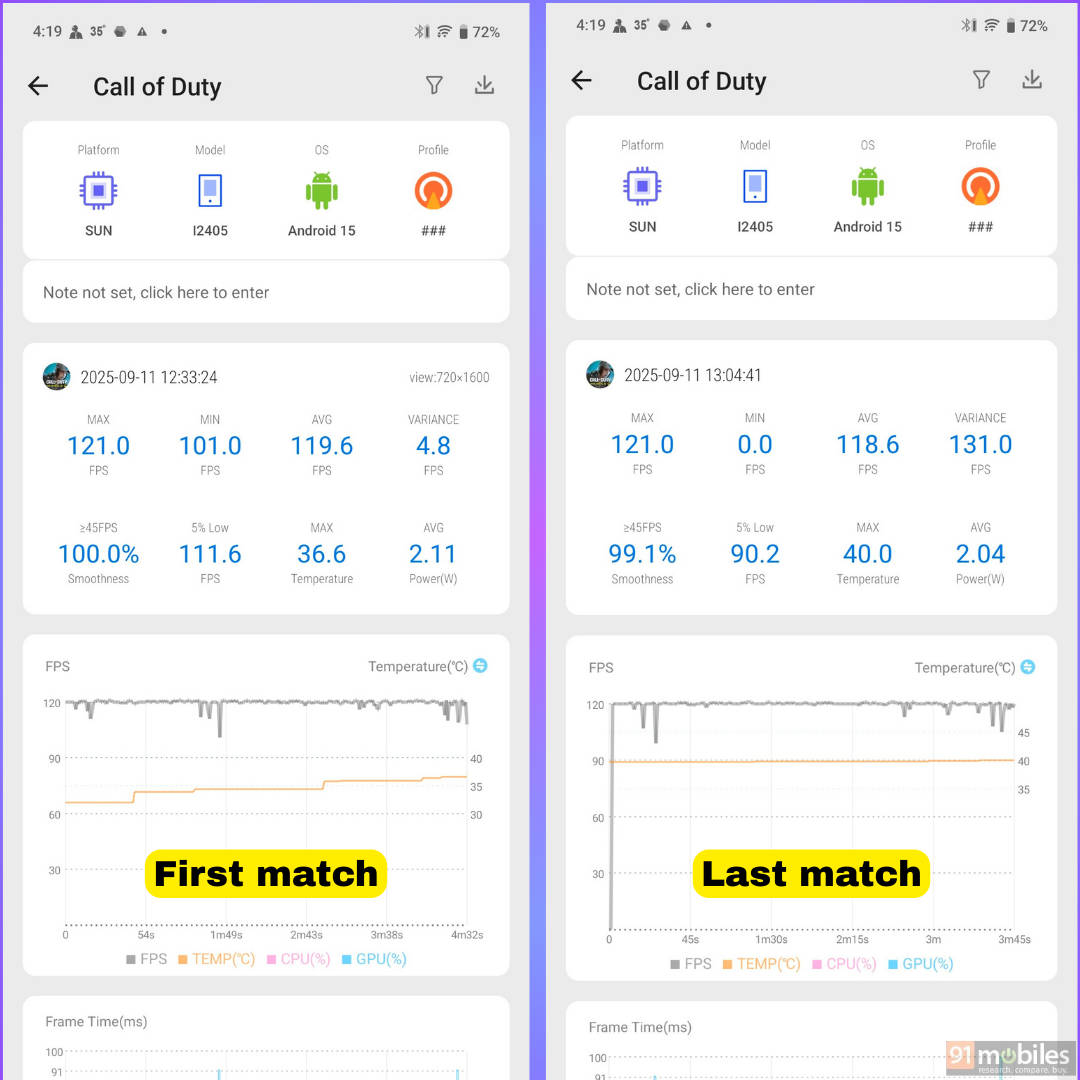
| iQOO Neo 10 | Duration | 22 minutes |
| Avg. FPS | Temperatures | 118 FPS/ 41.3°C |
Note: The average FPS and temperature data are obtained from the last and final CODM match played on each device. Frame rates were set to maximum.
Conclusion

If gaming is your priority, the OnePlus Nord 5 outperforms both the POCO F7 and iQOO Neo 10 in many aspects. It supports higher frame rates at 144FPS in CODM, runs cooler at 39.5°C, and sustains long sessions without major drops. In BGMI, it maintains near-120 FPS gameplay for almost an hour with minimal heating, whereas the iQOO Neo 10 shows frame drops and the POCO F7 is capped at 90FPS.
The Nord 5 also benefits from the largest vapour chamber among the three, ensuring better thermal efficiency. At Rs 31,999, it offers not just strong gaming chops but also a capable 50MP dual-camera setup, 6,800mAh battery, and handy extras like the Plus Key. With potential discounts during sales, it’s easily the most gamer-friendly choice in this segment.