Samsung Galaxy Tab S12+ review: the Plus is back, and it’s better than before


Samsung’s Galaxy Tab S series follows a predictable flow: the Ultra gets a refresh every year, while the standard and Plus models take turns. After the Tab S11 last year, we have the Tab S12+ making a comeback, since there was no Tab S11+ and the last Plus model we saw was the Tab S10+ two years ago. There’s no standard S12 this year either, so anyone who wants Samsung’s smaller flagship tablet will have to wait until 2027.
The Tab S12+ starts at Rs 1,29,999 for the 12GB+256GB variant, and the 12GB+512GB model costs Rs 1,49,999. The Tab S12 Ultra costs Rs 1,49,999 for the 12GB+256GB and Rs 1,69,999 for 12GB+512GB, so the Plus with 512GB costs exactly the same as the base Ultra. That makes the choice between the two tablets more interesting than usual. I tested the 5G variant priced at Rs 1,44,999 for about a week, and here’s my full review.
Table of Contents
Design: thin, light, and waterproof
At 5.3mm thick and 553g (555g for the 5G model), the Tab S12+ is thinner and lighter than the Tab S10+ it replaces, even though it packs a bigger display and a bigger battery. It measures 187.8 x 289.5mm and comes in Gray and Silver colours, both of which are subtle, low-key and won’t turn heads. I like the fact that it is a clean and understated design, which goes well with my personal aesthetics of keeping a Silver MacBook Air and iPhone 18 Pro Max.


Display and audio: a sensible size
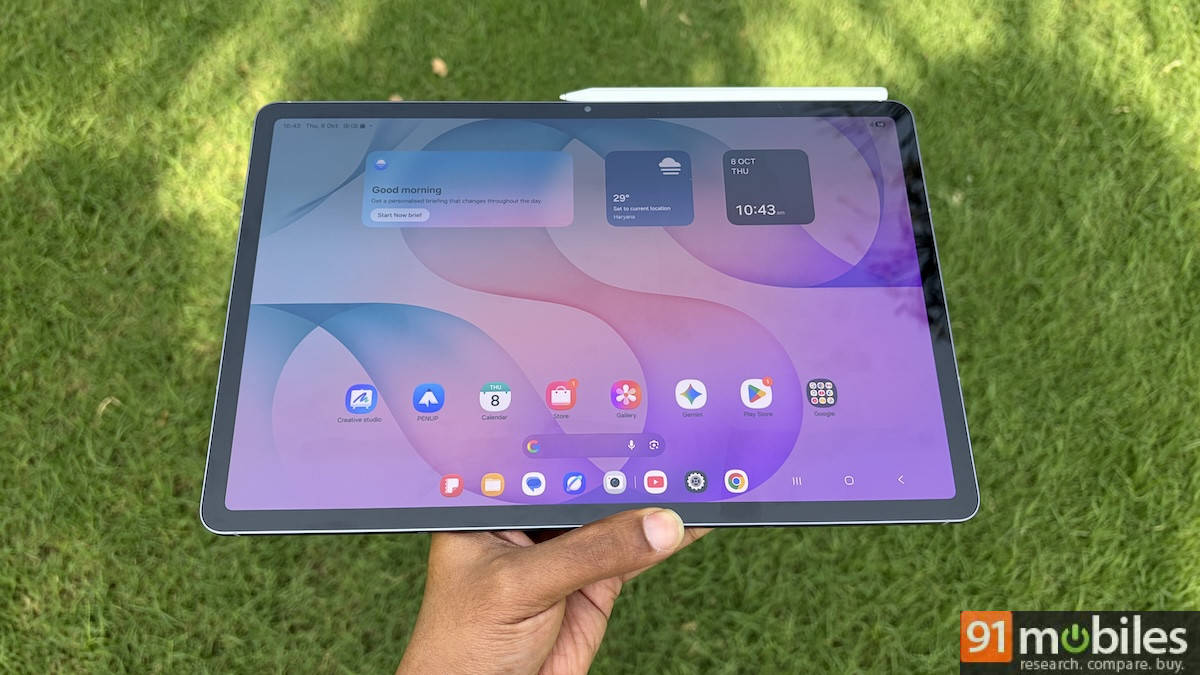
The Tab S12+ gets a 12.6-inch Dynamic AMOLED 2X display with a 2800×1752 resolution and a 120Hz refresh rate. The bezels are slimmer than on the Tab S10+, but it’s still noticeable in a good way. The border is the right kind of thick to be able to rest your palm and fingers comfortably without affecting what you’re watching on the screen. There’s also a Vision Booster feature, which automatically adjusts brightness, contrast, and colour in real-time to suit your surroundings.


Performance
The Tab S12+ is powered by the MediaTek Dimensity 9500, a 3nm chip that’s two generations ahead of the Dimensity 9300+ in the Tab S10+. It is paired with 12GB of RAM and either 256GB or 512GB of internal storage, with up to 2TB storage expansion support via a microSD slot. Samsung claims up to 19 percent faster CPU, 17 percent faster GPU, and 61 percent faster NPU performance, but those figures are measured against the Tab S11 Ultra, not the S10+.
Our in-house tests show how big the jump is from the previous generation. The Tab S10 Ultra uses the same Dimensity 9300+ as the S10+, and it scored 1,910,016 in AnTuTu. The Tab S12+ scored 3,679,861, almost double. Its Geekbench scores are about 60 percent higher in single-core and 47 percent higher in multi-core.
| Device | Chipset | AnTuTu | Geekbench single-core | Geekbench multi-core |
| Galaxy Tab S12+ | Dimensity 9500 | 3,679,861 | 3,383 | 10,392 |
| Galaxy Tab S12 Ultra | Dimensity 9500 | 3,454,581 | 3,282 | 10,032 |
| OnePlus Pad 4 | Snapdragon 8 Elite Gen 5 | 3,960,840 | 3,325 | 9,840 |
| Galaxy Tab S10 Ultra | Dimensity 9300+ | 1,910,016 | 2,117 | 7,088 |
The Plus even edges out the Ultra in AnTuTu (by about 6.5 percent) and ties it in PCMark, and it trails the Snapdragon 8 Elite Gen 5-powered OnePlus Pad 4 only in AnTuTu. Real-world performance is as good as the benchmark data suggests. The tablet feels extremely smooth and fluid out of the box, with apps opening quickly and scrolling through the UI and general apps feeling buttery smooth.
My primary use case for this tablet was writing articles on WordPress in Chrome, including this review, responding to emails, watching light YouTube content, and scrolling through web articles. Everything worked smoothly, with both the chipset and 120Hz refresh rate making the experience as fluid as possible. Even WordPress on Chrome felt mostly optimised, apart from the occasional bugs, and I didn’t really get the urge to open my MacBook to finish my work.
The tablet does get warm if you’re playing games for a while or working on Adobe Photoshop, which tends to drain battery faster than usual.
Performance with the Samsung Pro Keyboard
A big part of what makes the Galaxy Tab S12+ a terrific tablet for work is the Samsung Pro Keyboard. Priced at Rs 25,000, the keyboard looks as premium as the price tag suggests. It has a solid aluminium body and an upgraded metallic hinge for improved stability. It comes in the same Gray and Silver colourways to match the colour of the tablet. The keyboard gets its power directly from the tablet via the pogo-pin magnetic attachment. All you need to do is align the pogo pins on the back of the tablet to the pogo pins on the keyboard, and you’re good to go. No Bluetooth pairing required.


The backlit keys offer a nice tactile feel, and the trackpad is almost 40 per cent bigger than the previous model’s, giving you more room to swipe and use gesture controls. Moreover, the sturdy kickstand, hinge, and metal body let you keep the tablet on your lap with ease. Overall, the Samsung Pro Keyboard offers a comfortable and enjoyable typing experience.

Software and S Pen
The Tab S12+ ships with Android 17 and One UI 9, and Samsung promises up to seven years of updates, which is excellent for a tablet you’d probably keep on your desk for years. Our unit shipped with 51 pre-installed apps, three of them third-party.


Battery and charging: will get you from 9 to 5
Samsung has packed a 10,600mAh battery into the Tab S12+ and claims up to 21 hours of video playback. In our PCMark battery test, the tablet lasted 9 hours and 15 minutes, which is behind the Tab S12 Ultra’s 12 hours and 13 minutes (it has a 11,600mAh cell) and the OnePlus Pad 4’s 14 hours and 32 minutes (it has a 13,380mAh cell). The Tab S12+ does comfortably beat the Tab S10 Ultra, which managed 6 hours and 48 minutes. A 60-minute YouTube test cost 8 percent of the battery, against 7 percent for the Ultra.


I’m not saying the Tab S12+ can replace your laptop, but I am confident it can last a full 9 hours in the office on a single charge. Charging is capped at 45W, and it’s not especially quick. Our test took the tablet from 20 to 100 percent in 98 minutes, compared with 80 minutes for the Ultra and 93 minutes for the Tab S10 Ultra. Since the charger isn’t in the box, you’ll need to buy a 45W adapter separately to get these speeds.
Verdict
The Galaxy Tab S12+ is a proper upgrade for anyone using the Tab S10+ or an older tablet. You get a bigger, brighter display in a slimmer, lighter body; a chip that scores almost double the S10’s in AnTuTu (and real-world use shows this performance jump); a bigger battery; an IP68 rating; and seven years of updates. That makes the price hike easier to swallow, although Rs 1,29,999 is still a lot of money for a tablet.
It isn’t perfect. The tablet throttles under sustained load, the battery life trails some rivals, charging is slow, and the charger and keyboards cost extra. The Plus is also a very different pick from the Ultra, which gives you a 14.6-inch display, an 11,600mAh battery, Wi-Fi 7 (the Plus gets Wi-Fi 6E) and an extra 8MP ultrawide camera on the back for Rs 20,000 more at the same storage.
Ultimately, if you’re choosing between the Plus and Ultra tablets, it comes down to how you use it. The Tab S12+ is easier to hold and travel with, with its smaller display and lighter build. It’s the perfect companion device for your laptop. The Ultra is for those who want to replace their laptop entirely and want one large-screen device for all their work and entertainment needs.
Editor’s rating: 8.2 / 10
Pros:
- Slim, light design with an IP68 rating
- Bright 12.6-inch AMOLED display in a practical size
- Dimensity 9500 delivers a big jump over the Tab S10 range
- Up to seven years of OS updates
- 9-hour battery life allows for all-day use
Cons:
- Throttles under sustained loads
- Expensive, and keyboard costs extra
- Slow 45W charging, with no charger in the box