Sekyo Smart Alarm door sensor overview: this security checkpoint deserves your attention


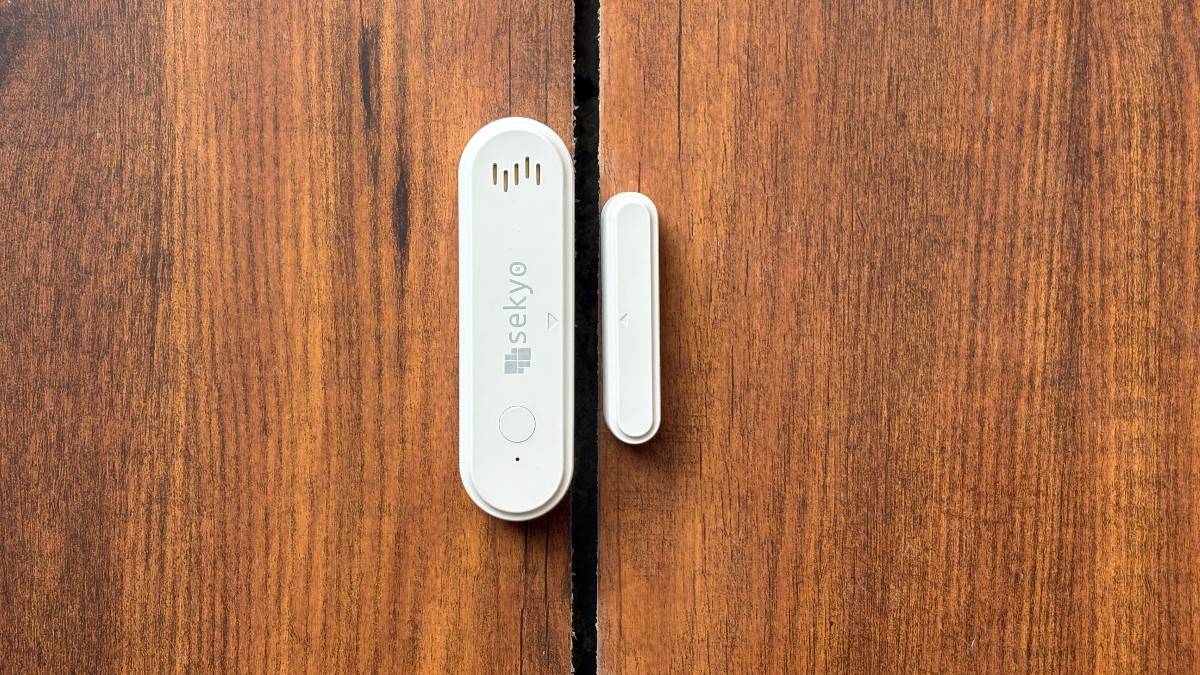
Sekyo – a Delhi-based wearable, GPS tracker, and home security brand – has introduced the WiFi Smart Door/Window Sensor. It’s a compact device designed to alert you the moment a door, window, shutter, or locker is opened. Whether someone attempts to force open a lock or simply gains access, the sensor instantly sends a notification to your smartphone.
We got our hands on the Sekyo WiFi Door Alarm Sensor to see how it works, what features it offers, and whether it can add an extra layer of security to your home. So, without any further ado, let’s dive in.
Table of Contents
Design and form factor


The Sekyo Wi-Fi Smart Door/Window Sensor consists of two units: a main sensor and a smaller magnetic unit. The main unit, which houses the electronics, is slightly bulkier, while the magnetic unit is slim and roughly the size of an eraser. Both are completely wireless, although the main unit is powered by two AAA batteries, which need to be purchased separately. The battery compartment is tamper-protected, meaning the batteries can’t be removed without alerting the owner.

The Sekyo Wi-Fi Smart Door/Window Sensor is available in two variants. The standard model sends instant notifications whenever the sensor is triggered, while the higher-end version also features a built-in siren that sounds an alarm when access is detected. Both units attach to a flat surface using adhesive tape (we’ll explain how that works later). The installation looks clean and unobtrusive, but I do wish the sensor were available in additional colour options besides white, making it easier to blend in with wooden or metal doors and door frames.
How to install Sekyo WiFi Smart Door sensor

Find a flat section on your door or window, preferably at the top so that it doesn’t get dislodged easily, next to the gap between the frame and the moving panel. Attach the main unit using the double-sided tape provided in the box, ensuring the arrow indicator faces the gap. Then, fix the companion unit on the adjacent surface, aligning its arrow with the arrow on the main unit. Both units should sit close together, if not completely attached, when the door or window is closed.
How it works, app connectivity

The Sekyo Wi-Fi Door Sensor is quick and easy to set up. Once the batteries are inserted into the main unit, it automatically pairs with the companion unit. The sensor responds instantly with a blue indicator light whenever the two units are separated or brought back together. If you have the built-in siren variant, it also emits a loud alarm at the same time. Both the visual and audible alerts happen instantly, with a minor latency, which is nothing to be concerned about. The siren variant also has a physical button to turn the alarm off.

Users can pair the sensor with a mobile app, SmartLife, available on both the Android and iPhone app stores, and remotely get updates from the sensor. The updates aren’t real-time, but you are notified within seconds. Pairing the sensor with the app is also not much of a trouble, and you have the option to use it with and without an account. I connected my iPhone to it, which took me almost a minute, and the device requires a connection to an active Wi-Fi to send notifications.


Beyond receiving notifications, the app offers a range of useful controls. You can adjust the siren volume or mute it entirely, choose between light and voice notifications, enable both, or disable them altogether to suit your preferences. The app even lets you customise the smartphone notifications, so that they don’t bug you too much. Additionally, users have the option to check the history – how many times the sensor was active, battery health, and assign a location if you have multiple sensors in place.

However, there is one major concern with the smart sensor that could have been addressed to make the device more reliable and secure. It relates to smartphone notifications over Wi-Fi, which must remain active at all times for remote alerts to work. The problem is that the device does not notify users if the Wi-Fi connection is lost. This is a significant oversight, as a disconnected sensor would fail to send intrusion alerts precisely when they are needed most.
Final thoughts
There might be several competing products on the market that offer a similar feature set, some at even lower prices. However, during my time testing the Sekyo sensor to monitor my room, it handled the basics well. Every time the door was opened, the siren sounded immediately, followed shortly by a notification on my phone, ensuring I was promptly informed of the event.

If you’re looking for an affordable way to add an extra layer of security to your home, office, locker, cupboard, or drawer beyond conventional locks, the Sekyo Wi-Fi Smart Sensor could be worth considering as long as you can guarantee an active internet connection.
The Sekyo Wi-Fi Smart Door Sensor is priced at Rs 999 for the standard version and around Rs 1,300 for the variant with a built-in siren. That’s reasonable pricing for a device designed to notify you of potential intrusions, even when you’re away from the location. Of course, while the sensor can alert you in real time, you’ll still need to take the necessary action in response.

