
Samsung Galaxy J2 2016
+ Compare


-
Design3

-
Rear Camera7

-
360° View

-
UI Screenshot16
![UI Screenshot]()
-
Benchmarks10
![Benchmarks]()
-
Videos3
![Videos]()


Key Specs
Performance
-
Spreadtrum SC8830 -
Quad Core, 1.5 GHz -
1.5 GB RAM
Display
-
5.0 inches (12.7 cm); Super AMOLED -
720x1280 px (HD)
Rear Camera
-
Single Camera Setup - 8 MP Primary Camera
-
LED Flash -
HD @30fps Video Recording
Front Camera
-
5 MP
Battery
-
2600 mAh
General
-
SIM1: Micro, SIM2: Micro -
5G Not Supported -
8 GB internal storage, Expandable upto 128 GB
Samsung Galaxy J2 2016 Compare Camera Samples


Samsung Galaxy J2 2016 Expert Review Summary
Expert Rating:
![Ketaki Bhojnagarwala]()
Verdict
The Samsung Galaxy J2 is priced at Rs 9,750, which puts it on par with competition like the Xiaomi Redmi Note 3(review), LeEco Le 1s(review)and Lenovo Vibe K5 Plus (review), all very formidable options. We mentioned earlier that specs alone aren`t enough to determine a Samsung smartphone`s popularity, but in this case, the J2 2016 also compromises on real life usage. The performance issues, awkwardly implemented Smart Glow ring and lack of onboard storage make it a
Pros
- Vibrant display
- Good battery life
Cons
- Sluggish performance
- Low on storage
- Smart Glow LED ring is limited in use
Specs at a Glance
+
+
Display
Read More
Design
+
Dimensions: 142.4 x 71.1 x 8.0 mmWeight: 138 gramsSamsung hasn’t made drastic changes to the Galaxy J2 2016’s design, but that said, there have been a few upgrades. For starters, the phone is now bigger, with a screen size bump from 4.7-inches to 5-inches. It’s still on the compact side though, so one-handed usage won’t be a problem. Our review unit was in black, although you can also purchase the phone in gold and silver colour options. The front of the device is classic Samsung. It features rounded corners, and a shiny metallic plastic rim around the edges that breaks the monotony of the otherwise black façade. However, the trim is of poor quality, and gets scuffed and dented quite easily. The bezels surrounding the screen are thick, and above the display you’ll find the earpiece, sensors, Samsung branding and the front camera. Unfortunately, the J2 2016 misses out on an ambient light sensor, which is a ridiculous omission at this price point. Below the display you’ll find the usual arrangement of a physical home button, flanked by two Android navigation keys in a silver finish. As can be expected of a budget Samsung phone, these aren’t backlit. Moving over to the edges, the right spine is where you’ll find the power button, while the left is home to the volume rocker. The primary microphone and micro-USB port are at the bottom, while the 3.5mm audio jack is on top. The back panel has received somewhat of a makeover. The usual plasticky rear case seems to be of better quality this time around, and features a ribbed finish along the sides and across a band at the centre. While it doesn’t do much aesthetically, it does make the smartphone more grippy. The rear panel features the primary camera surrounded by the large Smart Glow ring at top centre, with the loudspeaker and single LED flash on either side. Samsung branding below completes the setup at the rear.The J2 2016 isn’t a unibody smartphone, and the rear panel pries off to reveal the removable battery, along with slots for two micro-SIM cards as well as a microSD card. While we’re glad Samsung didn’t opt for a hybrid SIM card setup, it feels obsolete to remove the battery in order to insert or replace a SIM. Overall, the Galaxy J2 2016 feels like a sturdy, lightweight smartphone, but don’t expect it to draw second glances.
Read More
Display: AMOLED, but not ambient Size: 5.0 InchResolution: HD (720 x 1280 pixels)Display Type: AMOLEDPixel Density: 294 ppi
+
As we mentioned earlier, the 4.7-inch display of the J2 has been upgraded to a 5-inch panel. Along with the increased size, the resolution has been bumped up from 960 x 540 pixels to HD, resulting in a pixel density of 294ppi. While the J2 offered an AMOLED display, the J2 2016 takes this up a notch with a Super AMOLED screen. The screen is sharp, and outputs vibrant colours that should satisfy most users who want to watch videos or play games on the device. The lack of an ambient light sensor is a bummer though, requiring you to manually adjust the brightness slider. You can access this either from the drop down quick settings menu or the phone settings, where you'll also find an 'Outdoor' option, which bumps the brightness up to max for viewing the screen under harsh lighting. We have no complaints about the brightness – the levels are more than adequate and sunlight legibility isn’t a problem. In display settings, you can change the screen mode, choosing between Adaptive display (optimises colour, saturation and sharpness automatically), AMOLED cinema, AMOLED photo and Basic. The screen is responsive for the most part, although it’s not as fluid as we would have liked for swiping and scrolling.
Read More
Cameras: average fare
+
Primary camera: 8 MPFlash: LED FlashSecondary camera: 5 MPThe original Galaxy J2 featured mediocre camera specs, with 2MP and 5MP front and rear cameras respectively. The J2 2016 edition bumps this up to 5MP and 8MP units, both with f/2.2 aperture. The camera app is standard Samsung fare, with controls displayed on either side of the viewfinder. On one side, you’ll find the shutter button, front camera toggle, video mode, gallery shortcut and shooting modes shortcut. The other side is where you can enable the timer, flash and filter effects, and access the camera settings. In terms of the shooting modes on offer, you get Auto, Pro (adjustments for ISO, white balance, exposure values and metering), Panorama, Continuous Shot, Beauty Face, Rear Cam Selfie (using the Smart Glow ring) and Sports. Unfortunately, there’s no HDR mode, which is disappointing. The camera focusses relatively quickly, and snaps photos in a jiffy. When you tap to focus, you’ll also see a slider to let you adjust the exposure.The results we got from the J2 2016’s cameras were hit and miss, veering more towards the latter. As with most budget smartphones, the camera can take good photos in adequate lighting, especially macros. However even something simple like landscape shots in daylight tend to look blown out. Low light images are predictably grainy, although the camera tends to bump up the ISO to improve visibility. That said, focussing on a subject in artificial lighting seems to be an issue with the camera, and on closer inspection we found that images weren’t as sharp as we would have liked. The front camera was a huge disappointment though, with selfies often ending up out of focus and blurry. There’s a screen flash option for low light images, but it doesn’t do much to improve image quality. Here are a few image samples taken with the primary camera.
Read More
Software: Marshmallow-dipped TouchWiz
+
Operating System: AndroidOS Version: 6.0, Marshmallow The J2 2016 runs Android 6.0.1 Marshmallow with Samsung’s TouchWiz UI on top. TouchWiz has been toned down a lot over the last couple of years, although we still think some design elements can do with more polishing. You’ll be presented with the usual unified quick settings and notification drawer on top, and a dedicated app drawer below. Apart from usual widgets and wallpapers, there’s also a choice of four themes you can customise the device with. In terms of the pre-loaded content, you’ll find Facebook, Opera Max and Microsoft apps like Word, Excel, Powerpoint, OneNote and OneDrive. The usual Samsung apps like Galaxy Apps, My Galaxy and S Planner are present, along with a dedicated Smart Glow app. Like the original J2, the J2 2016 features Samsung's S Bike mode, which can be enabled via a toggle in the quick settings menu. When turned on, S Bike mode automatically answers incoming calls with a preset message informing callers that you're driving, with an option to dial 1 to notify you if it's urgent. You can also enable a smart reply to send automatic text messages to specific contacts with your estimated arrival time when they call. There are various tweaks you can find in the settings menu. Among these is Download booster, which lets you combine Wi-Fi and LTE networks to download large files over 30MB in size. There’s a Smart Notifier option that lets you categorise and group notifications into All, Priority, Social and Utility notifications, each with a dedicated tab in the notification panel. Smart Manager is a dashboard of sorts where you can manage your battery, storage, RAM and device security, as well as enable the Ultra data saving mode.
Read More
Smart Glow: unique idea, awkward implementation
+
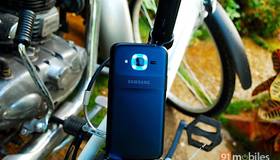
The defining feature of the J2 2016 is the Smart Glow ring, and we’ve explored the basics of what it can do in our overview. But let’s talk about how useful it is in real life. The Smart Glow LED ring serves three purposes – Priority alerts, Usage alerts and Selfie Assist. Starting with Priority alerts, this feature makes the Smart Glow ring light up to indicate a notification from a particular contact (emails, messages and calls) or app. Usage alerts will make the ring glow red when the battery is low, your data usage limit has been reached, or your storage is about to run out. Lastly, the Selfie Assist feature lights up the ring when you’re using the rear camera for a selfie, to let you know when the camera has detected and focussed on your face. What’s nice about the Priority alerts is that you can adjust the RGB parameters of the Glow ring manually, to create a colour combination of your choice. It’s fun playing around with the sliders and creating cool colours but unfortunately, this feature is relegated to just four apps or contacts. The apps themselves are limited in selection, and some apps that we use quite often like Twitter, Instagram and Snapchat aren’t in the list of supported apps. To use the Smart Glow ring to its full ability, it would have been ideal if we could add a minimum of eight apps or contacts to Priority alerts. In the Smart Glow app settings, you can enable a battery alert that lets you press the power button when the phone is charging to check if the phone is fully charged. If the phone is still charging, it will glow red.While the implementation of the Smart Glow ring is unique, there is an obvious flaw Samsung failed to notice – its location. Now, we don’t know about you, but we never keep our phone face down. In the case of the Galaxy J2, the rim around the display is slightly raised, but you’d still risk scratching the display. The end result is that we rarely ended up notificing the Smart Glow ring because the phone was almost always placed rear-down on a surface. We wish Samsung had thought of a more intelligent implementation of this ring – for instance, embedding it into the home button or somewhere around the bezel.
Read More
Performance: lasts long, but stumbles
+
CPU: Quad core, 1.5 GHz, Spreadtrum SC8830GPU: Mali-400 MP2RAM: 1.5 GBMemory: 8 GB + Up to 32 GBSIM Slots: Dual SIM , GSM+GSMWith the J2 2016, Samsung has surprisingly opted for an entry-level quad-core Spreadtrum SC8830 processor clocked at 1.5GHz, which is a step down from the Exynos and Qualcomm chipsets the company usually employs for its devices. While the RAM has been bumped up from 1GB to 1.5GB, the overall performance of the phone is still below par. For instance, there are noticeable lags when switching between apps and multi-tasking, and more than a few instances of apps freezing while using the device. While gaming on the device is fine for more lightweight games, playing graphics heavy titles like Riptide GP2 will result in a few frame drops. It's also worth mentioning that Samsung has equipped the J2 2016 with what it calls 'Turbo Speed Technology' or TST. The company claims that this makes native apps, like the gallery, contacts, camera, etc., load up to 40 percent faster, and we're inclined to agree. However, this doesn't apply to apps downloaded from the Play Store. The other feature of TST is that it shuts down idle background processes and frees up RAM, and taking a look at the RAM section in Smart Manager (screenshot below) reveals that the phone does a good job of conserving memory, even when multiple apps are running in the background. The onboard storage is also an issue – Samsung hasn’t increased the storage from last year's J2, and you still get only 8GB of internal memory, with just under 4GB available out of the box. The storage runs out quite fast if you have a lot of apps and content, and we think at least 16GB of internal storage is required on phones in its price range. In fact, there are plenty of smartphones priced under Rs 6,000 that offer 16GB of storage, so we’re not sure why Samsung compromised on this front.Another issue we had with the phone was the lack of the ambient light sensor as mentioned earlier. While the proximity sensor has been provided, we found that it doesn’t work as well as it should, with the display getting activated almost every time we made a call. The battery on the J2 2016 has been bumped up significantly from 2,000mAh to 2,600mAh, and this is one area where the smartphone impresses. The phone can last for an entire day with regular usage comprising of phone calls, WhatsApp, Facebook, Twitter and Snapchat usage, as well as use of the camera and browser. The standby times are also good. In our video loop battery drain test, the smartphone lasted for 13 hours and 45 minutes, which is an excellent result. As for the connectivity features, the smartphone features 4G LTE, Wi-Fi, Wi-Fi Direct, Bluetooth 4.1 and GPS.
Read More
Read full Review

Verdict
The Samsung Galaxy J2 is priced at Rs 9,750, which puts it on par with competition like the Xiaomi Redmi Note 3(review), LeEco Le 1s(review)and Lenovo Vibe K5 Plus (review), all very formidable options. We mentioned earlier that specs alone aren`t enough to determine a Samsung smartphone`s popularity, but in this case, the J2 2016 also compromises on real life usage. The performance issues, awkwardly implemented Smart Glow ring and lack of onboard storage make it a
- Vibrant display
- Good battery life
Pros
- Sluggish performance
- Low on storage
- Smart Glow LED ring is limited in use
Cons
Specs at a Glance
+Display
Read MoreDesign
+Dimensions: 142.4 x 71.1 x 8.0 mmWeight: 138 gramsSamsung hasn’t made drastic changes to the Galaxy J2 2016’s design, but that said, there have been a few upgrades. For starters, the phone is now bigger, with a screen size bump from 4.7-inches to 5-inches. It’s still on the compact side though, so one-handed usage won’t be a problem. Our review unit was in black, although you can also purchase the phone in gold and silver colour options. The front of the device is classic Samsung. It features rounded corners, and a shiny metallic plastic rim around the edges that breaks the monotony of the otherwise black façade. However, the trim is of poor quality, and gets scuffed and dented quite easily. The bezels surrounding the screen are thick, and above the display you’ll find the earpiece, sensors, Samsung branding and the front camera. Unfortunately, the J2 2016 misses out on an ambient light sensor, which is a ridiculous omission at this price point. Below the display you’ll find the usual arrangement of a physical home button, flanked by two Android navigation keys in a silver finish. As can be expected of a budget Samsung phone, these aren’t backlit. Moving over to the edges, the right spine is where you’ll find the power button, while the left is home to the volume rocker. The primary microphone and micro-USB port are at the bottom, while the 3.5mm audio jack is on top. The back panel has received somewhat of a makeover. The usual plasticky rear case seems to be of better quality this time around, and features a ribbed finish along the sides and across a band at the centre. While it doesn’t do much aesthetically, it does make the smartphone more grippy. The rear panel features the primary camera surrounded by the large Smart Glow ring at top centre, with the loudspeaker and single LED flash on either side. Samsung branding below completes the setup at the rear.The J2 2016 isn’t a unibody smartphone, and the rear panel pries off to reveal the removable battery, along with slots for two micro-SIM cards as well as a microSD card. While we’re glad Samsung didn’t opt for a hybrid SIM card setup, it feels obsolete to remove the battery in order to insert or replace a SIM. Overall, the Galaxy J2 2016 feels like a sturdy, lightweight smartphone, but don’t expect it to draw second glances.
Read MoreDisplay: AMOLED, but not ambient Size: 5.0 InchResolution: HD (720 x 1280 pixels)Display Type: AMOLEDPixel Density: 294 ppi
+As we mentioned earlier, the 4.7-inch display of the J2 has been upgraded to a 5-inch panel. Along with the increased size, the resolution has been bumped up from 960 x 540 pixels to HD, resulting in a pixel density of 294ppi. While the J2 offered an AMOLED display, the J2 2016 takes this up a notch with a Super AMOLED screen. The screen is sharp, and outputs vibrant colours that should satisfy most users who want to watch videos or play games on the device. The lack of an ambient light sensor is a bummer though, requiring you to manually adjust the brightness slider. You can access this either from the drop down quick settings menu or the phone settings, where you'll also find an 'Outdoor' option, which bumps the brightness up to max for viewing the screen under harsh lighting. We have no complaints about the brightness – the levels are more than adequate and sunlight legibility isn’t a problem. In display settings, you can change the screen mode, choosing between Adaptive display (optimises colour, saturation and sharpness automatically), AMOLED cinema, AMOLED photo and Basic. The screen is responsive for the most part, although it’s not as fluid as we would have liked for swiping and scrolling.
Read MoreCameras: average fare
+Primary camera: 8 MPFlash: LED FlashSecondary camera: 5 MPThe original Galaxy J2 featured mediocre camera specs, with 2MP and 5MP front and rear cameras respectively. The J2 2016 edition bumps this up to 5MP and 8MP units, both with f/2.2 aperture. The camera app is standard Samsung fare, with controls displayed on either side of the viewfinder. On one side, you’ll find the shutter button, front camera toggle, video mode, gallery shortcut and shooting modes shortcut. The other side is where you can enable the timer, flash and filter effects, and access the camera settings. In terms of the shooting modes on offer, you get Auto, Pro (adjustments for ISO, white balance, exposure values and metering), Panorama, Continuous Shot, Beauty Face, Rear Cam Selfie (using the Smart Glow ring) and Sports. Unfortunately, there’s no HDR mode, which is disappointing. The camera focusses relatively quickly, and snaps photos in a jiffy. When you tap to focus, you’ll also see a slider to let you adjust the exposure.The results we got from the J2 2016’s cameras were hit and miss, veering more towards the latter. As with most budget smartphones, the camera can take good photos in adequate lighting, especially macros. However even something simple like landscape shots in daylight tend to look blown out. Low light images are predictably grainy, although the camera tends to bump up the ISO to improve visibility. That said, focussing on a subject in artificial lighting seems to be an issue with the camera, and on closer inspection we found that images weren’t as sharp as we would have liked. The front camera was a huge disappointment though, with selfies often ending up out of focus and blurry. There’s a screen flash option for low light images, but it doesn’t do much to improve image quality. Here are a few image samples taken with the primary camera.
Read MoreSoftware: Marshmallow-dipped TouchWiz
+Operating System: AndroidOS Version: 6.0, Marshmallow The J2 2016 runs Android 6.0.1 Marshmallow with Samsung’s TouchWiz UI on top. TouchWiz has been toned down a lot over the last couple of years, although we still think some design elements can do with more polishing. You’ll be presented with the usual unified quick settings and notification drawer on top, and a dedicated app drawer below. Apart from usual widgets and wallpapers, there’s also a choice of four themes you can customise the device with. In terms of the pre-loaded content, you’ll find Facebook, Opera Max and Microsoft apps like Word, Excel, Powerpoint, OneNote and OneDrive. The usual Samsung apps like Galaxy Apps, My Galaxy and S Planner are present, along with a dedicated Smart Glow app. Like the original J2, the J2 2016 features Samsung's S Bike mode, which can be enabled via a toggle in the quick settings menu. When turned on, S Bike mode automatically answers incoming calls with a preset message informing callers that you're driving, with an option to dial 1 to notify you if it's urgent. You can also enable a smart reply to send automatic text messages to specific contacts with your estimated arrival time when they call. There are various tweaks you can find in the settings menu. Among these is Download booster, which lets you combine Wi-Fi and LTE networks to download large files over 30MB in size. There’s a Smart Notifier option that lets you categorise and group notifications into All, Priority, Social and Utility notifications, each with a dedicated tab in the notification panel. Smart Manager is a dashboard of sorts where you can manage your battery, storage, RAM and device security, as well as enable the Ultra data saving mode.
Read MoreSmart Glow: unique idea, awkward implementation
+The defining feature of the J2 2016 is the Smart Glow ring, and we’ve explored the basics of what it can do in our overview. But let’s talk about how useful it is in real life. The Smart Glow LED ring serves three purposes – Priority alerts, Usage alerts and Selfie Assist. Starting with Priority alerts, this feature makes the Smart Glow ring light up to indicate a notification from a particular contact (emails, messages and calls) or app. Usage alerts will make the ring glow red when the battery is low, your data usage limit has been reached, or your storage is about to run out. Lastly, the Selfie Assist feature lights up the ring when you’re using the rear camera for a selfie, to let you know when the camera has detected and focussed on your face. What’s nice about the Priority alerts is that you can adjust the RGB parameters of the Glow ring manually, to create a colour combination of your choice. It’s fun playing around with the sliders and creating cool colours but unfortunately, this feature is relegated to just four apps or contacts. The apps themselves are limited in selection, and some apps that we use quite often like Twitter, Instagram and Snapchat aren’t in the list of supported apps. To use the Smart Glow ring to its full ability, it would have been ideal if we could add a minimum of eight apps or contacts to Priority alerts. In the Smart Glow app settings, you can enable a battery alert that lets you press the power button when the phone is charging to check if the phone is fully charged. If the phone is still charging, it will glow red.While the implementation of the Smart Glow ring is unique, there is an obvious flaw Samsung failed to notice – its location. Now, we don’t know about you, but we never keep our phone face down. In the case of the Galaxy J2, the rim around the display is slightly raised, but you’d still risk scratching the display. The end result is that we rarely ended up notificing the Smart Glow ring because the phone was almost always placed rear-down on a surface. We wish Samsung had thought of a more intelligent implementation of this ring – for instance, embedding it into the home button or somewhere around the bezel.
Read MorePerformance: lasts long, but stumbles
+CPU: Quad core, 1.5 GHz, Spreadtrum SC8830GPU: Mali-400 MP2RAM: 1.5 GBMemory: 8 GB + Up to 32 GBSIM Slots: Dual SIM , GSM+GSMWith the J2 2016, Samsung has surprisingly opted for an entry-level quad-core Spreadtrum SC8830 processor clocked at 1.5GHz, which is a step down from the Exynos and Qualcomm chipsets the company usually employs for its devices. While the RAM has been bumped up from 1GB to 1.5GB, the overall performance of the phone is still below par. For instance, there are noticeable lags when switching between apps and multi-tasking, and more than a few instances of apps freezing while using the device. While gaming on the device is fine for more lightweight games, playing graphics heavy titles like Riptide GP2 will result in a few frame drops. It's also worth mentioning that Samsung has equipped the J2 2016 with what it calls 'Turbo Speed Technology' or TST. The company claims that this makes native apps, like the gallery, contacts, camera, etc., load up to 40 percent faster, and we're inclined to agree. However, this doesn't apply to apps downloaded from the Play Store. The other feature of TST is that it shuts down idle background processes and frees up RAM, and taking a look at the RAM section in Smart Manager (screenshot below) reveals that the phone does a good job of conserving memory, even when multiple apps are running in the background. The onboard storage is also an issue – Samsung hasn’t increased the storage from last year's J2, and you still get only 8GB of internal memory, with just under 4GB available out of the box. The storage runs out quite fast if you have a lot of apps and content, and we think at least 16GB of internal storage is required on phones in its price range. In fact, there are plenty of smartphones priced under Rs 6,000 that offer 16GB of storage, so we’re not sure why Samsung compromised on this front.Another issue we had with the phone was the lack of the ambient light sensor as mentioned earlier. While the proximity sensor has been provided, we found that it doesn’t work as well as it should, with the display getting activated almost every time we made a call. The battery on the J2 2016 has been bumped up significantly from 2,000mAh to 2,600mAh, and this is one area where the smartphone impresses. The phone can last for an entire day with regular usage comprising of phone calls, WhatsApp, Facebook, Twitter and Snapchat usage, as well as use of the camera and browser. The standby times are also good. In our video loop battery drain test, the smartphone lasted for 13 hours and 45 minutes, which is an excellent result. As for the connectivity features, the smartphone features 4G LTE, Wi-Fi, Wi-Fi Direct, Bluetooth 4.1 and GPS.
Read MoreCompetitors For Samsung Galaxy J2 2016
View Alternatives
Popular Comparisons
 Samsung Galaxy J2 2016
 Lenovo Vibe K5 Plus
Samsung Galaxy J2 2016
 Samsung Galaxy On5
Samsung Galaxy J2 2016
 Samsung Galaxy On7
Samsung Galaxy J2 2016
 Intex Aqua Genx
Samsung Galaxy J2 2016
 Lenovo Lemon 3
Samsung Galaxy J2 2016
 Meizu M3 Note



Samsung Galaxy J2 2016 Specifications
General |
|
|---|---|
| Operating System | Android v6.0 (Marshmallow) |
Performance
(Below Avg)
|
|
|---|---|
| Chipset | Spreadtrum SC8830 |
| Processor | Quad core, 1.5 GHz, Cortex A7 |
| Graphics (GPU) | Mali-400 MP2 |
| RAM | 1.5 GB |
Benchmark Screenshots

AnTuTu Benchmark

Graphics Benchmark

Vellamo Metal Benchmark

Vellamo Multicore Benchmark

Vellamo Browser Benchmark

Quadrant Benchmark

Camera Speed Benchmark

Geekbench3 Benchmark

Linpack Benchmark

Sunspider Benchmark
|
Display
(Excellent)
|
|
|---|---|
| Display Type | Super AMOLED |
| Screen Size | 5.0 inches (12.7 cm) |
| Resolution | 720x1280 px (HD) |
| Pixel Density | 294 ppi |
| Screen to Body Ratio (calculated) | 67.91 % |
| Screen Protection | No |
UI Screenshots

Lock Screen

Home Screen

Screen With Widgets

Dialer Screen

App Drawer

Quick Settings Panel

Settings Screen

OS Version

Storage

Battery

Camera On

Camera Options

Camera Modes

Camera Settings

Picture Size Options

Video Size Options
|
Design |
|
|---|---|
| Height | 142.4 mm |
| Width | 71.1 mm |
| Thickness | 8.0 mm |
| Weight | 138 grams |
|
Click to View

|
Rear Camera
(Good)
|
||||||
|---|---|---|---|---|---|---|
| Resolution | ||||||
|
||||||
| Autofocus | Yes | |||||
| OIS | No | |||||
| Flash | Yes, LED Flash | |||||
| Image Resolution | 3264 x 2448 Pixels | |||||
| Settings | Exposure compensation, ISO control | |||||
| Shooting Modes |
Continuous Shooting High Dynamic Range mode (HDR) |
|||||
| Camera Features |
Digital Zoom Auto Flash Face detection Touch to focus |
|||||
| Video Recording | 1280x720 @ 30 fps | |||||
Rear Camera Samples

Close Up

Low Light

Low Light With Flash

Colour Variance

Long Shot

HDR Off

Front Shot
|
Front Camera
(Good)
|
||||||
|---|---|---|---|---|---|---|
| Resolution | ||||||
|
||||||
| Autofocus | No | |||||
| Flash | No |
Battery
(Very Good)
|
|
|---|---|
| Capacity | 2600 mAh |
| Battery Type | Li-ion |
| TalkTime | Up to 14 Hours(3G) |
Storage |
|
|---|---|
| Internal Storage | 8 GB |
| Expandable Storage | Yes, Up to 128 GB |
Network & Connectivity |
|
|---|---|
| SIM Slot(s) | Dual SIM |
| SIM Type | SIM1: Micro, SIM2: Micro |
| Network Support | 5G Not Supported, 4G |
| SIM 1 |
4G bands
Expand
|
| SIM 2 |
4G bands
Expand
|
| Wi-Fi | Yes, Wi-Fi 4 (802.11 b/g/n) |
| Wi-Fi Features | Mobile Hotspot |
| Bluetooth | Yes, v4.1 |
| GPS | Yes with A-GPS, Glonass |
| NFC | No |
Multimedia |
|
|---|---|
| Audio Jack | 3.5 mm |
Sensors |
|
|---|---|
| Fingerprint Sensor | No |
| Other Sensors | Proximity sensor, Accelerometer |
Recent Stories
Samsung Galaxy J2 2016 User Reviews
Samsung Galaxy J2 2016 Key Highlights
| Processor | Spreadtrum SC8830 |
| RAM & Storage | 1.5 GB + 8 GB |
| Display | 5.0", 720 x 1280 Resolution |
| Rear Camera | 8 MP |
| Front Camera | 5 MP |
| Battery | 2600 mAh |

Popular Links
- All Upcoming Phones
- Upcoming Samsung Phones
- Samsung phones under 10k
- Samsung phones under 20k
- vivo S2 FE 5G
- OPPO Find X10
- OPPO Find X10 Pro Max
- Infinix GT 50 Pro
- Nothing Phone 4a
- Samsung Mobiles
- Motorola Mobiles
- vivo Mobiles
- OPPO Mobiles
- Tecno Mobiles
- realme Mobiles
- OnePlus Mobiles