Apple seems to be getting a little more lenient (willingly or unwillingly) about letting users leave its ecosystem. With iOS 26.3, the tech giant is introducing a new feature that makes it easier for iPhone users to switch to an Android phone by wirelessly transferring their data. It doesn’t require any cables, adapters or complicated setup – just a pure phone-to-phone transfer which users have been asking for for years.
Indications of this appeared earlier this month when the latest Android Canary build (the earliest experimental channel for Android) showed support for a function that would allow Google and Apple to switch from Android to iOS easily. Now, Apple has rolled out iOS 26.3 Beta 1, which reveals the iPhone side of things for this new feature.
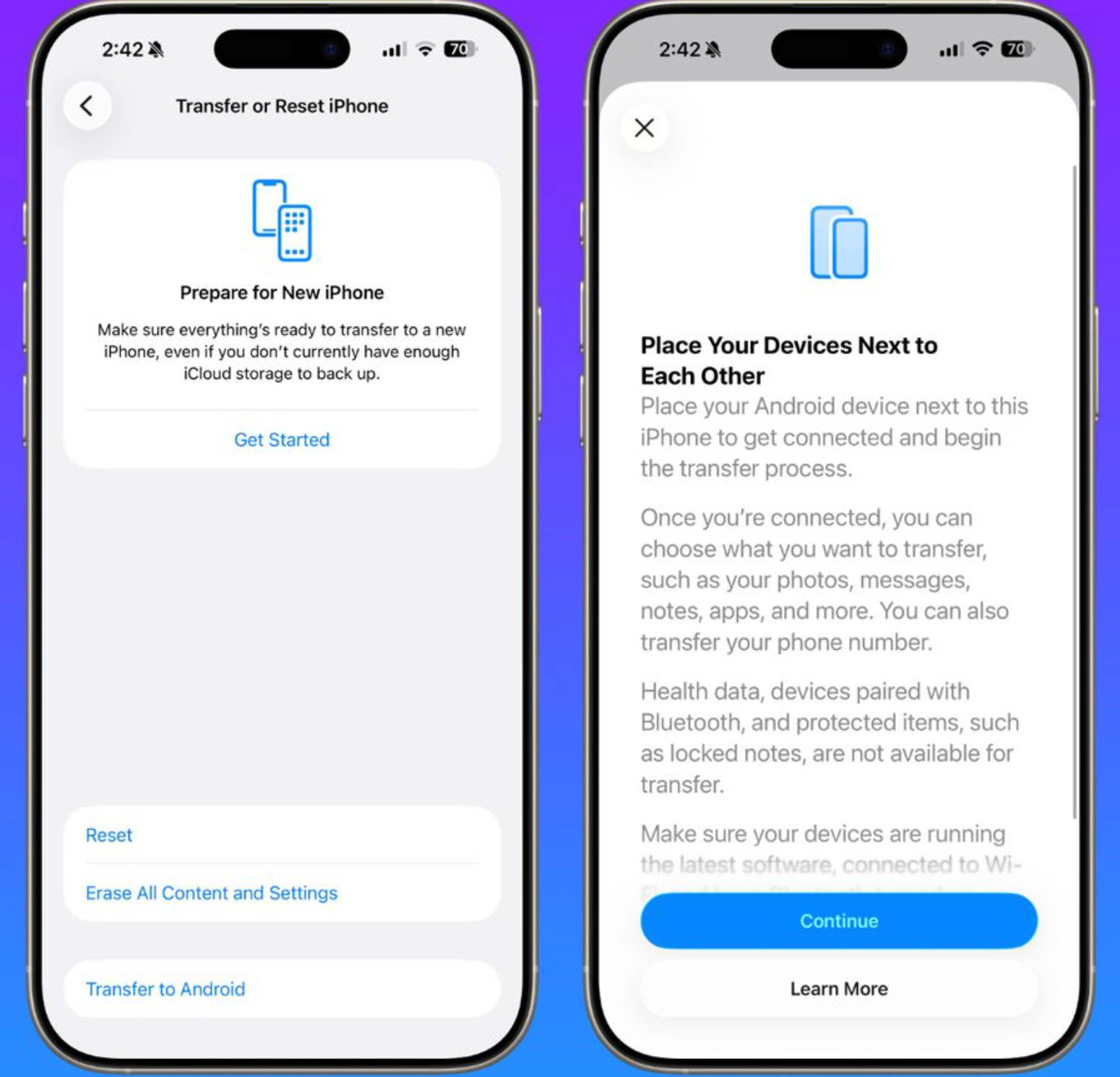
This feature is in-built and is simply called ‘Transfer to Android.’ It can be found under Settings > General > Transfer or Reset iPhone within the beta. Though this feature is not yet live for everyone, the presence of this option confirms Apple will support iPhone-to-Android device data transferring under iOS 26.3.
Until now, switching from an iPhone to an Android involved dealing with cables. Pixel phones once shipped with this Quick Switch adapter, but later relied on a charging cable connected between both phones to move data like contacts, photos, messages, and apps. It worked but in the era of clouds, it’s not what you’d call smooth and seamless.
Apple and Google already have apps which can be used as transition tools. Google’s Android Switch allows you to move from an iPhone to Android, whereas the Move to iOS app does the opposite. This is currently the best way to switch phones, at least until this feature is completely rolled out.
Transfer to Android will work like AirDrop, using a peer-to-peer Wi-Fi and Bluetooth connection. You’ll have to put the iPhones and Android phones side by side and then you should be able to choose what you want to transfer. You can transfer contacts, messages, notes, photos, apps, and even your phone number.
However, there are a few restrictions to consider. Health data, secured notes, Bluetooth accessories, and certain protected files will not be able to be transferred. Also, both phones must be updated to the latest software version. Pairing can be done by scanning a QR code on the Android phone or entering a pairing code.
Google is working on a similar side-by-side transfer feature for users moving from Android to iPhone. For users who’ve been curious about trying Android but worried about the hassle of data transfer, iOS 26.3 could finally make the jump feel simple.
This new switching feature also comes at a time when there is pressure from European regulators. Last week, the European Commission said (via) that Apple and Google had come up with the new transfer process in accordance with the Digital Markets Act (DMA), which looks to avoid lock-ins and allow users to have the flexibility to transfer their data from one ecosystem to another. Although the requirements were only for the European Union, the Transfer to Android functionality reportedly works worldwide with the iOS 26.3 beta.