Gmail address change feature starts rolling out in the US


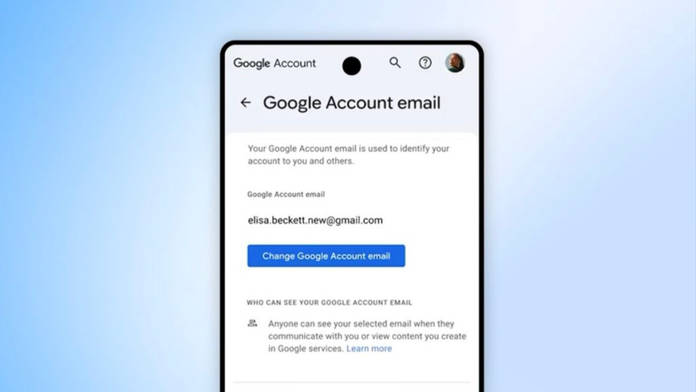
Google has started rolling out a long-awaited change for Gmail users that fixes something people have worked around for years. You can now change your primary @gmail.com address without creating a new account, though the feature is currently limited to users in the US. Until now, your email ID was essentially permanent. If it no longer fit, the only option was to start over and move everything manually, which is what Google is now trying to remove.
You can pick a new Gmail address and make it your main identity, while everything tied to your account stays where it is. Emails, Drive files, Photos, Calendar entries, subscriptions, purchases, all of it carries over without needing to be moved. The old address doesn’t disappear either. It stays active as an alias, so messages sent to it will still reach you, and you can continue using it for sign-ins or outgoing mail if needed. Google says you can make this change once a year, up to three times in total, with the option to switch back to a previous address if you change your mind.
Show Full Article
You asked, we delivered. If you’re a U.S. Google user, you can now change your account username for tools like Gmail, Photos, Drive and more — while keeping your emails, data and account history. Here’s what to know:
— Google (@Google) March 31, 2026
1️⃣ You can choose any available @gmail.com username.
2️⃣… pic.twitter.com/eF2lgbJaFg
If you do have access to the feature, the process itself is fairly direct. Head to your Google Account settings and open the Personal info section. From there, go to Email and select Google Account email. If your account is eligible, you’ll see the option to change it. You can then enter a new Gmail address, check if it’s available, and confirm the switch. Once done, the new address becomes your primary email, while the old one continues as an alternate linked to the same account.
Platforms like Microsoft and Apple have long allowed users to switch primary emails or rely on aliases without changing accounts. Google’s move brings Gmail closer to that flexibility, after years of keeping the original address fixed.
There are still a few things to keep in mind before making the switch. Google notes that some services, including Chromebooks, Remote Desktop, and certain integrations, may need extra steps after the change. If your email is linked to banking apps, subscriptions, or work tools, it is worth checking those connections once the new address is active. The process is designed to be smooth, but not every third-party service will update automatically. The rollout is limited to the US for now, but when it expands, it’s likely to see quick adoption simply because it solves a problem many people have lived with for a long time.

