Origin Workbench on Vivo X Fold5 is the best feature nobody is talking about


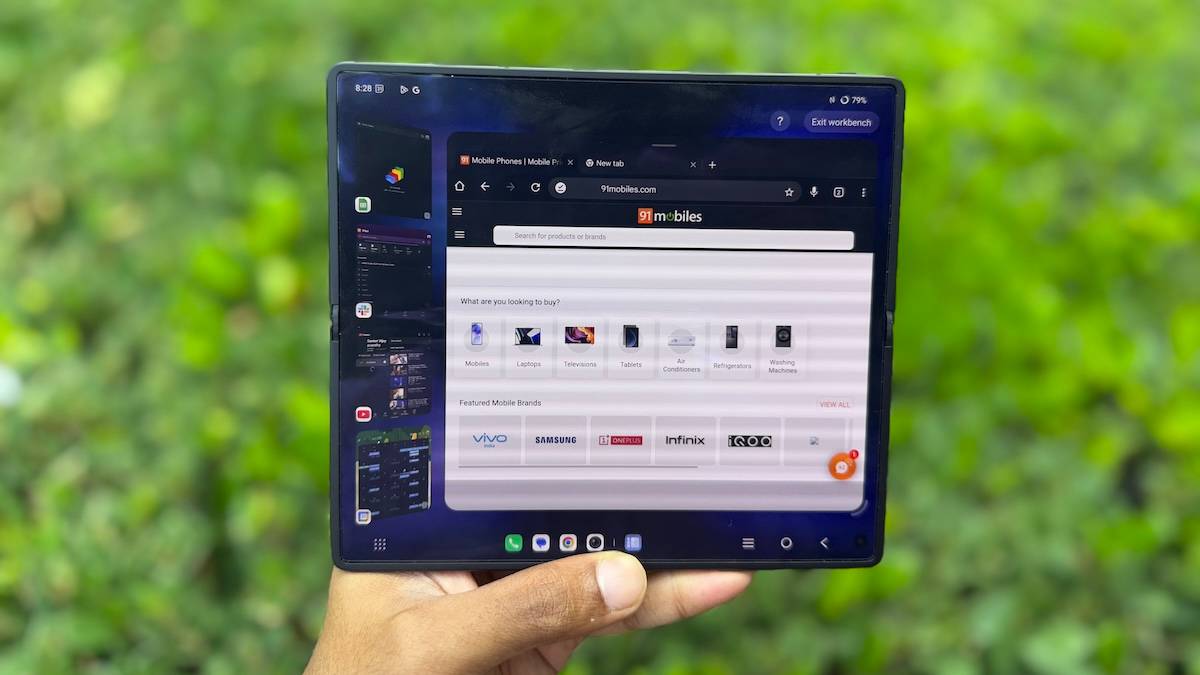
The Vivo X Fold5 was recently announced in India for around Rs 1,50,000, a few notches below the previous X Fold3 Pro (review) and the new Galaxy Z Fold7. We’ve been testing the foldable for a few days now, and our review will dive into the device in its entirety. There’s a lot to like about the Vivo X Fold5, from its slim form factor that makes it thinner (in its folded state) than some regular smartphones, to its impressively large 6,000mAh battery and Zeiss-branded rear camera setup.
But there’s one software feature that quietly changes how you use the foldable and barely anyone is talking about it. That feature is Origin Workbench.
What is Origin Workbench?
Foldables have always promised better multitasking. With a large, tablet-like display, you’d expect to get more done. But in reality, most foldables are limited to two apps in split screen or the occasional floating window. It’s functional, but not game-changing. This is where Origin Workbench on the Vivo X Fold5 stands out for me. It feels like a meaningful step forward. At its core, it’s a multitasking workspace that lets you run up to five apps at once and switch between them with ease. Think of it as a flexible desktop environment, tailored for a foldable screen.


Apps stay active when minimised to the dock, with live previews and smooth transitions. You can, for instance, have a YouTube video playing in the background while working on an email and referencing a PDF in another window. All of it works without feeling cramped or clunky.
During testing, I was able to take notes while watching a product launch livestream, all while keeping Slack open in a third window to communicate with my team.
Why it works
What makes Origin Workbench impressive is not just that it exists, but how simple and intentional it feels. You can tell Vivo didn’t just add a PC-like interface for the sake of it. The layout adapts well to the inner display. App windows are placed on the left side while the main app you’re working on is opened on the right, slightly reduced in size compared to full screen, but still good enough to work on.
Switching between apps feels quite fluid. You even get task previews, so jumping between windows is more visual and intuitive. You also have the option to enable or disable real-time changes in the nano window, i.e., if you want a video playing in real-time in the dock or if you want to keep it as a static preview and just have the audio playing in the background.


The entire system feels like it was designed by someone who has actually tried working on a foldable before.
Why it matters
Origin Workbench gives the foldable screen a real purpose. Instead of being just a big display for watching videos or reading, it becomes a dynamic workspace. That is exactly what the foldable category needs right now – a reason to exist beyond the novelty of folding.
And it is not just for power users who love to multitask at work. Even if you only want to keep Maps open while texting or jot down notes during a video call (I’m not sure if that’s a combination anyone would really use), Origin Workbench makes that experience far more seamless than what you get on other foldables. This is one feature Samsung should definitely bring to its foldable as well.

It may not be the flashiest feature on the Vivo X Fold5, but it is one of the most functional. And right now, that is exactly what the foldable space needs.

