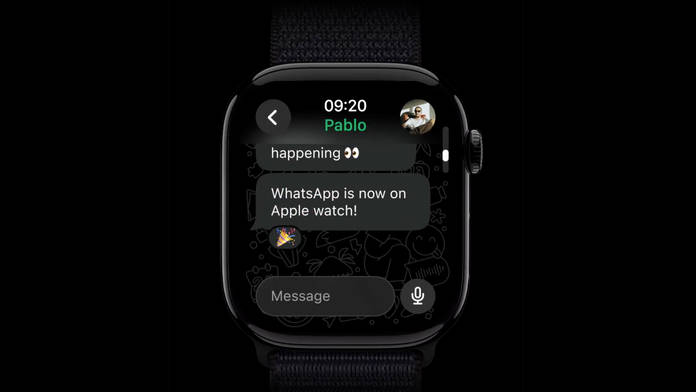
The long-awaited WhatsApp app is now available to download on your Apple Watch.
On cellular models, the app will work independently of your iPhones.
Manage encrypted conversations, send messages, and even send voice notes, directly from your smartwatch.
WhatsApp for Apple Watch now offers full messaging support. Previously limited to viewing messages and sending preset replies, the latest update lets users read, reply, and react directly from their wrist. The update is now available to download via the App Store. Once updated and downloaded the app, the WhatsApp chats sync up from your iPhone to your Apple Watch. If you have an LTE variant of the smartwatch, you won’t need your iPhone to be around to use WhatsApp.
This is a major development for both WhatsApp, as it expands cross-device functionality, and the Apple Watch, which continues its push toward greater independence. There are a few restrictions, which I get to in a bit, but like your smartphones, all your chats will be end-to-end encrypted.
Apple Watch isn’t the first smartwatch to offer WhatsApp messaging – Wear OS devices have supported it for years. However, given the Apple Watch’s deep integration with iPhones, this marks a major milestone. Users can now start or reply to chats using text or voice notes right from their wrist, even when their iPhone isn’t nearby.
The app works seamlessly and lets you view previous messages from the chat. However, you could do this for 20 recent chats or groups on WhatsApp for Apple Watch series, and there’s no option to send a message to any other contacts or groups other than these 20 that are visible up front. Moreover, if there is a video in the chat, it will only appear as an image and is not playable.
Speaking of images, WhatsApp has enhanced its clarity, as well as that of the stickers, to make them more appealing on the smartwatch display. Additionally, users can now react to messages with emojis just like on their phones, and even type custom replies using the on-screen keyboard. While it’s not ideal for longer messages, it works perfectly for quick responses. For those who prefer an even faster way to reply, preset messages are also available.
Screenshot of typing WhatsApp message on Apple Watch.
This is our initial impression of the WhatsApp app on an Apple Watch. The app is compatible with Apple Watch 4 or later models, running Watch OS 10 and later. You will need an iPhone running the latest version of iOS to get things started. Launch the Watch app, download WhatsApp, proceed to login, and enable notifications to start receiving messages and calls on your wrist. Like the mobile version, the app supports end-to-end encryption, ensuring your chats remain private and accessible only to you and the sender.
While it may not be a full-fledged app (yet), it is still good to see the messaging app on the smartwatch. The current limitations mirror those found on the Wear OS version, but with future updates, we hope WhatsApp will refine the experience, along with the ability to make voice calls, if not video calls, from the smartwatch to bring the overall experience closer to the smartphone.