
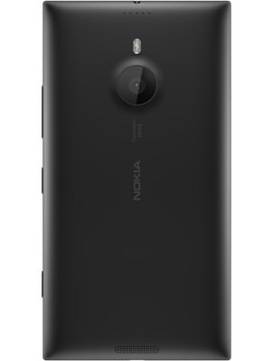
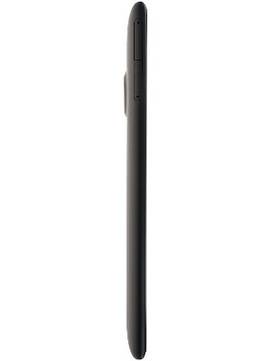
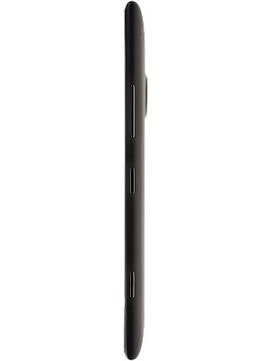
Nokia Lumia 1520
+ Compare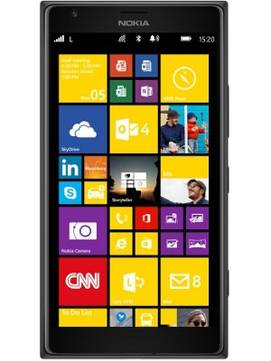
Key Specs
Performance
-
Qualcomm Snapdragon 800 -
Quad Core, 2.2 GHz -
2 GB RAM
Display
-
6.0 inches (15.24 cm); IPS LCD -
1080x1920 px (FULL HD) -
Gorilla Glass 2 Protection
Rear Camera
-
Single Camera Setup - 20 MP Primary Camera
-
Dual LED Flash -
4k @24fps Video Recording
Front Camera
-
1.2 MP -
HD @30 fps Video Recording
Battery
-
3400 mAh
General
-
SIM1: Nano -
5G Not Supported -
32 GB internal storage, Expandable upto 64 GB
Nokia Lumia 1520 Expert Review Summary
Expert Rating:
![Deepak Dhingra]()
Verdict
There are no two ways about it – the Lumia 1520 is undoubtedly the best Windows Phone device we`ve ever used. Sure, it`s huge and one-handed usage is an issue, but that comes with the territory and you should know what you`re getting into if you`re considering a device of this size. You can just about cram it into a trouser pocket, but do keep in mind that it does result in an unsightly bulge and could even restrict movement a tad. Priced at Rs 46,999, the Lumia 1520 doesn`t come cheap and that`s something that could be a deal killer unless you`re a staunch WP fan. The same amount of money c...
Read Full Verdict
Pros
- Gorgeous, high resolution screen
- Sturdy build
- Fast performance
- Super battery life
- Excellent shooter aided by compelling UI and apps
- Nokia`s signature apps
Cons
- App options still relatively low on WP as compared to iOS and Android
- Lack of Google apps and a unified notification centre may sour the deal
- Requires connivance with the devil to buy
Loaded to the brim, and then crammed with some more
+
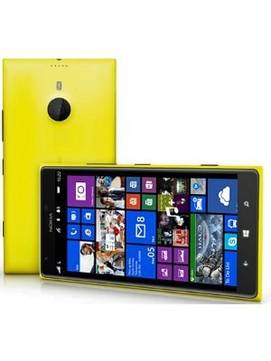
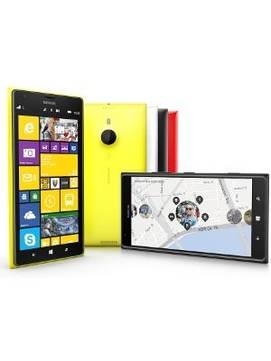
The Lumia range has always set standards as far as build quality is concerned, and apart from the Lumia 925 which is the only metal-toting model, Nokia’s done wonders using polycarbonate. The Lumia 1520 is no different, and encased in a smooth polycarbonate unibody chassis, feels quite solid and sturdy. Again, Nokia’s done well to make sure the new flagship caters to different tastes by offering it in multiple hues, though our review unit came in sedate black. Any device with a 6-inch screen isn’t going to be comfortable for one-handed usage, but the 1520’s curvy rear does help a tad… though we’d have to say that the phablet is prone to slippage if you’re not careful.
Read More
Supersized Windows Phone experience on a massive, lovely display
+
The mainstay of the Windows Phone interface has always been the colourful live tiles that call the start screen their home. If you’ve had a chance to play around with a Windows Phone device before, you’d know that it’s a straightforward UI which remains consistent across different devices regardless of brand, model or specs. Customisation options are few, but you do get dollops of colour, neat typography, and smooth animated dots that depict background processing. As far as the UI is concerned, the start screen and the app list are the two main components – making WP one of the easiest smartphone platforms to come to grips with. There’s practically no learning curve at all, and WP can easily be recommended to anyone buying their first smartphone. The start screen can be customised with tiles of your choice, in different sizes, and you can pin everything from your favourite apps to frequently-accessed contacts. You can also get hold of third-party apps using which you can pin other things such as shortcuts to settings and battery status on to the start screen. The app drawer is essentially an alphabetical list of all preloaded and installed apps, and you can search for one by using the search button on top or jump to a specific alphabet by tapping on the letters displayed between the apps. There’s no way to categorise apps into folders in the app drawer, though Nokia has recently addressed one of our long-standing gripes with Windows Phone by launching the App Folder, a utility that lets you place your favourite apps and settings into folders that can be pinned on the start screen.
Read More
A few hits and misses on the app front, but Nokia’s signature experiences sweeten the deal
+
WP’s always played well with popular networks like Facebook and Twitter ever since the beginning. Other apps such as WhatsApp, Evernote, Zite etc have also been around and Skype made its way to the platform later. More recently, a few critical gaps have been filled, thanks to the likes of Instagram and Vine landing on the OS. However, there are still a few things we miss, like official clients for Dropbox and Pocket for example. The biggest gap, and one that could be a deal killer, is the missing suite of Google apps. Suffice to say that you’ll find the going tough if you use Google’s services like Gmail, Hangouts, Maps, Chrome sync etc extensively. Barring these, WP is evolving fast as a mobile platform and the app storefront covers all the basics you may need.
Read More
Pure cam, lovely view
+
Nokia 808 PureView changed the smartphone camera game when it came out, and that legacy was carried forward by the Lumia 1020 when it offered the same 41-megapixel sensor combined with the power of the WP platform. The Lumia 1520 boasts the same PureView goodness, but with a scaled down 20-megapixel sensor. Apart from the sensor, the camera hardware also includes a dual-LED flash, a Zeiss lens, optical image stabilisation, and four microphones to capture optimal audio. Hardware aside, Nokia takes picture-taking to another level with the help of apps and camera add-ons (lenses in WP parlance) that tie in into the camera app. Quite a few of these are preloaded, including the Nokia Camera app that offers quite a few tweaks and lets you control white balance, focus, ISO, shutter speed and brightness to help you get the right shot. You can even choose to save your shots in DNG RAW format so preferred by professionals and enthusiasts who like to fine-tune their captures later on the desktop. ‘Lenses’ such as Smart Camera that captures a sequence of images to let you take action / sequence shots or save the best one, Nokia Panorama for panoramas and the Nokia Cinemagraph that captures animated shots are quite handy too. Our favourite is Nokia Refocus, an app that basically lets you focus on the background or the foreground of an image after you’ve shot it. It works by capturing multiple shots at different focal lengths, and in our experience, works pretty well once you’ve figured out how to use it and the kind of shots it works best for. You just need to make sure you have a fair degree of depth in your frame, move up close to the subject in the foreground, and then hold the phone steady before shooting. Apart from capturing shots, Nokia also enhances the viewing and sharing experience with its Storyteller app that creates timelines of captured images according to date and location, and lets you add captions to them. HDR mode is missing in action though.
Read More
Snappy Snapdragon-powered performance, and a battery that keeps up
+
Windows Phone isn’t really a resource-hungry platform, based on our experience with older Lumias powered by dual-core processors. The Windows Phone 8 Update 3 also brought support for quad-core CPUs, and that’s exactly what the Lumia 1520 carries inside. With a quad-core Snapdragon 800 chip running at 2.2GHz powering the show, aided in its efforts by 2GB of RAM and an Adreno 330 GPU, the going is super-smooth and there’s nary a hiccup whether it’s routine apps you’re running or playing graphics-heavy games. Further, the 3,400mAh battery sealed inside is capable of keeping the phablet away from a power socket for a full working day even with heavy usage, and can even be stretched well into the second day if your usage isn’t so heavy. Combine all of that with the lovely, large screen, and you’re looking at a device that’s quite compelling in a lot of ways.
Read More
Read full Review

Verdict
There are no two ways about it – the Lumia 1520 is undoubtedly the best Windows Phone device we`ve ever used. Sure, it`s huge and one-handed usage is an issue, but that comes with the territory and you should know what you`re getting into if you`re considering a device of this size. You can just about cram it into a trouser pocket, but do keep in mind that it does result in an unsightly bulge and could even restrict movement a tad. Priced at Rs 46,999, the Lumia 1520 doesn`t come cheap and that`s something that could be a deal killer unless you`re a staunch WP fan. The same amount of money c... Read Full Verdict
- Gorgeous, high resolution screen
- Sturdy build
- Fast performance
- Super battery life
- Excellent shooter aided by compelling UI and apps
- Nokia`s signature apps
Pros
- App options still relatively low on WP as compared to iOS and Android
- Lack of Google apps and a unified notification centre may sour the deal
- Requires connivance with the devil to buy
Cons
Loaded to the brim, and then crammed with some more
+The Lumia range has always set standards as far as build quality is concerned, and apart from the Lumia 925 which is the only metal-toting model, Nokia’s done wonders using polycarbonate. The Lumia 1520 is no different, and encased in a smooth polycarbonate unibody chassis, feels quite solid and sturdy. Again, Nokia’s done well to make sure the new flagship caters to different tastes by offering it in multiple hues, though our review unit came in sedate black. Any device with a 6-inch screen isn’t going to be comfortable for one-handed usage, but the 1520’s curvy rear does help a tad… though we’d have to say that the phablet is prone to slippage if you’re not careful.
Read MoreSupersized Windows Phone experience on a massive, lovely display
+The mainstay of the Windows Phone interface has always been the colourful live tiles that call the start screen their home. If you’ve had a chance to play around with a Windows Phone device before, you’d know that it’s a straightforward UI which remains consistent across different devices regardless of brand, model or specs. Customisation options are few, but you do get dollops of colour, neat typography, and smooth animated dots that depict background processing. As far as the UI is concerned, the start screen and the app list are the two main components – making WP one of the easiest smartphone platforms to come to grips with. There’s practically no learning curve at all, and WP can easily be recommended to anyone buying their first smartphone. The start screen can be customised with tiles of your choice, in different sizes, and you can pin everything from your favourite apps to frequently-accessed contacts. You can also get hold of third-party apps using which you can pin other things such as shortcuts to settings and battery status on to the start screen. The app drawer is essentially an alphabetical list of all preloaded and installed apps, and you can search for one by using the search button on top or jump to a specific alphabet by tapping on the letters displayed between the apps. There’s no way to categorise apps into folders in the app drawer, though Nokia has recently addressed one of our long-standing gripes with Windows Phone by launching the App Folder, a utility that lets you place your favourite apps and settings into folders that can be pinned on the start screen.
Read MoreA few hits and misses on the app front, but Nokia’s signature experiences sweeten the deal
+WP’s always played well with popular networks like Facebook and Twitter ever since the beginning. Other apps such as WhatsApp, Evernote, Zite etc have also been around and Skype made its way to the platform later. More recently, a few critical gaps have been filled, thanks to the likes of Instagram and Vine landing on the OS. However, there are still a few things we miss, like official clients for Dropbox and Pocket for example. The biggest gap, and one that could be a deal killer, is the missing suite of Google apps. Suffice to say that you’ll find the going tough if you use Google’s services like Gmail, Hangouts, Maps, Chrome sync etc extensively. Barring these, WP is evolving fast as a mobile platform and the app storefront covers all the basics you may need.
Read MorePure cam, lovely view
+Nokia 808 PureView changed the smartphone camera game when it came out, and that legacy was carried forward by the Lumia 1020 when it offered the same 41-megapixel sensor combined with the power of the WP platform. The Lumia 1520 boasts the same PureView goodness, but with a scaled down 20-megapixel sensor. Apart from the sensor, the camera hardware also includes a dual-LED flash, a Zeiss lens, optical image stabilisation, and four microphones to capture optimal audio. Hardware aside, Nokia takes picture-taking to another level with the help of apps and camera add-ons (lenses in WP parlance) that tie in into the camera app. Quite a few of these are preloaded, including the Nokia Camera app that offers quite a few tweaks and lets you control white balance, focus, ISO, shutter speed and brightness to help you get the right shot. You can even choose to save your shots in DNG RAW format so preferred by professionals and enthusiasts who like to fine-tune their captures later on the desktop. ‘Lenses’ such as Smart Camera that captures a sequence of images to let you take action / sequence shots or save the best one, Nokia Panorama for panoramas and the Nokia Cinemagraph that captures animated shots are quite handy too. Our favourite is Nokia Refocus, an app that basically lets you focus on the background or the foreground of an image after you’ve shot it. It works by capturing multiple shots at different focal lengths, and in our experience, works pretty well once you’ve figured out how to use it and the kind of shots it works best for. You just need to make sure you have a fair degree of depth in your frame, move up close to the subject in the foreground, and then hold the phone steady before shooting. Apart from capturing shots, Nokia also enhances the viewing and sharing experience with its Storyteller app that creates timelines of captured images according to date and location, and lets you add captions to them. HDR mode is missing in action though.
Read MoreSnappy Snapdragon-powered performance, and a battery that keeps up
+Windows Phone isn’t really a resource-hungry platform, based on our experience with older Lumias powered by dual-core processors. The Windows Phone 8 Update 3 also brought support for quad-core CPUs, and that’s exactly what the Lumia 1520 carries inside. With a quad-core Snapdragon 800 chip running at 2.2GHz powering the show, aided in its efforts by 2GB of RAM and an Adreno 330 GPU, the going is super-smooth and there’s nary a hiccup whether it’s routine apps you’re running or playing graphics-heavy games. Further, the 3,400mAh battery sealed inside is capable of keeping the phablet away from a power socket for a full working day even with heavy usage, and can even be stretched well into the second day if your usage isn’t so heavy. Combine all of that with the lovely, large screen, and you’re looking at a device that’s quite compelling in a lot of ways.
Read MorePopular Comparisons
Nokia Lumia 1520 Specifications
General |
|
|---|---|
| Operating System | Windows Phone v8.1 |
Performance
(Avg)
|
|
|---|---|
| Chipset | Qualcomm Snapdragon 800 MSM8974 |
| Processor | Quad core, 2.2 GHz, Krait 400 |
| Graphics (GPU) | Adreno 330 |
| RAM | 2 GB |
Display
(Excellent)
|
|
|---|---|
| Display Type | IPS LCD |
| Screen Size | 6.0 inches (15.24 cm) |
| Resolution | 1080x1920 px (FULL HD) |
| Pixel Density | 367 ppi |
| Screen to Body Ratio (calculated) | 71.34 % |
| Screen Protection | Corning Gorilla Glass v2 |
Design |
|
|---|---|
| Height | 162.8 mm |
| Width | 85.4 mm |
| Thickness | 8.7 mm |
| Weight | 209 grams |
Rear Camera
(Very Good)
|
||||||||
|---|---|---|---|---|---|---|---|---|
| Resolution | ||||||||
|
||||||||
| Autofocus | Yes | |||||||
| OIS | Yes | |||||||
| Flash | Yes, Dual LED Flash | |||||||
| Image Resolution | 4472 x 4472 Pixels | |||||||
| Camera Features | Digital Zoom | |||||||
| Video Recording |
3840x2160 @ 24 fps 1920x1080 @ 30 fps |
|||||||
| Video Recording Features |
Optical Image stabilization Stereo recording |
Front Camera
(Avg)
|
||||
|---|---|---|---|---|
| Resolution | ||||
|
||||
| Video Recording | 1280x720 @ 30 fps |
Battery
(Very Good)
|
|
|---|---|
| Capacity | 3400 mAh |
| Battery Type | Li-ion |
| TalkTime | Up to 25.1 Hours(3G) / Up to 27.4 Hours(2G) |
| Wireless Charging | Yes |
Storage |
|
|---|---|
| Internal Storage | 32 GB |
| Expandable Storage | Yes, Up to 64 GB |
Network & Connectivity |
|
|---|---|
| SIM Slot(s) | Single SIM |
| SIM Type | SIM1: Nano |
| Network Support | 5G Not Supported |
| Wi-Fi | Yes, Wi-Fi 5 (802.11 a/b/g/n/ac) 5GHz |
| Wi-Fi Features | Mobile Hotspot |
| Bluetooth | Yes, v4.0 |
| GPS | Yes with A-GPS, Glonass |
| NFC | Yes |
Multimedia |
|
|---|---|
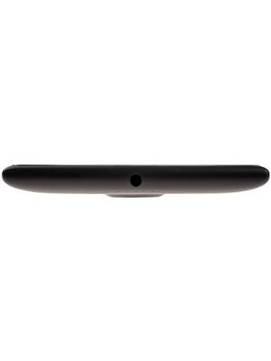
| Audio Jack | 3.5 mm |
Sensors |
|
|---|---|
| Other Sensors | Light sensor, Proximity sensor, Accelerometer, Compass |
Nokia Lumia 1520 User Reviews
Nokia Lumia 1520 Key Highlights
| Processor | Qualcomm Snapdragon 800 MSM8974 |
| RAM & Storage | 2 GB + 32 GB |
| Display | 6.0", 1080 x 1920 Resolution |
| Rear Camera | 20 MP |
| Front Camera | 1.2 MP |
| Battery | 3400 mAh |

Popular Links
- All Upcoming Phones
- vivo V80 5G
- Lava Virat Curve 5G
- OPPO F35 Pro
- Xiaomi Redmi Note 17 Pro Max 5G
- vivo S2 FE 5G
- Samsung Mobiles
- Motorola Mobiles
- vivo Mobiles
- OPPO Mobiles
- Tecno Mobiles
- realme Mobiles
- Xiaomi Mobiles