BenQ MOBIUZ EX271Q gaming monitor review: an all-round package for gamers


The MOBIUZ gaming monitor series from BenQ has earned a reputation for offering some excellent value-for-money options. With high refresh rates, good response times, and impressive panel quality, these monitors are highly preferred by both console and PC gamers. I managed to get my hands on the latest addition to this series, the MOBIUZ EX271Q. Now that I’ve spent enough time with this gaming monitor, I’m ready to share my thoughts and help you understand if it’s the ideal gaming monitor for your budget.

Before we dive into the detailed review, let’s get the pricing out of the way. The MOBIUZ EX271Q is currently available for Rs 23,989 in India. In this price category, it aims to stand out with its unique colour and contrast technologies. Let’s find out if it manages to do just that or not.
Table of Contents
Specs
- Panel type: 27″ Matte IPS LED
- Curved: No
- Resolution: 2,560 × 1,440 (16:9)
- Refresh rate: 180Hz (with DP); 144Hz (HDMI)
- Response time: 1 ms
- Brightness:
- Typical: 350 nits
- Peak (HDR): 400 nits
- Colour coverage: 95% DCI-P3%
- Ports:
- 2 × HDMI 2.0
- 1 × DisplayPort 1.4
- 1 × USB-C upstream (USB 3.2 Gen 1, 5 Gbps, Data only)
- 2 x USB-A Downstream (USB 3.2 Gen 1, 5 Gbps, power charging 4.5W)
- KVM switch
- Audio: No speakers
Familiar elegant design
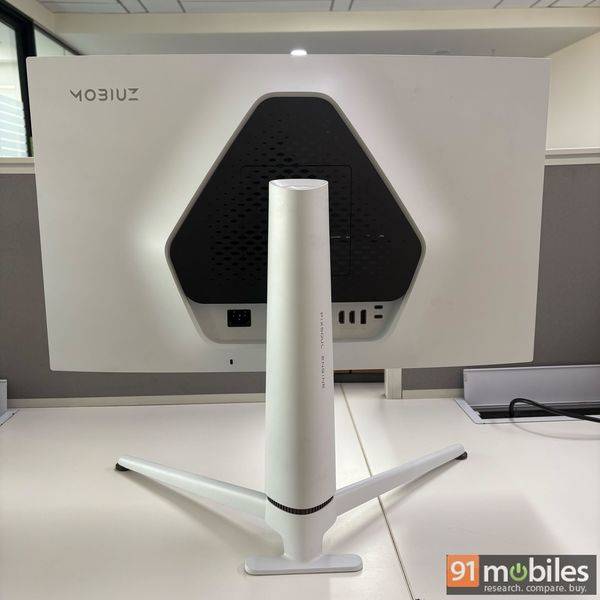
The MOBIUZ EX271Q comes with a similar aesthetic as other EX200 series monitors and combines matte white and black plastic elements to offer an elegant design, suitable for a gaming monitor. The monitor sports thin bezels on all sides, and the 27-inch IPS LED backlight panel allows for an immersive viewing experience.

The OSD button is placed in the middle at the bottom of the monitor’s display and lets you access the menu for detailed options.

At the front of the bottom frame, the monitor features an ambient light sensor that automatically adjusts the monitor’s brightness as per the lighting around your setup.

An important thing to note here is that this is not a slim monitor by any means. While the thick frame doesn’t impact the overall aesthetics, the pronounced design is hard to ignore, especially because the monitor doesn’t feature any built-in speakers. The net weight of the monitor is 7.2kg, which is clearly on the heftier side, but also a result of the premium build quality.

The stand that ships with the monitor is quite sturdy and offers a height adjustment of 100mm, which is more than enough for most use cases.
Tuning delivers impressive display quality
The MOBIUZ EX271Q comes with several colour mode options – Sci-fi, Realistic, Fantasy, Cinema, A.I., and more. Each preset is meant to suit a particular style of games. For example, the Sci-fi preset enhances metallic textures while the Realistic preset aims to reproduce lifelike contrast and natural saturation.
I was a bit apprehensive about how well the presets would perform initially, but the results proved to be satisfactory.

The monitor also comes with support for Color Shuttle app from BenQ. This app is meant to simplify colour tuning for you and lets you download colour profiles for some of the most popular games directly from BenQ’s official website. I found the process of downloading new game profiles and adding them to the monitor to be quite seamless.
The cherry on top was that the colour profiles were really accurate and captured the mood of most games well. While I couldn’t possibly check the profiles for all available titles, I did try Death Stranding 2: On the Beach, Ghost of Yotei, Battlefield 6, and Clair Obscur: Expedition 33 (even better than the default Fantasy preset). For all these games, the colour temperature, contrast, and gamma settings were adjusted really well. For those of you who find the colour tuning cumbersome, this app is truly a godsend.
While most of the presets are meant for gaming, you also get the option to improve your content consumption experience with customisation and tweaks to the Cinema mode. After tweaking the Colour Vibrance, Contrast, Gamma, and Brightness to achieve my desired profile, I liked what it managed to offer. Although I would have preferred even finer controls over the colour vibrance setting, as this is primarily a gaming monitor, I can give it a pass.
Smooth Low-Latency Gaming Experience
I tried both PC and console gaming on this monitor, and here’s how it performed:
PC Gaming
While the monitor is primarily being marketed for console gamers, I started by trying PC gaming on it to check out the FreeSync performance at higher frame rates. I tested both Cyberpunk 2077 and Black Myth: Wukong on the monitor, and the results were pretty impressive.

I experienced no tearing, and as far as colour accuracy was concerned, especially while playing Cyberpunk 2077, the Sci-fi preset enhanced the vibrant dystopian aesthetic offered by the game. The neon colours, which are quite prevalent in the game, clearly stood out from the dark and grimy urban environments.

In Black Myth, I couldn’t find any of the built-in presets to be particularly satisfying, so I ended up downloading the game profile from the Color Shuttle website. The result was pretty impressive. The mood setting for the game was on point, and I couldn’t go back to the default presets again.

As far as input latency is concerned, I didn’t find any issues, and the high refresh rate support ensured that the shooting felt quite satisfying in Cyberpunk 2077 fight sequences. The AI Contrast feature, which is meant to reveal intricate details in darker scenes with the use of AI, was a hit-and-miss for me. In certain scenes, it managed to do a good job; in some others, it overexposed the subjects.
The inclusion of a KVM switch is also a neat touch and enables you to connect both your work laptop and your gaming PC to this same monitor.
Console gaming on PS5
Moving on to console gaming, I used the monitor with my PlayStation 5 (Non-pro variant). What I noticed was that the Fantasy preset worked really well when I played Clair Obscur: Expedition 33. The painting-like visual tone of the game was supported well by the preset, which is meant to emphasise textured stones, fire, and other elements found in this particular genre. Again, while the preset performed well, with the help of a dedicated Color Shuttle profile for the game, the visual experience was enhanced further.

After testing around 5-6 games, I realised that the results were the same each time. The colour profiles from Color Shuttle were better suited to the games than any of the presets on offer.
Apart from colour accuracy, the low input lag and high refresh rates allowed for a smooth gaming experience. For console gamers, who don’t need higher refresh rates than 120Hz, this is one of the better monitors on the market.
Better than expected HDR Performance
When it comes to HDR performance, there are a lot of brands in the mid-range gaming monitor space that tend to exaggerate claims. While the situation has improved in the last couple of years, it is still hard to find a gaming monitor that delivers exceptional HDR performance under Rs 35,000. This is why I was again a bit sceptical about the HDR performance offered by the MOBIUZ EX271Q.

Although in certain scenarios, the monitor did struggle, I would say that it fared better overall than I initially expected. As we are talking about a monitor with peak HDR brightness of 400 nits, it can’t deliver true specular highlights. It tends to show slightly brighter spots than the rest of the image, but not the sparkling effect that a monitor with higher peak HDR brightness (700-1000 nits) offers.
However, this doesn’t stop the MOBIUZ EX271Q from delivering colours more accurately. You get more saturated reds and more nuanced blues with HDR enabled on this monitor. In comparison, the SDR mode looks slightly washed out.
Appealing monitor for the price
MOBIUZ EX271Q is an appealing choice under Rs 25,000 as it delivers colour accuracy, decent peak refresh rate, aesthetic design, and support for an extremely useful Color Shuttle app. Having said that, the monitor is a bit on the heavier side and doesn’t feature built-in speakers. I’d generally recommend dedicated speakers for a gaming setup, and most gamers rely on headphones anyway. But if you aren’t planning to go for either of these options, this speaker might not be for you.
However, if you can look past these factors, the MOBIUZ EX271Q offers a good overall package that ticks most of the right boxes. If I am asked about one standout aspect here over other gaming monitors in this price range, it has to be the Color Shuttle app support. This app enhances the viewing experience in the most convenient manner possible.
Editor’s Rating: 8.2 / 10
Pros:
- Elegant design
- Impressive colour accuracy
- Color Shuttle app support
Cons:
- No built-in speakers
- Hefty

