EvoFox One X Review: A Surprisingly Serious Controller


The EvoFox One X Tri-Mode Wireless Gamepad arrives with a seriously stacked spec sheet: Hall-effect sticks, 1000Hz polling, macros, gyro, and tri-mode connectivity. All of that under Rs 3,000. Honestly, it’s the kind of controller that instantly raises an eyebrow and promises to punch far above its price.
The good news is that after spending real time gaming, testing inputs, and poking around its features, it quickly became clear this controller has a personality of its own. It’s not flawless, but it’s far more interesting than most mid-range controllers. Here’s what it actually feels like to use.
Table of Contents
Xbox Energy, Budget Attitude
The moment I picked up the EvoFox One X, the Xbox inspiration was obvious. The shape, the button placement, the stick offset layout — everything screams familiar. And honestly, that’s a great thing. The Xbox controller remains the gold standard for ergonomics, at least in my opinion, and borrowing from the best isn’t a bad move.

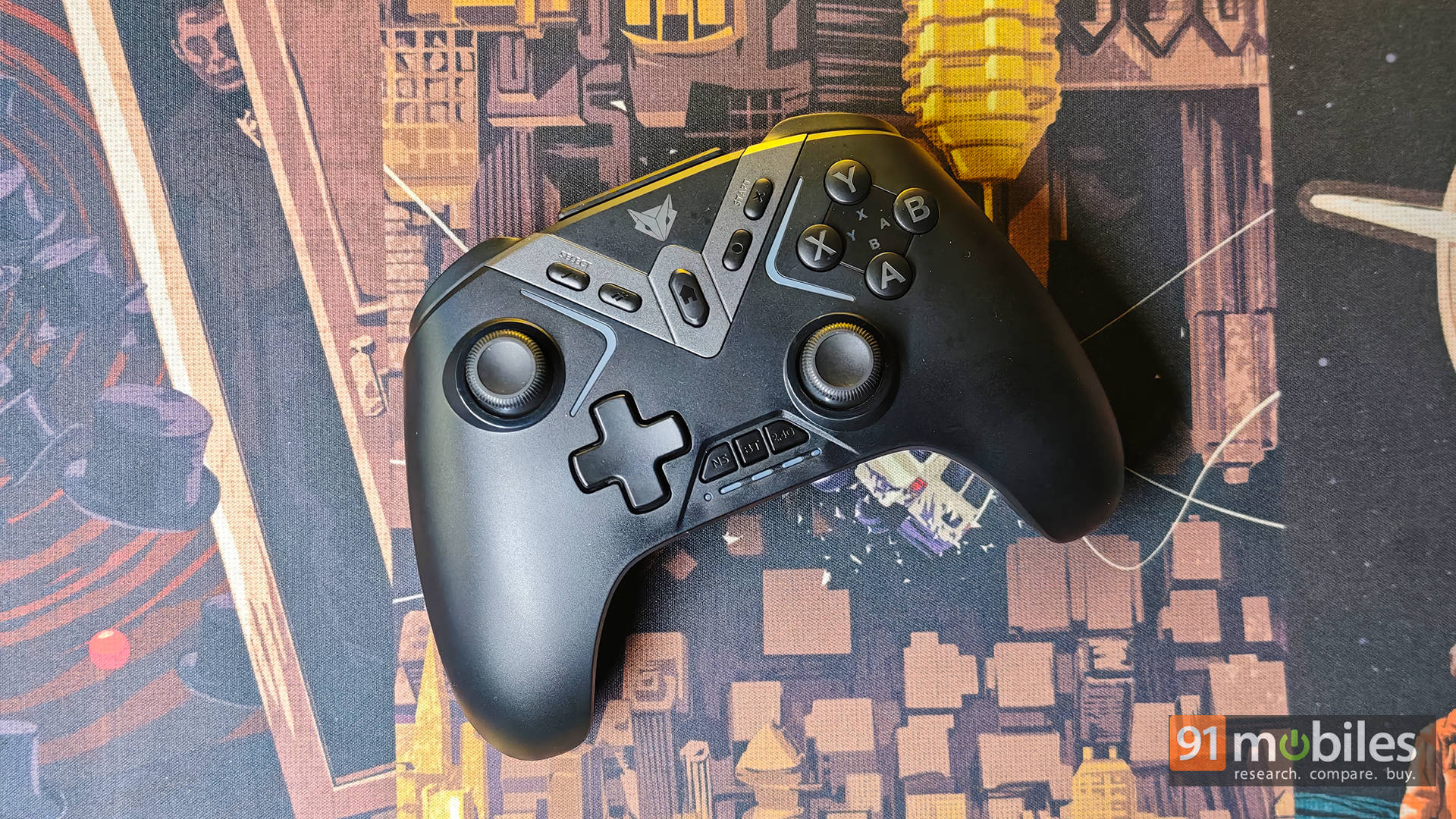
In hand, the controller feels comfortable almost instantly. The rubberised grips are surprisingly good and make long gaming sessions easy on the palms. After a few hours of gaming, I never felt any awkward pressure points or fatigue, which is exactly what you want from a controller meant for marathon sessions.

That said, there’s a clear difference when you compare it directly with an Xbox controller. The EvoFox feels slightly cheaper. The plastics don’t feel quite as dense, and the overall finish lacks that premium polish. But here’s the important part: it never feels flimsy. It feels like a solid mid-range controller rather than a toy pretending to be one.
The biggest weak spot in the build is the face buttons. They work perfectly fine, but they feel a bit mushy and soft compared to the crisp click of premium controllers. It’s not a dealbreaker, but once you notice it, you can’t unnotice it.

The triggers and thumbsticks, on the other hand, are the stars of the show. They feel smooth, consistent, and surprisingly premium for this price range, which becomes even more impressive once you factor in the Hall-effect tech inside them.
The Controller That Wants to Connect to Everything
As the name suggests, the “Tri-Mode” controller supports 2.4GHz dongle, Bluetooth, and wired USB-C connectivity. However, what’s most important is the fact that switching between modes is quite straightforward.

On my PC, using the 2.4GHz dongle felt the most natural. Plug it in, power the controller, and it just works. No drama, no weird setup rituals, no existential crisis. Bluetooth on PC can be a bit hit or miss based on user reports, but my experience was interestingly smooth on macOS. I used it for Xbox Cloud Gaming on my Mac, and it worked flawlessly. Pairing was quick, inputs were recognised instantly, and the experience felt stable throughout. That makes it a surprisingly good companion for cloud gaming and mobile devices.
Last but not least, wired mode is exactly what you expect: instant and rock solid. It’s nice knowing there’s always a fallback option when wireless isn’t ideal. The real takeaway here is versatility. This controller happily jumps between PC, Mac, mobile devices, and more. It feels like a single controller designed to rule them all.
Performance: Fast Fingers, Faster Inputs
Moving on to the actual performance of the controller, I was genuinely curious to see if the controller could live up to its bold spec sheet, and thankfully, it mostly does. The 1000Hz polling rate in wired and 2.4GHz modes isn’t just marketing fluff; it actually works. Inputs feel snappy and immediate, and there’s a sharp responsiveness here that many budget controllers simply don’t deliver. Whether I was racing, playing shooters, or grinding through sports titles, the controller kept pace comfortably.

That said, the Hall-effect sticks and triggers are easily the highlight. Stick drift is always a concern in this segment, but the magnetic sensors inspire confidence. In actual gameplay, the sticks feel smooth, precise, and consistent, with no odd dead zones or tracking quirks. Aiming felt steady, and small adjustments were easy to control, which makes a big difference in competitive games.
Add to that, the triggers feel equally solid. They’re smooth, progressive, and easy to modulate, which helps in racing and sports games where precision matters. The addition of back buttons and macro support pushes the controller into enthusiast territory. Being able to customise inputs adds a layer of flexibility that’s rare at this price and genuinely useful for multiplayer setups.

While all of that sounds good, I will highlight that the gyro needs a small reality check. It works, but it isn’t a native mouse-style gyro on PC out of the box. By default, it maps to the right stick, and unlocking its full potential requires tweaking through Steam Input. It’s not plug-and-play magic, but with some effort, it becomes far more capable. Even so, performance remains the strongest aspect of this controller: fast, precise, and reliably fun to use.
Software: Functional, But Not Fancy
As a PC gamer, I was genuinely surprised to discover there’s no native PC software for the EvoFox One X. Instead, customisation happens through the Keylinker app on Android and iOS. Downloading a random companion app wasn’t exactly comforting, and once I opened it, the interface felt like it had time-travelled straight from 2010. It works, but it definitely doesn’t feel premium.

The app lets you remap buttons, tweak sensitivity and dead zones, set turbo functions, and even update firmware. In terms of features, everything important is here and then some. The problem is that the experience feels clunky and dated compared to the polished PC suites from bigger brands. After dialling in my settings, I had zero hesitation in uninstalling the app, and honestly, most people will probably feel the same.
Battery Life: The Vibration Tax Is Real
A quick word on the battery life before I move on to the verdict: it seriously depends on how heavily you use the controller. Without vibration, the battery can last surprisingly long. Turn vibration on, and the battery drains much faster. It’s not terrible, but it’s something to keep in mind. Thankfully, USB-C charging makes topping it up easy.
Verdict: Budget Feature Monster?
The EvoFox One X is easily one of the most feature-packed controllers available in this price range. It delivers impressive performance, excellent sticks and triggers, and incredible versatility across devices. It feels comfortable, responsive, and genuinely fun to use. Sure, it isn’t perfect. The face buttons feel mushy, the app could be better, and the overall finish doesn’t match premium controllers. But considering the price tag of just Rs 2,999, the value here is hard to ignore.
At the same price, the Cosmic Byte Stellaris offers a very similar feature set, swapping the gyro for a physical trigger lock that some players may prefer. If build quality matters more, the 8BitDo Ultimate 2C is another strong option in this range. Meanwhile, spending a bit less on a PowerA controller gets solid performance but sacrifices versatility. The EvoFox ends up right in the middle, delivering the most features for the money, even if it gives up a little polish.
Editor’s Rating: 8 / 10
Pros:
- Hall-effect sticks and triggers
- 1000Hz fast, responsive performance
- Tri-mode versatile connectivity
- Excellent value for money
Cons:
- Face buttons feel mushy
- Clunky mobile companion app

