
Samsung Galaxy Note 4
+ Compare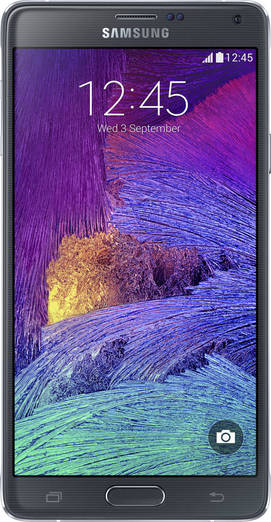



-
Design9

-
Rear Camera2

-
360° View

-
UI Screenshot12
![UI Screenshot]()
-
Benchmarks8
![Benchmarks]()
-
Videos4
![Videos]()


Key Specs
Performance
-
Qualcomm Snapdragon 805 -
Quad Core, 2.7 GHz -
3 GB RAM
Display
-
5.7 inches (14.48 cm); Super AMOLED -
1440x2560 px (QHD (2k)) -
Gorilla Glass 4 Protection
Rear Camera
-
Single Camera Setup - 16 MP Primary Camera
-
LED Flash -
4k @30fps Video Recording
Front Camera
-
3.7 MP -
Other Video Recording
Battery
-
3220 mAh -
Quick Charging v2.0
General
-
SIM1: Micro -
5G Not Supported -
32 GB internal storage, Expandable upto 128 GB
Samsung Galaxy Note 4 Expert Review Summary

Verdict
Recommending a phone that costs over half a lakh rupees is a difficult task, even one as capable as the Samsung Galaxy Note 4. Truthfully, we couldn`t find fault with it, and we tried really hard. It may not be the epitome of style, but other than that it scores on almost all fronts – the display, camera, performance, connectivity, battery life, and even the software features Samsung has crammed in. However, it`s not that there no other options – the LG G3 (review) may be
Specs at a glance
+5.7-inch, 2,560 x 1,440 pixel Super AMOLED display (515ppi) 2.7GHz quad-core Snapdragon 805 SoC 16-megapixel primary camera, 3.7MP front 32GB storage (expandable by 128GB) USB OTG, 4G, dual-band Wi-Fi 802.11 a/b/g/n/ac, Bluetooth 4.1, A-GPS, Wi-Fi Direct, Wi-Fi Hotspot, wireless display mirroring, NFC, IR, USB 2.0, MHL Android KitKat 4.4.4 with Touchwiz 3,220mAh battery Fingerprint scanner, heart rate monitor
Read MoreAdding a dash of metal to Samsung’s favourite recipe
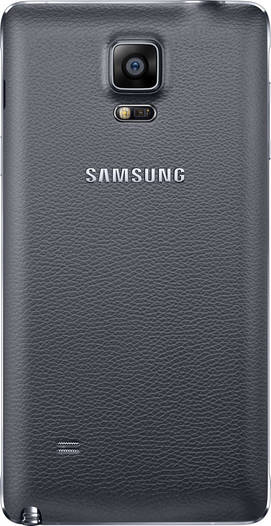
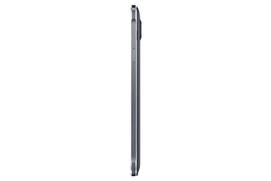
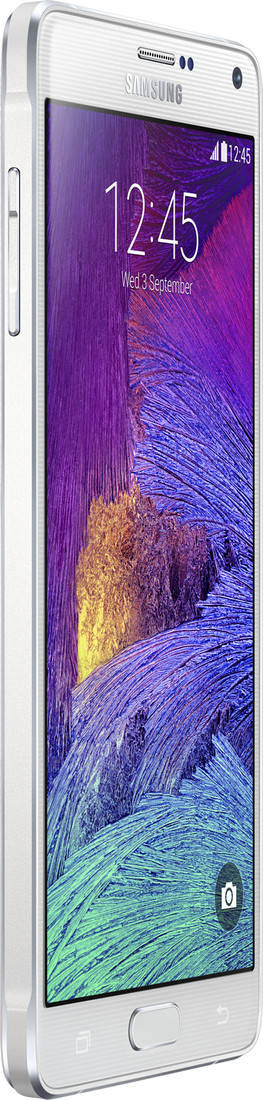
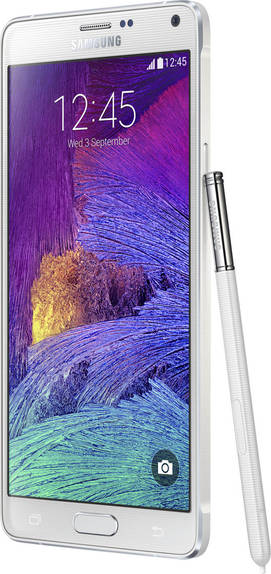
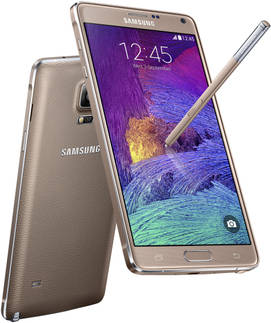
+One look at the Galaxy Note 4 and you’ll know it’s a Samsung. The brand hasn’t strayed away from its core design philosophy when it comes to the design – the phablet sticks to the same look we’ve seen before. The same rounded corners, the same oval home button flanked by capacitive keys, the same leathery texture at the rear – they're all there.Look closely however, and you’ll notice a welcome new addition – the metal frame. Unlike the Galaxy Alpha (review), which was the first Galaxy smartphone to use metal and rocks a very visible chrome-finished metal band around the sides, the Note 4 doesn’t flaunt it as much. The Note 4’s metal frame carries the same hue as the device itself, with only slim chamfered edges revealing the metal underneath. However, it does add a lot to the feel in the hand and the overall build – making the Note 4 justify its premium positioning. The controls and port placement is familiar – with the USB port at the bottom, the headset socket on top, volume rocker on the left and power key on the right. The top is also home to an IR blaster, while you’ll find the S Pen tucked away inside its silo at the bottom right.The front is the usual mix of screen, the home key at the bottom flanked by two backlit capacitive keys, and the front camera, earpiece, sensors and notification LED on top. Flip the device over, and you’ll see the primary camera lens with the flash and heart rate monitor module right below it. Samsung branding can be seen below that, with the phone speaker placer closer to the bottom. A large 4G label boasts about one of the key connectivity options offered by the device. The back panel opens up to reveal the removable battery, a micro-SIM slot and a microSD slot.At 176 grams, the Note 4 isn’t really lightweight, and feels reassuringly weighty in the hand. It’s quite large too, so one-handed usage is a no-no unless you have really large hands... or use one of its one-handed modes. We'll come to those shortly.
Read More2K 2 good
+With phablets being all the range these days, its common for new devices to up the screen sizes as compared to their predecessors – the new iPhone 6 duo and the Google Nexus 6 are good examples. But the Note was already large-screened to begin with. The Note 4 sticks to the same 5.7-inch screen size as the Note 3, but it ups the ante with something else – the resolution. And the only way up from full HD on mobile devices is 2K, or 2,560 x 1,440 pixels. On the Note 4, that translates into an eye-searing pixel density of 515ppi. We’ve always maintained so far that a capable full HD screen can barely be differentiated when placed alongside a mediocre 2K display, but the one on the Note 4 is just sublime in terms of visuals.Thanks to the Super AMOLED tech that Samsung uses, the colours pop out, and entertainment-related activities like gaming and video viewing look great, especially if you’re playing high-res videos or games with heavy graphics. The text is razor-sharp too, so working with productivity stuff like documents and web pages is a pleasure. The viewing angles and sunlight legibility are pretty good, and we have no qualms in admitting that the Galaxy Note 4’s display is one of the best we’ve laid eyes upon as far as smartphones go. For tweaking the display further, the display settings include various screen modes to choose from, including AMOLED cinema, AMOLED photo and an Adaptive display mode that automatically optimises the colour range and saturation for apps/tasks such as the gallery and video playback. There’s also an option to enhance touch sensitivity – handy for the upcoming winters when you may not want to get your hands out of your pockets without gloves.
Read MoreThe Wiz is in the house
+We’ve seen Samsung’s Touchwiz in action a number of time, including the latest version running on the Galaxy Alpha and the S5 (review). So we won’t really go into the details on the interface and its features, but we’ll definitely give you an overview of the ones specific to the Note 4. The base is Android KitKat 4.4.4, and you get all the features we’ve seen on high-end Galaxy devices before – right from Multi Window to a customisable quick settings panel. The leftmost home screen is reserved for the Flipboard-powered news aggregator dubbed Briefing, and allows you to view nicely-formatted articles based on specified topics of interest. The device settings covers all the modes we’ve encountered earlier too – Easy mode for a simplified launcher, Blocking mode for DND features, a Private mode for hiding personal content, and Safety assistance for emergencies. Quite notably, the main settings window lets you specify up to nine options as quick settings, and these are available in the form of large icons at the top of the list for quick access.An interesting new addition are dynamic wallpapers for the lockscreen. Available under ‘Display and wallpaper’ settings, you can set your lockscreen wallpaper as a static image per normal, or choose options like ‘Live weather’ and ‘My interests’. The former will display images based on the weather at your current location while the latter lets you choose topics you like, such as travel or nature, and sets the lockscreen wallpaper accordingly. Apart from the staple range of Samsung apps like S Voice, S Planner and the Galaxy Apps storefront, you’ll also find the full-fledged S Health app here. As usual, it ties into the heart rate monitor at the back to show you how fast your ticker is beating. But there’s lots more apart from this and the regular pedometer and workout-related stuff. The Note 4 also features an SpO2 sensor that measures the concentration of oxygen in your blood, and a UV sensor that can measure the UV intensity when you’re out in the sun. Both these new sensors are placed in the same module as the flash and the heart rate monitor at the back, and while the SpO2 sensor needs you to keep calm and place your finger over it to do its thing, just like the heart rate monitor, the UV sensor works by pointing it towards the sun. All this data is fed into S Health. In the same app, you’ll find Coach by Signa, a digital coach service that allows you to set fitness goals for yourself and then monitor your progress over time. Did we mention that the Note 4 can work as a universal remote as well? Thanks to the integrated infrared transmitter on top and the Smart Remote app, the phablet can be used to control other electronics such as TVs. The app is easy to set up and once you set up the region properly, also presents a detailed programme guide. And after trying it out with our LG TV and Tata Sky Plus box, we can say it works well too.The fingerprint scanner on the home button works reasonably well, as as we noted in our Galaxy Alpha review, Samsung has improved it from the S5 days. So it’s relatively simpler to register fingerprints and then use fingers to gain access to the device by swiping over the home key. We’re more interested in the goodies we haven’t seen before though, and there’s no dearth of them. Some of them are hidden under accessibility settings too. For example, under ‘Vision’, you’ll find a ‘Hover zoom’ option that magnifies content on the screen when you hover the S Pen over it. You can even customise the zoom levels. Under ‘Hearing’, you can enable flash notifications to alert you by blinking the camera flash. Under the same head, you’ll even find ‘Sound detectors’ – options that make the phone vibrate when the sound of a baby crying or a ringing doorbell are detected. Then there are the variety of one-handed modes. Under ‘Display and wallpaper’ settings, you’ll find the ‘One-handed operation’ option that lists a bunch of one-handed modes available. The one labelled ‘One-handed input’ isn’t new, and basically shrinks the dialling keys, the virtual keyboard, unlock pattern etc to one side for easy access with one hand. However, you can also enable ‘Reduce screen size’, which allows you to shrink the display to a manageable size by swiping from either side of the screen to the centre and back in one quick motion. Then there’s a ‘Side key panel’ that pops up a floating panel on the side, displaying the Android navigation keys (back, home and recents) so they can be accessed easily when using the phablet one-handed. The transparency levels of the side key panel can be tweaked, and you can even customise the order in which the keys appear or replace them with other options such as the app drawer launcher or a one-touch button to reduce screen size. Apart from these options, some apps can also be switched from a full-screen mode to mini floating windows by dragging them inside diagonally from the top corners. Yet another handy, yet not-so well-known feature is hidden under the Voice Recorder app. The default ‘Normal mode’ works as its name suggests, but then, you can also choose an ‘Interview mode’ that captures audio from two directions, ideal for one-on-one interviews. There’s a ‘Meeting mode’ available too that can distinguish up to eight sources of sounds, and you can even exclude certain sound sources when playing back the recordings.Clearly, Samsung has put a lot of thought behind all of this, and features like the one-handed modes and voice recording options highlight that well. Things don’t end here however, since we haven’t discussed the Note’s mainstay, the S Pen yet.
Read MoreThe S Pen is mightier than the sword
+If you’re not familiar with Samsung Note family’s mainstay, you should know that it’s a stylus. When Samsung introduced it with the original Note, many derided the brand for bring an archaic piece of tech back. However, the S Pen, as Samsung likes to call it, proved to be a handy addition and over time, has become one of the strongest points in favour of these devices.One common misconception is that the S Pen features of the Note range are mainly useful for the creative types – professionals like graphics artists, interior designers etc. Undoubtedly, the S Pen could be a useful tool for these guys, but there’s enough in there for even general users – especially those that are comfortable with writing or jotting down things. With the Note 4, Samsung has taken the appendage to another level by making the experience as close to a real pen as possible, doubling the pressure sensitivity as compared to the preview model in the range. Apart from using it for making handwritten-notes, the S Pen can also be used to input text when using the Samsung keyboard. Just select handwriting using the settings button on the keyboard, and write in the space provided. It will be converted into text and inserted into the text input field – it’s that simple, and works very well. The S Pen also enables instant previews when you hover it over image thumbnails in the gallery or entries in the calendar. Pulling the S Pen out wakes up the smartphone from slumber and launches a fan-shaped menu called Air Command. One of the new functions of the S Pen includes Smart Select – letting you collect any content you want directly from the screen, covering everything from documents, web pages, notes, images, widgets, and apps. The collected content can be modified and shared easily. Photo Note is yet another S Pen-enabled feature and is available from the S Pen widget on one of the home screens, letting you create editable notes from images of written text. The Action memo option lets you create notes that converts handwritten content into actionable items – such as calling a number you jotted or sending a message to a handwritten email ID.In S Note, which is Samsung’s feature-rich note-taking app, you’ll find different pen options such as ‘Fountain Pen’ and ‘Calligraphy Pen’ that let you use the S Pen’s pressure sensitivity to your advantage by detecting the pressure, angle and strokes of your writing. In the same app, you can even convert voice to text by tapping the mic icon and recording your voice. Do note that for this to work, the device needs to be connected to the internet and the voice memo language should match the language you’re uttering.Make no mistake – the Note 4’s S Pen is a powerful tool and if you use it well, can really take interaction with onscreen text/visuals, inputting and entering text, selecting and sharing content to a level that you never thought possible. The downside is that you need to take the time to learn and master all the available features – there are quite a few of them. Secondly, many of us are not as comfortable with handwriting these days, after having spent too much time thumping away on the keyboards on our laptops and mobile devices – so using the various handwriting modes on the Note 4 does mean getting back the days of yore.
Read MoreA versatile, capable shooter
+A 4K-capable, 16-megapixel OIS shooter at the back, coupled with a 3.7MP front-facing sensor make up the photo-shooting chops of the Galaxy Note 4. The app itself is fairly loaded in terms of options, but manages to keep casual shooting simple enough by limiting the number of visible modes. As far as shooting modes are concerned, apart from auto, you only get Rear-cam selfie, selective focus and panorama modes. Other modes like Virtual tour and Dual Camera are hidden from view, and you can use the ‘Manage modes’ option to control which modes are visible. You also have the option to download a few more like Animated Photo, Sound & shot and Sequence shot, depending upon what you need. The Rear-cam selfie mode is new, fuelling your self-portrait obsession with high-resolution images acquired using the primary camera using face detection to make sure your face stays in the frame. Samsung has thrown in quite a few options under settings, in case you want to explore your creative side while shooting. There’s control over various aspects like white balance, metering modes, exposure, and other features such as voice control are included too. The front snapper may not look too selfie-focussed in terms of megapixel count, but it does boast some handy features for clicking self portraits. For one, you can shoot selfies by placing and then removing your finger on the heart rate monitor at the back. In addition, there’s a Wide selfie mode that can fit more people into a single image – working similar to a panorama mode but using the front camera instead.The frills, features and modes are all fine, but the real thing that counts is the image quality. And we’ve got tons of image samples that prove that the Note 4 is one of the best shooters we’ve seen on a smartphone – generating great results in daylight and decent ones in low light. The close-ups are very good too, but the HDR mode is rather subtle. The main gripe we have with it is that you need to hold the device steady in dim light to get usable shots, and if your subject is in motion, you may end with blur.There’s more in our camera review of the Note 4, and here are some more image samples for you to take a look at.
Read MoreFast and faster
+With an absolutely top-of-the-line quad-core Snapdragon 805 chip zipping at 2.7GHz, Adreno 420 graphics and 3GB of RAM inside, clearly the Note 4 doesn’t skimp on specs in any way. We got a taste of what it can do when we ran a few benchmarks to gauge its prowess, and the real-life story is no different.We’ve used adjectives like ‘steroidal’ and ‘superfast’ when describing device performance, and truth is, they are all apt when it comes to talking about the Note 4. The innards are the most powerful you can get on mobile devices these days, so it’s almost given that everything flies on the device – from everything to mundane day-to-day tasks to multimedia and graphics-heavy games.The internal storage is a generous 32GB, with a little over 24GB available to use. And there’s a microSD slot that supports cards up to 128GB if you need to add more.The Note 4 is as loaded as it gets when it comes to connectivity too – you name it, and this baby has it. The support for the current Indian 4G band is more than welcome, making the device future-proof even if you don’t have a 4G network in your city. The USB OTG support is handy, and you get everything else including dual-band Wi-Fi ac, Bluetooth, Wi-Fi Direct, NFC, A-GPS and screen mirroring. The MHL support is useful when you want to hook it up to a large-screen telly, and we got a chance to try it out. The Note 4 (like other recent Galaxy models that support MHL) requires a special 11-pin MHL connector, and connecting the device to a television through HDMI mirrors screen content directly – useful for presentations, slideshows, sharing pictures with the family, playing videos and even gaming. 2K displays and powerful specs are usually arch enemies of battery life, but the 3,220mAh removable pack in the Note 4 takes care of things by lasting a full day comfortably even with heavy usage… more if your usage is low. The device lasted a very respectable 12 hours in our battery drain test, and even in real-life usage, didn’t give us a chance to complain. Your mileage could vary depending on usage of course, especially if you use it heavily for intensive gaming and playing high-resolution videos. The battery does seem to drain faster than the norm on standby, and once we managed to get it to about 20 per cent levels by late evening with 3G data on and prolonged screen-on times. Thankfully, the Note 4 supports fast charging, and comes with the usual battery saving modes – standard, as well as the more aggressive Ultra Power saving mode, to prolong usage.
Read MorePopular Comparisons
 Samsung Galaxy Note 4
 Sony Xperia Z3 Dual
Samsung Galaxy Note 4
Sony Xperia Z3 Dual
Samsung Galaxy Note 4
 Samsung Galaxy Note 6
Samsung Galaxy Note 4
Samsung Galaxy Note 6
Samsung Galaxy Note 4
 Samsung Galaxy Note 5 32GB
Samsung Galaxy Note 4
Samsung Galaxy Note 5 32GB
Samsung Galaxy Note 4
 Apple iPhone 6 16GB
Samsung Galaxy Note 4
Apple iPhone 6 16GB
Samsung Galaxy Note 4
 Samsung Galaxy Note 3
Samsung Galaxy Note 4
Samsung Galaxy Note 3
Samsung Galaxy Note 4
 Samsung Galaxy S6 32GB

Samsung Galaxy Note 4 Specifications
General |
|
|---|---|
| Operating System | Android v4.4.4 (Kitkat) |
| Custom UI | TouchWiz UI |
Performance
(Avg)
|
|
|---|---|
| Chipset | Qualcomm Snapdragon 805 APQ8084 |
| Processor | Quad core, 2.7 GHz, Krait 450 |
| Graphics (GPU) | Adreno 420 |
| RAM | 3 GB |
| RAM Type | LPDDR3 |
Benchmark Screenshots
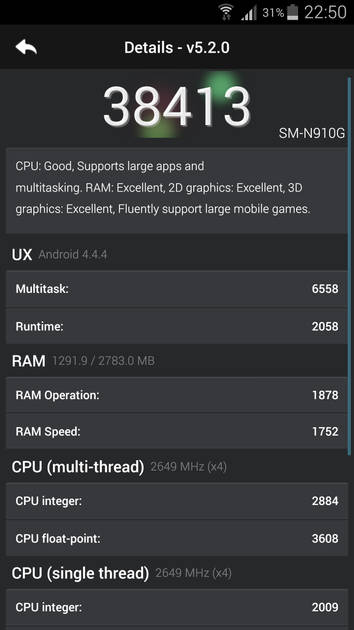
AnTuTu Benchmark
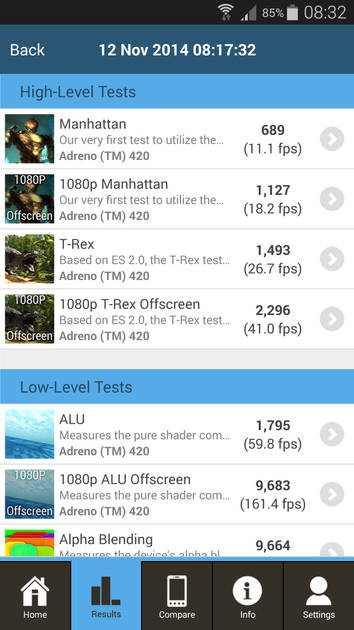
Graphics Benchmark
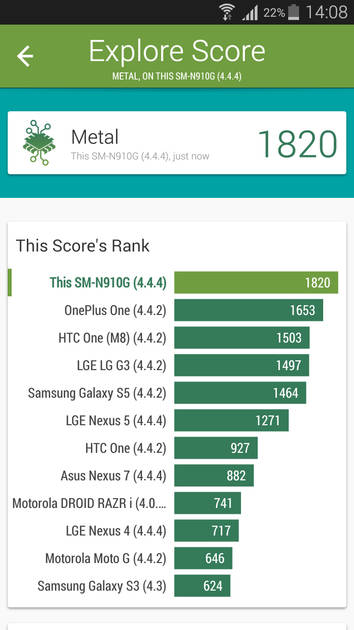
Vellamo Metal Benchmark
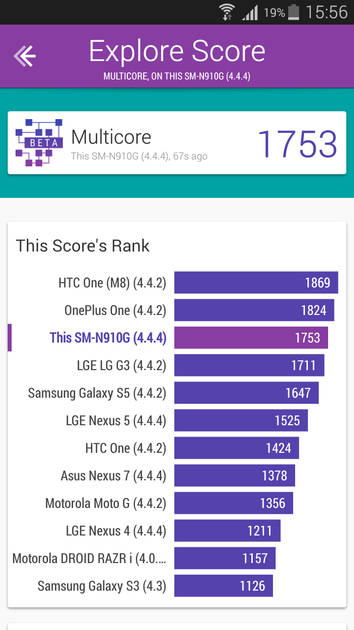
Vellamo Multicore Benchmark
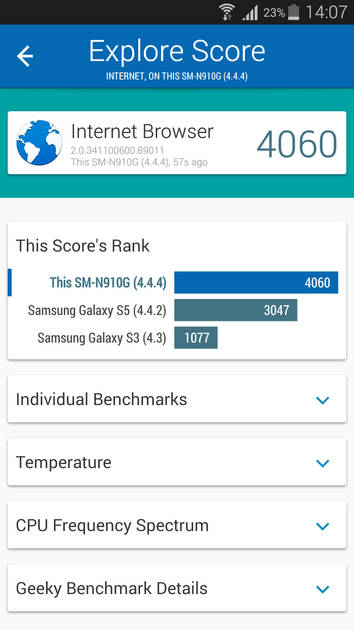
Vellamo Browser Benchmark
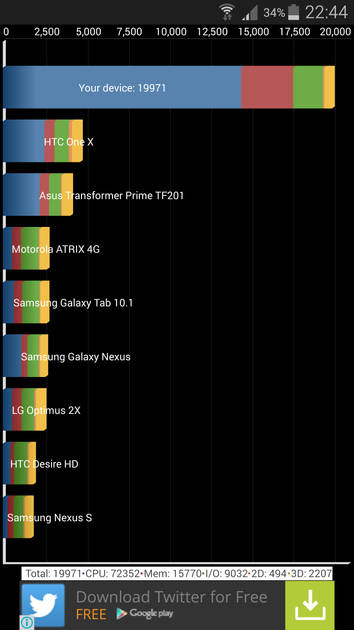
Quadrant Benchmark
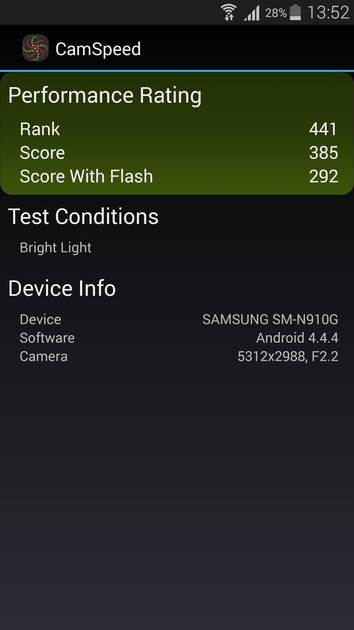
Camera Speed Benchmark
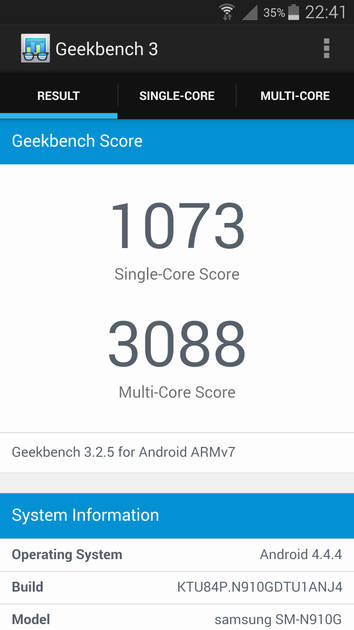
Geekbench3 Benchmark
|
Display
(Best In Class)
|
|
|---|---|
| Display Type | Super AMOLED |
| Screen Size | 5.7 inches (14.48 cm) |
| Resolution | 1440x2560 px (QHD (2k)) |
| Pixel Density | 515 ppi |
| Screen to Body Ratio (calculated) | 74.06 % |
| Screen Protection | Corning Gorilla Glass v4, Scratch-resistant glass |
UI Screenshots
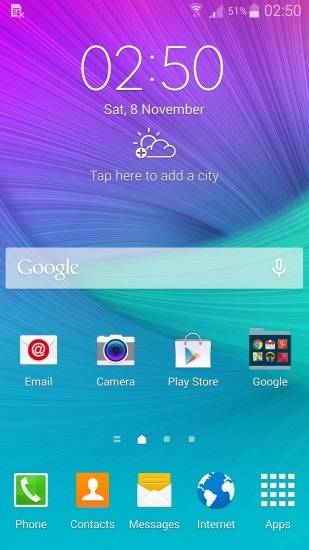
Home Screen
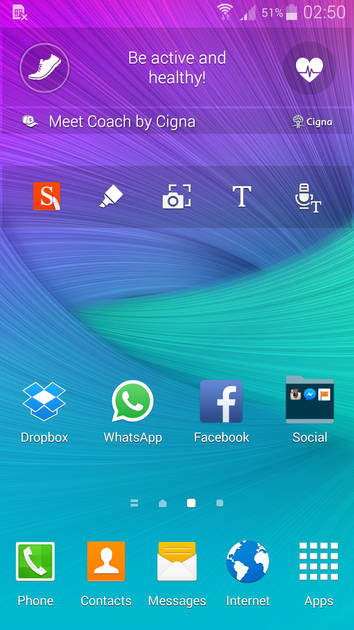
Screen With Widgets
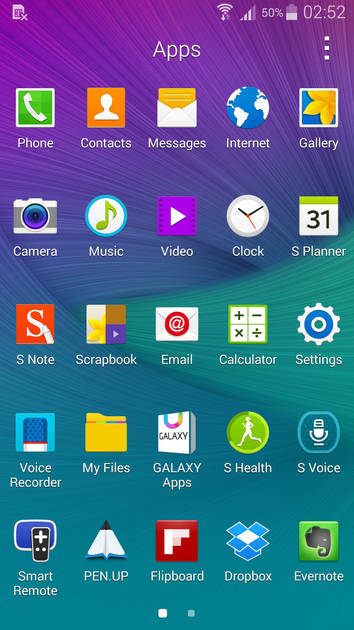
App Drawer
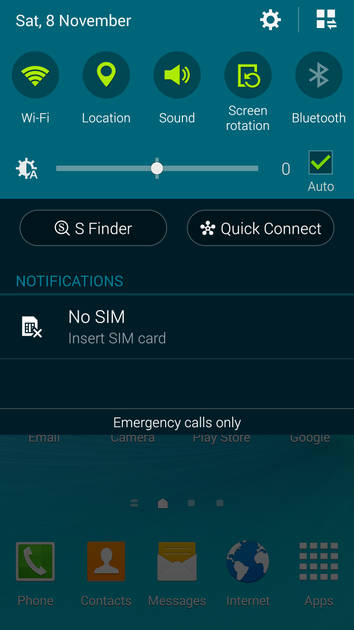
Notification Panel
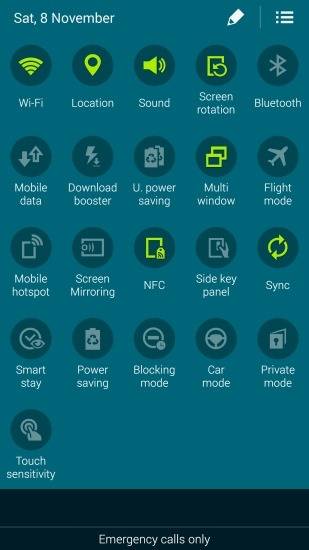
Quick Settings Panel
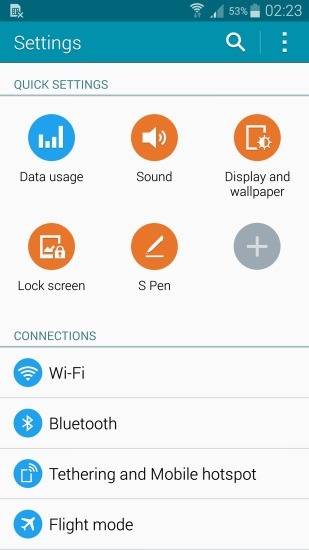
Settings Screen
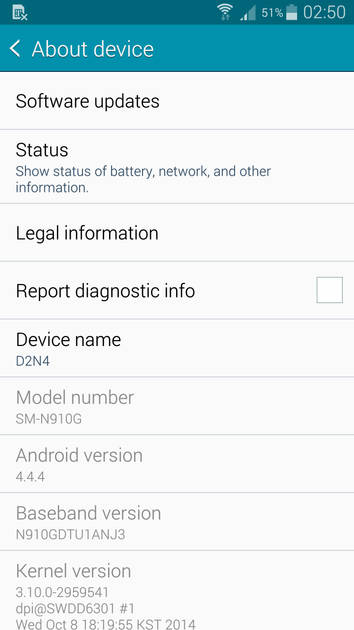
OS Version
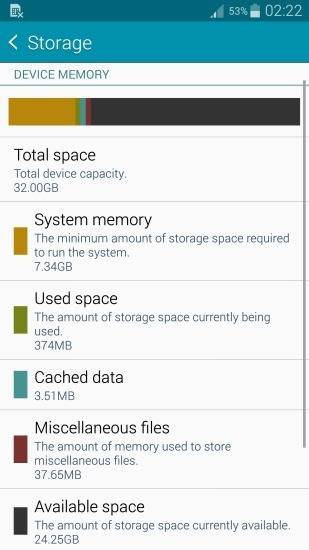
Storage
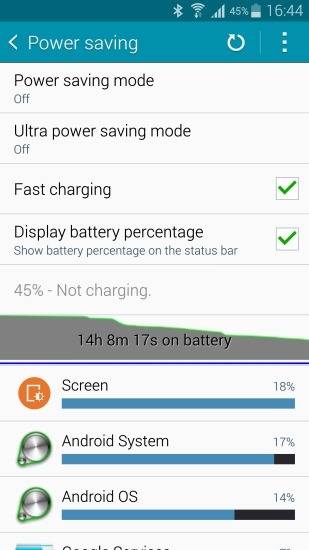
Battery
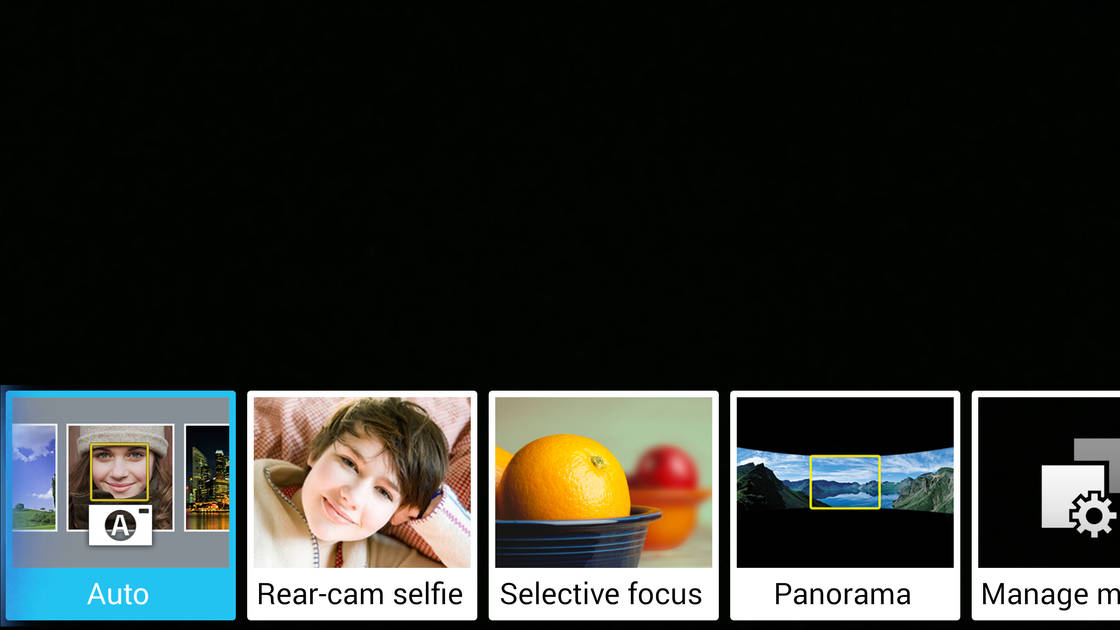
Camera Modes
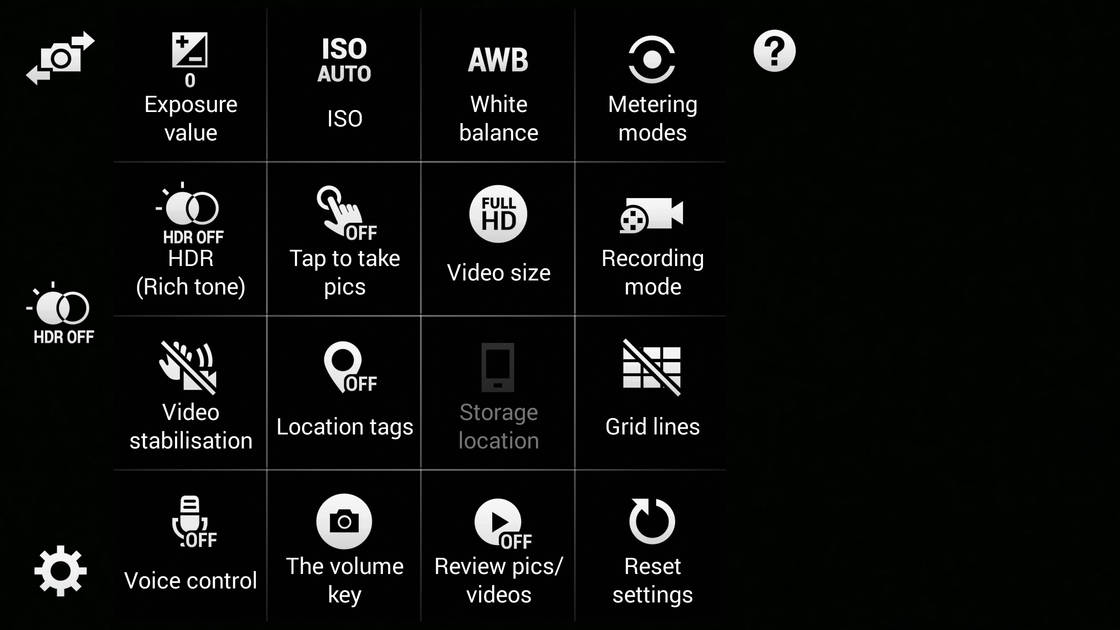
Camera Settings
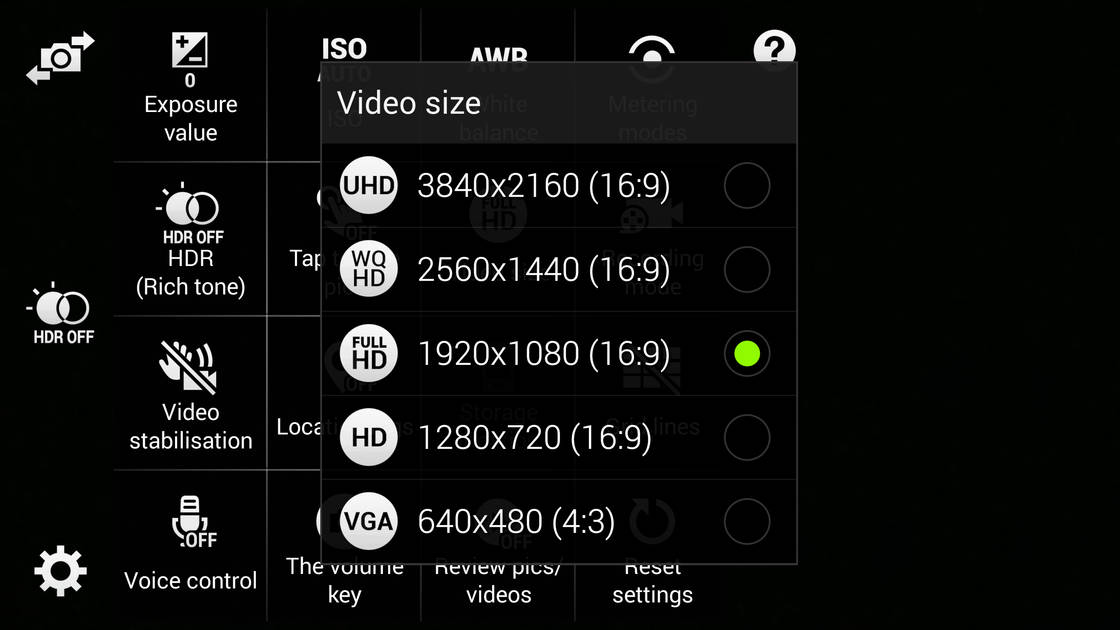
Video Size Options
|
Design |
|
|---|---|
| Height | 153.5 mm |
| Width | 78.6 mm |
| Thickness | 8.5 mm |
| Weight | 176 grams |
|
Click to View

|
Rear Camera
(Very Good)
|
||||||
|---|---|---|---|---|---|---|
| Resolution | ||||||
|
||||||
| Autofocus | Yes, Phase Detection autofocus | |||||
| OIS | Yes | |||||
| Flash | Yes, LED Flash | |||||
| Image Resolution | 4608 x 3456 Pixels | |||||
| Shooting Modes |
Continuous Shooting High Dynamic Range mode (HDR) |
|||||
| Camera Features |
Digital Zoom Auto Flash Face detection Simultaneous HD video and image recording Smile detection Touch to focus |
|||||
| Video Recording |
3840x2160 @ 30 fps 1920x1080 @ 60 fps 1280x720 @ 120 fps |
|||||
| Video Recording Features |
Optical Image stabilization Dual Video Recording |
|||||
Rear Camera Samples

Night Mode OFF

Long Shot
|
Front Camera
(Avg)
|
||||
|---|---|---|---|---|
| Resolution | ||||
|
||||
| Flash | No | |||
| Video Recording |
Other 2560x1440 fps |
Battery
(Very Good)
|
|
|---|---|
| Capacity | 3220 mAh |
| Battery Type | Li-ion |
| TalkTime | Up to 20 Hours(3G) |
| Quick Charging | Yes Quick Charging v2.0 |
Storage |
|
|---|---|
| Internal Storage | 32 GB |
| Expandable Storage | Yes, Up to 128 GB |
Network & Connectivity |
|
|---|---|
| SIM Slot(s) | Single SIM |
| SIM Type | SIM1: Micro |
| Network Support | 5G Not Supported, 4G |
| SIM 1 |
4G bands, 4G Speed
Expand
|
| SAR Value | Head: 0.183 W/kg |
| Wi-Fi | Yes, Wi-Fi 5 (802.11 a/b/g/n/ac) 5GHz |
| Wi-Fi Features | Wi-Fi Direct, Mobile Hotspot |
| Bluetooth | Yes, v4.1 |
| GPS | Yes with A-GPS, Glonass |
| NFC | Yes |
| Stylus | Yes |
| HDMI | Yesvia microUSB |
Multimedia |
|
|---|---|
| Audio Jack | 3.5 mm |
Sensors |
|
|---|---|
| Fingerprint Sensor | Yes |
| Fingerprint Sensor Position | Front |
| Infrared Sensor | Yes |
| Heart Rate Monitor | Yes |
| Other Sensors | Light sensor, Proximity sensor, Accelerometer, Barometer, Compass, Gyroscope |
Samsung Galaxy Note 4 User Reviews
Samsung Galaxy Note 4 Key Highlights
| Processor | Qualcomm Snapdragon 805 APQ8084 |
| RAM & Storage | 3 GB + 32 GB |
| Display | 5.7", 1440 x 2560 Resolution |
| Rear Camera | 16 MP |
| Front Camera | 3.7 MP |
| Battery | 3220 mAh |


Popular Links
- All Upcoming Phones
- Upcoming Samsung Phones
- Samsung phones under 10k
- Samsung phones under 20k
- vivo V80 5G
- OPPO K14 Plus 5G
- Xiaomi Redmi Note 17 Pro 5G
- Lava Virat Curve 5G
- OPPO F35 Pro
- Samsung Mobiles
- Motorola Mobiles
- vivo Mobiles
- OPPO Mobiles
- Tecno Mobiles
- realme Mobiles
- Xiaomi Mobiles