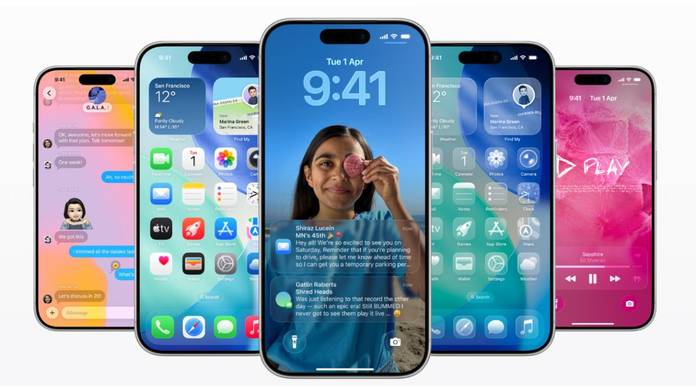
Apple is expected to roll out iOS 26.1 soon. This is the first major update since iOS 26’s release in September. The update brings several small but useful features and design tweaks across the interface for iPhones. With beta testing now wrapping up, iOS 26.1 is expected to arrive early next week, possibly on November 3rd or 4th.
iOS 26 introduced a new Liquid Glass design, giving a translucent effect across the UI. A new feature for this is the new Liquid Glass transparency toggle. Users can now choose between Clear or Tinted modes in Settings > Display & Brightness. The Clear option keeps the traditional transparent look that reveals background colors through buttons and menus, while Tinted increases opacity and contrast for better visibility.
There’s also a new Lock Screen camera swipe toggle in this update. If you often open the Camera app accidentally, you can now disable the left-swipe gesture from the Lock Screen without turning off the camera entirely. Apple has also added a Phone Haptics option that lets users switch off vibration feedback when a call connects or ends.
In the Clock app, alarms and timers now feature a “slide to stop” gesture instead of a simple tap. This change might help prevent accidental dismissals when you’re half asleep and trying to hit snooze.
The update also expands Apple Intelligence and AirPods Live Translation to more languages. Apple Intelligence now supports Danish, Dutch, Norwegian, Portuguese (Portugal), Swedish, Turkish, Traditional Chinese, and Vietnamese. Meanwhile, Live Translation on AirPods adds Japanese, Korean, Italian, and both Simplified and Traditional Chinese.
In Apple Music, you can now swipe directly over the song title to skip to the next or previous track. The Apple TV app sports a refreshed, more colorful icon inspired by the Liquid Glass design and now simply goes by the new “Apple TV” branding, dropping the “+” altogether.
For fitness enthusiasts, iOS 26.1 brings custom workout creation to the Fitness app. You can now design your own workouts by setting the type, intensity, duration, and start time, rather than following preset templates.
Apple has also made several interface refinements. In the Settings app, headers are now left-aligned instead of centered, creating a more consistent and modern look. The same change appears in Home Screen folders. The Phone keypad adopts the Liquid Glass design, the Photos app gets an updated video scrubber and a redesigned selection menu, and Safari slightly widens its bottom Tab Bar for a cleaner layout.
Finally, a new Privacy and Security option lets iPhones automatically download and install background security improvements, replacing the older Rapid Security Responses system.
Overall, iOS 26.1 isn’t a revolutionary update, but it adds a layer of polish across Apple’s ecosystem, refining both design and usability in small but meaningful ways.