After weeks of anticipation, OnePlus has just unveiled the next iteration of its smartphone and tablet software skin, OxygenOS 16. Based on Android 16, the update promises smooth and seamless UI interaction, personalisation of lockscreen and home screen through creative ways, new and enhanced AI functionalities, and better device interconnectivity. OnePlus positions OxygenOS 16 as a software that is unique to its users and works reliably well when needed, hence the tagline “Intelligently Yours”. OxygenOS 16 will come pre-installed on the OnePlus 15, which is expected to arrive in India in the next few months.
Since OnePlus initiated the Close and Open beta programmes before the OxygenOS 16 launch event for the OnePlus 13 series (13, 13s, 13R), OnePlus 12 series (12, 12R), and OnePlus Open, these are the first set of devices to officially receive the stable OxygenOS 16 update starting at the end of this month. On that note, here’s the month-wise OxygenOS 16 rollout schedule for eligible OnePlus devices:
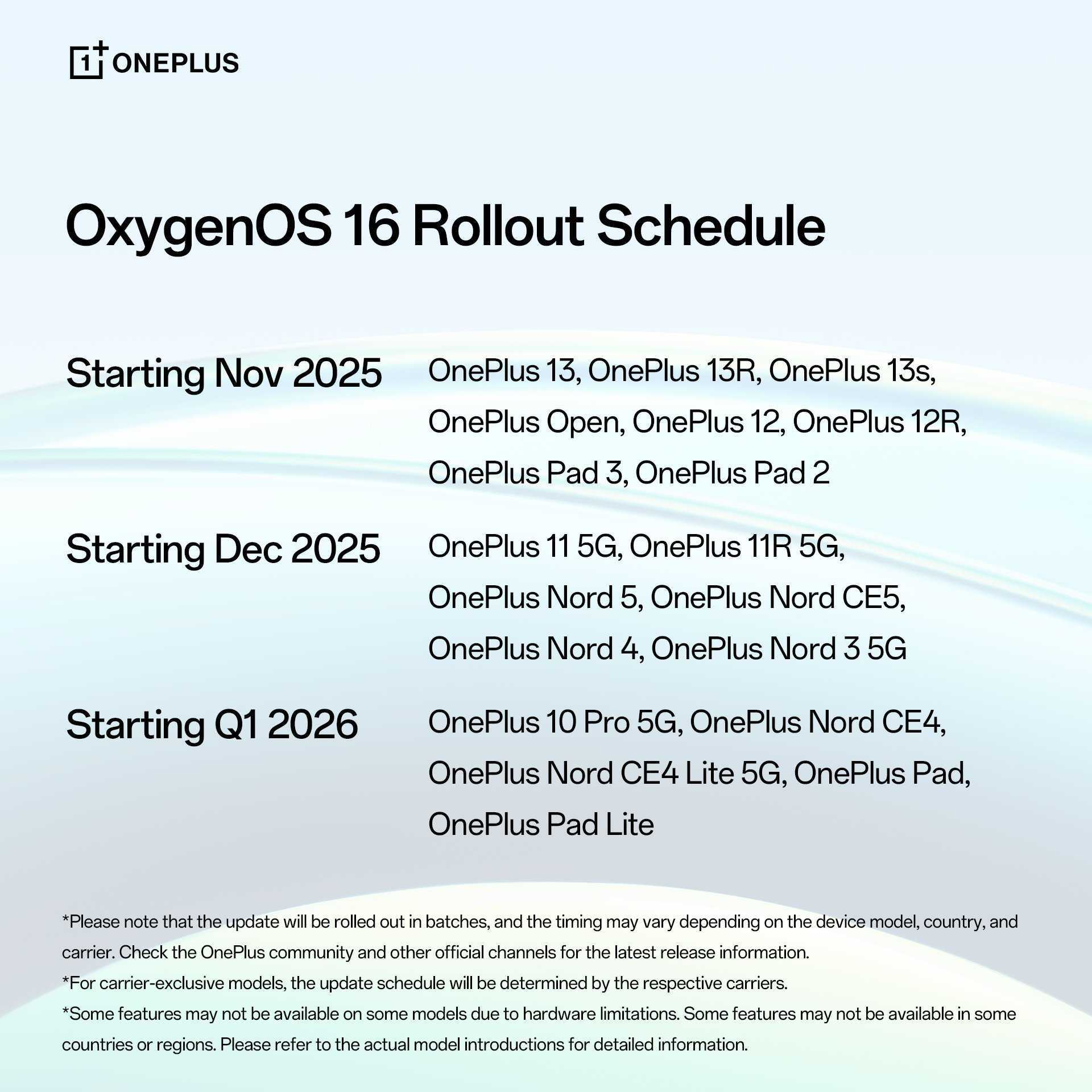
Surprisingly, the OnePlus 10 Pro, which was promised to receive three OS upgrades up to Android 15 at launch, is also confirmed to get the Android 16-based OxygenOS 16 update. It’s good to see OnePlus going above and beyond to deliver an extra major OS update to its Qualcomm Snapdragon 8 Gen 1-powered flagship. This ensures the users of this phone can experience the latest features without needing to upgrade to a more modern Oxygen-based device.
Coming to the key additions and features OxygenOS 16 brings, OnePlus has enhanced the swiftness and responsiveness of the UI by introducing Parallel Processing 2.0 and Flow Motion, which offer seamless and visually consistent transitions across the entire user interface and first-party apps, such as Notes, Shelf, Sound Recorder, etc. Users who rely on the three-button navigation system will be able to experience swift animations by tapping on the ‘recents’ button multiple times.
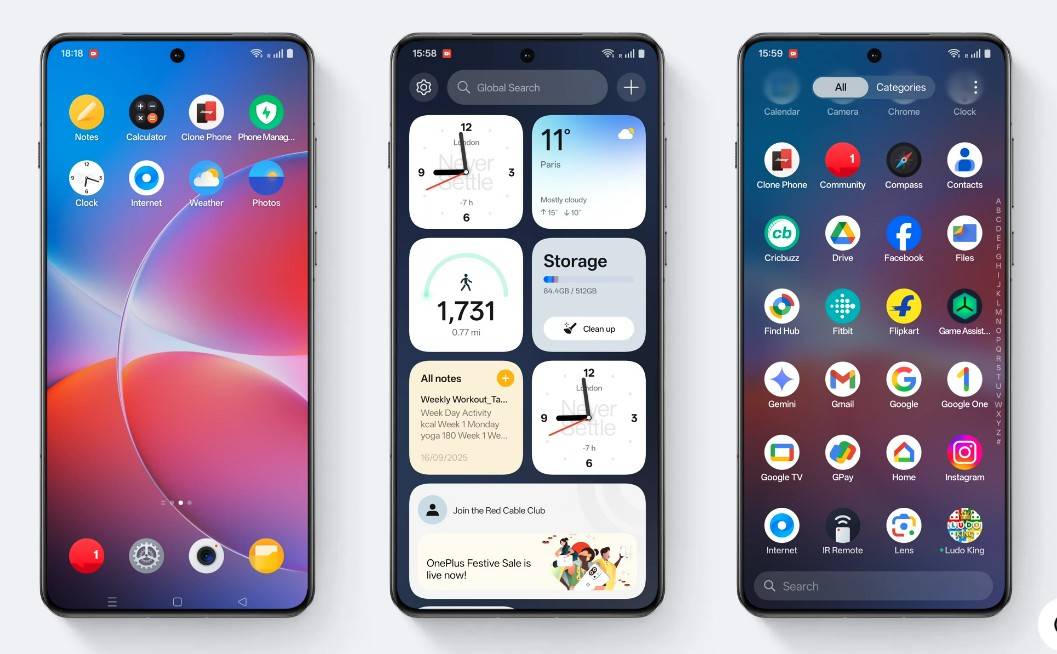
On top of the pre-existing customisation options, OnePlus is pushing out more ways for users to personalise their lockscreen and homescreen. For starters, along with the addition of several new large clocks, users will be able to add their own text on the lockscreen. Along with that, any form of Live Photo can now be set as a wallpaper, while the clocks have a light effect and even support depth to overlap images of humans, characters, and pets. Coming to the homescreen, the update enhances user creativity by allowing any app to be resized in 2×1, 1×2, and 2×2 layouts. OnePlus has even gone and given its own touch to the previously introduced themed icons through Flux icons. This forces every app to follow a colour scheme, based on the wallpaper or user choice.
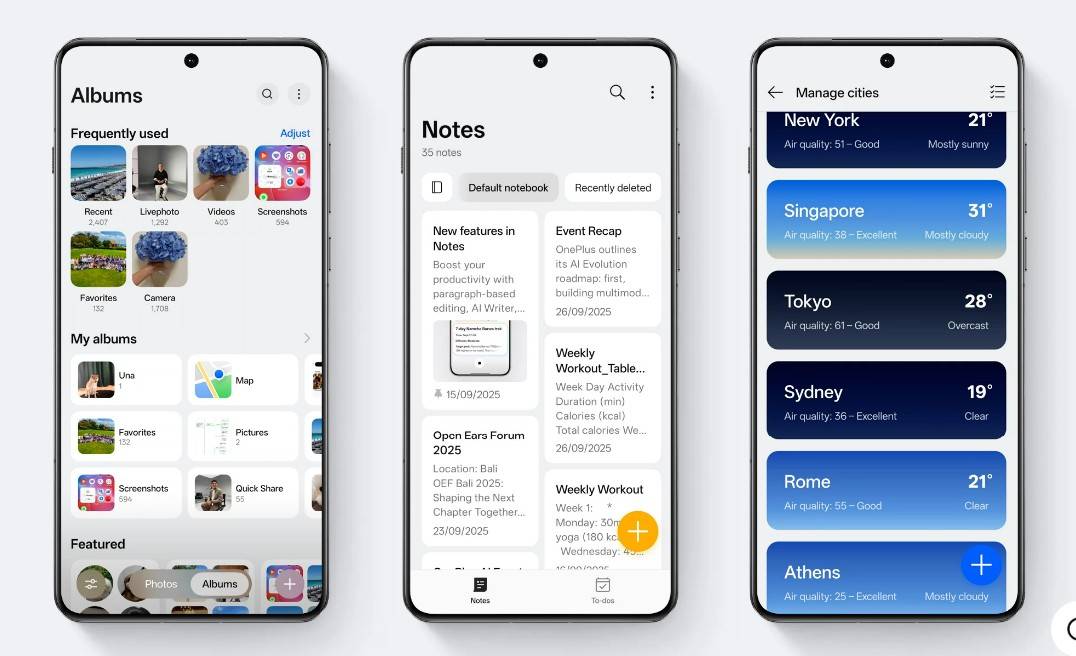
Moving on, the update completely revamps the Gallery app and App drawer. The former now offers an immersive view with two floating buttons towards the bottom — Photos and Albums. The Flow Motion is also applicable to the Gallery app for smooth interaction with albums, and the brand-new video editor will allow creators to edit videos with complex elements on the go. Coming to the App drawer, the search bar has now been positioned at the bottom for easy reachability, and the new ‘Categories’ tab displays all the available apps in a curated manner based on their genre.
Taking advantage of Google Gemini’s deep LLM architecture, the OnePlus Mind Space, introduced with the OnePlus 13s a few weeks back, can now be linked with Gemini to offer results that are curated based on the content you save in Mind Space. For instance, if you’ve previously saved photos or screenshots of apparel, asking Gemini to show similar outfits will utilise Mind Space’s data. Furthermore, AI Writing has been boosted to support more apps, AI Recorder offers real-time transcription, and Photos app gets AI Portrait Glow for intelligently adjusting face exposure, and AI Perfect Shot that fixes flaws like blinked eyes.
OxygenOS 16 brings one of OnePlus’ most sophisticated AI features yet, aimed at learning from user activity to provide a more customised experience. At its core is Plus Mind, an assistant that identifies on-screen materials and categorises them into Mind Space. Users may open Plus Mind with three-finger swipe-up or the Plus Key, the latter of which can also be assigned to open functions like screenshots, flashlight, camera, voice recording, Do Not Disturb, or switching between sound profiles. Plus Mind can read stored content, such as pulling out dates and times from event flyers and triggering calendar entries. Plus Mind also features long screenshots that save full-page content directly into Mind Space.
With OxygenOS 16, Google Gemini is incorporated into Mind Space so that it can utilize stored information to give context-dependent results and actions within a single query. This adds more practical, personalized support to the software.
Coming to ecosystem features and connectivity with non-OnePlus devices, the O+ Connect app enables seamless integration with both Mac and Windows PCs for wirelessly managing phone files, viewing photos/videos without downloading, syncing notifications and clipboard, and even remotely controlling their PC from their OnePlus device. Furthermore, a dedicated OHealth app for Apple Watch allows users to view notifications, manage calls, sync exercise records, and remotely access the phone’s camera.
With OxygenOS 16 (hands on), it appears that the company has improved upon the fundamentals already set on OxygenOS 14 and OxygenOS 15. With enhanced personalisation options, users will be able to customise their lockscreens and homescreens to their heart’s content, while the AI features could go a long way in improving productivity and workflow. Major and subtle refinements in design, UI smoothness, and multitasking on tablets could also make OxygenOS 16 a reliable Android software skin. We got our hands on OxygenOS 16 earlier on, so if you’re interested in taking a deep dive into what OnePlus’ latest software brings and how it compares to OxygenOS 15, feel free to check out our story.