


The ColorOS 17 release is an interesting one this year, since the update will be rolled out not only to OPPO devices but also to OnePlus and Realme devices. This comes as part of OPPO’s efforts to offer a unified software experience across all its brands by combining resources to build and maintain a single mobile software platform. As a result, OxygenOS and Realme UI are being axed in favour of ColorOS 17 on OnePlus and Realme devices.
The update has already been announced globally and has even gone live for several smartphones across price ranges. On that note, here’s everything you need to know about ColorOS 17’s release timeline, eligible devices, features and improvements, the download and installation process, and more.
Table of Contents
ColorOS 17 release timeline
The first official hint of the skin’s presence came in the form of the ColorOS 17 closed beta recruitment announcement, which began on August 6th for multiple OPPO, OnePlus, and Realme models in China, India, Indonesia, and Malaysia. The closed beta update was limited to 300 users on a specific device, while the open beta update was available to everyone who passed a compulsory quiz.
Later, OPPO officially unveiled ColorOS 17 in China on September 17th, followed by the global launch on October 13th. However, prior to the global launch, the Open Beta programme applications were already opened on October 9th for the OnePlus 15, OPPO Find X9, Find X9s, Find X9 Pro, Find X9 Ultra, Reno 15 Pro, and Reno 15 Pro mini. In India, the OPPO Find X10 and Find X10 Pro Max were the first smartphones to ship with ColorOS 17 out of the box.
The first set of devices that received the ColorOS 17 closed beta update included:
- OPPO: OPPO Find X9 Pro, OPPO Reno 15 Pro, OPPO Reno 15 Pro mini
- OnePlus: OnePlus 15, OnePlus 15R
- Realme: Realme GT 8 Pro
ColorOS 17 unified design and features across OPPO, OnePlus, and Realme devices
Since eligible phones from all three brands run ColorOS 17, they share the same design language and features, with a few additions for OnePlus devices, such as retaining the red-accented “1” in the status bar as a nod to OxygenOS. However, as was the case with OxygenOS 16 and Realme UI 7, which featured their own sets of homescreen icons, different quick settings sliders, and a distinct About Phone page compared to ColorOS 16, these elements are now in line with OPPO smartphones on ColorOS 17.
That said, with every first-party app, menu, setting, and core visual being the same, ColorOS developers can push updates faster, fix bugs on time, and deliver more stability by focusing on a single software iteration instead of three.
OPPO devices eligible for ColorOS 17
Since ColorOS has been the proprietary custom skin for OPPO devices, ColorOS 17 could be released for the following devices:
| Rollout timeline | Devices |
| October 29th, 2026 | OPPO Find N6, Find X9 Ultra, Find X9s, Find X9 Pro, Find X9 |
| October 30th, 2026 |
|
| November 2026 |
|
| December 2026 |
|
| 2027 Q1 |
|
OnePlus devices eligible for ColorOS 17
With OnePlus officially declaring that OxygenOS is being sunset in favour of ColorOS going forward starting with Android 17, the list of OnePlus devices set to get ColorOS 17 are as follows:
| Rollout timeline | Devices |
| October 29th, 2026 | OnePlus 15, OnePlus Pad 4 |
| October 30th, 2026 | OnePlus 15R, OnePlus 13, OnePlus 13s |
| November 2026 |
|
| December 2026 |
|
| Q1 2027 |
|
The company has also noted that users will be able to switch back to OxygenOS 16 if they don’t find ColorOS 17 up to the mark, whether in terms of design or specific features that may be removed in the upcoming ColorOS iteration.
Realme devices eligible for ColorOS 17
With most promising at least two OS upgrades, particularly on the entry-level and budget models, here’s the official list of Realme devices set to receive ColorOS 17:
| Rollout timeline | Devices |
| October 29th, 2026 | realme GT 8 Pro, realme GT 8 Pro Dream Edition |
| October 30th, 2026 |
|
November 2026 |
|
December 2026 |
|
2027 Q1 |
|
ColorOS 17 new features and improvements
While we’ve already covered ColorOS 17 in-depth in our dedicated hands-on story, here’s a glimpse of what to expect once you receive the update:
Living Flow Design
ColorOS 17 elevates the animation experience with fluid, responsive animations. Elements illuminate on tap or swipe, stretch with a lively bounce, and return smoothly. The entire UI features translucent, luminous effects for deeper immersion. Similarly, as part of the new design framework, first-party apps use morphing animations between pages and sections.
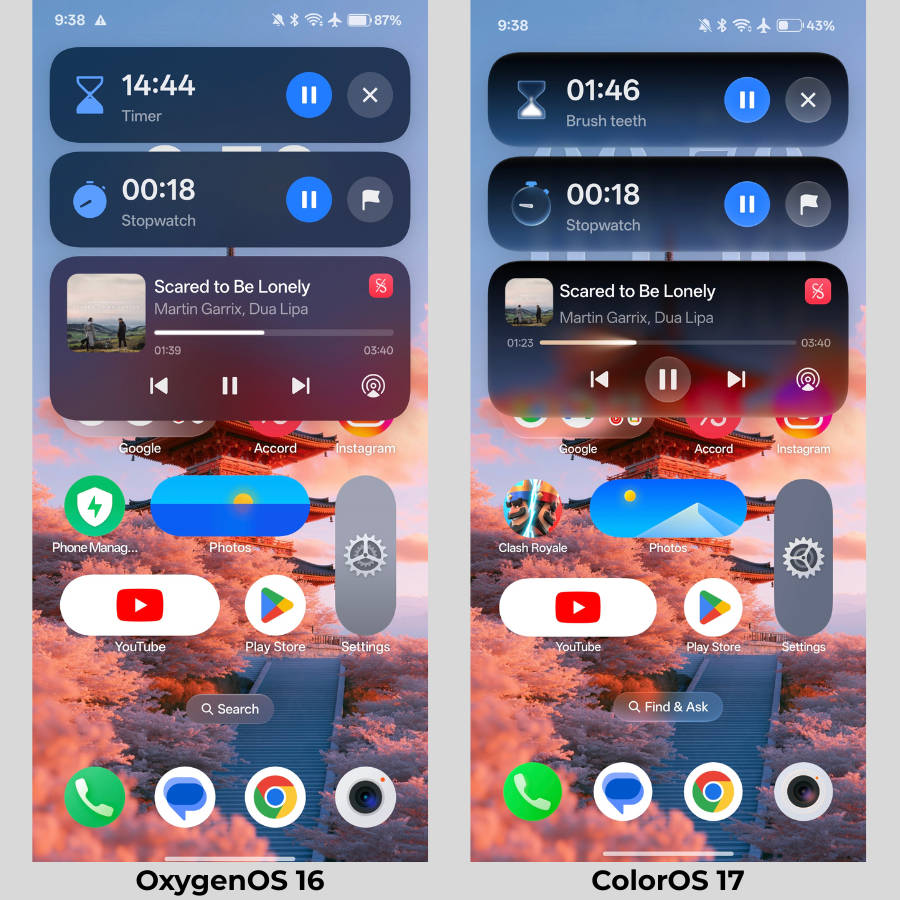
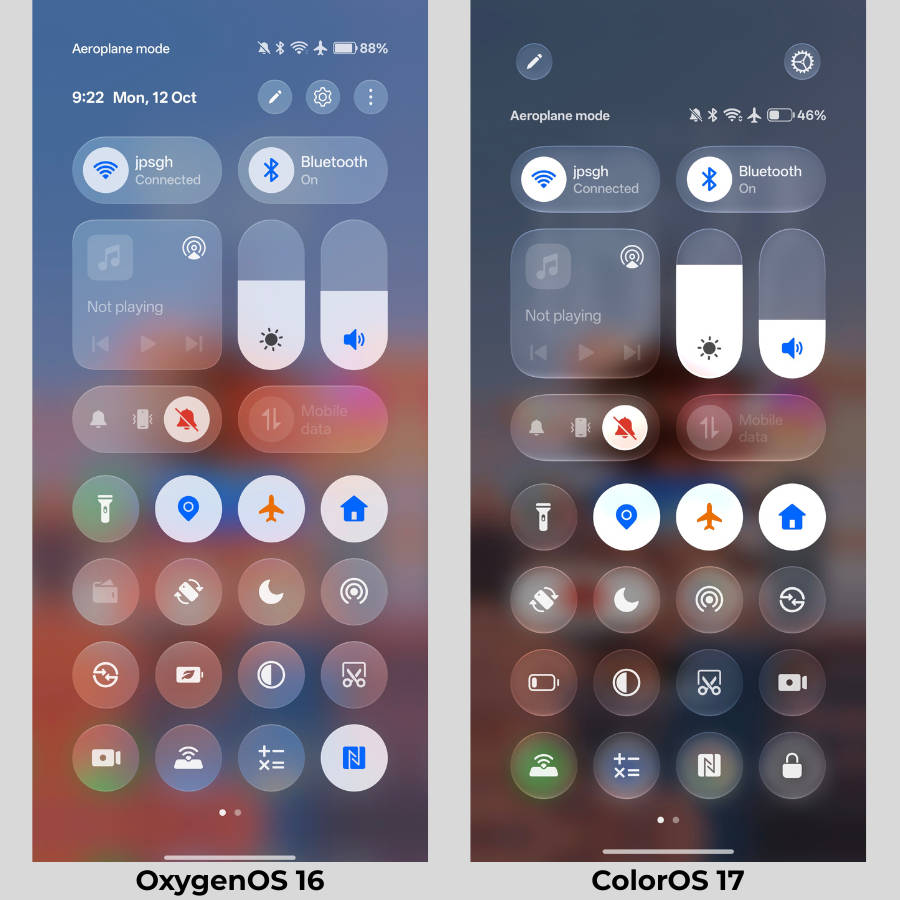
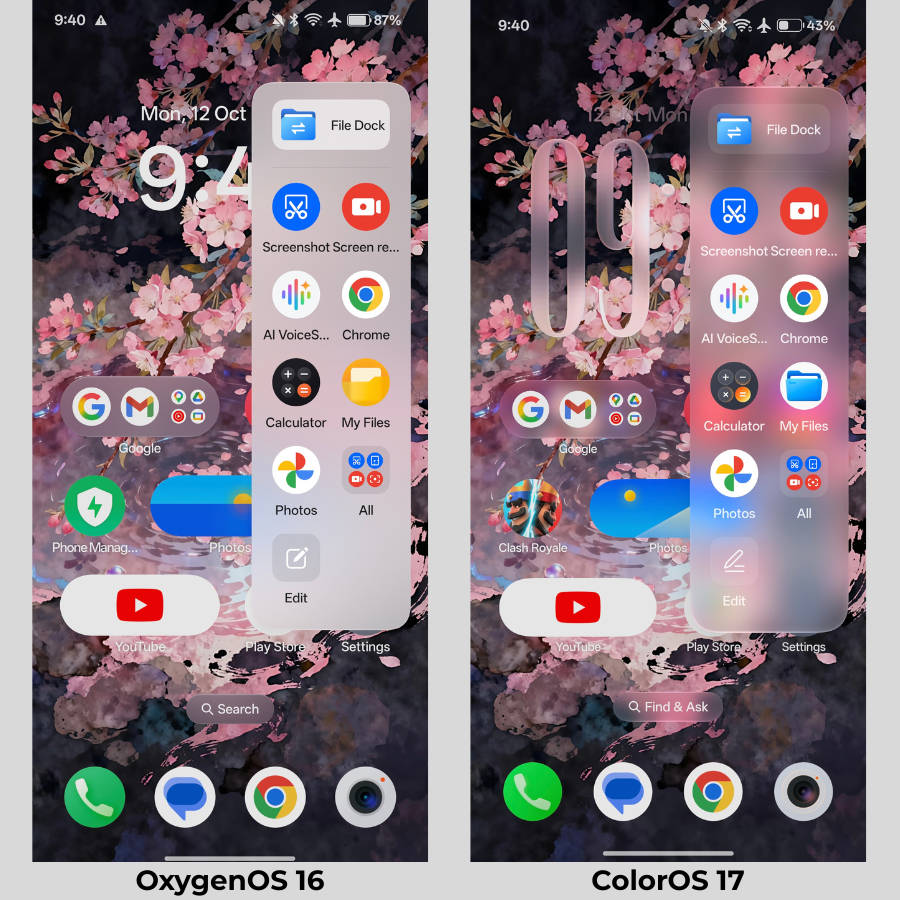
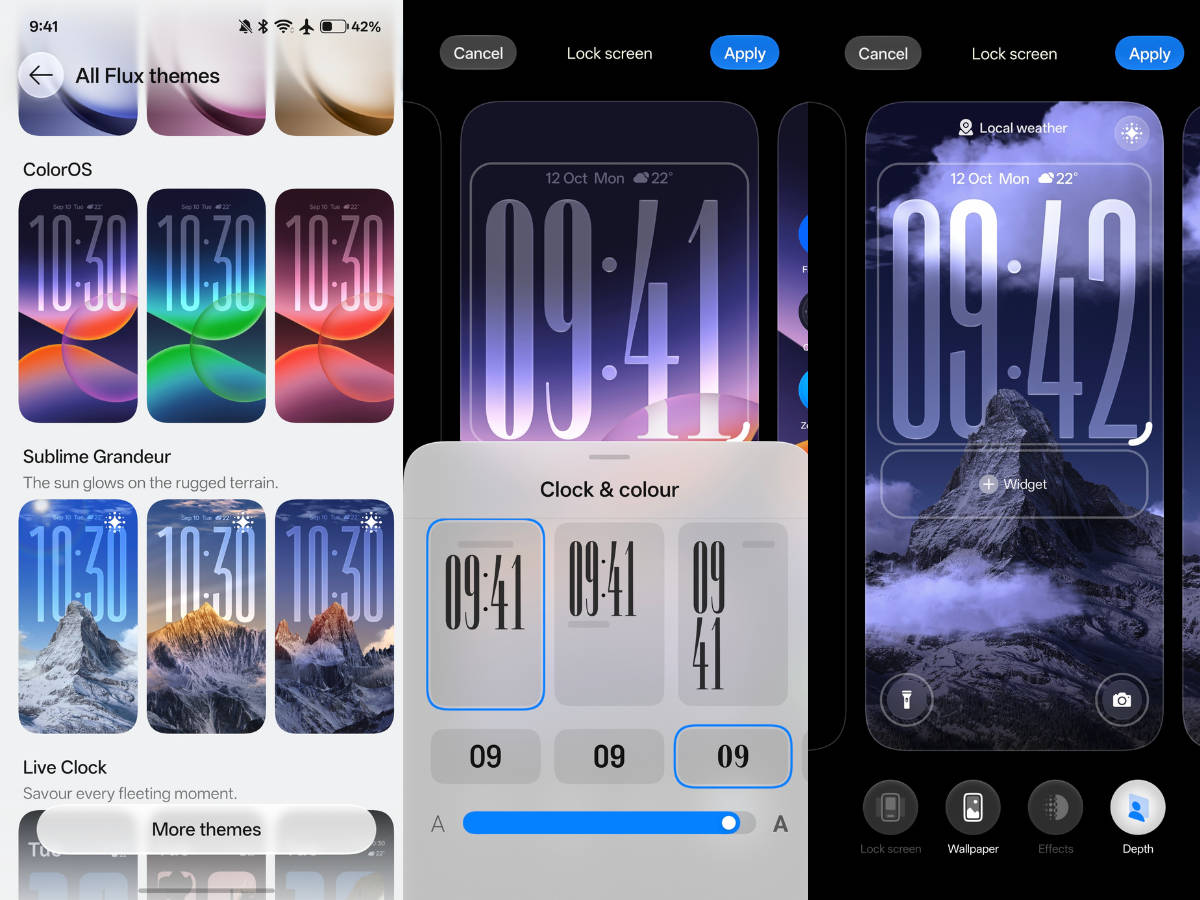
All first-party apps now feature a floating navigation bar for an immersive experience, including Clock, Notes, File Manager, and others, while the quick settings panel has been slightly altered to add glass effects and a more pronounced contour glow. Live Alerts get a translucent, gradient finish, while the Music alert includes a glowing seekbar that matches the album art.
Fairly enhanced customisation
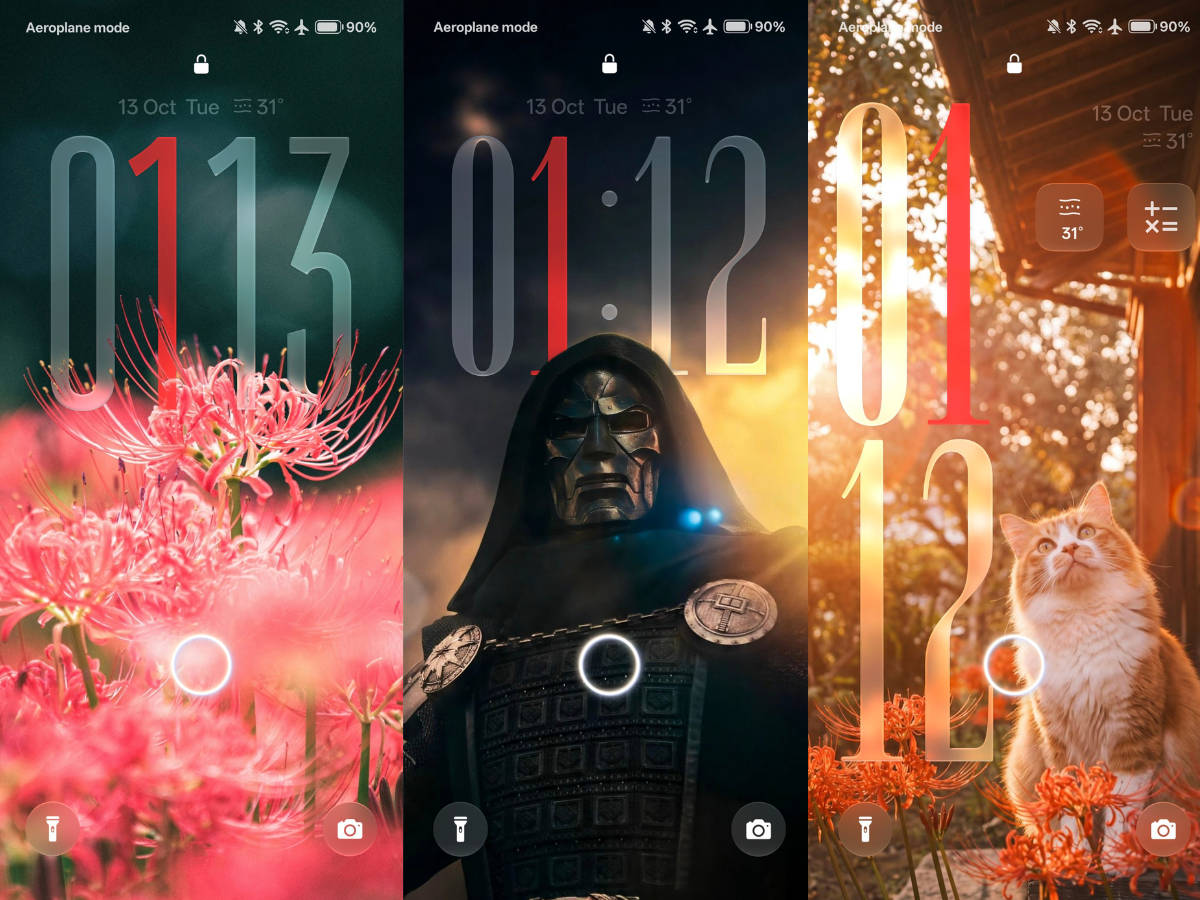
While the ColorOS 17 update drops the distinctive OxygenOS icons in favour of ColorOS ones on OnePlus devices, you now get a couple of new lockscreen clock styles, plus the ability to add or remove the colon from the time. Then there’s the Flux Clock widget, which ensures the clock moves seamlessly to its position when locking and unlocking the device. Simply put, when it comes to customisation, ColorOS 17 builds on existing options with refinements rather than major overhauls.
Performance boost
The New Luminous Rendering Engine cuts RAM usage by up to 25 percent and rendering load by up to 30 percent. As a result, everyday interactions feel silky smooth and responsive.
AI improvements
AI Mind Pilot has been introduced and can serve with answers from ChatGPT, Perplexity, and Gemini. Within AI Mind Pilot, the Agent Mode can organise files, create collages, and extract information from local content. AI Mind Space, introduced with ColorOS 16/OxygenOS 16 has been upgraded to deliver real time flight and train status when you feed in the ticket details beforehand.

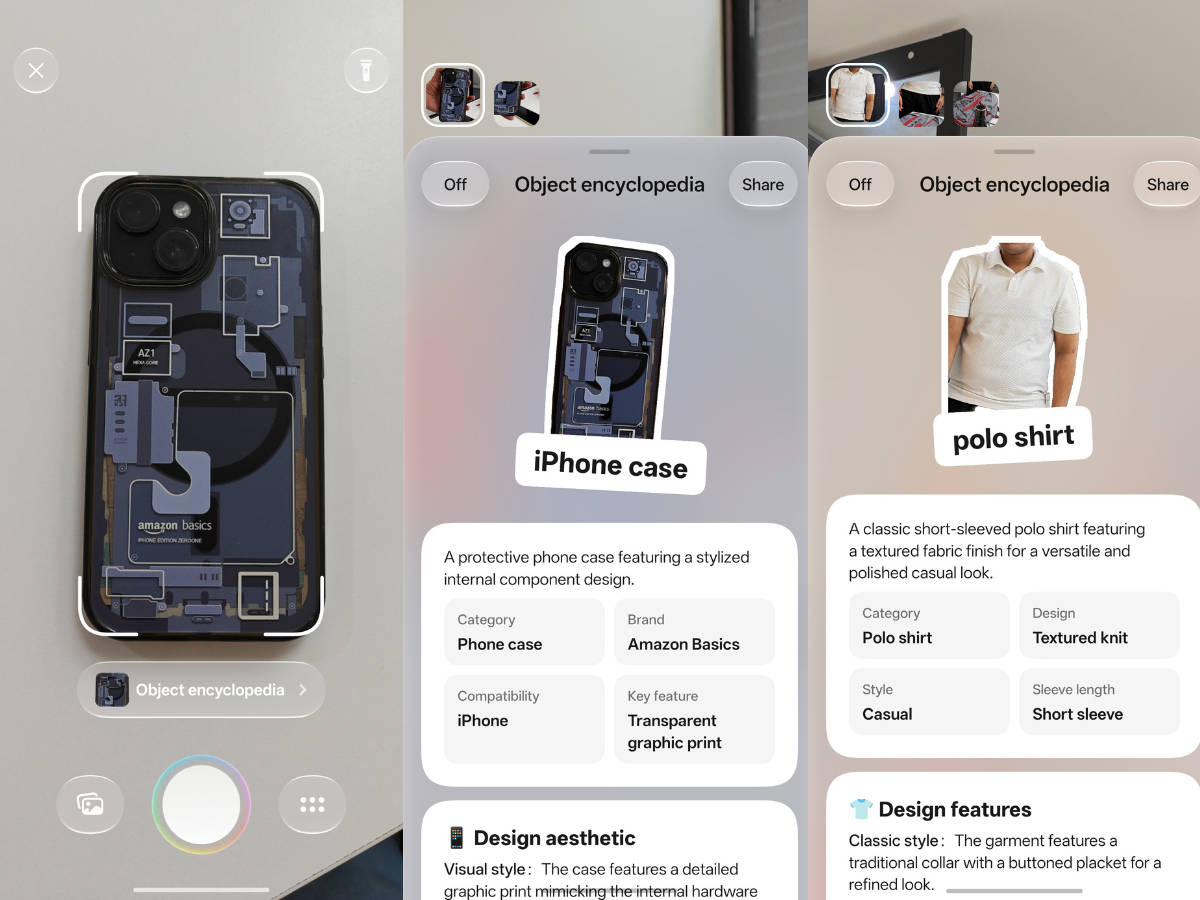
Just like AI Mind Pilot, OSee is a new app on ColorOS 17. It uses AI to look up information by simply pointing at an object, just like Google Lens. However, it goes beyond that and even provides additional information, such as the calorie and protein content of a particular dish or suggesting matching outfits with a given apparel.
While some quirks from prior ColorOS versions remain, such as not being able to resize all the toggles in the quick settings panel, ColorOS 17 as a whole is a well-rounded package that excels in usability, personalisation, and AI functionality, even compared to other major Android 17-based skins. During our time with it, ColorOS 17 left us thoroughly impressed, especially with its silky-smooth, fluid feel.
FAQs
When was ColorOS 17 released?
OPPO officially unveiled ColorOS 17 for global markets on October 13th, with rollouts officially beginning on October 29th for top-end OPPO, OnePlus, and Realme smartphones. The update is expected to be completed released for all eligible devices by the end of Q1 2027.
Does ColorOS 17 bring a major visual redesign?
Beyond introducing a new design framework, Living Flow Design, ColorOS 17 focuses on the core experience by improving stability, performance, AI productivity, and smoothness rather than introducing a major UI overhaul.
Will it be possible to downgrade from Android 17-based ColorOS 17 to Android 16?
As has been the case with ColorOS in the past, users are likely to be offered the option to downgrade from Android 17-based ColorOS 17 to Android 16. In fact, OnePlus has assured that it’ll provide a procedure for users willing to switch back to OxygenOS 16 if they don’t find ColorOS 17 on par with OxygenOS’ signature design, look, or specific features.
Which devices will get the ColorOS 17 update first?
As with major Android OS releases, OPPO, OnePlus, and Realme are prioritising their latest flagships for the ColorOS 17 update. Starting end of October, the OPPO Find X9 and Find X8 series, OnePlus 15 series, and Realme GT 8 Pro are promised to get the stable update.