Dell Alienware 16X Aurora Review: A Subtle-Looking Gaming Powerhouse


Dell’s mid-to-high-range gaming Aurora lineup has been available for some time now, but we only recently got our hands on the review units. The Alienware 16X Aurora is the focus of this review, and it is a beefy package featuring a top-end Intel Core Ultra 9 275HX chipset paired with the Nvidia GeForce RTX 5070 GPU.
Retailing around Rs 1.8 Lakhs for the base variant with 16 GB of RAM and a 512 GB SSD, and going up to Rs 2.4 Lakhs for the 32 GB + 1 TB model, this is firmly a premium product for potential buyers. I have been using the device for about a month now and have a pretty decent idea of how it performs as both a primary gaming machine and a daily driver. In this review, I’ll share my views on this laptop as a gaming machine, a daily driver and if it is worth buying for the price.
Table of Contents
An Alienware that doesn’t look like an Alienware
I’ve often associated the Alienware lineup with flashy designs, jagged edges, quirky lids and RGB elements aplenty. And I’m often substantiated in my perception with most of this lineup. Just look at the recently launched Alienware 18 Area-51, and you’ll know what I’m talking about right away.

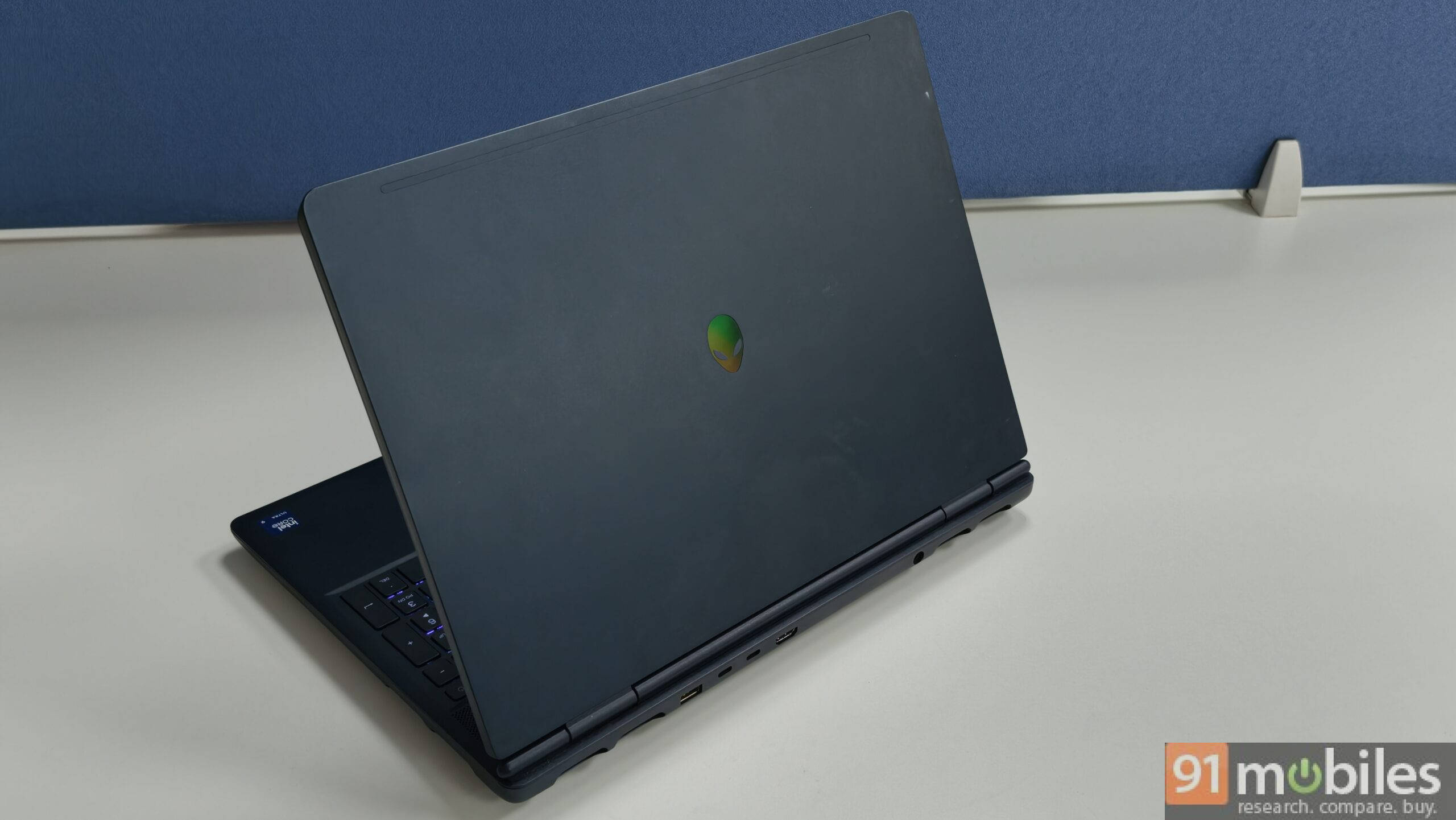
It was a pleasant surprise when I first saw this laptop, with its navy blue colourway that Dell calls “Interstellar Indigo”. It has a matte finish and does a reasonable job against fingerprints, but isn’t entirely successful. The only other design characteristic of this device is the iridescent Alienware logo on the back, which reflects light differently depending on the angle you look at it from.


The build quality, however, is pretty sturdy with an anodised aluminium top and bottom. The all-metal design also means you may be prone to occasional static shocks from your clothes, so be a little careful with that. It is a hefty machine for sure at 2.6kg, but that is well within the norms for a gaming laptop. The 16-inch screen has a wide 16:10 aspect ratio and looks pretty tall, with well-proportioned bezels around the edges.

Just above the keyboard is a mesh that helps with air intake and has the speakers nestled inside it, so the audio doesn’t drop when the laptop is placed flat down. The overall flex in both the keypad area and the lid is also quite minimal. The lid has a slight lip, which helps open up the lid quite easily with one hand. The laptop has a good design on all fronts, and I appreciate it quite a bit.
Plenty of ports and an effective cooling system
The laptop comes pretty loaded in terms of ports, and you basically get a complete set to tackle all your day-to-day needs. My only real peeve here is that almost all major ports lie at the rear of the device, but there are no logos to highlight which is which. It makes it a little annoying to constantly have to bend over or rotate the machine to plug into the required port you want before you get used to it.

Check out the entire list of ports below:
- 2x USB 3.2 Gen 1 (5 Gbps) ports
- 1x USB 3.2 Gen 2 (10 Gbps) Type-C port
- 1x Thunderbolt 4 (40 Gbps) port with DisplayPort 2.1 with Power Delivery
- 1x HDMI 2.1 port with Discrete GPU Direct Output
- 1x 3.5mm universal audio jack
- 1x RJ45 Ethernet port (1 Gbps)

As for cooling, the Alienware 16X Aurora comes with Dell’s Cryo-Chamber design. It essentially comprises two intake vents towards the rear of the laptop, one directly at the bottom, and 4 exhaust vents along the sides and back. This design helps the device effectively manage heat with its dual fan setup. The system is pretty effective in practice, too, and certainly has a big presence when the fans are on full blast.

The heat management is rather impressive, which is necessary as well, since the flagship Core Ultra 9 275HX can get insanely hot. The chipset quickly climbs up in temperature and can easily reach over 100 degrees Celsius when you play demanding games. With the fans at full blast, the temperature spikes, while still present, are much more manageable and hover around 95-97 degrees Celsius.
The GPU temperature stays around 85-87 degrees for even the most demanding titles I played on this machine, and if you cap frame rates to 60-90fps, it sits at a much more comfortable 70-degree range. CPU temperature drops similarly when framerates are capped and hovers in a more comfortable 85-90 degree range, depending on your graphical settings.
Excellent gaming and day-to-day performance
It may not come as a surprise to anyone here, but this is a mighty impressive machine when it comes to performance, both in gaming and day-to-day usage. With an Intel Core Ultra 9 275HX, an NVIDIA RTX 5070 GPU, 32GB of DDR5 RAM, and a 1TB SSD, there’s little to complain about here in terms of raw specifications.
With 32GB of RAM out of the box, you’re set for the foreseeable future, and given the ongoing RAM shortage affecting the industry, that is a big positive. That being said, if you do need more headroom, the two DDR5 slots are user-upgradeable, letting you boost your rig whenever you want. You get the same flexibility for storage: while the speedy 1TB drive will satisfy most users, an empty slot is available for easy expansion down the line.
The CPU has a 55W TDP, and the GPU has a 115W TGP, though Dell states that the laptop’s total performance power (TPP) rating is capped at just 155W. This makes sense, as Dell has probably capped the TPP to ensure the system doesn’t heat up too much. Nonetheless, the 15W difference in TPP doesn’t cause any drop in the performance, as you can see in our benchmarks.
Thanks to the flagship processor and a high-end 8GB VRAM RTX 5070 GPU, you can comfortably play any AAA title you want at Ultra graphical settings at 1080p resolution or at high settings at 2K resolution. There are, of course, some exceptions to this rule, particularly Unreal Engine 5-based games, which have unfortunately become more mainstream. Even still, with DLSS enabled, you can comfortably play any title you want at an impressive graphical fidelity.
In terms of performance benchmarks, it has pretty good results, although a surprise came along when I compared it with the ASUS TUF A16 RTX 5070, which is roughly Rs 60,000 cheaper than my particular variant and offers a similar set of core specifications. You can check it out below:
| Model | Alienware 16X Aurora | TUF A16 |
| Cinebench R24 MT | 1900 | 1159 |
| Cinebench R24 ST | 134 | 113 |
| Cinebench R23 MT | 33935 | 20194 |
| Cinebench R23 ST | 2199 | 1929 |
| PCMark 10 | 9110 | 7549 |
| PCMark 10 Extended | 12179 | 10489 |
| Geek Bench 6 ST | 3049 | 2703 |
| Geek Bench 6 MT | 19977 | 16011 |
| Geek Bench OpenCL | 139191 | 138405 |
| Geek Bench Vulcan | 120581 | 114726 |
| 3DMark Time Spy Extreme | 6756 | 6570 |
| 3DMark Time Spy | 14139 | 14025 |
| 3DMark Fire Strike Ultra | 8526 | 8375 |
| 3DMark Fire Strike Extreme | 16594 | 17534 |
| 3DMark Fire Strike | 37798 | 32270 |
| 3DMark Night Raid | 74339 | 66656 |
The TUF A16’s performance output is a step behind the 16X Aurora, but the difference isn’t so stark. While the benchmark comparison is pretty handy, in actual gaming performance, the difference is minimal at best. For context, both these laptops have a similar WQXGA (2560 x 1600p) panel, so it makes gaming comparisons at native resolution easier. We kept the graphical settings identical at these resolutions for a fair comparison. Here are some numbers:
| Games-Resolution | Alienware 16X Aurora FPS | TUF A16 FPS |
| Cyberpunk 2077-QHD | 68 | 67 |
| Cyberpunk 2077-QHD (DLSS+RT) | 59 | 58 |
| Black Myth: Wukong-QHD | 43 | 45 |
| Black Myth: Wukong-QHD (DLSS+RT) | 48 | 49 |
The ASUS TUF A16’s performance is practically identical when it comes to gaming numbers, with a minimal variation between titles. Even their thermal performance isn’t far off, and both devices do perform similarly here. So what’s the catch here, you may ask? Well, it’s the display, which I’ll talk about next.
An abundantly bright and sharp QHD+ display
The Alienware 16X Aurora comes with a 16-inch 2560 x 1600p display with a blistering 240Hz refresh rate, 100% DCI-P3 colour coverage, and a whopping 500 nits of brightness. For comparison, the TUF A16 (review) has a 400-nit, 165Hz panel with 100% sRGB colour coverage. The difference between the two panels is not small. The Alienware 16X Aurora is exceptionally bright even in well-lit rooms, and the colours make content appear vibrant.

With a 240Hz refresh rate, we are talking esports-level support. If you are a competitive gamer, you know this is easily worth it. Even for regular gamers, you can comfortably push high frame rates well beyond 200 on older titles and enjoy an extremely fluid experience, which is no small thing.
That is where a major chunk of the price difference lies, and the rest can be attributed to the more premium Alienware tag and the accompanying improvements in build quality and customer support. Keep in mind that the Alienware lineup competes with the premium ROG lineup from ASUS, not their more affordable TUF series gaming laptops.
The speakers on this device are another point of merit. They can get extremely loud and have good low-end and mid-range output. They easily drown out the fan noise when running at high RPM, which I feel is necessary for an immersive experience if you do not like wearing headphones like me.
Keyboard, webcam and battery life
The laptop uses a pretty basic AlienFX keyboard with a single-zone RGB layout. The keys have good travel and a slight clickiness to them. The overall typing experience on the keypad is pretty decent, and you get used to the layout quickly. The trackpad is pretty substantial in terms of size as well, and it works well with Windows Gesture support. There is an IR FHD webcam at the front, which does the job as required.

Let’s talk about battery life now. The device can easily run on the 94Wh battery for around 3.5 hours when unplugged, at a 70-80% brightness level and 240Hz refresh rate. This, in my experience, is more than sufficient even in bright rooms. However, on battery, the performance drop is pretty evident as the processor struggles slightly to deliver a similar level of performance. The 280W charging brick can quickly top up the device in around 2 hours. Then again, you will be using this device plugged in for most of the time, so that is not a key concern here.
Is the Alienware 16X Aurora worth it?
My particular variant (OAN1625101301MINO) with 32GB RAM and 1TB SSD retails for Rs 2,39,990 on Dell’s official store. This price positions it as a premium offering, and the laptop delivers on that promise. While you will find cheaper RTX 5070 laptops in the market, like the ASUS TUF F16, which is about Rs 40,000 less, the Alienware justifies the premium with a superior build and display quality.
When looking at competitors, the Legion Pro 5 retails at Rs 2,25,000 and offers nearly identical specifications, but opts for a 165Hz OLED panel compared to Alienware’s offering. On the higher end, spending around Rs 2.6 Lakh gets you the Legion Pro 7, which upgrades you to an RTX 5070 Ti with 12GB VRAM and a similar 240Hz OLED screen.
However, raw specs aren’t everything. For a product at this price point, the ownership experience matters just as much. And Dell’s Alienware lineup has a robust support network and priority repairs, giving you peace of mind that other brands might not match. The Alienware 16X Aurora ends up being a well-balanced option. It offers excellent 1080p gaming performance and good 2K support. Add to that its stellar display and a service network that adds real value to your purchase, and you’ve got a serious gaming machine worth considering.
Editor’s Rating: 8.2/10
Pros:
- Effortless 1080p gaming and does well at 2K resolution
- Premium build quality with an understated design
- Exceptional 240Hz QHD+ display with 500nits brightness
- Good variety of ports
Cons:
- The processor tends to heat up
- No OLED variant

