HP Omnibook 5 Flip 14-fp0789TU Review: Best Convertible Under Rs. 70K?


If you are looking for a productivity laptop under 70K, there are a lot of options for you to choose from. You can check out our list of the best laptops under Rs 70,000 here. Today, we have with us a new addition to this price range – the HP OmniBook 5 Flip. We recently reviewed the HP OmniBook 3, powered by the AMD Ryzen AI 5 340, and we will compare the performance of the 2 in the details below. However, it is important to note that the OmniBook 5 Flip I have here is a convertible laptop, while the OmniBook 3 was not. So your choice may also depend on the form factor you are looking for.

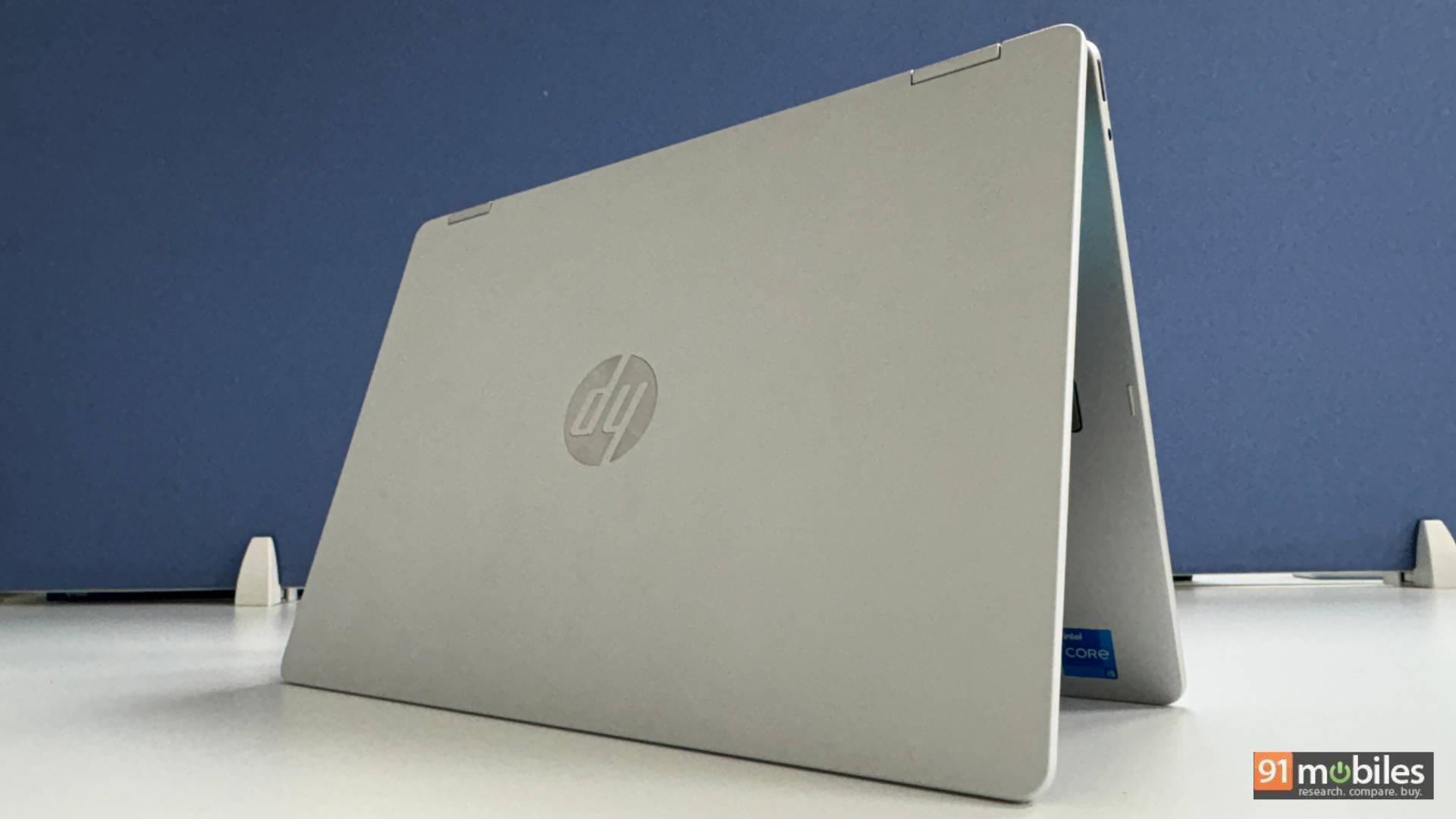
Table of Contents
Built like an HP: familiar and sturdy
Kicking things off with the design, we have a very minimal and traditional HP design. The lid of the laptop is very traditional HP silver with the brand logo right in the middle. Lift the lid, and you are greeted with the 14-inch IPS display. The hinge is strong with almost no wobble for the display, which is a good thing since the laptop can go all the way back to 360 degrees and be used as a tablet. You can’t lift the lid with a single finger, and that is a shame. It isn’t a deal breaker, more a quality of life improvement, something we have seen on other similar-priced laptops.

Keyboard and trackpad
Moving to the keyboard, the keys feel slightly smaller than I’d like, but it’s something I’ve got used to quite quickly. The keyboard is fine. It is a little squishy to type on, not in a bad way, especially if you are someone who types a lot. It’s easy to type on the keyboard enthusiastically, which is nice. I miss full-sized directional buttons, but that’s just me.

The keyboard is backlit and gets the job done well for viewing the keyboard in a low-lit situation. I was on a flight recently and used the laptop to work while the lights in the flight were off, and I could see the keyboard quite easily. The laptop does not have a fingerprint reader but supports login via Face recognition (Windows Hello).

Moving over to the trackpad, it is a staple budget HP, and that isn’t a bad thing. If you have used an HP laptop in the past, you will feel right at home. It is fairly large, smooth and supports the standard multitouch we have come to expect from modern Windows laptops. I personally switched off the “physical” right click and used the 2 fingers tap to right click, as the gestures and taps are precisely recognised on the laptop.

Overall, the build of the laptop is good, and it feels robust. The laptop feels sturdy with minimal flex in the body. The palmrest is also large and comfortable for long typing sessions.
Connectivity options
Coming to the connectivity options, the left side of the laptop houses 1 USB-A port, an HDMI port and 2 USB-C ports. The right has the headphone jack and one more USB-A port.

The laptop charges via USB-C, and there is no dedicated barrel port for power, which is nice. The base of the laptop has 2 rubber strips to keep the device elevated for good airflow when working on a desk.

Moving over to the convertible form factor, it’s easy to place the laptop on a table or your bed in tent mode for easier content consumption or Netflix binging. However, in tablet mode, I found the device to be a tad heavy to hold for long durations and ended up putting it in tent mode or going back to the traditional laptop form factor for ease of use. It comes with a stylus as well for your creative needs, so your mileage may vary based on how you use the device.
Display: Gets the job done nicely
The display of the HP OmniBook 5 Flip is functional. It has a 14-inch 16:10 IPS display, which is big enough for me to have my spreadsheets, social media feed, documents and PPTs easily visible. There is a bit of glare, especially if you have a direct light source on the display, so you may want to angle it accordingly. While the display isn’t the brightest I’ve seen, it got the job done well under some sunlight, too. Watching a couple of movies and trailers on the device was a good experience too.

Sure, you will see some light bleed when you watch content in a pitch dark room, but this is a multipurpose machine and the fact that the display is “fun” when it needs to be and functional when it needs to makes it alright in my books. It’s a 60Hz pane, which is more than enough for everyday use. The viewing angles are decent, too and having a few people huddle at my desk at work to catch a new movie trailer was a good experience for all involved.
The speakers sound better than I expected!
Moving over to the sound output, the laptop has 2 bottom-firing speakers, and when kept on a table, they sound good. Watching a couple of action movies, shows like Young Sheldon, or even attending a few work calls, the speakers sound pretty good for the package on offer.

Sticking with video calls, special shoutout to the camera that does a great job of capturing you in frame, even if there is a light source behind you (like a window). The mic, too, is great at catching your audio and, through AI, helps reduce and in some cases eliminate background noise for a seamless productivity experience. – These are definitely plus points for the productivity and education-centric use cases.

Coming back to the speakers, they can get loud, and you can enjoy the occasional movie on them. They pack a decent punch, making the laptop a good overall package.
Performance
I’ve already highlighted above that, for productivity, the laptop works very well. So let’s jump into some synthetic benchmarks and see how this laptop performs against some of its peers.
Synthetic Performance
Below is a look at some synthetic benchmarks of the HP OmniBook 5 Flip, powered by the Intel Core i5-1334U.
Additionally, we’ve also compared it to the ASUS Vivobook S 14 Flip TP3402VAO, powered by the Intel Core i5-13420H, the HP OmniBook 3, powered by the AMD Ryzen AI 5 340, and the Acer Swift Neo, powered by the Intel Core Ultra 5 – 115U.
| Benchmark / Laptop | HP Omnibook 5 Flip 14 | ASUS Vivobook S 14 Flip | HP OmniBook 3 15 | Acer Swift Neo 14 |
| Cinebench R23 MT | 8842 | 8548 | 11031 | 4967 |
| Cinebench R23 ST | 1696 | 1684 | 1906 | 1545 |
| PCMark 10 | 5381 | 5444 | 6797 | 5330 |
| PCMark 10 Extended | 4974 | 4560 | 6081 | 4813 |
| Geek Bench 6 ST | 2331 | 2257 | 2784 | 2055 |
| Geek Bench 6 MT | 8782 | 7850 | 10606 | 6975 |
| Geek Bench OpenCL | 12267 | 9575 | 13298 | 12514 |
| Geek Bench Vulcan | 16061 | 11116 | 20565 | 13284 |
| CPU - ONNX - Single Precision | 2343 | NA | 2815 | 1742 |
| CPU - ONNX - Half Precision | 954 | NA | 1595 | 848 |
| CPU - ONNX - Quantized Score | 4550 | NA | 7152 | 3704 |
| CPU - OpenVINO - Single Precision | 2290 | NA | 3755 | 1880 |
| CPU - OpenVINO - Half Precision | 2282 | NA | 3829 | 1835 |
| CPU - OpenVINO - Quantized Score | 4369 | NA | 10851 | 4652 |
| 3DMark Time Spy Extreme | 699 | 491 | 944 | 718 |
| 3DMark Time Spy | 1490 | 1072 | 2035 | 1652 |
| 3DMark Fire Strike Ultra | 1061 | 690 | 1333 | 861 |
| 3DMark Fire Strike Extreme | 1915 | 1331 | 2507 | 1676 |
| 3DMark Fire Strike | 3784 | 2875 | 4902 | 3520 |
| 3DMark Night Raid | 14905 | 12301 | 21029 | 14222 |
As you can see, the Intel Core i5-1334U performs well on paper when compared to the competition. It may not outright outperform the competition, but it is no slouch either, ensuring that it gives you the performance you need when multitasking or running some intensive apps (the kinds one would on a 70K machine). The Intel Core i5-1334U is not an "AI" processor; we didn't expect it to perform well in our AI benchmarks, and it shows.
Battery Life and real-world performance
Where the HP OmniBook 5 Flip outperformed the above competing laptops is in PC Mark Battery. The laptop lasted almost 14 hours, which is truly impressive, more than 5 hours longer than the nearest rival from the list of laptops shared above.

Moving over to real-world performance, I got through my workday without resorting to the charger. This was a typical 8-9 hour workday, with a few Google Meet calls, emails, working on content, checking videos, and some time spent on YouTube and Netflix.
Gaming
We played GTA V and Valorant on the laptop to see how well it works for casual gaming, and the device did not disappoint. We recorded an average of 46 FPS in GTA V and 129 FPS in Valorent at 1080p. As for the settings, for GTA V, we played the game with settings at High, Anisotropic Filtering 8X, Soft shadows, MSAA (Multisample Anti-Aliasing) off and FXAA (Fast Approximate Anti-Aliasing) on. For Valorent, we kept the settings at low with MSAA off
Verdict: Worth It?

The HP OmniBook 5 Flip find itself in the crowded space of laptops priced between 65-70K. It, however, stands out from the competition, thanks to a host of good features on offer. It is a convertible laptop for those that need to use it in tablet mode, has good overall performance, a good display and impressive speakers. The keyboard and trackpad get the job done as well. The build is good overall, considering the price. It has a decent selection of ports as well. What it lacks is that I personally feel the laptop is a tad heavier than I like. Otherwise, it is a value-for-money proposition for productivity on the go.
Editor's Rating: 7.5 / 10
Pros:
- Good performance for everyday use
- Good speakers and a decent webcam
- Well built with a nice display
- Convertible form factor
Cons:
- A tad heavy

