OPPO Bubble review: a fun idea that needs a little more polish


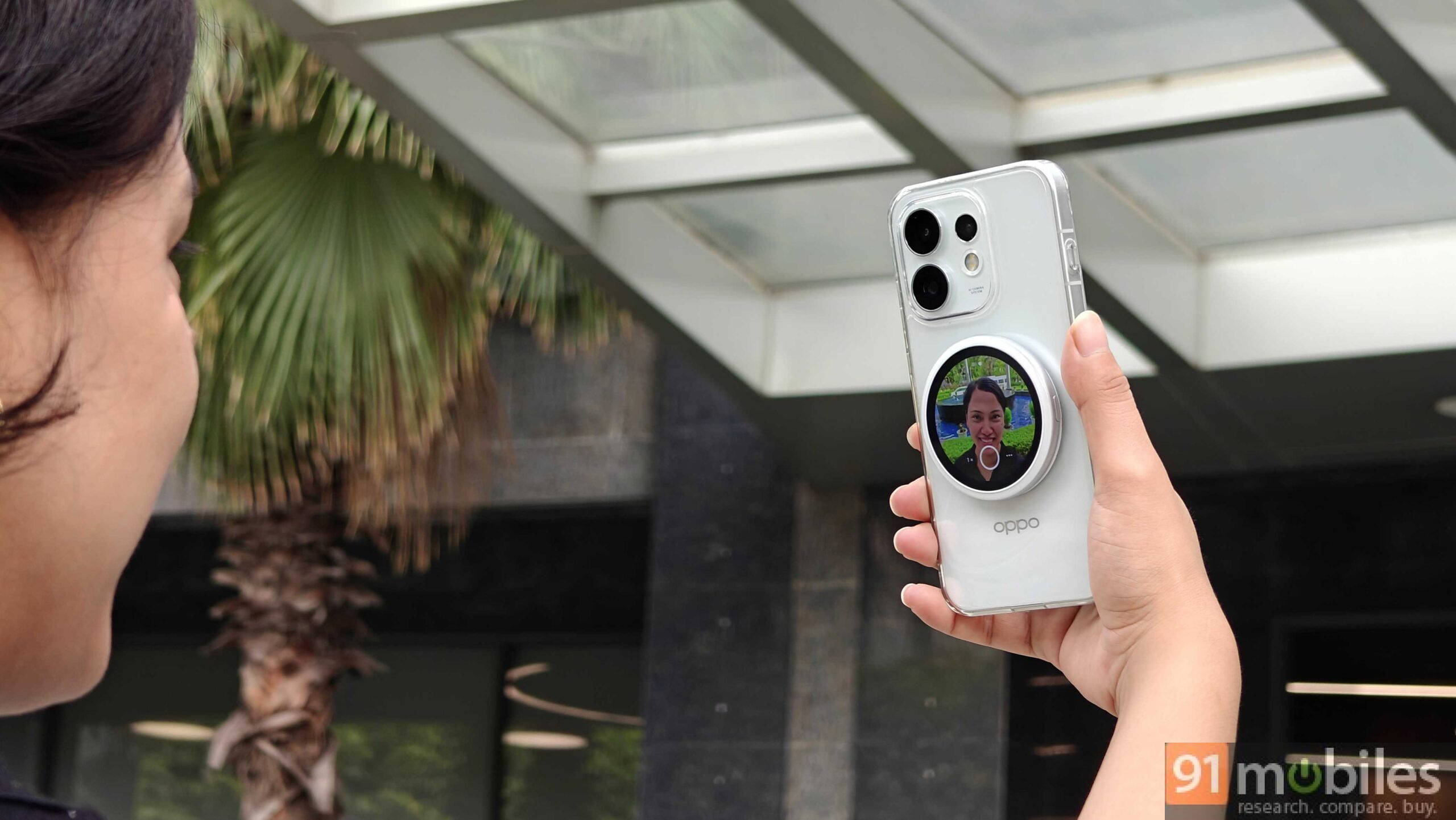
I was genuinely surprised to learn that the OPPO Bubble is launching in India. Even a year ago, a product like this would have felt unlikely. But smartphone brands here seem to be gradually becoming more willing to experiment, embracing the kind of playful, “cute” culture that’s typically reserved for other markets.
The OPPO Bubble itself isn’t overtly cute, but the concept certainly is. And in a smart move, OPPO has tapped into one of the biggest Gen Z and Millennial trends: bag charms. So instead of being just a camera accessory, the Bubble also doubles as a stylish bag charm that you can hang alongside your favourite trinkets.
But beyond the aesthetics, how well does it work as a camera accessory? We spent some time with the OPPO Bubble to find out.
Table of Contents
OPPO Bubble key specs
Before diving into the experience, here’s a quick look at the specifications. The OPPO Bubble features a circular 1.73-inch AMOLED display with a peak brightness of 600 nits. It packs a 560mAh battery, comes with an IP54 rating for dust and splash resistance, and supports Bluetooth 5.2 and 2.4GHz Wi-Fi. Charging is handled via a USB Type-C port.


The design: Cute or not?
The OPPO Bubble is a compact, lightweight circular display that resembles a pocket mirror. It’s easy to carry around and offers two ways to use it: you can either attach it to the back of your phone or use the included star-shaped hanging clip to turn it into a bag charm. Since the Reno 16 series doesn’t support MagSafe, OPPO includes a magnetic sticker that needs to be attached to the back of your phone or case. We found this a little inconvenient because it’s essentially a one-time application. If you frequently switch phone cases, you’ll have to choose one to dedicate to the sticker.

Another issue is that if you stick the magnetic ring directly onto your phone and then put a case over it, the Bubble doesn’t attach securely. The more practical approach is to apply the sticker to your phone case instead, which is what we ended up doing. If you’re using a MagSafe-compatible device like an iPhone, however, things are much simpler. The Bubble snaps on magnetically without requiring the included sticker. And yes, it works with an iPhone too, which we’ll get into later.
How does the OPPO Bubble work?
The OPPO Bubble is a companion accessory designed to work with the Reno 16’s cameras. Its primary purpose is to act as a wireless viewfinder for the rear cameras, allowing you to take higher-quality selfies using the main camera system instead of the front camera.
The Bubble connects to the Reno 16 (review) via Bluetooth, and the setup process is seamless. Since the Reno 16 comes with the Bubble companion app pre-installed, pairing takes only a few moments. OPPO has also announced an Android app for compatibility with other smartphones, which seems to have started rolling out. Once connected, simply unlock the Bubble and swipe up on its screen to launch the Reno 16’s camera. Impressively, this works even when the phone is locked, making it quick and convenient to capture photos or record videos remotely (within the Bluetooth range).


Beyond camera controls, the Bubble also functions as a customisable smart accessory. You can choose from built-in wallpapers or set your own through the companion app. Double-pressing the Bubble’s screen lets you switch between the default wallpapers, while custom images need to be added from the app. The device also includes interactive pet wallpapers, with playful options such as Meow, Popo, and Rara. You can keep the display always on, schedule it to turn off after one, two, or three hours, or simply lock it instantly using the power button.
Experience with the OPPO Bubble
We spent some time using the OPPO Bubble with the Reno 16, and the overall experience was straightforward. While the Bubble snaps onto the Reno 16 securely enough with the magnetic sticker, you’ll still need to handle it with some care, as it can slide off if the phone is moved abruptly. On an iPhone, however, the attachment feels noticeably more secure thanks to the built-in MagSafe magnets.
UI, display, and battery life

Using the Bubble is intuitive. After launching the camera from the Bubble, you can immediately start capturing photos or swipe right to switch to video recording. The shutter can be triggered either by the on-screen capture button or the physical side button. In practice, the on-screen button is the better option, as pressing the side button tends to shift the Bubble slightly, making it less ergonomic.
The display remains legible even outdoors under direct sunlight. However, it lacks auto-brightness support; you will have to adjust the brightness manually according to the environment. The Bubble promises close to 10 hours of usage between charges at medium screen brightness and uses a Type-C charger to juice up.
Camera controls, features
The Bubble also offers quick controls for switching between the Reno 16’s fixed focal lengths (0.6x, 1x, 2x, and 3.5x), enabling the rear camera mirror, and activating the countdown timer. Portrait mode and OPPO’s Pop Camera filters are supported as well, although these still need to be selected manually on the phone before shooting.
Front camera
Rear camera
Capturing photos is quick and responsive. Unsurprisingly, the results are noticeably better than those from the front camera, thanks to the superior rear camera hardware. As the camera samples above demonstrate, images captured with the 50MP primary camera offer finer detail, better exposure, and improved contrast than those taken with the front camera. You can read more about the OPPO Reno16’s camera performance in our full review.
Room for improvement
However, the OPPO Bubble isn’t without its compromises. During our testing, we noticed a few minor glitches when switching control between the phone and the Bubble. Since our device was a review unit, these issues may be resolved in retail software.
We also tested the OPPO Bubble with the iPhone 17 Pro Max using the companion app available on the App Store. While the accessory does work with the iPhone, the setup process isn’t nearly as seamless. It requires connecting to the Bubble’s local network and granting screen-syncing permissions before it can function. Although we were able to get it working, the experience wasn’t as polished as it is with the Reno 16. Given that this is OPPO’s first attempt at such a product, there’s room for refinement, and future software updates could improve cross-platform compatibility.
Should you get the OPPO Bubble?
At Rs 7,999, the OPPO Bubble is more of a fun, novelty accessory than an essential purchase. Its biggest advantage is letting you use the Reno 16’s rear cameras for selfies and group shots, resulting in better image quality. That said, the Reno 16 already features an impressive 50MP selfie camera, complete with ultra-wide and close-up shooting options, so many users may not feel the need for an external viewfinder.
The Bubble could make more sense to content creators looking to capture smooth, stable footage for their vlogs. The accessory also has its own charm. Its compact design makes it easy to clip onto a bag or carry around as a stylish accessory, and it adds a unique, playful element to mobile photography. Since there aren’t any direct competitors, comparisons are difficult. If the concept appeals to you and you enjoy experimenting with smartphone photography, the OPPO Bubble can be an enjoyable addition to your setup.

