TP-Link Deco BE25 review: the promise of stable, reliable Wi-Fi, delivered


Upgrading to a mesh router system is the best way to get rid of dead zones and ensure all the smart devices around the house keep getting their uninterrupted dose of wireless connectivity – no two ways about it. And if you have a large area to cover and many Wi-Fi-enabled devices to connect, a mesh router setup is the only way to go, believe me. Since my house has a smorgasbord of Wi-Fi-hungry devices (a tad bit more than the average user, I admit), I find the promise of seamless connectivity quite exciting. Trying out TP-Link’s new Deco BE25 gave me a chance to experience the true benefits of a capable, feature-rich mesh system for myself and left me impressed.

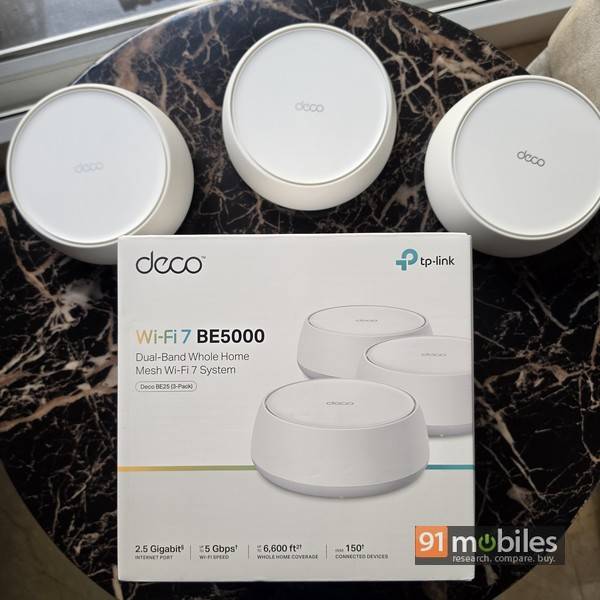
Unlike a regular router that broadcasts a signal from one point, a mesh router system uses two or more nodes to create a network. By placing these nodes at different locations in your house, you can extend Wi-Fi coverage to a larger area. This is why mesh routers are usually available in packs of two or three, comprising a primary router and one or more satellites. You can even add more satellites later if needed.
Table of Contents
Features

The routers that are included in the Deco BE25 Whole Home Mesh System are quite compact. Circular in shape and clad in white, they wouldn’t look out of place in your living room or bedroom. There are no ugly external antennas, and I didn’t feel the need to place the units out of sight. The system supports the latest Wi-Fi 7 standard (without the 6GHz band) and boasts a ton of features. Here’s a quick look:
- 5 Gbps dual-band Wi-Fi (split across bands, with up to 4.3 Gbps on 5GHz and 688 Mbps on 2.4Ghz)
- 2.5 Gbps wired connections
- Wireless and wired combined backhaul
- Multi-Link Operation (MLO)
- TP-Link HomeShield Security
- Parental controls
- Support for Google Assistant and Amazon Alexa
- Guest network
- Access control
Setup and management

Setting up a router used to involve rocket science a few years ago, but thankfully, those days are gone. The Deco BE25 is a cinch to set up and configure, as I discovered. The key is the Deco app, available both on Android and iOS. Interestingly, the Deco BE25 mesh system doesn’t have a designated primary router or satellites – the first router you set up automatically takes on the primary role, while others become the satellites. Making things easier, the two Ethernet ports on the back of each unit support auto-sensing and, depending upon the cable attached, can switch between WAN and LAN. In other words, the cable with the internet connection can be connected to either of the two ports. There’s no option to configure the routers via a web interface, however, and that’s something advanced users might miss, especially for troubleshooting purposes.


Setting up involves downloading and signing into the Deco app, connecting the internet cable to one of the Ethernet ports on the rear of a Deco router, powering it up, and then letting the app guide you through the rest. While you can check out and explore various options and settings available in the app, the basics require you to just enter the Wi-Fi name and password you want to use. Once the primary router is set up, you can just place the other units in different locations within the house and power them up – they’ll get added to the network as satellites automatically.

It barely takes more than a few minutes to set everything up. And when it is done, you can view the network status in the Deco app. You can also run a speed test and modify Wi-Fi settings. By default, a single Wi-Fi network that operates on both 2.4GHz and 5GHz is enabled, but you can choose to deactivate one of these if you want. You also get the option of enabling a guest network, which can have a different SSID and password from your main network – useful if you find yourself giving out your Wi-Fi password to visitors often. You can also limit the bandwidth available to the guest network.

If you’re really concerned about security, the Deco app provides quite a few options:
- You can create a separate network for IoT devices. This way, you can configure your smart home devices (including cameras, smart bulbs, smart plugs, etc) on this network, and keep your main network away from the prying eyes of hackers in case they try to gain access. Smart home devices can potentially be more vulnerable to hackers since they typically route their data and work via servers.
- You can also explicitly isolate specific devices from others on your network, effectively putting them in a quarantine mode of sorts.
- You can choose to get alerts via push notifications or email each time a new device connects to your network.
- An additional layer of security is available for cameras, with the available options for this being home mode and local only mode. The former puts cameras offline during set times when you’re at home, and the latter gives them access only to the local network and turns off access to the internet.
- You can also set up parental controls to monitor internet usage by kids. This lets you monitor usage time and specify time limits, track browsing history, block websites, filter out specific content types, set bedtimes and offtimes, and more.
- TP-Link’s HomeShield Centre offers paid options for the highest level of security and includes Service+ and Advanced Parental Controls. The Security+ service promises web protection, intrusion prevention, and IoT protection, and costs Rs 490 a month or Rs 3,500 per year. A 30-day trial is available. Advanced parental controls can be availed for Rs 290 per month or Rs 1,750 per year, and again, a 30-day trial is available.
Some of the other noteworthy options available via the Deco app include:
- Quality of Service (QoS), that allows you to prioritise specific devices for a set duration
- Network optimisation
- The ability to set up VPNs
- The ability to back up your network configuration settings to the cloud
Performance

I must admit the Deco BE25 proved to be overkill for my modest 200Mbps connection at home, delivering near-full speeds in the rooms I placed each of the three units in. I have a multitude of Wi-Fi capable devices spread around the house, including high-bandwidth ones like 4K TVs, plus others like phones, laptops, security cameras and quite a few smart home gadgets – all hankering for their share of the Wi-Fi pie. Worth mentioning that a couple of the security cameras are located at a distance from the nearest node – one on my balcony and another in the parking area one level below. And none of those had any Wi-Fi connectivity issues, with the three Deco BE25 units delivering stable, reliable connectivity. Using the Net Signal app, I tested for range, and the middle portion of my house, which is almost a dead zone, was getting Wi-Fi coverage thanks to Deco. I’d say that using a wired backhaul would provide even better connectivity if you have Ethernet cabling available.
Verdict

The TP-Link Deco BE25 is available in packs of three, two and one, priced at Rs 28,999, Rs 19,999 and Rs 10,499, respectively. If Wi-Fi 7 isn’t an important requirement, TP-Link also offers Wi-Fi 6 mesh systems that are priced lower. The Deco X20 (3-pack) is available for as low as Rs 13,599, while the more powerful Deco X50 (3-pack) is listed at Rs 15,999. Both support Wi-Fi 6 and boast many of the features and the same app experience as the Deco BE25. At Rs 28,999 for a pack of three, the Deco BE25 might seem a bit pricey at first glance (especially when compared to conventional routers), but the fact is that there aren’t many mesh systems available that support Wi-Fi 7 as of now. Options from Netgear and Linksys are priced much higher. Moreover, the capabilities and features offered by the TP-Link Deco BE25 are quite compelling, making it a worthy choice if you’re looking for a powerful solution for covering a large area with reliable Wi-Fi connectivity.
Editor’s rating: 8.5 / 10
Pros:
- Easy to set up
- Large coverage area
- Supports Wi-Fi 7 & up to 150 devices
- Lots of useful features
Cons:
- No web interface
- Advanced security features are paid

