OPPO officially unveiled ColorOS 17 globally on October 13th, detailing new features, improvements, and changes coming to its Android 17-based proprietary skin. It also revealed the rollout schedule, which said current-gen flagship smartphones from OPPO, OnePlus, and Realme will receive the stable version starting October 29th. However, a post on the OnePlus Community says ColorOS 17 has started rolling out to the OnePlus 15 six days early, while users on X report that their OPPO Find X9 series phones are also getting the update.
Table of Contents
Stable ColorOS 17 update rolls out to OnePlus 15, OPPO Find X9 series
Right after the global and India launch of the OPPO Find X10 series, the stable ColorOS 17 update is now seeding to the OnePlus 15 and OPPO Find X9 series, consisting of the Find X9 Ultra, Find X9s, Find X9 Pro, and Find X9. These flagship smartphones were set to receive the update on October 29th, per the official release schedule, but it appears the firmware is already free of bugs, glitches, and other issues; hence the early rollout.
Our OnePlus 15 unit, which was running a pre-release version of ColorOS 17, also received a new update this morning weighing 525MB, build number CPH2745_17.0.0.102(EX01). Users in the non-beta programme running OxygenOS 16 (Android 16) shall see a much bigger update. While we’ve already covered ColorOS 17 in detail in our hands-on story, OnePlus has published a lengthy changelog on its Community blog, which you can check out.
As for the OPPO Find X9 series, multiple users on X report that the ColorOS 17 update is live on their devices. As with the OnePlus 15, users upgrading from the closed or open beta programme to the stable version of ColorOS 17 receive an update of around 500MB, while ColorOS 16 users should get an update of just over 3.4GB.


How to download and install the update
If the ColorOS 17 update doesn’t arrive via OTA, you can update manually through the release candidate option. To do this, open ‘Settings’ and select ‘System & update ‘, then tap ‘Software update’. In the top right corner, select the ‘3-dot’ menu and select the ‘Beta program’. On the next screen, tap the button under the Release candidate option, and the ColorOS 17 update should appear once it fetches it manually from the server.
What’s new on ColorOS 17 and should you upgrade?
Living Flow Design: Aimed to make the experience seamless; every element has been reworked to have some kind of transition when moving from one page or section to another. Accompanying the transitions are luminous light effects, along with bouncy and stretchy animations when interacting with buttons or menus. These effects can be found on lockscreen clock, quick settings panel, navigation bars, and other key areas.
Luminous Rendering Engine: A new rendering architecture that uses less RAM, improving animation performance. This should also improve efficiency. Per OPPO, ColorOS 17 can retain over 90 percent of its initial smoothness, even with storage at 90 percent capacity.
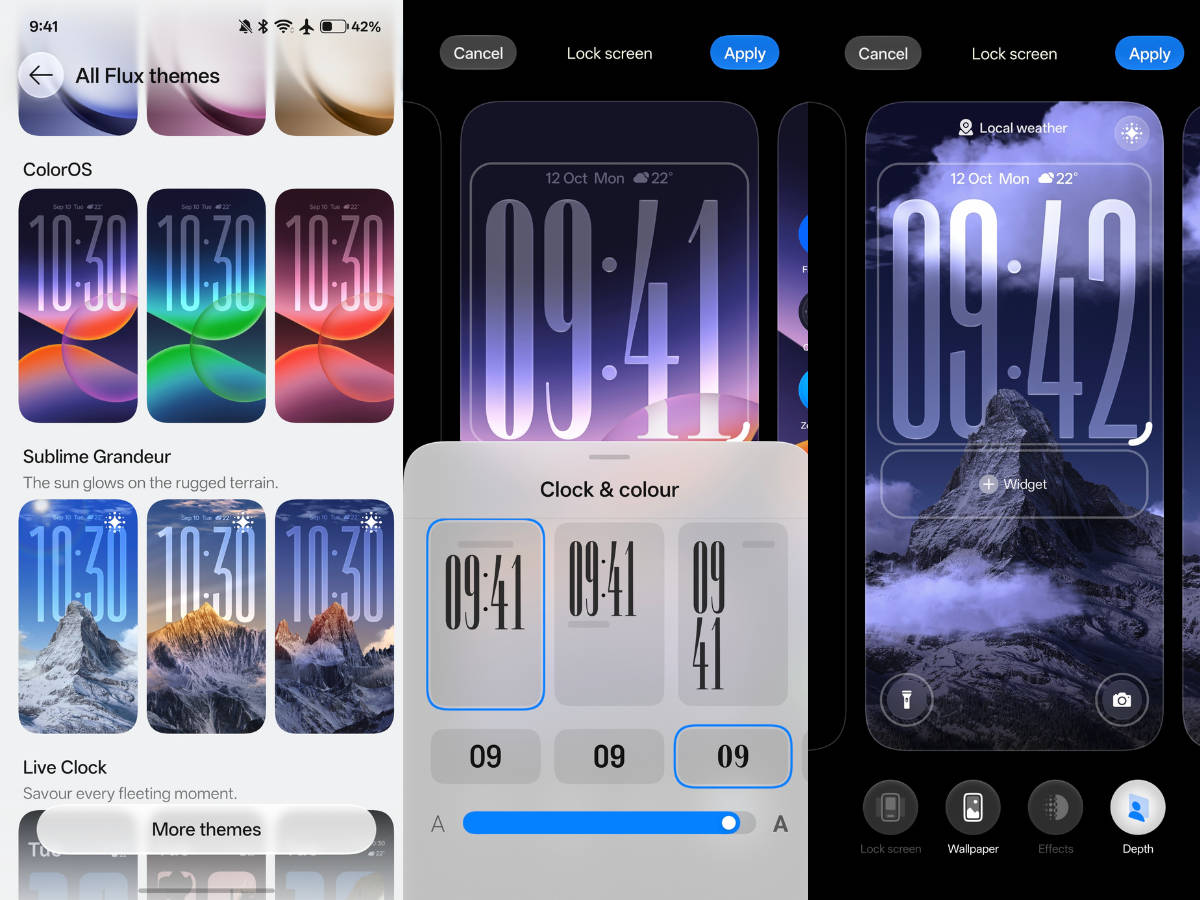
Improved customisation: ColorOS 17 introduces a couple of new lockscreen clock styles, along with weather effects that depict the climate in real time, such as sunny, rain, and fog. It also adds a new theme called ‘Esports mode’ that changes the look and feel of the game manager UI. On the home screen, there haven’t been major changes, except that every folder, clock, and icon now has light and transparency effects.

AI improvements (AI Mind Pilot, AI Suggest, OSee): OPPO has introduced AI Mind Pilot on ColorOS 17, a dedicated app that bundles ChatGPT, Gemini, and Perplexity into a single system that can perform tasks and actions based on the user’s prompt. The AI Agent mode can also access locally stored files and photos and sort, organise, or combine them. This is similar to Google’s Gemini Spark and Grok Bot, which can perform tasks as the user requests.
Overall, while ColorOS 17 brings iterative feature updates, it completely redefines the underlying animations, transitions, and UI interaction. For users who use their smartphone for productivity and office workflows, AI Mind Pilot should help them get tasks done faster. You can check when your OPPO, OnePlus, or Realme smartphone will get the ColorOS 17 stable update here.