Acer Aspire 3 A324-53 (UN.34RSI.004) Laptop Review: Best laptop under Rs 55,000?


Review Summary
Expert Rating
Budget laptops have always come with an unspoken rulebook: cut corners here, compromise there, hope the buyer doesn’t notice. The Acer Aspire 3 A324-53 doesn’t quite play by those rules.

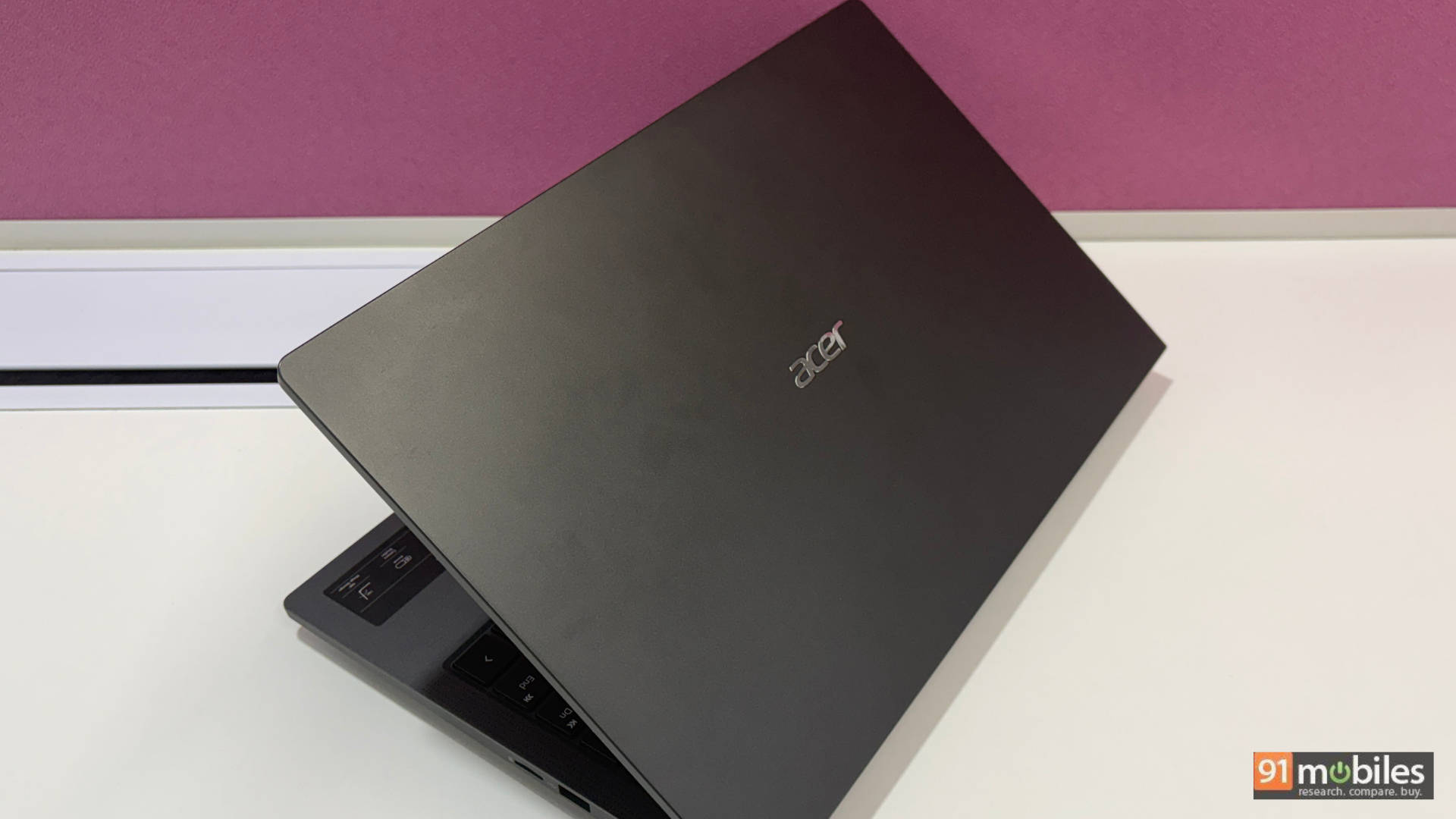
Usually priced under Rs 55,000, this 14-inch machine goes up against a crowded field of similarly spec’d contenders. On paper, it looks like just another U-series Intel laptop with a plastic chassis and a modest display. But spend a week with it, and a slightly different story starts to emerge, one that involves surprisingly fast storage, a battery that genuinely goes the distance, and a keyboard that punches well above its price tag.

Is it perfect? No. Are there compromises? Absolutely. But the more interesting question is: do those compromises matter for the person this laptop is actually built for? Let’s find out.
Table of Contents
Design and Build: Not Pretty, Not Ugly, Just Right
First things first, the steel grey colour? Chef’s kiss. Put it under any sort of lighting condition, and it genuinely shines. Look closely enough, and you’ll notice a very subtle, grainy texture running across the entire chassis. It adds a quiet elegance to what is otherwise a straightforward design. Weighing just under 1.5 kg and measuring just 19.4mm thin, this is a genuinely portable machine. The kind you can throw into a backpack without giving it a second thought.

That said, not everything about the build is flawless. The lid can’t be opened with one hand, which hints at slightly uneven weight distribution. On the flip side, the 180-degree hinge is a legitimately useful feature. It only recently occurred to me just how handy it is when you don’t have a height-adjustable desk. As someone who likes working standing up, I could simply lay the screen flat and carry on, though fair warning, don’t make a habit of that for long hours unless you want your neck to file a formal complaint.

There’s minor keyboard flex and slight screen wobble too, but nothing that would genuinely bother you. The all-plastic build might feel a little underwhelming at times, but don’t get me wrong, this laptop is surprisingly robust. Meanwhile, the minimalist design keeps things clean and professional.
Display and Audio: Fine for Excel, Not for Movie Night
I’ll keep this simple: it’s a perfectly adequate display for this kind of laptop. The Aspire 3 packs a 14-inch 1080p non-reflective panel. It means whether you’re working under harsh office lighting or out in direct sunlight, you won’t constantly be repositioning the screen just to see what’s on it. That said, yes, you may occasionally notice some glare when watching dark content. But for the Excel and Mail crowd? This display is just fine.

Viewing angles are decent, colours are okayish thanks to a 45% NTSC colour gamut, and the 60Hz refresh rate gets the job done. On the brightness front, the display is perfectly comfortable indoors. However, it gets a little tricky under very harsh lighting. But the non-reflective panel handles most of the reflections well enough.

As for the audio, the Aspire 3 features two upward-firing stereo speakers. The output is nothing to brag about, but it’s not bad enough to be written off either. Let’s put it this way: the speakers sound better than most laptops in this price range, but they’re nowhere near the MacBook Airs of the world. For meetings or college classes, they’ll hold up fine. But I’d still recommend keeping a pair of earphones handy. Don’t expect this laptop to fill a room even during a casual Netflix and chill session.

The built-in 2MP webcam works for the most part, delivering a usable output. The same goes for the microphones. We have seen better in Acer’s own budget lineup, specifically the Acer Aspire 14 AI, but for the price, it’s passable.

At the end of the day, the display and audio on the Aspire 3 will comfortably handle basic office chores and college tasks. Just don’t expect it to double as your entertainment setup.
Keyboard and Trackpad: You’ll adapt quickly
This is where I have to hand it to Acer. For the price, you’re getting a genuinely solid keyboard. It leans more towards the clicky side rather than the mushy side, which most people tend to prefer for extended typing sessions. Key travel is good, and whether you’re coming from a full-sized keyboard or a tenkeyless, you’ll adapt quickly. The backlight is a nice cherry on top.

The trackpad, however, is a little cramped. I found myself occasionally clicking just outside the trackpad area, which does take some getting used to. Meanwhile, Acer has added a slight texture to it, not sure what that’s about, but it’s there.
Ports and Connectivity: Every Port You Actually Need
For its size and price, the port selection here is genuinely impressive. You won’t need to carry any dongle, and I mean that. On the left side, you get two USB-C ports, one of which doubles as the charging port, which means one cable can handle both your laptop and other Type-C devices. You also get a USB 3.0 Type-A port and an HDMI port.

On the right, there’s a headphone jack, a USB 2.0 Type-A port, a microSD card slot, and a Kensington lock slot for added security.

On the wireless side of things, unlike most competitors in this price segment, you’re getting Wi-Fi 6 and Bluetooth 5.2. A notable upgrade that makes a real-world difference in connectivity speed and reliability.
Performance and Battery Life: Gets you through
Here’s where the trade-offs start to show. This is clearly where the price cut has been made, and it does show, but not as dramatically as you’d expect.

The Aspire 3 runs on the Intel Core i5-1334U. Now, I’m not saying it’s a bad processor, far from it. But the U-series designation tells you everything: this chip is built for efficiency, not raw muscle. Meaning, in real-world terms, juggling 15+ Chrome tabs alongside light photo editing won’t be a problem at all. For everyday office and college use, this laptop holds up very well. Just don’t expect it to run Black Myth: Wukong or Cyberpunk 2077 at even medium settings; this one is built for light gaming.

GTA V and Valorant are still manageable at decent frame rates with a few settings tweaks. That said, and credit where it’s due, Acer has paired it with 16GB of RAM (expandable to 32GB) and a 512GB Gen 4 SSD, which honestly blew my mind when I benchmarked it using CrystalDiskMark. 7,000+ MB/s read speeds and 5,000+ MB/s write speeds at this price point? That’s genuinely impressive.

For more context, I compared this laptop against a few similarly priced alternatives with comparable specs. Acer Aspire 15 AS15-42 (review), Lenovo ThinkBook 16 21MWA0AJIN (review), Infinix Air Pro Plus XL434 (review), Acer Aspire 14 AI A14-11M NX.JP3SI.001 (review). Much like the Aspire 3, most budget alternatives in this segment rely on U-series chips either from Intel or AMD, trading peak performance for longer battery life. We ran our full benchmarking suite on performance settings: Geekbench 6, Geekbench AI, PCMark 10, Cinebench, 3DMark, and CrossMark, to see how they stack up.
Model Number | Acer Aspire 3 A324-53 (UN.34RSI.004) | Acer Aspire 15 AS15-42 (UN.35MSI.00D) | Acer Aspire 14 AI A14-11M NX.JP3SI.001 | Lenovo ThinkBook 16 21MWA0AJIN |
Cinebench R24 MT | 344 | 488 | 704 | 519 |
Cinebench R24 ST | 99 | 85 | 95 | 88 |
Cinebench R23 MT | 6209 | 9262 | 7433 | 9393 |
Cinebench R23 ST | 1683 | 1440 | 963 | 1463 |
PCMark 10 | 6342 | 5665 | NA | 5779 |
PCMark 10 Extended | 5420 | 4333 | NA | 5193 |
Geek Bench 6 ST | 2415 | 1952 | 2126 | 2002 |
Geek Bench 6 MT | 8061 | 6395 | 10514 | 8072 |
Geek Bench OpenCL | 11865 | 13369 | 9560 | 14627 |
Geek Bench Vulcan | 15684 | 11581 | 13775 | 17096 |
CPU – ONNX – Single Precision | 2115 | 2361 | 1380 | 2868 |
CPU – OpenVINO – Single Precision | 2156 | 3270 | NA | 3230 |
3DMark Time Spy | 1390 | 964 | 1063 | 1534 |
3DMark Fire Strike | 3709 | 2309 | 3658 | 3901 |
3DMark Night Raid | 13296 | 10243 | 16229 | 16305 |
Battery Runtime (Hr:Min) | 7:25 | 5:40 | 15:13 | 9:00 |
Q8T1 READ | 7039.83 | 3722.91 | 6322.91 | 5966.13 |
Q8T1 WRITE | 5279.8 | 3161.85 | 4426.86 | 4753.55 |

On the battery front, the Aspire 3 surprises. Its 45Wh battery may look standard on paper, but the power-efficient i5-1334U stretches it further than you’d expect. In the PCMark 10 Video Loop benchmark, it lasted 7 hours and 25 minutes. This is roughly twice what most budget alternatives manage. For a typical day of web browsing, emails, and streaming, you’ll get through comfortably on a single charge. Charging is handled by the included 65W USB-C power delivery adapter, which also conveniently tops up your other Type-C devices. For hybrid professionals or students on the go, this is a genuinely low-maintenance setup.
Verdict
The Acer Aspire 3 A324-53 is a hard laptop to dismiss. It’s not the fastest thing at this price, and it won’t win any design awards. But it’s genuinely well-suited for the audience it’s built for: students, hybrid professionals, and everyday users who need a reliable, portable machine that doesn’t demand constant attention.

The Aspire 3 goes up against some solid competition, and depending on what you value, any one of its rivals could make a stronger case. It gives some ground on build quality, display, and raw performance. What keeps it in the conversation is mostly the price it comes at.

One more thing worth flagging before you make a decision: laptop prices in India have risen sharply over the last few weeks, and the Aspire 3 hasn’t been spared. It’s currently listed at over Rs 57,000 on platforms like Flipkart, which makes it a tough sell at that price. I’ve personally seen it drop as low as Rs 43,000 during sale events. Though with the way the market is behaving right now, expecting that kind of deal again would be a “holy smokes” kind of situation. But this laptop does find itself around the Rs 50,000 mark fairly regularly. At that price point, the Acer Aspire 3 genuinely becomes a no-brainer, one of the best laptops under Rs 50000.

That said, if you’re looking for a no-drama, all-day work companion under Rs 55,000, the Aspire 3 makes a very strong case for itself. Just keep your expectations calibrated; this is a productivity-first machine, not a powerhouse.
Editor’s Rating: 7.5/10
Pros:
- Light and slim enough to forget it’s in your bag
- No dongle needed, ever
- Clicky, satisfying keyboard
- Chews through everyday multitasking easily
Cons:
- Display colours are just okayish
- Subpar Audio and webcam

