Dell Alienware 16 Aurora AC16250 review: great thermals, good performance


Dell’s mid-to-high-range gaming Aurora lineup has been around for a while now, and we are back with a look at a new configuration of the Alienware 16 Aurora. I recently reviewed the top-end variant featuring the Intel Core Ultra 9 275HX and RTX 5070. You already have a good sense of what this machine is capable of at its peak. This time around, we are looking at a more accessible configuration, featuring the Intel Core 7 240H paired with the Nvidia GeForce RTX 5060 and 16GB of DDR5 RAM.
The key question here is how much of that premium Alienware experience carries over at a lower configuration and a friendlier price point. I have been using this variant for a while now and have a good sense of how it performs as both a gaming machine and a daily driver. Let’s get into it.
Table of Contents
A subtle non-alienware-esque design
So the Alienware 16 Aurora comes in a navy blue colourway that Dell calls “Interstellar Indigo”. For context, this is the exact same design as the higher-end configuration of the same laptop, and the two are virtually indistinguishable when kept side by side. It has a matte finish that does a reasonable job against fingerprints, though it isn’t entirely successful. The only standout design element is the iridescent Alienware logo on the back, which reflects light differently depending on the angle you look at it from.

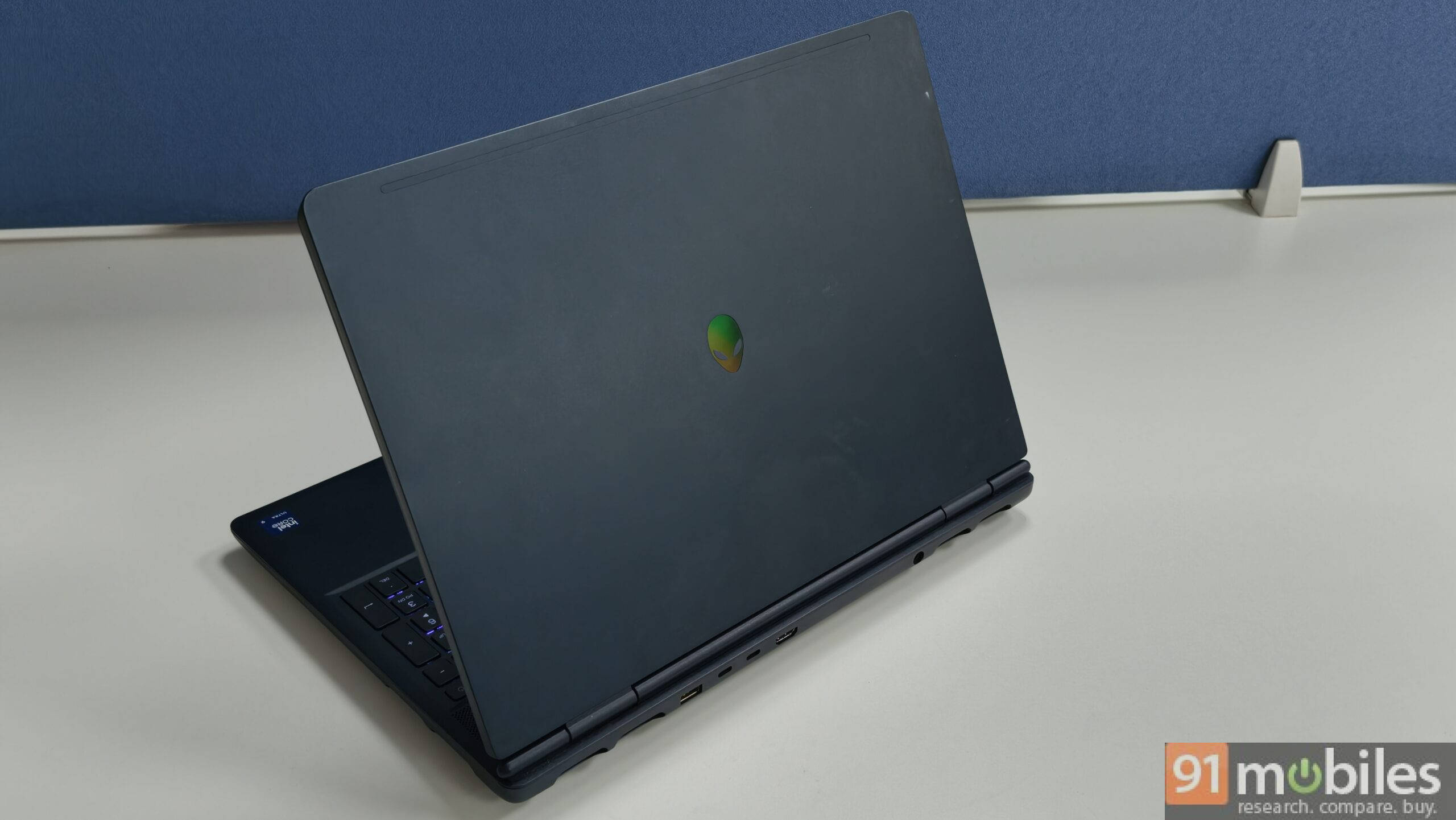
The build quality is pretty sturdy, with an anodised aluminium top and bottom giving it a premium, all-metal feel. It weighs in at 2.6kg, which is well within the norms for a gaming laptop of this size. The 16-inch screen carries a wide 16:10 aspect ratio, looks pleasantly tall, and has well-proportioned bezels all around.

Just above the keyboard sits a mesh grille that handles air intake and houses the speakers, ensuring audio doesn’t muffle when the laptop is placed flat. Flex in both the keypad area and the lid is minimal, and a slight lip on the lid makes one-handed opening effortless. It’s a well-put-together machine, and the design remains one of its strongest suits.
A good set of ports and a decent cooling system
The laptop comes pretty loaded in terms of ports, and you basically get a complete set to tackle all your day-to-day needs. My only real peeve here is that almost all major ports lie at the rear of the device, with no logos to indicate which is which. It makes it a little annoying to constantly have to bend over or rotate the machine to plug into the right port before you get used to it.

Here’s the full list of ports on offer:
- 2x USB 3.2 Gen 1 (5 Gbps) ports
- 1x USB 3.2 Gen 2 (10 Gbps) Type-C port with DisplayPort 1.4a
- 1x USB 3.2 Gen 2 (10 Gbps) Type-C port with Power Delivery
- 1x HDMI 2.1 port with Discrete GPU Direct Output
Do note that compared to the higher-end configuration, you lose the Thunderbolt 4 port and the RJ45 Ethernet port here, which is worth keeping in mind if either of those is important to your workflow.

As for cooling, the Alienware 16 Aurora comes with Dell’s Cryo-Chamber design. It comprises two intake vents towards the rear of the laptop, one directly at the bottom, and four exhaust vents along the sides and back. The dual fan setup is pretty effective in practice and certainly makes its presence felt when the fans are on full blast.
The Core 7 240H doesn’t climb to the extreme temperatures you’d see with the flagship Core Ultra 9 275HX, but it can still hover around 95 degrees Celsius under sustained load, which means the cooling system earns its keep here as well. The chipset also can’t be undervolted, which adds to the challenge. GPU temperatures stay in a more comfortable range around 75-80 degrees Celsius and are manageable even through extended gaming sessions, especially if you cap framerates to ease the load on both the processor and the GPU.
Decent gaming and productivity output
To put the Alienware 16 Aurora’s performance in context, we’ll compare it against the HP Victus 15, which runs on essentially the same hardware, including the Intel Core 7 240H at a 45W TDP and the Nvidia GeForce RTX 5060 at 80W TGP, and sits in a similar price bracket. It makes for a fair comparison, and in our tests, the Alienware performs better in benchmarks despite the near-identical hardware. The difference likely comes down to its cooling system, which keeps the processor and GPU running at peak performance longer.
| Benchmark | Alienware 16 Aurora | HP Victus 15 |
|---|---|---|
| Cinebench R24 MT | 990 | 683 |
| Cinebench R24 ST | 116 | 113 |
| Cinebench R23 MT | 17,662 | 11,738 |
| Cinebench R23 ST | 1,955 | 1,889 |
| PCMark 10 | 7,477 | 7,274 |
| PCMark 10 Extended | 9,881 | 9,449 |
| Geek Bench 6 MT | 13,904 | 13,449 |
| Geek Bench 6 ST | 2,725 | 2,722 |
| 3DMark Time Spy | 11,311 | 10,924 |
| 3DMark Time Spy Extreme | 5,208 | 4,972 |
| 3DMark Fire Strike | 25,728 | 24,584 |
| 3DMark Fire Strike Extreme | 13,751 | 13,611 |
| 3DMark Fire Strike Ultra | 6,876 | 6,865 |
| 3DMark Night Raid | 62,720 | 55,180 |
| Puget (DaVinci Resolve) | 6,759 | 6,499 |
| SSD Q8T1 Read (MB/s) | 6,612 | 4,842 |
| SSD Q8T1 Write (MB/s) | 5,876 | 1,273 |
| SSD Q1T1 Read (MB/s) | 4,350 | 2,891 |
| SSD Q1T1 Write (MB/s) | 4,564 | 1,101 |
In CPU workloads, the Core 7 240H posts a Cinebench R24 multi-threaded score that is comfortably ahead of the Victus’s 683. It implies that the Alienware holds its performance more steadily when you’re doing something demanding, despite having the same processor as the Victus. The Puget Systems benchmark for DaVinci Resolve also echoes the same, with the Alienware scoring higher against the Victus. For a content creator, that means you’d have quicker render times.
On the gaming side, the NVIDIA GeForce RTX 5060 is the machine’s main event. The 3DMark Time Spy and Time Spy Extreme scores put it ahead of the Victus in both GPU-heavy tests and mean more consistent frame rates during extended gaming sessions. Where the Victus may start to dip in performance as temperatures climb, Alienware’s cooling helps keep things performing for longer. With this setup, you’ll comfortably play all modern AAA titles at 1080p on high-ultra settings, and the QHD+ panel gives you room to push further at medium-high settings with DLSS and frame-gen enabled.
| Game | Dell Alienware 16 Aurora | HP Victus 15 |
|---|---|---|
| Cyberpunk 2077 – FHD Native | 81 | 76 |
| Cyberpunk 2077 – FHD DLSS | 96 | 89 |
| Cyberpunk 2077 – FHD DLSS+RT | 52 | 49 |
| Cyberpunk 2077 – FHD DLSS+RT+FG | 151 | 151 |
| Black Myth Wukong – FHD Native | 38 | 41 |
| Black Myth Wukong – FHD DLSS | 40 | 42 |
| Black Myth Wukong – FHD DLSS+RT | 40 | 41 |
RT* Ray Tracing
The storage also delivers better sequential read and write speeds, both well ahead of the Victus. In practical terms, this means faster boot times, near-instant application launches, and quicker loading in games. With 16GB of DDR5 RAM on board, the Alienware can handle gaming and everyday multitasking comfortably, though heavy multitaskers may want to keep an eye on an upgrade down the line.
The only real hiccup comes when you try to play games at QHD resolution, where memory is often the real bottleneck and drops frames. I experienced that while playing titles like Resident Evil 9 and Cyberpunk 2077, which demand around 20GB of RAM when playing at this resolution. This is one aspect where the Victus will deliver you more steady gaming performance compared to the Alienware.
A sharp QHD+ display with a few compromises
The Alienware 16 Aurora comes with a 16-inch 2560 x 1600p display, and the QHD+ resolution continues to be one of the strong suits of this machine. Content looks sharp and text is crisp, which makes it just as capable as a daily driver as it is a gaming screen. However, compared to the higher-end configuration of the same laptop, there are a few compromises here that are worth talking about.

The refresh rate on this variant drops to 120Hz, compared to the 240Hz panel on the top-end model. For competitive gamers, that is a difference worth factoring into your decision. For regular gamers, though, 120Hz is still a comfortable and fluid experience for most titles. The brightness has also been dropped to 300 nits from 500 nits, which means the display can feel a little lacking in brightly lit rooms. Colour coverage is 100% sRGB rather than DCI-P3, so while colours are still accurate and pleasant, they are not quite as vibrant as what the higher-end configuration offers.
The speakers, however, remain just as good. They can get pretty loud and have good low-end and mid-range output, easily drowning out the fan noise when running at high RPM. For those who prefer not to game with headphones on, this is a good trait to have.
Keyboard, webcam, and battery life
The laptop uses a basic AlienFX keyboard, though unlike the higher-end configuration, this one comes with a white-backlit layout rather than RGB. The keys have good travel and a slight clickiness to them, and the overall typing experience is pretty decent. The trackpad is substantial in size and works well. There is a 720p webcam at the front, which is functional and works as intended.

Battery life is one area where this variant has a slight edge over its higher-end sibling. The 96Wh battery, combined with the lower 120Hz refresh rate and reduced brightness, means you can comfortably squeeze out around 4 hours of unplugged use at 70% brightness. It is a slight but welcome improvement over the top-end model. The battery also delivers some great results in the PCMark battery benchmark, with 14 hours and 35 minutes of runtime.


Performance on battery does take a hit, though, as the processor struggles slightly without a consistent power supply, so you will want to stay plugged in for any serious gaming or heavy workloads. As with most gaming laptops, plugged-in use will be the norm here.
Verdict: Who should buy this Alienware?
On its own, this Alienware 16 Aurora is a pretty decent gaming laptop. It performance output is quite good, the cooling system is very effective, and the SSD is fast, so games and apps load quickly. The QHD+ display also gives you a sharper image quality and is a distinct advantage at its current starting price of Rs 1,39,990.
But how does it compare against competitors like the HP Victus 15 or the Lenovo LOQ 15? Let’s discuss it briefly. The HP Victus 15 uses very similar core hardware and usually sells in the same price band or lower, so it offers better value for most buyers. The Alienware is better in terms of cooling, though. It holds higher performance for longer and runs more stably under load, which helps in long gaming sessions and heavy CPU or GPU work.
The Lenovo LOQ is, however, a tough rival. It also sits in a similar price range but uses a Ryzen 7 250 processor and a higher TGP version of the RTX 5060, backed by 24GB of RAM at Rs 1,37,000. That extra GPU power and memory make it a more robust performer in raw frame rates, especially if you want to play newer AAA games at higher settings or at QHD resolution on an external monitor. The flip side is that the LOQ only ships with a native Full HD display, unless you select a screen upgrade on Lenovo.com, so you lose the sharp QHD+ panel you get on the Alienware unless you plug into a better monitor.
So the choice is simple. If you only care about the best value and highest fps for your money, the LOQ and Victus make more sense. If you want a cleaner design, better-built chassis, stronger cooling out of the box, and a native QHD+ screen, and you are fine paying a bit extra for that premium Alienware experience, this 16 Aurora variant is still a very good machine to live with.
Editor’s Rating 8.5/10
Pros:
- Sturdy, premium metal build with a subtle design
- Effective cooling that keeps CPU and GPU performance stable in long sessions
- Fast 1TB Gen 4 SSD for quick boot times, game loads, and app launches
- Sharp 16-inch QHD+ 16:10 display that looks crisp for work and gaming
Cons:
- Only 16GB RAM out of the box, which can feel limiting for QHD gaming
- Ports are placed mostly at the back and not labelled
- The display only has a 120Hz refresh rate

