


Competitors for HMD Fusion
| HMD Fusion | vs | Xiaomi Redmi Note 14 5G |
| HMD Fusion | vs | realme Narzo 70 Turbo |

HMD, or Human Mobile Devices, is navigating an intriguing transition as it introduces new products under its own brand while continuing to sell Nokia’s devices. The HMD Fusion is their latest launch in India and is an interesting device in itself. It is a modular phone that comes with a healthy side of accessories to make the smartphone experience more interesting. There are different attachments with specific purposes, which HMD calls “outfits” that latch onto the device.
These attachments, known as “outfits,” serve specialised purposes, transforming the phone into a handheld console, content creation tool, and more. But is the Fusion more than just a stylish concept? I’ve been using the phone for some time now, and I’ll try to answer that question in this review.
Table of Contents
While the HMD Fusion introduces distinct concepts like better repairability and modular accessories at aggressive pricing, it offers an average multimedia experience due to a subpar display. It is ideal for users who enjoy customising their devices. For anyone looking for an affordable and dependable device, it provides passable performance.
The big claim HMD Fusion puts forward is its Gen 2 repairability, and to be fair the device can walk the talk. From what I saw on iFixit’s repair tutorials, minor fixes seem pretty straightforward if you’re comfortable with electronics. I, thankfully, have some level of experience tinkering around with electronics like old phones, gaming laptops, PCs, and appliances, so the task didn’t seem too daunting except for sourcing some precision screwheads.
That said, replacing the display is where it gets tricky, even for someone comfortable with it, and the chances of making mistakes are pretty high if you’re not entirely confident. For something like that, I’d definitely recommend leaving it to the pros. Still, I think it’s a great initiative from HMD to encourage users to handle minor repairs themselves. It’s a useful skill to have, especially when repair bills can easily stack up for something that’s rather easy to repair once you let go of the apprehension and become comfortable dismantling your devices.
The HMD Fusion supports various modular attachments, referred to as “outfits” by the brand. My review unit included two: the Flashy outfit and the gaming outfit, and you get both when you purchase the phone, at no additional cost. The Flashy outfit is essentially an LED light attachment that fits onto the back of the case and serves as a secondary light source for selfies or regular shots. It performs well, and you can customise the LED colours and intensity to suit your needs.

An important thing to note about the outfit is that it is an extremely close fit. I was quite concerned I might just damage the device with the amount of pressure required to get it off. A few friends were unable to remove it entirely, and I was seriously concerned at times that I might just snap something.

The gaming outfit was more to my taste. It’s a controller attachment that connects to the Pogo pin cut-out on the phone’s rear panel and provides gamepad functionality for supported games. The controller is well-constructed despite being plastic, and the trigger buttons work fine, although I feel the tactile feedback could have been better. The buttons feel slightly mushy, and if you’ve used console controllers before, you’ll notice a gap in quality.

While there aren’t many free PlayStore titles that support gamepad functionality, I tested it with Asphalt Extreme and enjoyed the experience. You can also use the device as a remote streaming station for consoles, which is an interesting potential use case. I couldn’t test this feature, though, as I don’t own a console. With more gamepad-supported titles on the Play Store, the gaming outfit could become significantly more useful in the future.
| Thickness | Weight | IP rating | |
| HMD Fusion | 8.3 mm | 202 grams | IP54 |
| Redmi Note 14 | 7.99 mm | 190 grams | IP64 |
| Realme Narzo 70 Turbo | 7.6 mm | 185 grams | IP65 |
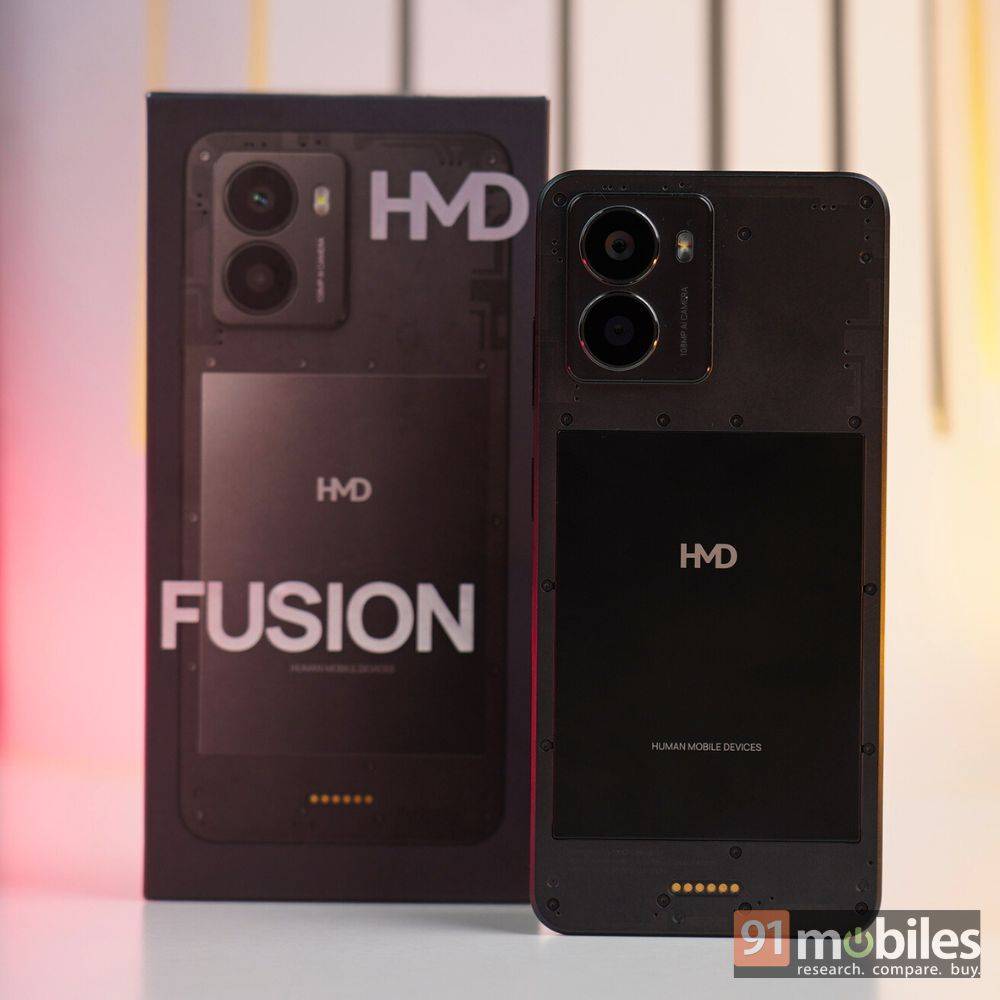
The HMD Fusion has a pretty fresh take when it comes to design. The rear panel features a textured matte finish that resists fingerprints and smudges, offering a clean and practical aesthetic. It’s comfortable to hold and does not feel too heavy, with exposed screws and a prominent rectangular section bearing the HMD logo, likely for battery access. This modular design is a bold choice but feels purposeful rather than gimmicky.

The bottom edge includes a USB-C charging port, a 3.5mm headphone jack, and a single down-firing speaker. The SIM tray is on the left, and the volume and power buttons are on the right as usual. Up top, there’s a microphone.
| Display | Peak brightness | |
| HMD Fusion | 6.56-inch LCD | 600 nits |
| Redmi Note 14 | 6.67-inch AMOLED | 2,100 nits |
| Realme Narzo 70 Turbo | 6.67-inch OLED | 2,000 nits |
The display bezels are a little wide and it has a bottom chin, which is pretty standard for the price range. The 6.56-inch LCD display, however, is a surprise with only an HD+ resolution and a 90Hz refresh rate. Over Rs 16,000, it is very rare to encounter a device with a non-AMOLED display, which makes the display feel outdated. The peak brightness level is 600 nits, sufficient for indoor use, but it feels underwhelming when you step outside in the daylight.

Therefore, the viewing experience is a slight letdown compared to its peers like the Redmi Note 14 (review) and Realme Narzo 70 Turbo (review). Both these phones have an AMOLED panel, a Full-HD+ display, and feel smoother with a 120Hz refresh rate. The HMD Fusion’s display looks washed out in comparison, and it lacks the smoothness of its competitors. The single-down firing speaker also lacks the oomph of a stereo setup, so the multimedia experience is not up to par for the price HMD asks.
For cameras, HMD Fusion uses a rather simple setup: a high-resolution 108MP primary camera with a 2MP depth sensor and a 50MP front camera for selfies and video calls. The phone’s primary camera is quite impressive and captures detailed images in daylight conditions, though the colours have a slight warm/sepia tint to them.

For portrait shots, the device does a decent job with edge detection, though there’s some observable noise around the darker areas. The low-light performance is average for its price, and the phone does take a couple of seconds to take a long exposure shot despite its large sensor.
The video support is slightly disappointing since the device can capture videos only up to 1080p. Rivals like the Realme Narzo 70 Turbo and other devices in this price range do offer 4K support, so it feels slightly lacking in comparison. I compared the phone’s cameras with a couple of its key rivals, and here’s how it went:
For daylight shots, the HMD Fusion’s primary camera does a good job in capturing details, but its colours appear slightly washed out when compared to the Redmi Note 14.
When compared against the Realme Narzo 70 Turbo, the HMD Fusion does a better job both in terms of details and maintaining colour accuracy, as the latter boosts the colours significantly.
For portrait shots, the HMD Fusion maintains a slight lead compared to the Redmi Note since it captures better details and has more appealing colours. Both phones struggle with edge detection as well.
The Realme Narzo 70 Turbo’s portrait shot is vibrant, and the colours are balanced well, compared to the HMD Fusion, where the image appears duller. In terms of details, however, the latter still maintains the lead since Realme’s offering softens the face.
HMD Fusion’s selfies have better clarity compared to the Redmi Note 14 thanks to the high-resolution camera, and its skin-colour reproduction looks closer to reality.
Compared to the Realme Narzo 70 Turbo, HMD still maintains a lead in selfies due to similar factors. The former adds a red tint to the subject’s skin, and its details aren’t as good.
In low-light scenarios, the HMD Fusion does a slightly better job than the Redmi Note 14 in terms of details and light flares and has comparatively less grain.
The Realme Narzo 70 Turbo outperforms the HMD Fusion in low-light photography, delivering better results in terms of detail, colour accuracy, and sharpness.
The HMD Fusion uses a modest Snapdragon 4 Gen 2 chipset for all its performance needs, paired with 8GB of RAM and 256GB of storage. While the performance output is satisfactory for day-to-day usage, the device could do with a bit more power since the chipset struggles with anything too heavy. There’s occasional performance dips in general usage too, though they didn’t bother me too much.

My expectations were pretty muted for the phone’s gaming performance backed by this experience, but the numbers did bring a smile to my face. The device is capable of gaming and performs better than its peers in demanding titles like COD: Mobile and BGMI, where it offers a performance output that’s on par with Realme Narzo 70 Turbo at similar graphical settings and exceeds the Redmi Note 14. If you like to play FPS titles, the HMD Fusion can definitely deliver a good experience, though I’d suggest using low-graphical presets for the best experience.

For software, the phone comes with Android 14 out of the box, and the OS is pretty clean, barring a few pre-installed games. You can easily uninstall them if you wish to, so there are no qualms with the software. Being a basic Android-based OS, there are not many unique features, and people who prefer stock Android will definitely enjoy the software.

The brand has promised two OS upgrades and three years of security patches, which is average for the price. However, do keep in mind, with Android 15 already available, you’re essentially getting just one OS update, which does detract from the longevity of the device that HMD’s gunning for.
| Pre-installed apps | Software updates | |
| HMD Fusion | 40 | 2 OS upgrades + 3 years security |
| Redmi Note 14 | 66 | 2 OS upgrades + 4 years security |
| Realme Narzo 70 Turbo | 67 | 2 OS upgrades + 3 years security |

The device packs a pretty standard 5,000mAh battery and comes with 33W fast charging support, with the charging brick included. The phone’s battery life is quite decent, partly due to the low-resolution display, which demands less power. The battery will easily last an entire day of use with moderate usage and scores decent in our battery benchmark test.

The charging speed is slightly behind its peers, as it takes 76 minutes to recharge from 20 to 100 percent, but it’s something that can be managed well if you charge at the end of the day.
| Battery size | Charging time | |
| HMD Fusion | 5,000mAh | 76 minutes (33W) |
| Redmi Note 14 | 5,110mAh | 32 minutes (45W) |
| Realme Narzo 70 Turbo | 5,000mAh | 64 minutes (45W) |
The HMD Fusion is available for Rs 17,999, for the 8GB+256GB configuration and this comes bundled with both the Flashy and Gaming outfits. The device has some interesting traits to it, considering its repairability and accessories, but it is quite an average performer considering the segment. Its chief competitors, the Redmi Note 14 (review) and Realme Narzo 70 (review), both have a superior display, higher performance, better charging speeds, comparable cameras and more durable designs.
The HMD Fusion offers several advantages, including a clean OS, modularity that enhances its versatility, a decent camera system, and reliable battery life. While these are commendable features, the phone could benefit from improvements in its multimedia experience and software support. If you’re open to exploring and experimenting with a novel design and concept without straining your budget, the HMD Fusion is an intriguing option worth considering.
| HMD Fusion | vs | Xiaomi Redmi Note 14 5G |
| HMD Fusion | vs | realme Narzo 70 Turbo |

