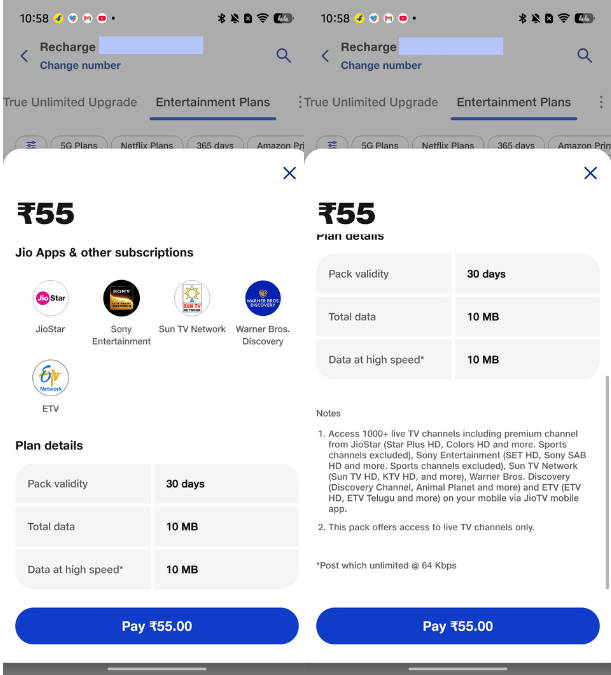
Reliance Jio has introduced a new budget-friendly entertainment pack aimed at users who wish to view TV channels right from their smartphones. Priced at just Rs 55, the JioTV Pro pack offers a 30-day validity and provides access to over 1,000 live TV channels across more than 16 languages via the JioTV app. The pack is available to both prepaid and postpaid Jio customers.
Table of Contents
Rs 55 JioTV Pro plan details
As stated above, this plan has a 30-day validity and allows viewers to enjoy over 1,000 channels. Once the pack is purchased, one can head over to the JioTV app, or install it if you haven’t already, and get access to all the live TV channels.
While you could previously view live TV channels on the JioTV app even without logging in, the pack unlocks all the premium channels on the app, including HD ones from JioStar, Sony Entertainment, Sun TV Network, and Warner Bros. Discovery. However, it’s worth noting that live sports channels from JioStar and Sony are not included with the plan.
Apart from TV channels, the JioTV Pro plan features 10MB of total data, which is a negligible amount of data but could come in handy when your primary recharge plan expires
If you’ve been longing to watch your favourite TV channel while travelling or in situations when you’re away from your TV, this plan could be worth considering given its vast channel collection and affordable cost.
How to recharge and use Rs 55 JioTV Pro plan
To purchase the Rs 55 JioTV Pro plan, here’s what you need to do:
- Open the MyJio app on your smartphone
- Select the ‘Recharge’ option from the bottom tab
- Scroll the top bar to the right and select ‘Entertainment Plans’
- Here, you’ll find the Rs 55 plan. Simply select ‘Buy’ and make the payment using your preferred method
How to view live TV channels on the JioTV app
- Once the plan is purchased, open or download the JioTV app from the Play Store or App Store.
- After opening the app, log in with the same mobile number you used to purchase the Rs 55 plan.
- Now, head over to the ‘TV Guide’ section of the JioTV app and select any live TV channel you want to view