nubia Z11 review: look ma, no bezels


Expert Rating
3.5/5
3.5/5
Design
★★★★★
★★★★★
Display
★★★★★
★★★★★
Software
★★★★★
★★★★★
Camera
★★★★★
★★★★★
Performance
★★★★★
★★★★★
Battery
★★★★★
★★★★★
Pros
- Sexy, bezel-less design
- Interesting edge screen features
- Smooth performance
- Exposure issues with the camera
- Using cases & screen protectors could be a problem
- Many features seem gimmicky
Heard of the nubia Z11? If you haven’t, let us tell you that it’s one of the very few phones in India offering up to 6GB RAM. And combined with the Snapdragon 820 chip inside, one of the most loaded too. Not just that, at its asking price of around Rs 30k, the Z11 is one of the very few phones that can stand up to the venerable OnePlus 3 (review) and its upgraded sibling, the 3T (review). Then consider the fact that the nubia Z11 not only made it to the list of nominees for our Sexiest Phone of the Year 2016 title, but was also nominated for the Most Innovative Phone of the Year 2016 award. 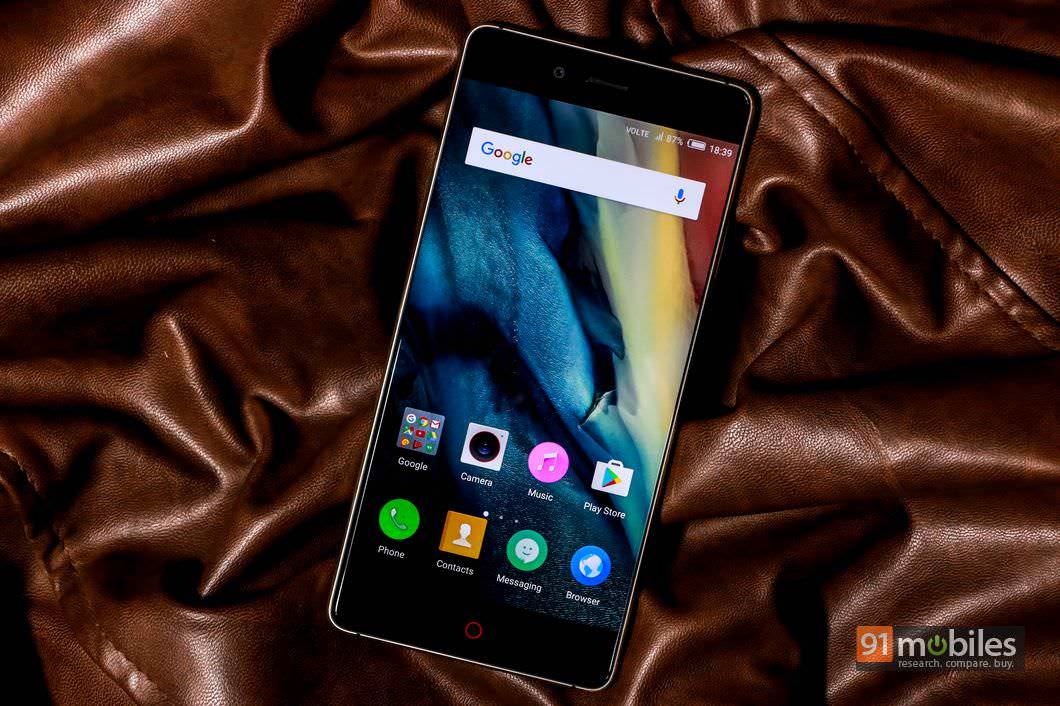

Specs at a glance
| Display | |
| Size | 5.5 Inch |
| Resolution | Full HD (1080 x 1920 pixels) |
| Performance | |
| CPU | Dual core, 2.15 GHz + Dual core, 1.6 GHz, Snapdragon 820 |
| RAM | 6 GB |
| Storage | |
| Internal memory | 64 GB |
| External memory | Up to 200 GB |
| Battery | |
| Capacity | 3000 mAH, Li-Polymer, Non removable |
| Camera | |
| Primary camera | 16 MP |
| Secondary camera | 8 MP |
| Connectivity | |
| Network support | Dual SIM 4G |
| Other options | Wi-Fi, Bluetooth 4.1, GPS |
| Others | |
| Battery Capacity | 3000 |
| Operating system | Android 6.0 Marshmallow |
Sexy to the core
Our review unit came in black with gold trimmings, and while the combination isn’t really everyone’s cup of tea, it gives the phone a rich, swanky look. But the real innovation is at the front, because nubia has managed to make the Z11 almost bezel less. Well, the Xiaomi Mi MIX is sort of our hero for the bezel-less brigade, but that said, you’d be hard pressed to see any side bezels on the nubia Z11. The edge-to-edge screen makes the nubia Z11 look really cool and futuristic. 
nubia’s signature red breathing light that encircles the capacitive home key at front accentuates the gold-black elegance, and there’s even a red band encircling the primary camera lens at the rear for added effect. Ports and controls are where you’d expect them to be, and include a USB Type-C port at the bottom and an IR blaster on top. A circular fingerprint scanner is placed at the rear.
Table of Contents
Screen grab

Shoots, and falters
With a 16MP sensor featuring OIS and PDAF at the rear, and an 8MP shooter at front, the Z11 is right up there with the best of the bunch in terms of camera prowess, at least on paper. The camera app is quite loaded and crammed with features too, including gimmicky modes like multi exposure, light painting and clone. Electronic Aperture lets you change the aperture, which could help you get some motion blur in your images when you’re shooting subjects in motion. There’s a very handy Pro mode as well, which lets you change various shooting parameters.


When it comes to image quality though, the Z11 does leave a little something to be desired. While most casual users should be pleased with the overall image quality, the Z11’s primary shooter has a tendency to overexpose and burn out details on bright areas. This is apparent not just on images shot in daylight, but those captured in low light as well. That niggle apart, the Z11’s primary camera is not half bad, and can get you some pretty decent shots. The same goes for the front snapper too. Here are a few image samples from the rear camera.
Edge and edgier


The Z11 runs Marshmallow with the brand’s own nubia UI on top. As with most Chinese skins and alternate ROMs, the skin carries a look which is very different from stock Android. It’s loaded with tons of features too, though thankfully, bloatware has been kept to a minimum. There’s no app drawer, but you get quite a few features including support for gestures and motion.


These include flip to mute, double tap to wake, swiping up or down using three fingers for capturing screenshots, and swiping sideways using three fingers to access last opened apps. There’s a Super Screenshot feature which can be accessed by a long press of the volume down and power keys (or a long press on the fingerprint sensor), and lets you capture long screenshots, screenshots in various other shapes or start screen recording.


Just like Xiaomi’s MIUI, most Lenovo smartphones and a few phones from Coolpad, the nubia Z11 also lets you install dual instances of apps. This feature lets you use different accounts in apps that don’t offer multi-account support, WhatsApp for instance. The Z11 also has a multi window feature which has been implemented in a way we haven’t seen before. While this feature mostly works with a specific set of compatible apps in most smartphones and platforms that have this, in the nubia Z11’s case, an upward swipe from the bottom of the screen creates two different desktops, effectively letting you use any two of the installed apps simultaneously.


Coming to the key highlights of the nubia Z11, viz. the edge screen features, the available options include various tasks you can accomplish using gestures on the edges of the display. For instance, you can hold the edge and swipe inwards on top of the screen to jump to a specific home screen, swipe up or down on the edge to access recent apps, swipe repeatedly to clear background apps, swipe from both edges to control screen brightness, and double tap the top edge to go back. While in theory, these gestures look quite innovative, we found them to be a hit and miss affair and frankly, a tad gimmicky. So much so that we didn’t really get around to using them much in our regular usage. Secondly, we suspect that anyone looking to use a case or even a screen protector with the Z11 could be disappointed, since these things are highly likely to obstruct the edge screen functionality.
A performer for sure

The 3,000mAh battery packs in enough juice to keep the phone alive for a full working day with medium usage, and lasted us about 13 hours in our video drain test. The device does support fast charging, but it seems nubia hasn’t bundled a quick charger, and it takes almost 3 hours to fully charge it.
Verdict

Editor’s rating: 3.5 / 5
Pros
- Sexy, bezel-less design
- Interesting edge screen features
- Smooth performance
Cons
- Exposure issue with the camera
- Use of cases and screen protectors is a question mark
- Many features seem gimmicky
Photos by Raj Rout

