Best gaming endurance phones in the Rs 40,000 – Rs 50,000 range


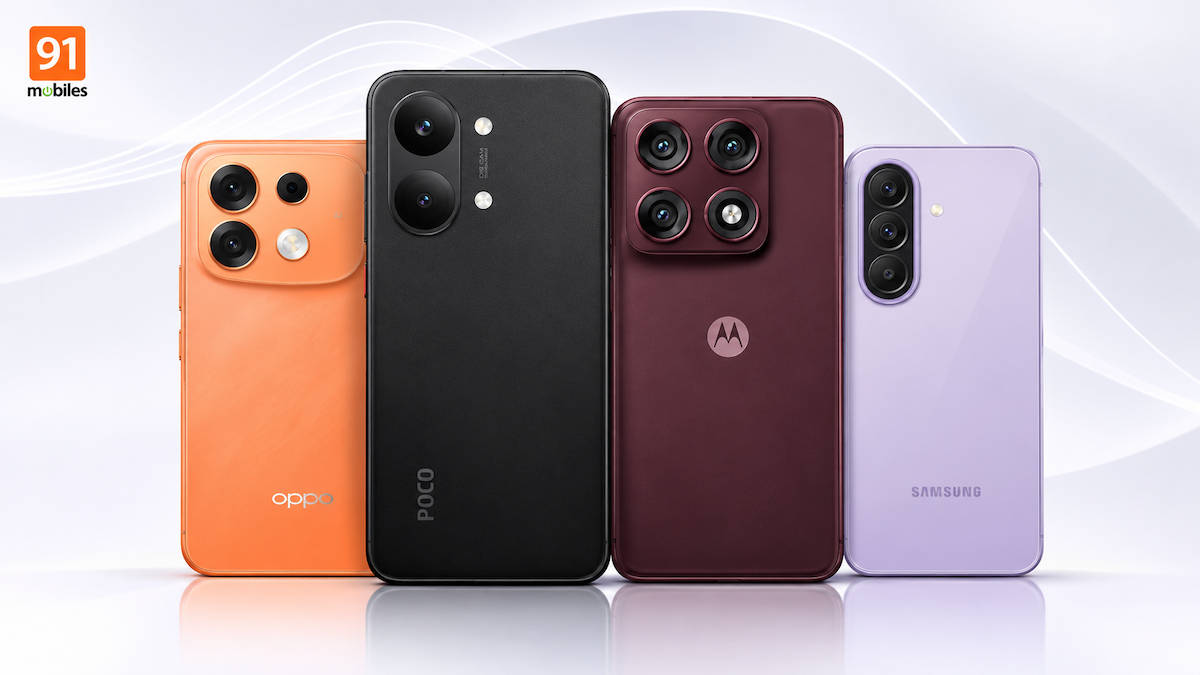
Getting a phone that can handle demanding games without heating up excessively or draining its battery quickly is not easy, even in the mid-premium Rs 40,000 to Rs 50,000 segment. While most phones in this price range offer capable processors and smooth displays, their sustained gaming performance can vary considerably.
To help you find the right option, we’ve shortlisted four phones in the Rs 40,000 to Rs 50,000 price range based on their gaming capabilities and our in-house BGMI testing. We considered the graphics and frame-rate settings supported by each phone, average FPS, battery consumption and temperature rise after 30 minutes of gaming. All phones were tested at 80 per cent screen brightness and 50 per cent volume. Here’s how they compare.
| Device | Starting Price |
| POCO X8 Pro Max | Rs 48,999 |
| Motorola Edge 70 Pro+ | Rs 47,999 |
| Samsung Galaxy A37 | Rs 46,999 |
| OPPO F35 Pro | Rs 45,999 |
*Prices as of November 14th, 2026
Table of Contents
POCO X8 Pro Max
The POCO X8 Pro Max (review) is powered by the Dimensity 9500s chipset, paired with 12GB LPDDR5X RAM and UFS 4.1 storage. Its 6.83-inch 1.5K AMOLED display supports a 120Hz refresh rate, while the 9,000mAh battery with 100W charging should comfortably handle long gaming sessions. The 3D IceLoop cooling system, with a 5,800 sq mm heat dissipation area, is another important addition.
Compared with the POCO X7 Pro, the X8 Pro Max brings a more powerful chipset, a larger battery, faster storage and an upgraded cooling system. This makes it a worthy upgrade for users who spend a lot of time gaming.
Why we chose it
The POCO X8 Pro Max is the strongest pick in this list if gaming endurance is your priority. It supports Ultra HDR graphics and Ultra Extreme frame rates in BGMI, making it one of the few phones in this price range to offer the highest available graphics and frame-rate settings.
It also delivered the highest average FPS in our testing, recording 39.7fps at maximum graphics settings. More importantly, the phone managed to keep its temperature rise to just 1.9°C after 30 minutes of gaming, the lowest among all four phones. Battery consumption was equally impressive, with the device losing just 4 percent charge during the session.
| Parameters | Results |
| BGMI graphics settings | Ultra HDR |
| BGMI FPS settings | Ultra Extreme |
| Average FPS (maximum graphics) | 39.7fps |
| Temperature before gaming | 26.1°C |
| Temperature after 30 minutes | 28°C |
| Temperature rise | 1.9°C |
| Battery drop (30 minutes) | 4 percent |
Review at a glance
Pros:
- Bright AMOLED display
- Excellent performance
- Effective cooling system
- Stupendous battery
Cons:
- Cameras need improvement
- Software feels cluttered
Motorola Edge 70 Pro+
The Motorola Edge 70 Pro+ (review) is powered by the Dimensity 8500 Extreme chipset, paired with 12GB LPDDR5X RAM and 256GB UFS 4.1 storage. Its 6.8-inch 1.5K AMOLED display supports a 144Hz refresh rate, while the 6,500mAh silicon-carbon battery supports 90W wired and 15W wireless charging. Motorola has also included a 4,600 sq mm vapour chamber for thermal management.
Compared with the Edge 60 Pro, the Edge 70 Pro+ brings a newer and more powerful chipset, a larger 6,500mAh battery, improved cooling hardware and a 144Hz display. The addition of a 50MP periscope telephoto camera also makes it a more versatile phone.
Why we chose it
The Motorola Edge 70 Pro+ is another capable option for gaming, with support for Ultra HDR graphics and Ultra Extreme frame rates in BGMI. Its 144Hz display also gives it an advantage over the POCO when it comes to display refresh rate, although the actual frame rate delivered in our test was slightly lower. The phone recorded an average of 38.2fps at maximum graphics settings. Its temperature increased from 26.2°C to 32.8°C after 30 minutes, marking a 6.6°C rise. Battery consumption, however, remained at 4 percent, matching the POCO X8 Pro Max.
| Parameters | Results |
| BGMI graphics settings | Ultra HDR |
| BGMI FPS settings | Ultra Extreme |
| Average FPS (maximum graphics) | 38.2fps |
| Temperature before gaming | 26.2°C |
| Temperature after 30 minutes | 32.8°C |
| Temperature rise | 6.6°C |
| Battery drop (30 minutes) | 4 percent |
Review at a glance
Pros:
- Slimmest phone under Rs 50,000
- Tall, vibrant AMOLED display
- Capable cameras with a periscope lens
- Good performance
Cons:
- Battery efficiency could be better
- Only three major OS updates
- Design is a bit slippery
Samsung Galaxy A37 5G
The Samsung Galaxy A37 5G (review) is powered by the in-house Exynos 1480 chipset and features a 6.7-inch Full HD+ Super AMOLED display with a 120Hz refresh rate. It packs a 5,000mAh battery with 45W charging support. Compared with the Galaxy A36 5G, the A37 brings a newer Exynos chipset in place of the Snapdragon 6 Gen 3, an upgraded IP68 rating and Android 16 out of the box. However, the battery capacity and display specifications remain largely unchanged. Its gaming results suggest that it’s better suited to users who play occasionally rather than those who spend hours on BGMI.
Why we chose it
The Samsung Galaxy A37 5G is a more affordable option in this list, but its gaming capabilities are relatively limited compared with the POCO and Motorola. It supports HDR graphics and Extreme frame rates in BGMI, which should be sufficient for casual gaming. In our testing, the phone recorded an average of 38.7fps at maximum graphics settings. However, its temperature increased from 28.4°C to 33.7°C after 30 minutes, a rise of 5.3°C. Battery consumption was also the highest in this comparison, with an 8 per cent drop during the same session.
| Parameters | Results |
| BGMI graphics settings | HDR |
| BGMI FPS settings | Extreme |
| Average FPS (maximum graphics) | 38.7fps |
| Temperature before gaming | 28.4°C |
| Temperature after 30 minutes | 33.7°C |
| Temperature rise | 5.3°C |
| Battery drop (30 minutes) | 8 percent |
Review at a glance
Pros:
- Vibrant display
- Strong scratch resistance
- Long-supported software
- Reliable primary camera
Cons
- Performance may not appeal to heavy users
- Ultrawide camera needs improvement
OPPO F35 Pro
The OPPO F35 Pro (review) is powered by the Dimensity 7360 Max chipset, paired with up to 8GB LPDDR4X RAM and UFS 3.1 storage. Its 6.78-inch 1.5K AMOLED display supports a 144Hz refresh rate, while the 8,000mAh battery supports 80W fast charging. Compared with the OPPO F33 Pro, the F35 Pro brings a more powerful chipset, a sharper 144Hz display, a larger battery and faster UFS 3.1 storage. It also adds an 8MP ultrawide rear camera with OIS on the primary camera. However, its chipset isn’t in the same performance class as the processors powering the POCO and Motorola.
Why we chose it
The OPPO F35 Pro takes a battery-first approach, combining a relatively modest mid-range chipset with a large 8,000mAh battery. It supports HDR graphics and Extreme frame rates in BGMI, although we couldn’t record its average FPS during our test because Shizuku wasn’t working on the device. The phone performed well in terms of heat and battery management. Its temperature increased from 27.4°C to 31.2°C after 30 minutes, marking a 3.8°C rise. Battery consumption stood at 4 percent, matching the POCO and Motorola.
| Parameters | Results |
| BGMI graphics settings | HDR |
| BGMI FPS settings | Extreme |
| Average FPS (maximum graphics) | NA |
| Temperature before gaming | 27.4°C |
| Temperature after 30 minutes | 31.2°C |
| Temperature rise | 3.8°C |
| Battery drop (30 minutes) | 4 percent |
Review at a glance
Pros:
- Stylish and durable
- Sharp and vibrant AMOLED display
- Excellent battery life
- Consistent cameras
Cons:
- Primary camera lacks detail
- Performance behind competition
- Limited software support
FAQs
1. Which is the best phone for BGMI under Rs 50,000?
The POCO X8 Pro Max is the strongest option in our testing. It supports Ultra HDR graphics and Ultra Extreme frame rates, recorded the highest average FPS of 39.7fps and showed the lowest temperature rise of just 1.9°C after 30 minutes of gaming.
2. Which phone heats the least during gaming?
The POCO X8 Pro Max recorded the lowest temperature rise in our BGMI test. Its temperature increased from 26.1°C to 28°C after 30 minutes, a rise of just 1.9°C. The OPPO F35 Pro followed with a 3.8°C rise.
3. Which phone consumes the least battery while gaming?
The POCO X8 Pro Max, Motorola Edge 70 Pro+ and OPPO F35 Pro all lost 4 percent battery after 30 minutes of BGMI. The Samsung Galaxy A37 5G consumed the most power, with an 8 percent drop.
4. Does a higher refresh rate mean better gaming performance?
Not necessarily. A 144Hz display can offer smoother visuals and more responsive interactions, but the actual gaming experience also depends on the chipset, GPU, thermal management and the frame rates supported by the game. The POCO X8 Pro Max, for instance, has a 120Hz display but delivered the highest average FPS in our testing.
5. Is a larger battery more important than a powerful chipset for gaming?
Both matter, but they serve different purposes. A powerful chipset helps run games at higher graphics settings and maintain stable frame rates, while a larger battery allows longer gaming sessions between charges. Thermal management is equally important, as excessive heat can affect sustained performance. Ideally, look for a phone that balances all three rather than choosing one based on battery capacity alone.