Like previous models, the latest Google Pixel 11 series isn’t about its hardware but its software. It may not have the most powerful chipset, the largest battery, the fastest charging, or the sharpest display around, but the smartphones can sway many with their AI capabilities and other software features. While there are plenty of them, we found these to be particularly helpful and useful while reviewing the Pixel 11, Pixel 11 Pro, and Pixel 11 Pro XL, and believe that other Android phones and even the iPhone should copy them.
Table of Contents
Rambler
First up is Rambler. While it is not entirely a new feature – Nothing did it first with its Essential Voice feature, Rambler can turn naturally spoken speech into clean, easy-to-read text. The feature is integrated into Gboard, which means it is compatible with almost every app. Rambler is powered by Gemini’s AI model, which identifies speech and transcribes it while removing filler words such as “um” and “uhh”, as well as fumbles.
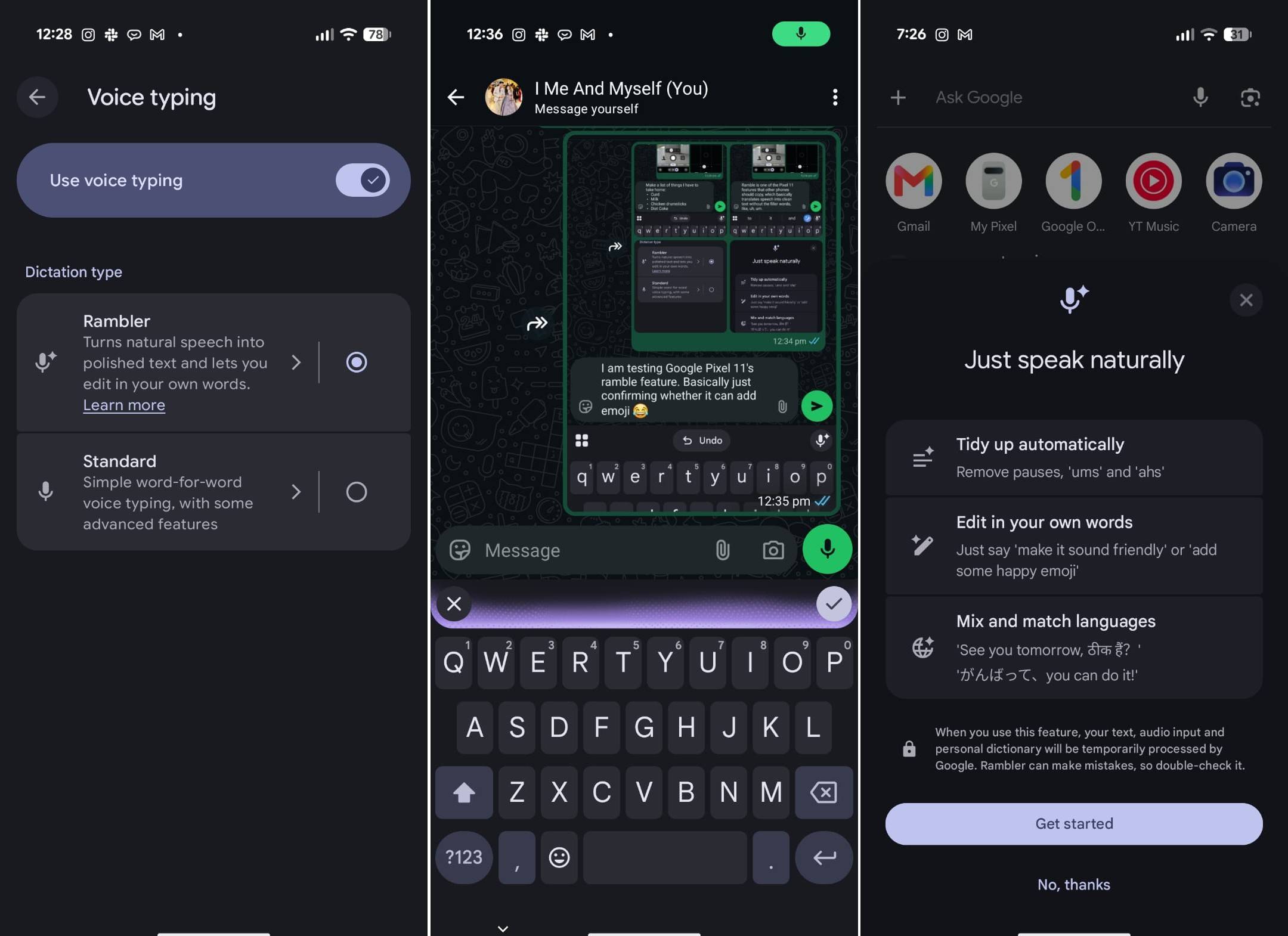
Furthermore, it is smart enough to understand the meaning and context of words like instead of transcribing “new paragraph”, it will actually create a new paragraph. Similarly, if you ask the Rambler to put something in brackets or in bullet points, it will do so. Rambler supports as many as 11 languages, including Hinglish, making it more convenient to use than typing on that on-screen keyboard.
The feature requires an active internet connection to work seamlessly and takes a couple of seconds to process the information. There is support for offline mode as well, but that is simple voice-to-text, only fixing punctuation and capitalisation wherever it is deemed necessary. Google claims Rambler has usage limits and refrains from transcribing Child Sexual Abuse Material (CSAM), harassment, and hate speech.

Other highlights of the feature include transcribing answers to questions when asked, translating the spoken language, emoji support, and remembering the message for a short while. You would need to give a few necessary permissions, such as access to the microphone and Gemini to analyse the text. The data is never saved, stored, or shared, and it’s deleted immediately after your text is delivered, said Google in its blog.
Magic Capture
Live Photos was a handy feature, but it had a few limitations in terms of duration, timing, and quality. Magic Capture on the Pixel 11 series is Google’s attempt to address those shortcomings. You can tell how significant the feature is by its placement, with a separate tab next to the Photos button in the camera app.

Its purpose is to record a video of up to two minutes, pick the right moments for you, and use AI to process and further enhance the results. Both the video and photos are saved on the phone, so you don’t miss out on either motion or static moments. Magic Capture is particularly useful for occasions or subjects that don’t stay still, such as kids, pets, or even a flower swaying in the wind. I wouldn’t call it perfect, but the feature gets most things right.
I was able to get some acceptable shots of my dog, who, I believe, has a bit of a camera phobia and would not stay still as soon as you point a camera at him. The Magic Capture was able to solve that thing for me, to some extent, not getting the perfectly stable shot every time, but much better than the regular shots taken.

The feature is backed by Gemini AI, which is said to analyse roughly 500 frames and automatically pick the best shots (max 5): one with a smile, laughter, or action. It only works with the primary camera for now, meaning the subject has to be at a safe distance (not too close and not too far either) for the sensor to focus. The quality is respectable: 12MP HDR+.
The Magic Capture works even without an internet connection and doesn’t necessarily require a backup on Google Photos. It’s powered by the Tensor G6 SoC and on-device Gemini Intelligence.
Teleprompter
Part of the Google Pixel 11 series’ Creator Suite, Teleprompter lets you read a script while recording videos. It works with both the front and rear cameras and uses AI to automatically scroll through the script based on the speaker’s pace. The feature also highlights the words being spoken, making the script easier to follow. While the teleprompter text cannot be repositioned on the screen, it sits right atop the screen, so you maintain eye contact with the camera for a more natural look.

Moreover, the text is positioned against a semi-transparent background, allowing creators to keep an eye on the viewfinder while reading the script. Apart from adjusting the text size and choosing ‘Dynamic’ scrolling, the Teleprompter’s customisation options remain limited. That shouldn’t be a deal-breaker, though, considering how seamlessly the feature works and how handy it is for recording videos with voice-overs.
The teleprompter works natively within the camera app, so there’s no need to download a third-party application. It also doesn’t require AI or an internet connection to work, meaning your script stays on the device, helping keep your data private and secure.
Social Media Grid
Addressing the cliché that “we are living in the social media age”, Google Pixel 11 has added a social media grid to its video recording interface. And why not? Almost everyone is now sharing moments on social media. To help them, the Social Media grid feature on the Pixel 11 series allows users to frame videos according to the requirements of the social media platforms. It adds a virtual box to the camera viewfinder, encouraging users to keep the subject within it and treat anything outside the box as a dead portion of the frame.

This ensures that the important elements of the video remain visible and are not hidden by the standard icons, text and other interface elements that social media platforms overlay on content. The Social Media Grid only needs to be enabled once from the ‘Creator’ section within the video settings of the camera app, rather than every time you record a video. Another positive aspect of the feature is that it works alongside other camera settings, including different Grid Types, and across all camera lenses.
Concluding…
The Google Pixel 11 series also comes with a handful of other features, including Live Translate, which works with videos on YouTube and select third-party platforms, besides calls and texts. The feature remained a bit finicky during our testing, failing to show up on some videos. Even when it did, there was a slight latency, with the translation taking a fraction of a second to appear in your local language.
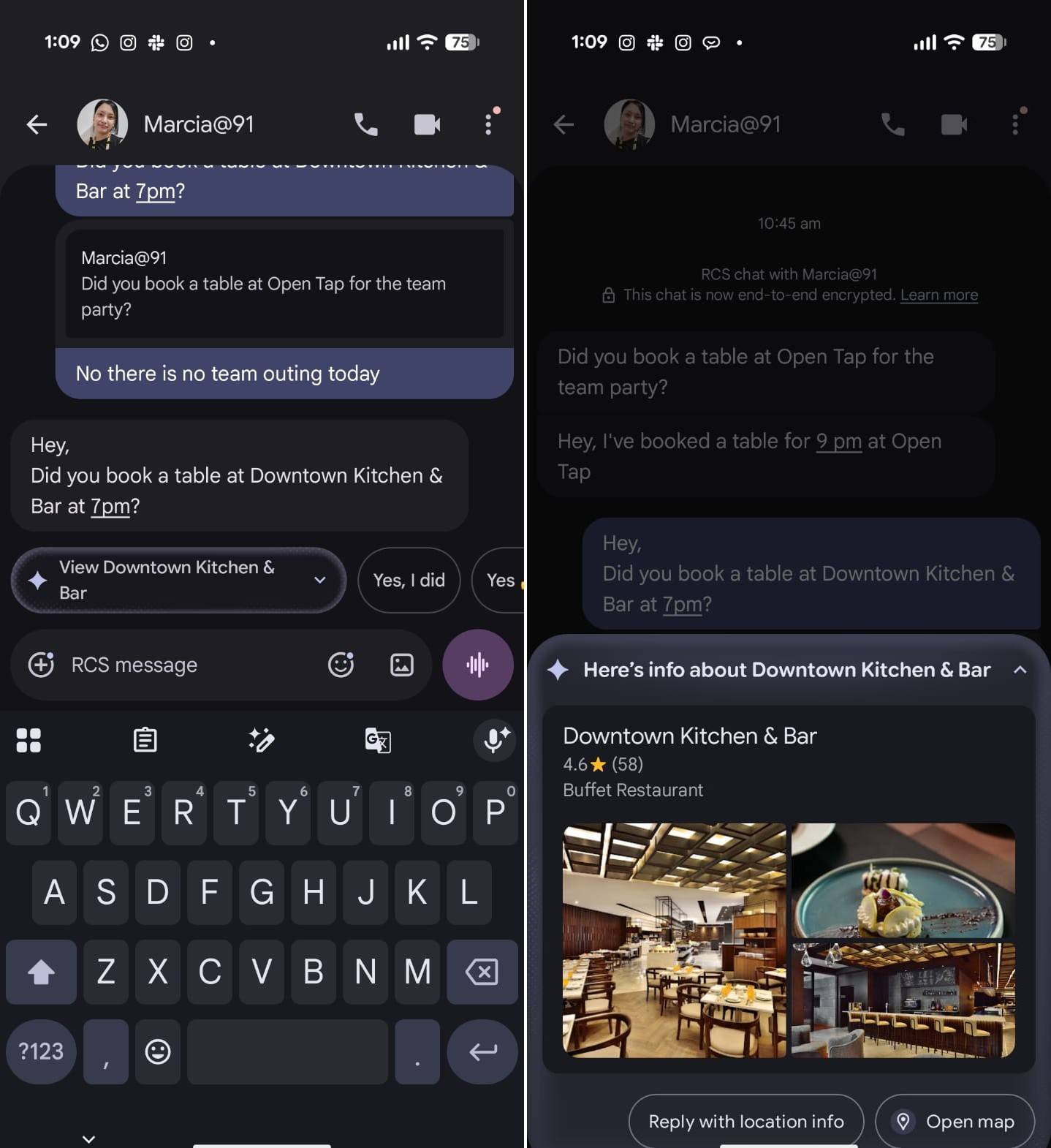
Next up is Proactive Suggestions, which is essentially contextual awareness. The feature takes cues from what is on your screen, with the required permissions, and suggests relevant actions. For instance, it can suggest opening Google Maps when a location is shared via text message. At the time of writing, I found the feature to be compatible mainly with Google’s suite of apps, and it doesn’t always work as seamlessly as advertised in some scenarios.
The Gemini Intelligence, meanwhile, offers cross-app support across 40 and counting apps, enabling hands-free control for a range of tasks. For instance, you can ask your smartphone to prepare a list of ingredients for a meal and then ask Gemini to pull up a video or recipe to help with the preparation.
Both Gemini Intelligence and Proactive Suggestions are not exclusive to the Pixel 11 series. You will find the latter in some form or another on other smartphones, incuding iPhones, as well, while Gemini Intelligence is expected to be compatible with other smartphones, at least high-end ones, running Android 17.
If other Android manufacturers can find a way to implement Pixel 11 series features such as Rambler, Magic Capture, Teleprompter, and Social Media Grid in the same way, or even a version of them, that could be the cherry on top.