HP OmniBook Ultra 14 review: Solid ultraportable with premium appeal


Review Summary
Expert Rating
We recently reviewed the HP OmniBook X 14 and came away impressed by its blend of portability, battery life, and everyday performance. The HP OmniBook Ultra 14 follows a similar philosophy but sits a notch higher in HP’s lineup, targeting users willing to pay a premium for a sleeker, more refined package.

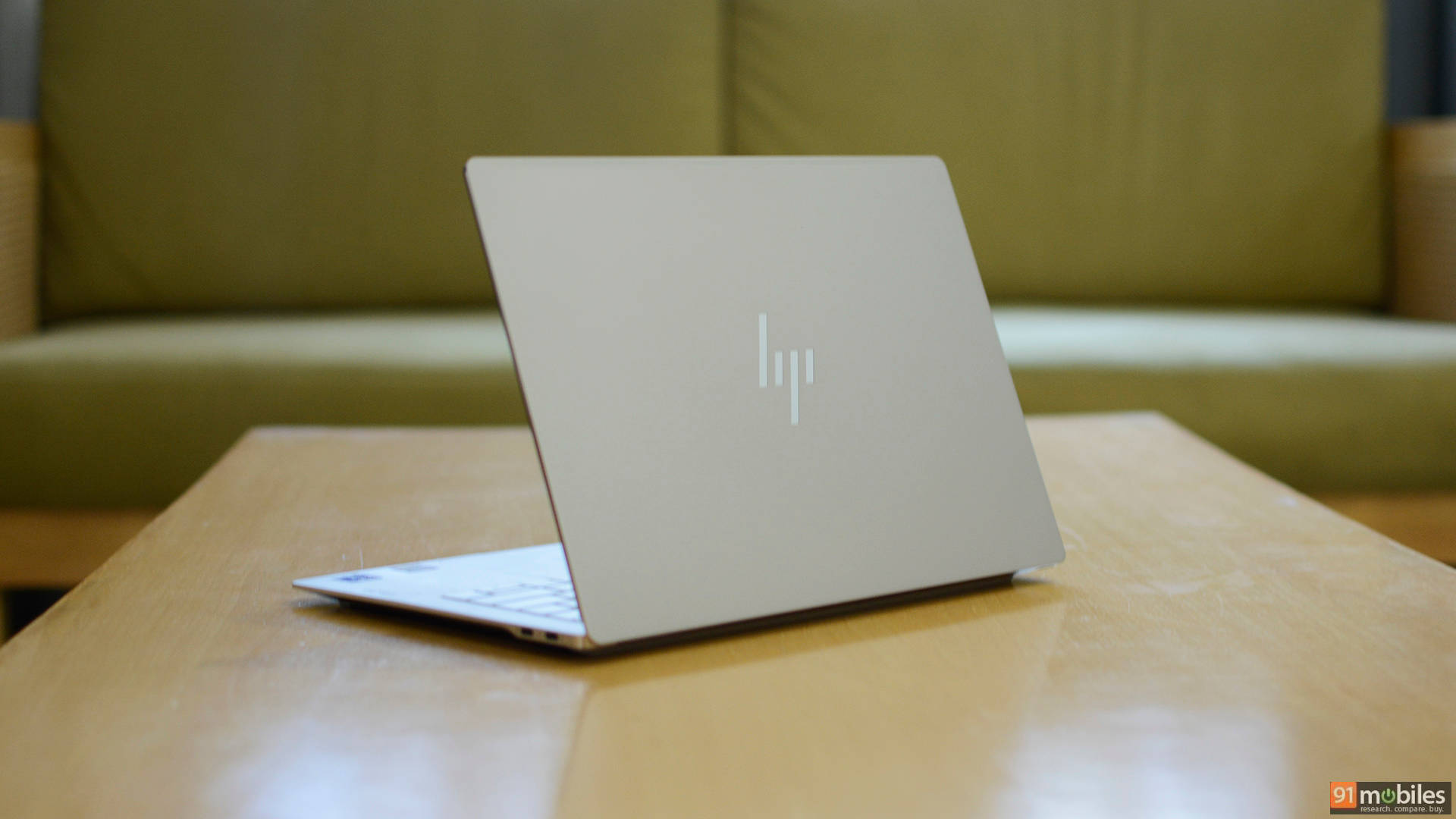
While the two laptops share a similar DNA, the Ultra model stands out with its noticeably thinner profile and more premium construction. The tradeoff, however, is a leaner selection of ports, making it a device that prioritises aesthetics and portability over connectivity. The question then remains whether these refinements are enough to justify the added cost over its already capable sibling. Here’s our full review.
Table of Contents
Slim, sophisticated, and surprisingly sharp
At first glance, the HP OmniBook Ultra 14 doesn’t stray too far from the design language established by the OmniBook X 14. Available in Eclipse gray or Silk sand colour options, it features a clean, minimalist aesthetic with a sandblasted matte finish and HP’s reflective logo centered on the lid. The understated look gives the laptop a premium appeal without drawing unnecessary attention, making it suitable for both professional and personal use.

The chassis is constructed from aluminium and feels exceptionally sturdy with no flex in the lid or keyboard deck. HP has also done an excellent job with the overall fit and finish, as there are no visible gaps anywhere on the machine. Despite packing high-performance hardware, the OmniBook Ultra 14 maintains a slim profile and is marginally lighter and slimmer than the OmniBook X 14 at 1.27 kgs and measuring 311.1 x 215.6 x 10.7 mm.

Opening the lid reveals a clean design with thin display bezels on all four sides and a subtle HP branding beneath the display. The hinge mechanism feels solid and allows the screen to open smoothly while providing minimal wobble during use. The bottom panel is equally pleasing with a large ventilation section and wide rubber feet. My only critique about the design is the chamfered edges. While they look nice and shiny, they are noticeably sharp.

Port selection is fairly minimal, with the left side housing two Thunderbolt 4 USB Type-C ports, while the right side includes another USB Type-C port alongside a 3.5mm headphone jack. While the inclusion of multiple USB-C ports is welcome, users who rely on legacy peripherals may still need to carry a dongle or USB hub.

Overall, the OmniBook Ultra 14 strikes an excellent balance between portability, premium build quality, and understated design. It may not be the most visually striking laptop in its segment, but its clean aesthetics, solid construction, and slim form factor make it a highly polished package.
Comfortable inputs, promising sound
The keyboard offers a similar layout to the OmniBook X 14, including the new HP Progress Typeface. However, the keycaps are larger with a more flattened design and less space between them. The keyboard also features two levels of backlighting and dedicated LED indicators for the volume and mic mute F-keys, as well as the function (Fn), caps lock, and power keys. Overall typing experience is excellent, despite only a 1.3 mm keystroke travel. I got used to the keyboard within two days of usage and was satisfied with the feedback, while the palm rest area felt spacious for a comfortable typing experience. As mentioned earlier, the edges feel sharp and depending on how you rest your palms, you may find the metal chassis digging slightly into your wrists during extended typing sessions.


Below the keyboard sits a generously sized glass trackpad that is responsive, accurate, and offers haptic feedback. Multi-touch gestures are registered reliably, while the smooth surface allows fingers to glide effortlessly across it. HP also offers optional gestures for volume and screen brightness that can be enabled or disabled using the included HP software.
Audio duties are handled by a quad-speaker setup firing downward through discreet slits on either side. The speakers are loud enough to fill a large room and remain clear even at higher volume levels, making them suitable for watching movies, attending video calls, or casual media consumption without external speakers.

As expected from a slim-and-light laptop, bass response is limited, so music and action-heavy content lack some of the depth and punch, especially compared to the MacBook Pro. That said, HP has included a number of software enhancements to improve the listening experience, including DTS Ultra, HP Audio Boost, and Poly Studio tuning. Users can also choose from various audio presets tailored for different types of content, allowing the sound profile to be adjusted depending on whether you’re watching videos, listening to music, or attending meetings. Overall, the speakers are among the better implementations in this category, prioritising clarity and volume over low-end performance.
A display worth paying extra for
HP continues to impress when it comes to display quality, as the OmniBook Ultra 14 features the same excellent 14-inch 3K (2880 x 1800) OLED touchscreen panel found on the OmniBook X 14. The display offers impressive brightness levels of up to 500 nits in SDR and 1,100 nits in HDR, ensuring excellent visibility even in brightly lit environments. At the other end of the spectrum, reducing the brightness in a dark room doesn’t result in a washed-out or dull viewing experience. The panel remains evenly lit throughout, with no noticeable blooming.

Colour reproduction is equally impressive, with full 100% DCI-P3 coverage making the display well-suited for photo and video editing. HP also allows users to switch between multiple colour profiles, including sRGB, Adobe RGB, and DCI-P3, through its bundled software, giving creators greater flexibility based on their workflow.
The display further enhances the experience with support for a variable refresh rate of up to 120Hz, dynamically adjusting based on on-screen content to deliver smoother visuals while potentially helping conserve battery life. Combined with a fast 0.2 ms response time, the panel feels exceptionally responsive in everyday use.
Other notable features include Corning Gorilla Glass 3 for added durability and an integrated low blue light filter to help reduce eye strain during extended usage sessions.
Balancing performance and portability
Under the hood, the HP OmniBook Ultra 14 is powered by Intel’s latest Panther Lake Core Ultra Series 3 processors and is offered in a single configuration for the Indian market. This includes the Core Ultra 7 356H processor, a 16-core, 16-thread chip that can boost up to 4.7 GHz. Complementing the processor is 16 GB of LPDDR5x memory running at a speedy 8533 MT/s and a 1 TB PCIe Gen 5 NVMe SSD, ensuring plenty of bandwidth for multitasking and fast storage access.
Given its premium positioning, the hardware package appears well-balanced for a wide range of workloads, including productivity, content creation, and light gaming. On paper, the specifications are nearly identical to those of the OmniBook X 14, making it particularly interesting to see whether HP’s thinner chassis has any impact on sustained performance and thermals.
To evaluate its performance, we compared the OmniBook Ultra 14 against the HP OmniBook X 14, which features the same Intel Core Ultra 7 356H processor, as well as the ASUS ZenBook S16 powered by the AMD Ryzen AI 9 465 and the ASUS ZenBook 14 OLED equipped with Intel’s Core Ultra 9 285H. This provided a good mix of direct and cross-platform comparisons, helping us understand where the OmniBook Ultra 14 stands in the premium ultraportable segment.
| Laptop/Benchmark | HP Omnibook Ultra 14-kd0083TU | HP OmnibookX 14-ka0068TU | ASUS ZenBook S16 | Asus Zenbook 14 OLED |
| CPU | Intel Core Ultra 7 356H | Intel Core Ultra 7 356H | AMD Ryzen AI 9 465 | Intel Core Ultra 9 285H |
| Cinebench R24 MT | 779 | 814 | 932 | 934 |
| Cinebench R24 ST | 119 | 121 | 115 | 126 |
| Cinebench R23 MT | 14096 | 16328 | 16771 | 15402 |
| Cinebench R23 ST | 2021 | 2029 | 1996 | 2801 |
| PCMark 10 | 8349 | 8234 | 8935 | 7559 |
| PCMark 10 Extended | 8006 | 6711 | 8372 | 7711 |
| Geek Bench 6 ST | 2762 | 2821 | 2782 | 2938 |
| Geek Bench 6 MT | 14428 | 16068 | 14317 | 15689 |
| Geek Bench OpenCL | 23148 | 23218 | 30429 | 41641 |
| Geek Bench Vulcan | 29081 | 28285 | 36294 | 35555 |
| 3DMark Time Spy Extreme | 1219 | 1354 | 1506 | 2127 |
| 3DMark Time Spy | 2751 | 2908 | 3312 | 4293 |
| 3DMark Fire Strike Ultra | 1339 | 1439 | 2150 | 2077 |
| 3DMark Fire Strike Extreme | 2975 | 2930 | 3904 | 3864 |
| 3DMark Fire Strike | 5719 | 5768 | 7408 | 8179 |
| 3DMark Night Raid | 25751 | 24482 | 28658 | 31669 |
| Battery Runtime (Hr:Min) | 14:39 | 19:59 | 6:02 | 14:11 |
In CPU-focused workloads, the OmniBook Ultra 14 delivered respectable results, although it consistently trailed the OmniBook X 14 despite sharing the same processor. For instance, it scored 779 points in Cinebench R24 multi-core compared to 814 points on the OmniBook X 14, while Cinebench R23 multi-core scores stood at 14,096 and 16,328, respectively. This suggests that the slimmer chassis of the OmniBook Ultra 14 may be slightly more conservative when it comes to sustaining higher multi-core boost frequencies over extended workloads. Unsurprisingly, the Ryzen AI 9-powered ZenBook S16 and the Core Ultra 9-equipped ZenBook 14 OLED pulled ahead in most CPU-heavy benchmarks, particularly in Cinebench and Geekbench multi-core tests. That said, the performance gap is going to be far less noticeable in day-to-day usage.
The laptop also posted a strong PCMark 10 score of 8,349, marginally ahead of the OmniBook X 14 and not too far behind the ZenBook S16. It also delivered healthy Geekbench 6 scores, indicating that productivity tasks such as web browsing, office work, photo editing, and multitasking are handled with ease.
The integrated GPU falls behind the Radeon-powered ZenBook S16 and the Arc graphics on the Core Ultra 9-based ZenBook 14 OLED in synthetic benchmarks like 3DMark and Geekbench GPU tests. That said, it remains more than capable of handling creative workloads. Despite its thin and light design, the OmniBook Ultra 14 is suitable for casual gaming, with around 74 FPS in GTA V and over 100 FPS in competitive esports titles like Valorant and Apex Legends.
One area where the OmniBook Ultra 14 clearly shines is storage performance. The included PCIe Gen5 NVMe SSD delivered excellent results in CrystalDiskMark, achieving sequential read and write speeds of 10,341MB/s and 8,691MB/s respectively. These speeds translate into near-instant boot times, rapid application launches, and quick file transfers, ensuring that storage never becomes a bottleneck during everyday use or heavier productivity workloads.
Good endurance, travel-friendly charger
Despite its slim chassis and powerful hardware, the OmniBook Ultra 14 delivers respectable battery life thanks to its 70Wh battery pack. In PCMark 10 Video battery benchmark with the display set to 80% brightness, the laptop lasted an impressive 14 hours and 39 minutes on a single charge. Real-world endurance naturally varies depending on the workload, but during my daily usage involving web browsing, document editing, video streaming, and a healthy amount of multitasking, the laptop consistently delivered around 8 to 9 hours of runtime.


Users looking to maximize battery life can stretch this further by lowering the refresh rate, switching to a more power-efficient performance profile, and reducing screen brightness when needed. When it does run out of juice, the bundled 65W USB-C GaN charger supports fast charging, allowing the battery to reach roughly 50% capacity in about 45 minutes. The charger itself is compact and lightweight enough to carry around comfortably, making it a practical travel companion. Since it uses a standard USB-C connection, it can also double as a charger for smartphones, tablets, and other compatible devices, reducing the number of power bricks you need to carry.
A refined ultrabook that comes at a cost
The HP OmniBook Ultra 14 stands as a premium ultraportable that gets most things right. It offers a sleek and sturdy aluminium chassis, an excellent 3K OLED display, fast PCIe Gen5 storage, respectable battery life, and enough performance to handle demanding productivity and content creation workloads.
What makes the OmniBook Ultra 14 particularly interesting is how it balances portability and performance. Despite its thin profile, the laptop remains cool and quiet during everyday tasks while delivering a premium user experience across the board. The display is among the best in its class, the speakers are surprisingly capable, and the compact USB-C charger further enhances its appeal as a travel-friendly machine.
That said, there are minor compromises. The sharp chassis edges can occasionally become uncomfortable during extended typing sessions, the integrated graphics performance lags behind some competing premium ultrabooks, and the battery life, while good, falls somewhat short of what we observed on the OmniBook X 14.
Starting at Rs 2,19,999 for the Eclipse Gray variant and Rs 2,21,999 for the Silk Sand option, the OmniBook Ultra 14 occupies the premium end of the market. At this price point, it faces competition from offerings such as the ASUS ZenBook S16 as well as HP's own OmniBook X 14. However, if you're looking for an elegantly built Windows laptop with a stunning OLED display, excellent everyday performance, and strong portability credentials, the OmniBook Ultra 14 is easy to recommend. It may not be the absolute performance leader in its class, but it delivers a refined and well-rounded experience.
Editor's rating: 8.5 / 10
Pros:
- Premium aluminum design
- Sharp, vibrant 3K OLED with 120Hz VRR
- Portable 65W GaN charger
- Speedy PCIe Gen 5 SSD
Cons:
- Sharp edges
- Limited ports

