BenQ MA320UG review: the 32-inch monitor Apple never made


Back in 2024, BenQ announced its first range of monitors built specifically for Mac users, the MA series, starting with the MA270U and MA320U. They were impressive for a few reasons: colour accuracy that matched a MacBook’s screen, brightness and volume controls that synced with macOS, and a single USB-C cable that carried video and charged the laptop. BenQ was already a well-established name by then, but the MA series got the attention of working professionals almost immediately. Now, in late 2026, the company has added the latest monitor to the line, the MA320UG. This 32-inch 4K monitor brings one of the most well-rounded packages I have seen when it comes to features and hardware.

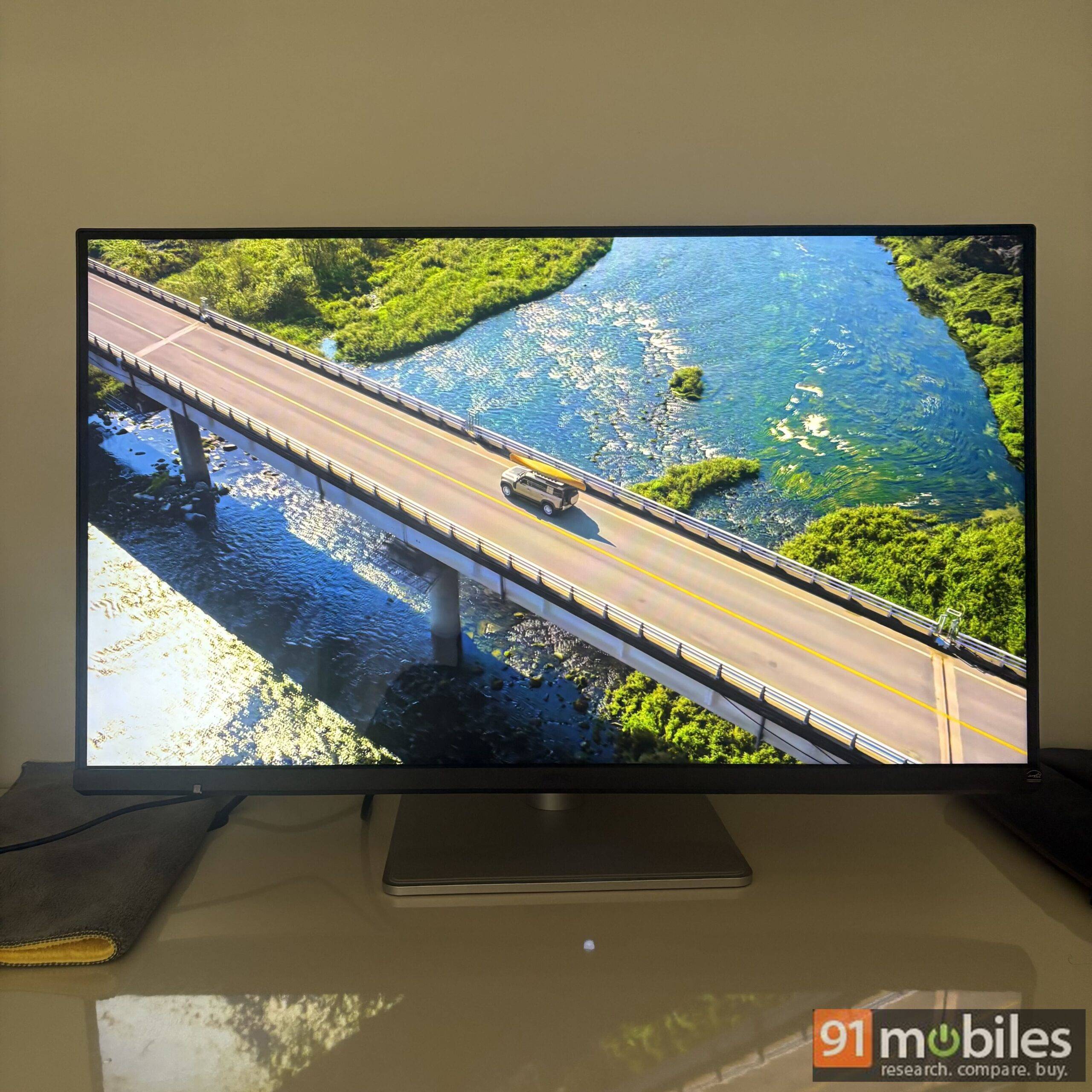
The MA320UG has been tailor-made for creators who use a Mac, which, as anyone who has walked into a co-working space lately can confirm, is a very large and fast-growing group, in India as much as anywhere else. It also lands in an interesting spot. Apple refreshed its Studio Display in March this year, but it still comes only in 27 inches, and it discontinued the 32-inch Pro Display XDR at the same time. Apple currently sells no 32-inch display. That makes the MA320UG an extremely appealing option for anyone who wants a large, high-resolution screen that works seamlessly with Apple devices.
While the MA320UG has been designed with professionals in mind, after using it for a couple of weeks, I am inclined to say it is equally suitable for gamers and cinephiles. Let me explain why.
First, the price. The BenQ MA320UG sells for Rs 82,998 in India. That is a substantial sum, but the comparison that matters is what Apple charges for a smaller (though higher-resolution) screen.
Table of Contents
Specs
- Panel: 31.5-inch IPS with LED backlight, Nano Gloss coating
- Resolution: 3,840 x 2,160 (16:9), 140 PPI
- Refresh rate: 120Hz, with FreeSync Premium and VESA MediaSync
- Response time: 5ms (GtG)
- Brightness: 450 nits (typical and peak HDR)
- HDR: HDR10, VESA DisplayHDR 400
- Native contrast: 2000:1
- Colour coverage: 98% P3, 99% sRGB, 1.07 billion colours
- Colour modes: Display P3, sRGB, HDR, M-book, Cinema, Game, ePaper, User
- Ports: 1 x Thunderbolt 4 upstream (96W power delivery), 1 x Thunderbolt 4 downstream (15W, daisy chain), 1 x USB-C upstream (35W), 2 x HDMI 2.1, 2 x USB-A 3.2 Gen 2 (10Gbps, 7.5W), 1 x USB-C downstream (15W), 3.5mm headphone jack
- Audio: 2 x 3W speakers
- Stand: 150mm height adjustment, tilt (-5 to 20 degrees), swivel (15 degrees each way), 90-degree pivot; VESA 100 x 100
- Weight: 9.64kg with stand
- In the box: Thunderbolt 4 cable (1m), USB-C cable, cleaning cloth
Design: familiar and built for a big screen
The MA320UG carries forward the same design ethos as the earlier MA monitors, and that is a good thing. It feels premium, the build is sturdy, and it offers plenty of connectivity, which matters more than usual here because a 32-inch screen tends to become the centre of a desk rather than an accessory to a laptop.
The bezels are thin on three sides. The frame itself is a touch thicker than you might expect, but that is hardly an issue because it makes room for the built-in speakers, and I would take a pair of speakers over a couple of millimetres of trim any day.
The stand is the same fully adjustable unit BenQ has been bundling across the series, and it deserves a mention because Apple still treats height adjustment as a paid upgrade. You get 150mm of height travel, tilt, a 90-degree pivot into portrait and 15 degrees of swivel in either direction. The swivel is more useful than it sounds on a screen this wide. It lets you angle the panel towards a colleague for a quick review without dragging the whole monitor across the desk, turn it slightly away from a window as the light shifts through the afternoon, or line it up neatly with a second display if you daisy-chain one. Viewing angles are pretty decent too, rated at 178 degrees both ways, so colours hold up when you are looking at the screen from off-centre.


Round the back sits a generous port selection: two Thunderbolt 4 ports (one upstream with 96W of power for the Mac, one downstream at 15W for daisy-chaining a second 4K 120Hz display), a USB-C port with 35W charging, two HDMI 2.1 ports, two 10Gbps USB-A ports, a USB-C downstream port and a headphone jack. One cable handles video, data and charging for a MacBook, and there is still room for a PlayStation and a Windows PC on the side. Daisy-chaining, for what it is worth, needs a Mac with a Pro, Max or Ultra chip, since the base M-series chips only drive one external display.
Features that elevate usage
Every software feature that made the MA270S stand out when we reviewed it in June is on the MA320UG, and it matters just as much on the bigger screen. The starting point is Display Pilot 2, BenQ’s companion app for macOS. Most monitor apps are a slower way of reaching the on-screen menu. This one changes how you use the monitor. iKeyboard Control lets the brightness and volume keys on a MacBook drive the monitor directly, so the external screen behaves like a native Apple display rather than something you adjust with buttons under the bezel.
Desktop Partition splits the 32-inch canvas into snap-to zones, which is the quickest way I have found to keep a timeline, a preview and a chat window tidy on one screen. ICCsync changes the macOS colour profile automatically when you switch the monitor’s colour mode, so the M-book mode matches the MacBook’s own panel without you touching System Settings. The Visual Optimizer sensor adjusts brightness to the room, which sounds trivial at first but then you realise that it casually but effectively removes a common inconvenience.
Then there is Smart KVM. You can plug a Mac into the Thunderbolt port and a Windows laptop into the USB-C port, and one keyboard and mouse control both. Switch on Picture-by-Picture and the two systems sit side by side on the same panel, and you can copy text and files between them. If you edit on a Mac but a client’s tools live on Windows, this alone justifies a good chunk of the price. Auto Pivot rotates the picture the moment you turn the screen to portrait, PIP and PBP handle a console or a second machine in a corner of the screen, firmware updates arrive over USB, and BenQ’s eye-care set (flicker-free backlight, hardware low blue light, TUV Eye Comfort 3.0 certification and an ePaper mode for long reading sessions) rounds things off.
Display and sound: the blacks are the surprise
The panel is a 31.5-inch IPS unit with 4K resolution, a 120Hz refresh rate, 450 nits of brightness, HDR10 support with DisplayHDR 400 certification, 98% P3 coverage, 1.07 billion colours and a 2000:1 native contrast ratio, all behind BenQ’s Nano Gloss coating.
I was expecting top-notch colour accuracy, because BenQ never disappoints in that department, and I got it. Colours match my MacBook closely enough in M-book mode that I stopped checking. What I did not expect was how deep the blacks are. That 2000:1 contrast figure is double what a typical IPS panel manages, and the glossy coating stops dark scenes from washing out the way they do on a matte screen. But I never thought I would compare an IPS LED panel with an OLED when it comes to deep blacks, but I stand corrected. This monitor can walk toe-to-toe with OLED monitors in normally lit rooms, and I am not exaggerating.

Peak brightness of 450 nits is decent rather than spectacular, and it should hold up well for most users; indoors I rarely needed it past the two-thirds mark. HDR viewing was immersive too and, importantly, not overly dark, which is a common problem with monitors that carry an HDR badge without the brightness to back it up.
The built-in speakers are a pair of 3W units. They get fairly loud, and while I will always recommend a dedicated soundbar for a fully immersive experience, you can rely on these for decent sound across calls, YouTube, and casual viewing.
Put it all together, and this monitor can easily be your primary media consumption device as well. With its large size, 4K resolution, excellent colour accuracy, and built-in speakers, it is pretty much a complete package on its own.
Day-to-day usage
If you are a creator, whether that means video editing, graphic design or anything in between, a 4K panel spread across 32 inches gives you the perfect canvas for the job. Does that mean the monitor is only meant for those professions? A big no. Most professionals now depend on a multi-monitor setup for everyday multitasking, and the 32-inch panel lets you keep several windows open side by side without the hassle of a second monitor, another stand and the wires that come with it. Add the seamless sync with MacBook controls and the butter-smooth 120Hz refresh rate, which BenQ pairs with adaptive sync, so it behaves much like ProMotion on a MacBook Pro, and regular work feels like a breeze. Scrolling a long document, scrubbing a timeline or dragging windows around all feel closer to the laptop’s own screen than any 60Hz external display can manage.


One thing I would like to highlight before you buy this monitor is that at 140 pixels per inch, macOS scales this panel differently from a 5K screen such as the MA270S. Text is sharp, and the default scaling looks right, but if you are coming from a 218 PPI Retina display and sit very close, you will notice the difference.
Gaming
With a 4K 120Hz panel in front of me, I had no way I wasn’t going to try gaming on the MA320UG, and as you would expect, the experience was pretty amazing. FreeSync Premium keeps frame pacing smooth from a console or a PC, and the HDMI 2.1 ports mean a PS5 or an Xbox Series X can run at 4K 120Hz without any fuss.


The one thing to note is the 5ms GtG response time. This monitor cannot keep up with dedicated gaming monitors in this price range, several of which are now OLED with response times measured in fractions of a millisecond, so competitive shooters are not what it is built for. If you want a laid-back gaming experience, though, this monitor will not let you down one bit.
Verdict
This monitor fills a gap Apple left in its portfolio: a 32-inch, high-resolution display that works seamlessly with Apple devices. At well under half the price of even the 27-inch Studio Display, which starts at Rs 1,89,900, the MA320UG is the ultimate upgrade most professionals can make to their work setup while staying in the comfort of their own ecosystem, with the laptop and the monitor controlled from the same keyboard.
That said, Rs 82,998 is still a substantial amount of money, and the MA320UG does not do everything. There is no built-in webcam, so Mac mini and Mac Studio owners will need to adjust their budget for one, and the speakers are good rather than great. Neither is a dealbreaker for the people this monitor is aimed at. After a couple of weeks with it, I struggled to think of a 32-inch monitor I would rather have on my desk, and that is a big compliment in itself.
Editor’s rating: 8.7 / 10
Pros:
- Excellent colour accuracy and surprisingly deep blacks
- 4K at 120Hz on a 32-inch canvas
- Seamless macOS integration through Display Pilot 2
- Thunderbolt 4, Smart KVM and daisy-chaining
- Fully adjustable stand and built-in speakers
Cons:
- No built-in webcam
- Still an expensive purchase

